GitHub Copilot 在程式碼編輯器中輸入時提供內嵌建議,並提供互動式聊天體驗。 您可以輸入@mssql後,向聊天參與者提問或提供提示。
開始
確保你連上資料庫,並且開啟一個啟用 MSSQL 擴充功能的編輯器視窗。 當你連線時, @mssql 聊天參與者能理解你資料庫環境的情境,並能提供準確且具情境感知的建議。 如果你沒有連接到資料庫,聊天參與者就沒有足夠的架構或資料脈絡來提供有意義的回應。
下列範例使用 AdventureWorksLT2022 範例資料庫,您可以從 Microsoft SQL Server 範例和社群專案 首頁下載。
為了獲得最佳結果,請調整數據表和架構名稱以符合您自己的環境。
請確保聊天中包含@mssql前綴。 例如,輸入 @mssql ,後面接著您的問題或提示。 這個前綴確保聊天參與者明白你是在尋求 SQL 相關協助。
在 Visual Studio Code 中與 MSSQL 的聊天參與者聊天
使用 GitHub Copilot Chat 中的聊天參與者,將智慧型、上下文感知的協助帶入您的 SQL 開發工作流程,直接在 Visual Studio Code 中。 無論您是撰寫查詢、演進架構或與應用程式程式代碼整合,GitHub Copilot 都能協助您設計和了解關係型模型、產生或優化 T-SQL 程式代碼、建立種子數據、Scaffold ORM 移轉,甚至使用自然語言來解釋商業規則或安全性考慮,全都專為連線的資料庫內容量身打造。
以下是您可以透過聊天參與者詢問的常見使用案例和範例:
列出或探索資料庫架構中的物件
詢問資料庫中數據表、數據行、架構和物件元數據的問題。
依類型分組物件
Show all objects in the `SalesLT` schema of my current database, grouped by type.
列表欄位與資料表屬性
List the columns, data types, and nullability of the `SalesLT.Customer` table.
在資料庫中計數資料表、檢視與程序
How many tables, views, and procedures are defined in my current database?
撰寫簡單的查詢
取得撰寫用於篩選、匯總和聯結之常見 SQL 查詢的說明。
根據近期訂單的客戶退貨名單
Write a T-SQL query to list all customers from `SalesLT.Customer` who placed an order in the last 30 days based on the latest order date.
計算每位客戶的平均訂單總額
Generate a query that calculates the average order total per customer from the `SalesLT.SalesOrderHeader` table, sorted descending.
更新查詢時會換到另一個欄位
Update the previous query to include the full name of each customer from the `SalesLT.Customer` table.
說明關聯性或概念
要求簡化架構關聯性、查詢邏輯或與開發相關的功能說明。
描述表間的外鍵關係
Describe the foreign key relationship between `SalesLT.SalesOrderHeader` and `SalesLT.Customer` tables in my current database.
說明表格關係與相關鍵數
I'm a developer new to T-SQL. Explain how `SalesLT.SalesOrderHeader` is related to `SalesLT.Customer`, and what keys are involved.
說明向量資料類型與使用選項
Explain how vector data types work in SQL Server and when to use them for AI scenarios.
產生移轉或整合程序代碼
要求協助產生 SQL 或 ORM 型移轉腳本。
在表格中加入外鍵約束
Create a T-SQL script to add a foreign key constraint on `SalesLT.SalesOrderDetail.ProductID` referencing `SalesLT.Product.ProductID`.
產生遷移腳本以新增外鍵
Generate a Sequelize migration to add a foreign key from `SalesLT.SalesOrderDetail.ProductID` to `SalesLT.Product.ProductID`, assuming both exist.
使用 GitHub Copilot 的內嵌建議
您可以從在新的編輯器視窗中輸入 T-SQL 查詢開始,例如 SELECT * FROM SalesLT.Customer,並觀察 GitHub Copilot 所提供的內嵌建議。 你打字時會顯示建議,你可以按 Tab 或 Enter來接受。
或者,您也可以直接在編輯器中輸入相同的查詢 SELECT * FROM SalesLT.Customer。 然後,將其突出以顯示✨智慧動作的圖示,該圖示會出現在突出顯示的查詢旁邊。 此圖示可讓您快速存取其他 GitHub Copilot 選項,例如 Modify using Copilot 調整查詢、 /doc 產生檔,或詢問與查詢相關的 GitHub Copilot 一般問題的能力。
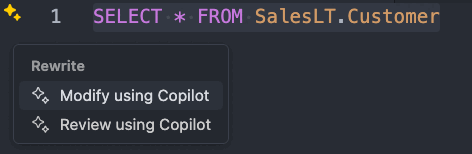
當您 選取 [使用 GitHub Copilot 檢閱] 時,您會看到如下的內嵌建議:
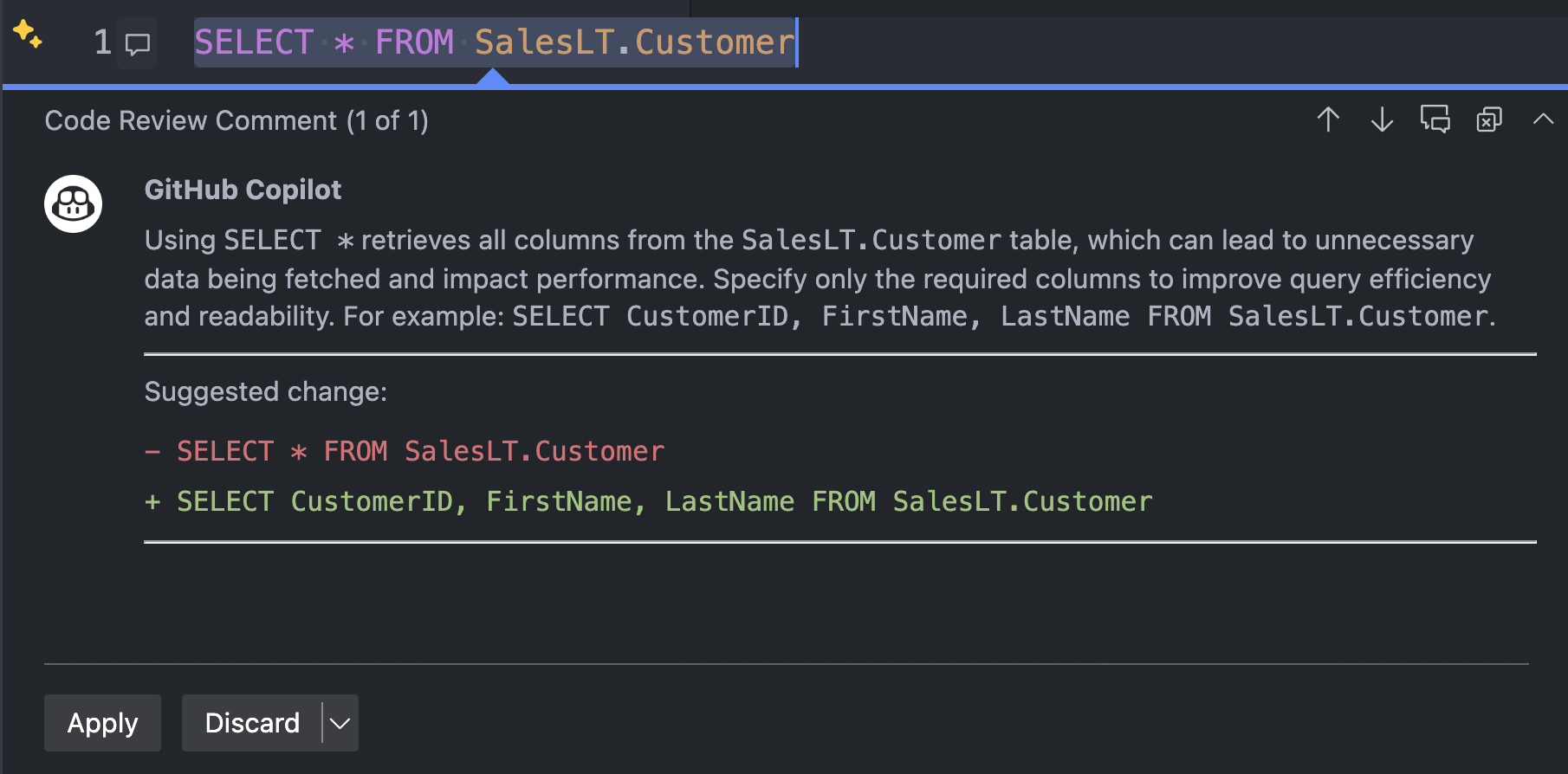
你也可以使用捷徑(macOS 用 Cmd+I,Windows 和 Linux 用 Ctrl+I )呼叫 GitHub Copilot,提出問題或要求修改你的查詢。

分享您的體驗
若要協助我們精簡及改善 MSSQL 延伸模組的 GitHub Copilot,請使用下列 GitHub 問題範本來提交您的意見反應: GitHub Copilot 意見反應
提交意見反應時,請考慮包括:
測試情境:請告訴我們你專注於哪些領域,例如架構建立、查詢產生、安全性、在地化。
有效的方法:描述任何感覺順利、有幫助或超出預期的經驗。
問題或錯誤:包含任何問題、不一致或令人困惑的行為。 螢幕快照或螢幕錄製特別有用。
改進建議:分享提升可用性、擴大覆蓋範圍或強化 GitHub Copilot 回應的點子。