這很重要
自 2025 年 5 月 1 日起,Azure AD B2C 將不再可供新客戶購買。 在我們的常見問題中深入瞭解。
開始之前,請使用此頁面頂端的 [選擇原則類型] 選取器,選擇您要設定的原則類型。 Azure Active Directory B2C 提供兩種方法來定義使用者如何與您的應用程式互動:透過預先定義的使用者流程,或透過完全可設定的自訂原則。 此文章中所需的步驟隨各方法而異。
使用 Azure Active Directory B2C (Azure AD B2C) 中的自定義電子郵件,將自定義電子郵件傳送給註冊以使用應用程式的使用者。 藉由使用第三方電子郵件提供者 SendGrid,您可以使用自己的電子郵件範本和 From: 位址和主旨,以及支援當地語系化和自定義單次密碼 (OTP) 設定。
此功能僅適用於自訂原則。 如需設定步驟,請在前述選取器中選取 [自訂原則]。
自定義電子郵件驗證需要使用第三方電子郵件提供者,例如 SendGrid、 Mailjet 或 SparkPost、自定義 REST API 或任何 HTTP 型電子郵件提供者(包括您自己的)。 本文說明如何設定使用 SendGrid 的解決方案。
建立 SendGrid 帳戶
如果您還沒有帳戶,請從設定 SendGrid 帳戶開始。 如需設定指示,請參閱如何使用 SendGrid 搭配 Azure 傳送電子郵件的建立 SendGrid 帳戶一節。
請確定您完成建立 SendGrid API 金鑰的區段。 記錄 API 金鑰以供後續步驟使用。
建立 Azure AD B2C 原則金鑰
接下來,將 SendGrid API 金鑰儲存在 Azure AD B2C 原則金鑰中,以供原則參考。
- 登入 Azure 入口網站。
- 如果您有多個租用戶的存取權,請使用頂端功能表中的 [設定] 圖示,從 [目錄 + 訂用帳戶] 功能表切換至您的 Azure AD B2C 租用戶。
- 在 Azure 入口網站的左上角,選擇 [ 所有服務],然後搜尋並選取 [Azure AD B2C]。
- 在 [概觀] 頁面上,選取 [ 身分識別體驗架構]。
- 選取 [原則密鑰 ],然後選取 [ 新增]。
- 針對 [選項],選擇 [ 手動]。
- 輸入政策金鑰的名稱。 例如:
SendGridSecret。 前置詞B2C_1A_會自動新增至金鑰的名稱。 - 在 [ 秘密] 中,輸入您先前記錄的 SendGrid API 密鑰。
- 針對 [ 金鑰使用方式],選取 [ 簽章]。
- 選取 ,創建。
建立 SendGrid 範本
建立 SendGrid 帳戶,並將 SendGrid API 密鑰儲存在 Azure AD B2C 原則金鑰中,建立 SendGrid 動態交易範本。
在 SendGrid 網站上,開啟 交易式範本 頁面,然後選取 [建立動態範本]。
輸入類似
Verification email的唯一範本名稱,然後選取 [ 建立]。若要開始編輯新的範本,請選取範本,
Verification email然後選取 [新增版本]。選取 [空白範本 ],然後選取 [ 程序代碼編輯器]。
在 HTML 編輯器中,貼上下列 HTML 範本或使用您自己的範本。 和
{{otp}}{{email}}參數會以一次性密碼值和用戶電子郵件地址動態取代。<!DOCTYPE html PUBLIC "-//W3C//DTD XHTML 1.0 Transitional//EN" "http://www.w3.org/TR/xhtml1/DTD/xhtml1-transitional.dtd"> <html xmlns="http://www.w3.org/1999/xhtml" dir="ltr" lang="en"><head id="Head1"> <meta http-equiv="Content-Type" content="text/html; charset=utf-8"><title>Contoso demo account email verification code</title><meta name="ROBOTS" content="NOINDEX, NOFOLLOW"> <style> table td {border-collapse:collapse;margin:0;padding:0;} </style> </head> <body dir="ltr" lang="en"> <table width="100%" cellpadding="0" cellspacing="0" border="0" dir="ltr" lang="en"> <tr> <td valign="top" width="50%"></td> <td valign="top"> <!-- Email Header --> <table width="640" cellpadding="0" cellspacing="0" border="0" dir="ltr" lang="en" style="border-left:1px solid #e3e3e3;border-right: 1px solid #e3e3e3;"> <tr style="background-color: #0072C6;"> <td width="1" style="background:#0072C6; border-top:1px solid #e3e3e3;"></td> <td width="24" style="border-top:1px solid #e3e3e3;border-bottom:1px solid #e3e3e3;"> </td> <td width="310" valign="middle" style="border-top:1px solid #e3e3e3; border-bottom:1px solid #e3e3e3;padding:12px 0;"> <h1 style="line-height:20pt;font-family:Segoe UI Light; font-size:18pt; color:#ffffff; font-weight:normal;"> <span id="HeaderPlaceholder_UserVerificationEmailHeader"><font color="#FFFFFF">Verify your email address</font></span> </h1> </td> <td width="24" style="border-top: 1px solid #e3e3e3;border-bottom: 1px solid #e3e3e3;"> </td> </tr> </table> <!-- Email Content --> <table width="640" cellpadding="0" cellspacing="0" border="0" dir="ltr" lang="en"> <tr> <td width="1" style="background:#e3e3e3;"></td> <td width="24"> </td> <td id="PageBody" width="640" valign="top" colspan="2" style="border-bottom:1px solid #e3e3e3;padding:10px 0 20px;border-bottom-style:hidden;"> <table cellpadding="0" cellspacing="0" border="0"> <tr> <td width="630" style="font-size:10pt; line-height:13pt; color:#000;"> <table cellpadding="0" cellspacing="0" border="0" width="100%" style="" dir="ltr" lang="en"> <tr> <td> <div style="font-family:'Segoe UI', Tahoma, sans-serif; font-size:14px; color:#333;"> <span id="BodyPlaceholder_UserVerificationEmailBodySentence1">Thanks for verifying your {{email}} account!</span> </div> <br> <div style="font-family:'Segoe UI', Tahoma, sans-serif; font-size:14px; color:#333; font-weight: bold"> <span id="BodyPlaceholder_UserVerificationEmailBodySentence2">Your code is: {{otp}}</span> </div> <br> <br> <div style="font-family:'Segoe UI', Tahoma, sans-serif; font-size:14px; color:#333;"> Sincerely, </div> <div style="font-family:'Segoe UI', Tahoma, sans-serif; font-size:14px; font-style:italic; color:#333;"> Contoso </div> </td> </tr> </table> </td> </tr> </table> </td> <td width="1"> </td> <td width="1"></td> <td width="1"> </td> <td width="1" valign="top"></td> <td width="29"> </td> <td width="1" style="background:#e3e3e3;"></td> </tr> <tr> <td width="1" style="background:#e3e3e3; border-bottom:1px solid #e3e3e3;"></td> <td width="24" style="border-bottom:1px solid #e3e3e3;"> </td> <td id="PageFooterContainer" width="585" valign="top" colspan="6" style="border-bottom:1px solid #e3e3e3;padding:0px;"> </td> <td width="29" style="border-bottom:1px solid #e3e3e3;"> </td> <td width="1" style="background:#e3e3e3; border-bottom:1px solid #e3e3e3;"></td> </tr> </table> </td> <td valign="top" width="50%"></td> </tr> </table> </body> </html>展開 [設定] 功能表,然後針對 [ 版本名稱] 輸入範本版本。
針對 [主旨],輸入
{{subject}}。選取 [儲存]。
選取返回箭號以返回交易範本頁面。
記錄您 建立的範本 標識碼,以供稍後步驟使用。 例如:
d-989077fbba9746e89f3f6411f596fb96。 當您 新增宣告轉換時,您可以指定此識別碼。
這很重要
後續步驟會示範如何建置自定義原則 XML 檔案。 建議您使用 GitHub 上提供的 自訂電子郵件驗證 自定義原則範例。
DisplayControl_TrustFrameworkExtensions.xml會使用 TrustFrameworkExtensions.xml 作為其基底檔案,因此請務必在您的政策中包含來自 TrustFrameworkBase.xmlTrustFrameworkLocalization.xml中的TrustFrameworkExtensions.xml、和檔案。
新增 Azure AD B2C 宣告類型
在您的政策中,將下列宣告類型新增至 <ClaimsSchema> 內的 <BuildingBlocks>元素。
這些宣告類型是必要的,才能使用一次性密碼(OTP)代碼來生成及驗證電子郵件地址。
<!--
<BuildingBlocks>
  <ClaimsSchema> -->
    <ClaimType Id="Otp">
      <DisplayName>Secondary One-time password</DisplayName>
      <DataType>string</DataType>
    </ClaimType>
    <ClaimType Id="emailRequestBody">
      <DisplayName>SendGrid request body</DisplayName>
      <DataType>string</DataType>
    </ClaimType>
    <ClaimType Id="VerificationCode">
      <DisplayName>Secondary Verification Code</DisplayName>
      <DataType>string</DataType>
      <UserHelpText>Enter your email verification code</UserHelpText>
      <UserInputType>TextBox</UserInputType>
    </ClaimType>
  <!--
  </ClaimsSchema>
</BuildingBlocks> -->
新增宣告轉換
接下來,您需要宣告轉換,以輸出 JSON 字串宣告,以形成傳送至 SendGrid 的要求主體。
JSON 物件的結構是以 InputParameter 的 ID (採用點標記法) 及 InputClaim 的 TransformationClaimType 來定義。 點標記法中的數字暗指陣列。 值來自於 InputClaim 的值和 InputParameter 的 "Value" 屬性。 如需 JSON 宣告轉換的詳細資訊,請參閱 JSON 宣告轉換。
將下列宣告轉換新增至 <ClaimsTransformations> 中的 <BuildingBlocks> 元素。 對宣告轉換 XML 進行下列更新:
- 使用
template_id您在 建立 SendGrid 範本中稍早建立的 SendGrid 交易範本識別碼來更新 InputParameter 值。 -
from.email更新位址值。 使用有效的電子郵件地址,協助防止驗證電子郵件標示為垃圾郵件。備註
您必須使用網域驗證或單一寄件者驗證,在 SendGrid 底下驗證此電子郵件位址。
- 請使用適合您組織的主旨行來更新輸入參數的值
personalizations.0.dynamic_template_data.subject。
<!--
<BuildingBlocks>
  <ClaimsTransformations> -->
    <ClaimsTransformation Id="GenerateEmailRequestBody" TransformationMethod="GenerateJson">
      <InputClaims>
        <InputClaim ClaimTypeReferenceId="email" TransformationClaimType="personalizations.0.to.0.email" />
        <InputClaim ClaimTypeReferenceId="otp" TransformationClaimType="personalizations.0.dynamic_template_data.otp" />
        <InputClaim ClaimTypeReferenceId="email" TransformationClaimType="personalizations.0.dynamic_template_data.email" />
      </InputClaims>
      <InputParameters>
        <!-- Update the template_id value with the ID of your SendGrid template. -->
        <InputParameter Id="template_id" DataType="string" Value="d-989077fbba9746e89f3f6411f596fb96"/>
        <InputParameter Id="from.email" DataType="string" Value="my_email@mydomain.com"/>
        <!-- Update with a subject line appropriate for your organization. -->
        <InputParameter Id="personalizations.0.dynamic_template_data.subject" DataType="string" Value="Contoso account email verification code"/>
      </InputParameters>
      <OutputClaims>
        <OutputClaim ClaimTypeReferenceId="emailRequestBody" TransformationClaimType="outputClaim"/>
      </OutputClaims>
    </ClaimsTransformation>
  <!--
  </ClaimsTransformations>
</BuildingBlocks> -->
新增 DataUri 內容定義
在 <BuildingBlocks> 聲明轉換的下方,新增以下 ContentDefinition 以引用版本 2.1.2 的數據 URI:
<!--
<BuildingBlocks> -->
  <ContentDefinitions>
   <ContentDefinition Id="api.localaccountsignup">
      <DataUri>urn:com:microsoft:aad:b2c:elements:contract:selfasserted:2.1.2</DataUri>
    </ContentDefinition>
    <ContentDefinition Id="api.localaccountpasswordreset">
      <DataUri>urn:com:microsoft:aad:b2c:elements:contract:selfasserted:2.1.2</DataUri>
    </ContentDefinition>
  </ContentDefinitions>
<!--
</BuildingBlocks> -->
建立顯示控制器
驗證顯示控制項可用來使用使用者收到的驗證碼來驗證電子郵件位址。
這個範例顯示控制項已設定為:
從使用者收集
email位址宣告類型。SendCode使用 動作,產生 OTP 程式代碼,並將具有 OTP 程式代碼的電子郵件傳送給使用者。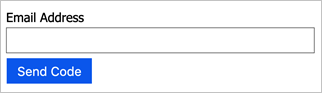
等候使用者提供用戶收到的代碼的
verificationCode宣告類型。將
email返回到具有此顯示控件參考的自我聲明技術配置檔。
在內容定義下,仍在<BuildingBlocks>中,將下列DisplayControl類型為VerificationControl新增至您的原則。
<!--
<BuildingBlocks> -->
  <DisplayControls>
    <DisplayControl Id="emailVerificationControl" UserInterfaceControlType="VerificationControl">
      <DisplayClaims>
        <DisplayClaim ClaimTypeReferenceId="email" Required="true" />
        <DisplayClaim ClaimTypeReferenceId="verificationCode" ControlClaimType="VerificationCode" Required="true" />
      </DisplayClaims>
      <OutputClaims>
        <OutputClaim ClaimTypeReferenceId="email" />
      </OutputClaims>
      <Actions>
        <Action Id="SendCode">
          <ValidationClaimsExchange>
            <ValidationClaimsExchangeTechnicalProfile TechnicalProfileReferenceId="GenerateOtp" />
            <ValidationClaimsExchangeTechnicalProfile TechnicalProfileReferenceId="SendOtp" />
          </ValidationClaimsExchange>
        </Action>
        <Action Id="VerifyCode">
          <ValidationClaimsExchange>
            <ValidationClaimsExchangeTechnicalProfile TechnicalProfileReferenceId="VerifyOtp" />
          </ValidationClaimsExchange>
        </Action>
      </Actions>
    </DisplayControl>
  </DisplayControls>
<!--
</BuildingBlocks> -->
新增 OTP 技術設定檔
GenerateOtp技術配置檔會產生電子郵件地址的代碼。
VerifyOtp技術設定檔會驗證與電子郵件地址相關聯的代碼。 您可以變更格式的組態,以及單次密碼的到期時間。 如需OTP技術配置檔的詳細資訊,請參閱 定義一次性密碼技術配置檔。
備註
由 Web.TPEngine.Providers.OneTimePasswordProtocolProvider 通訊協定產生的 OTP 程式代碼會系結至瀏覽器會話。 這表示使用者可以在不同的瀏覽器會話中產生唯一的 OTP 程式代碼,這些程式代碼對於其對應的會話而言都是有效的。 相較之下,內建電子郵件提供者所產生的 OTP 程式代碼與瀏覽器會話無關,因此如果使用者在新瀏覽器會話中產生新的 OTP 程式代碼,則會取代先前的 OTP 程式代碼。
將下列技術配置檔新增至 <ClaimsProviders> 專案。
<!--
<ClaimsProviders> -->
  <ClaimsProvider>
    <DisplayName>One time password technical profiles</DisplayName>
    <TechnicalProfiles>
      <TechnicalProfile Id="GenerateOtp">
        <DisplayName>Generate one time password</DisplayName>
        <Protocol Name="Proprietary" Handler="Web.TPEngine.Providers.OneTimePasswordProtocolProvider, Web.TPEngine, Version=1.0.0.0, Culture=neutral, PublicKeyToken=null" />
        <Metadata>
          <Item Key="Operation">GenerateCode</Item>
          <Item Key="CodeExpirationInSeconds">600</Item>
          <Item Key="CodeLength">6</Item>
          <Item Key="CharacterSet">0-9</Item>
          <Item Key="NumRetryAttempts">5</Item>
          <Item Key="NumCodeGenerationAttempts">10</Item>
          <Item Key="ReuseSameCode">false</Item>
        </Metadata>
        <InputClaims>
          <InputClaim ClaimTypeReferenceId="email" PartnerClaimType="identifier" />
        </InputClaims>
        <OutputClaims>
          <OutputClaim ClaimTypeReferenceId="otp" PartnerClaimType="otpGenerated" />
        </OutputClaims>
      </TechnicalProfile>

      <TechnicalProfile Id="VerifyOtp">
        <DisplayName>Verify one time password</DisplayName>
        <Protocol Name="Proprietary" Handler="Web.TPEngine.Providers.OneTimePasswordProtocolProvider, Web.TPEngine, Version=1.0.0.0, Culture=neutral, PublicKeyToken=null" />
        <Metadata>
          <Item Key="Operation">VerifyCode</Item>
        </Metadata>
        <InputClaims>
          <InputClaim ClaimTypeReferenceId="email" PartnerClaimType="identifier" />
          <InputClaim ClaimTypeReferenceId="verificationCode" PartnerClaimType="otpToVerify" />
        </InputClaims>
      </TechnicalProfile>
     </TechnicalProfiles>
  </ClaimsProvider>
<!--
</ClaimsProviders> -->
新增 REST API 技術配置檔
此 REST API 技術設定檔會產生電子郵件內容(使用 SendGrid 格式)。 如需 RESTful 技術配置檔的詳細資訊,請參閱 定義 RESTful 技術配置檔。
如同 OTP 技術設定檔,請將下列技術配置檔新增至 <ClaimsProviders> 元素。
<ClaimsProvider>
  <DisplayName>RestfulProvider</DisplayName>
  <TechnicalProfiles>
    <TechnicalProfile Id="SendOtp">
      <DisplayName>Use SendGrid's email API to send the code to the user</DisplayName>
      <Protocol Name="Proprietary" Handler="Web.TPEngine.Providers.RestfulProvider, Web.TPEngine, Version=1.0.0.0, Culture=neutral, PublicKeyToken=null" />
      <Metadata>
        <Item Key="ServiceUrl">https://api.sendgrid.com/v3/mail/send</Item>
        <Item Key="AuthenticationType">Bearer</Item>
        <Item Key="SendClaimsIn">Body</Item>
        <Item Key="ClaimUsedForRequestPayload">emailRequestBody</Item>
      </Metadata>
      <CryptographicKeys>
        <Key Id="BearerAuthenticationToken" StorageReferenceId="B2C_1A_SendGridSecret" />
      </CryptographicKeys>
      <InputClaimsTransformations>
        <InputClaimsTransformation ReferenceId="GenerateEmailRequestBody" />
      </InputClaimsTransformations>
      <InputClaims>
        <InputClaim ClaimTypeReferenceId="emailRequestBody" />
      </InputClaims>
    </TechnicalProfile>
  </TechnicalProfiles>
</ClaimsProvider>
參考 DisplayControl
在最後一個步驟中,新增對您所建立的「DisplayControl」的參考。 使用下列 XML 代碼段覆蓋您在基底原則中設定的現有 LocalAccountSignUpWithLogonEmail 和 LocalAccountDiscoveryUsingEmailAddress 自我宣告技術配置檔。 如果您使用較早版本的 Azure AD B2C 原則,這些技術設定檔會與DisplayClaims一起使用,並參考DisplayControl。
如需詳細資訊,請參閱 自我判斷技術概要 和 DisplayControl。
<ClaimsProvider>
  <DisplayName>Local Account</DisplayName>
  <TechnicalProfiles>
    <TechnicalProfile Id="LocalAccountSignUpWithLogonEmail">
      <DisplayClaims>
        <DisplayClaim DisplayControlReferenceId="emailVerificationControl" />
        <DisplayClaim ClaimTypeReferenceId="displayName" Required="true" />
        <DisplayClaim ClaimTypeReferenceId="givenName" Required="true" />
        <DisplayClaim ClaimTypeReferenceId="surName" Required="true" />
        <DisplayClaim ClaimTypeReferenceId="newPassword" Required="true" />
        <DisplayClaim ClaimTypeReferenceId="reenterPassword" Required="true" />
      </DisplayClaims>
    </TechnicalProfile>
    <TechnicalProfile Id="LocalAccountDiscoveryUsingEmailAddress">
      <DisplayClaims>
        <DisplayClaim DisplayControlReferenceId="emailVerificationControl" />
      </DisplayClaims>
    </TechnicalProfile>
  </TechnicalProfiles>
</ClaimsProvider>
[選擇性]將您的電子郵件當地語系化
若要將電子郵件當地語系化,您必須將當地語系化字串傳送至 SendGrid 或電子郵件提供者。 例如,您可以將電子郵件主旨、本文、程式代碼訊息或電子郵件的簽章當地語系化。 若要這樣做,您可以使用 GetLocalizedStringsTransformation 宣告轉換,將當地語系化字串複製到宣告類型。 該GenerateEmailRequestBody宣告轉換會使用包含當地語系化字串的輸入宣告,從而產生 JSON 承載。
在您的原則中,定義下列字串宣告:subject、message、codeIntro 和 signature。
定義 GetLocalizedStringsTransformation 宣告的轉換,將已語系化的字串值插入步驟 1 的宣告。
變更
GenerateEmailRequestBody宣告轉換,以搭配下列 XML 代碼段使用輸入宣告。更新 SendGrid 範本,以使用動態參數取代 Azure AD B2C 當地語系化的所有字串。
<ClaimsTransformation Id="GetLocalizedStringsForEmail" TransformationMethod="GetLocalizedStringsTransformation">
  <OutputClaims>
    <OutputClaim ClaimTypeReferenceId="subject" TransformationClaimType="email_subject" />
    <OutputClaim ClaimTypeReferenceId="message" TransformationClaimType="email_message" />
    <OutputClaim ClaimTypeReferenceId="codeIntro" TransformationClaimType="email_code" />
    <OutputClaim ClaimTypeReferenceId="signature" TransformationClaimType="email_signature" />
  </OutputClaims>
</ClaimsTransformation>
<ClaimsTransformation Id="GenerateEmailRequestBody" TransformationMethod="GenerateJson">
  <InputClaims>
    <InputClaim ClaimTypeReferenceId="email" TransformationClaimType="personalizations.0.to.0.email" />
    <InputClaim ClaimTypeReferenceId="subject" TransformationClaimType="personalizations.0.dynamic_template_data.subject" />
    <InputClaim ClaimTypeReferenceId="otp" TransformationClaimType="personalizations.0.dynamic_template_data.otp" />
    <InputClaim ClaimTypeReferenceId="email" TransformationClaimType="personalizations.0.dynamic_template_data.email" />
    <InputClaim ClaimTypeReferenceId="message" TransformationClaimType="personalizations.0.dynamic_template_data.message" />
    <InputClaim ClaimTypeReferenceId="codeIntro" TransformationClaimType="personalizations.0.dynamic_template_data.codeIntro" />
    <InputClaim ClaimTypeReferenceId="signature" TransformationClaimType="personalizations.0.dynamic_template_data.signature" />
  </InputClaims>
  <InputParameters>
    <InputParameter Id="template_id" DataType="string" Value="d-1234567890" />
    <InputParameter Id="from.email" DataType="string" Value="my_email@mydomain.com" />
  </InputParameters>
  <OutputClaims>
    <OutputClaim ClaimTypeReferenceId="emailRequestBody" TransformationClaimType="outputClaim" />
  </OutputClaims>
</ClaimsTransformation>
新增下列 Localization 元素。
<!--
<BuildingBlocks> -->
  <Localization Enabled="true">
    <SupportedLanguages DefaultLanguage="en" MergeBehavior="ReplaceAll">
      <SupportedLanguage>en</SupportedLanguage>
      <SupportedLanguage>es</SupportedLanguage>
    </SupportedLanguages>
    <LocalizedResources Id="api.custom-email.en">
      <LocalizedStrings>
        <!--Email template parameters-->
        <LocalizedString ElementType="GetLocalizedStringsTransformationClaimType" StringId="email_subject">Contoso account email verification code</LocalizedString>
        <LocalizedString ElementType="GetLocalizedStringsTransformationClaimType" StringId="email_message">Thanks for validating the account</LocalizedString>
        <LocalizedString ElementType="GetLocalizedStringsTransformationClaimType" StringId="email_code">Your code is</LocalizedString>
        <LocalizedString ElementType="GetLocalizedStringsTransformationClaimType" StringId="email_signature">Sincerely</LocalizedString>
      </LocalizedStrings>
    </LocalizedResources>
    <LocalizedResources Id="api.custom-email.es">
      <LocalizedStrings>
        <!--Email template parameters-->
        <LocalizedString ElementType="GetLocalizedStringsTransformationClaimType" StringId="email_subject">Código de verificación del correo electrónico de la cuenta de Contoso</LocalizedString>
        <LocalizedString ElementType="GetLocalizedStringsTransformationClaimType" StringId="email_message">Gracias por comprobar la cuenta de </LocalizedString>
        <LocalizedString ElementType="GetLocalizedStringsTransformationClaimType" StringId="email_code">Su código es</LocalizedString>
        <LocalizedString ElementType="GetLocalizedStringsTransformationClaimType" StringId="email_signature">Sinceramente</LocalizedString>
      </LocalizedStrings>
    </LocalizedResources>
  </Localization>
<!--
</BuildingBlocks> -->
透過更新 ContentDefinitions 元素以加入對 LocalizedResources 元素的參考。
<!--
<BuildingBlocks> -->
  <ContentDefinitions>
    <ContentDefinition Id="api.localaccountsignup">
      <DataUri>urn:com:microsoft:aad:b2c:elements:contract:selfasserted:2.1.2</DataUri>
      <LocalizedResourcesReferences MergeBehavior="Prepend">
        <LocalizedResourcesReference Language="en" LocalizedResourcesReferenceId="api.custom-email.en" />
        <LocalizedResourcesReference Language="es" LocalizedResourcesReferenceId="api.custom-email.es" />
      </LocalizedResourcesReferences>
    </ContentDefinition>
    <ContentDefinition Id="api.localaccountpasswordreset">
      <DataUri>urn:com:microsoft:aad:b2c:elements:contract:selfasserted:2.1.2</DataUri>
      <LocalizedResourcesReferences MergeBehavior="Prepend">
        <LocalizedResourcesReference Language="en" LocalizedResourcesReferenceId="api.custom-email.en" />
        <LocalizedResourcesReference Language="es" LocalizedResourcesReferenceId="api.custom-email.es" />
      </LocalizedResourcesReferences>
    </ContentDefinition>
  </ContentDefinitions>
<!--
</BuildingBlocks> -->
最後,將下列輸入宣告轉換新增至
LocalAccountSignUpWithLogonEmail和LocalAccountDiscoveryUsingEmailAddress技術配置檔。<InputClaimsTransformations> <InputClaimsTransformation ReferenceId="GetLocalizedStringsForEmail" /> </InputClaimsTransformations>
[選擇性]將 UI 當地語系化
Localization 元素可讓您在使用者旅程的政策中支援多個地區設定或語言。 原則中的當地語系化支援可讓您提供 驗證顯示控制項使用者介面元素和 一次性密碼錯誤訊息的語言特定字串。 將下列 LocalizedString 新增至您的 LocalizedResources。
<LocalizedResources Id="api.custom-email.en">
  <LocalizedStrings>
    ...
    <!-- Display control UI elements-->
    <LocalizedString ElementType="DisplayControl" ElementId="emailVerificationControl" StringId="intro_msg">Verification is necessary. Please click Send button.</LocalizedString>
    <LocalizedString ElementType="DisplayControl" ElementId="emailVerificationControl" StringId="success_send_code_msg">Verification code has been sent to your inbox. Please copy it to the input box below.</LocalizedString>
    <LocalizedString ElementType="DisplayControl" ElementId="emailVerificationControl" StringId="failure_send_code_msg">We are having trouble verifying your email address. Please enter a valid email address and try again.</LocalizedString>
    <LocalizedString ElementType="DisplayControl" ElementId="emailVerificationControl" StringId="success_verify_code_msg">E-mail address verified. You can now continue.</LocalizedString>
    <LocalizedString ElementType="DisplayControl" ElementId="emailVerificationControl" StringId="failure_verify_code_msg">We are having trouble verifying your email address. Please try again.</LocalizedString>
    <LocalizedString ElementType="DisplayControl" ElementId="emailVerificationControl" StringId="but_send_code">Send verification code</LocalizedString>
    <LocalizedString ElementType="DisplayControl" ElementId="emailVerificationControl" StringId="but_verify_code">Verify code</LocalizedString>
    <LocalizedString ElementType="DisplayControl" ElementId="emailVerificationControl" StringId="but_send_new_code">Send new code</LocalizedString>
    <LocalizedString ElementType="DisplayControl" ElementId="emailVerificationControl" StringId="but_change_claims">Change e-mail</LocalizedString>
    <!-- Claims-->
    <LocalizedString ElementType="ClaimType" ElementId="VerificationCode" StringId="DisplayName">Verification Code</LocalizedString>
    <LocalizedString ElementType="ClaimType" ElementId="VerificationCode" StringId="UserHelpText">Verification code received in the email.</LocalizedString>
    <LocalizedString ElementType="ClaimType" ElementId="VerificationCode" StringId="AdminHelpText">Verification code received in the email.</LocalizedString>
    <LocalizedString ElementType="ClaimType" ElementId="email" StringId="DisplayName">Email</LocalizedString>
    <!-- Email validation error messages-->
    <LocalizedString ElementType="ErrorMessage" StringId="UserMessageIfSessionDoesNotExist">You have exceeded the maximum time allowed.</LocalizedString>
    <LocalizedString ElementType="ErrorMessage" StringId="UserMessageIfMaxRetryAttempted">You have exceeded the number of retries allowed.</LocalizedString>
    <LocalizedString ElementType="ErrorMessage" StringId="UserMessageIfMaxNumberOfCodeGenerated">You have exceeded the number of code generation attempts allowed.</LocalizedString>
    <LocalizedString ElementType="ErrorMessage" StringId="UserMessageIfInvalidCode">You have entered the wrong code.</LocalizedString>
    <LocalizedString ElementType="ErrorMessage" StringId="UserMessageIfSessionConflict">Cannot verify the code, please try again later.</LocalizedString>
    <LocalizedString ElementType="ErrorMessage" StringId="UserMessageIfVerificationFailedRetryAllowed">The verification has failed, please try again.</LocalizedString>
  </LocalizedStrings>
</LocalizedResources>
相關內容
- 尋找自定義電子郵件驗證的範例 - GitHub 上的 DisplayControls 自定義原則 。
- 瞭解如何使用自定義 REST API 或任何 HTTP 型 SMTP 電子郵件提供者,請參閱 在 Azure AD B2C 自定義原則中定義 RESTful 技術配置檔。