Confluence Cloud Microsoft 365 Copilot 連接器可讓您的組織為 Confluence 內容編製索引。 設定連接器並從 Confluence 網站編製數據索引之後,終端使用者可以在 [搜尋] 中搜尋Microsoft內容。
若要設定搜尋結果頁面,您需要:
在本檔中,我們提供了設定 Confluence Cloud Copilot 連接器結果配置所需的範例結果配置 JSON。
開始之前
您必須已設定 Confluence Cloud Copilot 連接器。 若要依原樣取用範例結果配置 JSON,您必須選取下列屬性,以使用所述 的搜尋架構編製索引。
注意事項
- 需要擷取 搜尋屬性,才能在搜尋結果範本中顯示屬性。 屬性也可以有其他搜尋屬性。
| Property | 需要搜尋架構屬性 |
|---|---|
| 標題 | 取回 |
| URL | 取回 |
| UpdatedByName | 取回 |
| UpdatedOn | 取回 |
| 內容 | Content 屬性 |
結果配置
在此範例中,您的搜尋結果看起來會像這樣:
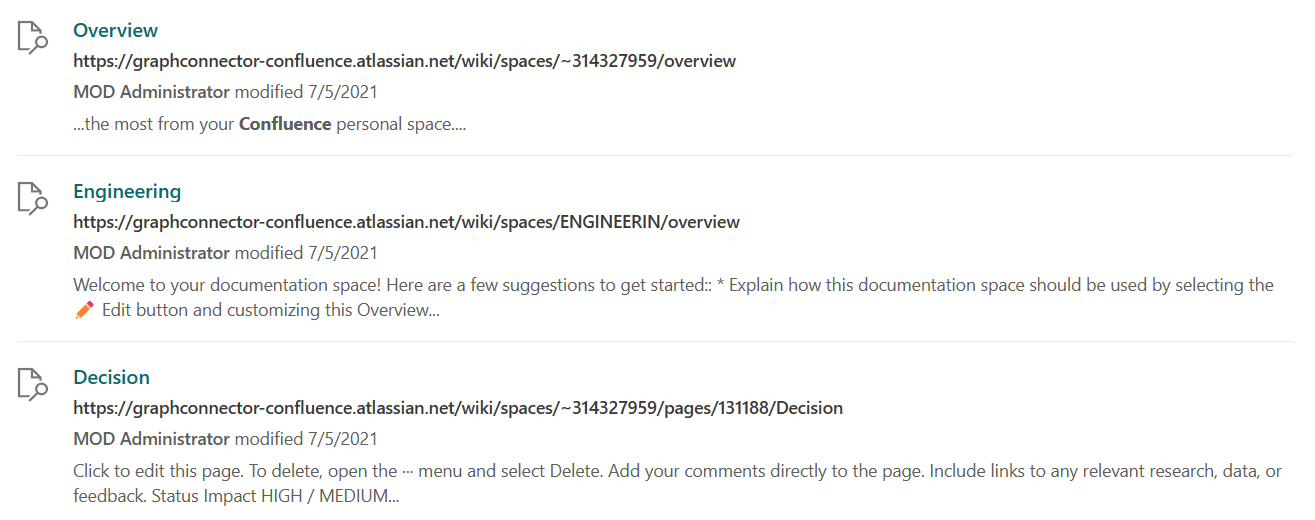
以下是配置的相關聯 JSON 檔案:
{
    "type": "AdaptiveCard",
    "version": "1.3",
    "body": [
        {
            "type": "ColumnSet",
            "columns": [
                {
                    "type": "Column",
                    "width": "auto",
                    "items": [
                        {
                            "type": "Image",
                            "url": "https://searchuxcdn.blob.core.windows.net/designerapp/images/DefaultMRTIcon.png",
                            "horizontalAlignment": "center",
                            "size": "small"
                        }
                    ],
                    "horizontalAlignment": "center"
                },
                {
                    "type": "Column",
                    "width": "stretch",
                    "items": [
                        {
                            "type": "ColumnSet",
                            "columns": [
                                {
                                    "type": "Column",
                                    "width": "auto",
                                    "items": [
                                        {
                                            "type": "TextBlock",
                                            "text": "[${Title}](${Url})",
                                            "weight": "bolder",
                                            "size": "medium",
                                            "maxLines": 3,
                                            "color": "accent"
                                        }
                                    ],
                                    "spacing": "none"
                                }
                            ],
                            "spacing": "small"
                        },
                        {
                            "type": "TextBlock",
                            "text": "[${Url}](${Url})",
                            "spacing": "small",
                            "weight": "bolder",
                            "color": "dark"
                        },
                        {
                            "type": "Container",
                            "items": [
                                {
                                    "type": "TextBlock",
                                    "text": "**${UpdatedByName}** modified {{DATE(${UpdatedOn})}}",
                                    "spacing": "small",
                                    "$when": "${UpdatedByName!='' && UpdatedOn!=''}"
                                },
                                {
                                    "type": "TextBlock",
                                    "text": "Modified on {{DATE(${UpdatedOn})}}",
                                    "spacing": "small",
                                    "$when": "${UpdatedByName=='' && UpdatedOn!=''}"
                                },
                                {
                                    "type": "TextBlock",
                                    "text": "Modified by __${UpdatedByName}__",
                                    "spacing": "small",
                                    "$when": "${UpdatedByName!='' && UpdatedOn==''}"
                                }
                            ],
                            "spacing": "small"
                        },
                        {
                            "type": "TextBlock",
                            "text": "${ResultSnippet}",
                            "maxLines": 2,
                            "wrap": true,
                            "spacing": "small"
                        }
                    ],
                    "spacing": "medium"
                }
            ]
        }
    ],
    "$schema": "http://adaptivecards.io/schemas/adaptive-card.json",
    "$data": {
        "UpdatedOn": "2019-09-25T06:08:39Z,SHORT",
        "ResultSnippet": "Marketing team at Contoso.., and looking at the Contoso Marketing documents on the team site. This contains the data from FY20 and will taken over to FY21...Marketing Planning is ongoing for FY20..",
        "UpdatedByName": "Amanda Brady",
        "Url": "https://modernacdesigner.azurewebsites.net",
        "Title": "Contoso Marketing Analysis - Q3 FY18"
    }
}