一致的格式能讓 Transact-SQL(T-SQL)更容易閱讀、審查和維護,尤其當多人共同貢獻同一程式碼庫時。 Visual Studio Code 的 MSSQL 擴充功能內建 SQL 格式化器(預覽版),你可以隨時執行,並在儲存時設定自動格式化,並透過 Visual Studio Code 設定進行自訂。
MSSQL 擴充中的 T-SQL 格式化功能建立在 ScriptDOM 上,這是一個開源的 .NET 函式庫,能解析 T-SQL 並根據抽象語法樹產生腳本。
依需求格式化
你可以在任何編輯器視窗中格式化 T-SQL。 格式化器對整份文件或只對你選擇的文字有效。
若要按需格式化 T-SQL,請使用以下方法之一:
右鍵選單:在 T-SQL 編輯器視窗中右鍵點擊,選擇 格式 文件或 格式選擇。
指令調色盤:執行 格式文件 或 格式選擇。
鍵盤快捷鍵:格式化文件時,Windows 和 Linux 按 Shift+Alt+F,macOS 按 Shift+選項+F。 格式選擇時,在 Windows 和 Linux 按 Ctrl+K、Ctrl+F,或在 macOS 按 Cmd+K、Cmd+F。
存檔時的格式
在 Visual Studio Code 中,標準編輯器設定控制的是儲存格式,而非專用的 MSSQL 格式化設定。
在 Visual Studio Code settings.json 檔案中,請使用以下設定,在儲存檔案時自動格式化 T-SQL:
{
  "[sql]": {
    "editor.formatOnSave": true
  }
}
設定格式選項
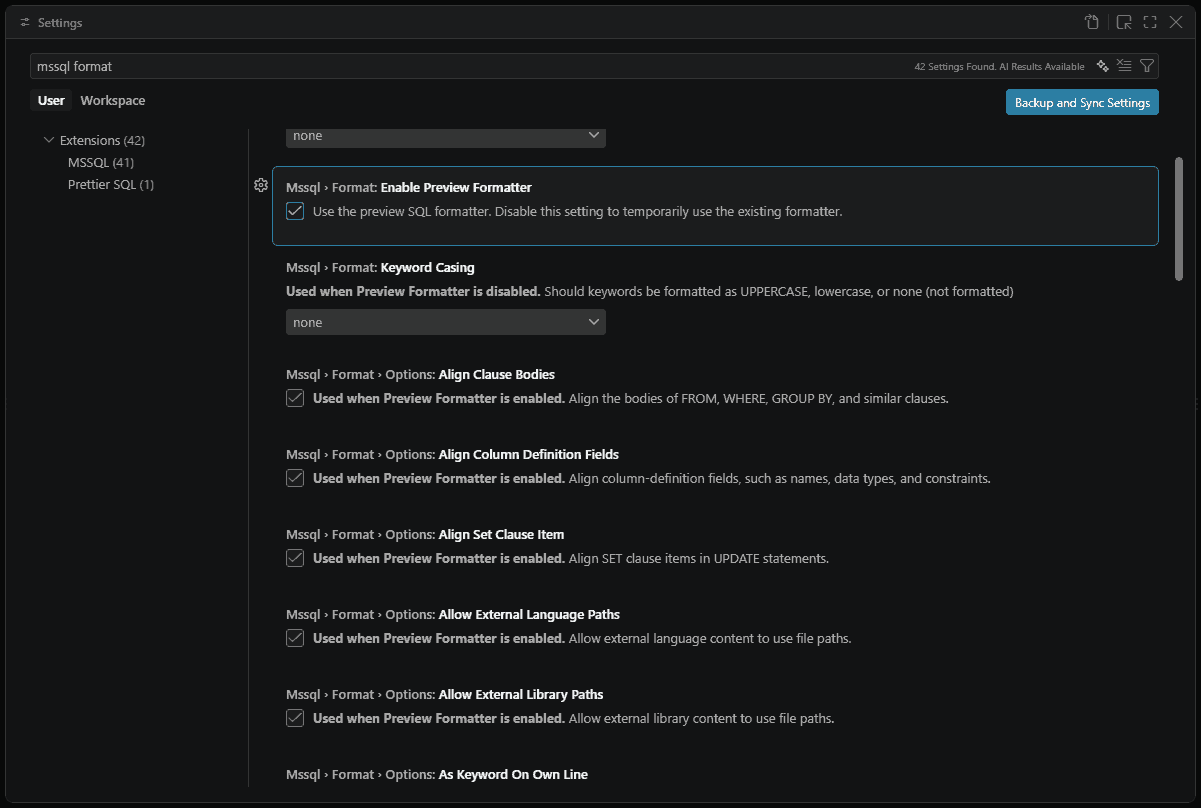
在 Visual Studio Code 設定介面或使用者或工作區settings.json中設定格式。
在設定編輯器中搜尋 MsSQL>格式 以查看可用選項。 在 settings.json中,使用相應 mssql.format.* 的設定。
預覽格式化器預設是啟用的。 其選項使用
mssql.format.options.*命名空間。啟用預覽格式化器後,現有的五個格式化設定仍然可用。 預覽格式化器會新增設定
mssql.format.options.*。
支援的設定
表格列出現有格式化器設定,接著是預覽格式化器的設定。
現有格式化器設定
| Setting | 類型 | 預設 | Description |
|---|---|---|---|
mssql.format.alignColumnDefinitionsInColumns |
bool | false |
將欄位定義在各欄中對齊。 |
mssql.format.datatypeCasing |
列舉 | none |
將資料型態格式化為 uppercase、 、 lowercase或 none (未格式化)。 |
mssql.format.keywordCasing |
列舉 | none |
關鍵字格式為 uppercase、 lowercase、 或 none (未格式化)。 |
mssql.format.placeCommasBeforeNextStatement |
bool | false |
在列表的每個項目開頭加上逗號,例如 , mycolumn2,而非結尾, mycolumn1,例如。 |
mssql.format.placeSelectStatementReferencesOnNewLine |
bool | false |
將參照置於 SELECT 陳述中的不同單獨行上。 對於 SELECT C1, C2 FROM T1,C1 和 C2 都位於不同的線上。 |
預覽格式化器設定
啟用預覽格式化工具時,這些 mssql.format.options.* 設定會疊加在現有的格式化工具設定之上。
一般
| Setting | 類型 | 預設 | Description |
|---|---|---|---|
mssql.format.enablePreviewFormatter |
bool | true |
使用 SQL 格式化器(預覽版)。 |
mssql.format.showParseErrorNotification |
bool | true |
當格式化器無法完全解析 T-SQL 時,請顯示通知。 |
mssql.format.options.sqlVersion |
列舉 | sql170 |
T-SQL 版本用於解析與產生格式化腳本。 |
mssql.format.options.sqlEngineType |
列舉 | all |
資料庫引擎 類型用於解析與產生格式化腳本。 有效值為 all、standalone和 sqlAzure。 |
對準
| Setting | 類型 | 預設 | Description |
|---|---|---|---|
mssql.format.options.alignClauseBodies |
bool | true |
對齊 FROM、WHERE、GROUP BY 及其他類似子句的主體部分。 |
mssql.format.options.alignColumnDefinitionFields |
bool | true |
對齊欄位定義中的欄位,例如名稱、類型和限制條件。 |
mssql.format.options.alignSetClauseItem |
bool | true |
在 SET 陳述式中對齊 UPDATE 子句項目。 |
路徑
| Setting | 類型 | 預設 | Description |
|---|---|---|---|
mssql.format.options.allowExternalLanguagePaths |
bool | true |
允許外部語言內容使用檔案路徑。 |
mssql.format.options.allowExternalLibraryPaths |
bool | true |
允許外部函式庫內容使用檔案路徑。 |
Formatting
| Setting | 類型 | 預設 | Description |
|---|---|---|---|
mssql.format.options.asKeywordOnOwnLine |
bool | true |
將 AS 另起一行。 |
mssql.format.options.keywordCasing |
列舉 | uppercase |
關鍵字是外殼風格。 有效值為 uppercase、lowercase和 pascalCase。 |
mssql.format.options.preserveComments |
bool | true |
格式化時請保留評論。 |
mssql.format.options.numNewlinesAfterStatement |
int | 1 |
每個陳述式後的換行次數,從 0 到 5。 |
縮排
| Setting | 類型 | 預設 | Description |
|---|---|---|---|
mssql.format.options.indentSetClause |
bool | false |
在 SET 陳述式中縮排 UPDATE 子句。 |
mssql.format.options.indentViewBody |
bool | false |
將 VIEW 本文縮排。 |
多行
| Setting | 類型 | 預設 | Description |
|---|---|---|---|
mssql.format.options.multilineInsertSourcesList |
bool | true |
INSERT 將資料來源設為多行。 |
mssql.format.options.multilineInsertTargetsList |
bool | true |
將 INSERT 欄設為多行。 |
mssql.format.options.multilineSelectElementsList |
bool | true |
將 SELECT 欄設為多行。 |
mssql.format.options.multilineSetClauseItems |
bool | true |
SET 項目以多行形式。 |
mssql.format.options.multilineViewColumnsList |
bool | true |
將 VIEW 欄設為多行。 |
mssql.format.options.multilineWherePredicatesList |
bool | true |
WHERE 判定為多行。 |
換行
| Setting | 類型 | 預設 | Description |
|---|---|---|---|
mssql.format.options.newLineBeforeCloseParenthesisInMultilineList |
bool | true |
多行清單中在右括號前換行。 |
mssql.format.options.newLineBeforeFromClause |
bool | true |
在 FROM 子句前換行。 |
mssql.format.options.newLineBeforeGroupByClause |
bool | true |
在 GROUP BY 子句前換行。 |
mssql.format.options.newLineBeforeHavingClause |
bool | true |
在 HAVING 子句前換行。 |
mssql.format.options.newLineBeforeJoinClause |
bool | true |
在 JOIN 子句前換行。 |
mssql.format.options.newLineBeforeOffsetClause |
bool | true |
在 OFFSET 子句前換行。 |
mssql.format.options.newLineBeforeOpenParenthesisInMultilineList |
bool | false |
多行列表中開括號前加行。 |
mssql.format.options.newLineBeforeOrderByClause |
bool | true |
在 ORDER BY 子句前換行。 |
mssql.format.options.newLineBeforeOutputClause |
bool | true |
在 OUTPUT 子句前換行。 |
mssql.format.options.newLineBeforeWhereClause |
bool | true |
在 WHERE 子句前換行。 |
mssql.format.options.newLineBeforeWindowClause |
bool | true |
在 WINDOW 子句前換行。 |
mssql.format.options.newlineFormattedCheckConstraint |
bool | false |
換行格式的 CHECK 限制。 |
mssql.format.options.newLineFormattedIndexDefinition |
bool | false |
以換行格式表示的索引定義 |
間距
| Setting | 類型 | 預設 | Description |
|---|---|---|---|
mssql.format.options.spaceBetweenDataTypeAndParameters |
bool | true |
資料型別與括號之間的空格,例如 VARCHAR (255)。 |
mssql.format.options.spaceBetweenParametersInDataType |
bool | true |
資料型態中參數之間的空隙。 |
範例設定檔案
{
  "mssql.format.options.keywordCasing": "lowercase",
  "mssql.format.options.alignClauseBodies": false,
  "mssql.format.options.numNewlinesAfterStatement": 2,
  "[sql]": {
    "editor.formatOnSave": true
  }
}
設定預設格式化器
要將 MSSQL 擴充功能設為預設,請選擇「配置預設格式...」>SQL Server(mssql)或新增以下設定:settings.json
{
  "[sql]": {
    "editor.defaultFormatter": "ms-mssql.mssql"
  }
}