Microsoft Agent Framework 的持久擴充功能為代理程式、多代理協調及 Microsoft 代理框架工作流程帶來持久執行。 你可以用它來持久化代理會話、檢查點協調與工作流程進度、從故障中復原,並在分散式主機間擴展工作,而不改變核心代理邏輯。
該擴充套件支援兩種 C# 與 Python 的主機模型:
- Azure Functions 用於管理型、無伺服器主機,採用 Azure Functions 程式設計模型。
- 自有運算/自架, 讓你能在自己的工作流程、服務、容器、Kubernetes 環境或現有應用程式基礎架構中運行持久的代理與工作流程。
Note
Go 對耐用延伸的支援即將推出。 關於現今的 Go 主機,請參閱 A2A 主機 與 Agent Framework Go 倉庫。
概觀
耐用代理結合代理框架的程式設計模型與耐用任務基礎設施(如 耐用任務排程器),以創建能夠:
- 自動在請求與工作執行間持續維持狀態
- 失敗後繼續, 且不失去對話脈絡或重複已完成的工作
- 根據需求,針對分散且無國籍的勞工進行擴展
- 協調多代理工作流程 ,確保可靠執行
- 以圖形為基礎的工作流程模型所建構的 Checkpoint Agent Framework 工作流程
- 暫停等待人類輸入或外部事件 ,且不會消耗計算或模型標記
- 當搭配可靠的串流代理(如 Redis)時,串流回應能可靠地產生
- 透過會話存活時間(TTL)清理及基於儀表板的監控來管理會話生命週期
何時使用耐用劑
當您需要時選擇耐用的代理:
- 持續對話狀態:代理工作階段能在程序崩潰、重啟及擴展事件中存活
- 複雜的編排: 協調多個代理,具有確定性、可靠的工作流程,可以運行數天或數週
- 事件驅動編排:與觸發器、佇列、webhooks、計時器或現有應用程式事件整合
- 自動交談狀態:代理程式交談歷程記錄會自動管理和保存,而不需要在程式碼中進行明確的狀態處理
- Durable Agent Framework 工作流程:讓基於圖形的 Microsoft Agent Framework 工作流程具備持久性,讓每個步驟都能被檢查並恢復
- 長壽命會話:在使用會話存活時間(TTL)清理自動移除閒置會話時,保持有用的對話
- 可靠的即時回應:對於需要即時使用者體驗並保證交付的應用程式,串流令牌輸出持久耐用
這種主機方式不同於託管服務型代理主機(如 Foundry Agent Service),後者提供完全託管的基礎設施,無需部署或管理工作主機。 當你需要結合程式碼優先部署與持久狀態管理的彈性時,耐用代理是理想選擇。
選擇主機模式
| 裝載模型 | 需要時就選 |
|---|---|
| Azure Functions | 一種託管、無伺服器的主機模式;內建縮放與縮放至零;Azure Functions triggers and bindings;由函式程式設計模型產生的 HTTP 端點;MCP 伺服器觸發器;以及最小化的主機基礎設施管理。 |
| 自帶計算/自架 | 對主機程序、部署環境、執行週期、基礎設施、網路、認證,或與現有應用程式或服務整合的控制權有更多。 此模型可用於容器、Kubernetes、長期運行的工作環境、主控台應用程式、自訂服務或非函數型主機環境。 |
當裝載在 Azure Functions 彈性消費 方案中時,代理可以擴展到數千個執行個體,或者在未使用時縮減至零執行個體,讓您只需支付所需的計算資源費用。 在自架情況下,你的主機控制程序壽命、擴展、網路及部署。
開始使用
在 .NET 專案中,選擇你的主機模型的套件集。
對於 Azure Functions 主機,請加裝 Azure Functions 整合套件同 Functions worker 套件。
dotnet add package Microsoft.Agents.AI.Foundry --prerelease
dotnet add package Microsoft.Agents.AI.Hosting.AzureFunctions --prerelease
Note
除了這些套件之外,請確定您的專案使用 2.2.0 版或更新版本的 Microsoft.Azure.Functions.Worker 套件。
對於自帶計算主機,請新增基本的 Durable Task 整合套件以及主機使用的 Durable Task Scheduler 工作者/客戶端套件:
dotnet add package Microsoft.Agents.AI.DurableTask --prerelease
dotnet add package Microsoft.DurableTask.Client.AzureManaged
dotnet add package Microsoft.DurableTask.Worker.AzureManaged
dotnet add package Microsoft.Extensions.Hosting
在 Python 專案中,選擇你的主機模型的套件。
對於 Azure Functions 主機,安裝 Azure Functions 整合套件。
pip install azure-identity
pip install agent-framework-azurefunctions --pre
若要自帶運算主機,請安裝 Durable Task 整合套件。
pip install azure-identity
pip install agent-framework-durabletask --pre
Azure Functions hosting
透過 Durable 擴充,你可以部署並架設 Microsoft 代理框架代理程式,格式為 Azure Functions,內建 HTTP 端點及基於編排的調用。 Azure Functions 提供事件驅動、按調用付費的定價,具有自動調整和最低限度的基礎結構管理。
當你在 Azure Functions 中設定一個持久代理時,該擴充功能會自動為你的代理建立 HTTP 端點,並管理底層基礎設施,用以儲存對話狀態、處理同時請求,以及協調多代理工作流程。 Azure Functions 主機整合也提供 Functions 專屬的便利功能,例如產生的 REST API 用於傳送訊息、檢查狀態及管理會話,以及如 MCP 伺服器觸發器,讓主機代理作為 MCP 伺服器,無需撰寫觸發膠。
using System;
using Azure.AI.Projects;
using Azure.Identity;
using Microsoft.Agents.AI;
using Microsoft.Agents.AI.Hosting.AzureFunctions;
using Microsoft.Azure.Functions.Worker.Builder;
using Microsoft.Extensions.Hosting;

var endpoint = Environment.GetEnvironmentVariable("AZURE_OPENAI_ENDPOINT");
var deploymentName = Environment.GetEnvironmentVariable("AZURE_OPENAI_DEPLOYMENT") ?? "gpt-4o-mini";

// Create an AI agent following the standard Microsoft Agent Framework pattern
AIAgent agent = new AIProjectClient(new Uri(endpoint), new DefaultAzureCredential())
    .AsAIAgent(
        model: deploymentName,
        instructions: "You are good at telling jokes.",
        name: "Joker");

// Configure the function app to host the agent with durable thread management
// This automatically creates HTTP endpoints and manages state persistence
using IHost app = FunctionsApplication
    .CreateBuilder(args)
    .ConfigureFunctionsWebApplication()
    .ConfigureDurableAgents(options =>
        options.AddAIAgent(agent)
    )
    .Build();
app.Run();
Warning
DefaultAzureCredential 開發方便,但在生產過程中需謹慎考量。 在生產環境中,建議使用特定的憑證(例如 ManagedIdentityCredential),以避免延遲問題、意外的憑證探測,以及備援機制帶來的安全風險。
import os
from agent_framework.azure import AgentFunctionApp
from agent_framework.openai import OpenAIChatCompletionClient
from azure.identity import DefaultAzureCredential

endpoint = os.getenv("AZURE_OPENAI_ENDPOINT")
deployment_name = os.getenv("AZURE_OPENAI_CHAT_COMPLETION_MODEL", "gpt-4o-mini")
api_version = os.getenv("AZURE_OPENAI_API_VERSION")

# Create an AI agent following the standard Microsoft Agent Framework pattern
agent = OpenAIChatCompletionClient(
    azure_endpoint=endpoint,
    model=deployment_name,
    api_version=api_version,
    credential=DefaultAzureCredential()
).as_agent(
    instructions="You are good at telling jokes.",
    name="Joker"
)

# Configure the function app to host the agent with durable thread management
# This automatically creates HTTP endpoints and manages state persistence
app = AgentFunctionApp(agents=[agent])
自帶計算/自主機
當你想要 Durable Extension 功能而不使用 Azure Functions 程式設計模型時,可以使用自帶式運算主機。 在此模型中,你的流程啟動一個持久任務工作者,註冊持久代理或工作流程,並連接到持久任務排程器的後端。 用戶端程式碼可以在同一程序中執行,也可以在獨立服務中執行。
自架工作者使用與 Azure Functions 主機相同的核心 Durable Extension 功能:檢查點與恢復、確定性代理協調、持久的代理框架工作流程、人機在循環中的等待、可靠的串流、閒置會話清理、儀表板可視化,以及跨無狀態工作者實例的分散式執行。 你的主機負責暴露自身的 API、生命週期管理、網路、認證和部署模型。
用基礎的 Durable Task 整合套件來設定你的主機。 用於持久代理使用ConfigureDurableAgents,圖形化Microsoft代理框架工作流使用ConfigureDurableWorkflows。
string connectionString = Environment.GetEnvironmentVariable("DURABLE_TASK_SCHEDULER_CONNECTION_STRING")
    ?? "Endpoint=http://localhost:8080;TaskHub=default;Authentication=None";

IHost host = Host.CreateDefaultBuilder(args)
    .ConfigureServices(services =>
    {
        services.ConfigureDurableAgents(
            options => options.AddAIAgent(agent),
            workerBuilder: builder => builder.UseDurableTaskScheduler(connectionString),
            clientBuilder: builder => builder.UseDurableTaskScheduler(connectionString));
    })
    .Build();

await host.StartAsync();
可執行的自架式範例請參考 .NET Durable Agents 主控台範例 以及 .NET Durable Workflows 主控台範例。
使用 Durable Task 整合套件來執行一個工作程序,負責註冊代理並監聽請求。 用戶端程式碼可以從另一個程序連接到同一個 Durable Task Scheduler 的任務中心。
from agent_framework.azure import DurableAIAgentWorker
from durabletask.azuremanaged.worker import DurableTaskSchedulerWorker

worker = DurableTaskSchedulerWorker(
    host_address="http://localhost:8080",
    secure_channel=False,
    taskhub="default",
)

agent_worker = DurableAIAgentWorker(worker)
agent_worker.add_agent(agent)

worker.start()
請參見 Python 持久任務範例,了解工作者與客戶端的範例,包括單代理主機、多代理路由、可靠串流、編排鏈、並行、條件句及人機迴路模式。
耐用代理框架工作流程
耐久性不僅限於耐用的配器。 採用圖形化工作流程模型所建構的 Microsoft Agent Framework 工作流程也能具備持久性。 Durable Extension 的檢查點工作流執行,使執行者與代理完成的步驟在程序重新啟動或失敗後不會重複。
當你想要與程式碼相關的分支、計時器、活動和外部事件進行命令式協調時,可以使用持久的協調。 當你想要一個宣告式的執行者與代理圖,包含類型路由、扇出/扇入、條件邊、工作流程事件、共享狀態、子工作流程或人工參與請求埠時,請使用持久代理框架的工作流程。
Note
耐用代理框架的工作流程與標準工作流程中的檢查點儲存不同。 檢查點儲存有助於在 Agent Framework 執行時恢復工作流程執行。 Durable Extension 會在 Durable Task 基礎設施上執行工作流程,因此工作流程進度會被檢查並恢復,跨分散式的 Durable Work。 關於標準工作流程檢查點,請參見 檢查點與繼續。
自架應用程式請以 ConfigureDurableWorkflows 註冊基於圖形的工作流程,或在 Functions 應用程式建構器中註冊 ConfigureDurableWorkflows 以Azure Functions主機。
請參閱
Azure Functions 主機提供持久工作流程範例,包括共享狀態、無共享狀態、平行工作流程執行及人工參與工作流程。
請參閱 Python Azure Functions範例,了解持久代理、編排、MCP 伺服器及工作流程範例。
Samples
| 語言 | 裝載模型 | Samples |
|---|---|---|
| C# | Azure Functions | .NET 耐用代理 - Azure Functions,.NET 持久工作流程 - Azure Functions |
| C# | 自帶計算/自架 | .NET Durable Agents - Console Apps, .NET Durable Workflows - Console Apps |
| Python | Azure Functions | Python Azure Functions 樣本 |
| Python | 自帶計算/自架 | Python 耐用任務樣本 |
| Go | 目前不支援 | 最新狀態請參閱 Agent Framework Go 倉庫 。 |
具有對話歷史的有狀態代理執行緒
代理程式會維護在多個互動中持續存在的持續執行緒。 每個執行緒以獨特的執行緒 ID 識別,並將完整的對話歷史儲存在由持久任務基礎架構管理的持久儲存中,例如 持久任務排程器。
此模式可啟用對話連續性,其中代理程式狀態會透過進程崩潰和重新啟動來保留,從而允許跨使用者執行緒維護完整的對話歷史記錄。 持久儲存確保即使主機程序重新啟動或在其他工作者實例上恢復工作,對話也能無縫地從中斷處繼續。
對於需要持續持續運作但應自動清理閒置對話的工作負載,使用會話存活時間(TTL)清理。 基於 TTL 的清理防止未使用的會話和對話紀錄無限累積,同時保留活躍的會話狀態。
以下 Azure Functions 範例展示了多個 HTTP 請求對同一執行緒,說明對話上下文如何持續存在。 在自架應用程式中,使用你自己流程或服務中的持久任務客戶端 API。
# First interaction - start a new thread
curl -X POST https://your-function-app.azurewebsites.net/api/agents/Joker/run \
  -H "Content-Type: text/plain" \
  -d "Tell me a joke about pirates"

# Response includes thread ID in x-ms-thread-id header and joke as plain text
# HTTP/1.1 200 OK
# Content-Type: text/plain
# x-ms-thread-id: @dafx-joker@263fa373-fa01-4705-abf2-5a114c2bb87d
#
# Why don't pirates shower before they walk the plank? Because they'll just wash up on shore later!

# Second interaction - continue the same thread with context
curl -X POST "https://your-function-app.azurewebsites.net/api/agents/Joker/run?thread_id=@dafx-joker@263fa373-fa01-4705-abf2-5a114c2bb87d" \
  -H "Content-Type: text/plain" \
  -d "Tell me another one about the same topic"

# Agent remembers the pirate context from the first message and responds with plain text
# What's a pirate's favorite letter? You'd think it's R, but it's actually the C!
代理程式狀態會維護在持久儲存體中,從而實現跨多個執行個體的分散式執行。 任何實例都可以在中斷或失敗後恢復代理的執行,確保持續運作。
可靠的串流
Durable Extension 支援需要即時代幣傳遞並保證持久傳遞的應用程式的可靠串流。 串流可在兩種主機模型中與核心擴充結合使用,但分散式主機需要可靠的串流代理,如 Redis,因此代幣串流能在程序重新啟動、重新連線或工作者變更時保持一致地傳遞。
當使用者體驗依賴漸進式回應,但工作負載仍需持久執行語意時,使用可靠的串流。 可執行範例請參見 Python Durable Task samples,其中包含可靠的串流模式。
確定性多代理協調
Durable Extension 支援建立確定性工作流程,透過 Durable Task 編排協調多個代理。 在Azure Functions中,這些系統使用 Durable Functions 編排;在自帶運算主機中,這些系統會透過你設定的 Durable Task 工作者和客戶端執行。
協調流程 是基於程式碼的工作流程,以可靠的方式協調多個操作(例如客服人員呼叫、外部 API 呼叫或計時器)。 確定性 意味著協調流程程式碼在失敗後重播時以相同的方式執行,使工作流程可靠且可偵錯,當您重播協調流程的歷史記錄時,您可以準確地看到每個步驟中發生的情況。
協調流程可靠地執行,在代理呼叫之間的故障中倖存下來,並提供可預測和可重複的流程。 這使得它們非常適合需要有保證的執行順序和容錯的複雜多代理場景。
序列編曲
在順序多代理模式中,專用代理以特定順序執行,其中每個代理的輸出可以影響下一個代理的執行。 此模式支援條件式邏輯和基於代理程式回應的分支。
在協調流程中使用代理程式時,您必須使用 context.GetAgent() API 來取得 DurableAIAgent 執行個體,這是標準 AIAgent 類型的特殊子類別,可包裝其中一個已註冊的代理程式。
DurableAIAgent包裝函式可確保持久協調流程架構正確追蹤客服人員呼叫並檢查點。
using Microsoft.Azure.Functions.Worker;
using Microsoft.DurableTask;
using Microsoft.Agents.AI.DurableTask;

[Function(nameof(SpamDetectionOrchestration))]
public static async Task<string> SpamDetectionOrchestration(
    [OrchestrationTrigger] TaskOrchestrationContext context)
{
    Email email = context.GetInput<Email>();

    // Check if the email is spam
    DurableAIAgent spamDetectionAgent = context.GetAgent("SpamDetectionAgent");
    AgentSession spamSession = await spamDetectionAgent.CreateSessionAsync();

    AgentResponse<DetectionResult> spamDetectionResponse = await spamDetectionAgent.RunAsync<DetectionResult>(
        message: $"Analyze this email for spam: {email.EmailContent}",
        session: spamSession);
    DetectionResult result = spamDetectionResponse.Result;

    if (result.IsSpam)
    {
        return await context.CallActivityAsync<string>(nameof(HandleSpamEmail), result.Reason);
    }

    // Generate response for legitimate email
    DurableAIAgent emailAssistantAgent = context.GetAgent("EmailAssistantAgent");
    AgentSession emailSession = await emailAssistantAgent.CreateSessionAsync();

    AgentResponse<EmailResponse> emailAssistantResponse = await emailAssistantAgent.RunAsync<EmailResponse>(
        message: $"Draft a professional response to: {email.EmailContent}",
        session: emailSession);

    return await context.CallActivityAsync<string>(nameof(SendEmail), emailAssistantResponse.Result.Response);
}
在協調流程中使用代理程式時,您必須使用該 app.get_agent() 方法來取得持久代理程式執行個體,這是其中一個已註冊代理程式的特殊包裝函式。 持久代理封裝器可確保代理程式呼叫被持久協調流程架構正確追蹤並進行檢查點記錄。
import azure.durable_functions as df
from typing import cast
from agent_framework.azure import AgentFunctionApp
from pydantic import BaseModel

class SpamDetectionResult(BaseModel):
    is_spam: bool
    reason: str

class EmailResponse(BaseModel):
    response: str

app = AgentFunctionApp(agents=[spam_detection_agent, email_assistant_agent])

@app.orchestration_trigger(context_name="context")
def spam_detection_orchestration(context: df.DurableOrchestrationContext):
    email = context.get_input()

    # Check if the email is spam
    spam_agent = app.get_agent(context, "SpamDetectionAgent")
    spam_thread = spam_agent.create_session()

    spam_result_raw = yield spam_agent.run(
        messages=f"Analyze this email for spam: {email['content']}",
        session=spam_thread,
        options={"response_format": SpamDetectionResult},
    )
    spam_result = cast(SpamDetectionResult, spam_result_raw.get("structured_response"))

    if spam_result.is_spam:
        result = yield context.call_activity("handle_spam_email", spam_result.reason)
        return result

    # Generate response for legitimate email
    email_agent = app.get_agent(context, "EmailAssistantAgent")
    email_thread = email_agent.create_session()

    email_response_raw = yield email_agent.run(
        messages=f"Draft a professional response to: {email['content']}",
        session=email_thread,
        options={"response_format": EmailResponse},
    )
    email_response = cast(EmailResponse, email_response_raw.get("structured_response"))

    result = yield context.call_activity("send_email", email_response.response)
    return result
編排流程協調多個代理之間的工作,即使在代理呼叫之間發生故障時仍能持續運作。 協調流程內容提供方法,以擷取協調流程內的託管代理程式並與之互動。
平行管弦樂編排
在平行多代理程式模式中,您可以同時執行多個代理程式,然後彙總其結果。 此模式對於收集不同的觀點或同時處理獨立的子任務非常有用。
using Microsoft.Azure.Functions.Worker;
using Microsoft.DurableTask;
using Microsoft.Agents.AI.DurableTask;

[Function(nameof(ResearchOrchestration))]
public static async Task<string> ResearchOrchestration(
    [OrchestrationTrigger] TaskOrchestrationContext context)
{
    string topic = context.GetInput<string>();

    // Execute multiple research agents in parallel
    DurableAIAgent technicalAgent = context.GetAgent("TechnicalResearchAgent");
    DurableAIAgent marketAgent = context.GetAgent("MarketResearchAgent");
    DurableAIAgent competitorAgent = context.GetAgent("CompetitorResearchAgent");

    // Start all agent runs concurrently
    Task<AgentResponse<TextResponse>> technicalTask =
        technicalAgent.RunAsync<TextResponse>($"Research technical aspects of {topic}");
    Task<AgentResponse<TextResponse>> marketTask =
        marketAgent.RunAsync<TextResponse>($"Research market trends for {topic}");
    Task<AgentResponse<TextResponse>> competitorTask =
        competitorAgent.RunAsync<TextResponse>($"Research competitors in {topic}");

    // Wait for all tasks to complete
    await Task.WhenAll(technicalTask, marketTask, competitorTask);

    // Aggregate results
    string allResearch = string.Join("\n\n",
        technicalTask.Result.Result.Text,
        marketTask.Result.Result.Text,
        competitorTask.Result.Result.Text);

    DurableAIAgent summaryAgent = context.GetAgent("SummaryAgent");
    AgentResponse<TextResponse> summaryResponse =
        await summaryAgent.RunAsync<TextResponse>($"Summarize this research:\n{allResearch}");

    return summaryResponse.Result.Text;
}
import azure.durable_functions as df
from agent_framework.azure import AgentFunctionApp

app = AgentFunctionApp(agents=[technical_agent, market_agent, competitor_agent, summary_agent])

@app.orchestration_trigger(context_name="context")
def research_orchestration(context: df.DurableOrchestrationContext):
    topic = context.get_input()

    # Execute multiple research agents in parallel
    technical_agent = app.get_agent(context, "TechnicalResearchAgent")
    market_agent = app.get_agent(context, "MarketResearchAgent")
    competitor_agent = app.get_agent(context, "CompetitorResearchAgent")

    technical_task = technical_agent.run(messages=f"Research technical aspects of {topic}")
    market_task = market_agent.run(messages=f"Research market trends for {topic}")
    competitor_task = competitor_agent.run(messages=f"Research competitors in {topic}")

    # Wait for all tasks to complete
    results = yield context.task_all([technical_task, market_task, competitor_task])

    # Aggregate results
    all_research = "\n\n".join([r.get('response', '') for r in results])

    summary_agent = app.get_agent(context, "SummaryAgent")
    summary = yield summary_agent.run(messages=f"Summarize this research:\n{all_research}")

    return summary.get('response', '')
平行執行會使用工作清單來追蹤。 自動檢查點可確保在彙總期間發生失敗時,不會重複或遺失已完成的代理程式執行。
人機參與循環的協調
確定性代理程式協調流程可以暫停以進行人工輸入、核准或檢閱,而不會耗用運算資源。 持久執行可讓協調流程在等待人類回應時等待數天甚至數週。 當與無伺服器託管結合時,所有運算資源在等待期間都會關閉,從而消除運算成本,直到使用者提供輸入為止。
using Microsoft.Azure.Functions.Worker;
using Microsoft.DurableTask;
using Microsoft.Agents.AI.DurableTask;

[Function(nameof(ContentApprovalWorkflow))]
public static async Task<string> ContentApprovalWorkflow(
    [OrchestrationTrigger] TaskOrchestrationContext context)
{
    string topic = context.GetInput<string>();

    // Generate content using an agent
    DurableAIAgent contentAgent = context.GetAgent("ContentGenerationAgent");
    AgentResponse<GeneratedContent> contentResponse =
        await contentAgent.RunAsync<GeneratedContent>($"Write an article about {topic}");
    GeneratedContent draftContent = contentResponse.Result;

    // Send for human review
    await context.CallActivityAsync(nameof(NotifyReviewer), draftContent);

    // Wait for approval with timeout
    HumanApprovalResponse approvalResponse;
    try
    {
        approvalResponse = await context.WaitForExternalEvent<HumanApprovalResponse>(
            eventName: "ApprovalDecision",
            timeout: TimeSpan.FromHours(24));
    }
    catch (OperationCanceledException)
    {
        // Timeout occurred - escalate for review
        return await context.CallActivityAsync<string>(nameof(EscalateForReview), draftContent);
    }

    if (approvalResponse.Approved)
    {
        return await context.CallActivityAsync<string>(nameof(PublishContent), draftContent);
    }

    return "Content rejected";
}
import azure.durable_functions as df
from datetime import timedelta
from agent_framework.azure import AgentFunctionApp

app = AgentFunctionApp(agents=[content_agent])

@app.orchestration_trigger(context_name="context")
def content_approval_workflow(context: df.DurableOrchestrationContext):
    topic = context.get_input()

    # Generate content using an agent
    content_agent = app.get_agent(context, "ContentGenerationAgent")
    draft_content = yield content_agent.run(
        messages=f"Write an article about {topic}"
    )

    # Send for human review
    yield context.call_activity("notify_reviewer", draft_content)

    # Wait for approval with timeout
    approval_task = context.wait_for_external_event("ApprovalDecision")
    timeout_task = context.create_timer(
        context.current_utc_datetime + timedelta(hours=24)
    )

    winner = yield context.task_any([approval_task, timeout_task])

    if winner == approval_task:
        timeout_task.cancel()
        approval_data = approval_task.result
        if approval_data.get("approved"):
            result = yield context.call_activity("publish_content", draft_content)
            return result
        return "Content rejected"

    # Timeout occurred - escalate for review
    result = yield context.call_activity("escalate_for_review", draft_content)
    return result
確定性代理編排可以等待外部事件,在等待人類回饋的過程中持久保留其狀態,克服故障、重新啟動並延長等待時間。 當人工回應到達時,協調流程會自動恢復,並保持完整的交談內容和執行狀態完好無損。
提供人力回饋
若要向等待中的編排發送批准或輸入,請使用 Durable Task client SDK 或 Azure Functions Durable 擴充端點,向該協調實例提出外部事件。 例如,檢閱者可能會透過呼叫下列項目的網路表單來核准內容:
await client.RaiseEventAsync(instanceId, "ApprovalDecision", new HumanApprovalResponse
{
    Approved = true,
    Feedback = "Looks great!"
});
approval_data = {
    "approved": True,
    "feedback": "Looks great!"
}
await client.raise_event(instance_id, "ApprovalDecision", approval_data)
成本效益
裝載在 Azure Functions 彈性取用方案上時,具有持久代理程式的人機迴圈工作流程非常符合成本效益。 對於等待 24 小時核准的工作流程,您只需支付幾秒鐘的執行時間 (產生內容、傳送通知和處理回應的時間),而不是等待 24 小時。 在等待期間,不會耗用任何計算資源。
使用 Durable Task Scheduler 的可觀察性
持久任務排程器 (DTS) 是持久代理程式建議的持久後端,透過 UI 儀表板提供最佳效能、完全託管的基礎結構和內建可觀察性。 Azure Functions 應用程式可以使用其他儲存後端(例如 Azure 儲存體),但 DTS 是專為耐用工作負載優化,並提供更優越的效能與監控功能。 自架工作者也會使用 DTS 進行持久的排程、狀態及儀表板可視化。
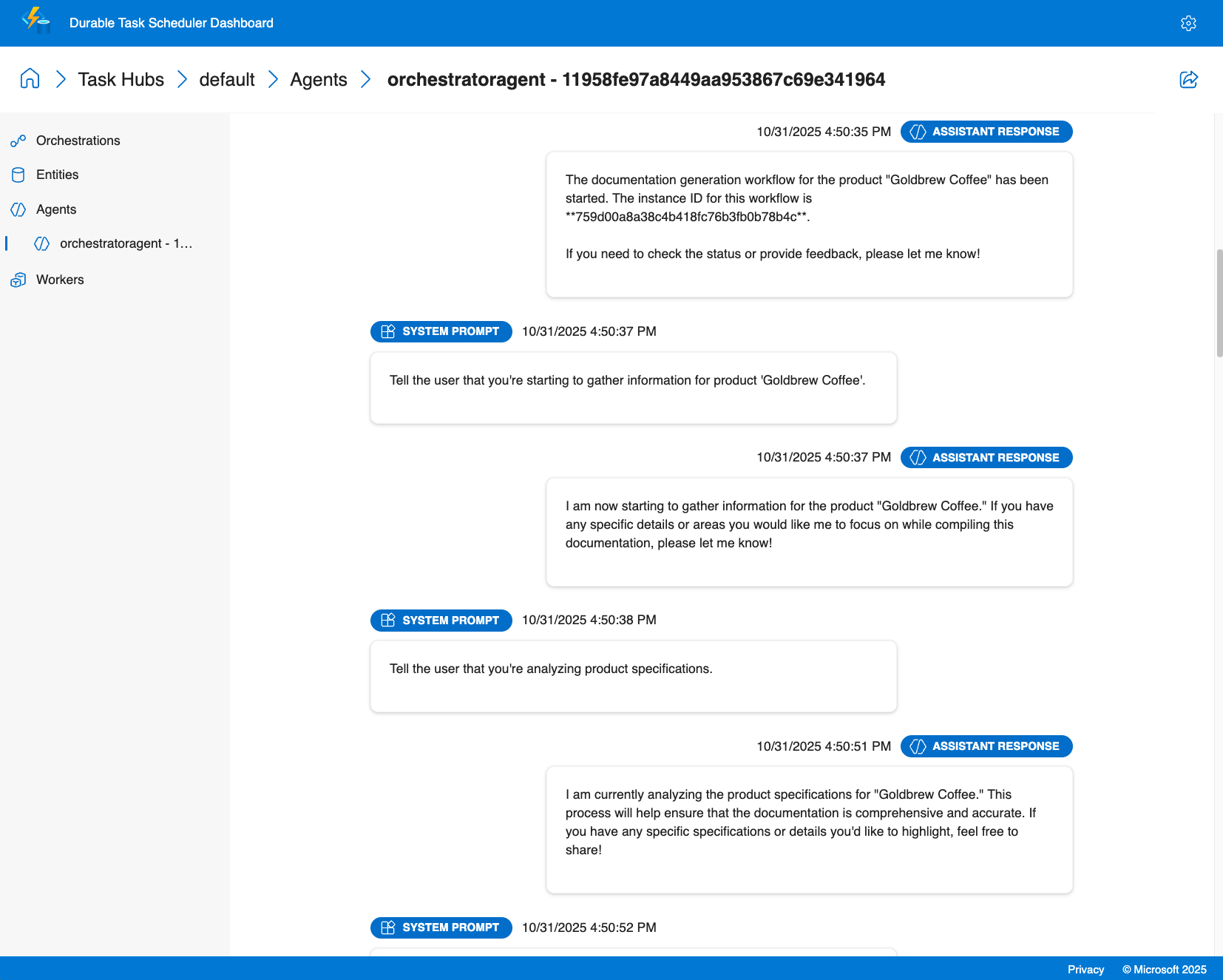
代理會話洞察
- 對話紀錄:查看每個客服會話的完整聊天紀錄,包括所有訊息、工具呼叫及任何時間點的對話上下文
- 任務時間: 監控特定任務和客服人員互動需要多長時間才能完成
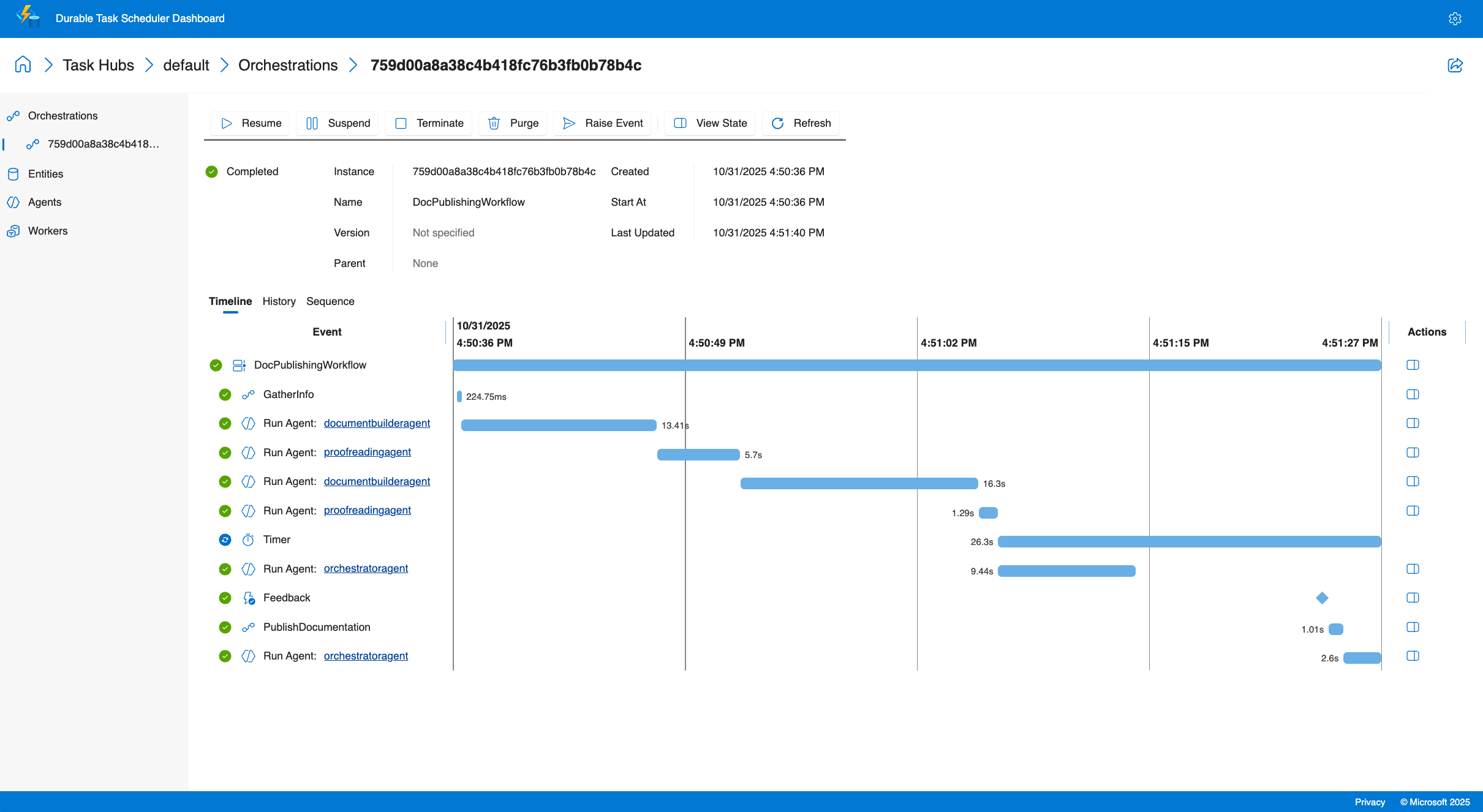
配器洞察
- 多代理程式視覺化:在呼叫多個專用代理程式時查看執行流程,並具有平行執行和條件分支的視覺化表示
- 執行歷史:訪問詳細的執行日誌
- 即時監控:追蹤整個部署中的作用中協調流程、佇列工作項目和代理程式狀態
- 效能指標:監控代理程式回應時間、權杖使用情況和協調流程持續時間
除錯能力
- 檢視結構化客服專員輸出和工具呼叫結果
- 追蹤工具呼叫及其結果
- 監視人機迴圈案例的外部事件處理
儀表板可讓您準確了解代理程式正在做什麼、快速診斷問題,並根據實際執行資料最佳化效能。
教學:用 Azure Functions 建立並執行 durable agent
這個教學會教你如何利用 Azure Functions 的 Durable Extension 主機模型來建立並執行一個持久的 AI 代理。 您將建置 Azure Functions 應用程式,以裝載具有內建 HTTP 端點的可設定狀態代理程式,並瞭解如何使用 Durable Task Scheduler 儀錶板來監視它。 關於自架代理,請參見 範例。
Prerequisites
開始之前,請確定您具備下列先決條件:
- .NET 9.0 SDK 或更新版本
- Azure Functions Core Tools v4.x
- Azure 開發人員命令列介面 (azd)
- 已安裝並驗證Azure CLI
- 已安裝並執行 Docker Desktop (用於使用 Azurite 和 Durable Task Scheduler 模擬器進行本機開發)
- 具有建立資源許可權的 Azure 訂用帳戶
Note
Microsoft Agent Framework 支援所有主動支援的 .NET 版本。 基於此範例的目的,建議使用 .NET 9 SDK 或更新版本。
- Python 3.10 或更新版本
- Azure Functions Core Tools v4.x
- Azure 開發人員命令列介面 (azd)
- 已安裝並驗證Azure CLI
- 已安裝並執行 Docker Desktop (用於使用 Azurite 和 Durable Task Scheduler 模擬器進行本機開發)
- 具有建立資源許可權的 Azure 訂用帳戶
下載快速入門專案
使用 Azure 開發人員 CLI 從持久代理程式快速入門範本初始化新專案。
為您的專案建立新的目錄,並流覽至它:
mkdir MyDurableAgent
cd MyDurableAgent
從範本初始化專案:
azd init --template durable-agents-quickstart-dotnet當系統提示輸入環境名稱時,請輸入名稱,例如
my-durable-agent。
這會下載包含所有必要檔案的快速入門專案,包括 Azure Functions 設定、代理程式程式碼和基礎結構即程式碼範本。
為您的專案建立新的目錄,並流覽至它:
mkdir MyDurableAgent
cd MyDurableAgent
從範本初始化專案:
azd init --template durable-agents-quickstart-python當系統提示輸入環境名稱時,請輸入名稱,例如
my-durable-agent。建立並啟用虛擬環境:
uv venv .venv
source .venv/bin/activate
Note
python3 -m venv .venv 也能用,但因為已知的 ensurepip 問題,可能會無限期卡在 Microsoft Store Python Windows。 用 uv venv .venv 來避免這種情況。
安裝所需的套件:
python -m pip install -r requirements.txt
這會下載包含所有必要檔案的快速入門專案,包括 Azure Functions 設定、代理程式程式碼和基礎結構即程式碼範本。 它也會準備具有必要相依性的虛擬環境。
佈建 Azure 資源
使用 Azure 開發人員 CLI 為您的持久代理程式建立必要的 Azure 資源。
佈建基礎結構:
azd provision此指令會建立:
- 具有 gpt-4o-mini 部署的 Azure OpenAI 服務平台
- 具有彈性取用裝載方案的 Azure Functions 應用程式
- Azure 儲存體帳戶用於 Azure Functions 執行階段和持久儲存的儲存體
- 用於管理代理程式狀態的持久工作排程器執行個體 (耗用量計劃)
- 必要的網路和身分識別組態
出現提示時,請選取您的 Azure 訂用帳戶,然後選擇資源的位置。
佈建程序需要幾分鐘的時間。 完成之後,azd 會將建立的資源資訊儲存在您的環境中。
檢閱代理程序代碼
現在讓我們檢查定義持久代理程式的程式碼。
開啟 Program.cs 以查看代理程式設定:
using Azure.AI.Projects;
using Azure.Identity;
using Microsoft.Agents.AI;
using Microsoft.Agents.AI.Hosting.AzureFunctions;
using Microsoft.Azure.Functions.Worker.Builder;
using Microsoft.Extensions.Hosting;

var endpoint = Environment.GetEnvironmentVariable("AZURE_OPENAI_ENDPOINT")
    ?? throw new InvalidOperationException("AZURE_OPENAI_ENDPOINT environment variable is not set");
var deploymentName = Environment.GetEnvironmentVariable("AZURE_OPENAI_DEPLOYMENT") ?? "gpt-4o-mini";

// Create an AI agent following the standard Microsoft Agent Framework pattern
AIAgent agent = new AIProjectClient(new Uri(endpoint), new DefaultAzureCredential())
    .AsAIAgent(
        model: deploymentName,
        instructions: "You are a helpful assistant that can answer questions and provide information.",
        name: "MyDurableAgent");

using IHost app = FunctionsApplication
    .CreateBuilder(args)
    .ConfigureFunctionsWebApplication()
    .ConfigureDurableAgents(options => options.AddAIAgent(agent))
    .Build();
app.Run();
此程式碼:
- 從環境變數擷取您的 Azure OpenAI 設定。
- 使用 Azure 認證建立 Azure OpenAI 用戶端。
- 創建一個帶有指令和名稱的 AI 代理。
- 設定 Azure Functions 應用程式,以裝載具有持久執行緒管理的代理程式。
開啟 function_app.py 以查看代理程式設定:
import os
from agent_framework.azure import AgentFunctionApp
from agent_framework.openai import OpenAIChatCompletionClient
from azure.identity import DefaultAzureCredential

endpoint = os.getenv("AZURE_OPENAI_ENDPOINT")
if not endpoint:
    raise ValueError("AZURE_OPENAI_ENDPOINT is not set.")
deployment_name = os.getenv("AZURE_OPENAI_CHAT_COMPLETION_MODEL", "gpt-4o-mini")
api_version = os.getenv("AZURE_OPENAI_API_VERSION")

# Create an AI agent following the standard Microsoft Agent Framework pattern
agent = OpenAIChatCompletionClient(
    azure_endpoint=endpoint,
    model=deployment_name,
    api_version=api_version,
    credential=DefaultAzureCredential()
).as_agent(
    instructions="You are a helpful assistant that can answer questions and provide information.",
    name="MyDurableAgent"
)

# Configure the function app to host the agent with durable thread management
app = AgentFunctionApp(agents=[agent])
此程式碼:
- 從環境變數擷取您的 Azure OpenAI 設定。
- 使用 Azure 認證建立 Azure OpenAI 用戶端。
- 創建一個帶有指令和名稱的 AI 代理。
- 設定 Azure Functions 應用程式,以裝載具有持久執行緒管理的代理程式。
代理程式現在已準備好裝載在 Azure Functions 中。 持久任務延伸會自動建立 HTTP 端點以與代理程式互動,並管理多個請求的交談狀態。
配置本機設定
local.settings.json根據專案中包含的範例檔案建立用於本機開發的檔案。
複製範例設定檔案:
cp local.settings.sample.json local.settings.json
從配置的資源中取得 Azure OpenAI 的端點:
azd env get-value AZURE_OPENAI_ENDPOINT開啟
local.settings.json,並在<your-resource-name>值中以上一個命令的端點取代AZURE_OPENAI_ENDPOINT。
您的 local.settings.json 應該看起來像這樣:
{
  "IsEncrypted": false,
  "Values": {
    // ... other settings ...
    "AZURE_OPENAI_ENDPOINT": "https://your-openai-resource.openai.azure.com",
    "AZURE_OPENAI_DEPLOYMENT": "gpt-4o-mini",
    "TASKHUB_NAME": "default"
  }
}
Note
此 local.settings.json 檔案僅用於本機開發,不會部署至 Azure。 針對生產部署,這些設定會由基礎結構範本自動在 Azure Functions 應用程式中設定。
啟動本機開發環境依賴
若要在本機執行持久代理程式,您必須啟動兩個服務:
- Azurite:仿擬 Azure 儲存體服務(用於 Azure Functions 來管理觸發事件和內部狀態)。
- 持久任務排程器 (DTS) 模擬器:管理持久狀態 (交談歷程記錄、協調流程狀態) 和代理程式的排程
啟動 Azurite
Azurite 會在本機模擬 Azure 儲存體服務。 Azure Functions 會使用它來管理內部狀態。 您必須在新的終端機視窗中執行此專案,並在開發和測試持久代理程式時保持執行。
開啟新的終端機視窗,並提取 Azurite Docker 映像:
docker pull mcr.microsoft.com/azure-storage/azurite在終端機視窗中啟動 Azurite:
docker run -p 10000:10000 -p 10001:10001 -p 10002:10002 mcr.microsoft.com/azure-storage/azuriteAzurite 將啟動並接聽 Blob (10000)、佇列 (10001) 和資料表 (10002) 服務的預設連接埠。
在開發和測試持久代理程式時,請讓此終端機視窗保持開啟。
Tip
如需 Azurite 的詳細資訊,包括替代安裝方法,請參閱 使用 Azurite 模擬器進行本機 Azure 儲存體開發。
啟動 Durable Task Scheduler 模擬器
DTS 模擬器提供持久的後端來管理代理程式狀態和協調流程。 它儲存對話歷史記錄並確保代理的狀態在重新啟動後持續存在。 它也會觸發持久協調流程和代理程式。 您必須在個別的新終端機視窗中執行此專案,並在開發和測試持久代理程式時保持執行。
開啟另一個新的終端機窗口,拉取DTS模擬器Docker映像:
docker pull mcr.microsoft.com/dts/dts-emulator:latest執行 DTS 模擬器:
docker run -p 8080:8080 -p 8082:8082 mcr.microsoft.com/dts/dts-emulator:latest此命令啟動模擬器並公開:
- 連接埠 8080:持久工作排程器的 gRPC 端點 (由 Functions 應用程式使用)
- 連接埠 8082:系統管理儀錶板
儀表板將在
http://localhost:8082上提供。
在開發和測試持久代理程式時,請讓此終端機視窗保持開啟。
Tip
若要深入瞭解 DTS 模擬器,包括如何設定多個工作中心和存取儀表板,請參閱使用 Durable Task Scheduler 進行開發。
執行函式應用程式
現在您已準備好使用持久代理程式執行 Azure Functions 應用程式。
在新的終端機視窗中(讓 Azurite 和 DTS 模擬器在不同的視窗中執行),導航到您的專案目錄。
啟動 Azure Functions 執行階段:
func start您應該會看到輸出,指出函式應用程式正在執行,包括代理程式的 HTTP 端點:
Functions:
     http-MyDurableAgent: [POST] http://localhost:7071/api/agents/MyDurableAgent/run
     dafx-MyDurableAgent: entityTrigger
這些端點會自動管理交談狀態 - 您不需要自行建立或管理執行緒物件。
在本地測試該代理
現在,您可以使用 HTTP 要求與持久代理程式互動。 代理程式會跨多個請求維護對話狀態,從而啟用多輪對話。
開始新的對話
建立新討論串並傳送您的第一則訊息:
curl -i -X POST http://localhost:7071/api/agents/MyDurableAgent/run \
  -H "Content-Type: text/plain" \
  -d "What are three popular programming languages?"
範例回應 (請注意, x-ms-thread-id 標頭包含執行緒識別碼):
HTTP/1.1 200 OK
Content-Type: text/plain
x-ms-thread-id: @dafx-mydurableagent@263fa373-fa01-4705-abf2-5a114c2bb87d
Content-Length: 189

Three popular programming languages are Python, JavaScript, and Java. Python is known for its simplicity and readability, JavaScript powers web interactivity, and Java is widely used in enterprise applications.
儲存標頭中的 x-ms-thread-id 執行緒 ID(例如, @dafx-mydurableagent@263fa373-fa01-4705-abf2-5a114c2bb87d) 以供下一個請求使用。
繼續對話
將執行緒識別碼包含為查詢參數,將後續訊息傳送至相同的執行緒:
curl -X POST "http://localhost:7071/api/agents/MyDurableAgent/run?thread_id=@dafx-mydurableagent@263fa373-fa01-4705-abf2-5a114c2bb87d" \
  -H "Content-Type: text/plain" \
  -d "Which one is best for beginners?"
將 @dafx-mydurableagent@263fa373-fa01-4705-abf2-5a114c2bb87d 替換為上一個回應中的 x-ms-thread-id 標頭內的實際執行緒 ID。
範例回應:
Python is often considered the best choice for beginners among those three. Its clean syntax reads almost like English, making it easier to learn programming concepts without getting overwhelmed by complex syntax. It's also versatile and widely used in education.
請注意,代理程式會記住前一則訊息 (三種程式設計語言) 中的環境定義,而不需要您再次指定它們。 由於交談狀態是由持久工作排程器持久儲存,因此即使您重新啟動函式應用程式或交談由不同的執行個體繼續,此歷程記錄仍會持續存在。
使用 Durable Task Scheduler 儀表板進行監視
Durable Task Scheduler 提供內建儀表板,用於監視和偵錯持久代理程式。 儀表板提供對代理操作、對話歷史和執行流程的深入可見性。
存取儀表板
在網頁瀏覽器中開啟本機 DTS 模擬器
http://localhost:8082的儀表板。從清單中選取 預設 工作中心,以檢視其詳細資料。
選取右上角的齒輪圖示以開啟設定,並確保已選取預覽功能下的啟用客服專員頁面選項。
探索客服專員對話
在儀表板中,導覽至 客服專員 索引標籤。
從清單中選擇您的穩定代理程式執行緒(例如,
mydurableagent - 263fa373-fa01-4705-abf2-5a114c2bb87d)。您將看到客服專員線程的詳細視圖,包括包含所有訊息和回應的完整對話歷史記錄。
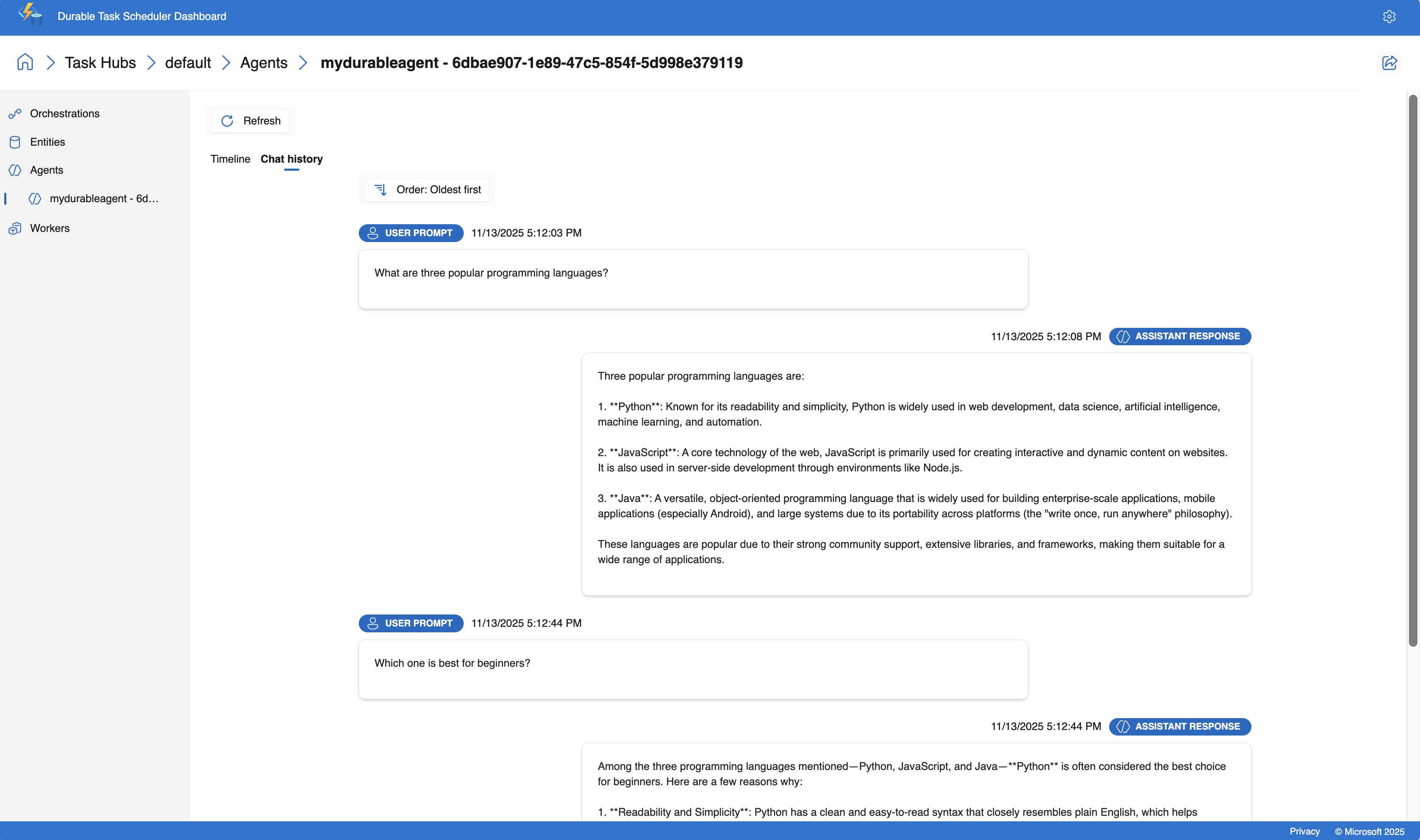
儀表板提供時間軸檢視,以協助您瞭解交談的流程。 關鍵資訊包括:
- 每次互動的時間戳和持續時間
- 提示和回應內容
- 使用的標記數目
Tip
DTS 儀表板提供即時更新,因此您可以在透過 HTTP 端點與代理程式互動時觀察代理程式的行為。
部署至 Azure
現在您已在本機測試持久代理程式,請將其部署至 Azure。
部署應用程式:
azd deploy此命令會封裝您的應用程式,並將它部署至佈建期間建立的 Azure Functions 應用程式。
等候部署完成。 輸出會確認您的代理程式何時在 Azure 中執行。
測試已部署的代理程式
部署之後,請測試在 Azure 中執行的代理程式。
取得功能鍵
Azure Functions 需要生產環境中 HTTP 觸發函式的 API 金鑰:
API_KEY=`az functionapp function keys list --name $(azd env get-value AZURE_FUNCTION_NAME) --resource-group $(azd env get-value AZURE_RESOURCE_GROUP) --function-name http-MyDurableAgent --query default -o tsv`
在 Azure 開啟新對話
建立新執行緒,並將第一則訊息傳送至已部署的代理程式:
curl -i -X POST "https://$(azd env get-value AZURE_FUNCTION_NAME).azurewebsites.net/api/agents/MyDurableAgent/run?code=$API_KEY" \
  -H "Content-Type: text/plain" \
  -d "What are three popular programming languages?"
請注意回應標頭中 x-ms-thread-id 傳回的執行緒識別碼。
在 Azure 繼續對話
在同一個線程中發送後續消息。 取代 <thread-id> 為上一個回應中的執行緒識別碼:
THREAD_ID="<thread-id>"
curl -X POST "https://$(azd env get-value AZURE_FUNCTION_NAME).azurewebsites.net/api/agents/MyDurableAgent/run?code=$API_KEY&thread_id=$THREAD_ID" \
  -H "Content-Type: text/plain" \
  -d "Which is easiest to learn?"
代理程式會在 Azure 中維護交談內容,就像在本機一樣,這展現了代理程式狀態的持久性。
監視已部署的代理程式
您可以使用 Azure 中的 Durable Task Scheduler 儀錶板來監視已部署的代理程式。
獲取 Durable Task Scheduler 執行個體的名稱:
azd env get-value DTS_NAME開啟 Azure 入口網站 ,然後搜尋上一個步驟中的 Durable Task Scheduler 名稱。
在 Durable Task Scheduler 資源的概觀頁面中,從清單中選取 預設 工作中樞。
選取工作中樞頁面頂端的 [ 開啟儀表板 ] 以開啟監視儀表板。
檢視代理的對話,就像使用本地模擬器時一樣。
Azure 裝載的儀錶板提供與本機模擬器相同的偵錯和監視功能,可讓您檢查交談歷程記錄、追蹤工具呼叫,以及分析生產環境中的效能。
Tutorial: Orchestrate durable agents with Azure Functions
本教學將示範如何利用 Azure Functions 的主機模型及扇出/扇入模式,協調多個耐用的 AI 代理。 你會將 前一教學 的持久代理擴展到建立一個多代理系統,處理使用者的問題,然後同時將回應翻譯成多種語言。 關於自架編排範例,請參見 取樣。
瞭解協調流程模式
您將建置的協調流程遵循下列流程:
- 使用者輸入 - 來自使用者的問題或訊息
-
主代理程式 - 第一個教學課程中的
MyDurableAgent負責處理問題 - 扇出 — 主要代理程式的回應會同時傳送至兩個翻譯代理程式
- 翻譯代理 - 兩名專業代理翻譯回應 (法文和西班牙文)
- Fan-in - 結果會被集結成一個 JSON 回應,其中包含原始回應以及其翻譯內容。
此模式可實現並發處理,與順序轉換相比,減少總響應時間。
在系統啟動時註冊代理人
若要在持久協調流程中正確使用代理程式,請在應用程式啟動時註冊它們。 它們可以在各個編排執行中使用。
更新您的 Program.cs,以便將翻譯代理程式與現有的 MyDurableAgent 一起註冊。
using System;
using Azure.AI.Projects;
using Azure.Identity;
using Microsoft.Agents.AI;
using Microsoft.Agents.AI.Hosting.AzureFunctions;
using Microsoft.Azure.Functions.Worker.Builder;
using Microsoft.Extensions.Hosting;

// Get the Azure OpenAI configuration
string endpoint = Environment.GetEnvironmentVariable("AZURE_OPENAI_ENDPOINT")
    ?? throw new InvalidOperationException("AZURE_OPENAI_ENDPOINT is not set.");
string deploymentName = Environment.GetEnvironmentVariable("AZURE_OPENAI_DEPLOYMENT")
    ?? "gpt-4o-mini";

// Create the Microsoft Foundry client
AIProjectClient client = new(new Uri(endpoint), new DefaultAzureCredential());

// Create the main agent from the first tutorial
AIAgent mainAgent = client.AsAIAgent(
    model: deploymentName,
    instructions: "You are a helpful assistant that can answer questions and provide information.",
    name: "MyDurableAgent");

// Create translation agents
AIAgent frenchAgent = client.AsAIAgent(
    model: deploymentName,
    instructions: "You are a translator. Translate the following text to French. Return only the translation, no explanations.",
    name: "FrenchTranslator");

AIAgent spanishAgent = client.AsAIAgent(
    model: deploymentName,
    instructions: "You are a translator. Translate the following text to Spanish. Return only the translation, no explanations.",
    name: "SpanishTranslator");

// Build and configure the Functions host
using IHost app = FunctionsApplication
    .CreateBuilder(args)
    .ConfigureFunctionsWebApplication()
    .ConfigureDurableAgents(options =>
    {
        // Register all agents for use in orchestrations and HTTP endpoints
        options.AddAIAgent(mainAgent);
        options.AddAIAgent(frenchAgent);
        options.AddAIAgent(spanishAgent);
    })
    .Build();

app.Run();
更新您的 function_app.py,以便將翻譯代理程式與現有的 MyDurableAgent 一起註冊。
import os
from azure.identity import DefaultAzureCredential
from agent_framework.azure import AgentFunctionApp
from agent_framework.openai import OpenAIChatCompletionClient

# Get the Azure OpenAI configuration
endpoint = os.getenv("AZURE_OPENAI_ENDPOINT")
if not endpoint:
    raise ValueError("AZURE_OPENAI_ENDPOINT is not set.")
deployment_name = os.getenv("AZURE_OPENAI_CHAT_COMPLETION_MODEL", "gpt-4o-mini")
api_version = os.getenv("AZURE_OPENAI_API_VERSION")

# Create the Azure OpenAI client
chat_client = OpenAIChatCompletionClient(
    azure_endpoint=endpoint,
    model=deployment_name,
    api_version=api_version,
    credential=DefaultAzureCredential()
)

# Create the main agent from the first tutorial
main_agent = chat_client.as_agent(
    instructions="You are a helpful assistant that can answer questions and provide information.",
    name="MyDurableAgent"
)

# Create translation agents
french_agent = chat_client.as_agent(
    instructions="You are a translator. Translate the following text to French. Return only the translation, no explanations.",
    name="FrenchTranslator"
)

spanish_agent = chat_client.as_agent(
    instructions="You are a translator. Translate the following text to Spanish. Return only the translation, no explanations.",
    name="SpanishTranslator"
)

# Create the function app and register all agents
app = AgentFunctionApp(agents=[main_agent, french_agent, spanish_agent])
建立編排函式
協調流程功能會協調多個代理程式的工作流程。 它從持久性上下文中檢索已註冊的代理,並協調它們的執行,首先呼叫主代理,然後同時分發至翻譯代理。
建立專案目錄中名為的新 AgentOrchestration.cs 檔案:
using System.Collections.Generic;
using System.Threading.Tasks;
using Microsoft.Agents.AI;
using Microsoft.Agents.AI.DurableTask;
using Microsoft.Azure.Functions.Worker;
using Microsoft.DurableTask;

namespace MyDurableAgent;

public static class AgentOrchestration
{
    // Define a strongly-typed response structure for agent outputs
    public sealed record TextResponse(string Text);

    [Function("agent_orchestration_workflow")]
    public static async Task<Dictionary<string, string>> AgentOrchestrationWorkflow(
        [OrchestrationTrigger] TaskOrchestrationContext context)
    {
        var input = context.GetInput<string>() ?? throw new ArgumentNullException(nameof(context), "Input cannot be null");

        // Step 1: Get the main agent's response
        DurableAIAgent mainAgent = context.GetAgent("MyDurableAgent");
        AgentResponse<TextResponse> mainResponse = await mainAgent.RunAsync<TextResponse>(input);
        string agentResponse = mainResponse.Result.Text;

        // Step 2: Fan out - get the translation agents and run them concurrently
        DurableAIAgent frenchAgent = context.GetAgent("FrenchTranslator");
        DurableAIAgent spanishAgent = context.GetAgent("SpanishTranslator");

        Task<AgentResponse<TextResponse>> frenchTask = frenchAgent.RunAsync<TextResponse>(agentResponse);
        Task<AgentResponse<TextResponse>> spanishTask = spanishAgent.RunAsync<TextResponse>(agentResponse);

        // Step 3: Wait for both translation tasks to complete (fan-in)
        await Task.WhenAll(frenchTask, spanishTask);

        // Get the translation results
        TextResponse frenchResponse = (await frenchTask).Result;
        TextResponse spanishResponse = (await spanishTask).Result;

        // Step 4: Combine results into a dictionary
        var result = new Dictionary<string, string>
        {
            ["original"] = agentResponse,
            ["french"] = frenchResponse.Text,
            ["spanish"] = spanishResponse.Text
        };

        return result;
    }
}
將編排功能新增至您的 function_app.py 檔案:
import azure.durable_functions as df

@app.orchestration_trigger(context_name="context")
def agent_orchestration_workflow(context: df.DurableOrchestrationContext):
    """
    Orchestration function that coordinates multiple agents.
    Returns a dictionary with the original response and translations.
    """
    input_text = context.get_input()

    # Step 1: Get the main agent's response
    main_agent = app.get_agent(context, "MyDurableAgent")
    main_response = yield main_agent.run(input_text)
    agent_response = main_response.text

    # Step 2: Fan out - get the translation agents and run them concurrently
    french_agent = app.get_agent(context, "FrenchTranslator")
    spanish_agent = app.get_agent(context, "SpanishTranslator")

    parallel_tasks = [
        french_agent.run(agent_response),
        spanish_agent.run(agent_response)
    ]

    # Step 3: Wait for both translation tasks to complete (fan-in)
    translations = yield context.task_all(parallel_tasks) # type: ignore

    # Step 4: Combine results into a dictionary
    result = {
        "original": agent_response,
        "french": translations[0].text,
        "spanish": translations[1].text
    }

    return result
Note
Go 對此功能的支援即將推出。 最新狀態請參閱 Agent Framework Go 倉庫 。
測試編排
請確定第一個教程中的本機開發依賴項仍在執行中:
- 藍銅礦 在一個終端視窗中
- 另一個終端機視窗中的 Durable Task Scheduler 模擬器
在您的本機開發相依項目已運行的情況下:
在新的終端機視窗中啟動 Azure Functions 應用程式:
func startDurable Functions 延伸模組會自動建立內建 HTTP 端點來管理協調流程。 使用內建 API 啟動協調流程:
curl -X POST http://localhost:7071/runtime/webhooks/durabletask/orchestrators/agent_orchestration_workflow \
  -H "Content-Type: application/json" \
  -d '"\"What are three popular programming languages?\""'
回應包含用於管理編排實例的 URL:
{
  "id": "abc123def456",
  "statusQueryGetUri": "http://localhost:7071/runtime/webhooks/durabletask/instances/abc123def456",
  "sendEventPostUri": "http://localhost:7071/runtime/webhooks/durabletask/instances/abc123def456/raiseEvent/{eventName}",
  "terminatePostUri": "http://localhost:7071/runtime/webhooks/durabletask/instances/abc123def456/terminate",
  "purgeHistoryDeleteUri": "http://localhost:7071/runtime/webhooks/durabletask/instances/abc123def456"
}
使用
statusQueryGetUri查詢協調流程狀態(將abc123def456替換為您的實際執行個體識別碼):curl http://localhost:7071/runtime/webhooks/durabletask/instances/abc123def456
監測狀態端點,直到
runtimeStatus到達Completed。 完成後,您會看到編排輸出,其中包含主代理的回應及其翻譯:{ "name": "agent_orchestration_workflow", "instanceId": "abc123def456", "runtimeStatus": "Completed", "output": { "original": "Three popular programming languages are Python, JavaScript, and Java. Python is known for its simplicity...", "french": "Trois langages de programmation populaires sont Python, JavaScript et Java. Python est connu pour sa simplicité...", "spanish": "Tres lenguajes de programación populares son Python, JavaScript y Java. Python es conocido por su simplicidad..." } }
監視儀表板中的協調流程
Durable Task Scheduler 儀表板可讓您查看協調流程:
在瀏覽器中開啟
http://localhost:8082。選取「預設」工作中樞。
選取「編排」標籤。
在清單中尋找您的協調流程執行個體。
選取個體以查看:
- 協調流程時間表
- 主要代理程式執行,然後是並行翻譯代理程式
- 每個代理程式執行(MyDurableAgent,接著是法文和西班牙文翻譯器)
- 扇出與扇入模式的視覺化呈現
- 每個步驟的時間和持續時間
將 orchestration 部署到 Azure
使用 Azure 開發人員 CLI 部署更新的應用程式:
azd deploy
這會使用新的協調流程函式和其他代理程式,將更新的程式碼部署至第一個教學課程中建立的 Azure Functions 應用程式。
測試已部署的協調流程
部署之後,請測試在 Azure 中執行的協調流程。
取得持久延伸的系統金鑰:
SYSTEM_KEY=$(az functionapp keys list --name $(azd env get-value AZURE_FUNCTION_NAME) --resource-group $(azd env get-value AZURE_RESOURCE_GROUP) --query "systemKeys.durabletask_extension" -o tsv)
使用內建 API 啟動協調流程:
curl -X POST "https://$(azd env get-value AZURE_FUNCTION_NAME).azurewebsites.net/runtime/webhooks/durabletask/orchestrators/agent_orchestration_workflow?code=$SYSTEM_KEY" \
  -H "Content-Type: application/json" \
  -d '"\"What are three popular programming languages?\""'
- 使用回應中的
statusQueryGetUri進行輪詢以檢查完成狀態,並檢視翻譯結果。
下一步
其他資源: