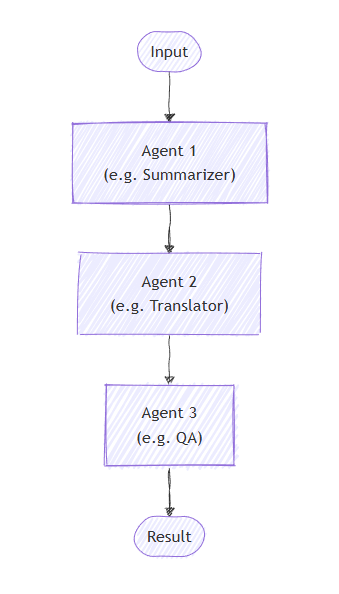
在循序協調流程中,代理程式會組織在管線中。 每個代理程式依序處理任務,將其輸出傳遞給序列中的下一個代理程式。 這非常適合每個步驟都建立在前一個步驟之上的工作流程,例如文件審查、資料處理管道或多階段推理。
您將學到的內容
- 如何建立代理的循序管線
- 如何鏈結代理程式,每個代理程式都建立在先前的輸出之上
- 如何將代理程式與自訂執行器混合用於特殊任務
- 如何追蹤整個流程中的對話進程
定義您的客服專員
在循序編排中,代理程式會組織在管道中,每個代理程式依序處理任務,並將輸出傳遞給序列中的下一個代理程式。
設定 Azure OpenAI 用戶端
using System;
using System.Collections.Generic;
using System.Linq;
using System.Threading.Tasks;
using Azure.AI.OpenAI;
using Azure.Identity;
using Microsoft.Agents.Workflows;
using Microsoft.Extensions.AI;
using Microsoft.Agents.AI;

// 1) Set up the Azure OpenAI client
var endpoint = Environment.GetEnvironmentVariable("AZURE_OPENAI_ENDPOINT") ??
    throw new InvalidOperationException("AZURE_OPENAI_ENDPOINT is not set.");
var deploymentName = Environment.GetEnvironmentVariable("AZURE_OPENAI_DEPLOYMENT_NAME") ?? "gpt-4o-mini";
var client = new AzureOpenAIClient(new Uri(endpoint), new AzureCliCredential())
    .GetChatClient(deploymentName)
    .AsIChatClient();
建立將依序運作的專用代理程式:
// 2) Helper method to create translation agents
static ChatClientAgent GetTranslationAgent(string targetLanguage, IChatClient chatClient) =>
    new(chatClient,
        $"You are a translation assistant who only responds in {targetLanguage}. Respond to any " +
        $"input by outputting the name of the input language and then translating the input to {targetLanguage}.");

// Create translation agents for sequential processing
var translationAgents = (from lang in (string[])["French", "Spanish", "English"]
                         select GetTranslationAgent(lang, client));
設定循序協調流程
使用下列方式 AgentWorkflowBuilder建置工作流程:
// 3) Build sequential workflow
var workflow = AgentWorkflowBuilder.BuildSequential(translationAgents);
執行循序工作流程
執行工作流程並處理事件:
// 4) Run the workflow
var messages = new List<ChatMessage> { new(ChatRole.User, "Hello, world!") };

StreamingRun run = await InProcessExecution.StreamAsync(workflow, messages);
await run.TrySendMessageAsync(new TurnToken(emitEvents: true));

List<ChatMessage> result = new();
await foreach (WorkflowEvent evt in run.WatchStreamAsync().ConfigureAwait(false))
{
    if (evt is AgentRunUpdateEvent e)
    {
        Console.WriteLine($"{e.ExecutorId}: {e.Data}");
    }
    else if (evt is WorkflowOutputEvent outputEvt)
    {
        result = (List<ChatMessage>)outputEvt.Data!;
        break;
    }
}

// Display final result
foreach (var message in result)
{
    Console.WriteLine($"{message.Role}: {message.Content}");
}
範例輸出
French_Translation: User: Hello, world!
French_Translation: Assistant: English detected. Bonjour, le monde !
Spanish_Translation: Assistant: French detected. ¡Hola, mundo!
English_Translation: Assistant: Spanish detected. Hello, world!
重要概念
- 順序處理:每個代理依序處理前一個代理的輸出
- AgentWorkflowBuilder.BuildSequential():從代理程式集合建立管線工作流程
- ChatClientAgent:代表由聊天客戶端支援的代理,並提供特定說明
- StreamingRun: 提供實時執行和事件流功能
-
事件處理:透過
AgentRunUpdateEvent監控代理的進度,透過WorkflowOutputEvent監控完成情況
在循序協調流程中,每個代理程式依序處理任務,輸出從一個代理程式流向下一個代理程式。 讓我們從定義兩階段流程的代理程式開始:
from agent_framework.azure import AzureChatClient
from azure.identity import AzureCliCredential

# 1) Create agents using AzureChatClient
chat_client = AzureChatClient(credential=AzureCliCredential())

writer = chat_client.create_agent(
    instructions=(
        "You are a concise copywriter. Provide a single, punchy marketing sentence based on the prompt."
    ),
    name="writer",
)

reviewer = chat_client.create_agent(
    instructions=(
        "You are a thoughtful reviewer. Give brief feedback on the previous assistant message."
    ),
    name="reviewer",
)
設定循序協調流程
該 SequentialBuilder 類創建了一個管道,代理程式在其中按順序處理任務。 每個客服專員都會看到完整的對話歷史記錄並添加他們的回應:
from agent_framework import SequentialBuilder

# 2) Build sequential workflow: writer -> reviewer
workflow = SequentialBuilder().participants([writer, reviewer]).build()
執行循序工作流程
執行工作流程,並收集每個代理貢獻的最終對話記錄。
from agent_framework import ChatMessage, WorkflowOutputEvent

# 3) Run and print final conversation
output_evt: WorkflowOutputEvent | None = None
async for event in workflow.run_stream("Write a tagline for a budget-friendly eBike."):
    if isinstance(event, WorkflowOutputEvent):
        output_evt = event

if output_evt:
    print("===== Final Conversation =====")
    messages: list[ChatMessage] | Any = output_evt.data
    for i, msg in enumerate(messages, start=1):
        name = msg.author_name or ("assistant" if msg.role == Role.ASSISTANT else "user")
        print(f"{'-' * 60}\n{i:02d} [{name}]\n{msg.text}")
範例輸出
===== Final Conversation =====
------------------------------------------------------------
01 [user]
Write a tagline for a budget-friendly eBike.
------------------------------------------------------------
02 [writer]
Ride farther, spend less—your affordable eBike adventure starts here.
------------------------------------------------------------
03 [reviewer]
This tagline clearly communicates affordability and the benefit of extended travel, making it
appealing to budget-conscious consumers. It has a friendly and motivating tone, though it could
be slightly shorter for more punch. Overall, a strong and effective suggestion!
進階:將代理程式與自訂執行器混合
循序協調流程支援將代理程式與自訂執行程式混合,以進行專門處理。 當您需要不需要 LLM 的自訂邏輯時,這很有用:
定義自訂執行程式
from agent_framework import Executor, WorkflowContext, handler
from agent_framework import ChatMessage, Role

class Summarizer(Executor):
    """Simple summarizer: consumes full conversation and appends an assistant summary."""

    @handler
    async def summarize(
        self,
        conversation: list[ChatMessage],
        ctx: WorkflowContext[list[ChatMessage]]
    ) -> None:
        users = sum(1 for m in conversation if m.role == Role.USER)
        assistants = sum(1 for m in conversation if m.role == Role.ASSISTANT)
        summary = ChatMessage(
            role=Role.ASSISTANT,
            text=f"Summary -> users:{users} assistants:{assistants}"
        )
        await ctx.send_message(list(conversation) + [summary])
建立混合循序工作流程
# Create a content agent
content = chat_client.create_agent(
    instructions="Produce a concise paragraph answering the user's request.",
    name="content",
)

# Build sequential workflow: content -> summarizer
summarizer = Summarizer(id="summarizer")
workflow = SequentialBuilder().participants([content, summarizer]).build()
使用自訂執行程式的範例輸出
------------------------------------------------------------
01 [user]
Explain the benefits of budget eBikes for commuters.
------------------------------------------------------------
02 [content]
Budget eBikes offer commuters an affordable, eco-friendly alternative to cars and public transport.
Their electric assistance reduces physical strain and allows riders to cover longer distances quickly,
minimizing travel time and fatigue. Budget models are low-cost to maintain and operate, making them accessible
for a wider range of people. Additionally, eBikes help reduce traffic congestion and carbon emissions,
supporting greener urban environments. Overall, budget eBikes provide cost-effective, efficient, and
sustainable transportation for daily commuting needs.
------------------------------------------------------------
03 [assistant]
Summary -> users:1 assistants:1
重要概念
- 共享上下文:每個參與者都會收到完整的對話歷史記錄,包括所有先前的訊息
-
訂單事項:代理嚴格按照清單中
participants()指定的順序執行 - 靈活的參與者:您可以按任何順序混合代理和自訂執行者
- 對話流程:每個代理人/執行器都會附加到對話中,構建完整的對話。