Note
這不是這篇文章的最新版本。 關於目前版本,請參閱 本文的 .NET 10 版本。
Warning
不再支援此版本的 ASP.NET Core。 如需詳細資訊,請參閱 .NET 和 .NET Core 支持原則。 如需目前的版本,請參閱 本文的 .NET 9 版本。
本文說明如何從 JavaScript (JS) 叫用 .NET 方法。
如需有關如何從 .NET 呼叫 JS 方法的資訊,請參閱在 ASP.NET Core Blazor 中從 .NET 方法呼叫 JavaScript 函式。
叫用靜態 .NET 方法
若要從 JavaScript (JS) 叫用靜態 .NET 方法,請使用 JS 函式:
-
DotNet.invokeMethodAsync(建議):針對伺服器端和用戶端元件兩者都非同步。 -
DotNet.invokeMethod:僅針對用戶端元件同步。
傳入包含方法的組件名稱、靜態 .NET 方法的識別碼,以及任何引數。
在以下範例中:
-
{PACKAGE ID/ASSEMBLY NAME}佔位符是專案套件識別碼,適用於應用程式的程式庫或元件名稱(<PackageId>在專案檔案中)。 -
{.NET METHOD ID}預留位置是 .NET 方法識別碼。 -
{ARGUMENTS}預留位置是要傳遞至方法的選擇性、以逗號分隔的引數,每個引數都必須為 JSON 可序列化。
DotNet.invokeMethodAsync('{PACKAGE ID/ASSEMBLY NAME}', '{.NET METHOD ID}', {ARGUMENTS});
DotNet.invokeMethodAsync 會傳回 JS Promise,表示作業的結果。
DotNet.invokeMethod (用戶端元件) 會傳回作業的結果。
Important
針對伺服器端元件,我們建議在同步版本 (invokeMethodAsync) 上使用非同步函式 (invokeMethod)。
.NET 方法必須是公用、靜態,且具有[JSInvokable] 屬性。
在以下範例中:
-
{<T>}預留位置表示傳回型別,只有傳回值的方法才需要這個項目。 -
{.NET METHOD ID}預留位置是方法識別碼。
@code {
    [JSInvokable]
    public static Task{<T>} {.NET METHOD ID}()
    {
        ...
    }
}
Note
靜態 .NET 方法不支援呼叫開放式泛型方法,但是執行個體方法支援。 如需詳細資訊,請參閱呼叫 .NET 泛型類別方法一節。
在下列元件中,ReturnArrayAsync C# 方法會傳回 int 陣列。
[JSInvokable] 屬性會套用至方法,讓方法成為 JS 可叫用 的方法。
CallDotnet1.razor:
@page "/call-dotnet-1"
@implements IAsyncDisposable
@inject IJSRuntime JS

<PageTitle>Call .NET 1</PageTitle>

<h1>Call .NET Example 1</h1>

<p>
    <button id="btn">Trigger .NET static method</button>
</p>

<p>
    See the result in the developer tools console.
</p>

@code {
    private IJSObjectReference? module;

    protected override async Task OnAfterRenderAsync(bool firstRender)
    {
        if (firstRender)
        {
            module = await JS.InvokeAsync<IJSObjectReference>("import",
                "./Components/Pages/CallDotnet1.razor.js");

            await module.InvokeVoidAsync("addHandlers");
        }
    }

    [JSInvokable]
    public static Task<int[]> ReturnArrayAsync() =>
        Task.FromResult(new int[] { 11, 12, 13 });

    async ValueTask IAsyncDisposable.DisposeAsync()
    {
        if (module is not null)
        {
            try
            {
                await module.DisposeAsync();
            }
            catch (JSDisconnectedException)
            {
            }
        }
    }
}
CallDotnet1.razor.js:
export function returnArrayAsync() {
  DotNet.invokeMethodAsync('BlazorSample', 'ReturnArrayAsync')
    .then(data => {
      console.log(data);
    });
}

export function addHandlers() {
  const btn = document.getElementById("btn");
  btn.addEventListener("click", returnArrayAsync);
}
addHandlers
JS 函式會新增 click 事件至按鈕。
returnArrayAsync
JS 函式會指派為處理常式。
returnArrayAsync
JS 函數會呼叫元件的 ReturnArrayAsync .NET 方法,該方法會將結果記錄到瀏覽器的 web 開發人員工具主控台。
BlazorSample 是應用程式的組件名稱。
CallDotnet1.razor:
@page "/call-dotnet-1"
@implements IAsyncDisposable
@inject IJSRuntime JS

<PageTitle>Call .NET 1</PageTitle>

<h1>Call .NET Example 1</h1>

<p>
    <button id="btn">Trigger .NET static method</button>
</p>

<p>
    See the result in the developer tools console.
</p>

@code {
    private IJSObjectReference? module;

    protected override async Task OnAfterRenderAsync(bool firstRender)
    {
        if (firstRender)
        {
            module = await JS.InvokeAsync<IJSObjectReference>("import",
                "./Components/Pages/CallDotnet1.razor.js");

            await module.InvokeVoidAsync("addHandlers");
        }
    }

    [JSInvokable]
    public static Task<int[]> ReturnArrayAsync() =>
        Task.FromResult(new int[] { 11, 12, 13 });

    async ValueTask IAsyncDisposable.DisposeAsync()
    {
        if (module is not null)
        {
            try
            {
                await module.DisposeAsync();
            }
            catch (JSDisconnectedException)
            {
            }
        }
    }
}
CallDotnet1.razor.js:
export function returnArrayAsync() {
  DotNet.invokeMethodAsync('BlazorSample', 'ReturnArrayAsync')
    .then(data => {
      console.log(data);
    });
}

export function addHandlers() {
  const btn = document.getElementById("btn");
  btn.addEventListener("click", returnArrayAsync);
}
addHandlers
JS 函式會新增 click 事件至按鈕。
returnArrayAsync
JS 函式會指派為處理常式。
returnArrayAsync
JS 函數會呼叫元件的 ReturnArrayAsync .NET 方法,該方法會將結果記錄到瀏覽器的 web 開發人員工具主控台。
BlazorSample 是應用程式的組件名稱。
CallDotNetExample1.razor:
@page "/call-dotnet-example-1"

<h1>Call .NET Example 1</h1>

<p>
    <button onclick="returnArrayAsync()">
        Trigger .NET static method
    </button>
</p>

@code {
    [JSInvokable]
    public static Task<int[]> ReturnArrayAsync()
    {
        return Task.FromResult(new int[] { 1, 2, 3 });
    }
}
CallDotNetExample1.razor:
@page "/call-dotnet-example-1"

<h1>Call .NET Example 1</h1>

<p>
    <button onclick="returnArrayAsync()">
        Trigger .NET static method
    </button>
</p>

@code {
    [JSInvokable]
    public static Task<int[]> ReturnArrayAsync()
    {
        return Task.FromResult(new int[] { 1, 2, 3 });
    }
}
CallDotNetExample1.razor:
@page "/call-dotnet-example-1"

<h1>Call .NET Example 1</h1>

<p>
    <button onclick="returnArrayAsync()">
        Trigger .NET static method
    </button>
</p>

@code {
    [JSInvokable]
    public static Task<int[]> ReturnArrayAsync()
    {
        return Task.FromResult(new int[] { 1, 2, 3 });
    }
}
CallDotNetExample1.razor:
@page "/call-dotnet-example-1"

<h1>Call .NET Example 1</h1>

<p>
    <button onclick="returnArrayAsync()">
        Trigger .NET static method
    </button>
</p>

@code {
    [JSInvokable]
    public static Task<int[]> ReturnArrayAsync()
    {
        return Task.FromResult(new int[] { 1, 2, 3 });
    }
}
<button> 元素的 onclick HTML 屬性是 JavaScript 的 onclick 事件處理常式指派,用於處理 click 事件,而不是 Blazor 的 @onclick 指示詞屬性。
returnArrayAsync
JS 函式會指派為處理常式。
下列 returnArrayAsyncJS 函式會呼叫元件的 ReturnArrayAsync .NET 方法,該方法會將結果記錄到瀏覽器的 web 開發人員工具主控台。
BlazorSample 是應用程式的組件名稱。
<script>
  window.returnArrayAsync = () => {
    DotNet.invokeMethodAsync('BlazorSample', 'ReturnArrayAsync')
      .then(data => {
        console.log(data);
      });
    };
</script>
Note
如需 JS 位置的一般指導和我們對於生產應用程式的建議,請參閱 ASP.NET Core Blazor 應用程式中的 JavaScript 位置
選取 Trigger .NET static method 按鈕時,瀏覽器的開發人員工具主控台輸出會顯示陣列資料。 輸出的格式在瀏覽器之間稍有不同。 下列輸出顯示 Microsoft Edge 所使用的格式:
Array(3) [ 11, 12, 13 ]
在呼叫 invokeMethodAsync 函式時,藉由以引數形式傳遞資料,將資料傳遞至 .NET 方法。
若要示範傳遞資料至 .NET,請傳遞起始位置至 ReturnArrayAsync 方法,其中 JS 會叫用該方法:
export function returnArrayAsync() {
  DotNet.invokeMethodAsync('BlazorSample', 'ReturnArrayAsync', 14)
    .then(data => {
      console.log(data);
    });
}
<script>
  window.returnArrayAsync = () => {
    DotNet.invokeMethodAsync('BlazorSample', 'ReturnArrayAsync', 14)
      .then(data => {
        console.log(data);
      });
    };
</script>
元件的可叫用 ReturnArrayAsync 方法會接收起始位置,並從中建構陣列。 陣列會傳回以記錄至主控台:
[JSInvokable]
public static Task<int[]> ReturnArrayAsync(int startPosition) =>
    Task.FromResult(Enumerable.Range(startPosition, 3).ToArray());
重新編譯應用程式並重新整理瀏覽器之後,選取按鈕時,瀏覽器主控台中會出現下列輸出:
Array(3) [ 14, 15, 16 ]
JS 呼叫的 .NET 方法識別碼是 .NET 方法名稱,但是您可以使用 [JSInvokable] 屬性建構函式來指定不同的識別碼。 在下列範例中,DifferentMethodName 是 ReturnArrayAsync 方法的指派方法識別碼:
[JSInvokable("DifferentMethodName")]
在對 DotNet.invokeMethodAsync (伺服器端或用戶端元件) 或 DotNet.invokeMethod (僅限用戶端元件) 的呼叫中,呼叫 DifferentMethodName 以執行 ReturnArrayAsync .NET 方法:
DotNet.invokeMethodAsync('BlazorSample', 'DifferentMethodName');-
DotNet.invokeMethod('BlazorSample', 'DifferentMethodName');(僅限用戶端元件)
Note
本節中的 ReturnArrayAsync 方法範例會傳回 Task 的結果,而不使用明確的 C# async 和 await 關鍵字。 使用 async 和 await 對方法進行編碼,通常是使用 await 關鍵字傳回非同步作業值的方法。
由 ReturnArrayAsync 和 async 關鍵字組成的 await 方法:
[JSInvokable]
public static async Task<int[]> ReturnArrayAsync() =>
    await Task.FromResult(new int[] { 11, 12, 13 });
如需詳細資訊,請參閱 C# 指南中的使用 async 和 await 進行非同步程式設計。
建立 JavaScript 物件和資料參考以傳遞至 .NET
呼叫 DotNet.createJSObjectReference(jsObject) 以建構 JS 物件參考,使其可以傳遞至 .NET,其中 jsObject 是用來建立 JS Object 物件參考的 JS。 下列範例會將不可序列化 window 物件的參考傳遞至 .NET,該物件會在 ReceiveWindowObject C# 方法中以 IJSObjectReference 的形式接收:
DotNet.invokeMethodAsync('{PACKAGE ID/ASSEMBLY NAME}', 'ReceiveWindowObject',
  DotNet.createJSObjectReference(window));
[JSInvokable]
public static void ReceiveWindowObject(IJSObjectReference objRef)
{
    ...
}
在上述範例中,{PACKAGE ID/ASSEMBLY NAME} 是項目檔案中(<PackageId>)用於程式庫或組件名稱的專案套件識別碼。
Note
上述範例不需要處置 JSObjectReference,因為 window 物件參考不會保留在 JS 中。
維護 JSObjectReference 的參考需要加以處置,以避免用戶端上的 JS 記憶體流失。 下列範例會重構上述程式碼,以擷取 JSObjectReference 的參考,然後呼叫 DotNet.disposeJSObjectReference() 以處置參考:
var jsObjectReference = DotNet.createJSObjectReference(window);

DotNet.invokeMethodAsync('{PACKAGE ID/ASSEMBLY NAME}', 'ReceiveWindowObject', jsObjectReference);

DotNet.disposeJSObjectReference(jsObjectReference);
在上述範例中,{PACKAGE ID/ASSEMBLY NAME} 是項目檔案中(<PackageId>)用於程式庫或組件名稱的專案套件識別碼。
呼叫 DotNet.createJSStreamReference(streamReference) 以建構 JS 資料流參考,使其可以傳遞至 .NET,其中 streamReference 是 ArrayBuffer、Blob 或任何型別陣列,例如 Uint8Array 或 Float32Array,用來建立 JS 資料流參考。
叫用執行個體 .NET 方法
若要從 JavaScript (JS) 叫用執行個體 .NET 方法:
藉由將執行個體包裝在 JS,並在其上呼叫 DotNetObjectReference,藉傳址將 .NET 執行個體傳遞至 Create。
使用 JS (
invokeMethodAsync) 或來自已傳遞 的invokeMethod(僅限用戶端元件),從 DotNetObjectReference 叫用 .NET執行個體方法。 傳遞執行個體 .NET 方法的識別碼和任何引數。 從 JS 叫用其他 .NET 方法時,也可以引數形式傳遞 .NET 執行個體。在以下範例中:
-
dotNetHelper是 DotNetObjectReference。 -
{.NET METHOD ID}預留位置是 .NET 方法識別碼。 -
{ARGUMENTS}預留位置是要傳遞至方法的選擇性、以逗號分隔的引數,每個引數都必須為 JSON 可序列化。
dotNetHelper.invokeMethodAsync('{.NET METHOD ID}', {ARGUMENTS});Note
invokeMethodAsync和invokeMethod在叫用執行個體方法時不接受組件名稱參數。invokeMethodAsync會傳回 JSPromise,表示作業的結果。invokeMethod(僅限用戶端元件) 會傳回作業的結果。Important
針對伺服器端元件,我們建議在同步版本 (
invokeMethodAsync) 上使用非同步函式 (invokeMethod)。-
本文的下列各節示範叫用執行個體 .NET 方法的各種方法:
避免修剪 JavaScript-invokable .NET 方法
本節適用於已啟用預先 (AOT) 編譯和執行階段重新連結的用戶端應用程式。
下列各節中的數個範例是以類別執行個體方法為基礎,其中以 [JSInvokable]屬性標示的 JavaScript 可叫用 .NET 方法是並非 Razor 元件的類別成員。 當這類 .NET 方法位於 Razor 元件中時,會受到保護,使其免於執行階段重新連結/修剪。 為了保護 .NET 方法免於在 Razor 元件外部的修剪,請使用類別建構函式上的 DynamicDependency屬性實作方法,如下列範例所示:
using System.Diagnostics.CodeAnalysis;
using Microsoft.JSInterop;

public class ExampleClass {

    [DynamicDependency(nameof(ExampleJSInvokableMethod))]
    public ExampleClass()
    {
    }

    [JSInvokable]
    public string ExampleJSInvokableMethod()
    {
        ...
    }
}
如需詳細資訊,請參閱準備 .NET 程式庫以進行修剪:DynamicDependency 。
將 DotNetObjectReference 傳遞至個別 JavaScript 函式
本節中的範例示範如何將 DotNetObjectReference 傳遞至個別 JavaScript (JS) 函式。
下列 sayHello1JS 函式會接收 DotNetObjectReference 並呼叫 invokeMethodAsync,以呼叫元件的 GetHelloMessage .NET 方法:
<script>
  window.sayHello1 = (dotNetHelper) => {
    return dotNetHelper.invokeMethodAsync('GetHelloMessage');
  };
</script>
Note
如需 JS 位置的一般指導和我們對於生產應用程式的建議,請參閱 ASP.NET Core Blazor 應用程式中的 JavaScript 位置
在上述範例中,變數名稱 dotNetHelper 是任意的,而且可以變更為任何慣用的名稱。
針對下列 元件:
- 元件具有名為 JS 的
GetHelloMessage可叫用 .NET 方法。 - 選取
Trigger .NET instance method按鈕時,會使用 JS 呼叫sayHello1函式 DotNetObjectReference。 -
sayHello1:- 呼叫
GetHelloMessage並接收訊息結果。 - 將訊息結果傳回呼叫
TriggerDotNetInstanceMethod方法。
- 呼叫
-
sayHello1中result的傳回訊息會向使用者顯示。 - 為了避免記憶體流失並允許記憶體回收,DotNetObjectReference 所建立的 .NET 物件參考會在
Dispose方法中處置。
CallDotnet2.razor:
@page "/call-dotnet-2"
@implements IDisposable
@inject IJSRuntime JS

<PageTitle>Call .NET 2</PageTitle>

<h1>Call .NET Example 2</h1>

<p>
    <label>
        Name: <input @bind="name" />
    </label>
</p>

<p>
    <button @onclick="TriggerDotNetInstanceMethod">
        Trigger .NET instance method
    </button>
</p>

<p>
    @result
</p>

@code {
    private string? name;
    private string? result;
    private DotNetObjectReference<CallDotnet2>? objRef;

    protected override void OnInitialized() =>
        objRef = DotNetObjectReference.Create(this);

    public async Task TriggerDotNetInstanceMethod() =>
        result = await JS.InvokeAsync<string>("sayHello1", objRef);

    [JSInvokable]
    public string GetHelloMessage() => $"Hello, {name}!";

    public void Dispose() => objRef?.Dispose();
}
CallDotnet2.razor:
@page "/call-dotnet-2"
@implements IDisposable
@inject IJSRuntime JS

<PageTitle>Call .NET 2</PageTitle>

<h1>Call .NET Example 2</h1>

<p>
    <label>
        Name: <input @bind="name" />
    </label>
</p>

<p>
    <button @onclick="TriggerDotNetInstanceMethod">
        Trigger .NET instance method
    </button>
</p>

<p>
    @result
</p>

@code {
    private string? name;
    private string? result;
    private DotNetObjectReference<CallDotnet2>? objRef;

    protected override void OnInitialized() =>
        objRef = DotNetObjectReference.Create(this);

    public async Task TriggerDotNetInstanceMethod() =>
        result = await JS.InvokeAsync<string>("sayHello1", objRef);

    [JSInvokable]
    public string GetHelloMessage() => $"Hello, {name}!";

    public void Dispose() => objRef?.Dispose();
}
CallDotNetExample2.razor:
@page "/call-dotnet-example-2"
@implements IDisposable
@inject IJSRuntime JS

<h1>Call .NET Example 2</h1>

<p>
    <label>
        Name: <input @bind="name" />
    </label>
</p>

<p>
    <button @onclick="TriggerDotNetInstanceMethod">
        Trigger .NET instance method
    </button>
</p>

<p>
    @result
</p>

@code {
    private string? name;
    private string? result;
    private DotNetObjectReference<CallDotNetExample2>? objRef;

    protected override void OnInitialized()
    {
        objRef = DotNetObjectReference.Create(this);
    }

    public async Task TriggerDotNetInstanceMethod()
    {
        result = await JS.InvokeAsync<string>("sayHello1", objRef);
    }

    [JSInvokable]
    public string GetHelloMessage() => $"Hello, {name}!";

    public void Dispose()
    {
        objRef?.Dispose();
    }
}
CallDotNetExample2.razor:
@page "/call-dotnet-example-2"
@implements IDisposable
@inject IJSRuntime JS

<h1>Call .NET Example 2</h1>

<p>
    <label>
        Name: <input @bind="name" />
    </label>
</p>

<p>
    <button @onclick="TriggerDotNetInstanceMethod">
        Trigger .NET instance method
    </button>
</p>

<p>
    @result
</p>

@code {
    private string? name;
    private string? result;
    private DotNetObjectReference<CallDotNetExample2>? objRef;

    protected override void OnInitialized()
    {
        objRef = DotNetObjectReference.Create(this);
    }

    public async Task TriggerDotNetInstanceMethod()
    {
        result = await JS.InvokeAsync<string>("sayHello1", objRef);
    }

    [JSInvokable]
    public string GetHelloMessage() => $"Hello, {name}!";

    public void Dispose()
    {
        objRef?.Dispose();
    }
}
CallDotNetExample2.razor:
@page "/call-dotnet-example-2"
@implements IDisposable
@inject IJSRuntime JS

<h1>Call .NET Example 2</h1>

<p>
    <label>
        Name: <input @bind="name" />
    </label>
</p>

<p>
    <button @onclick="TriggerDotNetInstanceMethod">
        Trigger .NET instance method
    </button>
</p>

<p>
    @result
</p>

@code {
    private string name;
    private string result;
    private DotNetObjectReference<CallDotNetExample2> objRef;

    protected override void OnInitialized()
    {
        objRef = DotNetObjectReference.Create(this);
    }

    public async Task TriggerDotNetInstanceMethod()
    {
        result = await JS.InvokeAsync<string>("sayHello1", objRef);
    }

    [JSInvokable]
    public string GetHelloMessage() => $"Hello, {name}!";

    public void Dispose()
    {
        objRef?.Dispose();
    }
}
CallDotNetExample2.razor:
@page "/call-dotnet-example-2"
@implements IDisposable
@inject IJSRuntime JS

<h1>Call .NET Example 2</h1>

<p>
    <label>
        Name: <input @bind="name" />
    </label>
</p>

<p>
    <button @onclick="TriggerDotNetInstanceMethod">
        Trigger .NET instance method
    </button>
</p>

<p>
    @result
</p>

@code {
    private string name;
    private string result;
    private DotNetObjectReference<CallDotNetExample2> objRef;

    protected override void OnInitialized()
    {
        objRef = DotNetObjectReference.Create(this);
    }

    public async Task TriggerDotNetInstanceMethod()
    {
        result = await JS.InvokeAsync<string>("sayHello1", objRef);
    }

    [JSInvokable]
    public string GetHelloMessage() => $"Hello, {name}!";

    public void Dispose()
    {
        objRef?.Dispose();
    }
}
在上述範例中,變數名稱 dotNetHelper 是任意的,而且可以變更為任何慣用的名稱。
使用下列指導將引數傳遞至執行個體方法:
將參數新增至 .NET 方法叫用。 在下列範例中,名稱會傳遞至方法。 視需要將其他參數新增至清單。
<script>
  window.sayHello2 = (dotNetHelper, name) => {
    return dotNetHelper.invokeMethodAsync('GetHelloMessage', name);
  };
</script>
在上述範例中,變數名稱 dotNetHelper 是任意的,而且可以變更為任何慣用的名稱。
將參數清單提供給 .NET 方法。
CallDotnet3.razor:
@page "/call-dotnet-3"
@implements IDisposable
@inject IJSRuntime JS

<PageTitle>Call .NET 3</PageTitle>

<h1>Call .NET Example 3</h1>

<p>
    <label>
        Name: <input @bind="name" />
    </label>
</p>

<p>
    <button @onclick="TriggerDotNetInstanceMethod">
        Trigger .NET instance method
    </button>
</p>

<p>
    @result
</p>

@code {
    private string? name;
    private string? result;
    private DotNetObjectReference<CallDotnet3>? objRef;

    protected override void OnInitialized() =>
        objRef = DotNetObjectReference.Create(this);

    public async Task TriggerDotNetInstanceMethod() =>
        result = await JS.InvokeAsync<string>("sayHello2", objRef, name);

    [JSInvokable]
    public string GetHelloMessage(string passedName) => $"Hello, {passedName}!";

    public void Dispose() => objRef?.Dispose();
}
CallDotnet3.razor:
@page "/call-dotnet-3"
@implements IDisposable
@inject IJSRuntime JS

<PageTitle>Call .NET 3</PageTitle>

<h1>Call .NET Example 3</h1>

<p>
    <label>
        Name: <input @bind="name" />
    </label>
</p>

<p>
    <button @onclick="TriggerDotNetInstanceMethod">
        Trigger .NET instance method
    </button>
</p>

<p>
    @result
</p>

@code {
    private string? name;
    private string? result;
    private DotNetObjectReference<CallDotnet3>? objRef;

    protected override void OnInitialized() =>
        objRef = DotNetObjectReference.Create(this);

    public async Task TriggerDotNetInstanceMethod() =>
        result = await JS.InvokeAsync<string>("sayHello2", objRef, name);

    [JSInvokable]
    public string GetHelloMessage(string passedName) => $"Hello, {passedName}!";

    public void Dispose() => objRef?.Dispose();
}
CallDotNetExample3.razor:
@page "/call-dotnet-example-3"
@implements IDisposable
@inject IJSRuntime JS

<h1>Call .NET Example 3</h1>

<p>
    <label>
        Name: <input @bind="name" />
    </label>
</p>

<p>
    <button @onclick="TriggerDotNetInstanceMethod">
        Trigger .NET instance method
    </button>
</p>

<p>
    @result
</p>

@code {
    private string? name;
    private string? result;
    private DotNetObjectReference<CallDotNetExample3>? objRef;

    protected override void OnInitialized()
    {
        objRef = DotNetObjectReference.Create(this);
    }

    public async Task TriggerDotNetInstanceMethod()
    {
        result = await JS.InvokeAsync<string>("sayHello2", objRef, name);
    }

    [JSInvokable]
    public string GetHelloMessage(string passedName) => $"Hello, {passedName}!";

    public void Dispose()
    {
        objRef?.Dispose();
    }
}
CallDotNetExample3.razor:
@page "/call-dotnet-example-3"
@implements IDisposable
@inject IJSRuntime JS

<h1>Call .NET Example 3</h1>

<p>
    <label>
        Name: <input @bind="name" />
    </label>
</p>

<p>
    <button @onclick="TriggerDotNetInstanceMethod">
        Trigger .NET instance method
    </button>
</p>

<p>
    @result
</p>

@code {
    private string? name;
    private string? result;
    private DotNetObjectReference<CallDotNetExample3>? objRef;

    protected override void OnInitialized()
    {
        objRef = DotNetObjectReference.Create(this);
    }

    public async Task TriggerDotNetInstanceMethod()
    {
        result = await JS.InvokeAsync<string>("sayHello2", objRef, name);
    }

    [JSInvokable]
    public string GetHelloMessage(string passedName) => $"Hello, {passedName}!";

    public void Dispose()
    {
        objRef?.Dispose();
    }
}
CallDotNetExample3.razor:
@page "/call-dotnet-example-3"
@implements IDisposable
@inject IJSRuntime JS

<h1>Call .NET Example 3</h1>

<p>
    <label>
        Name: <input @bind="name" />
    </label>
</p>

<p>
    <button @onclick="TriggerDotNetInstanceMethod">
        Trigger .NET instance method
    </button>
</p>

<p>
    @result
</p>

@code {
    private string name;
    private string result;
    private DotNetObjectReference<CallDotNetExample3> objRef;

    protected override void OnInitialized()
    {
        objRef = DotNetObjectReference.Create(this);
    }

    public async Task TriggerDotNetInstanceMethod()
    {
        result = await JS.InvokeAsync<string>("sayHello2", objRef, name);
    }

    [JSInvokable]
    public string GetHelloMessage(string passedName) => $"Hello, {passedName}!";

    public void Dispose()
    {
        objRef?.Dispose();
    }
}
CallDotNetExample3.razor:
@page "/call-dotnet-example-3"
@implements IDisposable
@inject IJSRuntime JS

<h1>Call .NET Example 3</h1>

<p>
    <label>
        Name: <input @bind="name" />
    </label>
</p>

<p>
    <button @onclick="TriggerDotNetInstanceMethod">
        Trigger .NET instance method
    </button>
</p>

<p>
    @result
</p>

@code {
    private string name;
    private string result;
    private DotNetObjectReference<CallDotNetExample3> objRef;

    protected override void OnInitialized()
    {
        objRef = DotNetObjectReference.Create(this);
    }

    public async Task TriggerDotNetInstanceMethod()
    {
        result = await JS.InvokeAsync<string>("sayHello2", objRef, name);
    }

    [JSInvokable]
    public string GetHelloMessage(string passedName) => $"Hello, {passedName}!";

    public void Dispose()
    {
        objRef?.Dispose();
    }
}
在上述範例中,變數名稱 dotNetHelper 是任意的,而且可以變更為任何慣用的名稱。
將 DotNetObjectReference 傳遞至具有多個 JavaScript 函式的類別
本節中的範例示範如何將 DotNetObjectReference 傳遞至具有多個函式的 JavaScript (JS) 類別。
從 DotNetObjectReference建立 OnAfterRenderAsync,並將其傳遞至 類別以供多個函式使用。 請確定 .NET 程式碼會處置 DotNetObjectReference,如下列範例所示。
在下列元件中,Trigger JS function 按鈕會藉由設定 JSJS 屬性,而非 onclick 的 Blazor 指示詞屬性,來呼叫 @onclick 函式。
CallDotNetExampleOneHelper.razor:
@page "/call-dotnet-example-one-helper"
@implements IAsyncDisposable
@inject IJSRuntime JS

<PageTitle>Call .NET Example</PageTitle>

<h1>Pass <code>DotNetObjectReference</code> to a JavaScript class</h1>

<p>
    <label>
        Message: <input @bind="name" />
    </label>
</p>

<p>
    <button id="sayHelloBtn">
        Trigger JS function <code>sayHello</code>
    </button>
</p>

<p>
    <button id="welcomeVisitorBtn">
        Trigger JS function <code>welcomeVisitor</code>
    </button>
</p>

@code {
    private IJSObjectReference? module;
    private string? name;
    private DotNetObjectReference<CallDotNetExampleOneHelper>? dotNetHelper;

    protected override async Task OnAfterRenderAsync(bool firstRender)
    {
        if (firstRender)
        {
            module = await JS.InvokeAsync<IJSObjectReference>("import",
                "./Components/Pages/CallDotNetExampleOneHelper.razor.js");

            dotNetHelper = DotNetObjectReference.Create(this);
            await module.InvokeVoidAsync("GreetingHelpers.setDotNetHelper",
                dotNetHelper);

            await module.InvokeVoidAsync("addHandlers");
        }
    }

    [JSInvokable]
    public string GetHelloMessage() => $"Hello, {name}!";

    [JSInvokable]
    public string GetWelcomeMessage() => $"Welcome, {name}!";

    async ValueTask IAsyncDisposable.DisposeAsync()
    {
        if (module is not null)
        {
            try
            {
                await module.DisposeAsync();
            }
            catch (JSDisconnectedException)
            {
            }
        }

        dotNetHelper?.Dispose();
    }
}
在前述範例中:
-
JS是所插入的 IJSRuntime 執行個體。 IJSRuntime 會由 Blazor 架構進行註冊。 - 變數名稱
dotNetHelper是任意的,而且可以變更為任何慣用的名稱。 - 元件必須明確處置 DotNetObjectReference,以允許記憶體回收並防止記憶體流失。
-
JSDisconnectedException 如果 Blazor線路遺失, SignalR 則會在模塊處置期間被截獲。 如果在應用程式中使用Blazor WebAssembly上述程式代碼,則不會SignalR遺失任何連線,因此您可以移除
try-catch區塊,並保留處置模組的行 ()。await module.DisposeAsync();如需詳細資訊,請參閱 ASP.NET Core Blazor JavaScript 互通性 (JS Interop)。
CallDotNetExampleOneHelper.razor.js:
export class GreetingHelpers {
  static dotNetHelper;

  static setDotNetHelper(value) {
    GreetingHelpers.dotNetHelper = value;
  }

  static async sayHello() {
    const msg =
      await GreetingHelpers.dotNetHelper.invokeMethodAsync('GetHelloMessage');
    alert(`Message from .NET: "${msg}"`);
  }

  static async welcomeVisitor() {
    const msg =
      await GreetingHelpers.dotNetHelper.invokeMethodAsync('GetWelcomeMessage');
    alert(`Message from .NET: "${msg}"`);
  }
}

export function addHandlers() {
  const sayHelloBtn = document.getElementById("sayHelloBtn");
  sayHelloBtn.addEventListener("click", GreetingHelpers.sayHello);

  const welcomeVisitorBtn = document.getElementById("welcomeVisitorBtn");
  welcomeVisitorBtn.addEventListener("click", GreetingHelpers.welcomeVisitor);
}
在上述範例中,變數名稱 dotNetHelper 是任意的,而且可以變更為任何慣用的名稱。
@page "/call-dotnet-example-one-helper"
@implements IDisposable
@inject IJSRuntime JS

<h1>Pass <code>DotNetObjectReference</code> to a JavaScript class</h1>

<p>
    <label>
        Message: <input @bind="name" />
    </label>
</p>

<p>
    <button onclick="GreetingHelpers.sayHello()">
        Trigger JS function <code>sayHello</code>
    </button>
</p>

<p>
    <button onclick="GreetingHelpers.welcomeVisitor()">
        Trigger JS function <code>welcomeVisitor</code>
    </button>
</p>

@code {
    private string? name;
    private DotNetObjectReference<CallDotNetExampleOneHelper>? dotNetHelper;

    protected override async Task OnAfterRenderAsync(bool firstRender)
    {
        if (firstRender)
        {
            dotNetHelper = DotNetObjectReference.Create(this);
            await JS.InvokeVoidAsync("GreetingHelpers.setDotNetHelper",
                dotNetHelper);
        }
    }

    [JSInvokable]
    public string GetHelloMessage() => $"Hello, {name}!";

    [JSInvokable]
    public string GetWelcomeMessage() => $"Welcome, {name}!";

    public void Dispose()
    {
        dotNetHelper?.Dispose();
    }
}
在前述範例中:
-
JS是所插入的 IJSRuntime 執行個體。 IJSRuntime 會由 Blazor 架構進行註冊。 - 變數名稱
dotNetHelper是任意的,而且可以變更為任何慣用的名稱。 - 元件必須明確處置 DotNetObjectReference,以允許記憶體回收並防止記憶體流失。
<script>
  class GreetingHelpers {
    static dotNetHelper;

    static setDotNetHelper(value) {
      GreetingHelpers.dotNetHelper = value;
    }

    static async sayHello() {
      const msg =
        await GreetingHelpers.dotNetHelper.invokeMethodAsync('GetHelloMessage');
      alert(`Message from .NET: "${msg}"`);
    }

    static async welcomeVisitor() {
      const msg =
        await GreetingHelpers.dotNetHelper.invokeMethodAsync('GetWelcomeMessage');
      alert(`Message from .NET: "${msg}"`);
    }
  }

  window.GreetingHelpers = GreetingHelpers;
</script>
在前述範例中:
-
GreetingHelpers類別會新增至window物件,以全域定義類別,這會允許 Blazor 找出 JS Interop 的類別。 - 變數名稱
dotNetHelper是任意的,而且可以變更為任何慣用的名稱。
Note
如需 JS 位置的一般指導和我們對於生產應用程式的建議,請參閱 ASP.NET Core Blazor 應用程式中的 JavaScript 位置
呼叫 .NET 泛型類別方法
JavaScript (JS) 函式可以呼叫 .NET 泛型類別方法,其中 JS 函式會呼叫泛型類別的 .NET 方法。
在下列泛型型別類別 (GenericType<TValue>) 中:
- 類別具有單一型別參數 (
TValue),其具有單一泛型Value屬性。 - 類別有兩個標示為
[JSInvokable]屬性的非泛型方法,每個方法都有名為newValue的泛型型別參數:-
Update同步更新來自Value的newValue值。 - 在使用
UpdateAsync(等待時會非同步暫止回目前內容) 建立可等候的工作之後,Value非同步更新來自newValue的 Task.Yield 值。
-
- 每個類別方法都會將
TValue的型別和Value的值寫入主控台。 寫入主控台僅供示範之用。 生產應用程式通常會避免寫入主控台,以利於應用程式記錄。 如需詳細資訊,請參閱 ASP.NET Core Blazor 記錄和 .NET 和 ASP.NET Core 中的記錄。
Note
開放式泛型型別和方法不會指定型別預留位置的型別。 相反地,封閉式泛型會提供所有型別預留位置的型別。 本節中的範例示範封閉式泛型,但是JS叫用具有開放式泛型的 Interop 執行個體方法。 針對靜態 .NET 方法叫用,不支援使用開放式泛型,稍早已在本文中說明過這一點。
如需詳細資訊,請參閱下列文章:
GenericType.cs:
using Microsoft.JSInterop;

public class GenericType<TValue>
{
    public TValue? Value { get; set; }

    [JSInvokable]
    public void Update(TValue newValue)
    {
        Value = newValue;

        Console.WriteLine($"Update: GenericType<{typeof(TValue)}>: {Value}");
    }

    [JSInvokable]
    public async Task UpdateAsync(TValue newValue)
    {
        await Task.Yield();
        Value = newValue;

        Console.WriteLine($"UpdateAsync: GenericType<{typeof(TValue)}>: {Value}");
    }
}
在下列 invokeMethodsAsync 函式中:
- 泛型型別類別的
Update和UpdateAsync方法會使用代表字串和數字的引數來呼叫。 - 用戶端元件支援使用
invokeMethod同步呼叫 .NET 方法。syncInterop會接收布林值,指出 JS Interop 是否發生在用戶端上。 當syncInterop為true時,invokeMethod會安全地呼叫。 如果syncInterop的值是false,則只會呼叫非同步函式invokeMethodAsync,因為 JS Interop 正在伺服器端元件中執行。 - 為了示範目的,DotNetObjectReference 函式呼叫 (
invokeMethod或invokeMethodAsync),.NET 方法呼叫 (Update或UpdateAsync),引數會寫入主控台。 引數會使用亂數來允許比對 JS 函式呼叫與 .NET 方法叫用 (也寫入 .NET 端的主控台)。 生產程式碼通常不會寫入用戶端或伺服器上的主控台。 生產應用程式通常依賴應用程式記錄。 如需詳細資訊,請參閱 ASP.NET Core Blazor 記錄和 .NET 和 ASP.NET Core 中的記錄。
<script>
  const randomInt = () => Math.floor(Math.random() * 99999);

  window.invokeMethodsAsync = async (syncInterop, dotNetHelper1, dotNetHelper2) => {
    var n = randomInt();
    console.log(`JS: invokeMethodAsync:Update('string ${n}')`);
    await dotNetHelper1.invokeMethodAsync('Update', `string ${n}`);

    n = randomInt();
    console.log(`JS: invokeMethodAsync:UpdateAsync('string ${n}')`);
    await dotNetHelper1.invokeMethodAsync('UpdateAsync', `string ${n}`);

    if (syncInterop) {
      n = randomInt();
      console.log(`JS: invokeMethod:Update('string ${n}')`);
      dotNetHelper1.invokeMethod('Update', `string ${n}`);
    }

    n = randomInt();
    console.log(`JS: invokeMethodAsync:Update(${n})`);
    await dotNetHelper2.invokeMethodAsync('Update', n);

    n = randomInt();
    console.log(`JS: invokeMethodAsync:UpdateAsync(${n})`);
    await dotNetHelper2.invokeMethodAsync('UpdateAsync', n);

    if (syncInterop) {
      n = randomInt();
      console.log(`JS: invokeMethod:Update(${n})`);
      dotNetHelper2.invokeMethod('Update', n);
    }
  };
</script>
Note
如需 JS 位置的一般指導和我們對於生產應用程式的建議,請參閱 ASP.NET Core Blazor 應用程式中的 JavaScript 位置
在下列 GenericsExample 元件中:
- 當選取 JS 按鈕時,就會呼叫
invokeMethodsAsync函式Invoke Interop。 - 系統會建立一組 DotNetObjectReference 型別,並且以 JS 和
GenericType的形式傳遞至string執行個體的int函式。
GenericsExample.razor:
@page "/generics-example"
@implements IDisposable
@inject IJSRuntime JS

<p>
    <button @onclick="InvokeInterop">Invoke Interop</button>
</p>

<ul>
    <li>genericType1: @genericType1?.Value</li>
    <li>genericType2: @genericType2?.Value</li>
</ul>

@code {
    private GenericType<string> genericType1 = new() { Value = "string 0" };
    private GenericType<int> genericType2 = new() { Value = 0 };
    private DotNetObjectReference<GenericType<string>>? objRef1;
    private DotNetObjectReference<GenericType<int>>? objRef2;

    protected override void OnInitialized()
    {
        objRef1 = DotNetObjectReference.Create(genericType1);
        objRef2 = DotNetObjectReference.Create(genericType2);
    }

    public async Task InvokeInterop()
    {
        var syncInterop = OperatingSystem.IsBrowser();

        await JS.InvokeVoidAsync(
            "invokeMethodsAsync", syncInterop, objRef1, objRef2);
    }

    public void Dispose()
    {
        objRef1?.Dispose();
        objRef2?.Dispose();
    }
}
@page "/generics-example"
@implements IDisposable
@inject IJSRuntime JS

<p>
    <button @onclick="InvokeInterop">Invoke Interop</button>
</p>

<ul>
    <li>genericType1: @genericType1?.Value</li>
    <li>genericType2: @genericType2?.Value</li>
</ul>

@code {
    private GenericType<string> genericType1 = new() { Value = "string 0" };
    private GenericType<int> genericType2 = new() { Value = 0 };
    private DotNetObjectReference<GenericType<string>>? objRef1;
    private DotNetObjectReference<GenericType<int>>? objRef2;

    protected override void OnInitialized()
    {
        objRef1 = DotNetObjectReference.Create(genericType1);
        objRef2 = DotNetObjectReference.Create(genericType2);
    }

    public async Task InvokeInterop()
    {
        var syncInterop = OperatingSystem.IsBrowser();

        await JS.InvokeVoidAsync(
            "invokeMethodsAsync", syncInterop, objRef1, objRef2);
    }

    public void Dispose()
    {
        objRef1?.Dispose();
        objRef2?.Dispose();
    }
}
在上述範例中,JS 是插入的 IJSRuntime 執行個體。
IJSRuntime 會由 Blazor 架構進行註冊。
以下示範在用戶端元件中選取 Invoke Interop 按鈕時,上述範例的一般輸出:
JS:invokeMethodAsync:Update(‘string 37802’)
.NET:更新:GenericType<System.String:string> 37802
JS:invokeMethodAsync:UpdateAsync('string 53051')
JS:invokeMethod:Update('string 26784')
.NET:更新:GenericType<System.String>:string 26784
JS:invokeMethodAsync:Update(14107)
.NET:更新:型別<System.Int32>:14107
JS:invokeMethodAsync:UpdateAsync(48995)
JS:invokeMethod:Update(12872)
.NET:更新:GenericType<System.Int32>:12872
.NET:UpdateAsync:GenericType<System.String:string> 53051
.NET: UpdateAsync: GenericType<System.Int32>: 48995
如果在伺服器端元件中實作上述範例,則會避免使用 invokeMethod 的同步呼叫。 針對伺服器端元件,我們建議在同步版本 (invokeMethodAsync) 上使用非同步函式 (invokeMethod)。
伺服器端元件的一般輸出:
JS:invokeMethodAsync:Update('string 34809')
.NET:Update:GenericType<System.String>:string 34809
JS:invokeMethodAsync:UpdateAsync('string 93059')
JS:invokeMethodAsync:Update(41997)
.NET:更新:GenericType<System.Int32>:41997
JS:invokeMethodAsync:UpdateAsync(24652)
.NET:UpdateAsync:GenericType<System.String:string> 93059
.NET:UpdateAsync:GenericType<System.Int32>:24652
上述輸出範例示範非同步方法會根據數個因素,以任意順序執行和完成,包括執行緒排程和方法執行速度。 無法可靠地預測非同步方法呼叫的完成順序。
類別執行個體範例
下列 sayHello1JS 函式:
- 在已傳遞
GetHelloMessage上呼叫 DotNetObjectReference .NET 方法。 - 將訊息從
GetHelloMessage傳回給sayHello1呼叫端。
<script>
  window.sayHello1 = (dotNetHelper) => {
    return dotNetHelper.invokeMethodAsync('GetHelloMessage');
  };
</script>
Note
如需 JS 位置的一般指導和我們對於生產應用程式的建議,請參閱 ASP.NET Core Blazor 應用程式中的 JavaScript 位置
在上述範例中,變數名稱 dotNetHelper 是任意的,而且可以變更為任何慣用的名稱。
下列 HelloHelper 類別具有名為 JS 的 GetHelloMessage 可叫用 .NET 方法。 建立 HelloHelper 時,Name 屬性中的名稱是用來從 GetHelloMessage 傳回訊息。
HelloHelper.cs:
using Microsoft.JSInterop;

namespace BlazorSample;

public class HelloHelper(string? name)
{
    public string? Name { get; set; } = name ?? "No Name";

    [JSInvokable]
    public string GetHelloMessage() => $"Hello, {Name}!";
}
using Microsoft.JSInterop;

namespace BlazorSample;

public class HelloHelper(string? name)
{
    public string? Name { get; set; } = name ?? "No Name";

    [JSInvokable]
    public string GetHelloMessage() => $"Hello, {Name}!";
}
using Microsoft.JSInterop;

public class HelloHelper
{
    public HelloHelper(string? name)
    {
        Name = name ?? "No Name";
    }

    public string? Name { get; set; }

    [JSInvokable]
    public string GetHelloMessage() => $"Hello, {Name}!";
}
using Microsoft.JSInterop;

public class HelloHelper
{
    public HelloHelper(string? name)
    {
        Name = name ?? "No Name";
    }

    public string? Name { get; set; }

    [JSInvokable]
    public string GetHelloMessage() => $"Hello, {Name}!";
}
using Microsoft.JSInterop;

public class HelloHelper
{
    public HelloHelper(string name)
    {
        Name = name;
    }

    public string Name { get; set; }

    [JSInvokable]
    public string GetHelloMessage() => $"Hello, {Name}!";
}
using Microsoft.JSInterop;

public class HelloHelper
{
    public HelloHelper(string name)
    {
        Name = name;
    }

    public string Name { get; set; }

    [JSInvokable]
    public string GetHelloMessage() => $"Hello, {Name}!";
}
下列 CallHelloHelperGetHelloMessage 類別中的 JsInteropClasses3 方法會使用 JS 的新執行個體叫用 sayHello1 函式 HelloHelper。
JsInteropClasses3.cs:
using Microsoft.JSInterop;

namespace BlazorSample;

public class JsInteropClasses3(IJSRuntime js)
{
    private readonly IJSRuntime js = js;

    public async ValueTask<string> CallHelloHelperGetHelloMessage(string? name)
    {
        using var objRef = DotNetObjectReference.Create(new HelloHelper(name));
        return await js.InvokeAsync<string>("sayHello1", objRef);
    }
}
using Microsoft.JSInterop;

namespace BlazorSample;

public class JsInteropClasses3(IJSRuntime js)
{
    private readonly IJSRuntime js = js;

    public async ValueTask<string> CallHelloHelperGetHelloMessage(string? name)
    {
        using var objRef = DotNetObjectReference.Create(new HelloHelper(name));
        return await js.InvokeAsync<string>("sayHello1", objRef);
    }
}
using Microsoft.JSInterop;

public class JsInteropClasses3
{
    private readonly IJSRuntime js;

    public JsInteropClasses3(IJSRuntime js)
    {
        this.js = js;
    }

    public async ValueTask<string> CallHelloHelperGetHelloMessage(string? name)
    {
        using var objRef = DotNetObjectReference.Create(new HelloHelper(name));
        return await js.InvokeAsync<string>("sayHello1", objRef);
    }
}
using Microsoft.JSInterop;

public class JsInteropClasses3
{
    private readonly IJSRuntime js;

    public JsInteropClasses3(IJSRuntime js)
    {
        this.js = js;
    }

    public async ValueTask<string> CallHelloHelperGetHelloMessage(string? name)
    {
        using var objRef = DotNetObjectReference.Create(new HelloHelper(name));
        return await js.InvokeAsync<string>("sayHello1", objRef);
    }
}
using System.Threading.Tasks;
using Microsoft.JSInterop;

public class JsInteropClasses3
{
    private readonly IJSRuntime js;

    public JsInteropClasses3(IJSRuntime js)
    {
        this.js = js;
    }

    public async ValueTask<string> CallHelloHelperGetHelloMessage(string name)
    {
        using var objRef = DotNetObjectReference.Create(new HelloHelper(name));
        return await js.InvokeAsync<string>("sayHello1", objRef);
    }
}
using System.Threading.Tasks;
using Microsoft.JSInterop;

public class JsInteropClasses3
{
    private readonly IJSRuntime js;

    public JsInteropClasses3(IJSRuntime js)
    {
        this.js = js;
    }

    public async ValueTask<string> CallHelloHelperGetHelloMessage(string name)
    {
        using var objRef = DotNetObjectReference.Create(new HelloHelper(name));
        return await js.InvokeAsync<string>("sayHello1", objRef);
    }
}
為了避免記憶體流失並允許記憶體回收,當物件參考超出 DotNetObjectReference範圍時,會處置 using var 所建立的 .NET 物件參考。
在下列元件中選取 Trigger .NET instance method 按鈕時,會以 JsInteropClasses3.CallHelloHelperGetHelloMessage 的值呼叫 name。
CallDotnet4.razor:
@page "/call-dotnet-4"
@inject IJSRuntime JS

<PageTitle>Call .NET 4</PageTitle>

<h1>Call .NET Example 4</h1>

<p>
    <label>
        Name: <input @bind="name" />
    </label>
</p>

<p>
    <button @onclick="TriggerDotNetInstanceMethod">
        Trigger .NET instance method
    </button>
</p>

<p>
    @result
</p>

@code {
    private string? name;
    private string? result;
    private JsInteropClasses3? jsInteropClasses;

    protected override void OnInitialized() =>
        jsInteropClasses = new JsInteropClasses3(JS);

    private async Task TriggerDotNetInstanceMethod()
    {
        if (jsInteropClasses is not null)
        {
            result = await jsInteropClasses.CallHelloHelperGetHelloMessage(name);
        }
    }
}
CallDotnet4.razor:
@page "/call-dotnet-4"
@inject IJSRuntime JS

<PageTitle>Call .NET 4</PageTitle>

<h1>Call .NET Example 4</h1>

<p>
    <label>
        Name: <input @bind="name" />
    </label>
</p>

<p>
    <button @onclick="TriggerDotNetInstanceMethod">
        Trigger .NET instance method
    </button>
</p>

<p>
    @result
</p>

@code {
    private string? name;
    private string? result;
    private JsInteropClasses3? jsInteropClasses;

    protected override void OnInitialized() =>
        jsInteropClasses = new JsInteropClasses3(JS);

    private async Task TriggerDotNetInstanceMethod()
    {
        if (jsInteropClasses is not null)
        {
            result = await jsInteropClasses.CallHelloHelperGetHelloMessage(name);
        }
    }
}
CallDotNetExample4.razor:
@page "/call-dotnet-example-4"
@inject IJSRuntime JS

<h1>Call .NET Example 4</h1>

<p>
    <label>
        Name: <input @bind="name" />
    </label>
</p>

<p>
    <button @onclick="TriggerDotNetInstanceMethod">
        Trigger .NET instance method
    </button>
</p>

<p>
    @result
</p>

@code {
    private string? name;
    private string? result;
    private JsInteropClasses3? jsInteropClasses;

    protected override void OnInitialized()
    {
        jsInteropClasses = new JsInteropClasses3(JS);
    }

    private async Task TriggerDotNetInstanceMethod()
    {
        if (jsInteropClasses is not null)
        {
            result = await jsInteropClasses.CallHelloHelperGetHelloMessage(name);
        }
    }
}
CallDotNetExample4.razor:
@page "/call-dotnet-example-4"
@inject IJSRuntime JS

<h1>Call .NET Example 4</h1>

<p>
    <label>
        Name: <input @bind="name" />
    </label>
</p>

<p>
    <button @onclick="TriggerDotNetInstanceMethod">
        Trigger .NET instance method
    </button>
</p>

<p>
    @result
</p>

@code {
    private string? name;
    private string? result;
    private JsInteropClasses3? jsInteropClasses;

    protected override void OnInitialized()
    {
        jsInteropClasses = new JsInteropClasses3(JS);
    }

    private async Task TriggerDotNetInstanceMethod()
    {
        if (jsInteropClasses is not null)
        {
            result = await jsInteropClasses.CallHelloHelperGetHelloMessage(name);
        }
    }
}
CallDotNetExample4.razor:
@page "/call-dotnet-example-4"
@inject IJSRuntime JS

<h1>Call .NET Example 4</h1>

<p>
    <label>
        Name: <input @bind="name" />
    </label>
</p>

<p>
    <button @onclick="TriggerDotNetInstanceMethod">
        Trigger .NET instance method
    </button>
</p>

<p>
    @result
</p>

@code {
    private string name;
    private string result;
    private JsInteropClasses3 jsInteropClasses;

    protected override void OnInitialized()
    {
        jsInteropClasses = new JsInteropClasses3(JS);
    }

    private async Task TriggerDotNetInstanceMethod()
    {
        result = await jsInteropClasses.CallHelloHelperGetHelloMessage(name);
    }
}
CallDotNetExample4.razor:
@page "/call-dotnet-example-4"
@inject IJSRuntime JS

<h1>Call .NET Example 4</h1>

<p>
    <label>
        Name: <input @bind="name" />
    </label>
</p>

<p>
    <button @onclick="TriggerDotNetInstanceMethod">
        Trigger .NET instance method
    </button>
</p>

<p>
    @result
</p>

@code {
    private string name;
    private string result;
    private JsInteropClasses3 jsInteropClasses;

    protected override void OnInitialized()
    {
        jsInteropClasses = new JsInteropClasses3(JS);
    }

    private async Task TriggerDotNetInstanceMethod()
    {
        result = await jsInteropClasses.CallHelloHelperGetHelloMessage(name);
    }
}
下圖顯示在 Amy Pond 欄位中具有 Name 名稱的轉譯元件。 選取按鈕之後,Hello, Amy Pond! 會顯示在 UI 中:

JsInteropClasses3 類別中顯示的上述模式也可以完全在元件中實作。
CallDotnet5.razor:
@page "/call-dotnet-5"
@inject IJSRuntime JS

<PageTitle>Call .NET 5</PageTitle>

<h1>Call .NET Example 5</h1>

<p>
    <label>
        Name: <input @bind="name" />
    </label>
</p>

<p>
    <button @onclick="TriggerDotNetInstanceMethod">
        Trigger .NET instance method
    </button>
</p>

<p>
    @result
</p>

@code {
    private string? name;
    private string? result;

    public async Task TriggerDotNetInstanceMethod()
    {
        using var objRef = DotNetObjectReference.Create(new HelloHelper(name));
        result = await JS.InvokeAsync<string>("sayHello1", objRef);
    }
}
CallDotnet5.razor:
@page "/call-dotnet-5"
@inject IJSRuntime JS

<PageTitle>Call .NET 5</PageTitle>

<h1>Call .NET Example 5</h1>

<p>
    <label>
        Name: <input @bind="name" />
    </label>
</p>

<p>
    <button @onclick="TriggerDotNetInstanceMethod">
        Trigger .NET instance method
    </button>
</p>

<p>
    @result
</p>

@code {
    private string? name;
    private string? result;

    public async Task TriggerDotNetInstanceMethod()
    {
        using var objRef = DotNetObjectReference.Create(new HelloHelper(name));
        result = await JS.InvokeAsync<string>("sayHello1", objRef);
    }
}
CallDotNetExample5.razor:
@page "/call-dotnet-example-5"
@inject IJSRuntime JS

<h1>Call .NET Example 5</h1>

<p>
    <label>
        Name: <input @bind="name" />
    </label>
</p>

<p>
    <button @onclick="TriggerDotNetInstanceMethod">
        Trigger .NET instance method
    </button>
</p>

<p>
    @result
</p>

@code {
    private string? name;
    private string? result;

    public async Task TriggerDotNetInstanceMethod()
    {
        using var objRef = DotNetObjectReference.Create(new HelloHelper(name));
        result = await JS.InvokeAsync<string>("sayHello1", objRef);
    }
}
CallDotNetExample5.razor:
@page "/call-dotnet-example-5"
@inject IJSRuntime JS

<h1>Call .NET Example 5</h1>

<p>
    <label>
        Name: <input @bind="name" />
    </label>
</p>

<p>
    <button @onclick="TriggerDotNetInstanceMethod">
        Trigger .NET instance method
    </button>
</p>

<p>
    @result
</p>

@code {
    private string? name;
    private string? result;

    public async Task TriggerDotNetInstanceMethod()
    {
        using var objRef = DotNetObjectReference.Create(new HelloHelper(name));
        result = await JS.InvokeAsync<string>("sayHello1", objRef);
    }
}
CallDotNetExample5.razor:
@page "/call-dotnet-example-5"
@inject IJSRuntime JS

<h1>Call .NET Example 5</h1>

<p>
    <label>
        Name: <input @bind="name" />
    </label>
</p>

<p>
    <button @onclick="TriggerDotNetInstanceMethod">
        Trigger .NET instance method
    </button>
</p>

<p>
    @result
</p>

@code {
    private string name;
    private string result;

    public async Task TriggerDotNetInstanceMethod()
    {
        using var objRef = DotNetObjectReference.Create(new HelloHelper(name));
        result = await JS.InvokeAsync<string>("sayHello1", objRef);
    }
}
CallDotNetExample5.razor:
@page "/call-dotnet-example-5"
@inject IJSRuntime JS

<h1>Call .NET Example 5</h1>

<p>
    <label>
        Name: <input @bind="name" />
    </label>
</p>

<p>
    <button @onclick="TriggerDotNetInstanceMethod">
        Trigger .NET instance method
    </button>
</p>

<p>
    @result
</p>

@code {
    private string name;
    private string result;

    public async Task TriggerDotNetInstanceMethod()
    {
        using var objRef = DotNetObjectReference.Create(new HelloHelper(name));
        result = await JS.InvokeAsync<string>("sayHello1", objRef);
    }
}
為了避免記憶體流失並允許記憶體回收,當物件參考超出 DotNetObjectReference範圍時,會處置 using var 所建立的 .NET 物件參考。
在 Hello, Amy Pond! 欄位中提供 Amy Pond 名稱時,此元件所顯示的輸出是 name。
在上述 元件中,會處置 .NET 物件參考。 如果類別或元件未處置 DotNetObjectReference,請在已傳遞 dispose 上呼叫 DotNetObjectReference,從用戶端進行處置:
window.{JS FUNCTION NAME} = (dotNetHelper) => {
  dotNetHelper.invokeMethodAsync('{.NET METHOD ID}');
  dotNetHelper.dispose();
}
在前述範例中:
-
{JS FUNCTION NAME}預留位置是 JS 函式的名稱。 - 變數名稱
dotNetHelper是任意的,而且可以變更為任何慣用的名稱。 -
{.NET METHOD ID}預留位置是 .NET 方法識別碼。
元件執行個體 .NET 方法協助程式類別
協助程式類別可以 Action 形式叫用 .NET 執行個體方法。 協助程式類別適用於使用靜態 .NET 方法不適用的案例:
- 當相同型別的數個元件在相同頁面上轉譯時。
- 在伺服器端應用程式中,有多個使用者同時使用相同的元件。
在以下範例中:
- 元件包含數個
ListItem1元件。 - 每個
ListItem1元件都是由訊息和按鈕所組成。 - 選取
ListItem1元件按鈕時,該ListItem1的UpdateMessage方法會變更清單項目文字並隱藏按鈕。
下列 MessageUpdateInvokeHelper 類別會維護 JS 可叫用 .NET 方法 UpdateMessageCaller,以在具現化類別時叫用指定的 Action。
MessageUpdateInvokeHelper.cs:
using Microsoft.JSInterop;

namespace BlazorSample;

public class MessageUpdateInvokeHelper(Action action)
{
    private readonly Action action = action;

    [JSInvokable]
    public void UpdateMessageCaller() => action.Invoke();
}
using Microsoft.JSInterop;

namespace BlazorSample;

public class MessageUpdateInvokeHelper(Action action)
{
    private readonly Action action = action;

    [JSInvokable]
    public void UpdateMessageCaller() => action.Invoke();
}
using Microsoft.JSInterop;

public class MessageUpdateInvokeHelper
{
    private Action action;

    public MessageUpdateInvokeHelper(Action action)
    {
        this.action = action;
    }

    [JSInvokable]
    public void UpdateMessageCaller()
    {
        action.Invoke();
    }
}
using Microsoft.JSInterop;

public class MessageUpdateInvokeHelper
{
    private Action action;

    public MessageUpdateInvokeHelper(Action action)
    {
        this.action = action;
    }

    [JSInvokable]
    public void UpdateMessageCaller()
    {
        action.Invoke();
    }
}
using System;
using Microsoft.JSInterop;

public class MessageUpdateInvokeHelper
{
    private Action action;

    public MessageUpdateInvokeHelper(Action action)
    {
        this.action = action;
    }

    [JSInvokable]
    public void UpdateMessageCaller()
    {
        action.Invoke();
    }
}
using System;
using Microsoft.JSInterop;

public class MessageUpdateInvokeHelper
{
    private Action action;

    public MessageUpdateInvokeHelper(Action action)
    {
        this.action = action;
    }

    [JSInvokable]
    public void UpdateMessageCaller()
    {
        action.Invoke();
    }
}
下列 updateMessageCallerJS 函式會叫用 UpdateMessageCaller .NET 方法。
<script>
  window.updateMessageCaller = (dotNetHelper) => {
    dotNetHelper.invokeMethodAsync('UpdateMessageCaller');
    dotNetHelper.dispose();
  }
</script>
Note
如需 JS 位置的一般指導和我們對於生產應用程式的建議,請參閱 ASP.NET Core Blazor 應用程式中的 JavaScript 位置
在上述範例中,變數名稱 dotNetHelper 是任意的,而且可以變更為任何慣用的名稱。
下列 ListItem1 元件是共用元件,可在父代元件中使用任意次數,並針對 HTML 清單 (<li>...</li> 或 <ul>...</ul>) 建立清單項目 (<ol>...</ol>)。 每個 ListItem1 元件執行個體都會建立 MessageUpdateInvokeHelper 的執行個體,並將 Action 設定為其 UpdateMessage 方法。
選取 ListItem1 元件的 InteropCall 按鈕時,會使用為 updateMessageCaller 執行個體建立的 DotNetObjectReference 叫用 MessageUpdateInvokeHelper。 這可讓架構在該 UpdateMessageCaller 的 ListItem1 執行個體上呼叫 MessageUpdateInvokeHelper。 已傳遞 DotNetObjectReference 會在 JS (dotNetHelper.dispose()) 中處置。
ListItem1.razor:
@inject IJSRuntime JS

<li>
    @message
    <button @onclick="InteropCall" style="display:@display">InteropCall</button>
</li>

@code {
    private string message = "Select one of these list item buttons.";
    private string display = "inline-block";
    private MessageUpdateInvokeHelper? messageUpdateInvokeHelper;

    protected override void OnInitialized()
    {
        messageUpdateInvokeHelper = new MessageUpdateInvokeHelper(UpdateMessage);
    }

    protected async Task InteropCall()
    {
        if (messageUpdateInvokeHelper is not null)
        {
            await JS.InvokeVoidAsync("updateMessageCaller",
                DotNetObjectReference.Create(messageUpdateInvokeHelper));
        }
    }

    private void UpdateMessage()
    {
        message = "UpdateMessage Called!";
        display = "none";
        StateHasChanged();
    }
}
@inject IJSRuntime JS

<li>
    @message
    <button @onclick="InteropCall" style="display:@display">InteropCall</button>
</li>

@code {
    private string message = "Select one of these list item buttons.";
    private string display = "inline-block";
    private MessageUpdateInvokeHelper? messageUpdateInvokeHelper;

    protected override void OnInitialized()
    {
        messageUpdateInvokeHelper = new MessageUpdateInvokeHelper(UpdateMessage);
    }

    protected async Task InteropCall()
    {
        if (messageUpdateInvokeHelper is not null)
        {
            await JS.InvokeVoidAsync("updateMessageCaller",
                DotNetObjectReference.Create(messageUpdateInvokeHelper));
        }
    }

    private void UpdateMessage()
    {
        message = "UpdateMessage Called!";
        display = "none";
        StateHasChanged();
    }
}
@inject IJSRuntime JS

<li>
    @message
    <button @onclick="InteropCall" style="display:@display">InteropCall</button>
</li>

@code {
    private string message = "Select one of these list item buttons.";
    private string display = "inline-block";
    private MessageUpdateInvokeHelper? messageUpdateInvokeHelper;

    protected override void OnInitialized()
    {
        messageUpdateInvokeHelper = new MessageUpdateInvokeHelper(UpdateMessage);
    }

    protected async Task InteropCall()
    {
        if (messageUpdateInvokeHelper is not null)
        {
            await JS.InvokeVoidAsync("updateMessageCaller",
                DotNetObjectReference.Create(messageUpdateInvokeHelper));
        }
    }

    private void UpdateMessage()
    {
        message = "UpdateMessage Called!";
        display = "none";
        StateHasChanged();
    }
}
@inject IJSRuntime JS

<li>
    @message
    <button @onclick="InteropCall" style="display:@display">InteropCall</button>
</li>

@code {
    private string message = "Select one of these list item buttons.";
    private string display = "inline-block";
    private MessageUpdateInvokeHelper? messageUpdateInvokeHelper;

    protected override void OnInitialized()
    {
        messageUpdateInvokeHelper = new MessageUpdateInvokeHelper(UpdateMessage);
    }

    protected async Task InteropCall()
    {
        if (messageUpdateInvokeHelper is not null)
        {
            await JS.InvokeVoidAsync("updateMessageCaller",
                DotNetObjectReference.Create(messageUpdateInvokeHelper));
        }
    }

    private void UpdateMessage()
    {
        message = "UpdateMessage Called!";
        display = "none";
        StateHasChanged();
    }
}
@inject IJSRuntime JS

<li>
    @message
    <button @onclick="InteropCall" style="display:@display">InteropCall</button>
</li>

@code {
    private string message = "Select one of these list item buttons.";
    private string display = "inline-block";
    private MessageUpdateInvokeHelper messageUpdateInvokeHelper;

    protected override void OnInitialized()
    {
        messageUpdateInvokeHelper = new MessageUpdateInvokeHelper(UpdateMessage);
    }

    protected async Task InteropCall()
    {
        await JS.InvokeVoidAsync("updateMessageCaller",
            DotNetObjectReference.Create(messageUpdateInvokeHelper));
    }

    private void UpdateMessage()
    {
        message = "UpdateMessage Called!";
        display = "none";
        StateHasChanged();
    }
}
@inject IJSRuntime JS

<li>
    @message
    <button @onclick="InteropCall" style="display:@display">InteropCall</button>
</li>

@code {
    private string message = "Select one of these list item buttons.";
    private string display = "inline-block";
    private MessageUpdateInvokeHelper messageUpdateInvokeHelper;

    protected override void OnInitialized()
    {
        messageUpdateInvokeHelper = new MessageUpdateInvokeHelper(UpdateMessage);
    }

    protected async Task InteropCall()
    {
        await JS.InvokeVoidAsync("updateMessageCaller",
            DotNetObjectReference.Create(messageUpdateInvokeHelper));
    }

    private void UpdateMessage()
    {
        message = "UpdateMessage Called!";
        display = "none";
        StateHasChanged();
    }
}
在 StateHasChanged 中設定 message 時,會呼叫 UpdateMessage 來更新 UI。 如果未呼叫 StateHasChanged,則 Blazor 無法得知叫用 Action 時是否應該更新 UI。
下列父代元件包含四個清單項目,每個清單項目都是 ListItem1 元件的執行個體。
CallDotnet6.razor:
@page "/call-dotnet-6"

<PageTitle>Call .NET 6</PageTitle>

<h1>Call .NET Example 6</h1>

<ul>
    <ListItem1 />
    <ListItem1 />
    <ListItem1 />
    <ListItem1 />
</ul>
CallDotnet6.razor:
@page "/call-dotnet-6"

<PageTitle>Call .NET 6</PageTitle>

<h1>Call .NET Example 6</h1>

<ul>
    <ListItem1 />
    <ListItem1 />
    <ListItem1 />
    <ListItem1 />
</ul>
CallDotNetExample6.razor:
@page "/call-dotnet-example-6"

<h1>Call .NET Example 6</h1>

<ul>
    <ListItem1 />
    <ListItem1 />
    <ListItem1 />
    <ListItem1 />
</ul>
CallDotNetExample6.razor:
@page "/call-dotnet-example-6"

<h1>Call .NET Example 6</h1>

<ul>
    <ListItem1 />
    <ListItem1 />
    <ListItem1 />
    <ListItem1 />
</ul>
CallDotNetExample6.razor:
@page "/call-dotnet-example-6"

<h1>Call .NET Example 6</h1>

<ul>
    <ListItem1 />
    <ListItem1 />
    <ListItem1 />
    <ListItem1 />
</ul>
CallDotNetExample6.razor:
@page "/call-dotnet-example-6"

<h1>Call .NET Example 6</h1>

<ul>
    <ListItem1 />
    <ListItem1 />
    <ListItem1 />
    <ListItem1 />
</ul>
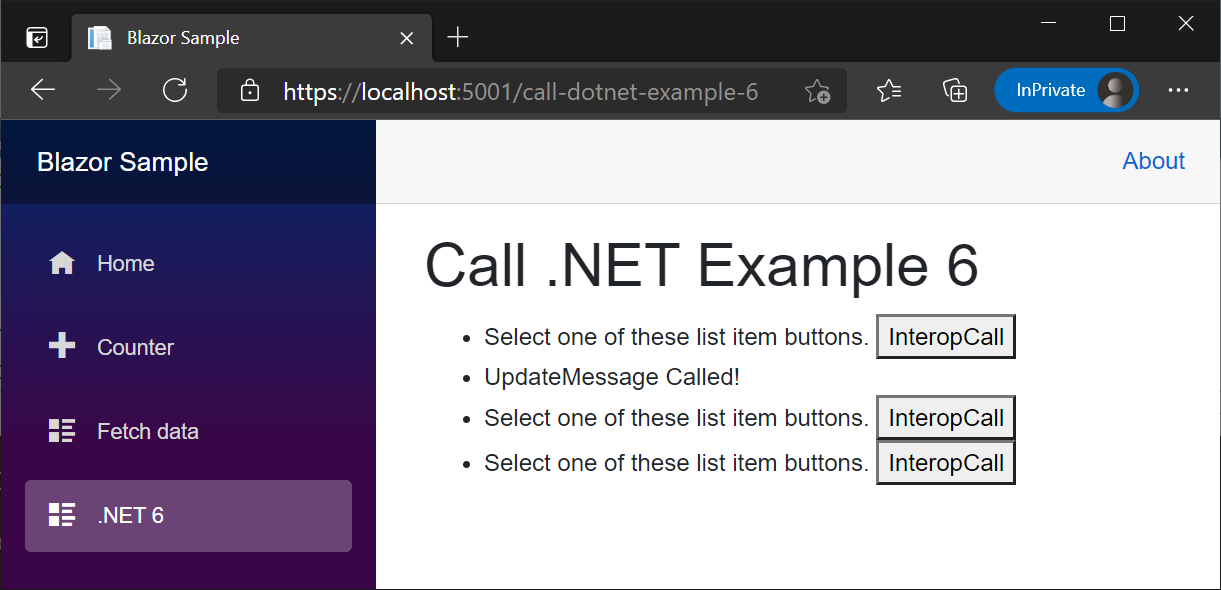
下圖顯示選取第二個 InteropCall 按鈕之後轉譯的父代元件:
- 第二個
ListItem1元件已顯示UpdateMessage Called!訊息。 - 因為按鈕的 CSS
InteropCall屬性設定為ListItem1,因此看不到第二個display元件的none按鈕。
從 DotNetObjectReference 呼叫的元件執行個體 .NET 方法會指派給元素屬性
將 DotNetObjectReference 指派給 HTML 元素的屬性允許在元件執行個體上呼叫 .NET 方法:
- 擷取元素參考 (ElementReference)。
- 在元件的
OnAfterRender{Async}方法中,會以元素參考和元件執行個體作為 JS 的形式來叫用 JavaScript (DotNetObjectReference) 函式。 JS 函式會將 DotNetObjectReference 連結至屬性中的元素。 - 在 JS 中叫用元素事件時 (例如
onclick),會使用元素的已連結 DotNetObjectReference 來呼叫 .NET 方法。
類似於元件實例 .NET 方法協助程序類別一節中所述的方法,此方法在使用靜態 .NET 方法不適用的案例中很有用:
- 當相同型別的數個元件在相同頁面上轉譯時。
- 在伺服器端應用程式中,有多個使用者同時使用相同的元件。
- .NET 方法是從 JS 事件叫用 (例如
onclick),而不是從 Blazor 事件叫用 (例如@onclick)。
在以下範例中:
- 此元件包含數個
ListItem2元件,此為共用元件。 - 每個
ListItem2元件是由清單項目訊息<span>所組成,而第二個<span>元件的displayCSS 屬性設定為inline-block以便顯示。 - 選取
ListItem2元件清單項目時,該ListItem2的UpdateMessage方法會變更第一個<span>中的清單項目文字,並將其<span>屬性設定為display來隱藏第二個none。
下列 assignDotNetHelperJS 函式會將 DotNetObjectReference 指派給名為 dotNetHelper 的屬性中的元素。 下列 interopCallJS 函式會針對已傳遞元素使用 DotNetObjectReference,以叫用名為 UpdateMessage 的 .NET 方法:
ListItem2.razor.js:
export function assignDotNetHelper(element, dotNetHelper) {
  element.dotNetHelper = dotNetHelper;
}

export async function interopCall(element) {
  await element.dotNetHelper.invokeMethodAsync('UpdateMessage');
}
ListItem2.razor.js:
export function assignDotNetHelper(element, dotNetHelper) {
  element.dotNetHelper = dotNetHelper;
}

export async function interopCall(element) {
  await element.dotNetHelper.invokeMethodAsync('UpdateMessage');
}
<script>
  window.assignDotNetHelper = (element, dotNetHelper) => {
    element.dotNetHelper = dotNetHelper;
  }

  window.interopCall = async (element) => {
    await element.dotNetHelper.invokeMethodAsync('UpdateMessage');
  }
</script>
Note
如需 JS 位置的一般指導和我們對於生產應用程式的建議,請參閱 ASP.NET Core Blazor 應用程式中的 JavaScript 位置
在上述範例中,變數名稱 dotNetHelper 是任意的,而且可以變更為任何慣用的名稱。
下列 ListItem2 元件是共用元件,可在父代元件中使用任意次數,並針對 HTML 清單 (<li>...</li> 或 <ul>...</ul>) 建立清單項目 (<ol>...</ol>)。
每個 ListItem2 元件執行個體都會以 assignDotNetHelper 的形式使用元素參考 (清單項目的第一個 JS 元素) 和元件執行個體,在 OnAfterRenderAsync 中叫用 <span>DotNetObjectReference 函式。
選取 ListItem2 元件訊息 <span> 時,會叫用 interopCall 並且以參數 (<span>) 形式傳遞 this 元素,這會叫用 UpdateMessage .NET 方法。 在 UpdateMessage 中,會呼叫 StateHasChanged 以在已設定 message 且已更新第二個 display 的 <span> 屬性時,更新 UI。 如果未呼叫 StateHasChanged,則 Blazor 無法得知叫用方法時是否應該更新 UI。
處置元件時會處置 DotNetObjectReference。
ListItem2.razor:
@inject IJSRuntime JS
@implements IAsyncDisposable

<li>
    <span style="font-weight:bold;color:@color" @ref="elementRef"
        @onclick="CallJSToInvokeDotnet">
        @message
    </span>
    <span style="display:@display">
        Not Updated Yet!
    </span>
</li>

@code {
    private IJSObjectReference? module;
    private DotNetObjectReference<ListItem2>? objRef;
    private ElementReference elementRef;
    private string display = "inline-block";
    private string message = "Select one of these list items.";
    private string color = "initial";

    protected override async Task OnAfterRenderAsync(bool firstRender)
    {
        if (firstRender)
        {
            module = await JS.InvokeAsync<IJSObjectReference>("import",
                "./Components/ListItem2.razor.js");

            objRef = DotNetObjectReference.Create(this);
            await module.InvokeVoidAsync("assignDotNetHelper", elementRef, objRef);
        }
    }

    public async Task CallJSToInvokeDotnet()
    {
        if (module is not null)
        {
            await module.InvokeVoidAsync("interopCall", elementRef);
        }
    }

    [JSInvokable]
    public void UpdateMessage()
    {
        message = "UpdateMessage Called!";
        display = "none";
        color = "MediumSeaGreen";
        StateHasChanged();
    }

    async ValueTask IAsyncDisposable.DisposeAsync()
    {
        if (module is not null)
        {
            try
            {
                await module.DisposeAsync();
            }
            catch (JSDisconnectedException)
            {
            }
        }

        objRef?.Dispose();
    }
}
@inject IJSRuntime JS
@implements IAsyncDisposable

<li>
    <span style="font-weight:bold;color:@color" @ref="elementRef"
        @onclick="CallJSToInvokeDotnet">
        @message
    </span>
    <span style="display:@display">
        Not Updated Yet!
    </span>
</li>

@code {
    private IJSObjectReference? module;
    private DotNetObjectReference<ListItem2>? objRef;
    private ElementReference elementRef;
    private string display = "inline-block";
    private string message = "Select one of these list items.";
    private string color = "initial";

    protected override async Task OnAfterRenderAsync(bool firstRender)
    {
        if (firstRender)
        {
            module = await JS.InvokeAsync<IJSObjectReference>("import",
                "./Components/ListItem2.razor.js");

            objRef = DotNetObjectReference.Create(this);
            await module.InvokeVoidAsync("assignDotNetHelper", elementRef, objRef);
        }
    }

    public async Task CallJSToInvokeDotnet()
    {
        if (module is not null)
        {
            await module.InvokeVoidAsync("interopCall", elementRef);
        }
    }

    [JSInvokable]
    public void UpdateMessage()
    {
        message = "UpdateMessage Called!";
        display = "none";
        color = "MediumSeaGreen";
        StateHasChanged();
    }

    async ValueTask IAsyncDisposable.DisposeAsync()
    {
        if (module is not null)
        {
            try
            {
                await module.DisposeAsync();
            }
            catch (JSDisconnectedException)
            {
            }
        }

        objRef?.Dispose();
    }
}
@inject IJSRuntime JS

<li>
    <span @ref="elementRef" onclick="interopCall(this)">@message</span>
    <span style="display:@display">Not Updated Yet!</span>
</li>

@code {
    private DotNetObjectReference<ListItem2>? objRef;
    private ElementReference elementRef;
    private string display = "inline-block";
    private string message = "Select one of these list items.";

    protected override async Task OnAfterRenderAsync(bool firstRender)
    {
        if (firstRender)
        {
            objRef = DotNetObjectReference.Create(this);
            await JS.InvokeVoidAsync("assignDotNetHelper", elementRef, objRef);
        }
    }

    [JSInvokable]
    public void UpdateMessage()
    {
        message = "UpdateMessage Called!";
        display = "none";
        StateHasChanged();
    }

    public void Dispose() => objRef?.Dispose();
}
@inject IJSRuntime JS

<li>
    <span @ref="elementRef" onclick="interopCall(this)">@message</span>
    <span style="display:@display">Not Updated Yet!</span>
</li>

@code {
    private DotNetObjectReference<ListItem2>? objRef;
    private ElementReference elementRef;
    private string display = "inline-block";
    private string message = "Select one of these list items.";

    protected override async Task OnAfterRenderAsync(bool firstRender)
    {
        if (firstRender)
        {
            objRef = DotNetObjectReference.Create(this);
            await JS.InvokeVoidAsync("assignDotNetHelper", elementRef, objRef);
        }
    }

    [JSInvokable]
    public void UpdateMessage()
    {
        message = "UpdateMessage Called!";
        display = "none";
        StateHasChanged();
    }

    public void Dispose() => objRef?.Dispose();
}
@inject IJSRuntime JS

<li>
    <span @ref="elementRef" onclick="interopCall(this)">@message</span>
    <span style="display:@display">Not Updated Yet!</span>
</li>

@code {
    private DotNetObjectReference<ListItem2> objRef;
    private ElementReference elementRef;
    private string display = "inline-block";
    private string message = "Select one of these list items.";

    protected override async Task OnAfterRenderAsync(bool firstRender)
    {
        if (firstRender)
        {
            objRef = DotNetObjectReference.Create(this);
            await JS.InvokeVoidAsync("assignDotNetHelper", elementRef, objRef);
        }
    }

    [JSInvokable]
    public void UpdateMessage()
    {
        message = "UpdateMessage Called!";
        display = "none";
        StateHasChanged();
    }

    public void Dispose() => objRef?.Dispose();
}
@inject IJSRuntime JS

<li>
    <span @ref="elementRef" onclick="interopCall(this)">@message</span>
    <span style="display:@display">Not Updated Yet!</span>
</li>

@code {
    private DotNetObjectReference<ListItem2> objRef;
    private ElementReference elementRef;
    private string display = "inline-block";
    private string message = "Select one of these list items.";

    protected override async Task OnAfterRenderAsync(bool firstRender)
    {
        if (firstRender)
        {
            objRef = DotNetObjectReference.Create(this);
            await JS.InvokeVoidAsync("assignDotNetHelper", elementRef, objRef);
        }
    }

    [JSInvokable]
    public void UpdateMessage()
    {
        message = "UpdateMessage Called!";
        display = "none";
        StateHasChanged();
    }

    public void Dispose() => objRef?.Dispose();
}
下列父代元件包含四個清單項目,每個清單項目都是 ListItem2 元件的執行個體。
CallDotnet7.razor:
@page "/call-dotnet-7"

<PageTitle>Call .NET 7</PageTitle>

<h1>Call .NET Example 7</h1>

<ul>
    <ListItem2 />
    <ListItem2 />
    <ListItem2 />
    <ListItem2 />
</ul>
CallDotnet7.razor:
@page "/call-dotnet-7"

<PageTitle>Call .NET 7</PageTitle>

<h1>Call .NET Example 7</h1>

<ul>
    <ListItem2 />
    <ListItem2 />
    <ListItem2 />
    <ListItem2 />
</ul>
CallDotNetExample7.razor:
@page "/call-dotnet-example-7"

<h1>Call .NET Example 7</h1>

<ul>
    <ListItem2 />
    <ListItem2 />
    <ListItem2 />
    <ListItem2 />
</ul>
CallDotNetExample7.razor:
@page "/call-dotnet-example-7"

<h1>Call .NET Example 7</h1>

<ul>
    <ListItem2 />
    <ListItem2 />
    <ListItem2 />
    <ListItem2 />
</ul>
CallDotNetExample7.razor:
@page "/call-dotnet-example-7"

<h1>Call .NET Example 7</h1>

<ul>
    <ListItem2 />
    <ListItem2 />
    <ListItem2 />
    <ListItem2 />
</ul>
CallDotNetExample7.razor:
@page "/call-dotnet-example-7"

<h1>Call .NET Example 7</h1>

<ul>
    <ListItem2 />
    <ListItem2 />
    <ListItem2 />
    <ListItem2 />
</ul>
用戶端元件中的同步 JS Interop
本節僅適用於用戶端元件。
不論所呼叫的程式碼是同步還是非同步的,JS Interop 通話都是非同步的。 通話會預設為以非同步方式進行,以確保元件在伺服器端和用戶端轉譯模式可以相容。 在伺服器上,所有 JS Interop 呼叫都必須以非同步方式進行,因為這些呼叫會透過網路連線來傳送。
如果您確定元件只會在 WebAssembly 上執行,則可以選擇進行同步的 JS Interop 呼叫。 進行同步呼叫的額外負荷會略低於進行非同步呼叫,而且可減少轉譯週期,因為在等候結果時不會有中繼狀態。
若要在用戶端元件中從 JavaScript 同步呼叫至 .NET,請使用 DotNet.invokeMethod 而非 DotNet.invokeMethodAsync。
如果是以下情形,則同步呼叫可運作:
JavaScript 位置
請使用 JS所述的任何方法載入 JavaScript () 程式碼:
-
在
<head>標記 中載入指令碼 (通常不建議使用) -
在
<body>標記中載入指令碼 -
從外部 JavaScript 檔案載入指令碼 (
.js) - 在 Blazor 啟動前或啟動後插入指令碼
使用 JS 模組載入 JS,在本文的 JavaScript 模組中的 JavaScript 隔離一節中說明。
Warning
請勿將 <script> 標籤放在元件檔案 (.razor) 中,因為 <script> 標籤無法動態更新。
JavaScript 模組中的 JavaScript 隔離
Blazor 會啟用標準 JS (ECMAScript 規格) 中的 JavaScript () 隔離。 Blazor 中的 JavaScript 模組載入運作方式與其他型別的 Web 應用程式相同,因此您可以任意地自訂在應用程式中定義模組的方式。 如需有關如何使用 JavaScript 模組的指南,請參閱 MDN Web 文件:JavaScript 模組。
JS 隔離提供下列優點:
- 已匯入的 JS 不再會產生全域命名空間問題。
- 不需要程式庫和元件的取用者即可匯入相關 JS。
如需詳細資訊,請參閱從 ASP.NET Core Blazor 中的 .NET 方法呼叫 JavaScript 函式。
if ({CONDITION}) import("/additionalModule.js");
在上述範例中,{CONDITION} 預留位置代表用來判斷是否應該載入模組的條件式檢查。
關於瀏覽器相容性,請參閱我是否可以使用:JavaScript 模組:動態匯入。
避免循環物件參考
包含循環參考的物件無法在用戶端上進行序列化以便發出:
- .NET 方法呼叫。
- 當傳回型別具有循環參考時,來自 C# 的 JavaScript 方法呼叫。
位元組陣列支援
Blazor 支援可避免將位元組陣列編碼/解碼為 Base64 的最佳化位元組陣列 JavaScript (JS) Interop。 下列範例使用 JS Interop 將位元組陣列傳遞至 .NET。
請提供 sendByteArrayJS 函式。 函式會以靜態方式呼叫,其中包含 invokeMethodAsync 呼叫中的組件名稱參數,呼叫方式是元件中的按鈕,而且不會傳回值:
CallDotnet8.razor.js:
export function sendByteArray() {
  const data = new Uint8Array([0x45, 0x76, 0x65, 0x72, 0x79, 0x74, 0x68, 0x69,
    0x6e, 0x67, 0x27, 0x73, 0x20, 0x73, 0x68, 0x69, 0x6e, 0x79, 0x2c,
    0x20, 0x43, 0x61, 0x70, 0x74, 0x61, 0x69, 0x6e, 0x2e, 0x20, 0x4e,
    0x6f, 0x74, 0x20, 0x74, 0x6f, 0x20, 0x66, 0x72, 0x65, 0x74, 0x2e]);
  DotNet.invokeMethodAsync('BlazorSample', 'ReceiveByteArray', data)
    .then(str => {
      alert(str);
    });
}

export function addHandlers() {
  const btn = document.getElementById("btn");
  btn.addEventListener("click", sendByteArray);
}
<script>
  window.sendByteArray = () => {
    const data = new Uint8Array([0x45,0x76,0x65,0x72,0x79,0x74,0x68,0x69,
      0x6e,0x67,0x27,0x73,0x20,0x73,0x68,0x69,0x6e,0x79,0x2c,
      0x20,0x43,0x61,0x70,0x74,0x61,0x69,0x6e,0x2e,0x20,0x4e,
      0x6f,0x74,0x20,0x74,0x6f,0x20,0x66,0x72,0x65,0x74,0x2e]);
    DotNet.invokeMethodAsync('BlazorSample', 'ReceiveByteArray', data)
      .then(str => {
        alert(str);
      });
  };
</script>
Note
如需 JS 位置的一般指導和我們對於生產應用程式的建議,請參閱 ASP.NET Core Blazor 應用程式中的 JavaScript 位置
CallDotnet8.razor:
@page "/call-dotnet-8"
@using System.Text
@implements IAsyncDisposable
@inject IJSRuntime JS

<PageTitle>Call .NET 8</PageTitle>

<h1>Call .NET Example 8</h1>

<p>
    <button id="btn">Send Bytes</button>
</p>

<p>
    Quote ©2005 <a href="https://www.uphe.com">Universal Pictures</a>:
    <a href="https://www.uphe.com/movies/serenity-2005">Serenity</a><br>
    <a href="https://www.imdb.com/name/nm0821612/">Jewel Staite on IMDB</a>
</p>

@code {
    private IJSObjectReference? module;

    protected override async Task OnAfterRenderAsync(bool firstRender)
    {
        if (firstRender)
        {
            module = await JS.InvokeAsync<IJSObjectReference>("import",
                "./Components/Pages/CallDotnet8.razor.js");

            await module.InvokeVoidAsync("addHandlers");
        }
    }

    [JSInvokable]
    public static Task<string> ReceiveByteArray(byte[] receivedBytes) =>
        Task.FromResult(Encoding.UTF8.GetString(receivedBytes, 0,
            receivedBytes.Length));

    async ValueTask IAsyncDisposable.DisposeAsync()
    {
        if (module is not null)
        {
            try
            {
                await module.DisposeAsync();
            }
            catch (JSDisconnectedException)
            {
            }
        }
    }
}
CallDotnet8.razor:
@page "/call-dotnet-8"
@using System.Text
@implements IAsyncDisposable
@inject IJSRuntime JS

<PageTitle>Call .NET 8</PageTitle>

<h1>Call .NET Example 8</h1>

<p>
    <button id="btn">Send Bytes</button>
</p>

<p>
    Quote ©2005 <a href="https://www.uphe.com">Universal Pictures</a>:
    <a href="https://www.uphe.com/movies/serenity-2005">Serenity</a><br>
    <a href="https://www.imdb.com/name/nm0821612/">Jewel Staite on IMDB</a>
</p>

@code {
    private IJSObjectReference? module;

    protected override async Task OnAfterRenderAsync(bool firstRender)
    {
        if (firstRender)
        {
            module = await JS.InvokeAsync<IJSObjectReference>("import",
                "./Components/Pages/CallDotnet8.razor.js");

            await module.InvokeVoidAsync("addHandlers");
        }
    }

    [JSInvokable]
    public static Task<string> ReceiveByteArray(byte[] receivedBytes) =>
        Task.FromResult(Encoding.UTF8.GetString(receivedBytes, 0,
            receivedBytes.Length));

    async ValueTask IAsyncDisposable.DisposeAsync()
    {
        if (module is not null)
        {
            try
            {
                await module.DisposeAsync();
            }
            catch (JSDisconnectedException)
            {
            }
        }
    }
}
CallDotNetExample8.razor:
@page "/call-dotnet-example-8"
@using System.Text

<PageTitle>Call .NET 8</PageTitle>

<h1>Call .NET Example 8</h1>

<p>
    <button onclick="sendByteArray()">Send Bytes</button>
</p>

<p>
    Quote ©2005 <a href="https://www.uphe.com">Universal Pictures</a>:
    <a href="https://www.uphe.com/movies/serenity-2005">Serenity</a><br>
    <a href="https://www.imdb.com/name/nm0821612/">Jewel Staite on IMDB</a>
</p>

@code {
    [JSInvokable]
    public static Task<string> ReceiveByteArray(byte[] receivedBytes)
    {
        return Task.FromResult(
            Encoding.UTF8.GetString(receivedBytes, 0, receivedBytes.Length));
    }
}
CallDotNetExample8.razor:
@page "/call-dotnet-example-8"
@using System.Text

<h1>Call .NET Example 8</h1>

<p>
    <button onclick="sendByteArray()">Send Bytes</button>
</p>

<p>
    Quote ©2005 <a href="https://www.uphe.com">Universal Pictures</a>:
    <a href="https://www.uphe.com/movies/serenity-2005">Serenity</a><br>
    <a href="https://www.imdb.com/name/nm0821612/">Jewel Staite on IMDB</a>
</p>

@code {
    [JSInvokable]
    public static Task<string> ReceiveByteArray(byte[] receivedBytes)
    {
        return Task.FromResult(
            Encoding.UTF8.GetString(receivedBytes, 0, receivedBytes.Length));
    }
}
如需有關從 .NET 呼叫 JavaScript 時如何使用位元組陣列的資訊,請參閱在 ASP.NET Core Blazor 中從 .NET 方法呼叫 JavaScript 函式。
從 JavaScript 串流至 .NET
Blazor 支援直接從 JavaScript 將資料串流至 .NET。 串流是使用 Microsoft.JSInterop.IJSStreamReference 介面要求。
Microsoft.JSInterop.IJSStreamReference.OpenReadStreamAsync 會傳回 Stream,並使用下列參數:
-
maxAllowedSize:從 JavaScript 讀取作業的允許位元組數目上限,如果未指定,則預設為 512,000 個位元組。 -
cancellationToken:CancellationToken,用於取消讀取。
在 JavaScript 中:
function streamToDotNet() {
  return new Uint8Array(10000000);
}
在 C# 程式碼中:
var dataReference =
    await JS.InvokeAsync<IJSStreamReference>("streamToDotNet");
using var dataReferenceStream =
    await dataReference.OpenReadStreamAsync(maxAllowedSize: 10_000_000);

var outputPath = Path.Combine(Path.GetTempPath(), "file.txt");
using var outputFileStream = File.OpenWrite(outputPath);
await dataReferenceStream.CopyToAsync(outputFileStream);
在前述範例中:
-
JS是所插入的 IJSRuntime 執行個體。 IJSRuntime 會由 Blazor 架構進行註冊。 -
dataReferenceStream會寫入磁碟 (file.txt) 中的目前使用者暫存資料夾路徑 (GetTempPath)。
在 ASP.NET Core Blazor 中從 .NET 方法呼叫 JavaScript 函式會說明反向作業,使用 DotNetStreamReference 從 JavaScript 串流至 .NET。
ASP.NET Core Blazor 檔案上傳涵蓋如何在 Blazor 中上傳檔案。 如需在伺服器端元件中串流 <textarea> 資料的表單範例,請參閱疑難排解 ASP.NET Core Blazor 表單。
JavaScript [JSImport]/[JSExport] Interop
本節適用於用戶端元件。
除了根據 JS 介面使用 Blazor 的 JS Interop 機制在用戶端元件中與 JavaScript (IJSRuntime) 互動外,以 .NET 7 或更新版本為目標的應用程式也可以使用 JS[JSImport]/[JSExport] Interop API。
如需詳細資訊,請參閱 JavaScript JSImport/JSExport Interop 與 ASP.NET Core Blazor。
處置 JavaScript Interop 物件參考
JavaScript (JS) Interop 文章中的範例會示範典型的物件處置模式:
如本文所述從 JS 呼叫 .NET 時,請處置任何從 .NET 或從 DotNetObjectReference 建立的 JS,以免流失 .NET 記憶體。
從 .NET 呼叫 JS 時,如從 ASP.NET Core 中的 .NET 方法呼叫 JavaScript 函式 Blazor中所述,請處置從 .NET 或從 IJSObjectReference 所建立的任何 /IJSInProcessObjectReference/
JSObjectReferenceJS,以免流失 JS 記憶體。
JS Interop 物件參考會實作為對應,且會由建立參考的 JS Interop 呼叫端上的識別碼建立索引鍵。 從 .NET 或 JS 端起始物件處置時,Blazor 會從對應中移除該項目,只要物件沒有其他強式參考存在,就可以對物件進行記憶體回收。
至少,請一律處置在 .NET 端建立的物件,以免 .NET 受控記憶體流失。
元件處置期間的 DOM 清除工作
如需詳細資訊,請參閱 ASP.NET Core Blazor JavaScript 互通性 (JS Interop)。
沒有線路的 JavaScript Interop 呼叫
如需詳細資訊,請參閱 ASP.NET Core Blazor JavaScript 互通性 (JS Interop)。
其他資源
- 從 ASP.NET Core Blazor 中的 .NET 方法呼叫 JavaScript 函式
-
InteropComponent.razor範例 (dotnet/AspNetCoreGitHub 存放庫main分支):main分支代表產品單位針對下一版 ASP.NET Core 的目前開發項目。 若要選取不同版本的分支(例如,release/{VERSION}佔{VERSION}位元是發行版本),請使用 [ 切換分支或標籤 ] 下拉式清單來選取分支。 對於已不存在的分支,請使用 [ 捲標] 索引標籤 來尋找 API (例如 ,v7.0.0。 - 與 DOM 互動
-
Blazor 範例 GitHub 存放庫 (
dotnet/blazor-samples) (如何下載) - 處理 ASP.NET Core Blazor 應用程式中的錯誤 (JavaScript Interop 區段)
- 威脅防護:從瀏覽器叫用的 .NET 方法
