Note
這不是這篇文章的最新版本。 關於目前版本,請參閱 本文的 .NET 10 版本。
Warning
不再支援此版本的 ASP.NET Core。 如需詳細資訊,請參閱 .NET 和 .NET Core 支持原則。 如需目前的版本,請參閱 本文的 .NET 9 版本。
作者:Kirk Larkin、Steve Smith 和 Brandon Dahler
ASP.NET Core 支援相依性插入 (DI) 軟體設計模式,這是用來在類別與其相依性之間達成控制權反轉 (IoC) \(英文\) 的技術。
有關 Blazor 新增或取代本文指導的 DI 指導,請參閱 ASP.NET Core Blazor 相依性插入。
如需有關在 MVC 控制器中執行相依性插入的具體資訊,請參閱 ASP.NET Core 中的 將相依性插入至控制器。
如需在 Web 應用程式以外的應用程式中使用相依性插入的相關資訊,請參閱 .NET 中的相依性插入。
如需選項相依性插入的資訊,請參閱 ASP.NET Core中的
本文提供 ASP.NET Core 中相依性插入的相關信息。 使用相依性插入的主要文件包含在 .NET 的相依性插入中。
檢視或下載範例程式碼 \(英文\) (如何下載)
依賴注入概觀
相依物件是另一個物件所依賴的物件。 檢查具有 MyDependency 方法的下列 WriteMessage 類別,其他類別相依於此:
public class MyDependency
{
    public void WriteMessage(string message)
    {
        Console.WriteLine($"MyDependency.WriteMessage called. Message: {message}");
    }
}
類別可建立 MyDependency 類別的執行個體,以便使用其 WriteMessage 方法。 在下列範例中,MyDependency 類別是 IndexModel 類別的相依性:
public class IndexModel : PageModel
{
    private readonly MyDependency _dependency = new MyDependency();

    public void OnGet()
    {
        _dependency.WriteMessage("IndexModel.OnGet");
    }
}
類別建立並直接相依於 MyDependency 類別。 程式碼相依性 (例如上述範例) 有問題,因此基於下列原因應該避免使用:
- 若要將
MyDependency取代為不同的實作,必須修改IndexModel類別。 - 若
MyDependency有相依性,那些相依性必須同時由IndexModel類別設定。 在具有多個相依於MyDependency之多個類別的大型專案中,設定程式碼在不同的應用程式之間會變得鬆散。 - 此實作難以進行單元測試。
相依性注入可透過下列方式解決這些問題:
- 使用介面或基底類別來將相依性實作抽象化。
- 在服務容器中註冊相依性。 ASP.NET Core 提供內建服務容器 IServiceProvider。 服務通常會在應用程式的
Program.cs檔案中註冊。 - 將服務注入到其使用類別的建構函式中。 架構負責管理依賴關係的實例,並在不再需要時將其釋放。
在範例應用程式中,IMyDependency 介面會定義 WriteMessage 方法:
public interface IMyDependency
{
    void WriteMessage(string message);
}
這個介面由具體類型 MyDependency 實作。
public class MyDependency : IMyDependency
{
    public void WriteMessage(string message)
    {
        Console.WriteLine($"MyDependency.WriteMessage Message: {message}");
    }
}
範例應用程式會用具象型別 IMyDependency 註冊 MyDependency 服務。
AddScoped 方法會以具範圍的存留期註冊服務,也就是單一要求的存留期。 本文稍後會說明 服務存留期。
using DependencyInjectionSample.Interfaces;
using DependencyInjectionSample.Services;

var builder = WebApplication.CreateBuilder(args);

builder.Services.AddRazorPages();

builder.Services.AddScoped<IMyDependency, MyDependency>();

var app = builder.Build();
在範例應用程式中,會要求 IMyDependency 服務,並將其用來呼叫 WriteMessage 方法:
public class Index2Model : PageModel
{
    private readonly IMyDependency _myDependency;

    public Index2Model(IMyDependency myDependency)
    {
        _myDependency = myDependency;
    }

    public void OnGet()
    {
        _myDependency.WriteMessage("Index2Model.OnGet");
    }
}
使用 DI 模式,控制器或 Razor Page 會:
- 不會使用具體類型
MyDependency,只使用其所實作的IMyDependency介面。 這可讓您輕鬆地變更實作,而不需要修改控制器或 Razor Page。 - 不會建立
MyDependency的執行個體,其是由 DI 容器所建立。
IMyDependency 介面的實作可透過使用內建記錄 API 來改善:
public class MyDependency2 : IMyDependency
{
    private readonly ILogger<MyDependency2> _logger;

    public MyDependency2(ILogger<MyDependency2> logger)
    {
        _logger = logger;
    }

    public void WriteMessage(string message)
    {
        _logger.LogInformation( $"MyDependency2.WriteMessage Message: {message}");
    }
}
更新的 Program.cs 會註冊新的 IMyDependency 實作:
using DependencyInjectionSample.Interfaces;
using DependencyInjectionSample.Services;

var builder = WebApplication.CreateBuilder(args);

builder.Services.AddRazorPages();

builder.Services.AddScoped<IMyDependency, MyDependency2>();

var app = builder.Build();
MyDependency2 相依於 ILogger<TCategoryName>,且在建構函式中要求之。
ILogger<TCategoryName> 是架構提供的服務。
在鏈式結構中使用相依性注入是很常見的。 每個要求的相依性接著會要求其自己的相依性。 容器會解決圖形中的相依性,並傳回完全解析的服務。 必須先解析的相依性集合組通常稱為「相依性樹狀結構」、「相依性圖形」或「物件圖形」。
容器透過利用(泛型)的開放型別來解析,從而免去了註冊每個(泛型)已建構型別的必要。
在依賴注入術語中,服務:
- 通常是為其他物件提供服務的物件,例如
IMyDependency服務。 - 與網路服務沒有直接關係,儘管此服務可能會使用網路服務。
此架構提供強固的記錄系統。 之所以撰寫上述範例示範的 IMyDependency 實作,是為了示範基礎 DI,而非實作記錄。 多數應用程式不需要撰寫記錄器。 下列程式碼示範如何使用預設記錄,而不需要註冊任何服務:
public class AboutModel : PageModel
{
    private readonly ILogger _logger;

    public AboutModel(ILogger<AboutModel> logger)
    {
        _logger = logger;
    }

    public string Message { get; set; } = string.Empty;

    public void OnGet()
    {
        Message = $"About page visited at {DateTime.UtcNow.ToLongTimeString()}";
        _logger.LogInformation(Message);
    }
}
上述程式代碼可正常運作,不需要變更 Program.cs中的任何項目,這是因為架構提供了 日誌 功能。
使用擴充方法註冊服務群組
ASP.NET Core 架構會使用慣例來註冊一組相關服務。 此慣例為使用單一 Add{GROUP_NAME} 擴充方法來註冊所有架構功能需要的服務。 例如,AddControllers 擴充方法會註冊 MVC 控制器所需的服務。
下列程式代碼是由 Pages 範本使用個別帳戶的 Razor 產生的,並示範如何使用擴充方法 AddDbContext 和 AddDefaultIdentity,將其他服務新增至容器:
using DependencyInjectionSample.Data;
using Microsoft.AspNetCore.Identity;
using Microsoft.EntityFrameworkCore;

var builder = WebApplication.CreateBuilder(args);

var connectionString = builder.Configuration.GetConnectionString("DefaultConnection");
builder.Services.AddDbContext<ApplicationDbContext>(options =>
    options.UseSqlServer(connectionString));
builder.Services.AddDatabaseDeveloperPageExceptionFilter();

builder.Services.AddDefaultIdentity<IdentityUser>(options => options.SignIn.RequireConfirmedAccount = true)
    .AddEntityFrameworkStores<ApplicationDbContext>();
builder.Services.AddRazorPages();

var app = builder.Build();
請考量會註冊服務並設定選項的下列內容:
using ConfigSample.Options;
using Microsoft.Extensions.DependencyInjection.ConfigSample.Options;

var builder = WebApplication.CreateBuilder(args);

builder.Services.AddRazorPages();

builder.Services.Configure<PositionOptions>(
    builder.Configuration.GetSection(PositionOptions.Position));
builder.Services.Configure<ColorOptions>(
    builder.Configuration.GetSection(ColorOptions.Color));

builder.Services.AddScoped<IMyDependency, MyDependency>();
builder.Services.AddScoped<IMyDependency2, MyDependency2>();

var app = builder.Build();
相關註冊群組可移至擴充方法,以註冊服務。 例如,設定服務會新增至下列類別:
using ConfigSample.Options;
using Microsoft.Extensions.Configuration;

namespace Microsoft.Extensions.DependencyInjection
{
    public static class MyConfigServiceCollectionExtensions
    {
        public static IServiceCollection AddConfig(
             this IServiceCollection services, IConfiguration config)
        {
            services.Configure<PositionOptions>(
                config.GetSection(PositionOptions.Position));
            services.Configure<ColorOptions>(
                config.GetSection(ColorOptions.Color));

            return services;
        }

        public static IServiceCollection AddMyDependencyGroup(
             this IServiceCollection services)
        {
            services.AddScoped<IMyDependency, MyDependency>();
            services.AddScoped<IMyDependency2, MyDependency2>();

            return services;
        }
    }
}
剩餘的服務會在相似的類別中註冊。 下列程式碼使用新增擴充方法來註冊服務:
using Microsoft.Extensions.DependencyInjection.ConfigSample.Options;

var builder = WebApplication.CreateBuilder(args);

builder.Services
    .AddConfig(builder.Configuration)
    .AddMyDependencyGroup();

builder.Services.AddRazorPages();

var app = builder.Build();
注意:每個 services.Add{GROUP_NAME} 擴充方法都會新增並可能會設定服務。 例如,AddControllersWithViews 會新增 MVC 控制器與檢視所需的服務,而 AddRazorPages 會新增 Razor Pages 所需的服務。
使用壽命
請參閱 .NET 中的相依性插入中的服務存留期
若要在中介軟體中使用限定範圍服務,請使用下列其中一種方法:
- 將服務插入中介軟體的
Invoke或InvokeAsync方法。 使用建構函式注入會拋出運行時例外,因為它會強制限定範圍的服務行為像單例一樣。 存留期和註冊選項一節中的範例示範InvokeAsync方法。 - 使用 Factory 式中介軟體。 使用此方法註冊的中介軟體會根據用戶端要求 (連線) 啟動,以允許將限定範圍服務插入中介軟體的建構函式中。
如需詳細資訊,請參閱撰寫自訂 ASP.NET Core 中介軟體。
服務註冊方法
請參閱 .NET 中相依性插入中的服務註冊方法
當模擬測試類型時,通常會使用多個實作。
只用一個實作型別註冊服務,相當於使用相同的實作和服務型別註冊該服務。 這就是為什麼使用不指定明確服務類型的方法,無法註冊服務的多個實作。 這些方法可以註冊服務的多個 案例,但是它們全都有相同的 實作 類別。
上述任何服務註冊方法都可以用來註冊相同服務類型的多個服務實例。 在下列範例中,系統兩次呼叫 AddSingleton,其服務型別為 IMyDependency。 第二次的 AddSingleton 呼叫在解析為 IMyDependency 時覆寫了第一次的呼叫,而在多個服務透過 IEnumerable<IMyDependency> 解析時,會加入到第一次的呼叫中。 透過 IEnumerable<{SERVICE}> 解析時,服務會以註冊時的順序顯示。
services.AddSingleton<IMyDependency, MyDependency>();
services.AddSingleton<IMyDependency, DifferentDependency>();

public class MyService
{
    public MyService(IMyDependency myDependency,
       IEnumerable<IMyDependency> myDependencies)
    {
        Trace.Assert(myDependency is DifferentDependency);

        var dependencyArray = myDependencies.ToArray();
        Trace.Assert(dependencyArray[0] is MyDependency);
        Trace.Assert(dependencyArray[1] is DifferentDependency);
    }
}
金鑰服務
索引鍵服務這個詞 是指使用鍵註冊和擷取依賴注入(DI)服務的機制。 透過呼叫 AddKeyedSingleton (或 AddKeyedScoped 或 AddKeyedTransient) 來註冊服務,從而與鍵建立關聯。 藉由指定具有 [FromKeyedServices] 屬性的索引鍵來存取已註冊的服務。 下列程式碼示範如何使用索引鍵服務:
using Microsoft.AspNetCore.Mvc;
using Microsoft.AspNetCore.SignalR;

var builder = WebApplication.CreateBuilder(args);

builder.Services.AddKeyedSingleton<ICache, BigCache>("big");
builder.Services.AddKeyedSingleton<ICache, SmallCache>("small");
builder.Services.AddControllers();

var app = builder.Build();

app.MapGet("/big", ([FromKeyedServices("big")] ICache bigCache) => bigCache.Get("date"));
app.MapGet("/small", ([FromKeyedServices("small")] ICache smallCache) =>
                                                               smallCache.Get("date"));

app.MapControllers();

app.Run();

public interface ICache
{
    object Get(string key);
}
public class BigCache : ICache
{
    public object Get(string key) => $"Resolving {key} from big cache.";
}

public class SmallCache : ICache
{
    public object Get(string key) => $"Resolving {key} from small cache.";
}

[ApiController]
[Route("/cache")]
public class CustomServicesApiController : Controller
{
    [HttpGet("big-cache")]
    public ActionResult<object> GetOk([FromKeyedServices("big")] ICache cache)
    {
        return cache.Get("data-mvc");
    }
}

public class MyHub : Hub
{
    public void Method([FromKeyedServices("small")] ICache cache)
    {
        Console.WriteLine(cache.Get("signalr"));
    }
}
中介軟體中的鍵控服務
中介軟體於建構函式與 Invoke/InvokeAsync 方法中都支援具索引鍵的服務:
var builder = WebApplication.CreateBuilder(args);
builder.Services.AddKeyedSingleton<MySingletonClass>("test");
builder.Services.AddKeyedScoped<MyScopedClass>("test2");

var app = builder.Build();
app.UseMiddleware<MyMiddleware>();
app.Run();

internal class MyMiddleware
{
    private readonly RequestDelegate _next;

    public MyMiddleware(RequestDelegate next,
        [FromKeyedServices("test")] MySingletonClass service)
    {
        _next = next;
    }

    public Task Invoke(HttpContext context,
        [FromKeyedServices("test2")]
            MyScopedClass scopedService) => _next(context);
}
如需建立中介軟體的詳細資訊,請參閱撰寫自訂的 ASP.NET Core 中介軟體。
建構函式插入行為
請參閱 建構函式插入行為在.NET 中的相依性插入
Entity Framework 內容
根據預設,因為會將 Web 應用程式資料庫作業範圍設定為用戶端要求,所以通常會使用具範圍存留期將 Entity Framework 內容新增至服務容器。 若要使用不同的存留期,請使用 AddDbContext 多載來指定存留期。 指定存留期的服務不應該使用存留期比服務存留期還短的資料庫內容。
留期和註冊選項
為了示範這些服務存留期與註冊選項之間的差異,請考慮下列介面,以具有識別碼 OperationId 的「作業」代表工作。 視如何針對下列介面設定作業服務存留期而定,當類別要求時,容器會提供相同或不同的服務執行個體:
public interface IOperation
{
    string OperationId { get; }
}

public interface IOperationTransient : IOperation { }
public interface IOperationScoped : IOperation { }
public interface IOperationSingleton : IOperation { }
下列 Operation 類別會實作上述所有介面。
Operation 建構函式會產生 GUID,並將最後 4 個字元儲存在 OperationId 屬性中:
public class Operation : IOperationTransient, IOperationScoped, IOperationSingleton
{
    public Operation()
    {
        OperationId = Guid.NewGuid().ToString()[^4..];
    }

    public string OperationId { get; }
}
下列程式碼會根據具名存留期來建立 Operation 類別的多個註冊:
var builder = WebApplication.CreateBuilder(args);

builder.Services.AddRazorPages();

builder.Services.AddTransient<IOperationTransient, Operation>();
builder.Services.AddScoped<IOperationScoped, Operation>();
builder.Services.AddSingleton<IOperationSingleton, Operation>();

var app = builder.Build();

if (!app.Environment.IsDevelopment())
{
    app.UseExceptionHandler("/Error");
    app.UseHsts();
}

app.UseHttpsRedirection();
app.UseStaticFiles();

app.UseMyMiddleware();
app.UseRouting();

app.UseAuthorization();

app.MapRazorPages();

app.Run();
範例應用程式會示範要求內與個別要求之間的物件存留期。
IndexModel 和中介軟體會針對每種 IOperation 類型發出請求,並記錄每個類型的 OperationId:
public class IndexModel : PageModel
{
    private readonly ILogger _logger;
    private readonly IOperationTransient _transientOperation;
    private readonly IOperationSingleton _singletonOperation;
    private readonly IOperationScoped _scopedOperation;

    public IndexModel(ILogger<IndexModel> logger,
                      IOperationTransient transientOperation,
                      IOperationScoped scopedOperation,
                      IOperationSingleton singletonOperation)
    {
        _logger = logger;
        _transientOperation = transientOperation;
        _scopedOperation    = scopedOperation;
        _singletonOperation = singletonOperation;
    }

    public void  OnGet()
    {
        _logger.LogInformation("Transient: " + _transientOperation.OperationId);
        _logger.LogInformation("Scoped: "    + _scopedOperation.OperationId);
        _logger.LogInformation("Singleton: " + _singletonOperation.OperationId);
    }
}
與 IndexModel 類似,中介軟體會解析相同的服務:
public class MyMiddleware
{
    private readonly RequestDelegate _next;
    private readonly ILogger _logger;

    private readonly IOperationSingleton _singletonOperation;

    public MyMiddleware(RequestDelegate next, ILogger<MyMiddleware> logger,
        IOperationSingleton singletonOperation)
    {
        _logger = logger;
        _singletonOperation = singletonOperation;
        _next = next;
    }

    public async Task InvokeAsync(HttpContext context,
        IOperationTransient transientOperation, IOperationScoped scopedOperation)
    {
        _logger.LogInformation("Transient: " + transientOperation.OperationId);
        _logger.LogInformation("Scoped: " + scopedOperation.OperationId);
        _logger.LogInformation("Singleton: " + _singletonOperation.OperationId);

        await _next(context);
    }
}

public static class MyMiddlewareExtensions
{
    public static IApplicationBuilder UseMyMiddleware(this IApplicationBuilder builder)
    {
        return builder.UseMiddleware<MyMiddleware>();
    }
}
必須在 InvokeAsync 方法中解析限定範圍和暫時性服務:
public async Task InvokeAsync(HttpContext context,
    IOperationTransient transientOperation, IOperationScoped scopedOperation)
{
    _logger.LogInformation("Transient: " + transientOperation.OperationId);
    _logger.LogInformation("Scoped: " + scopedOperation.OperationId);
    _logger.LogInformation("Singleton: " + _singletonOperation.OperationId);

    await _next(context);
}
記錄器輸出會顯示:
- 「暫時性」 物件一律不同。 在
OperationId和中介軟體中,暫時性IndexModel值不同。 - 在同一個請求中,限定範圍物件是相同的,但在每個新請求中則會有所不同。
- 對於每個請求而言,Singleton物件都是相同的。
若要減少記錄輸出,請在 appsettings.Development.json 檔案中設定「Logging:LogLevel:Microsoft:Error」:
{
  "MyKey": "MyKey from appsettings.Development.json",
  "Logging": {
    "LogLevel": {
      "Default": "Information",
      "System": "Debug",
      "Microsoft": "Error"
    }
  }
}
解決應用程式啟動時的服務
下列程式碼示範如何在應用程式啟動時,在有限的持續時間內解析限定範圍服務:
var builder = WebApplication.CreateBuilder(args);

builder.Services.AddScoped<IMyDependency, MyDependency>();

var app = builder.Build();

using (var serviceScope = app.Services.CreateScope())
{
    var services = serviceScope.ServiceProvider;

    var myDependency = services.GetRequiredService<IMyDependency>();
    myDependency.WriteMessage("Call services from main");
}

app.MapGet("/", () => "Hello World!");

app.Run();
範圍驗證
請參閱 建構函式插入行為在.NET 中的相依性插入
如需詳細資訊,請參閱範圍驗證。
請求服務
服務及其在 ASP.NET Core 要求內的相依性會透過 HttpContext.RequestServices 公開。
架構會為每個要求建立一個範圍,且 RequestServices 會公開限定範圍的服務提供者。 只要要求為使用中,所有限定範圍服務就都有效。
Note
偏好要求相依性做為建構函式參數,而不是從 RequestServices 解析服務。 要求相依性做為建構函式參數會產生更容易測試的類別。
相依注入的設計服務
設計服務進行相依性注入時:
- 避免具有狀態的靜態類別和成員。 避免設計應用程式改用 singleton 服務來建立全域狀態。
- 避免直接在服務內具現化相依類別。 直接具現化會將程式碼耦合到特定實作。
- 讓服務維持在小型、情況良好且可輕鬆測試的狀態。
如果類別有許多插入的相依性,則可能表示類別有太多責任,並違反 單一責任原則 (SRP)。 嘗試通過將某些責任移到新類別中來重構類別。 請記住,Razor Pages 頁面模型類別與 MVC 控制器類別應該專注於 UI 考量。
服務的處置
容器會為它建立的 Dispose 類型呼叫 IDisposable。 開發人員永遠不會處置從容器所解析的服務。 如果類型或工廠已註冊為 "singleton",則容器會自動處置該 "singleton"。
在下列範例中,服務是由服務容器所建立,並自動進行處置:
public class Service1 : IDisposable
{
    private bool _disposed;

    public void Write(string message)
    {
        Console.WriteLine($"Service1: {message}");
    }

    public void Dispose()
    {
        if (_disposed)
            return;

        Console.WriteLine("Service1.Dispose");
        _disposed = true;
    }
}

public class Service2 : IDisposable
{
    private bool _disposed;

    public void Write(string message)
    {
        Console.WriteLine($"Service2: {message}");
    }

    public void Dispose()
    {
        if (_disposed)
            return;

        Console.WriteLine("Service2.Dispose");
        _disposed = true;
    }
}

public interface IService3
{
    public void Write(string message);
}

public class Service3 : IService3, IDisposable
{
    private bool _disposed;

    public Service3(string myKey)
    {
        MyKey = myKey;
    }

    public string MyKey { get; }

    public void Write(string message)
    {
        Console.WriteLine($"Service3: {message}, MyKey = {MyKey}");
    }

    public void Dispose()
    {
        if (_disposed)
            return;

        Console.WriteLine("Service3.Dispose");
        _disposed = true;
    }
}
using DIsample2.Services;

var builder = WebApplication.CreateBuilder(args);

builder.Services.AddRazorPages();

builder.Services.AddScoped<Service1>();
builder.Services.AddSingleton<Service2>();

var myKey = builder.Configuration["MyKey"];
builder.Services.AddSingleton<IService3>(sp => new Service3(myKey));

var app = builder.Build();
public class IndexModel : PageModel
{
    private readonly Service1 _service1;
    private readonly Service2 _service2;
    private readonly IService3 _service3;

    public IndexModel(Service1 service1, Service2 service2, IService3 service3)
    {
        _service1 = service1;
        _service2 = service2;
        _service3 = service3;
    }

    public void OnGet()
    {
        _service1.Write("IndexModel.OnGet");
        _service2.Write("IndexModel.OnGet");
        _service3.Write("IndexModel.OnGet");
    }
}
偵錯控制台在每次重新載入索引頁面之後會顯示下列輸出:
Service1: IndexModel.OnGet
Service2: IndexModel.OnGet
Service3: IndexModel.OnGet, MyKey = MyKey from appsettings.Development.json
Service1.Dispose
服務容器未建立的服務
請考慮下列程式碼:
var builder = WebApplication.CreateBuilder(args);

builder.Services.AddRazorPages();

builder.Services.AddSingleton(new Service1());
builder.Services.AddSingleton(new Service2());
在上述程式碼中:
- 服務執行個體不是由服務容器建立的。
- 架構不會自動處置服務。
- 開發人員負責處置服務。
暫時性和共用執行個體的 IDisposable 指導
請參閱.NET 中相依性注入中的暫時性和共用執行個體的 IDisposable 指引
預設服務容器的替代
請參閱 .NET 中相依性插入中的預設服務容器取代
Recommendations
請參閱 .NET 中的相依性插入中的建議
避免使用「服務定位器模式」。 例如,當您可以改用 DI 時,請勿叫用 GetService 來取得服務執行個體:
Incorrect:
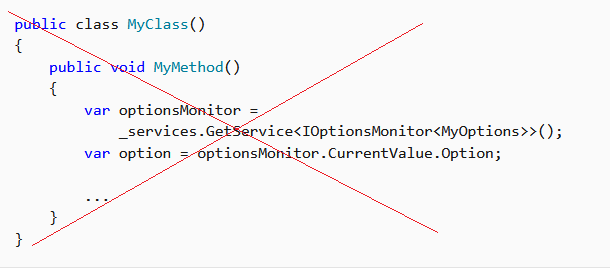
Correct:
public class MyClass
{
    private readonly IOptionsMonitor<MyOptions> _optionsMonitor;

    public MyClass(IOptionsMonitor<MyOptions> optionsMonitor)
    {
        _optionsMonitor = optionsMonitor;
    }

    public void MyMethod()
    {
        var option = _optionsMonitor.CurrentValue.Option;

        ...
    }
}
另一個要避免的服務定位器變化是插入一個在執行階段解析相依性的工廠。 這兩種做法都會混用控制反轉策略。
避免以靜態方式存取
HttpContext(例如 IHttpContextAccessor.HttpContext)。
DI 是靜態/全域物件存取模式的「替代」選項。 如果您將其與靜態物件存取混合,可能無法實現 DI 的優點。
DI 中多租戶的建議設計模式
Orchard Core 是一種應用程式架構,可用於在 ASP.NET Core 上建置模組化的多租使用者應用程式。 如需詳細資訊,請參閱 Orchard Core 文件。
如需如何只使用 Orchard Core 架構來建置模組化和多租用戶應用程式,而不需要其任何 CMS 特定功能的範例,請參閱 Orchard Core 範例。
架構提供的服務
Program.cs 會註冊應用程式所使用的服務,包括 Entity Framework Core 和 ASP.NET Core MVC 等平台功能。 一開始,提供給 IServiceCollection 的 Program.cs 具有架構定義的服務 (取決於主機的設定方式)。 針對以 ASP.NET Core 範本為基礎的應用程式,架構會註冊超過 250 個服務。
下表列出這類架構註冊型服務的些許範例:
| 服務類型 | Lifetime |
|---|---|
| Microsoft.AspNetCore.Hosting.Builder.IApplicationBuilderFactory | Transient |
| IHostApplicationLifetime | Singleton |
| IWebHostEnvironment | Singleton |
| Microsoft.AspNetCore.Hosting.IStartup | Singleton |
| Microsoft.AspNetCore.Hosting.IStartupFilter | Transient |
| Microsoft.AspNetCore.Hosting.Server.IServer | Singleton |
| Microsoft.AspNetCore.Http.IHttpContextFactory | Transient |
| Microsoft.Extensions.Logging.ILogger<TCategoryName> | Singleton |
| Microsoft.Extensions.Logging.ILoggerFactory | Singleton |
| Microsoft.Extensions.ObjectPool.ObjectPoolProvider | Singleton |
| Microsoft.Extensions.Options.IConfigureOptions<TOptions> | Transient |
| Microsoft.Extensions.Options.IOptions<TOptions> | Singleton |
| System.Diagnostics.DiagnosticSource | Singleton |
| System.Diagnostics.DiagnosticListener | Singleton |
其他資源
- ASP.NET Core Blazor 相依注入
- ASP.NET Core 中檢視的相依性注入
- ASP.NET Core 控制器的相依性插入
- ASP.NET Core 中需求處理常式中的相依性注入
- 適用於 DI 應用程式開發的 NDC 會議模式
- ASP.NET Core 中的應用程式啟動
- ASP.NET Core 中基於工廠模式的中介軟體啟用
- 了解 .NET 中的相依性插入基本概念
- 相依性插入指導方針
- 教學課程:在 .NET 中使用相依性插入
- .NET 相依注入
- ASP.NET CORE 依賴注入:什麼是 ISERVICECOLLECTION?
- 在 ASP.NET Core 中處置 IDisposables 的四種方式
- 在 ASP.NET Core 使用 Dependency Injection 撰寫簡潔的程式碼 (MSDN)
- 明確相依性準則
- 逆轉控制容器和相依性插入模式 (Martin Fowler) \(英文\)
- How to register a service with multiple interfaces in ASP.NET Core DI (如何使用 ASP.NET Core DI 中的多個介面註冊服務)
作者:Kirk Larkin、Steve Smith 和 Brandon Dahler
ASP.NET Core 支援相依性插入 (DI) 軟體設計模式,這是用來在類別與其相依性之間達成控制權反轉 (IoC) \(英文\) 的技術。
如需 MVC 控制器中相依性插入的特定詳細資訊,請參閱 ASP.NET Core 控制器的相依性插入。
如需在 Web 應用程式以外的應用程式中使用相依性插入的相關資訊,請參閱 .NET 中的相依性插入。
如需選項相依性插入的詳細資訊,請參閱 ASP.NET Core 中的選項模式。
本主題提供 ASP.NET Core 中相依性插入的相關資訊。 使用相依性插入的主要文件包含在 .NET 的相依性插入中。
檢視或下載範例程式碼 \(英文\) (如何下載)
依賴注入概觀
相依物件是另一個物件所依賴的物件。 檢查具有 MyDependency 方法的下列 WriteMessage 類別,其他類別相依於此:
public class MyDependency
{
    public void WriteMessage(string message)
    {
        Console.WriteLine($"MyDependency.WriteMessage called. Message: {message}");
    }
}
類別可建立 MyDependency 類別的執行個體,以便使用其 WriteMessage 方法。 在下列範例中,MyDependency 類別是 IndexModel 類別的相依性:
public class IndexModel : PageModel
{
    private readonly MyDependency _dependency = new MyDependency();

    public void OnGet()
    {
        _dependency.WriteMessage("IndexModel.OnGet");
    }
}
類別建立並直接相依於 MyDependency 類別。 程式碼相依性 (例如上述範例) 有問題,因此基於下列原因應該避免使用:
- 若要將
MyDependency取代為不同的實作,必須修改IndexModel類別。 - 若
MyDependency有相依性,那些相依性必須同時由IndexModel類別設定。 在具有多個相依於MyDependency之多個類別的大型專案中,設定程式碼在不同的應用程式之間會變得鬆散。 - 此實作難以進行單元測試。
相依性注入可透過下列方式解決這些問題:
- 使用介面或基底類別來將相依性實作抽象化。
- 在服務容器中註冊相依性。 ASP.NET Core 提供內建服務容器 IServiceProvider。 服務通常會在應用程式的
Program.cs檔案中註冊。 - 將服務注入到其使用類別的建構函式中。 架構負責管理依賴關係的實例,並在不再需要時將其釋放。
在範例應用程式中,IMyDependency 介面會定義 WriteMessage 方法:
public interface IMyDependency
{
    void WriteMessage(string message);
}
這個介面由具體類型 MyDependency 實作。
public class MyDependency : IMyDependency
{
    public void WriteMessage(string message)
    {
        Console.WriteLine($"MyDependency.WriteMessage Message: {message}");
    }
}
範例應用程式會用具象型別 IMyDependency 註冊 MyDependency 服務。
AddScoped 方法會以具範圍的存留期註冊服務,也就是單一要求的存留期。 會在本主題的後文說明服務存留期。
using DependencyInjectionSample.Interfaces;
using DependencyInjectionSample.Services;

var builder = WebApplication.CreateBuilder(args);

builder.Services.AddRazorPages();

builder.Services.AddScoped<IMyDependency, MyDependency>();

var app = builder.Build();
在範例應用程式中,會要求 IMyDependency 服務,並將其用來呼叫 WriteMessage 方法:
public class Index2Model : PageModel
{
    private readonly IMyDependency _myDependency;

    public Index2Model(IMyDependency myDependency)
    {
        _myDependency = myDependency;
    }

    public void OnGet()
    {
        _myDependency.WriteMessage("Index2Model.OnGet");
    }
}
使用 DI 模式,控制器或 Razor Page 會:
- 不會使用具體類型
MyDependency,只使用其所實作的IMyDependency介面。 這可讓您輕鬆地變更實作,而不需要修改控制器或 Razor Page。 - 不會建立
MyDependency的執行個體,其是由 DI 容器所建立。
IMyDependency 介面的實作可透過使用內建記錄 API 來改善:
public class MyDependency2 : IMyDependency
{
    private readonly ILogger<MyDependency2> _logger;

    public MyDependency2(ILogger<MyDependency2> logger)
    {
        _logger = logger;
    }

    public void WriteMessage(string message)
    {
        _logger.LogInformation( $"MyDependency2.WriteMessage Message: {message}");
    }
}
更新的 Program.cs 會註冊新的 IMyDependency 實作:
using DependencyInjectionSample.Interfaces;
using DependencyInjectionSample.Services;

var builder = WebApplication.CreateBuilder(args);

builder.Services.AddRazorPages();

builder.Services.AddScoped<IMyDependency, MyDependency2>();

var app = builder.Build();
MyDependency2 相依於 ILogger<TCategoryName>,且在建構函式中要求之。
ILogger<TCategoryName> 是架構提供的服務。
在鏈式結構中使用相依性注入是很常見的。 每個要求的相依性接著會要求其自己的相依性。 容器會解決圖形中的相依性,並傳回完全解析的服務。 必須先解析的相依性集合組通常稱為「相依性樹狀結構」、「相依性圖形」或「物件圖形」。
容器透過利用(泛型)的開放型別來解析,從而免去了註冊每個(泛型)已建構型別的必要。
在依賴注入術語中,服務:
- 通常是為其他物件提供服務的物件,例如
IMyDependency服務。 - 與 Web 服務無關,但服務可能使用 Web 服務。
此架構提供強固的記錄系統。 之所以撰寫上述範例示範的 IMyDependency 實作,是為了示範基礎 DI,而非實作記錄。 多數應用程式不需要撰寫記錄器。 下列程式碼示範如何使用預設記錄,而不需要註冊任何服務:
public class AboutModel : PageModel
{
    private readonly ILogger _logger;

    public AboutModel(ILogger<AboutModel> logger)
    {
        _logger = logger;
    }

    public string Message { get; set; } = string.Empty;

    public void OnGet()
    {
        Message = $"About page visited at {DateTime.UtcNow.ToLongTimeString()}";
        _logger.LogInformation(Message);
    }
}
使用上述程式碼時無須更新 Program.cs,因為記錄會由架構提供。
使用擴充方法註冊服務群組
ASP.NET Core 架構會使用慣例來註冊一組相關服務。 此慣例為使用單一 Add{GROUP_NAME} 擴充方法來註冊所有架構功能需要的服務。 例如,AddControllers 擴充方法會註冊 MVC 控制器所需的服務。
下列程式代碼是由 Pages 範本使用個別帳戶的 Razor 產生的,並示範如何使用擴充方法 AddDbContext 和 AddDefaultIdentity,將其他服務新增至容器:
using DependencyInjectionSample.Data;
using Microsoft.AspNetCore.Identity;
using Microsoft.EntityFrameworkCore;

var builder = WebApplication.CreateBuilder(args);

var connectionString = builder.Configuration.GetConnectionString("DefaultConnection");
builder.Services.AddDbContext<ApplicationDbContext>(options =>
    options.UseSqlServer(connectionString));
builder.Services.AddDatabaseDeveloperPageExceptionFilter();

builder.Services.AddDefaultIdentity<IdentityUser>(options => options.SignIn.RequireConfirmedAccount = true)
    .AddEntityFrameworkStores<ApplicationDbContext>();
builder.Services.AddRazorPages();

var app = builder.Build();
請考量會註冊服務並設定選項的下列內容:
using ConfigSample.Options;
using Microsoft.Extensions.DependencyInjection.ConfigSample.Options;

var builder = WebApplication.CreateBuilder(args);

builder.Services.AddRazorPages();

builder.Services.Configure<PositionOptions>(
    builder.Configuration.GetSection(PositionOptions.Position));
builder.Services.Configure<ColorOptions>(
    builder.Configuration.GetSection(ColorOptions.Color));

builder.Services.AddScoped<IMyDependency, MyDependency>();
builder.Services.AddScoped<IMyDependency2, MyDependency2>();

var app = builder.Build();
相關註冊群組可移至擴充方法,以註冊服務。 例如,設定服務會新增至下列類別:
using ConfigSample.Options;
using Microsoft.Extensions.Configuration;

namespace Microsoft.Extensions.DependencyInjection
{
    public static class MyConfigServiceCollectionExtensions
    {
        public static IServiceCollection AddConfig(
             this IServiceCollection services, IConfiguration config)
        {
            services.Configure<PositionOptions>(
                config.GetSection(PositionOptions.Position));
            services.Configure<ColorOptions>(
                config.GetSection(ColorOptions.Color));

            return services;
        }

        public static IServiceCollection AddMyDependencyGroup(
             this IServiceCollection services)
        {
            services.AddScoped<IMyDependency, MyDependency>();
            services.AddScoped<IMyDependency2, MyDependency2>();

            return services;
        }
    }
}
剩餘的服務會在相似的類別中註冊。 下列程式碼使用新增擴充方法來註冊服務:
using Microsoft.Extensions.DependencyInjection.ConfigSample.Options;

var builder = WebApplication.CreateBuilder(args);

builder.Services
    .AddConfig(builder.Configuration)
    .AddMyDependencyGroup();

builder.Services.AddRazorPages();

var app = builder.Build();
注意:每個 services.Add{GROUP_NAME} 擴充方法都會新增並可能會設定服務。 例如,AddControllersWithViews 會新增 MVC 控制器與檢視所需的服務,而 AddRazorPages 會新增 Razor Pages 所需的服務。
使用壽命
請參閱 .NET 中的相依性插入中的服務存留期
若要在中介軟體中使用限定範圍服務,請使用下列其中一種方法:
- 將服務插入中介軟體的
Invoke或InvokeAsync方法。 使用建構函式注入會拋出運行時例外,因為它會強制限定範圍的服務行為像單例一樣。 存留期和註冊選項一節中的範例示範InvokeAsync方法。 - 使用 Factory 式中介軟體。 使用此方法註冊的中介軟體會根據用戶端要求 (連線) 啟動,以允許將限定範圍服務插入中介軟體的建構函式中。
如需詳細資訊,請參閱撰寫自訂 ASP.NET Core 中介軟體。
服務註冊方法
請參閱 .NET 中相依性插入中的服務註冊方法
當模擬測試類型時,通常會使用多個實作。
只用一個實作型別註冊服務,相當於使用相同的實作和服務型別註冊該服務。 這就是一個服務的多個實作無法使用不採用明確服務型別方法註冊的原因。 這些方法可註冊服務的多個執行個體,但這些執行個體全都會有相同的實作型別。
所有上述服務註冊方法都能用來註冊相同服務型別的多個服務執行個體。 在下列範例中,系統兩次呼叫 AddSingleton,其服務型別為 IMyDependency。 第二次的 AddSingleton 呼叫在解析為 IMyDependency 時覆寫了第一次的呼叫,而在多個服務透過 IEnumerable<IMyDependency> 解析時,會加入到第一次的呼叫中。 透過 IEnumerable<{SERVICE}> 解析時,服務會以註冊時的順序顯示。
services.AddSingleton<IMyDependency, MyDependency>();
services.AddSingleton<IMyDependency, DifferentDependency>();

public class MyService
{
    public MyService(IMyDependency myDependency,
       IEnumerable<IMyDependency> myDependencies)
    {
        Trace.Assert(myDependency is DifferentDependency);

        var dependencyArray = myDependencies.ToArray();
        Trace.Assert(dependencyArray[0] is MyDependency);
        Trace.Assert(dependencyArray[1] is DifferentDependency);
    }
}
金鑰服務
「鍵控服務」是指一種使用鍵註冊和擷取相依性注入服務的機制。 透過呼叫 AddKeyedSingleton (或 AddKeyedScoped 或 AddKeyedTransient) 來註冊服務,從而與鍵建立關聯。 藉由指定具有 [FromKeyedServices] 屬性的索引鍵來存取已註冊的服務。 下列程式碼示範如何使用索引鍵服務:
using Microsoft.AspNetCore.Mvc;
using Microsoft.AspNetCore.SignalR;

var builder = WebApplication.CreateBuilder(args);

builder.Services.AddKeyedSingleton<ICache, BigCache>("big");
builder.Services.AddKeyedSingleton<ICache, SmallCache>("small");
builder.Services.AddControllers();

var app = builder.Build();

app.MapGet("/big", ([FromKeyedServices("big")] ICache bigCache) => bigCache.Get("date"));
app.MapGet("/small", ([FromKeyedServices("small")] ICache smallCache) =>
                                                               smallCache.Get("date"));

app.MapControllers();

app.Run();

public interface ICache
{
    object Get(string key);
}
public class BigCache : ICache
{
    public object Get(string key) => $"Resolving {key} from big cache.";
}

public class SmallCache : ICache
{
    public object Get(string key) => $"Resolving {key} from small cache.";
}

[ApiController]
[Route("/cache")]
public class CustomServicesApiController : Controller
{
    [HttpGet("big-cache")]
    public ActionResult<object> GetOk([FromKeyedServices("big")] ICache cache)
    {
        return cache.Get("data-mvc");
    }
}

public class MyHub : Hub
{
    public void Method([FromKeyedServices("small")] ICache cache)
    {
        Console.WriteLine(cache.Get("signalr"));
    }
}
建構函式插入行為
請參閱 建構函式插入行為在.NET 中的相依性插入
Entity Framework 內容
根據預設,因為會將 Web 應用程式資料庫作業範圍設定為用戶端要求,所以通常會使用具範圍存留期將 Entity Framework 內容新增至服務容器。 若要使用不同的存留期,請使用 AddDbContext 多載來指定存留期。 指定存留期的服務不應該使用存留期比服務存留期還短的資料庫內容。
留期和註冊選項
為了示範這些服務存留期與註冊選項之間的差異,請考慮下列介面,以具有識別碼 OperationId 的「作業」代表工作。 視如何針對下列介面設定作業服務存留期而定,當類別要求時,容器會提供相同或不同的服務執行個體:
public interface IOperation
{
    string OperationId { get; }
}

public interface IOperationTransient : IOperation { }
public interface IOperationScoped : IOperation { }
public interface IOperationSingleton : IOperation { }
下列 Operation 類別會實作上述所有介面。
Operation 建構函式會產生 GUID,並將最後 4 個字元儲存在 OperationId 屬性中:
public class Operation : IOperationTransient, IOperationScoped, IOperationSingleton
{
    public Operation()
    {
        OperationId = Guid.NewGuid().ToString()[^4..];
    }

    public string OperationId { get; }
}
下列程式碼會根據具名存留期來建立 Operation 類別的多個註冊:
var builder = WebApplication.CreateBuilder(args);

builder.Services.AddRazorPages();

builder.Services.AddTransient<IOperationTransient, Operation>();
builder.Services.AddScoped<IOperationScoped, Operation>();
builder.Services.AddSingleton<IOperationSingleton, Operation>();

var app = builder.Build();

if (!app.Environment.IsDevelopment())
{
    app.UseExceptionHandler("/Error");
    app.UseHsts();
}

app.UseHttpsRedirection();
app.UseStaticFiles();

app.UseMyMiddleware();
app.UseRouting();

app.UseAuthorization();

app.MapRazorPages();

app.Run();
範例應用程式會示範要求內與個別要求之間的物件存留期。
IndexModel 和中介軟體會針對每種 IOperation 類型發出請求,並記錄每個類型的 OperationId:
public class IndexModel : PageModel
{
    private readonly ILogger _logger;
    private readonly IOperationTransient _transientOperation;
    private readonly IOperationSingleton _singletonOperation;
    private readonly IOperationScoped _scopedOperation;

    public IndexModel(ILogger<IndexModel> logger,
                      IOperationTransient transientOperation,
                      IOperationScoped scopedOperation,
                      IOperationSingleton singletonOperation)
    {
        _logger = logger;
        _transientOperation = transientOperation;
        _scopedOperation    = scopedOperation;
        _singletonOperation = singletonOperation;
    }

    public void  OnGet()
    {
        _logger.LogInformation("Transient: " + _transientOperation.OperationId);
        _logger.LogInformation("Scoped: "    + _scopedOperation.OperationId);
        _logger.LogInformation("Singleton: " + _singletonOperation.OperationId);
    }
}
與 IndexModel 類似,中介軟體會解析相同的服務:
public class MyMiddleware
{
    private readonly RequestDelegate _next;
    private readonly ILogger _logger;

    private readonly IOperationSingleton _singletonOperation;

    public MyMiddleware(RequestDelegate next, ILogger<MyMiddleware> logger,
        IOperationSingleton singletonOperation)
    {
        _logger = logger;
        _singletonOperation = singletonOperation;
        _next = next;
    }

    public async Task InvokeAsync(HttpContext context,
        IOperationTransient transientOperation, IOperationScoped scopedOperation)
    {
        _logger.LogInformation("Transient: " + transientOperation.OperationId);
        _logger.LogInformation("Scoped: " + scopedOperation.OperationId);
        _logger.LogInformation("Singleton: " + _singletonOperation.OperationId);

        await _next(context);
    }
}

public static class MyMiddlewareExtensions
{
    public static IApplicationBuilder UseMyMiddleware(this IApplicationBuilder builder)
    {
        return builder.UseMiddleware<MyMiddleware>();
    }
}
必須在 InvokeAsync 方法中解析限定範圍和暫時性服務:
public async Task InvokeAsync(HttpContext context,
    IOperationTransient transientOperation, IOperationScoped scopedOperation)
{
    _logger.LogInformation("Transient: " + transientOperation.OperationId);
    _logger.LogInformation("Scoped: " + scopedOperation.OperationId);
    _logger.LogInformation("Singleton: " + _singletonOperation.OperationId);

    await _next(context);
}
記錄器輸出會顯示:
- 「暫時性」 物件一律不同。 在
OperationId和中介軟體中,暫時性IndexModel值不同。 - 在同一個請求中,限定範圍物件是相同的,但在每個新請求中則會有所不同。
- 對於每個請求而言,Singleton物件都是相同的。
若要減少記錄輸出,請在 appsettings.Development.json 檔案中設定「Logging:LogLevel:Microsoft:Error」:
{
  "MyKey": "MyKey from appsettings.Development.json",
  "Logging": {
    "LogLevel": {
      "Default": "Information",
      "System": "Debug",
      "Microsoft": "Error"
    }
  }
}
在應用程式啟動時解析服務
下列程式碼示範如何在應用程式啟動時,在有限的持續時間內解析限定範圍服務:
var builder = WebApplication.CreateBuilder(args);

builder.Services.AddScoped<IMyDependency, MyDependency>();

var app = builder.Build();

using (var serviceScope = app.Services.CreateScope())
{
    var services = serviceScope.ServiceProvider;

    var myDependency = services.GetRequiredService<IMyDependency>();
    myDependency.WriteMessage("Call services from main");
}

app.MapGet("/", () => "Hello World!");

app.Run();
範圍驗證
請參閱 建構函式插入行為在.NET 中的相依性插入
如需詳細資訊,請參閱範圍驗證。
請求服務
服務及其在 ASP.NET Core 要求內的相依性會透過 HttpContext.RequestServices 公開。
架構會為每個要求建立一個範圍,且 RequestServices 會公開限定範圍的服務提供者。 只要要求為使用中,所有限定範圍服務就都有效。
Note
偏好要求相依性做為建構函式參數,而不是從 RequestServices 解析服務。 要求相依性做為建構函式參數會產生更容易測試的類別。
相依注入的設計服務
設計服務進行相依性注入時:
- 避免具有狀態的靜態類別和成員。 避免設計應用程式改用 singleton 服務來建立全域狀態。
- 避免直接在服務內具現化相依類別。 直接具現化會將程式碼耦合到特定實作。
- 讓服務維持在小型、情況良好且可輕鬆測試的狀態。
如果類別有許多插入的相依性,則可能表示類別有太多責任,並且違反單一責任原則 (SRP)。 嘗試通過將某些責任移到新類別中來重構類別。 請記住,Razor Pages 頁面模型類別與 MVC 控制器類別應該專注於 UI 考量。
服務的處置
容器會為它建立的 Dispose 類型呼叫 IDisposable。 開發人員永遠不會處置從容器所解析的服務。 如果類型或工廠已註冊為 "singleton",則容器會自動處置該 "singleton"。
在下列範例中,服務會由服務容器建立並自動處置:dependency-injection\samples\6.x\DIsample2\DIsample2\Services\Service1.cs
public class Service1 : IDisposable
{
    private bool _disposed;

    public void Write(string message)
    {
        Console.WriteLine($"Service1: {message}");
    }

    public void Dispose()
    {
        if (_disposed)
            return;

        Console.WriteLine("Service1.Dispose");
        _disposed = true;
    }
}

public class Service2 : IDisposable
{
    private bool _disposed;

    public void Write(string message)
    {
        Console.WriteLine($"Service2: {message}");
    }

    public void Dispose()
    {
        if (_disposed)
            return;

        Console.WriteLine("Service2.Dispose");
        _disposed = true;
    }
}

public interface IService3
{
    public void Write(string message);
}

public class Service3 : IService3, IDisposable
{
    private bool _disposed;

    public Service3(string myKey)
    {
        MyKey = myKey;
    }

    public string MyKey { get; }

    public void Write(string message)
    {
        Console.WriteLine($"Service3: {message}, MyKey = {MyKey}");
    }

    public void Dispose()
    {
        if (_disposed)
            return;

        Console.WriteLine("Service3.Dispose");
        _disposed = true;
    }
}
using DIsample2.Services;

var builder = WebApplication.CreateBuilder(args);

builder.Services.AddRazorPages();

builder.Services.AddScoped<Service1>();
builder.Services.AddSingleton<Service2>();

var myKey = builder.Configuration["MyKey"];
builder.Services.AddSingleton<IService3>(sp => new Service3(myKey));

var app = builder.Build();
public class IndexModel : PageModel
{
    private readonly Service1 _service1;
    private readonly Service2 _service2;
    private readonly IService3 _service3;

    public IndexModel(Service1 service1, Service2 service2, IService3 service3)
    {
        _service1 = service1;
        _service2 = service2;
        _service3 = service3;
    }

    public void OnGet()
    {
        _service1.Write("IndexModel.OnGet");
        _service2.Write("IndexModel.OnGet");
        _service3.Write("IndexModel.OnGet");
    }
}
偵錯控制台在每次重新載入索引頁面之後會顯示下列輸出:
Service1: IndexModel.OnGet
Service2: IndexModel.OnGet
Service3: IndexModel.OnGet, MyKey = MyKey from appsettings.Development.json
Service1.Dispose
服務容器未建立的服務
請考慮下列程式碼:
var builder = WebApplication.CreateBuilder(args);

builder.Services.AddRazorPages();

builder.Services.AddSingleton(new Service1());
builder.Services.AddSingleton(new Service2());
在上述程式碼中:
- 服務執行個體不是由服務容器建立的。
- 架構不會自動處置服務。
- 開發人員負責處置服務。
暫時性和共用執行個體的 IDisposable 指導
請參閱.NET 中相依性注入中的暫時性和共用執行個體的 IDisposable 指引
預設服務容器的替代
請參閱 .NET 中相依性插入中的預設服務容器取代
Recommendations
請參閱 .NET 中的相依性插入中的建議
避免使用「服務定位器模式」。 例如,當您可以改用 DI 時,請勿叫用 GetService 來取得服務執行個體:
Incorrect:
Correct:
public class MyClass
{
    private readonly IOptionsMonitor<MyOptions> _optionsMonitor;

    public MyClass(IOptionsMonitor<MyOptions> optionsMonitor)
    {
        _optionsMonitor = optionsMonitor;
    }

    public void MyMethod()
    {
        var option = _optionsMonitor.CurrentValue.Option;

        ...
    }
}
另一個要避免的服務定位器變化是插入一個在執行階段解析相依性的工廠。 這兩種做法都會混用控制反轉策略。
避免以靜態方式存取
HttpContext(例如 IHttpContextAccessor.HttpContext)。
DI 是靜態/全域物件存取模式的「替代」選項。 如果您將 DI 與靜態物件存取混合,則可能無法實現 DI 的優點。
DI 中多租戶的建議設計模式
Orchard Core 是一種應用程式架構,可用於在 ASP.NET Core 上建置模組化的多租用戶應用程式。 如需詳細資訊,請參閱 Orchard Core 文件。
如需如何只使用 Orchard Core 架構來建置模組化和多租用戶應用程式,而不需要其任何 CMS 特定功能的範例,請參閱 Orchard Core 範例。
架構提供的服務
Program.cs 會註冊應用程式所使用的服務,包括 Entity Framework Core 和 ASP.NET Core MVC 等平台功能。 一開始,提供給 IServiceCollection 的 Program.cs 具有架構定義的服務 (取決於主機的設定方式)。 針對以 ASP.NET Core 範本為基礎的應用程式,架構會註冊超過 250 個服務。
下表列出這類架構註冊型服務的些許範例:
| 服務類型 | Lifetime |
|---|---|
| Microsoft.AspNetCore.Hosting.Builder.IApplicationBuilderFactory | Transient |
| IHostApplicationLifetime | Singleton |
| IWebHostEnvironment | Singleton |
| Microsoft.AspNetCore.Hosting.IStartup | Singleton |
| Microsoft.AspNetCore.Hosting.IStartupFilter | Transient |
| Microsoft.AspNetCore.Hosting.Server.IServer | Singleton |
| Microsoft.AspNetCore.Http.IHttpContextFactory | Transient |
| Microsoft.Extensions.Logging.ILogger<TCategoryName> | Singleton |
| Microsoft.Extensions.Logging.ILoggerFactory | Singleton |
| Microsoft.Extensions.ObjectPool.ObjectPoolProvider | Singleton |
| Microsoft.Extensions.Options.IConfigureOptions<TOptions> | Transient |
| Microsoft.Extensions.Options.IOptions<TOptions> | Singleton |
| System.Diagnostics.DiagnosticSource | Singleton |
| System.Diagnostics.DiagnosticListener | Singleton |
其他資源
- ASP.NET Core 中檢視的相依性注入
- ASP.NET Core 控制器的相依性插入
- ASP.NET Core 中需求處理常式中的相依性注入
- ASP.NET Core Blazor 相依注入
- 適用於 DI 應用程式開發的 NDC 會議模式
- ASP.NET Core 中的應用程式啟動
- ASP.NET Core 中基於工廠模式的中介軟體啟用
- 了解 .NET 中的相依性插入基本概念
- 相依性插入指導方針
- 教學課程:在 .NET 中使用相依性插入
- .NET 相依注入
- ASP.NET CORE 依賴注入:什麼是 ISERVICECOLLECTION?
- 在 ASP.NET Core 中處置 IDisposables 的四種方式
- 在 ASP.NET Core 使用 Dependency Injection 撰寫簡潔的程式碼 (MSDN)
- 明確相依性準則
- 逆轉控制容器和相依性插入模式 (Martin Fowler) \(英文\)
- How to register a service with multiple interfaces in ASP.NET Core DI (如何使用 ASP.NET Core DI 中的多個介面註冊服務)
作者:Kirk Larkin、Steve Smith 和 Brandon Dahler
ASP.NET Core 支援相依性插入 (DI) 軟體設計模式,這是用來在類別與其相依性之間達成控制權反轉 (IoC) \(英文\) 的技術。
如需 MVC 控制器中相依性插入的特定詳細資訊,請參閱 ASP.NET Core 控制器的相依性插入。
如需在 Web 應用程式以外的應用程式中使用相依性插入的相關資訊,請參閱 .NET 中的相依性插入。
如需選項相依性插入的詳細資訊,請參閱 ASP.NET Core 中的選項模式。
本主題提供 ASP.NET Core 中相依性插入的相關資訊。 使用相依性插入的主要文件包含在 .NET 的相依性插入中。
檢視或下載範例程式碼 \(英文\) (如何下載)
依賴注入概觀
相依物件是另一個物件所依賴的物件。 檢查具有 MyDependency 方法的下列 WriteMessage 類別,其他類別相依於此:
public class MyDependency
{
    public void WriteMessage(string message)
    {
        Console.WriteLine($"MyDependency.WriteMessage called. Message: {message}");
    }
}
類別可建立 MyDependency 類別的執行個體,以便使用其 WriteMessage 方法。 在下列範例中,MyDependency 類別是 IndexModel 類別的相依性:
public class IndexModel : PageModel
{
    private readonly MyDependency _dependency = new MyDependency();

    public void OnGet()
    {
        _dependency.WriteMessage("IndexModel.OnGet");
    }
}
類別建立並直接相依於 MyDependency 類別。 程式碼相依性 (例如上述範例) 有問題,因此基於下列原因應該避免使用:
- 若要將
MyDependency取代為不同的實作,必須修改IndexModel類別。 - 若
MyDependency有相依性,那些相依性必須同時由IndexModel類別設定。 在具有多個相依於MyDependency之多個類別的大型專案中,設定程式碼在不同的應用程式之間會變得鬆散。 - 此實作難以進行單元測試。
相依性注入可透過下列方式解決這些問題:
- 使用介面或基底類別來將相依性實作抽象化。
- 在服務容器中註冊相依性。 ASP.NET Core 提供內建服務容器 IServiceProvider。 服務通常會在應用程式的
Program.cs檔案中註冊。 - 將服務注入到其使用類別的建構函式中。 架構負責管理依賴關係的實例,並在不再需要時將其釋放。
在範例應用程式中,IMyDependency 介面會定義 WriteMessage 方法:
public interface IMyDependency
{
    void WriteMessage(string message);
}
這個介面由具體類型 MyDependency 實作。
public class MyDependency : IMyDependency
{
    public void WriteMessage(string message)
    {
        Console.WriteLine($"MyDependency.WriteMessage Message: {message}");
    }
}
範例應用程式會用具象型別 IMyDependency 註冊 MyDependency 服務。
AddScoped 方法會以具範圍的存留期註冊服務,也就是單一要求的存留期。 會在本主題的後文說明服務存留期。
using DependencyInjectionSample.Interfaces;
using DependencyInjectionSample.Services;

var builder = WebApplication.CreateBuilder(args);

builder.Services.AddRazorPages();

builder.Services.AddScoped<IMyDependency, MyDependency>();

var app = builder.Build();
在範例應用程式中,會要求 IMyDependency 服務,並將其用來呼叫 WriteMessage 方法:
public class Index2Model : PageModel
{
    private readonly IMyDependency _myDependency;

    public Index2Model(IMyDependency myDependency)
    {
        _myDependency = myDependency;
    }

    public void OnGet()
    {
        _myDependency.WriteMessage("Index2Model.OnGet");
    }
}
使用 DI 模式,控制器或 Razor Page 會:
- 不會使用具體類型
MyDependency,只使用其所實作的IMyDependency介面。 這可讓您輕鬆地變更實作,而不需要修改控制器或 Razor Page。 - 不會建立
MyDependency的執行個體,其是由 DI 容器所建立。
IMyDependency 介面的實作可透過使用內建記錄 API 來改善:
public class MyDependency2 : IMyDependency
{
    private readonly ILogger<MyDependency2> _logger;

    public MyDependency2(ILogger<MyDependency2> logger)
    {
        _logger = logger;
    }

    public void WriteMessage(string message)
    {
        _logger.LogInformation( $"MyDependency2.WriteMessage Message: {message}");
    }
}
更新的 Program.cs 會註冊新的 IMyDependency 實作:
using DependencyInjectionSample.Interfaces;
using DependencyInjectionSample.Services;

var builder = WebApplication.CreateBuilder(args);

builder.Services.AddRazorPages();

builder.Services.AddScoped<IMyDependency, MyDependency2>();

var app = builder.Build();
MyDependency2 相依於 ILogger<TCategoryName>,且在建構函式中要求之。
ILogger<TCategoryName> 是架構提供的服務。
在鏈式結構中使用相依性注入是很常見的。 每個要求的相依性接著會要求其自己的相依性。 容器會解決圖形中的相依性,並傳回完全解析的服務。 必須先解析的相依性集合組通常稱為「相依性樹狀結構」、「相依性圖形」或「物件圖形」。
容器透過利用(泛型)的開放型別來解析,從而免去了註冊每個(泛型)已建構型別的必要。
在依賴注入術語中,服務:
- 通常是為其他物件提供服務的物件,例如
IMyDependency服務。 - 與 Web 服務無關,但服務可能使用 Web 服務。
此架構提供強固的記錄系統。 之所以撰寫上述範例示範的 IMyDependency 實作,是為了示範基礎 DI,而非實作記錄。 多數應用程式不需要撰寫記錄器。 下列程式碼示範如何使用預設記錄,而不需要註冊任何服務:
public class AboutModel : PageModel
{
    private readonly ILogger _logger;

    public AboutModel(ILogger<AboutModel> logger)
    {
        _logger = logger;
    }

    public string Message { get; set; } = string.Empty;

    public void OnGet()
    {
        Message = $"About page visited at {DateTime.UtcNow.ToLongTimeString()}";
        _logger.LogInformation(Message);
    }
}
使用上述程式碼時無須更新 Program.cs,因為記錄會由架構提供。
使用擴充方法註冊服務群組
ASP.NET Core 架構會使用慣例來註冊一組相關服務。 此慣例為使用單一 Add{GROUP_NAME} 擴充方法來註冊所有架構功能需要的服務。 例如,AddControllers 擴充方法會註冊 MVC 控制器所需的服務。
下列程式碼是由 Razor Pages 範本使用個別使用者帳戶所產生,並示範如何使用擴充方法 AddDbContext 和 AddDefaultIdentity,將其他服務新增至容器:
using DependencyInjectionSample.Data;
using Microsoft.AspNetCore.Identity;
using Microsoft.EntityFrameworkCore;

var builder = WebApplication.CreateBuilder(args);

var connectionString = builder.Configuration.GetConnectionString("DefaultConnection");
builder.Services.AddDbContext<ApplicationDbContext>(options =>
    options.UseSqlServer(connectionString));
builder.Services.AddDatabaseDeveloperPageExceptionFilter();

builder.Services.AddDefaultIdentity<IdentityUser>(options => options.SignIn.RequireConfirmedAccount = true)
    .AddEntityFrameworkStores<ApplicationDbContext>();
builder.Services.AddRazorPages();

var app = builder.Build();
請考量會註冊服務並設定選項的下列內容:
using ConfigSample.Options;
using Microsoft.Extensions.DependencyInjection.ConfigSample.Options;

var builder = WebApplication.CreateBuilder(args);

builder.Services.AddRazorPages();

builder.Services.Configure<PositionOptions>(
    builder.Configuration.GetSection(PositionOptions.Position));
builder.Services.Configure<ColorOptions>(
    builder.Configuration.GetSection(ColorOptions.Color));

builder.Services.AddScoped<IMyDependency, MyDependency>();
builder.Services.AddScoped<IMyDependency2, MyDependency2>();

var app = builder.Build();
相關註冊群組可移至擴充方法,以註冊服務。 例如,設定服務會新增至下列類別:
using ConfigSample.Options;
using Microsoft.Extensions.Configuration;

namespace Microsoft.Extensions.DependencyInjection
{
    public static class MyConfigServiceCollectionExtensions
    {
        public static IServiceCollection AddConfig(
             this IServiceCollection services, IConfiguration config)
        {
            services.Configure<PositionOptions>(
                config.GetSection(PositionOptions.Position));
            services.Configure<ColorOptions>(
                config.GetSection(ColorOptions.Color));

            return services;
        }

        public static IServiceCollection AddMyDependencyGroup(
             this IServiceCollection services)
        {
            services.AddScoped<IMyDependency, MyDependency>();
            services.AddScoped<IMyDependency2, MyDependency2>();

            return services;
        }
    }
}
剩餘的服務會在相似的類別中註冊。 下列程式碼使用新增擴充方法來註冊服務:
using Microsoft.Extensions.DependencyInjection.ConfigSample.Options;

var builder = WebApplication.CreateBuilder(args);

builder.Services
    .AddConfig(builder.Configuration)
    .AddMyDependencyGroup();

builder.Services.AddRazorPages();

var app = builder.Build();
注意:每個 services.Add{GROUP_NAME} 擴充方法都會新增並可能會設定服務。 例如,AddControllersWithViews 會新增 MVC 控制器與檢視所需的服務,而 AddRazorPages 會新增 Razor Pages 所需的服務。
使用壽命
請參閱 .NET 中的相依性插入中的服務存留期
若要在中介軟體中使用限定範圍服務,請使用下列其中一種方法:
- 將服務插入中介軟體的
Invoke或InvokeAsync方法。 使用建構函式注入會拋出運行時例外,因為它會強制限定範圍的服務行為像單例一樣。 存留期和註冊選項一節中的範例示範InvokeAsync方法。 - 使用 Factory 式中介軟體。 使用此方法註冊的中介軟體會根據用戶端要求 (連線) 啟動,以允許將限定範圍服務插入中介軟體的建構函式中。
如需詳細資訊,請參閱撰寫自訂 ASP.NET Core 中介軟體。
服務註冊方法
請參閱 .NET 中相依性插入中的服務註冊方法
當模擬測試類型時,通常會使用多個實作。
只用一個實作型別註冊服務,相當於使用相同的實作和服務型別註冊該服務。 這就是一個服務的多個實作無法使用不採用明確服務型別方法註冊的原因。 這些方法可註冊服務的多個執行個體,但這些執行個體全都會有相同的實作型別。
所有上述服務註冊方法都能用來註冊相同服務型別的多個服務執行個體。 在下列範例中,系統兩次呼叫 AddSingleton,其服務型別為 IMyDependency。 第二次的 AddSingleton 呼叫在解析為 IMyDependency 時覆寫了第一次的呼叫,而在多個服務透過 IEnumerable<IMyDependency> 解析時,會加入到第一次的呼叫中。 透過 IEnumerable<{SERVICE}> 解析時,服務會以註冊時的順序顯示。
services.AddSingleton<IMyDependency, MyDependency>();
services.AddSingleton<IMyDependency, DifferentDependency>();

public class MyService
{
    public MyService(IMyDependency myDependency,
       IEnumerable<IMyDependency> myDependencies)
    {
        Trace.Assert(myDependency is DifferentDependency);

        var dependencyArray = myDependencies.ToArray();
        Trace.Assert(dependencyArray[0] is MyDependency);
        Trace.Assert(dependencyArray[1] is DifferentDependency);
    }
}
建構函式插入行為
請參閱 建構函式插入行為在.NET 中的相依性插入
Entity Framework 內容
根據預設,因為會將 Web 應用程式資料庫作業範圍設定為用戶端要求,所以通常會使用具範圍存留期將 Entity Framework 內容新增至服務容器。 若要使用不同的存留期,請使用 AddDbContext 多載來指定存留期。 指定存留期的服務不應該使用存留期比服務存留期還短的資料庫內容。
留期和註冊選項
為了示範這些服務存留期與註冊選項之間的差異,請考慮下列介面,以具有識別碼 OperationId 的「作業」代表工作。 視如何針對下列介面設定作業服務存留期而定,當類別要求時,容器會提供相同或不同的服務執行個體:
public interface IOperation
{
    string OperationId { get; }
}

public interface IOperationTransient : IOperation { }
public interface IOperationScoped : IOperation { }
public interface IOperationSingleton : IOperation { }
下列 Operation 類別會實作上述所有介面。
Operation 建構函式會產生 GUID,並將最後 4 個字元儲存在 OperationId 屬性中:
public class Operation : IOperationTransient, IOperationScoped, IOperationSingleton
{
    public Operation()
    {
        OperationId = Guid.NewGuid().ToString()[^4..];
    }

    public string OperationId { get; }
}
下列程式碼會根據具名存留期來建立 Operation 類別的多個註冊:
var builder = WebApplication.CreateBuilder(args);

builder.Services.AddRazorPages();

builder.Services.AddTransient<IOperationTransient, Operation>();
builder.Services.AddScoped<IOperationScoped, Operation>();
builder.Services.AddSingleton<IOperationSingleton, Operation>();

var app = builder.Build();

if (!app.Environment.IsDevelopment())
{
    app.UseExceptionHandler("/Error");
    app.UseHsts();
}

app.UseHttpsRedirection();
app.UseStaticFiles();

app.UseMyMiddleware();
app.UseRouting();

app.UseAuthorization();

app.MapRazorPages();

app.Run();
範例應用程式會示範要求內與個別要求之間的物件存留期。
IndexModel 和中介軟體會針對每種 IOperation 類型發出請求,並記錄每個類型的 OperationId:
public class IndexModel : PageModel
{
    private readonly ILogger _logger;
    private readonly IOperationTransient _transientOperation;
    private readonly IOperationSingleton _singletonOperation;
    private readonly IOperationScoped _scopedOperation;

    public IndexModel(ILogger<IndexModel> logger,
                      IOperationTransient transientOperation,
                      IOperationScoped scopedOperation,
                      IOperationSingleton singletonOperation)
    {
        _logger = logger;
        _transientOperation = transientOperation;
        _scopedOperation    = scopedOperation;
        _singletonOperation = singletonOperation;
    }

    public void  OnGet()
    {
        _logger.LogInformation("Transient: " + _transientOperation.OperationId);
        _logger.LogInformation("Scoped: "    + _scopedOperation.OperationId);
        _logger.LogInformation("Singleton: " + _singletonOperation.OperationId);
    }
}
與 IndexModel 類似,中介軟體會解析相同的服務:
public class MyMiddleware
{
    private readonly RequestDelegate _next;
    private readonly ILogger _logger;

    private readonly IOperationSingleton _singletonOperation;

    public MyMiddleware(RequestDelegate next, ILogger<MyMiddleware> logger,
        IOperationSingleton singletonOperation)
    {
        _logger = logger;
        _singletonOperation = singletonOperation;
        _next = next;
    }

    public async Task InvokeAsync(HttpContext context,
        IOperationTransient transientOperation, IOperationScoped scopedOperation)
    {
        _logger.LogInformation("Transient: " + transientOperation.OperationId);
        _logger.LogInformation("Scoped: " + scopedOperation.OperationId);
        _logger.LogInformation("Singleton: " + _singletonOperation.OperationId);

        await _next(context);
    }
}

public static class MyMiddlewareExtensions
{
    public static IApplicationBuilder UseMyMiddleware(this IApplicationBuilder builder)
    {
        return builder.UseMiddleware<MyMiddleware>();
    }
}
必須在 InvokeAsync 方法中解析限定範圍和暫時性服務:
public async Task InvokeAsync(HttpContext context,
    IOperationTransient transientOperation, IOperationScoped scopedOperation)
{
    _logger.LogInformation("Transient: " + transientOperation.OperationId);
    _logger.LogInformation("Scoped: " + scopedOperation.OperationId);
    _logger.LogInformation("Singleton: " + _singletonOperation.OperationId);

    await _next(context);
}
記錄器輸出會顯示:
- 「暫時性」 物件一律不同。 在
OperationId和中介軟體中,暫時性IndexModel值不同。 - 在同一個請求中,限定範圍物件是相同的,但在每個新請求中則會有所不同。
- 對於每個請求而言,Singleton物件都是相同的。
若要減少記錄輸出,請在 appsettings.Development.json 檔案中設定「Logging:LogLevel:Microsoft:Error」:
{
  "MyKey": "MyKey from appsettings.Development.json",
  "Logging": {
    "LogLevel": {
      "Default": "Information",
      "System": "Debug",
      "Microsoft": "Error"
    }
  }
}
在應用程式啟動時解析服務
下列程式碼示範如何在應用程式啟動時,在有限的持續時間內解析限定範圍服務:
var builder = WebApplication.CreateBuilder(args);

builder.Services.AddScoped<IMyDependency, MyDependency>();

var app = builder.Build();

using (var serviceScope = app.Services.CreateScope())
{
    var services = serviceScope.ServiceProvider;

    var myDependency = services.GetRequiredService<IMyDependency>();
    myDependency.WriteMessage("Call services from main");
}

app.MapGet("/", () => "Hello World!");

app.Run();
範圍驗證
請參閱 建構函式插入行為在.NET 中的相依性插入
如需詳細資訊,請參閱範圍驗證。
請求服務
服務及其在 ASP.NET Core 要求內的相依性會透過 HttpContext.RequestServices 公開。
架構會為每個要求建立一個範圍,且 RequestServices 會公開限定範圍的服務提供者。 只要要求為使用中,所有限定範圍服務就都有效。
Note
偏好要求相依性做為建構函式參數,而不是從 RequestServices 解析服務。 要求相依性做為建構函式參數會產生更容易測試的類別。
相依注入的設計服務
設計服務進行相依性注入時:
- 避免具有狀態的靜態類別和成員。 避免設計應用程式改用 singleton 服務來建立全域狀態。
- 避免直接在服務內具現化相依類別。 直接具現化會將程式碼耦合到特定實作。
- 讓服務維持在小型、情況良好且可輕鬆測試的狀態。
如果類別有許多插入的相依性,則可能表示類別有太多責任,並且違反單一責任原則 (SRP)。 嘗試通過將某些責任移到新類別中來重構類別。 請記住,Razor Pages 頁面模型類別與 MVC 控制器類別應該專注於 UI 考量。
服務的處置
容器會為它建立的 Dispose 類型呼叫 IDisposable。 開發人員永遠不會處置從容器所解析的服務。 如果類型或工廠已註冊為 "singleton",則容器會自動處置該 "singleton"。
在下列範例中,服務會由服務容器建立並自動處置:dependency-injection\samples\6.x\DIsample2\DIsample2\Services\Service1.cs
public class Service1 : IDisposable
{
    private bool _disposed;

    public void Write(string message)
    {
        Console.WriteLine($"Service1: {message}");
    }

    public void Dispose()
    {
        if (_disposed)
            return;

        Console.WriteLine("Service1.Dispose");
        _disposed = true;
    }
}

public class Service2 : IDisposable
{
    private bool _disposed;

    public void Write(string message)
    {
        Console.WriteLine($"Service2: {message}");
    }

    public void Dispose()
    {
        if (_disposed)
            return;

        Console.WriteLine("Service2.Dispose");
        _disposed = true;
    }
}

public interface IService3
{
    public void Write(string message);
}

public class Service3 : IService3, IDisposable
{
    private bool _disposed;

    public Service3(string myKey)
    {
        MyKey = myKey;
    }

    public string MyKey { get; }

    public void Write(string message)
    {
        Console.WriteLine($"Service3: {message}, MyKey = {MyKey}");
    }

    public void Dispose()
    {
        if (_disposed)
            return;

        Console.WriteLine("Service3.Dispose");
        _disposed = true;
    }
}
using DIsample2.Services;

var builder = WebApplication.CreateBuilder(args);

builder.Services.AddRazorPages();

builder.Services.AddScoped<Service1>();
builder.Services.AddSingleton<Service2>();

var myKey = builder.Configuration["MyKey"];
builder.Services.AddSingleton<IService3>(sp => new Service3(myKey));

var app = builder.Build();
public class IndexModel : PageModel
{
    private readonly Service1 _service1;
    private readonly Service2 _service2;
    private readonly IService3 _service3;

    public IndexModel(Service1 service1, Service2 service2, IService3 service3)
    {
        _service1 = service1;
        _service2 = service2;
        _service3 = service3;
    }

    public void OnGet()
    {
        _service1.Write("IndexModel.OnGet");
        _service2.Write("IndexModel.OnGet");
        _service3.Write("IndexModel.OnGet");
    }
}
偵錯控制台在每次重新載入索引頁面之後會顯示下列輸出:
Service1: IndexModel.OnGet
Service2: IndexModel.OnGet
Service3: IndexModel.OnGet, MyKey = MyKey from appsettings.Development.json
Service1.Dispose
服務容器未建立的服務
請考慮下列程式碼:
var builder = WebApplication.CreateBuilder(args);

builder.Services.AddRazorPages();

builder.Services.AddSingleton(new Service1());
builder.Services.AddSingleton(new Service2());
在上述程式碼中:
- 服務執行個體不是由服務容器建立的。
- 架構不會自動處置服務。
- 開發人員負責處置服務。
暫時性和共用執行個體的 IDisposable 指導
請參閱.NET 中相依性注入中的暫時性和共用執行個體的 IDisposable 指引
預設服務容器的替代
請參閱 .NET 中相依性插入中的預設服務容器取代
Recommendations
請參閱 .NET 中的相依性插入中的建議
避免使用「服務定位器模式」。 例如,當您可以改用 DI 時,請勿叫用 GetService 來取得服務執行個體:
Incorrect:
Correct:
public class MyClass
{
    private readonly IOptionsMonitor<MyOptions> _optionsMonitor;

    public MyClass(IOptionsMonitor<MyOptions> optionsMonitor)
    {
        _optionsMonitor = optionsMonitor;
    }

    public void MyMethod()
    {
        var option = _optionsMonitor.CurrentValue.Option;

        ...
    }
}
另一個要避免的服務定位器變化是插入一個在執行階段解析相依性的工廠。 這兩種做法都會混用控制反轉策略。
避免以靜態方式存取
HttpContext(例如 IHttpContextAccessor.HttpContext)。
DI 是靜態/全域物件存取模式的「替代」選項。 如果您將 DI 與靜態物件存取混合,則可能無法實現 DI 的優點。
DI 中多租戶的建議設計模式
Orchard Core 是一種應用程式架構,可用於在 ASP.NET Core 上建置模組化的多租用戶應用程式。 如需詳細資訊,請參閱 Orchard Core 文件。
如需如何只使用 Orchard Core 架構來建置模組化和多租用戶應用程式,而不需要其任何 CMS 特定功能的範例,請參閱 Orchard Core 範例。
架構提供的服務
Program.cs 會註冊應用程式所使用的服務,包括 Entity Framework Core 和 ASP.NET Core MVC 等平台功能。 一開始,提供給 IServiceCollection 的 Program.cs 具有架構定義的服務 (取決於主機的設定方式)。 針對以 ASP.NET Core 範本為基礎的應用程式,架構會註冊超過 250 個服務。
下表列出這類架構註冊型服務的些許範例:
| 服務類型 | Lifetime |
|---|---|
| Microsoft.AspNetCore.Hosting.Builder.IApplicationBuilderFactory | Transient |
| IHostApplicationLifetime | Singleton |
| IWebHostEnvironment | Singleton |
| Microsoft.AspNetCore.Hosting.IStartup | Singleton |
| Microsoft.AspNetCore.Hosting.IStartupFilter | Transient |
| Microsoft.AspNetCore.Hosting.Server.IServer | Singleton |
| Microsoft.AspNetCore.Http.IHttpContextFactory | Transient |
| Microsoft.Extensions.Logging.ILogger<TCategoryName> | Singleton |
| Microsoft.Extensions.Logging.ILoggerFactory | Singleton |
| Microsoft.Extensions.ObjectPool.ObjectPoolProvider | Singleton |
| Microsoft.Extensions.Options.IConfigureOptions<TOptions> | Transient |
| Microsoft.Extensions.Options.IOptions<TOptions> | Singleton |
| System.Diagnostics.DiagnosticSource | Singleton |
| System.Diagnostics.DiagnosticListener | Singleton |
其他資源
- ASP.NET Core 中檢視的相依性注入
- ASP.NET Core 控制器的相依性插入
- ASP.NET Core 中需求處理常式中的相依性注入
- ASP.NET Core Blazor 相依注入
- 適用於 DI 應用程式開發的 NDC 會議模式
- ASP.NET Core 中的應用程式啟動
- ASP.NET Core 中基於工廠模式的中介軟體啟用
- 在 ASP.NET Core 中處置 IDisposables 的四種方式
- 在 ASP.NET Core 使用 Dependency Injection 撰寫簡潔的程式碼 (MSDN)
- 明確相依性準則
- 逆轉控制容器和相依性插入模式 (Martin Fowler) \(英文\)
- How to register a service with multiple interfaces in ASP.NET Core DI (如何使用 ASP.NET Core DI 中的多個介面註冊服務)
作者:Kirk Larkin、Steve Smith、Scott Addie 和 Brandon Dahler
ASP.NET Core 支援相依性插入 (DI) 軟體設計模式,這是用來在類別與其相依性之間達成控制權反轉 (IoC) \(英文\) 的技術。
如需 MVC 控制器中相依性插入的特定詳細資訊,請參閱 ASP.NET Core 控制器的相依性插入。
如需在 Web 應用程式以外的應用程式中使用相依性插入的相關資訊,請參閱 .NET 中的相依性插入。
如需選項相依性插入的詳細資訊,請參閱 ASP.NET Core 中的選項模式。
本主題提供 ASP.NET Core 中相依性插入的相關資訊。 使用相依性插入的主要文件包含在 .NET 的相依性插入中。
檢視或下載範例程式碼 \(英文\) (如何下載)
依賴注入概觀
相依物件是另一個物件所依賴的物件。 檢查具有 MyDependency 方法的下列 WriteMessage 類別,其他類別相依於此:
public class MyDependency
{
    public void WriteMessage(string message)
    {
        Console.WriteLine($"MyDependency.WriteMessage called. Message: {message}");
    }
}
類別可建立 MyDependency 類別的執行個體,以便使用其 WriteMessage 方法。 在下列範例中,MyDependency 類別是 IndexModel 類別的相依性:
public class IndexModel : PageModel
{
    private readonly MyDependency _dependency = new MyDependency();

    public void OnGet()
    {
        _dependency.WriteMessage("IndexModel.OnGet created this message.");
    }
}
類別建立並直接相依於 MyDependency 類別。 程式碼相依性 (例如上述範例) 有問題,因此基於下列原因應該避免使用:
- 若要將
MyDependency取代為不同的實作,必須修改IndexModel類別。 - 若
MyDependency有相依性,那些相依性必須同時由IndexModel類別設定。 在具有多個相依於MyDependency之多個類別的大型專案中,設定程式碼在不同的應用程式之間會變得鬆散。 - 此實作難以進行單元測試。 應用程式應該使用模擬物件或假物件
MyDependency類別,但這個方法無法做到。
相依性注入可透過下列方式解決這些問題:
- 使用介面或基底類別來將相依性實作抽象化。
- 在服務容器中註冊相依性。 ASP.NET Core 提供內建服務容器 IServiceProvider。 服務通常會在應用程式的
Startup.ConfigureServices方法中註冊。 - 將服務注入到其使用類別的建構函式中。 架構負責管理依賴關係的實例,並在不再需要時將其釋放。
在範例應用程式中,IMyDependency 介面會定義 WriteMessage 方法:
public interface IMyDependency
{
    void WriteMessage(string message);
}
這個介面由具體類型 MyDependency 實作。
public class MyDependency : IMyDependency
{
    public void WriteMessage(string message)
    {
        Console.WriteLine($"MyDependency.WriteMessage Message: {message}");
    }
}
範例應用程式會用具象型別 IMyDependency 註冊 MyDependency 服務。
AddScoped 方法會以具範圍的存留期註冊服務,也就是單一要求的存留期。 會在本主題的後文說明服務存留期。
public void ConfigureServices(IServiceCollection services)
{
    services.AddScoped<IMyDependency, MyDependency>();

    services.AddRazorPages();
}
在範例應用程式中,會要求 IMyDependency 服務,並將其用來呼叫 WriteMessage 方法:
public class Index2Model : PageModel
{
    private readonly IMyDependency _myDependency;

    public Index2Model(IMyDependency myDependency)
    {
        _myDependency = myDependency;
    }

    public void OnGet()
    {
        _myDependency.WriteMessage("Index2Model.OnGet");
    }
}
使用 DI 模式,控制器會:
- 不會使用具體類型
MyDependency,只使用其所實作的IMyDependency介面。 這可讓您輕鬆地變更控制器所使用的實作,而不需要修改控制器。 - 不會建立
MyDependency的執行個體,其是由 DI 容器所建立。
IMyDependency 介面的實作可透過使用內建記錄 API 來改善:
public class MyDependency2 : IMyDependency
{
    private readonly ILogger<MyDependency2> _logger;

    public MyDependency2(ILogger<MyDependency2> logger)
    {
        _logger = logger;
    }

    public void WriteMessage(string message)
    {
        _logger.LogInformation( $"MyDependency2.WriteMessage Message: {message}");
    }
}
經過更新的 ConfigureServices 方法會註冊新的 IMyDependency 實作:
public void ConfigureServices(IServiceCollection services)
{
    services.AddScoped<IMyDependency, MyDependency2>();

    services.AddRazorPages();
}
MyDependency2 相依於 ILogger<TCategoryName>,且在建構函式中要求之。
ILogger<TCategoryName> 是架構提供的服務。
在鏈式結構中使用相依性注入是很常見的。 每個要求的相依性接著會要求其自己的相依性。 容器會解決圖形中的相依性,並傳回完全解析的服務。 必須先解析的相依性集合組通常稱為「相依性樹狀結構」、「相依性圖形」或「物件圖形」。
容器透過利用(泛型)的開放型別來解析,從而免去了註冊每個(泛型)已建構型別的必要。
在依賴注入術語中,服務:
- 通常是為其他物件提供服務的物件,例如
IMyDependency服務。 - 與 Web 服務無關,但服務可能使用 Web 服務。
此架構提供強固的記錄系統。 之所以撰寫上述範例示範的 IMyDependency 實作,是為了示範基礎 DI,而非實作記錄。 多數應用程式不需要撰寫記錄器。 下列程式碼示範如何使用預設記錄,而不需要在 ConfigureServices 中註冊任何服務:
public class AboutModel : PageModel
{
    private readonly ILogger _logger;

    public AboutModel(ILogger<AboutModel> logger)
    {
        _logger = logger;
    }

    public string Message { get; set; }

    public void OnGet()
    {
        Message = $"About page visited at {DateTime.UtcNow.ToLongTimeString()}";
        _logger.LogInformation(Message);
    }
}
使用上述程式碼時無須更新 ConfigureServices,因為記錄會由架構提供。
注入到啟動過程中的服務
服務可以插入 Startup 建構函式和 Startup.Configure 方法。
使用泛型主機 (Startup) 時,只能將下列服務插入 IHostBuilder 建構函式:
任何向 DI 容器註冊的服務都可以注入到Startup.Configure方法:
public void Configure(IApplicationBuilder app, ILogger<Startup> logger)
{
    ...
}
如需詳細資訊,請參閱在 ASP.NET Core 中啟動應用程式和在啟動中存取設定。
使用擴充方法註冊服務群組
ASP.NET Core 架構會使用慣例來註冊一組相關服務。 此慣例為使用單一 Add{GROUP_NAME} 擴充方法來註冊所有架構功能需要的服務。 例如,AddControllers 擴充方法會註冊 MVC 控制器所需的服務。
下列程式碼是由 Razor Pages 範本使用個別使用者帳戶所產生,並示範如何使用擴充方法 AddDbContext 和 AddDefaultIdentity,將其他服務新增至容器:
public void ConfigureServices(IServiceCollection services)
{
    services.AddDbContext<ApplicationDbContext>(options =>
        options.UseSqlServer(
            Configuration.GetConnectionString("DefaultConnection")));
    services.AddDefaultIdentity<IdentityUser>(options => options.SignIn.RequireConfirmedAccount = true)
        .AddEntityFrameworkStores<ApplicationDbContext>();
    services.AddRazorPages();
}
請考量會註冊服務並設定選項的下列 ConfigureServices 方法:
public void ConfigureServices(IServiceCollection services)
{
    services.Configure<PositionOptions>(
        Configuration.GetSection(PositionOptions.Position));
    services.Configure<ColorOptions>(
        Configuration.GetSection(ColorOptions.Color));

    services.AddScoped<IMyDependency, MyDependency>();
    services.AddScoped<IMyDependency2, MyDependency2>();

    services.AddRazorPages();
}
相關註冊群組可移至擴充方法,以註冊服務。 例如,設定服務會新增至下列類別:
using ConfigSample.Options;
using Microsoft.Extensions.Configuration;

namespace Microsoft.Extensions.DependencyInjection
{
    public static class MyConfigServiceCollectionExtensions
    {
        public static IServiceCollection AddConfig(
             this IServiceCollection services, IConfiguration config)
        {
            services.Configure<PositionOptions>(
                config.GetSection(PositionOptions.Position));
            services.Configure<ColorOptions>(
                config.GetSection(ColorOptions.Color));

            return services;
        }

        public static IServiceCollection AddMyDependencyGroup(
             this IServiceCollection services)
        {
            services.AddScoped<IMyDependency, MyDependency>();
            services.AddScoped<IMyDependency2, MyDependency2>();

            return services;
        }
    }
}
剩餘的服務會在相似的類別中註冊。 以下 ConfigureServices 方法使用新的擴充方法來註冊服務:
public void ConfigureServices(IServiceCollection services)
{
    services.AddConfig(Configuration)
            .AddMyDependencyGroup();

    services.AddRazorPages();
}
注意:每個 services.Add{GROUP_NAME} 擴充方法都會新增並可能會設定服務。 例如,AddControllersWithViews 會新增 MVC 控制器與檢視所需的服務,而 AddRazorPages 會新增 Razor Pages 所需的服務。 建議應用程式遵循 Microsoft.Extensions.DependencyInjection 命名空間中建立擴充方法的命名慣例。 在 Microsoft.Extensions.DependencyInjection 命名空間中建立擴充方法:
- 封裝服務註冊群組。
- 提供便利的 IntelliSense 存取來使用服務。
使用壽命
請參閱 .NET 中的相依性插入中的服務存留期
若要在中介軟體中使用限定範圍服務,請使用下列其中一種方法:
- 將服務插入中介軟體的
Invoke或InvokeAsync方法。 使用建構函式注入會拋出運行時例外,因為它會強制限定範圍的服務行為像單例一樣。 存留期和註冊選項一節中的範例示範InvokeAsync方法。 - 使用 Factory 式中介軟體。 使用此方法註冊的中介軟體會根據用戶端要求 (連線) 啟動,以允許將限定範圍服務插入中介軟體的
InvokeAsync方法中。
如需詳細資訊,請參閱撰寫自訂 ASP.NET Core 中介軟體。
服務註冊方法
請參閱 .NET 中相依性插入中的服務註冊方法
當模擬測試類型時,通常會使用多個實作。
只用一個實作型別註冊服務,相當於使用相同的實作和服務型別註冊該服務。 這就是一個服務的多個實作無法使用不採用明確服務型別方法註冊的原因。 這些方法可註冊服務的多個執行個體,但這些執行個體全都會有相同的實作型別。
所有上述服務註冊方法都能用來註冊相同服務型別的多個服務執行個體。 在下列範例中,系統兩次呼叫 AddSingleton,其服務型別為 IMyDependency。 第二次的 AddSingleton 呼叫在解析為 IMyDependency 時覆寫了第一次的呼叫,而在多個服務透過 IEnumerable<IMyDependency> 解析時,會加入到第一次的呼叫中。 透過 IEnumerable<{SERVICE}> 解析時,服務會以註冊時的順序顯示。
services.AddSingleton<IMyDependency, MyDependency>();
services.AddSingleton<IMyDependency, DifferentDependency>();

public class MyService
{
    public MyService(IMyDependency myDependency,
       IEnumerable<IMyDependency> myDependencies)
    {
        Trace.Assert(myDependency is DifferentDependency);

        var dependencyArray = myDependencies.ToArray();
        Trace.Assert(dependencyArray[0] is MyDependency);
        Trace.Assert(dependencyArray[1] is DifferentDependency);
    }
}
建構函式插入行為
請參閱 建構函式插入行為在.NET 中的相依性插入
Entity Framework 內容
根據預設,因為會將 Web 應用程式資料庫作業範圍設定為用戶端要求,所以通常會使用具範圍存留期將 Entity Framework 內容新增至服務容器。 若要使用不同的存留期,請使用 AddDbContext 多載來指定存留期。 指定存留期的服務不應該使用存留期比服務存留期還短的資料庫內容。
留期和註冊選項
為了示範這些服務存留期與註冊選項之間的差異,請考慮下列介面,以具有識別碼 OperationId 的「作業」代表工作。 視如何針對下列介面設定作業服務存留期而定,當類別要求時,容器會提供相同或不同的服務執行個體:
public interface IOperation
{
    string OperationId { get; }
}

public interface IOperationTransient : IOperation { }
public interface IOperationScoped : IOperation { }
public interface IOperationSingleton : IOperation { }
下列 Operation 類別會實作上述所有介面。
Operation 建構函式會產生 GUID,並將最後 4 個字元儲存在 OperationId 屬性中:
public class Operation : IOperationTransient, IOperationScoped, IOperationSingleton
{
    public Operation()
    {
        OperationId = Guid.NewGuid().ToString()[^4..];
    }

    public string OperationId { get; }
}
根據命名的存留期,Startup.ConfigureServices 方法會建立多個 Operation 類別的註冊:
public void ConfigureServices(IServiceCollection services)
{
    services.AddTransient<IOperationTransient, Operation>();
    services.AddScoped<IOperationScoped, Operation>();
    services.AddSingleton<IOperationSingleton, Operation>();

    services.AddRazorPages();
}
範例應用程式會示範要求內與個別要求之間的物件存留期。
IndexModel 和中介軟體會針對每種 IOperation 類型發出請求,並記錄每個類型的 OperationId:
public class IndexModel : PageModel
{
    private readonly ILogger _logger;
    private readonly IOperationTransient _transientOperation;
    private readonly IOperationSingleton _singletonOperation;
    private readonly IOperationScoped _scopedOperation;

    public IndexModel(ILogger<IndexModel> logger,
                      IOperationTransient transientOperation,
                      IOperationScoped scopedOperation,
                      IOperationSingleton singletonOperation)
    {
        _logger = logger;
        _transientOperation = transientOperation;
        _scopedOperation    = scopedOperation;
        _singletonOperation = singletonOperation;
    }

    public void  OnGet()
    {
        _logger.LogInformation("Transient: " + _transientOperation.OperationId);
        _logger.LogInformation("Scoped: "    + _scopedOperation.OperationId);
        _logger.LogInformation("Singleton: " + _singletonOperation.OperationId);
    }
}
與 IndexModel 類似,中介軟體會解析相同的服務:
public class MyMiddleware
{
    private readonly RequestDelegate _next;
    private readonly ILogger _logger;

    private readonly IOperationTransient _transientOperation;
    private readonly IOperationSingleton _singletonOperation;

    public MyMiddleware(RequestDelegate next, ILogger<MyMiddleware> logger,
        IOperationTransient transientOperation,
        IOperationSingleton singletonOperation)
    {
        _logger = logger;
        _transientOperation = transientOperation;
        _singletonOperation = singletonOperation;
        _next = next;
    }

    public async Task InvokeAsync(HttpContext context,
        IOperationScoped scopedOperation)
    {
        _logger.LogInformation("Transient: " + _transientOperation.OperationId);
        _logger.LogInformation("Scoped: "    + scopedOperation.OperationId);
        _logger.LogInformation("Singleton: " + _singletonOperation.OperationId);

        await _next(context);
    }
}

public static class MyMiddlewareExtensions
{
    public static IApplicationBuilder UseMyMiddleware(this IApplicationBuilder builder)
    {
        return builder.UseMiddleware<MyMiddleware>();
    }
}
限定範圍服務必須在 InvokeAsync 方法中進行解析:
public async Task InvokeAsync(HttpContext context,
    IOperationScoped scopedOperation)
{
    _logger.LogInformation("Transient: " + _transientOperation.OperationId);
    _logger.LogInformation("Scoped: "    + scopedOperation.OperationId);
    _logger.LogInformation("Singleton: " + _singletonOperation.OperationId);

    await _next(context);
}
記錄器輸出會顯示:
- 「暫時性」 物件一律不同。 在
OperationId和中介軟體中,暫時性IndexModel值不同。 - 在同一個請求中,限定範圍物件是相同的,但在每個新請求中則會有所不同。
- 對於每個請求而言,Singleton物件都是相同的。
若要減少記錄輸出,請在 appsettings.Development.json 檔案中設定「Logging:LogLevel:Microsoft:Error」:
{
  "MyKey": "MyKey from appsettings.Development.json",
  "Logging": {
    "LogLevel": {
      "Default": "Information",
      "System": "Debug",
      "Microsoft": "Error"
    }
  }
}
從主程序呼叫服務
使用 IServiceScope 建立 ,以解析應用程式範圍中的範圍服務。 此法可用於在開機時存取範圍服務,以執行初始化工作。
下列範例示範如何存取限定範圍的 IMyDependency 服務,並在 WriteMessage 中呼叫其 Program.Main 方法:
public class Program
{
    public static void Main(string[] args)
    {
        var host = CreateHostBuilder(args).Build();

        using (var serviceScope = host.Services.CreateScope())
        {
            var services = serviceScope.ServiceProvider;

            try
            {
                var myDependency = services.GetRequiredService<IMyDependency>();
                myDependency.WriteMessage("Call services from main");
            }
            catch (Exception ex)
            {
                var logger = services.GetRequiredService<ILogger<Program>>();
                logger.LogError(ex, "An error occurred.");
            }
        }

        host.Run();
    }

    public static IHostBuilder CreateHostBuilder(string[] args) =>
        Host.CreateDefaultBuilder(args)
            .ConfigureWebHostDefaults(webBuilder =>
            {
                webBuilder.UseStartup<Startup>();
            });
}
範圍驗證
請參閱 建構函式插入行為在.NET 中的相依性插入
如需詳細資訊,請參閱範圍驗證。
請求服務
服務及其在 ASP.NET Core 要求內的相依性會透過 HttpContext.RequestServices 公開。
架構會為每個要求建立一個範圍,且 RequestServices 會公開限定範圍的服務提供者。 只要要求為使用中,所有限定範圍服務就都有效。
Note
偏好要求相依性做為建構函式參數,而不是從 RequestServices 解析服務。 要求相依性做為建構函式參數會產生更容易測試的類別。
相依注入的設計服務
設計服務進行相依性注入時:
- 避免具有狀態的靜態類別和成員。 避免設計應用程式改用 singleton 服務來建立全域狀態。
- 避免直接在服務內具現化相依類別。 直接具現化會將程式碼耦合到特定實作。
- 讓服務維持在小型、情況良好且可輕鬆測試的狀態。
如果類別有許多插入的相依性,則可能表示類別有太多責任,並且違反單一責任原則 (SRP)。 嘗試通過將某些責任移到新類別中來重構類別。 請記住,Razor Pages 頁面模型類別與 MVC 控制器類別應該專注於 UI 考量。
服務的處置
容器會為它建立的 Dispose 類型呼叫 IDisposable。 開發人員永遠不會處置從容器所解析的服務。 如果類型或工廠已註冊為 "singleton",則容器會自動處置該 "singleton"。
在下列範例中,服務是由服務容器所建立,並自動進行處置:
public class Service1 : IDisposable
{
    private bool _disposed;

    public void Write(string message)
    {
        Console.WriteLine($"Service1: {message}");
    }

    public void Dispose()
    {
        if (_disposed)
            return;

        Console.WriteLine("Service1.Dispose");
        _disposed = true;
    }
}

public class Service2 : IDisposable
{
    private bool _disposed;

    public void Write(string message)
    {
        Console.WriteLine($"Service2: {message}");
    }

    public void Dispose()
    {
        if (_disposed)
            return;

        Console.WriteLine("Service2.Dispose");
        _disposed = true;
    }
}

public interface IService3
{
    public void Write(string message);
}

public class Service3 : IService3, IDisposable
{
    private bool _disposed;

    public Service3(string myKey)
    {
        MyKey = myKey;
    }

    public string MyKey { get; }

    public void Write(string message)
    {
        Console.WriteLine($"Service3: {message}, MyKey = {MyKey}");
    }

    public void Dispose()
    {
        if (_disposed)
            return;

        Console.WriteLine("Service3.Dispose");
        _disposed = true;
    }
}
public void ConfigureServices(IServiceCollection services)
{
    services.AddScoped<Service1>();
    services.AddSingleton<Service2>();

    var myKey = Configuration["MyKey"];
    services.AddSingleton<IService3>(sp => new Service3(myKey));

    services.AddRazorPages();
}
public class IndexModel : PageModel
{
    private readonly Service1 _service1;
    private readonly Service2 _service2;
    private readonly IService3 _service3;

    public IndexModel(Service1 service1, Service2 service2, IService3 service3)
    {
        _service1 = service1;
        _service2 = service2;
        _service3 = service3;
    }

    public void OnGet()
    {
        _service1.Write("IndexModel.OnGet");
        _service2.Write("IndexModel.OnGet");
        _service3.Write("IndexModel.OnGet");
    }
}
偵錯控制台在每次重新載入索引頁面之後會顯示下列輸出:
Service1: IndexModel.OnGet
Service2: IndexModel.OnGet
Service3: IndexModel.OnGet, MyKey = My Key from config
Service1.Dispose
服務容器未建立的服務
請考慮下列程式碼:
public void ConfigureServices(IServiceCollection services)
{
    services.AddSingleton(new Service1());
    services.AddSingleton(new Service2());

    services.AddRazorPages();
}
在上述程式碼中:
- 服務執行個體不是由服務容器建立的。
- 架構不會自動處置服務。
- 開發人員負責處置服務。
暫時性和共用執行個體的 IDisposable 指導
請參閱.NET 中相依性注入中的暫時性和共用執行個體的 IDisposable 指引
預設服務容器的替代
請參閱 .NET 中相依性插入中的預設服務容器取代
Recommendations
請參閱 .NET 中的相依性插入中的建議
避免使用「服務定位器模式」。 例如,當您可以改用 DI 時,請勿叫用 GetService 來取得服務執行個體:
Incorrect:
Correct:
public class MyClass
{
    private readonly IOptionsMonitor<MyOptions> _optionsMonitor;

    public MyClass(IOptionsMonitor<MyOptions> optionsMonitor)
    {
        _optionsMonitor = optionsMonitor;
    }

    public void MyMethod()
    {
        var option = _optionsMonitor.CurrentValue.Option;

        ...
    }
}
另一個要避免的服務定位器變化是插入一個在執行階段解析相依性的工廠。 這兩種做法都會混用控制反轉策略。
避免以靜態方式存取
HttpContext(例如 IHttpContextAccessor.HttpContext)。
請避免在 BuildServiceProvider 中呼叫
ConfigureServices。 開發人員想要解決BuildServiceProvider中的服務時,通常會呼叫ConfigureServices。 例如,請考慮從組態載入LoginPath的情況。 請避免使用下列方法: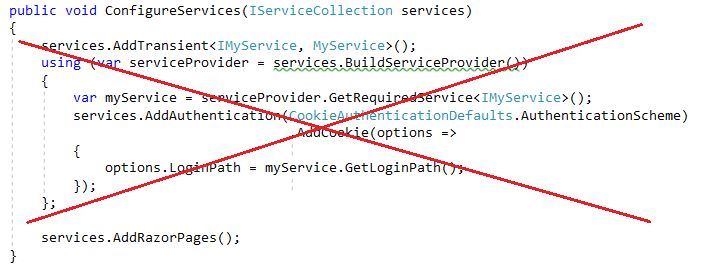
在上圖中,選取
services.BuildServiceProvider下方的綠色波浪線會顯示下列 ASP0000 警告:ASP0000 從應用程式程式碼呼叫 'BuildServiceProvider' 會導致產生單例服務的額外複本。 請考慮將服務插入相依性做為參數的替代方法「設定」。
呼叫
BuildServiceProvider會建立第二個容器,而有可能會建立撕裂的單例,並導致在多個容器中對物件圖形的引用。取得
LoginPath的正確方式是使用選項模式的 DI 內建支援:public void ConfigureServices(IServiceCollection services) { services.AddAuthentication(CookieAuthenticationDefaults.AuthenticationScheme) .AddCookie(); services.AddOptions<CookieAuthenticationOptions>( CookieAuthenticationDefaults.AuthenticationScheme) .Configure<IMyService>((options, myService) => { options.LoginPath = myService.GetLoginPath(); }); services.AddRazorPages(); }容器會擷取可處置的暫時性服務,以進行處置。 如果從最上層容器解析,則這可能會變成記憶體流失。
啟用範圍驗證,以確定應用程式沒有可擷取限定範圍服務的 singleton。 如需詳細資訊,請參閱範圍驗證。
就像所有的建議集,您可能會遇到需要忽略建議的情況。 例外狀況很少見,大部分是架構本身內的特殊案例。
DI 是靜態/全域物件存取模式的「替代」選項。 如果您將 DI 與靜態物件存取混合,則可能無法實現 DI 的優點。
DI 中多租戶的建議設計模式
Orchard Core 是一種應用程式架構,可用於在 ASP.NET Core 上建置模組化的多租用戶應用程式。 如需詳細資訊,請參閱 Orchard Core 文件。
如需如何只使用 Orchard Core 架構來建置模組化和多租用戶應用程式,而不需要其任何 CMS 特定功能的範例,請參閱 Orchard Core 範例。
架構提供的服務
Startup.ConfigureServices 方法會註冊應用程式所使用的服務,包括 Entity Framework Core 和 ASP.NET Core MVC 等平台功能。 一開始,提供給 IServiceCollection 的 ConfigureServices 具有架構定義的服務 (取決於主機的設定方式)。 針對以 ASP.NET Core 範本為基礎的應用程式,架構會註冊超過 250 個服務。
下表列出這類架構註冊型服務的些許範例:
| 服務類型 | Lifetime |
|---|---|
| Microsoft.AspNetCore.Hosting.Builder.IApplicationBuilderFactory | Transient |
| IHostApplicationLifetime | Singleton |
| IWebHostEnvironment | Singleton |
| Microsoft.AspNetCore.Hosting.IStartup | Singleton |
| Microsoft.AspNetCore.Hosting.IStartupFilter | Transient |
| Microsoft.AspNetCore.Hosting.Server.IServer | Singleton |
| Microsoft.AspNetCore.Http.IHttpContextFactory | Transient |
| Microsoft.Extensions.Logging.ILogger<TCategoryName> | Singleton |
| Microsoft.Extensions.Logging.ILoggerFactory | Singleton |
| Microsoft.Extensions.ObjectPool.ObjectPoolProvider | Singleton |
| Microsoft.Extensions.Options.IConfigureOptions<TOptions> | Transient |
| Microsoft.Extensions.Options.IOptions<TOptions> | Singleton |
| System.Diagnostics.DiagnosticSource | Singleton |
| System.Diagnostics.DiagnosticListener | Singleton |
其他資源
- ASP.NET Core 中檢視的相依性注入
- ASP.NET Core 控制器的相依性插入
- ASP.NET Core 中需求處理常式中的相依性注入
- ASP.NET Core Blazor 相依注入
- 適用於 DI 應用程式開發的 NDC 會議模式
- ASP.NET Core 中的應用程式啟動
- ASP.NET Core 中基於工廠模式的中介軟體啟用
- 在 ASP.NET Core 中處置 IDisposables 的四種方式
- 在 ASP.NET Core 使用 Dependency Injection 撰寫簡潔的程式碼 (MSDN)
- 明確相依性準則
- 逆轉控制容器和相依性插入模式 (Martin Fowler) \(英文\)
- How to register a service with multiple interfaces in ASP.NET Core DI (如何使用 ASP.NET Core DI 中的多個介面註冊服務)
