本文件可協助設定使用閘道 API 中下列資源的範例應用程式。 其中提供下列作業的步驟:
- 建立具有一個 HTTPS 接聽程式的 閘道 資源。
- 建立參考後端服務的 HTTPRoute 資源。
- 建立 BackendTLSPolicy 資源,此資源具有 HTTPRoute 中所參考後端服務的用戶端和 CA 憑證。
背景
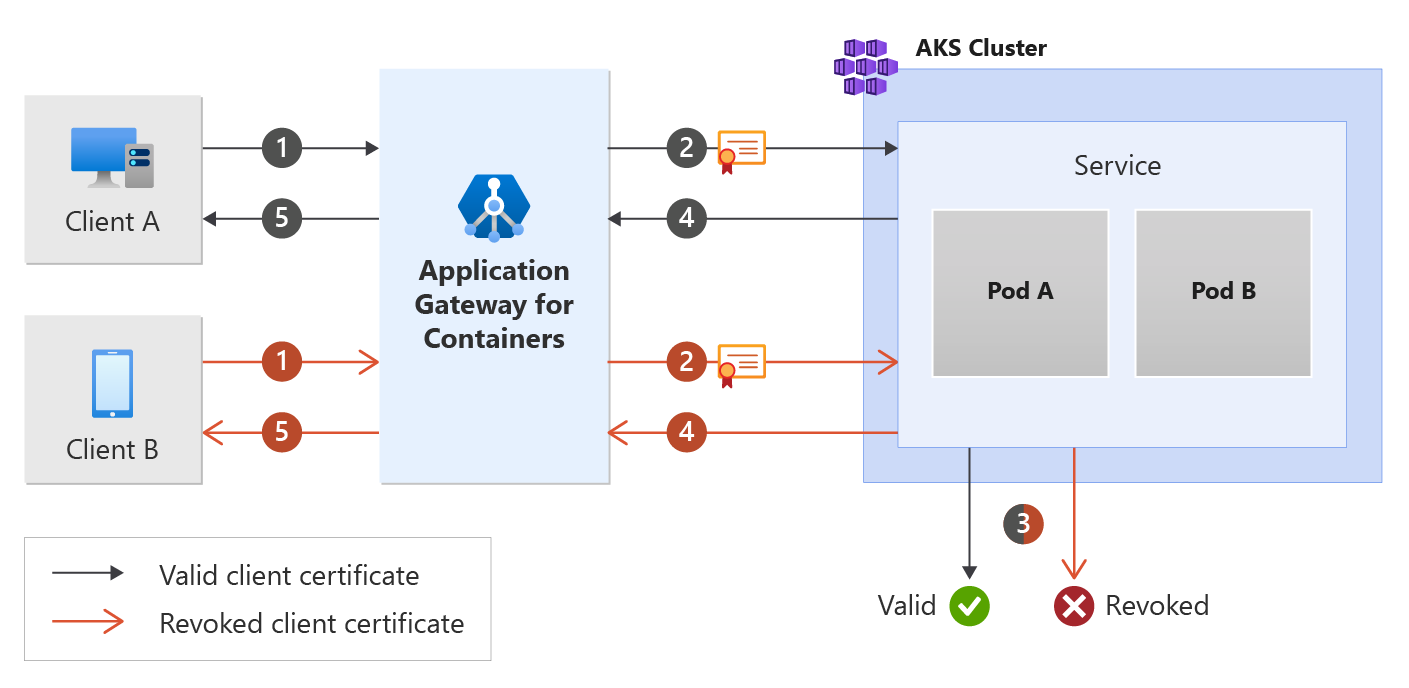
相互傳輸層安全性 (MTLS) 是依賴憑證來加密通訊並識別服務客戶端的程式。 這可讓後端工作負載只信任來自已驗證裝置的連線,進一步提升其安全性狀態。
請參閱下圖:
先決條件
如果遵循 BYO 部署策略,請確定您已設定適用於容器的應用程式閘道資源和 ALB 控制器。
如果遵循 ALB 受管理的部署策略,請確定您已透過 ApplicationLoadBalancer 自訂資源佈建 ALB 控制器 以及適用於容器的應用程式閘道資源。
部署範例 HTTP 應用程式:
在您的叢集上套用下列 deployment.yaml 檔案來建立範例 Web 應用程式,並部署範例秘密來示範後端相互驗證 (mTLS)。
kubectl apply -f https://raw.githubusercontent.com/MicrosoftDocs/azure-docs/refs/heads/main/articles/application-gateway/for-containers/examples/https-scenario/end-to-end-ssl-with-backend-mtls/deployment.yaml此命令會在叢集上建立下列項目:
- 名為
test-infra的命名空間 test-infra命名空間中名為mtls-app的一個服務test-infra命名空間中名為mtls-app的一個部署test-infra命名空間中名為mtls-app-nginx-cm的一個 ConfigMaptest-infra命名空間中的四個秘密稱為backend.com、frontend.com、gateway-client-cert和ca.bundle
- 名為
部署必要的閘道 API 資源
建立閘道
kubectl apply -f - <<EOF
apiVersion: gateway.networking.k8s.io/v1
kind: Gateway
metadata:
  name: gateway-01
  namespace: test-infra
  annotations:
    alb.networking.azure.io/alb-namespace: alb-test-infra
    alb.networking.azure.io/alb-name: alb-test
spec:
  gatewayClassName: azure-alb-external
  listeners:
  - name: https-listener
    port: 443
    protocol: HTTPS
    allowedRoutes:
      namespaces:
        from: Same
    tls:
      mode: Terminate
      certificateRefs:
      - kind : Secret
        group: ""
        name: frontend.com
EOF
備註
當 ALB 控制器在 Azure Resource Manager 中建立容器資源的應用程式閘道時,它會針對前端資源使用下列命名慣例: fe-<eight randomly generated characters>。
如果您想要變更在 Azure 中建立的前端資源名稱,請考慮遵循 自備部署策略。
建立閘道資源之後,請確定狀態有效,接聽程式的狀態為「已程式化」,並且已經將位址指派給閘道。
kubectl get gateway gateway-01 -n test-infra -o yaml
成功建立閘道的範例輸出:
status:
  addresses:
  - type: IPAddress
    value: xxxx.yyyy.alb.azure.com
  conditions:
  - lastTransitionTime: "2023-06-19T21:04:55Z"
    message: Valid Gateway
    observedGeneration: 1
    reason: Accepted
    status: "True"
    type: Accepted
  - lastTransitionTime: "2023-06-19T21:04:55Z"
    message: Application Gateway For Containers resource has been successfully updated.
    observedGeneration: 1
    reason: Programmed
    status: "True"
    type: Programmed
  listeners:
  - attachedRoutes: 0
    conditions:
    - lastTransitionTime: "2023-06-19T21:04:55Z"
      message: ""
      observedGeneration: 1
      reason: ResolvedRefs
      status: "True"
      type: ResolvedRefs
    - lastTransitionTime: "2023-06-19T21:04:55Z"
      message: Listener is accepted
      observedGeneration: 1
      reason: Accepted
      status: "True"
      type: Accepted
    - lastTransitionTime: "2023-06-19T21:04:55Z"
      message: Application Gateway For Containers resource has been successfully updated.
      observedGeneration: 1
      reason: Programmed
      status: "True"
      type: Programmed
    name: https-listener
    supportedKinds:
    - group: gateway.networking.k8s.io
      kind: HTTPRoute
建立閘道之後,請建立 HTTPRoute 資源。
kubectl apply -f - <<EOF
apiVersion: gateway.networking.k8s.io/v1
kind: HTTPRoute
metadata:
  name: https-route
  namespace: test-infra
spec:
  parentRefs:
  - name: gateway-01
  rules:
  - backendRefs:
    - name: mtls-app
      port: 443
EOF
建立 HTTPRoute 資源之後,請確定路由的狀態為「已接受」,且適用於容器的應用程式閘道資源的狀態為「已程式化」。
kubectl get httproute https-route -n test-infra -o yaml
確認已成功更新適用於容器的應用程式閘道資源的狀態。
status:
  parents:
  - conditions:
    - lastTransitionTime: "2023-06-19T22:18:23Z"
      message: ""
      observedGeneration: 1
      reason: ResolvedRefs
      status: "True"
      type: ResolvedRefs
    - lastTransitionTime: "2023-06-19T22:18:23Z"
      message: Route is Accepted
      observedGeneration: 1
      reason: Accepted
      status: "True"
      type: Accepted
    - lastTransitionTime: "2023-06-19T22:18:23Z"
      message: Application Gateway For Containers resource has been successfully updated.
      observedGeneration: 1
      reason: Programmed
      status: "True"
      type: Programmed
    controllerName: alb.networking.azure.io/alb-controller
    parentRef:
      group: gateway.networking.k8s.io
      kind: Gateway
      name: gateway-01
      namespace: test-infra
建立 BackendTLSPolicy
kubectl apply -f - <<EOF
apiVersion: alb.networking.azure.io/v1
kind: BackendTLSPolicy
metadata:
  name: mtls-app-tls-policy
  namespace: test-infra
spec:
  targetRef:
    group: ""
    kind: Service
    name: mtls-app
    namespace: test-infra
  default:
    sni: backend.com
    ports:
    - port: 443
    clientCertificateRef:
      name: gateway-client-cert
      group: ""
      kind: Secret
    verify:
      caCertificateRef:
        name: ca.bundle
        group: ""
        kind: Secret
      subjectAltName: backend.com
EOF
建立 BackendTLSPolicy 物件之後,請檢查物件上的狀態,以確保原則有效:
kubectl get backendtlspolicy -n test-infra mtls-app-tls-policy -o yaml
建立有效 BackendTLSPolicy 物件的範例輸出:
status:
  conditions:
  - lastTransitionTime: "2023-06-29T16:54:42Z"
    message: Valid BackendTLSPolicy
    observedGeneration: 1
    reason: Accepted
    status: "True"
    type: Accepted
測試應用程式的存取權
現在我們已準備好將一些流量透過指派給前端的 FQDN 傳送至範例應用程式。 使用下列命令來取得 FQDN:
fqdn=$(kubectl get gateway gateway-01 -n test-infra -o jsonpath='{.status.addresses[0].value}')
以 CURL 執行 FQDN 時,會根據 HTTPRoute 上設定的後端傳回回應。
curl --insecure https://$fqdn/
恭喜您,您已安裝 ALB 控制器,部署了後端應用程式,並透過容器應用程式閘道的入口,將流量引導至應用程式。