適用於: Azure SQL Database
注意
- 資料庫層級 TDE CMK 適用於 Azure SQL 資料庫 (所有 SQL Database 版本)。 它不適用於 Azure SQL 受控執行個體、內部部署 SQL Server、Azure VM 和 Azure Synapse Analytics (專用 SQL 集區 (先前稱為 SQL DW))。
- 您可以套用相同的指南,排除同盟用戶端識別碼參數,在相同的租用戶中設定資料庫層級客戶自控金鑰。 如需資料庫層級客戶自控金鑰的詳細資訊,請參閱資料庫層級中使用客戶自控金鑰的透明資料加密 (TDE)。
在本指南中,我們在資料庫層級會逐步建立、更新和擷取具有透明資料加密 (TDE) 的 Azure SQL Database 和客戶自控 (CMK) 金鑰,利用使用者指派的受控識別來存取 Azure Key Vault。 Azure Key Vault 位於與 Azure SQL 資料庫不同的 Microsoft Entra 租用戶中。 如需詳細資訊,請參閱使用透明資料加密的跨租用戶客戶自控金鑰。
必要條件
- 本指南假設您有兩個 Microsoft Entra 租戶。
- 第一個包含 Azure SQL Database 資源、多租使用者Microsoft Entra 應用程式,以及使用者指派的受控識別。
- 第二個租戶負責管理 Azure Key Vault。
- 如需設定 Microsoft Entra 應用程式和 Azure Key Vault 所需的跨租用戶 CMK 和 RBAC 權限的完整指示,請參閱下列其中一個指南:
- Azure CLI 2.52.0 版或更高版本。
- Az PowerShell 模組 10.3.0 版或更高版本。
- 資料庫層級 CMK 所需的 RBAC 權限與伺服器層級 CMK 所需的權限相同。 具體而言,在伺服器層級使用 Azure 金鑰保存庫、 受控識別和 跨租用戶 CMK 進行 TDE 時適用的相同 RBAC 許可權也適用於資料庫層級。 如需金鑰管理和存取原則的詳細資訊,請參閱金鑰管理。
首個租戶的必要資源
為了本教學課程的目的,我們假設第一個租戶屬於獨立軟體廠商 (ISV),而第二個租戶來自他們的客戶。 如需此案例的詳細資訊,請參閱使用透明資料加密的跨租用戶客戶自控金鑰。
在能夠使用跨租戶 CMK 來設定 Azure SQL Database 的 TDE 之前,我們需要具備一個已配置的多租戶 Microsoft Entra 應用程式,此應用程式透過使用者指派的受控識別,作為應用程式的同盟身分識別認證。 遵循「必要條件」章節中的指引之一。
在您想要建立 Azure SQL Database 的第一個租戶上,建立並設定多租戶 Microsoft Entra 應用程式。
建立使用者指派的受控識別。
將使用者指派的受控識別 設定為多租戶應用程式的同盟身份認證。
記錄應用程式名稱和應用程式識別碼。 在 Azure 入口網站>Microsoft Entra IDEnterprise>應用程式中查詢此資訊,並搜尋已建立的應用程式。
第二租戶上的必要資源
注意
自 2024 年 3 月 30 日起,Azure AD 和 MSOnline PowerShell 模組已被淘汰。 若要深入了解,請閱讀淘汰更新。 在此日期之後,對這些模組的支援僅限於對 Microsoft Graph PowerShell SDK 的移轉協助和安全性修正。 淘汰的模組將繼續運作至 2025 年 3 月 30 日。
我們建議移轉至 Microsoft Graph PowerShell 以與 Microsoft Entra ID (以前稱為 Azure AD) 互動。 如需了解常見的移轉問題,請參閱移轉常見問題。
注意:MSOnline 1.0.x 版可能會在 2024 年 6 月 30 日之後發生中斷。
在 Azure Key Vault 所在的第二個租戶中,使用第一個租戶中已註冊應用程式的應用程式識別碼,建立服務主體(應用程式)。 以下是一些註冊多租戶應用程式的範例。 分別將 <TenantID> 和 <ApplicationID> 替換為來自 Microsoft Entra ID 的租戶 ID ,以及來自多租戶應用程式的應用程式 ID 。
前往 Azure 入口網站>Microsoft Entra ID>企業應用程式,並搜尋建立的應用程式。
建立 Azure Key Vault (如果您尚未建立),然後建立金鑰。
建立或設定存取原則。
- 在建立存取原則時,選取「金鑰權限」下的[取得]、[包裝金鑰]、[解除包裝金鑰] 權限。
- 在建立存取原則時,於 主體 選項中選取在第一個步驟中已建立的多租用戶應用程式。

建立存取政策和金鑰後,從 Azure Key Vault 取出金鑰並記錄金鑰識別碼。
使用資料庫層級客戶自控金鑰建立新的 Azure SQL Database
以下範例展示了如何在 Azure SQL Database 上建立一個由使用者指派的管理身份資料庫,以及如何在資料庫層級設定跨租戶客戶管理的金鑰。 你需要使用者指派的託管身份,以便在資料庫建立階段設定客戶管理的金鑰以實現透明資料加密。
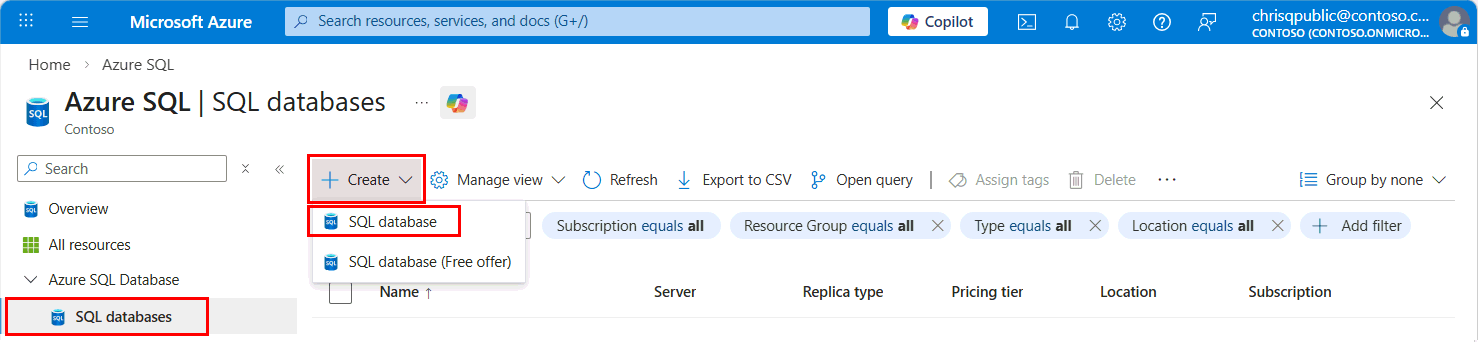
移至 Azure SQL 中樞 at aka.ms/azuresqlhub。
在資源選單中,展開 Azure SQL 資料庫 並選擇 SQL 資料庫。
從 + Create 下拉選單中,選擇 SQL 資料庫。
在 [建立 SQL Database] 表單的 [基本資料] 索引標籤上,在 [專案詳細資料] 下,為資料庫選取想要的 Azure [訂用帳戶]、[資源群組] 和 [伺服器]。 然後,針對 [資料庫名稱],使用唯一的名稱。 如果您尚未為 Azure SQL 資料庫建立邏輯伺服器,請參閱建立伺服器並使用跨租用戶客戶自控金鑰 (CMK) 設定 TDE,以取得參考。
當您前往 [安全性] 索引標籤時,選取 [設定資料庫層級金鑰的透明資料加密]。
![建立 Azure SQL 資料庫時,Azure 入口網站和 [安全性] 功能表的螢幕擷取畫面。](media/transparent-data-encryption-byok-database-level-basic-actions/configure-transparent-data-encryption.png?view=azuresql)
在 [透明資料加密] 功能表上,選取 [資料庫層級客戶自控金鑰 (CMK)]。
![Azure 入口網站 [透明資料加密] 功能表的螢幕擷取畫面。](media/transparent-data-encryption-byok-database-level-basic-actions/transparent-data-encryption-configuration-menu.png?view=azuresql)
對於 使用者指派的受控識別,如果所需的識別未列在 識別 功能表中,請選取 設定 以啟用 資料庫識別,並按一下 新增,將使用者指派的受控識別新增至資源。 接著選取套用。
![Azure 入口網站 [身分識別] 功能表的螢幕擷取畫面。](media/transparent-data-encryption-byok-database-level-basic-actions/configure-identity-transparent-data-encryption.png?view=azuresql)
在 [透明資料加密] 功能表上,選取 [變更金鑰]。 針對要用於 TDE 的客戶自控金鑰,選取所需的訂閱、金鑰保存庫、金鑰和版本。 請選取 [選取] 按鈕。 在您選取金鑰之後,您也可以使用 [透明資料加密] 功能表中的 [Azure Key vault URI (物件識別碼)],視需要新增其他資料庫金鑰。
您也可以在資料庫層級使用 [透明資料加密] 功能表中的 [自動金鑰輪替] 核取方塊來啟用 [自動金鑰輪替]。
![Azure 入口網站中參考其他金鑰的 [透明資料加密] 功能表的螢幕擷取畫面。](media/transparent-data-encryption-byok-database-level-basic-actions/additional-keys.png?view=azuresql)
選擇 <套用> 以繼續進行資料庫的建立。
選取 [下一步:其他設定]。
選取 下一步:標記。
請考慮使用 Azure 標籤。 例如,「Owner」或「CreatedBy」標籤可識別資源的建立者,以及 Environment 標籤可識別此資源是否處於生產、開發等狀態。如需詳細資訊,請參閱 開發 Azure 資源的命名和標記策略。
選擇 檢閱 + 創建。
在 [檢閱 + 建立] 頁面,完成檢閱後,選擇 [建立]。
注意
如果使用者指派的受控識別未在金鑰保存庫上啟用正確的權限,則資料庫建立將會失敗。 使用者指派的受控識別需要具有金鑰保存庫的 Get、wrapKey 和 unwrapKey 權限。 如需詳細資訊,請參閱利用客戶自控金鑰支援透明資料加密的受控識別。
如需如何安裝目前版本的 Azure CLI,請參閱安裝 Azure CLI 一文。
使用 az sql db create 命令建立資料庫,並配置使用者指派的受控識別和跨租戶客戶管理的 TDE。 第二個租用戶的金鑰識別碼可用於 encryption-protector 欄位中。 多租使用者應用程式的 應用程式識別碼 可以在 [federated-client-id] 欄位中使用。
--encryption-protector-auto-rotation 參數可用來在資料庫層級上啟用自動金鑰輪替。
若要取得使用者指派的受控識別資源識別碼,請在 Azure 入口網站中搜尋受控識別。 尋找您的受控識別,並移至 [屬性]。 UMI「資源識別碼」的範例看起來像
az sql db create --resource-group $resourceGroupName --server $serverName --name mySampleDatabase --sample-name AdventureWorksLT --edition GeneralPurpose --compute-model Serverless --family Gen5 --capacity 2 --assign-identity --user-assigned-identity-id $identityid --encryption-protector $keyid --federated-client-id $federatedclientid --encryption-protector-auto-rotation True
使用 PowerShell 建立一個配置了使用者指派的受控識別和跨租戶客戶管理的透明資料加密 (TDE) 的資料庫。
如需 Az PowerShell 模組安裝指示,請參閱安裝 Azure PowerShell。
使用 New-AzSqlDatabase Cmdlet。
取代範例中的下列值:
-
<ResourceGroupName>:Azure SQL 邏輯伺服器的資源群組名稱
-
<DatabaseName>:使用唯一 Azure SQL 資料庫名稱
-
<ServerName>:使用唯一的 Azure SQL 邏輯伺服器名稱
-
<UserAssignedIdentityId>:要指派給伺服器的使用者指派的受控身分識別清單(可以是一個或多個)
-
<CustomerManagedKeyId>:來自第二個租使用者 Azure Key Vault 的密鑰標識碼
-
<FederatedClientId>:多租戶應用程式的應用程式識別符
-
-EncryptionProtectorAutoRotation:可用來在資料庫層級上啟用自動金鑰輪替
若要取得使用者指派的受控識別資源識別碼,請在 Azure 入口網站中搜尋受控識別。 尋找您的受控識別,並移至 [屬性]。 UMI「資源識別碼」的範例看起來像
# create a server with user-assigned managed identity and cross-tenant customer-managed TDE with automatic key rotation enabled
$params = @{
    ResourceGroupName = '<ResourceGroupName>'
    ServerName = '<ServerName>'
    DatabaseName = '<DatabaseName>'
    AssignIdentity = $true
    UserAssignedIdentityId = '<UserAssignedIdentityId>'
    EncryptionProtector = '<CustomerManagedKeyId>'
    FederatedClientId = '<FederatedClientId>'
    EncryptionProtectorAutoRotation = $true
}

New-AzSqlDatabase @params
以下是 ARM 範本的範例,其會建立 Azure SQL Database,包含資料庫層級中使用者指派的受控識別和客戶自控的 TDE。 針對跨租戶 CMK,請使用來自第二個租戶 Azure Key Vault 的 密鑰識別碼,以及來自多租戶應用程式的 應用程式識別碼。
如需詳細資訊和 ARM 範本,請參閱 適用於 Azure SQL 資料庫的 Azure Resource Manager 範本。
使用 Azure 入口網站中的自訂部署,然後在編輯器中建置您自己的範本。 接下來,將設定貼進範例後,請儲存。
若要取得使用者指派的受控識別資源識別碼,請在 Azure 入口網站中搜尋受控識別。 尋找您的受控識別,並移至 [屬性]。 UMI「資源識別碼」的範例看起來像 。
{
  "$schema": "https://schema.management.azure.com/schemas/2019-04-01/deploymentTemplate.json#",
  "contentVersion": "1.0.0.0",
  "parameters": {
    "server_name": {
      "type": "String"
    },
    "database_name": {
      "type": "String"
    },
    "user_assigned_identity": {
      "type": "String"
    },
    "encryption_protector": {
      "type": "String"
    },
    "federated_client_id": {
      "type": "String"
    },
    "location": {
      "type": "String"
    },
    "encryption_protector_auto_rotation": {
      "type": "bool"
    }
  },
  "variables": {},
  "resources": [
    {
      "type": "Microsoft.Sql/servers/databases",
      "apiVersion": "2023-02-01-preview",
      "name": "[concat(parameters('server_name'), concat('/',parameters('database_name')))]",
      "location": "[parameters('location')]",
      "sku": {
        "name": "Basic",
        "tier": "Basic",
        "capacity": 5
      },
      "identity": {
        "type": "UserAssigned",
        "userAssignedIdentities": {
          "[parameters('user_assigned_identity')]": {}
        }
      },
      "properties": {
        "collation": "SQL_Latin1_General_CP1_CI_AS",
        "maxSizeBytes": 104857600,
        "catalogCollation": "SQL_Latin1_General_CP1_CI_AS",
        "zoneRedundant": false,
        "readScale": "Disabled",
        "requestedBackupStorageRedundancy": "Geo",
        "maintenanceConfigurationId": "/subscriptions/00000000-0000-0000-0000-000000000000/providers/Microsoft.Maintenance/publicMaintenanceConfigurations/SQL_Default",
        "isLedgerOn": false,
        "encryptionProtector": "[parameters('encryption_protector')]",
        "federatedClientId": "[parameters('federated_client_id')]",
        "encryptionProtectorAutoRotation": "[parameters('encryption_protector_auto_rotation')]"
      }
    }
  ]
}
使用資料庫層級客戶自控金鑰更新現有 Azure SQL Database
以下範例展示了如何在 Azure SQL Database 上更新現有資料庫,並使用使用者指派的管理身份,以及如何在資料庫層級設定跨租戶客戶管理的金鑰。 你需要使用者指派的受管身份來設定客戶管理的金鑰以實現透明資料加密。
如需如何安裝目前版本的 Azure CLI,請參閱安裝 Azure CLI 一文。
使用 az sql db create 命令來更新已配置使用者指派受控識別與跨租戶客戶管理 TDE 的資料庫。 第二個租用戶的金鑰識別碼可用於 encryption-protector 欄位中。 多租使用者應用程式的 應用程式識別碼 可以在 [federated-client-id] 欄位中使用。
若要取得使用者指派的受控識別資源識別碼,請在 Azure 入口網站中搜尋受控識別。 尋找您的受控識別,並移至 [屬性]。 UMI「資源識別碼」的範例看起來像 。
--encryption-protector-auto-rotation 參數可用來在資料庫層級上啟用自動金鑰輪替。
az sql db update --resource-group $resourceGroupName --server $serverName --name mySampleDatabase --sample-name AdventureWorksLT --edition GeneralPurpose --compute-model Serverless --family Gen5 --capacity 2 --assign-identity --user-assigned-identity-id $identityid --encryption-protector $keyid --federated-client-id $federatedclientid --keys $keys --keys-to-remove $keysToRemove --encryption-protector-auto-rotation True
此清單 $keys 是以空格分隔的金鑰清單,這些金鑰要新增至資料庫,而 $keysToRemove 是必須從資料庫移除的金鑰空格分隔清單
$keys = '"https://yourvault.vault.azure.net/keys/yourkey1/6638b3667e384aefa31364f94d230000" "https://yourvault.vault.azure.net/keys/yourkey2/ fd021f84a0d94d43b8ef33154bca0000"'

$keysToRemove = '"https://yourvault.vault.azure.net/keys/yourkey3/6638b3667e384aefa31364f94d230000" "https://yourvault.vault.azure.net/keys/yourkey4/fd021f84a0d94d43b8ef33154bca0000"'
在資料庫層級使用 PowerShell 更新資料庫,並設定使用者指派的受控識別和跨租用戶客戶自控的 TDE。
如需 Az PowerShell 模組安裝指示,請參閱安裝 Azure PowerShell。
使用 Set-AzSqlDatabase Cmdlet。
取代範例中的下列值:
-
<ResourceGroupName>:Azure SQL 邏輯伺服器的資源群組名稱
-
<DatabaseName>:使用唯一 Azure SQL 資料庫名稱
-
<ServerName>:使用唯一的 Azure SQL 邏輯伺服器名稱
-
<UserAssignedIdentityId>:要指派給伺服器的使用者指派的受控身分識別清單(可以是一個或多個)
-
<CustomerManagedKeyId>:來自第二個租使用者 Azure Key Vault 的密鑰標識碼
-
<FederatedClientId>:多租戶應用程式的應用程式識別符
-
<ListOfKeys>:以逗號分隔的資料庫層級客戶管理金鑰清單,將新增至資料庫
-
<ListOfKeysToRemove>:要從資料庫移除的資料庫層級客戶自控金鑰逗號分隔清單
-
-EncryptionProtectorAutoRotation:可用來在資料庫層級上啟用自動金鑰輪替
若要取得使用者指派的受控識別資源識別碼,請在 Azure 入口網站中搜尋受控識別。 尋找您的受控識別,並移至 [屬性]。 UMI「資源識別碼」的範例看起來像 。
$params = @{
    ResourceGroupName = "<ResourceGroupName>"
    ServerName = "<ServerName>"
    DatabaseName = "<DatabaseName>"
    AssignIdentity = $true
    UserAssignedIdentityId = "<UserAssignedIdentityId>"
    EncryptionProtector = "<CustomerManagedKeyId>"
    FederatedClientId = "<FederatedClientId>"
    KeyList = "<ListOfKeys>"
    KeysToRemove = "<ListOfKeysToRemove>"
    EncryptionProtectorAutoRotation = $true
}

Set-AzSqlDatabase @params
-KeyList 和 -KeysToRemove 的範例如下:
$keysToAdd = "https://yourvault.vault.azure.net/keys/yourkey1/fd021f84a0d94d43b8ef33154bca0000","https://yourvault.vault.azure.net/keys/yourkey2/fd021f84a0d94d43b8ef33154bca0000"

$keysToRemove = "https://yourvault.vault.azure.net/keys/yourkey3/fd021f84a0d94d43b8ef33154bca0000"
以下是 ARM 範本的範例,用來更新 Azure SQL Database,包括資料庫層級中使用者指派的受控身分和客戶管理的透明資料加密 (TDE)。 針對跨租戶 CMK,請使用來自第二個租戶 Azure Key Vault 的 密鑰識別碼,以及來自多租戶應用程式的 應用程式識別碼。
如需詳細資訊和 ARM 範本,請參閱 適用於 Azure SQL 資料庫的 Azure Resource Manager 範本。
使用 Azure 入口網站中的自訂部署,然後在編輯器中建置您自己的範本。 接下來,將設定貼進範例後,請儲存。
若要取得使用者指派的受控識別資源識別碼,請在 Azure 入口網站中搜尋受控識別。 尋找您的受控識別,並移至 [屬性]。 UMI「資源識別碼」的範例看起來像 。
{
  "$schema": "https://schema.management.azure.com/schemas/2019-04-01/deploymentTemplate.json#",
  "contentVersion": "1.0.0.0",
  "parameters": {
    "server_name": {
      "type": "String"
    },
    "database_name": {
      "type": "String"
    },
    "user_assigned_identity": {
      "type": "String"
    },
    "encryption_protector": {
      "type": "String"
    },
    "location": {
      "type": "String"
    },
    "federated_client_id": {
      "type": "String"
    },
    "keys_to_add": {
      "type": "Object"
    },
    "encryption_protector_auto_rotation": {
      "type": "bool"
    }
  },
  "variables": {},
  "resources": [
    {
      "type": "Microsoft.Sql/servers/databases",
      "apiVersion": "2023-02-01-preview",
      "name": "[concat(parameters('server_name'), concat('/',parameters('database_name')))]",
      "location": "[parameters('location')]",
      "sku": {
        "name": "Basic",
        "tier": "Basic",
        "capacity": 5
      },
      "identity": {
        "type": "UserAssigned",
        "userAssignedIdentities": {
          "[parameters('user_assigned_identity')]": {}
        }
      },
      "properties": {
        "collation": "SQL_Latin1_General_CP1_CI_AS",
        "maxSizeBytes": 104857600,
        "catalogCollation": "SQL_Latin1_General_CP1_CI_AS",
        "zoneRedundant": false,
        "readScale": "Disabled",
        "requestedBackupStorageRedundancy": "Geo",
        "maintenanceConfigurationId": "/subscriptions/e1775f9f-a286-474d-b6f0-29c42ac74554/providers/Microsoft.Maintenance/publicMaintenanceConfigurations/SQL_Default",
        "isLedgerOn": false,
        "encryptionProtector": "[parameters('encryption_protector')]",
        "keys": "[parameters('keys_to_add')]",
        "federatedClientId": "[parameters('federated_client_id')]",
        "encryptionProtectorAutoRotation": "[parameters('encryption_protector_auto_rotation')]"
      }
    }
  ]
}
encryption_protector 和 keys_to_add 參數的範例如下:
    "keys_to_add": {
      "value": {
        "https://yourvault.vault.azure.net/keys/yourkey1/fd021f84a0d94d43b8ef33154bca0000": {},
        "https://yourvault.vault.azure.net/keys/yourkey2/fd021f84a0d94d43b8ef33154bca0000": {}
      }
    },
    "encryption_protector": {
      "value": "https://yourvault.vault.azure.net/keys/yourkey2/fd021f84a0d94d43b8ef33154bca0000"
    }
重要
若要從資料庫移除金鑰,必須將特定金鑰的關鍵字典值傳遞為 Null。 例如: "https://yourvault.vault.azure.net/keys/yourkey1/fd021f84a0d94d43b8ef33154bca0000": null 。
在 Azure SQL Database 上檢視資料庫層級客戶自控的金鑰設定
以下是擷取資料庫的資料庫層級客戶自控金鑰的範例。 ARM 資源 Microsoft.Sql/servers/databases 預設只會顯示資料庫上設定的 TDE 保護裝置和受控識別。 若要展開金鑰的完整清單,請使用參數 -ExpandKeyList。 此外,還可以使用篩選器(例如 -KeysFilter "current")和時間點值(例如 2023-01-01)來擷取當前使用的金鑰以及在特定時間點使用的金鑰。 這些篩選準則僅支援個別資料庫查詢,而不支援伺服器層級查詢。
如需如何安裝目前版本的 Azure CLI,請參閱安裝 Azure CLI 一文。
# Retrieve the basic database level customer-managed key settings from a database
az sql db show --resource-group $resourceGroupName --server $serverName --name mySampleDatabase

# Retrieve the basic database level customer-managed key settings from a database and all the keys ever added
az sql db show --resource-group $resourceGroupName --server $serverName --name mySampleDatabase --expand-keys

# Retrieve the basic database level customer-managed key settings from a database and the current keys in use
az sql db show --resource-group $resourceGroupName --server $serverName --name mySampleDatabase --expand-keys --keys-filter current

# Retrieve the basic database level customer-managed key settings from a database and the keys in use at a particular point in time
az sql db show --resource-group $resourceGroupName --server $serverName --name mySampleDatabase --expand-keys --keys-filter 01-01-2015

# Retrieve all the databases in a server to check which ones are configured with database level customer-managed keys
az sql db list --resource-group $resourceGroupName --server $serverName
如需 Az PowerShell 模組安裝指示,請參閱安裝 Azure PowerShell。
使用 Get-AzSqlDatabase Cmdlet。
# Retrieve the basic database level customer-managed key settings from a database
Get-AzSqlDatabase -ResourceGroupName <ResourceGroupName> -ServerName <ServerName> -DatabaseName <DatabaseName>

# Retrieve the basic database level customer-managed key settings from a database and all the keys ever added
Get-AzSqlDatabase -ResourceGroupName <ResourceGroupName> -ServerName <ServerName> -DatabaseName <DatabaseName> -ExpandKeyList

# Retrieve the basic database level customer-managed key settings from a database and the current keys in use
Get-AzSqlDatabase -ResourceGroupName <ResourceGroupName> -ServerName <ServerName> -DatabaseName <DatabaseName> -ExpandKeyList -KeysFilter "current"

# Retrieve the basic database level customer-managed key settings from a database and the keys in use at a particular point in time
Get-AzSqlDatabase -ResourceGroupName <ResourceGroupName> -ServerName <ServerName> -DatabaseName <DatabaseName> -ExpandKeyList -KeysFilter '2023-02-03 00:00:00'

# Retrieve all the databases in a server to check which ones are configured with database level customer-managed keys
Get-AzSqlDatabase -resourceGroupName <ResourceGroupName> -ServerName <ServerName> | Select DatabaseName, EncryptionProtector
使用適用於 Azure SQL Database 的 2022-08-01-preview REST API。
從資料庫擷取基本資料庫層級客戶自控的金鑰設定。
GET https://management.azure.com/subscriptions/{subscriptionId}/resourceGroups/{resourceGroupName}/providers/Microsoft.Sql/servers/{serverName}/databases/{databaseName}?api-version=2022-08-01-preview
從資料庫和所有曾新增的金鑰擷取基本資料庫層級客戶自控的金鑰設定
GET https://management.azure.com/subscriptions/{subscriptionId}/resourceGroups/{resourceGroupName}/providers/Microsoft.Sql/servers/{serverName}/databases/{databaseName}?api-version=2022-08-01-preview&$expand=keys
從資料庫和目前正在使用的金鑰擷取基本資料庫層級客戶自控的金鑰設定
GET https://management.azure.com/subscriptions/{subscriptionId}/resourceGroups/{resourceGroupName}/providers/Microsoft.Sql/servers/{serverName}/databases/{databaseName}?api-version=2022-08-01-preview&$expand=keys($filter=pointInTime('current'))
從資料庫和在特定時間點使用的金鑰擷取基本資料庫層級客戶自控的金鑰設定
GET https://management.azure.com/subscriptions/{subscriptionId}/resourceGroups/{resourceGroupName}/providers/Microsoft.Sql/servers/{serverName}/databases/{databaseName}?api-version=2022-08-01-preview&$expand=keys($filter=pointInTime('2023-02-04T01:57:42.49Z'))
列出邏輯伺服器中的所有金鑰
若要擷取伺服器下每個資料庫所使用的所有金鑰(不僅僅是主要的保護金鑰)的清單,必須使用金鑰篩選器來逐一查詢。 以下是 PowerShell 查詢的範例,可列出邏輯伺服器下的每個金鑰。
使用 Get-AzSqlDatabase Cmdlet。
$dbs = Get-AzSqlDatabase -resourceGroupName <ResourceGroupName> -ServerName <ServerName>
foreach ($db in $dbs)
{
Get-AzSqlDatabase -DatabaseName $db.DatabaseName -ServerName $db.ServerName -ResourceGroupName $db.ResourceGroupName -ExpandKeyList
}
在 Azure SQL Database 上重新驗證資料庫層級客戶自控的金鑰
若 TDE 保護器如 Azure SQL 透明資料加密與客戶管理金鑰所述無法存取,資料庫將無法存取。 修復好金鑰存取後,使用重新驗證金鑰操作讓資料庫再次可存取。 以下指令提供範例。
如需如何安裝目前版本的 Azure CLI,請參閱安裝 Azure CLI 一文。
az sql db tde key revalidate --resource-group $resourceGroupName --server $serverName --database mySampleDatabase
使用適用於 Azure SQL Database 的 2022-08-01-preview REST API。
POST https://management.azure.com/subscriptions/{subscriptionId}/resourceGroups/{resourceGroupName}/providers/Microsoft.Sql/servers/{serverName}/databases/{databaseName}/encryptionProtector/current/revalidate?api-version=2022-08-01-preview
在 Azure SQL Database 上回復客戶管理的資料庫層級金鑰
如果伺服器已配置了代管金鑰,則可以使用以下命令將使用資料庫層級 CMK 設定的資料庫還原為伺服器層級加密。
如需如何安裝目前版本的 Azure CLI,請參閱安裝 Azure CLI 一文。
az sql db tde key revert --resource-group $resourceGroupName --server $serverName --name mySampleDatabase
使用適用於 Azure SQL Database 的 2022-08-01-preview REST API。
POST https://management.azure.com/subscriptions/{subscriptionId}/resourceGroups/{resourceGroupName}/providers/Microsoft.Sql/servers/{serverName}/databases/{databaseName}/encryptionProtector/current/revert?api-version=2022-08-01-preview
相關內容
