本文將教你如何在 Azure Functions 中建置、測試、除錯及部署 Java Spring Cloud 函式。 完成後,函式 會在 Consumption Plan 上執行並回應 HTTP 請求。
必要條件
- Azure 訂用帳戶。 如果您沒有 Azure 訂用帳戶,請在開始前建立免費帳戶。
要使用 Java 開發函式,請安裝以下工具:
- Java Developer Kit 第 11 版
- Apache Maven 3.0 版或更高版本
- Azure CLI
- Azure Functions Core Tools 第 4 版
重要
將環境變數設定 JAVA_HOME 為 JDK 的安裝位置以完成此快速啟動。
請確保你的核心工具版本至少是 4.0.5455。
你要建造的東西
你會建立一個經典的「Hello, World」函式,能在 Azure Functions 上執行,並用 Spring Cloud Function 配置。
函式接收一個 User 包含使用者名稱的 JSON 物件,並回傳一個 Greeting 包含該使用者歡迎訊息的物件。
該專案可在 GitHub 倉庫的 Spring Cloud Function 範例 azure-function-java-worker 中取得。 如果您想要查看本快速入門中所述的最終工作,可以直接使用該範例。
建立新的 Maven 專案
建立一個空的 Maven 專案,並用 Spring Cloud Function 和 Azure Functions 配置。
在空資料夾中建立一個新的 pom.xml 檔案。 接著,從範例專案的 pom.xml 檔案複製內容。
注意
此檔案同時使用來自 Spring Boot 和 Spring Cloud Function 的 Maven 相依性。 它也會配置 Spring Boot 和 Azure Functions Maven 外掛。
為您的應用程式自訂幾個屬性:
-
<functionAppName>是你 Azure 函式的名稱。 -
<functionAppRegion>是你部署函式的 Azure 區域名稱。 -
<functionResourceGroup>是你使用的 Azure 資源群組名稱。
直接在pom.xml檔案頂端附近變更這些屬性,如下列範例所示:
    <properties>
        <java.version>11</java.version>

        <!-- Spring Boot start class. WARNING: correct class must be set -->
        <start-class>com.example.DemoApplication</start-class>

        <!-- customize those properties. WARNING: the functionAppName should be unique across Azure -->
        <azure.functions.maven.plugin.version>1.36.0</azure.functions.maven.plugin.version>
        <functionResourceGroup>my-spring-function-resource-group</functionResourceGroup>
        <functionAppServicePlanName>my-spring-function-service-plan</functionAppServicePlanName>
        <functionAppName>my-spring-function</functionAppName>
        <functionPricingTier>Y1</functionPricingTier>
        <functionAppRegion>eastus</functionAppRegion>
    </properties>
建立 Azure 組態檔
建立 src/main/resources 資料夾,並將下列 Azure Functions 組態檔新增至其中。
host.json:
{
  "version": "2.0",
  "extensionBundle": {
    "id": "Microsoft.Azure.Functions.ExtensionBundle",
    "version": "[4.*, 5.2.0)"
  },
  "functionTimeout": "00:10:00"
}
local.settings.json:
{
  "IsEncrypted": false,
  "Values": {
    "AzureWebJobsStorage": "",
    "FUNCTIONS_WORKER_RUNTIME": "java",
    "FUNCTIONS_EXTENSION_VERSION": "~4",
    "AzureWebJobsDashboard": ""
  }
}
建立網域物件
Azure Functions 可以接收及傳送 JSON 格式的物件。
建立UserGreeting代表你領域模型的物件。
如果你想自訂這個快速入門,可以建立更複雜的物件和更多屬性。
建立 src/main/java/com/example/model 資料夾,並新增下列兩個檔案:
User.java:
package com.example.model;

public class User {

    private String name;

    public User() {
    }

    public User(String name) {
        this.name = name;
    }

    public String getName() {
        return name;
    }

    public void setName(String name) {
        this.name = name;
    }
}
Greeting.java:
package com.example.model;

public class Greeting {

    private String message;

    public Greeting() {
    }

    public Greeting(String message) {
        this.message = message;
    }

    public String getMessage() {
        return message;
    }

    public void setMessage(String message) {
        this.message = message;
    }
}
建立 Spring Boot 應用程式
此應用程式管理所有業務邏輯,並可存取完整的 Spring Boot 生態系統。 這項功能相較於標準 Azure 函式,為您提供兩大主要優點:
- 它不依賴 Azure Functions API,因此您可以輕鬆地將它移植到其他系統。 例如,您可以在一般的 Spring Boot 應用程式中重複使用它。
- 您可以使用 Spring Boot 中的所有
@Enable批注來新增功能。
在 src/main/java/com/example 資料夾中,建立下列檔案,這是一般的 Spring Boot 應用程式:
DemoApplication.java:
package com.example;

import org.springframework.boot.SpringApplication;
import org.springframework.boot.autoconfigure.SpringBootApplication;

@SpringBootApplication
public class DemoApplication {
    public static void main(String[] args) throws Exception {
        SpringApplication.run(DemoApplication.class, args);
    }
}
現在, 在 src/main/java/com/example/你好 資料夾中建立下列檔案。 這段程式碼包含一個 Spring Boot 元件,代表你想執行的函式:
Hello.java:
package com.example.hello;

import com.example.model.*;
import org.springframework.stereotype.Component;
import java.util.function.Function;

@Component
public class Hello implements Function<User, Greeting> {

    @Override
    public Greeting apply(User user) {
        return new Greeting("Hello, " + user.getName() + "!\n");
    }
}
注意
函數 Hello 是相當具針對性的:
- 這是
java.util.function.Function。 其中包含商業規則,並使用標準 Java API 將一個物件轉換成另一個物件。 - 因為它有
@Component註記,所以它是 Spring Bean。 預設情況下,其名稱與類別相同,但以小寫字元開頭:hello。 如果您想要在應用程式中建立其他函式,請遵循此命名慣例非常重要。 名稱必須與你在下一節建立的 Azure Functions 名稱相符。
建立 Azure 函式
要使用完整的 Azure Functions API,請建立一個 Azure 函式,將執行委派給你在前一步建立的 Spring Cloud 函式。
在 src/main/java/com/example/你好 資料夾中,建立下列 Azure Function 類別檔案:
HelloHandler.java:
package com.example.hello;

import com.microsoft.azure.functions.*;
import com.microsoft.azure.functions.annotation.AuthorizationLevel;
import com.microsoft.azure.functions.annotation.FunctionName;
import com.microsoft.azure.functions.annotation.HttpTrigger;
import com.example.model.*;
import org.springframework.beans.factory.annotation.Autowired;
import org.springframework.stereotype.Component;

import java.util.Optional;

@Component
public class HelloHandler {

    @Autowired
    private Hello hello;

    @FunctionName("hello")
    public HttpResponseMessage execute(
        @HttpTrigger(name = "request", methods = {HttpMethod.GET, HttpMethod.POST}, authLevel = AuthorizationLevel.ANONYMOUS) HttpRequestMessage<Optional<User>> request, ExecutionContext context) {
        User user = request.getBody()
                           .filter(u -> u.getName() != null)
                           .orElseGet(() -> new User(request.getQueryParameters().getOrDefault("name", "world")));
        context.getLogger().info("Greeting user name: " + user.getName());
        return request.createResponseBuilder(HttpStatus.OK)
                      .body(hello.apply(user))
                      .header("Content-Type", "application/json")
                      .build();
    }
}
這個 Java 類別是一個 Azure 函式,具備以下特性:
- 類別具有
@Component註釋,因此它是 Spring Bean。 - 註解所
@FunctionName("hello")定義的函式名稱為hello。 - 類別會實作實際的 Azure 函式,因此您可以在這裡使用完整的 Azure Functions API。
新增單元測試
此步驟是選擇性的,但建議驗證應用程式是否正常運作。
建立 src/test/java/com/example 資料夾,並新增下列 JUnit 測試:
HelloTest.java:
package com.example;

import com.example.hello.Hello;
import com.example.model.Greeting;
import com.example.model.User;
import org.junit.jupiter.api.Test;

import static org.assertj.core.api.Assertions.assertThat;

public class HelloTest {

    @Test
    public void test() {
        Greeting result = new Hello().apply(new User("foo"));
        assertThat(result.getMessage()).isEqualTo("Hello, foo!\n");
    }
}
你現在可以透過使用 Maven 測試你的 Azure 函式:
mvn clean test
在本機執行函式
在你將應用程式部署到 Azure Function 之前,先在本地測試。
首先,將你的申請打包成 JAR 檔案:
mvn package
現在應用程式已打包完成,請使用 azure-functions Maven 外掛執行:
mvn azure-functions:run
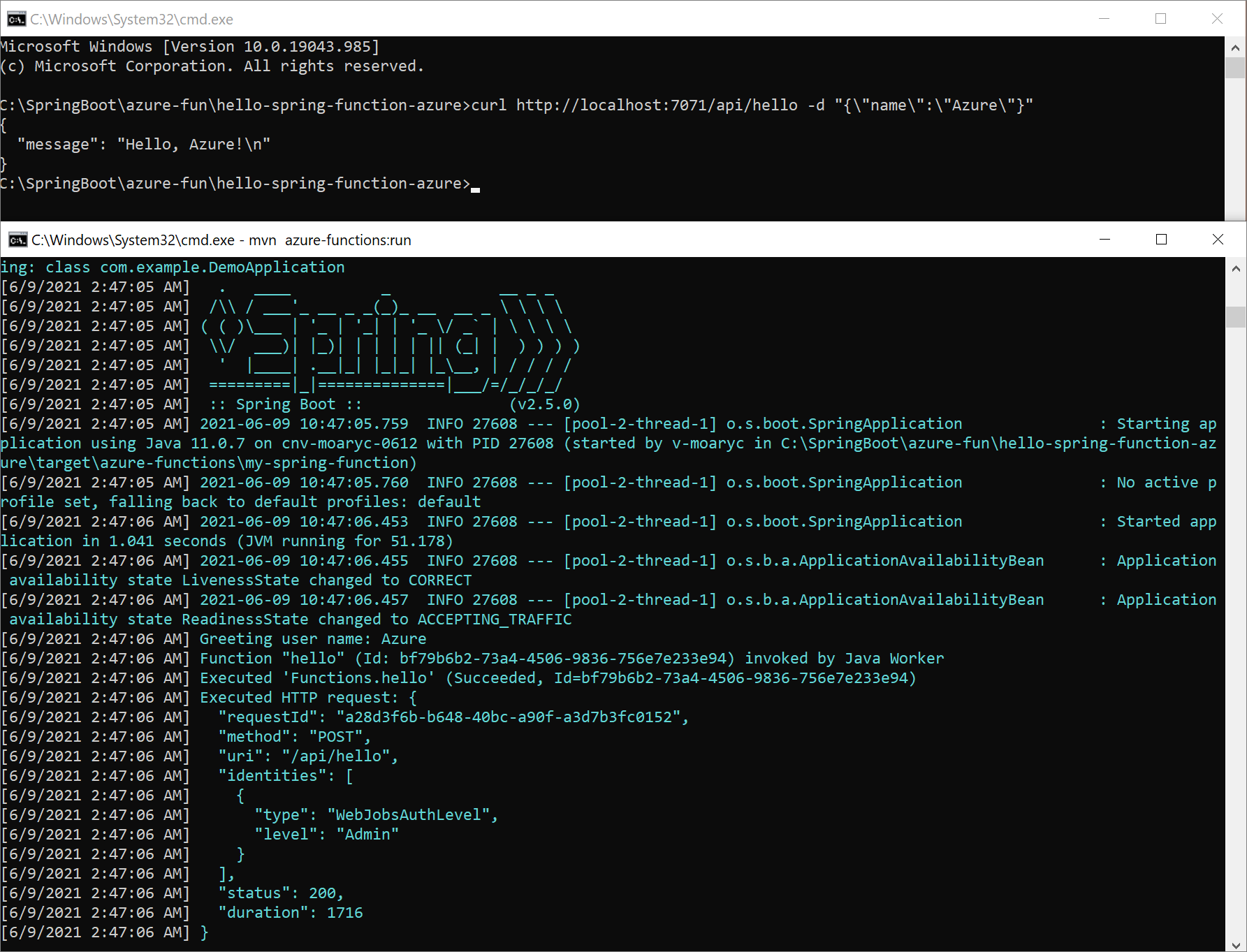
Azure Function 現在已可在您的 localhost 上使用,並使用 7071 連接埠。 傳送 POST 要求給它,並附上一個 JSON 格式的 User 物件,以測試此函式。 例如,使用 cURL:
curl -X POST http://localhost:7071/api/hello -d "{\"name\":\"Azure\"}"
函式會以 Greeting JSON 格式的物件回應:
{
  "message": "Hello, Azure!\n"
}
以下是畫面頂端 cURL 要求的螢幕快照,以及底部的本機 Azure 函式:
在本機執行除錯功能
下列各節說明如何偵錯函式。
使用 Intellij IDEA 進行除錯
在 IntelliJ IDEA 中開啟專案,然後建立一個遠端 JVM 除錯 執行設定以附加。 如需詳細資訊,請參閱 教學課程:遠端偵錯。
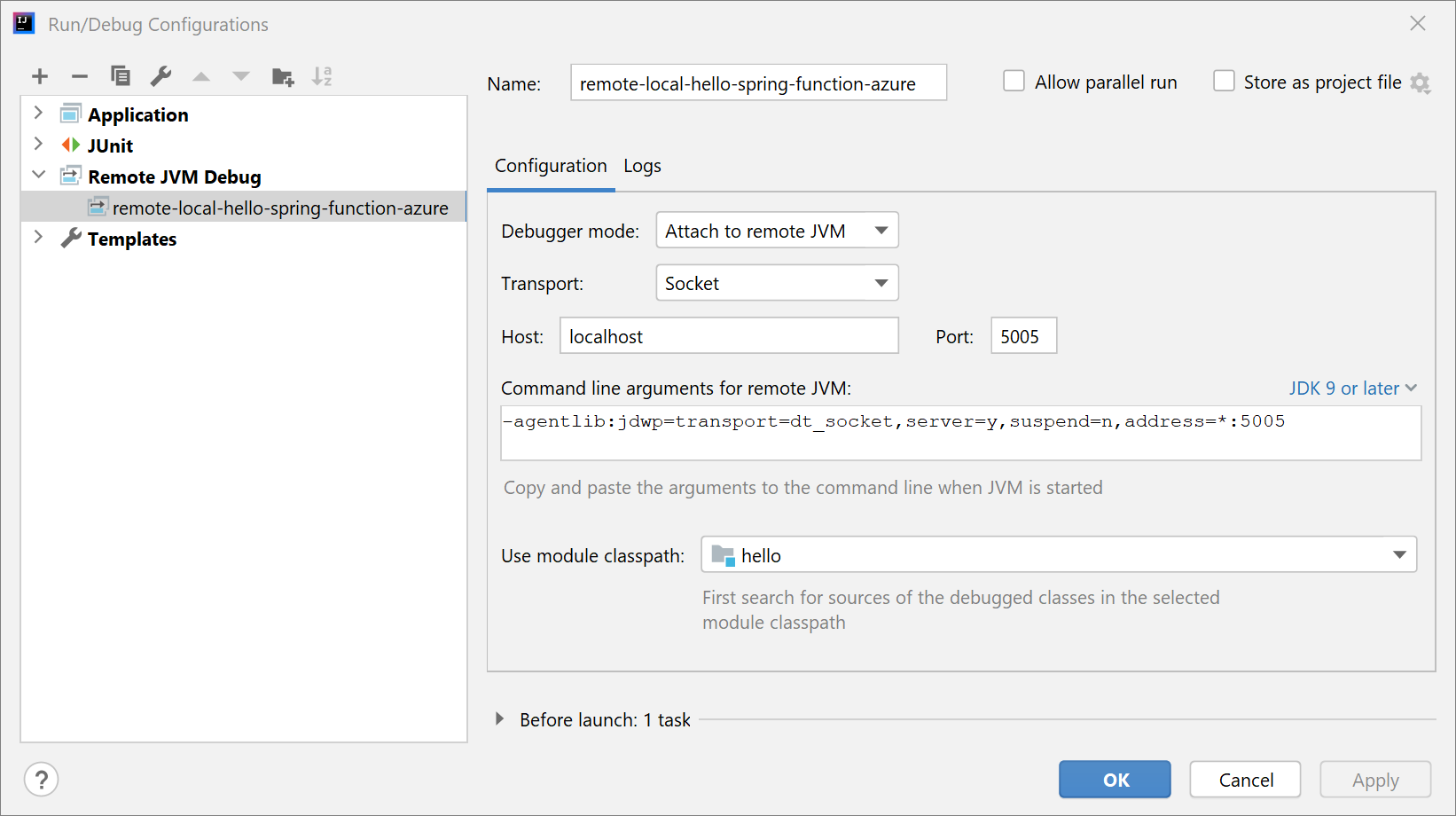
使用下列命令執行應用程式:
mvn azure-functions:run -DenableDebug
應用程式啟動時,您會看到下列輸出:
Worker process started and initialized.
Listening for transport dt_socket at address: 5005
在 IntelliJ IDEA 中啟動專案偵錯。 您會看到下列輸出:
Connected to the target VM, address: 'localhost:5005', transport: 'socket'
標記您要偵錯的斷點。 IntelliJ IDEA 在發送請求後會進入除錯模式。
使用 Visual Studio Code 進行偵錯
在Visual Studio Code開啟專案,然後設定以下 launch.json 檔案內容:
{
    "version": "0.2.0",
    "configurations": [
        {
            "type": "java",
            "name": "Attach to Remote Program",
            "request": "attach",
            "hostName": "127.0.0.1",
            "port": 5005
        }
    ]
}
使用下列命令執行應用程式:
mvn azure-functions:run -DenableDebug
應用程式啟動時,您會看到下列輸出:
Worker process started and initialized.
Listening for transport dt_socket at address: 5005
先用 Visual Studio Code 進行專案除錯,然後標記你想除錯的斷點。 Visual Studio Code 在發送請求後會進入除錯模式。 如需詳細資訊,請參閱 執行和偵錯 Java。
將功能部署至 Azure Functions
現在,您要將 Azure 函式發佈至生產環境。 請記住,您在 <functionAppName> 檔案中定義的 <functionAppRegion>、<functionResourceGroup> 和 屬性是用來設定您的函式。
注意
Maven 外掛程式需要向 Azure 進行驗證。 如果您已安裝 Azure CLI,請先使用 az login ,再繼續進行。
如需更多認證選項,請參閱資料庫中的azure-maven-plugins。
執行 Maven 以自動部署您的函式:
mvn azure-functions:deploy
現在移至 Azure 入口網站,以尋找已建立的Function App。
選擇功能:
- 在函式概觀中,記下函式的 URL。
- 若要檢查執行中的函式,請選取 導覽功能表上的 [記錄串流 ]。
現在,如同您在上一節中所做的,請使用 cURL 來存取執行中的函式,如下列範例所示。 請務必以您的實際函式名稱取代 your-function-name 。
curl https://your-function-name.azurewebsites.net/api/hello -d "{\"name\":\"Azure\"}"
如同上一 Greeting 節,函式應該會以物件回答您,但仍採用 JSON 格式:
{
  "message": "Hello, Azure!\n"
}
恭喜,您有在 Azure Functions 上執行的 Spring Cloud 函式! 如需 Spring Cloud 函式的詳細資訊和範例,請參閱下列資源:
下一步
若要深入了解 Spring 和 Azure,請繼續閱讀「Azure 上的 Spring」文件中心中的資訊。