本文說明 Spring Cloud Azure 和 Spring Security 如何搭配使用。
具有 Microsoft Entra 識別符的 Spring Security
當您建置 Web 應用程式時,身分識別和存取管理一律會是基本部分。
Azure 提供絕佳的平臺來將應用程式開發旅程大眾化,因為它不僅提供雲端式身分識別服務,還能與 Azure 生態系統的其餘部分進行深度整合。
Spring Security 可讓您輕鬆地使用功能強大的抽象和可延伸介面來保護 Spring 型應用程式。 然而,儘管 Spring 框架功能強大,它仍不是專為特定身分識別提供者量身打造的。
spring-cloud-azure-starter-active-directory 提供將 Web 應用程式連線到 Microsoft Entra ID (Microsoft Entra ID for short) 租使用者的最佳方式,並使用 Microsoft Entra ID 保護您的資源伺服器。 它會使用 Oauth 2.0 通訊協定來保護 Web 應用程式和資源伺服器。
存取 Web 應用程式
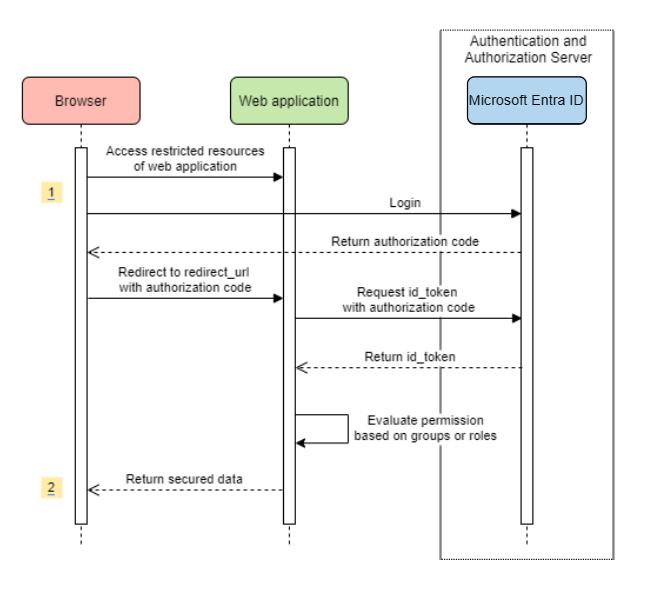
此案例會使用 OAuth 2.0 授權碼授與 流程,以使用Microsoft帳戶登入使用者。
系統圖表
在 Azure 中建立必要的資源
建立應用程式註冊。 取得
AZURE_TENANT_ID、AZURE_CLIENT_ID與AZURE_CLIENT_SECRET。將
redirect URI設定為APPLICATION_BASE_URI/login/oauth2/code/,例如http://localhost:8080/login/oauth2/code/。 結尾的/是必需的。
新增必要的相依性
<dependencies>
    <dependency>
        <groupId>com.azure.spring</groupId>
        <artifactId>spring-cloud-azure-starter-active-directory</artifactId>
    </dependency>
    <dependency>
        <groupId>org.springframework.boot</groupId>
        <artifactId>spring-boot-starter-oauth2-client</artifactId>
    </dependency>
</dependencies>
新增必要的屬性
spring:
  cloud:
    azure:
      active-directory:
        enabled: true
        profile:
          tenant-id: <tenant>
        credential:
          client-id: ${AZURE_CLIENT_ID}
          client-secret: ${AZURE_CLIENT_SECRET}
注意
tenant-id 允許的值包括:common、organizations、consumers或租用戶標識碼。 如需這些值的詳細資訊,請參閱 錯誤 AADSTS50020 - 來自身分識別提供者的使用者帳戶不存在於租用戶中中的 使用了錯誤的端點(個人和組織帳戶)一節。 如需有關將單一租用戶應用程式轉換為多租用戶的資訊,請參閱 在 Microsoft Entra ID 上將單一租用戶應用程式轉換為多租用戶。
現在,啟動您的應用程式,並透過瀏覽器存取您的應用程式。 系統會將您重新導向至Microsoft登入頁面。
進階使用方式
新增額外的安全性設定
@Configuration(proxyBeanMethods = false)
@EnableWebSecurity
@EnableMethodSecurity
public class AadOAuth2LoginSecurityConfig {

   /**
    * Add configuration logic as needed.
    */
   @Bean
   SecurityFilterChain filterChain(HttpSecurity http) throws Exception {
       http.with(AadWebApplicationHttpSecurityConfigurer.aadWebApplication(), Customizer.withDefaults())
           .authorizeHttpRequests(authorize -> authorize.anyRequest().authenticated());
           // Do some custom configuration.
       return http.build();
   }
}
依應用程式角色授權存取權
在 Azure 中建立必要的資源:
使用下列參數建立應用程式角色:
- 顯示名稱:系統管理員
- 允許的成員類型:使用者/群組
- 值:系統管理員
- 您要啟用此應用程式角色嗎: 是
注意
如果您想要使用應用程式角色型訪問控制,就無法將組名放在 role 宣告中。 如需詳細資訊,請參閱 設定群組選擇性宣告 一節,將選擇性宣告提供給您的應用程式。
保護特定方法。
class Demo {
   @GetMapping("Admin")
   @ResponseBody
   @PreAuthorize("hasAuthority('APPROLE_Admin')")
   public String admin() {
       return "Admin message";
   }
}
依組名或組標識碼授權存取權
新增相關的組態屬性。
spring:
 cloud:
   azure:
     active-directory:
       enabled: true
       user-group:
         allowed-group-names: group1_name_1, group2_name_2
         # 1. If allowed-group-ids == all, then all group ID will take effect.
         # 2. If "all" is used, we should not configure other group ids.
         # 3. "all" is only supported for allowed-group-ids, not supported for allowed-group-names.
         allowed-group-ids: group_id_1, group_id_2
保護特定方法。
@Controller
public class RoleController {
   @GetMapping("group1")
   @ResponseBody
   @PreAuthorize("hasRole('ROLE_group1')")
   public String group1() {
       return "group1 message";
   }

   @GetMapping("group2")
   @ResponseBody
   @PreAuthorize("hasRole('ROLE_group2')")
   public String group2() {
       return "group2 message";
   }

   @GetMapping("group1Id")
   @ResponseBody
   @PreAuthorize("hasRole('ROLE_<group1-id>')")
   public String group1Id() {
       return "group1Id message";
   }

   @GetMapping("group2Id")
   @ResponseBody
   @PreAuthorize("hasRole('ROLE_<group2-id>')")
   public String group2Id() {
       return "group2Id message";
   }
}
使用國家/地區 Azure,而非全球 Azure
除了全域 Azure 雲端之外,Microsoft Entra ID 部署在下列國家/地區雲端:
Azure Government
Azure China 21Vianet
Azure 德國
以下是使用 Azure China 21Vianet 的範例。
spring:
  cloud:
    azure:
      active-directory:
        enabled: true
        base-uri: https://login.partner.microsoftonline.cn
        graph-base-uri: https://microsoftgraph.chinacloudapi.cn
如需詳細資訊,請參閱
設定重新導向 URI 範本
開發人員可以自定義 redirect-uri。
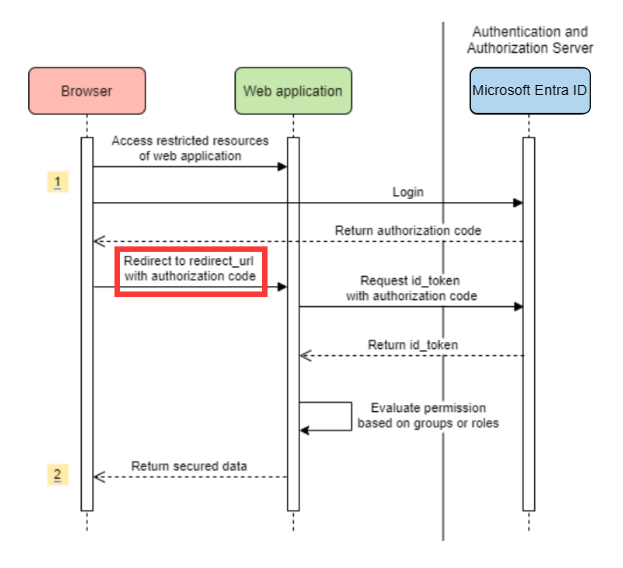
在您的 application.yml 檔案中新增 redirect-uri-template 屬性。
spring:
 cloud:
   azure:
     active-directory:
       enabled: true
       redirect-uri-template: ${REDIRECT-URI-TEMPLATE}
在 Azure 入口網站中更新 redirect-uri。
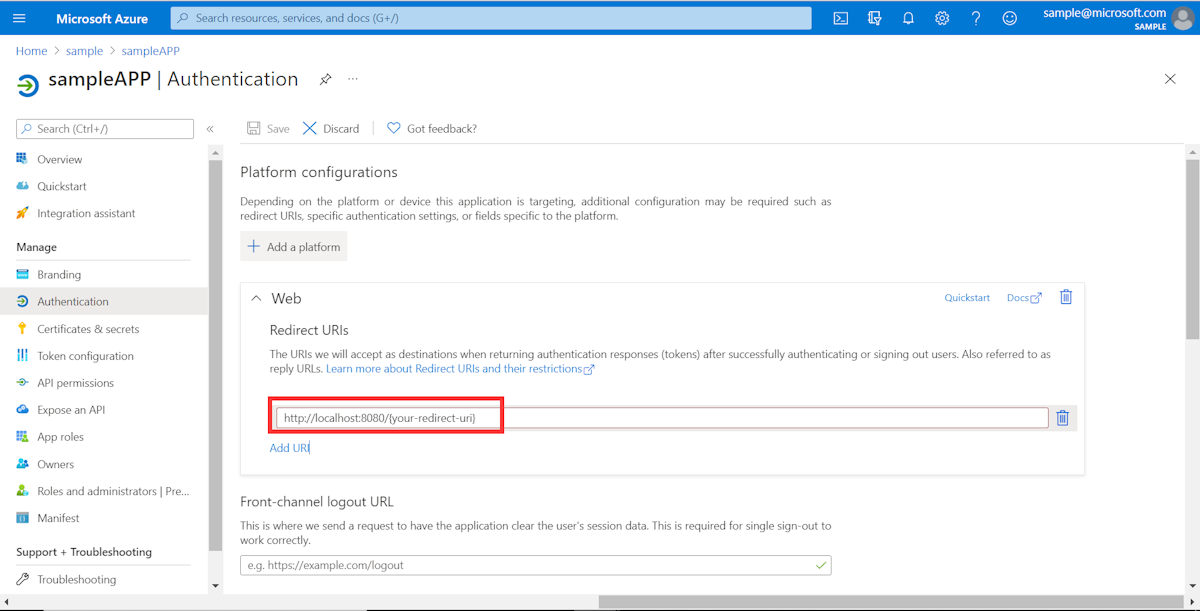
設定 redirect-uri-template之後,我們需要更新安全性產生器:
@Configuration(proxyBeanMethods = false)
@EnableWebSecurity
@EnableMethodSecurity
public class AadOAuth2LoginSecurityConfig {

    /**
     * Add configuration logic as needed.
     */
    @Bean
    public SecurityFilterChain htmlFilterChain(HttpSecurity http) throws Exception {
        // @formatter:off
        http.with(AadWebApplicationHttpSecurityConfigurer.aadWebApplication(), Customizer.withDefaults())
            .oauth2Login(login -> login.loginProcessingUrl("${REDIRECT-URI-TEMPLATE}"))
            .authorizeHttpRequests(auth -> auth.anyRequest().authenticated());
        // @formatter:on
        return http.build();
    }
}
透過 Proxy 連線到 Microsoft Entra ID
若要透過 Proxy 伺服器連線至 Microsoft Entra ID,請提供如以下範例所示的 RestTemplateCustomizer bean:
@Configuration
class DemoConfiguration {
    @Bean
    public RestTemplateCustomizer proxyRestTemplateCustomizer() {
        return (RestTemplate restTemplate) -> {
            Proxy proxy = new Proxy(Proxy.Type.HTTP, new InetSocketAddress(PROXY_SERVER_HOST, PROXY_SERVER_PORT));
            SimpleClientHttpRequestFactory requestFactory = new SimpleClientHttpRequestFactory();
            requestFactory.setProxy(proxy);
            restTemplate.setRequestFactory(requestFactory);
        };
    }
}
樣品
範例專案: aad-web-application。
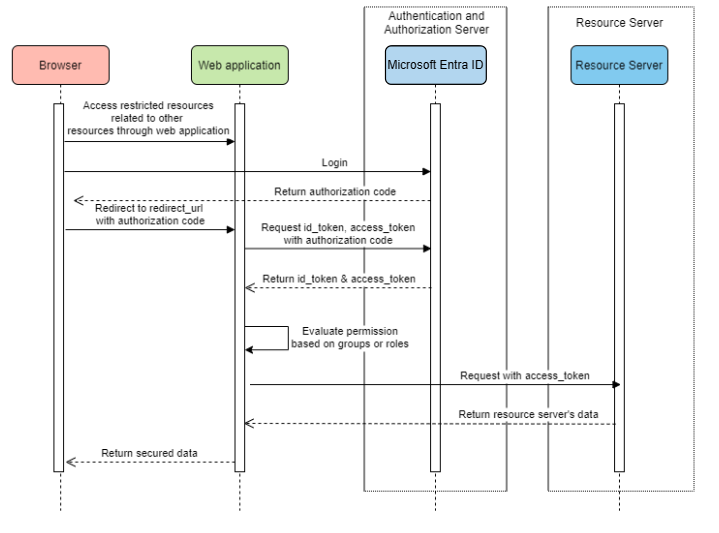
存取資源伺服器的 Web 應用程式
系統圖表
在 Azure 中建立必要的資源
建立應用程式註冊。 取得
AZURE_TENANT_ID、AZURE_CLIENT_ID與AZURE_CLIENT_SECRET。將
redirect URI設定為APPLICATION_BASE_URI/login/oauth2/code/,例如http://localhost:8080/login/oauth2/code/。 結尾的/是必需的。
新增必要的相依性
<dependencies>
    <dependency>
        <groupId>com.azure.spring</groupId>
        <artifactId>spring-cloud-azure-starter-active-directory</artifactId>
    </dependency>
    <dependency>
        <groupId>org.springframework.boot</groupId>
        <artifactId>spring-boot-starter-oauth2-client</artifactId>
    </dependency>
</dependencies>
新增必要的屬性
spring:
  cloud:
    azure:
      active-directory:
        enabled: true
        profile:
          tenant-id: <tenant>
        credential:
          client-id: ${AZURE_CLIENT_ID}
          client-secret: ${AZURE_CLIENT_SECRET}
        authorization-clients:
          graph:
            scopes: https://graph.microsoft.com/Analytics.Read, email
注意
tenant-id 允許的值包括:common、organizations、consumers或租用戶標識碼。 如需這些值的詳細資訊,請參閱 錯誤 AADSTS50020 - 來自身分識別提供者的使用者帳戶不存在於租用戶中中的 使用了錯誤的端點(個人和組織帳戶)一節。 如需有關將單一租用戶應用程式轉換為多租用戶的資訊,請參閱 在 Microsoft Entra ID 上將單一租用戶應用程式轉換為多租用戶。
在這裡,graph 是 OAuth2AuthorizedClient的名稱,scopes 表示登入時需要同意的範圍。
在應用程式中使用 OAuth2AuthorizedClient
public class Demo {
    @GetMapping("/graph")
    @ResponseBody
    public String graph(
    @RegisteredOAuth2AuthorizedClient("graph") OAuth2AuthorizedClient graphClient) {
        // toJsonString() is just a demo.
        // oAuth2AuthorizedClient contains access_token. We can use this access_token to access resource server.
        return toJsonString(graphClient);
    }
}
現在,啟動您的應用程式,並在瀏覽器中存取您的應用程式。 然後,系統會將您重新導向至Microsoft登入頁面。
進階使用方式
用戶端認證流程
預設流程為 授權碼流程,如果您想要使用 用戶端憑證流程,您可以像這樣設定:
spring:
  cloud:
    azure:
      active-directory:
        enabled: true
        profile:
          tenant-id: <tenant>
        credential:
          client-id: ${AZURE_CLIENT_ID}
          client-secret: ${AZURE_CLIENT_SECRET}
        authorization-clients:
          graph:
            authorization-grant-type: client_credentials # Change type to client_credentials
            scopes: https://graph.microsoft.com/Analytics.Read, email
注意
tenant-id 允許的值包括:common、organizations、consumers或租用戶標識碼。 如需這些值的詳細資訊,請參閱 錯誤 AADSTS50020 - 來自身分識別提供者的使用者帳戶不存在於租用戶中中的 使用了錯誤的端點(個人和組織帳戶)一節。 如需有關將單一租用戶應用程式轉換為多租用戶的資訊,請參閱 在 Microsoft Entra ID 上將單一租用戶應用程式轉換為多租用戶。
存取多個資源伺服器
在一個 Web 應用程式中,您可以藉由設定如下來存取多個資源伺服器:
spring:
  cloud:
    azure:
      active-directory:
        enabled: true
        profile:
          tenant-id: <tenant>
        credential:
          client-id: ${AZURE_CLIENT_ID}
          client-secret: ${AZURE_CLIENT_SECRET}
        authorization-clients:
          resource-server-1:
            scopes: # Scopes for resource-server-1
          resource-server-2:
            scopes: # Scopes for resource-server-2
注意
tenant-id 允許的值包括:common、organizations、consumers或租用戶標識碼。 如需這些值的詳細資訊,請參閱 錯誤 AADSTS50020 - 來自身分識別提供者的使用者帳戶不存在於租用戶中中的 使用了錯誤的端點(個人和組織帳戶)一節。 如需有關將單一租用戶應用程式轉換為多租用戶的資訊,請參閱 在 Microsoft Entra ID 上將單一租用戶應用程式轉換為多租用戶。
然後,您可以在應用程式中使用 OAuth2AuthorizedClient,如下所示
public class Demo {
    @GetMapping("/resource-server-1")
    @ResponseBody
    public String graph1(
    @RegisteredOAuth2AuthorizedClient("resource-server-1") OAuth2AuthorizedClient client) {
        return callResourceServer1(client);
    }

    @GetMapping("/resource-server-2")
    @ResponseBody
    public String graph2(
    @RegisteredOAuth2AuthorizedClient("resource-server-2") OAuth2AuthorizedClient client) {
        return callResourceServer2(client);
    }
}
樣品
範例專案: aad-web-application。
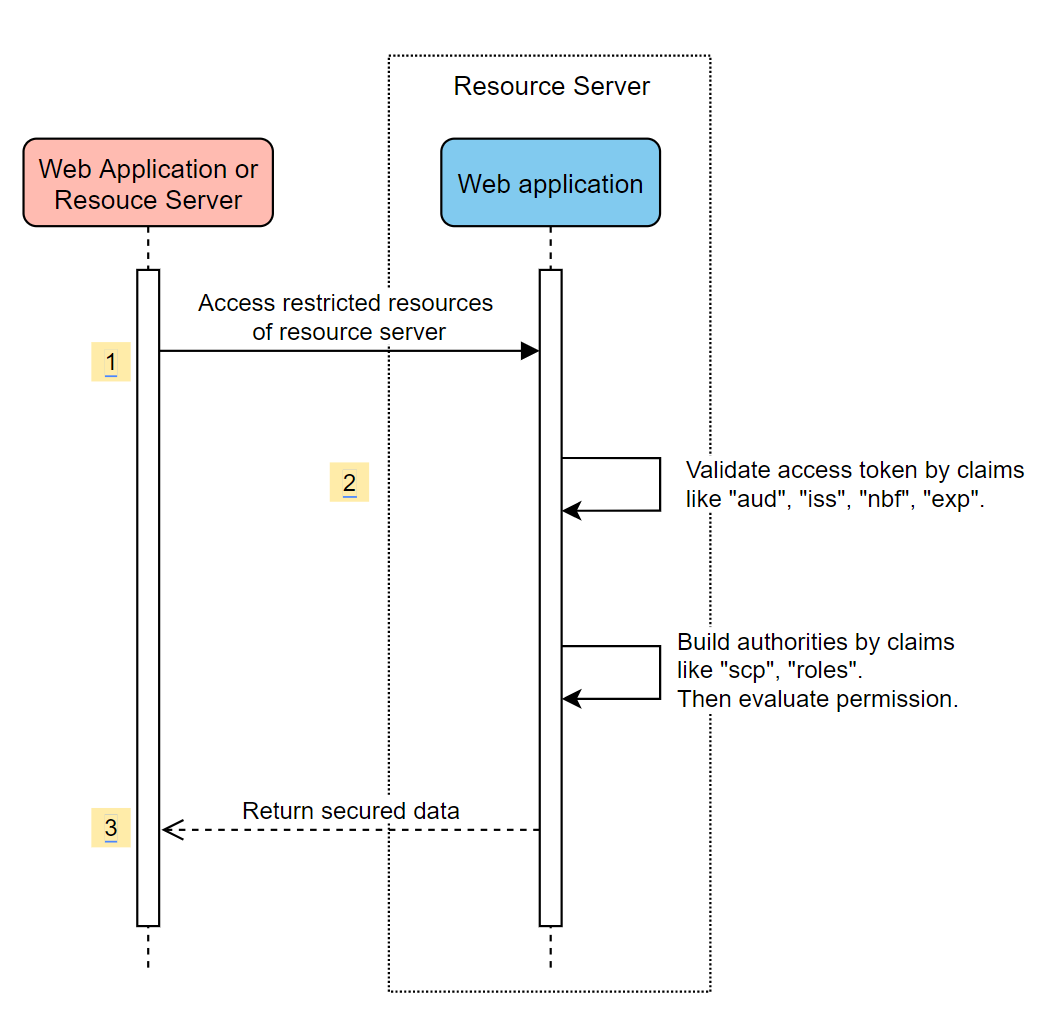
存取資源伺服器
此案例不支援登入,只要藉由驗證存取令牌來保護伺服器。 如果存取權杖有效,伺服器會處理該請求。
系統圖表
在 Azure 中建立必要的資源
建立應用程式註冊。 取得
AZURE_CLIENT_ID。公開範圍名稱為
Scope-1的 Web API。
新增必要的相依性
<dependencies>
    <dependency>
        <groupId>com.azure.spring</groupId>
        <artifactId>spring-cloud-azure-starter-active-directory</artifactId>
    </dependency>
    <dependency>
        <groupId>org.springframework.boot</groupId>
        <artifactId>spring-boot-starter-oauth2-resource-server</artifactId>
    </dependency>
</dependencies>
新增必要的屬性
spring:
  cloud:
    azure:
      active-directory:
        enabled: true
        credential:
          client-id: ${AZURE_CLIENT_ID}
現在啟動您的應用程式並存取應用程式的 Web API。
您將取得 401,而不需要存取令牌。
使用存取令牌存取您的應用程式。 存取權杖中的下列宣告將會經過驗證:
iss:存取令牌必須由Microsoft Entra ID 發出。nbf:目前的時間不能在nbf之前。exp:目前的時間不能在exp之後。aud:如果spring.cloud.azure.active-directory.credential.client-id或spring.cloud.azure.active-directory.credential.app-id-uri設定,對象必須等於設定的client-id或app-id-uri。 如果未設定這兩個屬性,將不會驗證此宣告。
如需存取權杖的詳細資訊,請參閱 MS 文件中關於 Microsoft 身分識別平台存取權杖的說明。
進階使用方式
新增額外的安全性設定
@Configuration(proxyBeanMethods = false)
@EnableWebSecurity
@EnableMethodSecurity
public class AadOAuth2ResourceServerSecurityConfig {

    /**
     * Add configuration logic as needed.
     */
    @Bean
    public SecurityFilterChain htmlFilterChain(HttpSecurity http) throws Exception {
        // @formatter:off
        http.with(AadResourceServerHttpSecurityConfigurer.aadResourceServer(), Customizer.withDefaults())
            .authorizeHttpRequests(authorize -> authorize.anyRequest().authenticated());
        // @formatter:on
        return http.build();
    }
}
根據範圍驗證權限
在 Azure 中建立必要的資源。
公開名稱為
Scope1的 Web API 範圍。
保護特定的方法。
class Demo {
    @GetMapping("scope1")
    @ResponseBody
    @PreAuthorize("hasAuthority('SCOPE_Scope1')")
    public String scope1() {
        return "Congratulations, you can access `scope1` endpoint.";
    }
}
如此一來,當存取 /scope1 端點時,將會驗證存取令牌中的下列宣告:
-
scp:值必須包含Scope1。
依應用程式角色驗證許可權
在 Azure 中建立必要的資源。
使用下列參數建立應用程式角色:
- 顯示名稱:AppRole1
- 允許的成員類型:使用者/群組
- 值:AppRole1
- 您要啟用此應用程式角色嗎: 是
保護特定方法。
class Demo {
    @GetMapping("app-role1")
    @ResponseBody
    @PreAuthorize("hasAuthority('APPROLE_AppRole1')")
    public String appRole1() {
        return "Congratulations, you can access `app-role1` endpoint.";
    }
}
如此一來,當存取 /app-role1 端點時,將會驗證存取令牌中的下列宣告:
-
roles:值必須包含AppRole1。
使用 JWT 用戶端驗證
若要使用 JSON Web 令牌 (JWT) 進行客戶端驗證,請使用下列步驟:
- 請參閱 Microsoft 身分識別平台應用程式驗證憑證認證資料中的 向 Microsoft 身分識別平台註冊您的憑證 一節。
- 將 .pem 憑證上傳至 Azure 入口網站中註冊的應用程式。
- 設定 .PFX 或 .P12 憑證的路徑和密碼。
- 將屬性
spring.cloud.azure.active-directory.authorization-clients.azure.client-authentication-method=private_key_jwt組態新增至用戶端,以透過 JWT 用戶端驗證進行驗證。
下列範例組態檔適用於 Web 應用程式案例。 憑證資訊是在全域屬性中設定的。
spring:
  cloud:
    azure:
      credential:
        client-id: ${AZURE_CLIENT_ID}
        client-certificate-path: ${AZURE_CERTIFICATE_PATH}
        client-certificate-password: ${AZURE_CERTIFICATE_PASSWORD}
      profile:
        tenant-id: <tenant>
      active-directory:
        enabled: true
        user-group:
          allowed-group-names: group1,group2
          allowed-group-ids: <group1-id>,<group2-id>
        post-logout-redirect-uri: http://localhost:8080
        authorization-clients:
          azure:
            client-authentication-method: private_key_jwt
          arm:
            client-authentication-method: private_key_jwt
            scopes: https://management.core.windows.net/user_impersonation
          graph:
            client-authentication-method: private_key_jwt
            scopes:
              - https://graph.microsoft.com/User.Read
              - https://graph.microsoft.com/Directory.Read.All
          webapiA:
            client-authentication-method: private_key_jwt
            scopes:
              - ${WEB_API_A_APP_ID_URL}/Obo.WebApiA.ExampleScope
          webapiB:
            client-authentication-method: private_key_jwt
            scopes:
              - ${WEB_API_B_APP_ID_URL}/.default
            authorization-grant-type: client_credentials
注意
tenant-id 允許的值包括:common、organizations、consumers或租用戶標識碼。 如需這些值的詳細資訊,請參閱 錯誤 AADSTS50020 - 來自身分識別提供者的使用者帳戶不存在於租用戶中中的 使用了錯誤的端點(個人和組織帳戶)一節。 如需有關將單一租用戶應用程式轉換為多租用戶的資訊,請參閱 在 Microsoft Entra ID 上將單一租用戶應用程式轉換為多租用戶。
您也可以在 active-directory 服務屬性中設定憑證資訊,如下列範例所示:
spring:
  cloud:
    azure:
      active-directory:
        enabled: true
        credential:
          client-id: ${AZURE_CLIENT_ID}
          client-certificate-path: ${AZURE_CERTIFICATE_PATH}
          client-certificate-password: ${AZURE_CERTIFICATE_PASSWORD}
        profile:
          tenant-id: <tenant>
        user-group:
          allowed-group-names: group1,group2
          allowed-group-ids: <group1-id>,<group2-id>
        post-logout-redirect-uri: http://localhost:8080
        authorization-clients:
          azure:
            client-authentication-method: private_key_jwt
          arm:
            client-authentication-method: private_key_jwt
            scopes: https://management.core.windows.net/user_impersonation
          graph:
            client-authentication-method: private_key_jwt
            scopes:
              - https://graph.microsoft.com/User.Read
              - https://graph.microsoft.com/Directory.Read.All
          webapiA:
            client-authentication-method: private_key_jwt
            scopes:
              - ${WEB_API_A_APP_ID_URL}/Obo.WebApiA.ExampleScope
          webapiB:
            client-authentication-method: private_key_jwt
            scopes:
              - ${WEB_API_B_APP_ID_URL}/.default
            authorization-grant-type: client_credentials
注意
tenant-id 允許的值包括:common、organizations、consumers或租用戶標識碼。 如需這些值的詳細資訊,請參閱 錯誤 AADSTS50020 - 來自身分識別提供者的使用者帳戶不存在於租用戶中中的 使用了錯誤的端點(個人和組織帳戶)一節。 如需有關將單一租用戶應用程式轉換為多租用戶的資訊,請參閱 在 Microsoft Entra ID 上將單一租用戶應用程式轉換為多租用戶。
透過 Proxy 連線到 Microsoft Entra ID
若要透過代理伺服器連線至 Microsoft Entra ID,請提供 `RestTemplateCustomizer` Bean。 如需詳細資訊,請參閱 透過 proxy 連線到 Microsoft Entra ID 一節。
樣品
範例專案: aad-resource-server。
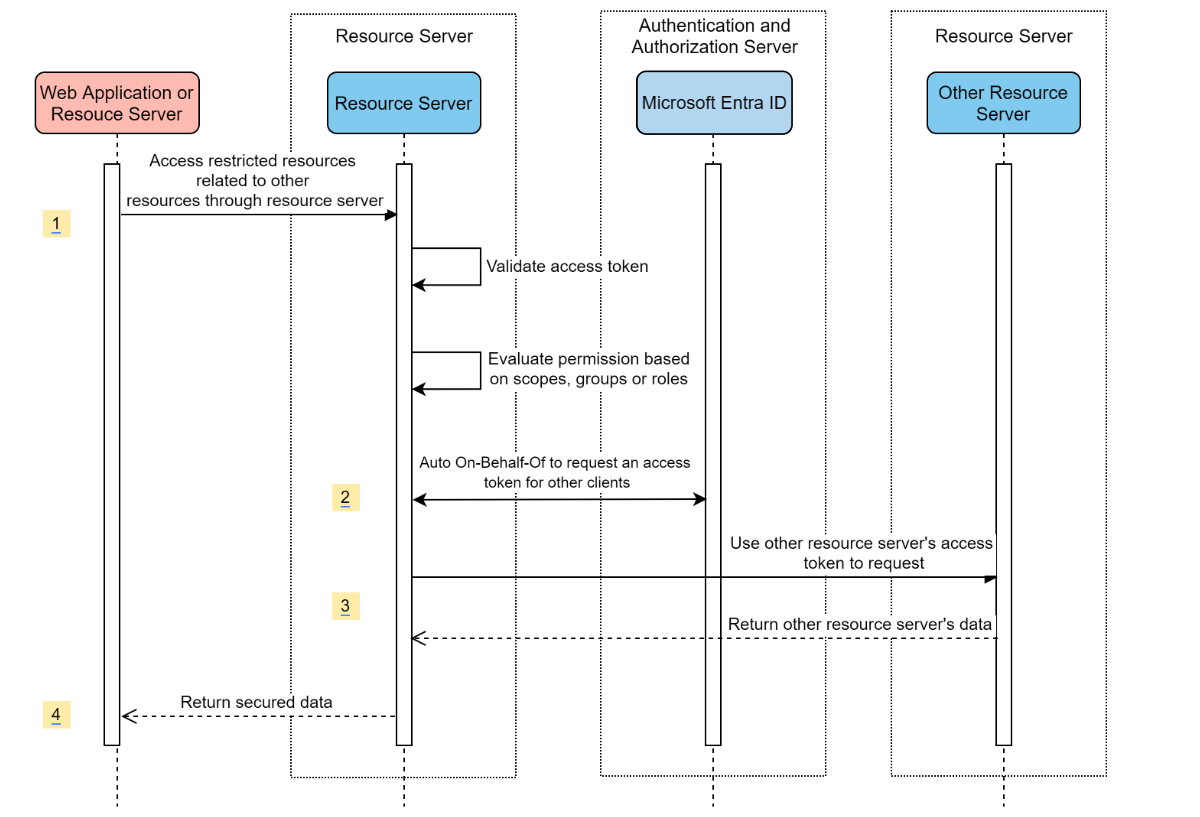
存取其他資源伺服器的資源伺服器
系統圖表
在 Azure 中建立必要的資源
建立應用程式註冊。 取得
AZURE_TENANT_ID、AZURE_CLIENT_ID與AZURE_CLIENT_SECRET。
新增必要的相依性
<dependencies>
    <dependency>
        <groupId>com.azure.spring</groupId>
        <artifactId>spring-cloud-azure-starter-active-directory</artifactId>
    </dependency>
    <dependency>
        <groupId>org.springframework.boot</groupId>
        <artifactId>spring-boot-starter-oauth2-resource-server</artifactId>
    </dependency>
    <dependency>
        <groupId>org.springframework.boot</groupId>
        <artifactId>spring-boot-starter-oauth2-client</artifactId>
    </dependency>
</dependencies>
新增必要的屬性
spring:
  cloud:
    azure:
      active-directory:
        enabled: true
        profile:
          tenant-id: <tenant>
        credential:
          client-id: ${AZURE_CLIENT_ID}
          client-secret: ${AZURE_CLIENT_SECRET}
        authorization-clients:
          graph:
            scopes:
              - https://graph.microsoft.com/User.Read
注意
tenant-id 允許的值包括:common、organizations、consumers或租用戶標識碼。 如需這些值的詳細資訊,請參閱 錯誤 AADSTS50020 - 來自身分識別提供者的使用者帳戶不存在於租用戶中中的 使用了錯誤的端點(個人和組織帳戶)一節。 如需有關將單一租用戶應用程式轉換為多租用戶的資訊,請參閱 在 Microsoft Entra ID 上將單一租用戶應用程式轉換為多租用戶。
在應用程式中使用 OAuth2AuthorizedClient
public class SampleController {
    @GetMapping("call-graph")
    public String callGraph(@RegisteredOAuth2AuthorizedClient("graph") OAuth2AuthorizedClient graph) {
        return callMicrosoftGraphMeEndpoint(graph);
    }
}
樣品
範例專案: aad-resource-server-obo。
一個應用程式中的 Web 應用程式和資源伺服器
在 Azure 中建立必要的資源
建立應用程式註冊。 取得
AZURE_TENANT_ID、AZURE_CLIENT_ID與AZURE_CLIENT_SECRET。
新增必要的相依性
<dependencies>
    <dependency>
        <groupId>com.azure.spring</groupId>
        <artifactId>spring-cloud-azure-starter-active-directory</artifactId>
    </dependency>
    <dependency>
        <groupId>org.springframework.boot</groupId>
        <artifactId>spring-boot-starter-oauth2-resource-server</artifactId>
    </dependency>
    <dependency>
        <groupId>org.springframework.boot</groupId>
        <artifactId>spring-boot-starter-oauth2-client</artifactId>
    </dependency>
</dependencies>
新增必要的屬性
將屬性 spring.cloud.azure.active-directory.application-type 設定為 web_application_and_resource_server,併為每個授權用戶端指定授權類型。
spring:
  cloud:
    azure:
      active-directory:
        enabled: true
        profile:
          tenant-id: <tenant>
        credential:
          client-id: ${AZURE_CLIENT_ID}
          client-secret: ${AZURE_CLIENT_SECRET}
        app-id-uri: ${WEB_API_ID_URI}
        application-type: web_application_and_resource_server  # This is required.
        authorization-clients:
          graph:
            authorizationGrantType: authorization_code # This is required.
            scopes:
              - https://graph.microsoft.com/User.Read
              - https://graph.microsoft.com/Directory.Read.All
注意
tenant-id 允許的值包括:common、organizations、consumers或租用戶標識碼。 如需這些值的詳細資訊,請參閱 錯誤 AADSTS50020 - 來自身分識別提供者的使用者帳戶不存在於租用戶中中的 使用了錯誤的端點(個人和組織帳戶)一節。 如需有關將單一租用戶應用程式轉換為多租用戶的資訊,請參閱 在 Microsoft Entra ID 上將單一租用戶應用程式轉換為多租用戶。
定義 SecurityFilterChain
設定多個 SecurityFilterChain 實例。
AadWebApplicationAndResourceServerConfig 包含兩個資源伺服器和 Web 應用程式的安全性篩選鏈結組態。
@Configuration(proxyBeanMethods = false)
@EnableWebSecurity
@EnableMethodSecurity
public class AadWebApplicationAndResourceServerConfig {

    @Bean
    @Order(1)
    public SecurityFilterChain apiFilterChain(HttpSecurity http) throws Exception {
        http.with(AadResourceServerHttpSecurityConfigurer.aadResourceServer(), Customizer.withDefaults())
            // All the paths that match `/api/**`(configurable) work as the resource server. Other paths work as the web application.
            .securityMatcher("/api/**")
            .authorizeHttpRequests(auth -> auth.anyRequest().authenticated());
        return http.build();
    }

    @Bean
    public SecurityFilterChain htmlFilterChain(HttpSecurity http) throws Exception {
        // @formatter:off
        http.with(AadWebApplicationHttpSecurityConfigurer.aadWebApplication(), Customizer.withDefaults())
            .authorizeHttpRequests(auth -> auth.requestMatchers("/login").permitAll().anyRequest().authenticated());
        // @formatter:on
        return http.build();
    }
}
配置
spring-cloud-azure-starter-active-directory 的可設定屬性:
| 名字 | 描述 |
|---|---|
spring.cloud.azure.active-directory.app-id-uri |
應用程式識別碼 URI,可能用於id_token的 “aud” 宣告中。 |
spring.cloud.azure.active-directory.application-type |
Microsoft Entra 應用程式的類型。 |
spring.cloud.azure.active-directory.authenticate-additional-parameters |
將其他參數新增至授權 URL。 |
spring.cloud.azure.active-directory.authorization-clients |
OAuth2 授權用戶端。 |
spring.cloud.azure.active-directory.credential.client-id |
使用 Azure 執行服務主體驗證時要使用的用戶端識別碼。 |
spring.cloud.azure.active-directory.credential.client-secret |
使用 Azure 進行服務主體驗證時所使用的用戶端密碼。 |
spring.cloud.azure.active-directory.jwk-set-cache-lifespan |
快取 JWK 設定在到期前的存續期,預設值為 5 分鐘。 |
spring.cloud.azure.active-directory.jwk-set-cache-refresh-time |
快取 JWK 設定在到期前的重新整理時間,預設值為 5 分鐘。 |
spring.cloud.azure.active-directory.jwt-connect-timeout |
呼叫 JWKSet 遠端 URL 時發生連線逾時。 |
spring.cloud.azure.active-directory.jwt-read-timeout |
讀取 JWKSet 遠端 URL 話叫的逾時。 |
spring.cloud.azure.active-directory.jwt-size-limit |
JWKSet 遠端 URL 呼叫的大小限制(以位元組為單位)。 |
spring.cloud.azure.active-directory.post-logout-redirect-uri |
登出後的重新導向 URI。 |
spring.cloud.azure.active-directory.profile.cloud-type |
要連線的 Azure 雲端名稱。 支援的類型包括:AZURE、AZURE_CHINA、AZURE_GERMANY、AZURE_US_GOVERNMENT、OTHER。 |
spring.cloud.azure.active-directory.profile.environment |
Microsoft Entra 端點的屬性 |
spring.cloud.azure.active-directory.profile.tenant-id |
Azure 租用戶標識碼。
tenant-id 允許的值包括:common、organizations、consumers或租用戶標識碼。 |
spring.cloud.azure.active-directory.redirect-uri-template |
重新導向端點:由授權伺服器用來透過資源擁有者使用者代理程式將包含授權認證的回應傳回給用戶端。 預設值為 {baseUrl}/login/oauth2/code/。 |
spring.cloud.azure.active-directory.resource-server.claim-to-authority-prefix-map |
設定要使用哪個宣告來建立 GrantedAuthority,以及 GrantedAuthority 字串值的前綴。 預設值為:“scp” -> “SCOPE_”、“roles” -> “APPROLE_”。 |
spring.cloud.azure.active-directory.resource-server.principal-claim-name |
設定在 AuthenticatedPrincipal#getName 中傳回存取令牌中的宣告。 預設值為 「sub」。 |
spring.cloud.azure.active-directory.session-stateless |
如果 true 會啟動無狀態驗證篩選器 AadAppRoleStatlessAuthenticationFilter。 默認值為 false,會啟動 AadAuthenticationFilter。 |
spring.cloud.azure.active-directory.user-group.allowed-group-ids |
群組標識碼可用來建構 GrantedAuthority。 |
spring.cloud.azure.active-directory.user-group.allowed-group-names |
組名可用來建構 GrantedAuthority。 |
spring.cloud.azure.active-directory.user-group.use-transitive-members |
如果為 「true」,請使用 「v1.0/me/transitiveMemberOf」 來取得成員。 否則,請使用 「v1.0/me/memberOf」。。 預設值為 false。 |
spring.cloud.azure.active-directory.user-name-attribute |
決定哪個宣告作為主體的名稱。 |
以下是如何使用這些屬性的一些範例:
應用程式類型
應用程式類型可以從相依性推斷:spring-security-oauth2-client 或 spring-security-oauth2-resource-server。 如果推斷的值不是您想要的值,您可以指定應用程式類型。 以下是有效值和推斷值資料表:
spring-cloud-azure-starter-active-directory的應用程式類型:
具有相依關係:spring-security-oauth2-client |
具有相依性:spring-security-oauth2-resource-server |
應用程式類型的有效值 | 推斷的值 |
|---|---|---|---|
| 是的 | 不 | web_application |
web_application |
| 不 | 是的 | resource_server |
resource_server |
| 是的 | 是的 |
web_application、resource_server、resource_server_with_obo、web_application_and_resource_server |
resource_server_with_obo |
搭配 Azure Active Directory B2C 的 Spring Security
Azure Active Directory (Azure AD) B2C 是一項身分識別管理服務,可讓您自定義及控制客戶在使用應用程式時如何註冊、登入及管理其配置檔。 Azure AD B2C 可啟用這些動作,同時保護客戶的身分識別。
相依性設定
<dependencies>
    <dependency>
        <groupId>com.azure.spring</groupId>
        <artifactId>spring-cloud-azure-starter-active-directory-b2c</artifactId>
    </dependency>
</dependencies>
配置
spring-cloud-azure-starter-active-directory-b2c 的可設定屬性:
| 名字 | 描述 |
|---|---|
spring.cloud.azure.active-directory.b2c.app-id-uri |
可用於令牌「aud」宣告的應用程式識別碼 URI。 |
spring.cloud.azure.active-directory.b2c.authenticate-additional-parameters |
驗證的其他參數。 |
spring.cloud.azure.active-directory.b2c.authorization-clients |
指定用戶端組態。 |
spring.cloud.azure.active-directory.b2c.base-uri |
Azure AD B2C 端點基底 URI。 |
spring.cloud.azure.active-directory.b2c.credential |
Azure AD B2C 認證資訊。 |
spring.cloud.azure.active-directory.b2c.jwt-connect-timeout |
呼叫 JWKSet 遠端 URL 時發生連線逾時。 |
spring.cloud.azure.active-directory.b2c.jwt-read-timeout |
讀取 JWKSet 遠端 URL 話叫的逾時。 |
spring.cloud.azure.active-directory.b2c.jwt-size-limit |
JWKSet 遠端 URL 呼叫的大小限制(以位元組為單位)。 |
spring.cloud.azure.active-directory.b2c.login-flow |
指定主要登入流程金鑰。 預設值為 sign-up-or-sign-in。 |
spring.cloud.azure.active-directory.b2c.logout-success-url |
登出後的重新導向 URL。 預設值為 http://localhost:8080/login。 |
spring.cloud.azure.active-directory.b2c.profile |
Azure AD B2C 設定檔資訊。 |
spring.cloud.azure.active-directory.b2c.reply-url |
取得授權碼後的回覆 URL。 預設值為 {baseUrl}/login/oauth2/code/。 |
spring.cloud.azure.active-directory.b2c.user-flows |
使用者流程。 |
spring.cloud.azure.active-directory.b2c.user-name-attribute-name |
使用者名稱屬性名稱。 |
如需完整組態,請參閱 Spring Cloud Azure 組態屬性。
基本用法
Web 應用程式 是任何 Web 型應用程式,可讓使用者使用 Microsoft Entra 識別元登入,而 資源伺服器 在驗證從 Microsoft Entra ID 取得的access_token之後,將會接受或拒絕存取。 我們將涵蓋本指南中的 4 個案例:
存取 Web 應用程式。
存取資源伺服器的 Web 應用程式。
存取資源伺服器。
存取其他資源伺服器的資源伺服器。
使用方式 1:存取 Web 應用程式
此情境使用 OAuth 2.0 授權碼授與流程,讓使用者使用您的 Azure AD B2C 使用者帳戶登入。
從入口網站功能表中選取 [Azure AD B2C],選取 [應用程式],然後選取 [新增]。
指定您的應用程式 名稱(例如 webapp),為 http://localhost:8080/login/oauth2/code/新增 ,將 應用程式識別碼 記錄為 WEB_APP_AZURE_CLIENT_ID,然後選取 [儲存]。
從您的應用程式選取 [
在左側選取使用者流程,然後選取新增使用者流程。
選擇 [註冊] 或 []、配置檔編輯,以及 [密碼重設] 分別建立使用者流程。 指定您的使用者流程 名稱 和 使用者屬性與宣告,然後選取 建立。
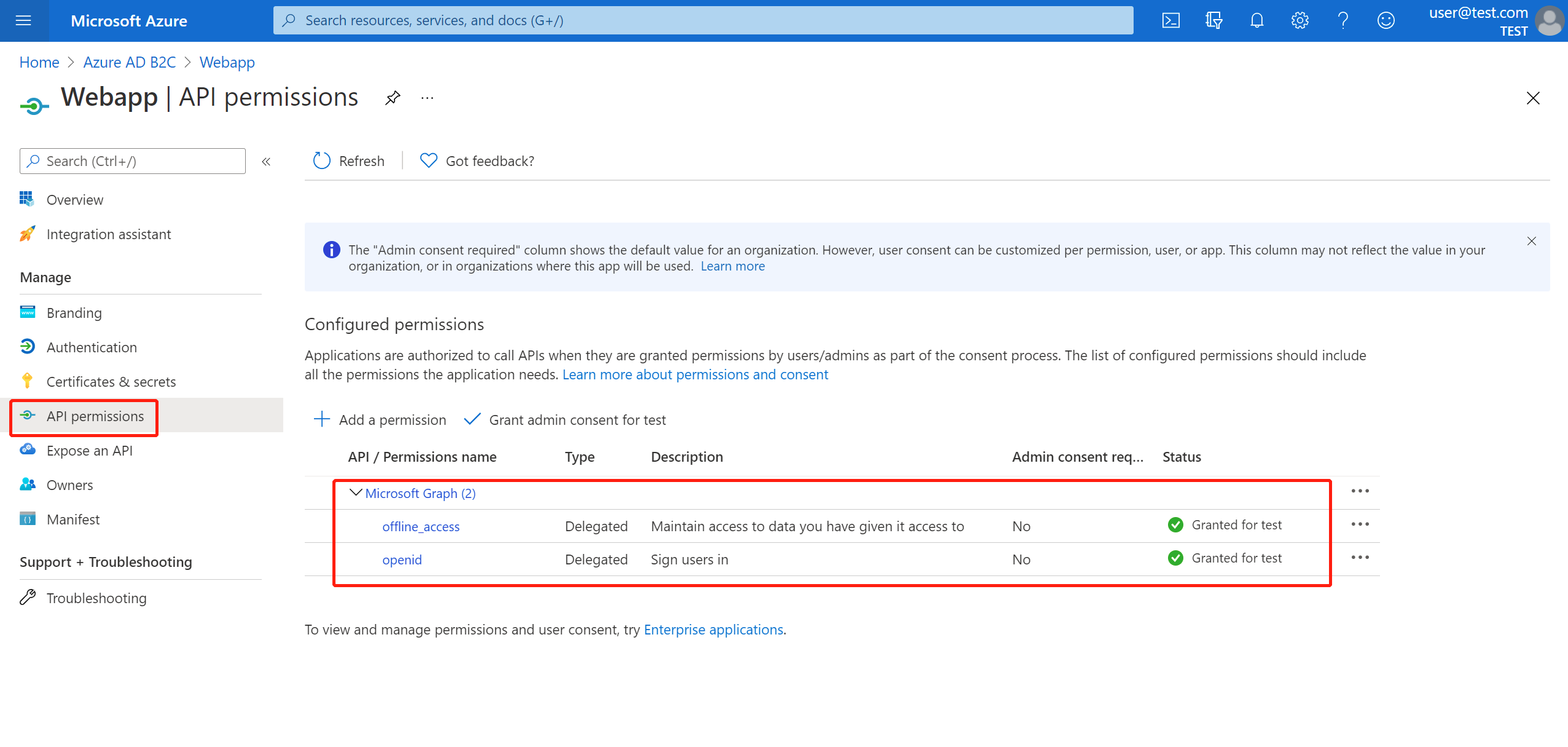
選取 [API 許可權],>[新增許可權>Microsoft API]、選取 [Microsoft Graph]、選取 [委派的許可權]、選取 [offline_access] 和 [openid 許可權],然後選取 [新增許可權 以完成此程式。
授與管理員同意 Graph 許可權。
將下列相依性新增至 pom.xml 檔案。
<dependencies>
   <dependency>
       <groupId>com.azure.spring</groupId>
       <artifactId>azure-spring-boot-starter-active-directory-b2c</artifactId>
   </dependency>
   <dependency>
       <groupId>org.springframework.boot</groupId>
       <artifactId>spring-boot-starter-web</artifactId>
   </dependency>
   <dependency>
       <groupId>org.springframework.boot</groupId>
       <artifactId>spring-boot-starter-thymeleaf</artifactId>
   </dependency>
   <dependency>
       <groupId>org.springframework.boot</groupId>
       <artifactId>spring-boot-starter-security</artifactId>
   </dependency>
   <dependency>
       <groupId>org.thymeleaf.extras</groupId>
       <artifactId>thymeleaf-extras-springsecurity6</artifactId>
   </dependency>
</dependencies>
使用您稍早建立的值,將屬性新增至您的 application.yml 檔案,如下列範例所示:
spring:
 cloud:
   azure:
     active-directory:
       b2c:
         enabled: true
         authenticate-additional-parameters:
           domain_hint: xxxxxxxxx         # optional
           login_hint: xxxxxxxxx          # optional
           prompt: [login,none,consent]   # optional
         base-uri: ${BASE_URI}
         credential:
           client-id: ${WEBAPP_AZURE_CLIENT_ID}
           client-secret: ${WEBAPP_AZURE_CLIENT_SECRET}
         login-flow: ${LOGIN_USER_FLOW_KEY}               # default to sign-up-or-sign-in, will look up the user-flows map with provided key.
         logout-success-url: ${LOGOUT_SUCCESS_URL}
         user-flows:
           ${YOUR_USER_FLOW_KEY}: ${USER_FLOW_NAME}
         user-name-attribute-name: ${USER_NAME_ATTRIBUTE_NAME}
撰寫 Java 程式代碼。
針對控制器程式代碼,您可以參考下列範例:
@Controller
public class WebController {

   private void initializeModel(Model model, OAuth2AuthenticationToken token) {
       if (token != null) {
           final OAuth2User user = token.getPrincipal();
           model.addAllAttributes(user.getAttributes());
           model.addAttribute("grant_type", user.getAuthorities());
           model.addAttribute("name", user.getName());
       }
   }

   @GetMapping(value = { "/", "/home" })
   public String index(Model model, OAuth2AuthenticationToken token) {
       initializeModel(model, token);
       return "home";
   }
}
針對安全性設定程式碼,您可以參考下列範例:
@Configuration(proxyBeanMethods = false)
@EnableWebSecurity
public class WebSecurityConfiguration {

    private final AadB2cOidcLoginConfigurer configurer;

    public WebSecurityConfiguration(AadB2cOidcLoginConfigurer configurer) {
        this.configurer = configurer;
    }

    @Bean
    SecurityFilterChain filterChain(HttpSecurity http) throws Exception {
        // @formatter:off
        http.authorizeHttpRequests(auth -> auth.anyRequest().authenticated())
            .with(configurer, Customizer.withDefaults());
        // @formatter:on
        return http.build();
    }
}
從 aad-b2c-web-application sample 複製 home.html,並將 PROFILE_EDIT_USER_FLOW 和 替換為您先前使用的使用者流程名稱。
建置及測試您的應用程式。 讓 Webapp 在埠 8080上執行。
在 Maven 建置並啟動您的應用程式之後,請在網頁瀏覽器中開啟 http://localhost:8080/。 您應該重新導向至登入頁面。
選取具有登入使用者流程的連結。 您應該會被重新導向至 Azure AD B2C,以開始驗證程序。
成功登入之後,您應該會看到來自瀏覽器的範例 home page。
使用方式 2:存取資源伺服器的 Web 應用程式
此案例是以 存取 Web 應用程式 案例為基礎,以允許應用程式存取其他資源。 此案例 OAuth 2.0 用戶端認證授與 流程。
從入口網站功能表中選取 [Azure AD B2C],選取 [應用程式],然後選取 [新增]。
指定您的應用程式 名稱(例如 webApiA),將 應用程式識別碼 記錄為 WEB_API_A_AZURE_CLIENT_ID,然後選取 [儲存]。
從您的應用程式選取 [
從瀏覽窗格中選取 [[公開 API],然後選取 [設定]。 將應用程式識別碼 URI記下作為您的,然後選取儲存。
從導覽窗格中選取 Manifest,然後將下列 JSON 區段貼到 appRoles 陣列中。 將 應用程式識別碼 URI 記錄為 WEB_API_A_APP_ID_URL,將應用程式角色的值記錄為 WEB_API_A_ROLE_VALUE,然後選取 [儲存]。
{
 "allowedMemberTypes": [
   "Application"
 ],
 "description": "WebApiA.SampleScope",
 "displayName": "WebApiA.SampleScope",
 "id": "04989db0-3efe-4db6-b716-ae378517d2b7",
 "isEnabled": true,
 "value": "WebApiA.SampleScope"
}
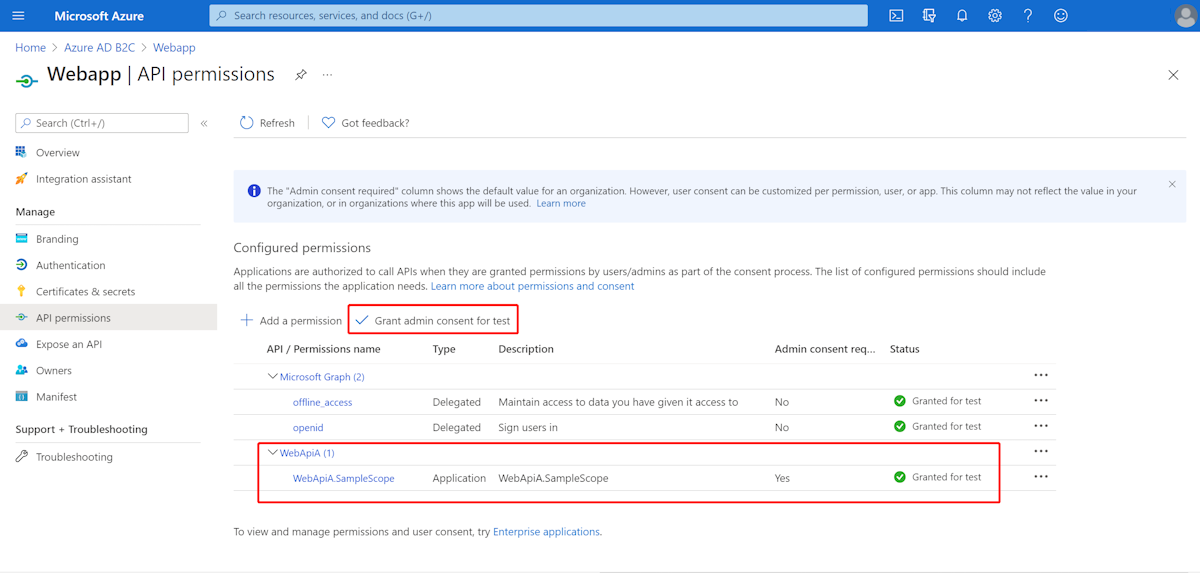
選取 [API 許可權],>[新增許可權>My API]、選取 [WebApiA 應用程式名稱]、選取 [應用程式許可權]、選取 [WebApiA.SampleScope 許可權],然後選取 [新增許可權 以完成此程式。
授與系統管理員同意 WebApiA 許可權。
以 存取 Web 應用程式 情境為基礎,新增下列相依性。
<dependency>
 <groupId>org.springframework.boot</groupId>
 <artifactId>spring-boot-starter-webflux</artifactId>
</dependency>
根據 存取 Web 應用程式 案例,新增下列設定。
spring:
 cloud:
   azure:
     active-directory:
       b2c:
         enabled: true
         base-uri: ${BASE_URI}             # Such as: https://xxxxb2c.b2clogin.com
         profile:
           tenant-id: <tenant>
         authorization-clients:
           ${RESOURCE_SERVER_A_NAME}:
             authorization-grant-type: client_credentials
             scopes: ${WEB_API_A_APP_ID_URL}/.default
注意
tenant-id 允許的值包括:common、organizations、consumers或租用戶標識碼。 如需這些值的詳細資訊,請參閱 錯誤 AADSTS50020 - 來自身分識別提供者的使用者帳戶不存在於租用戶中中的 使用了錯誤的端點(個人和組織帳戶)一節。 如需有關將單一租用戶應用程式轉換為多租用戶的資訊,請參閱 在 Microsoft Entra ID 上將單一租用戶應用程式轉換為多租用戶。
撰寫 Webapp Java 程式代碼。
針對控制器程式代碼,您可以參考下列範例:
class Demo {
   /**
    * Access to protected data from Webapp to WebApiA through client credential flow. The access token is obtained by webclient, or
    * <p>@RegisteredOAuth2AuthorizedClient("webApiA")</p>. In the end, these two approaches will be executed to
    * DefaultOAuth2AuthorizedClientManager#authorize method, get the access token.
    *
    * @return Respond to protected data from WebApi A.
    */
   @GetMapping("/webapp/webApiA")
   public String callWebApiA() {
       String body = webClient
           .get()
           .uri(LOCAL_WEB_API_A_SAMPLE_ENDPOINT)
           .attributes(clientRegistrationId("webApiA"))
           .retrieve()
           .bodyToMono(String.class)
           .block();
       LOGGER.info("Call callWebApiA(), request '/webApiA/sample' returned: {}", body);
       return "Request '/webApiA/sample'(WebApi A) returned a " + (body != null ? "success." : "failure.");
   }
}
安全性設定程式碼與 存取 Web 應用程式 情境中的相同。 新增另一個 Bean webClient,如下所示:
public class SampleConfiguration {
   @Bean
   public WebClient webClient(OAuth2AuthorizedClientManager oAuth2AuthorizedClientManager) {
       ServletOAuth2AuthorizedClientExchangeFilterFunction function =
           new ServletOAuth2AuthorizedClientExchangeFilterFunction(oAuth2AuthorizedClientManager);
       return WebClient.builder()
                       .apply(function.oauth2Configuration())
                       .build();
   }
}
若要撰寫
建置及測試您的應用程式。 讓 Webapp 和 WebApiA 分別在埠 8080 和 8081 上執行。 啟動 Webapp 和 WebApiA 應用程式。 成功登入之後返回首頁。 然後,您可以存取 http://localhost:8080/webapp/webApiA 以取得 WebApiA 資源回應。
使用方式 3:存取資源伺服器
此案例不支援登入。 只要透過驗證存取權杖來保護伺服器,權杖有效時,伺服器就會處理該請求。
若要建置您的 WebApiA 許可權,請參閱 Usage 2:Web 應用程式存取資源伺服器。
新增 WebApiA 許可權,並授與 Web 應用程式的管理員同意。
將下列相依性新增至 pom.xml 檔案。
<dependencies>
   <dependency>
       <groupId>com.azure.spring</groupId>
       <artifactId>azure-spring-boot-starter-active-directory-b2c</artifactId>
   </dependency>
   <dependency>
       <groupId>org.springframework.boot</groupId>
       <artifactId>spring-boot-starter-web</artifactId>
   </dependency>
</dependencies>
新增下列設定。
spring:
 cloud:
   azure:
     active-directory:
       b2c:
         enabled: true
         base-uri: ${BASE_URI}             # Such as: https://xxxxb2c.b2clogin.com
         profile:
           tenant-id: <tenant>
         app-id-uri: ${APP_ID_URI}         # If you're using v1.0 token, configure app-id-uri for `aud` verification
         credential:
           client-id: ${AZURE_CLIENT_ID}           # If you're using v2.0 token, configure client-id for `aud` verification
         user-flows:
           sign-up-or-sign-in: ${SIGN_UP_OR_SIGN_IN_USER_FLOW_NAME}
注意
tenant-id 允許的值包括:common、organizations、consumers或租用戶標識碼。 如需這些值的詳細資訊,請參閱 錯誤 AADSTS50020 - 來自身分識別提供者的使用者帳戶不存在於租用戶中中的 使用了錯誤的端點(個人和組織帳戶)一節。 如需有關將單一租用戶應用程式轉換為多租用戶的資訊,請參閱 在 Microsoft Entra ID 上將單一租用戶應用程式轉換為多租用戶。
撰寫 Java 程式代碼。
針對控制器程式代碼,您可以參考下列範例:
class Demo {
   /**
    * webApiA resource api for web app
    * @return test content
    */
   @PreAuthorize("hasAuthority('APPROLE_WebApiA.SampleScope')")
   @GetMapping("/webApiA/sample")
   public String webApiASample() {
       LOGGER.info("Call webApiASample()");
       return "Request '/webApiA/sample'(WebApi A) returned successfully.";
   }
}
針對安全性設定程式碼,您可以參考下列範例:
@Configuration(proxyBeanMethods = false)
@EnableWebSecurity
@EnableMethodSecurity
public class ResourceServerConfiguration {

    @Bean
    public SecurityFilterChain htmlFilterChain(HttpSecurity http) throws Exception {
        JwtAuthenticationConverter authenticationConverter = new JwtAuthenticationConverter();
        JwtGrantedAuthoritiesConverter jwtGrantedAuthoritiesConverter = new JwtGrantedAuthoritiesConverter();
        jwtGrantedAuthoritiesConverter.setAuthorityPrefix("APPROLE_");
        authenticationConverter.setJwtGrantedAuthoritiesConverter(jwtGrantedAuthoritiesConverter);
        // @formatter:off
        http.authorizeHttpRequests(auth -> auth.anyRequest().authenticated())
            .oauth2ResourceServer(o -> o.jwt(j -> j.jwtAuthenticationConverter(authenticationConverter)));
        // @formatter:on
        return http.build();
    }
}
建置及測試您的應用程式。 讓 WebApiA 在埠 8081上執行。 取得 webApiA 資源的存取令牌,然後存取 http://localhost:8081/webApiA/sample 作為持有人授權標頭。
使用方式 4:存取其他資源伺服器的資源伺服器
此案例是 存取資源伺服器 的升級版,並支援根據 OAuth 2.0 用戶端憑證流程存取其他應用程式資源。
在參考先前的步驟時,我們會建立 WebApiB 應用程式,並公開應用程式許可權 WebApiB.SampleScope。
{
   "allowedMemberTypes": [
       "Application"
   ],
   "description": "WebApiB.SampleScope",
   "displayName": "WebApiB.SampleScope",
   "id": "04989db0-3efe-4db6-b716-ae378517d2b7",
   "isEnabled": true,
   "lang": null,
   "origin": "Application",
   "value": "WebApiB.SampleScope"
}
授予管理員對 WebApiB 的同意權限。
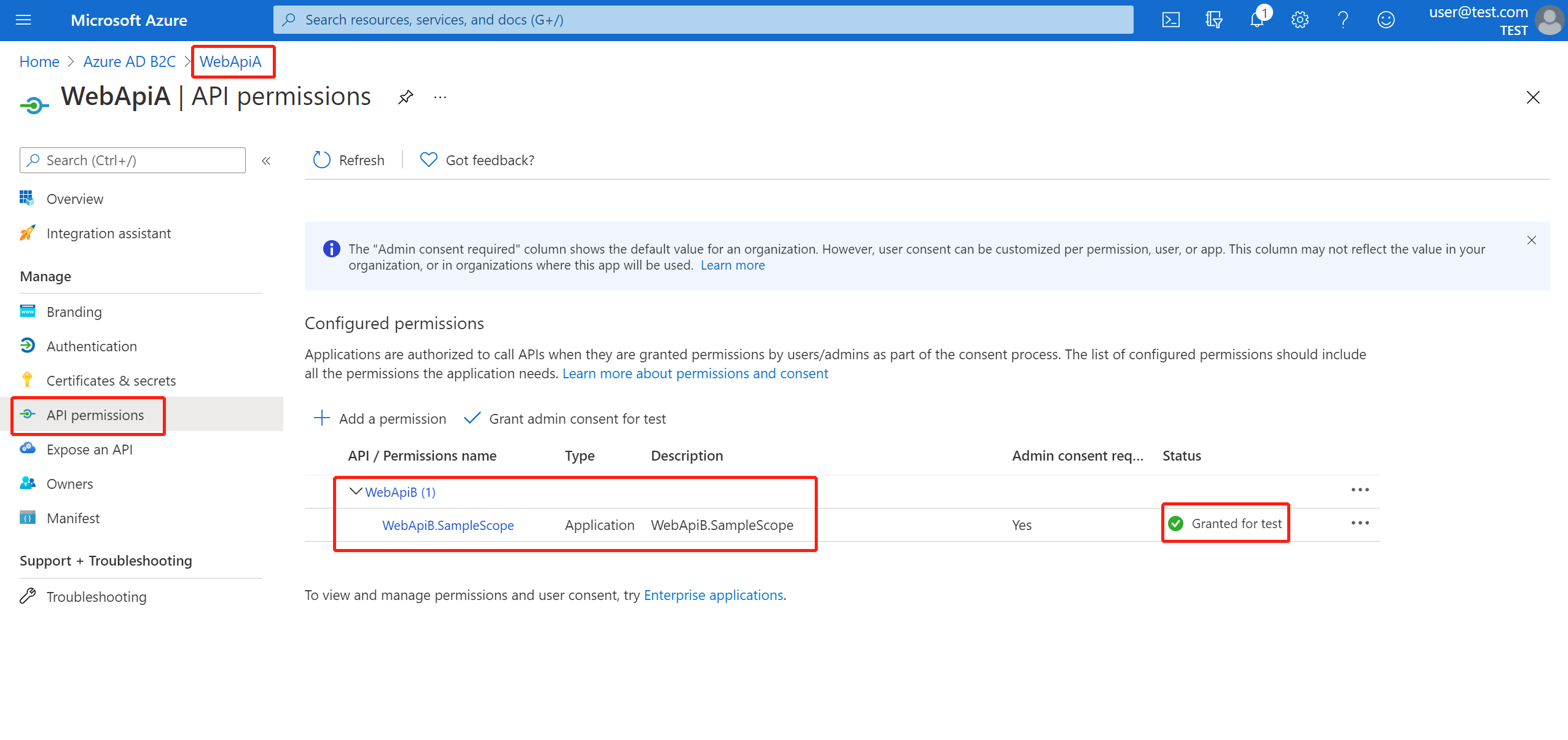
存取資源伺服器的基礎上,將下列相依性新增至您的 pom.xml 檔案。
<dependency>
<groupId>org.springframework.boot</groupId>
<artifactId>spring-boot-starter-webflux</artifactId>
</dependency>
在 存取資源伺服器 案例組態的基礎上,新增下列組態。
spring:
 cloud:
   azure:
     active-directory:
       b2c:
         enabled: true
         credential:
           client-secret: ${WEB_API_A_AZURE_CLIENT_SECRET}
         authorization-clients:
           ${RESOURCE_SERVER_B_NAME}:
             authorization-grant-type: client_credentials
             scopes: ${WEB_API_B_APP_ID_URL}/.default
撰寫 Java 程式代碼。
針對您的 WebApiA 控制器程式代碼,您可以參考下列範例:
public class SampleController {
   /**
    * Access to protected data from WebApiA to WebApiB through client credential flow. The access token is obtained by webclient, or
    * <p>@RegisteredOAuth2AuthorizedClient("webApiA")</p>. In the end, these two approaches will be executed to
    * DefaultOAuth2AuthorizedClientManager#authorize method, get the access token.
    *
    * @return Respond to protected data from WebApi B.
    */
   @GetMapping("/webApiA/webApiB/sample")
   @PreAuthorize("hasAuthority('APPROLE_WebApiA.SampleScope')")
   public String callWebApiB() {
       String body = webClient
           .get()
           .uri(LOCAL_WEB_API_B_SAMPLE_ENDPOINT)
           .attributes(clientRegistrationId("webApiB"))
           .retrieve()
           .bodyToMono(String.class)
           .block();
       LOGGER.info("Call callWebApiB(), request '/webApiB/sample' returned: {}", body);
       return "Request 'webApiA/webApiB/sample'(WebApi A) returned a " + (body != null ? "success." : "failure.");
   }
}
針對您的 WebApiB 控制器程式代碼,您可以參考下列範例:
public class SampleController {
   /**
    * webApiB resource api for other web application
    * @return test content
    */
   @PreAuthorize("hasAuthority('APPROLE_WebApiB.SampleScope')")
   @GetMapping("/webApiB/sample")
   public String webApiBSample() {
       LOGGER.info("Call webApiBSample()");
       return "Request '/webApiB/sample'(WebApi B) returned successfully.";
   }
}
安全性設定程式碼與 存取資源伺服器 情境中的設定相同,另外加入一個 Bean webClient,如下所示
public class SampleConfiguration {
   @Bean
   public WebClient webClient(OAuth2AuthorizedClientManager oAuth2AuthorizedClientManager) {
       ServletOAuth2AuthorizedClientExchangeFilterFunction function =
           new ServletOAuth2AuthorizedClientExchangeFilterFunction(oAuth2AuthorizedClientManager);
       return WebClient.builder()
                       .apply(function.oauth2Configuration())
                       .build();
   }
}
建置及測試您的應用程式。 讓 WebApiA 和 WebApiB 分別在埠 8081 和 8082 上執行。 啟動 WebApiA 和 WebApiB 應用程式、取得 webApiA 資源的存取令牌,以及存取 http://localhost:8081/webApiA/webApiB/sample 作為持有人授權標頭。
樣品
欲了解更多資訊,請參閱範例spring-cloud-azure-starter-active-directory-b2c。