利用 LangChain.js 和 Azure 服務打造智慧型人力資源助理。 該代理人協助虛構的 NorthWind 公司員工透過搜尋公司文件,找到人力資源問題的答案。
你會使用 Azure AI 搜尋服務 尋找相關文件,並使用 Azure OpenAI 生成準確答案。 LangChain.js 框架處理代理協調的複雜性,讓您能專注於特定的業務需求。
您將學到什麼:
- 使用 Azure Developer CLI 部署 Azure 資源
- 建立一個能與 Azure 服務整合的 LangChain.js 代理
- 實作檢索增強生成(RAG)以進行文件搜尋
- 在本地和 Azure 中測試並除錯你的代理程式
完成這個教學後,你已經有一個可用的 REST API,能根據公司文件回答人資問題。
架構概觀

NorthWind 依賴兩個資料來源:
- 所有 員工都能 取得人力資源文件
- 機密人力資源資料庫,包含敏感員工資料。
本教學著重於建立一個 LangChain.js 代理,判斷員工的問題是否能透過公開的人資文件得到解答。 如果是,LangChain.js 代理程式會直接提供答案。
先決條件
若要在 Codespace 或本地開發容器中使用此範例,包括建置與執行 LangChain.js agent,您需要以下條件:
- 作用中的 Azure 帳戶。 如果您沒有帳戶,請免費建立帳戶。
如果你在本地執行範例程式碼,且沒有開發容器,你還需要:
- Node.js LTS 安裝在你的系統上。
- 用於撰寫和編譯 TypeScript 程式代碼的 TypeScript。
- Azure Developer CLI(azd)已安裝和配置。
- LangChain.js程式庫 用於建置代理程式。
- 可選用 LangSmith 來監控 AI 的使用。 您需要項目名稱、金鑰和端點。
- 選用:用於偵錯 LangGraph 鏈結和 LangChain.js 代理程式的 LangGraph Studio 。
Azure 資源
以下 Azure 資源是必備的。 本文中會用 Azure Developer CLI 和 Bicep 範本,搭配 Azure Verified Modules(AVM)為你建立。 這些資源同時提供無密碼與金鑰存取,供學習用途。 這個教學使用你本地的開發者帳號進行無密碼認證:
- 管理身份 用於無密碼認證 Azure 服務。
- Azure Container Registry 用來儲存 Node.js Fastify API 伺服器的 Docker 映像。
- 使用Azure Container App來承載Node.js Fastify API伺服器。
- Azure AI 搜尋資源 用於向量搜尋。
- Azure OpenAI 資源包含以下模型:
- 內嵌模型,例如
text-embedding-3-small。 - 像大型語言模型(LLM)
'gpt-4.1-mini.
- 內嵌模型,例如
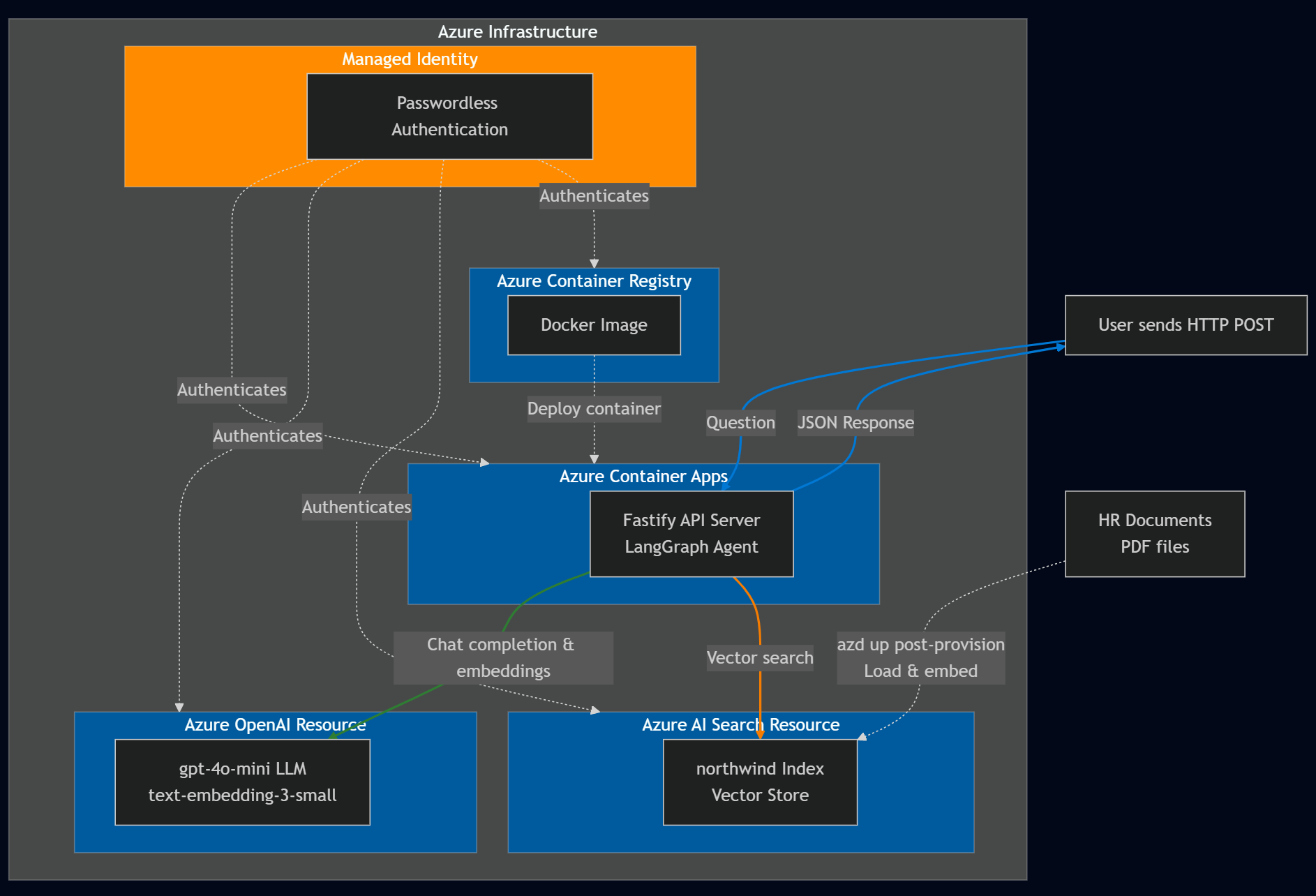
代理程序架構
LangChain.js 架構提供建置智慧代理為 LangGraph 的決策流程。 在本教學課程中,您會建立 LangChain.js 代理程式,與 Azure AI 搜尋服務與 Azure OpenAI 整合,以回答 HR 相關問題。 代理程式的架構設計為:
- 判斷某個問題是否與 所有 員工都能取得的一般人資文件相關。
- 根據使用者查詢,從 Azure AI 搜尋服務 檢索相關文件。
- 使用 Azure OpenAI 根據擷取的檔和 LLM 模型產生答案。
重要元件:
圖表結構:LangChain.js 代理程式會以圖形表示,其中:
- 節點會 執行特定工作,例如決策或擷取數據。
- 邊界 定義節點間的流動,決定作業的順序。
Azure AI 搜尋服務整合:
- 使用嵌入模型來建立向量。
- 將人力資源文件(*.md, *.pdf)插入向量儲存。 這些 文件 包括:
- 公司資訊
- 員工手冊
- 福利手冊
- 員工角色函式庫
- 根據使用者提示擷取相關文件。
Azure OpenAI 整合:
- 利用大型語言模型來:
- 判斷問題是否能從非個人化的人資文件中回答。
- 使用文件和用戶問題的內容產生提示的解答。
- 利用大型語言模型來:
下表提供用戶問題的範例,這些問題與一般人力資源文件無關且無法回答:
| 問題 | 相關性 | Explanation |
|---|---|---|
Does the NorthWind Health Plus plan cover eye exams? |
Yes | 人力資源檔,如員工手冊,應該提供答案。 |
How much of my perks + benefits have I spent? |
否 | 這個問題需要存取此代理程式範圍之外的機密員工數據。 |
透過使用 LangChain.js 框架,您可以避免許多代理程式和 Azure 服務整合所需的繁瑣的代理代碼,以便您能專注於您的業務需求。
複製範例程式碼庫
在新目錄中,複製範例程式碼庫並更改至新目錄:
git clone https://github.com/Azure-Samples/azure-typescript-langchainjs.git
cd azure-typescript-langchainjs
這個範例提供了你需要的程式碼,讓你能建立安全的 Azure 資源,並使用 Azure AI 搜尋服務 和 Azure OpenAI 建置 LangChain.js agent,並從 Node.js Fastify API 伺服器使用該代理程式。
驗證到 Azure CLI 和 Azure 開發者 CLI
用 Azure Developer CLI 登入 Azure,建立 Azure 資源,並部署原始碼。 因為部署過程同時使用 Azure CLI 和 Azure Developer CLI,請登入 Azure CLI,然後設定 Azure Developer CLI 使用你在 Azure CLI 的認證:
az login
azd config set auth.useAzCliAuth true
使用 Azure Developer CLI 建立資源並部署程式碼
開始部署流程時,請執行以下 azd up 指令:
azd up
在 azd up 指令執行過程中,請回答以下問題:
-
新環境名稱:輸入唯一的環境名稱,例如
langchain-agent。 此環境名稱作為 Azure 資源群組的一部分使用。 - 選擇 Azure 訂閱:選擇建立資源的訂閱。
-
選擇區域:例如
eastus2。
整個部署約需10至15分鐘。 Azure Developer CLI 會利用檔案中定義 azure.yaml 的階段與鉤子來協調流程:
供應階段(相當於):azd provision
- 建立定義於以下格式的
infra/main.bicepAzure 資源: -
配置後的掛鉤:檢查 Azure AI 搜尋服務 索引
northwind是否已經存在- 如果索引不存在:使用 LangChain.js 執行
npm install和npm run load_data,並透過 PDF 載入器和嵌入式客戶端上傳人資文件。 - 如果有索引:跳過資料載入以避免重複(你可以手動刪除索引或執行
npm run load_data)部署階段(相當於):azd deploy
- 如果索引不存在:使用 LangChain.js 執行
- 預部署掛鉤:建立 Fastify API 伺服器的 Docker 映像檔,並推送到 Azure 容器註冊表
- 將容器化 API 伺服器部署到 Azure 容器應用程式
部署完成後,環境變數與資源資訊會儲存在 .env 儲存庫根目錄中的檔案中。 你可以在 Azure 入口網站查看這些資源。
這些資源同時提供無密碼與金鑰存取,供學習用途。 這個入門教學使用你本地的開發者帳號進行無密碼認證。 對於生產應用程式,僅使用無密碼認證並使用受管理身份。 了解更多關於 無密碼認證的資訊。
在本地使用範例程式碼
現在 Azure 資源已經建立,你可以在本地執行 LangChain.js 代理。
安裝依賴項
安裝這個專案的 Node.js 套件。
npm install此指令安裝定義在
package.json目錄中的兩個packages-v1檔案的相依關係,包括:-
./packages-v1/server-api:- Fastify 用於網頁伺服器
-
./packages-v1/langgraph-agent:- LangChain.js 用於建構代理
- Azure SDK 用戶端程式庫
@azure/search-documents用於整合 Azure AI 搜尋資源。 參考文件 在這裡。
-
建立兩個套件:API 伺服器和 AI 代理程式。
npm run build此指令會在兩個套件間建立連結,讓 API 伺服器能呼叫 AI 代理。
在本地執行 API 伺服器
Azure 開發者 CLI 建立了所需的 Azure 資源,並在根 .env 檔案中設定了環境變數。 此配置包含一個後置掛鉤,用以將資料上傳至向量儲存。 現在,你可以運行承載 LangChain.js 代理的 Fastify API 伺服器。 啟動 Fastify API 伺服器。
npm run dev
伺服器啟動並在埠 3000 監聽。 你可以在瀏覽器中點選 [http://localhost:3000] 來測試伺服器。 你應該會看到一個歡迎訊息,表示伺服器正在運行。
使用 API 來提問
你可以使用像 REST Client 這類工具,或 curl 向 /ask 端點發送帶有你問題的 JSON 主體的 POST 請求。
REST 客戶端查詢可在 packages-v1/server-api/http 目錄中找到。
使用 curl 的範例:
curl -X POST http://localhost:3000/answer -H "Content-Type: application/json" -d "{\"question\": \"Does the NorthWind Health Plus plan cover eye exams?\"}"
你應該會收到 LangChain.js 代理的 JSON 回覆和答案。
{
  "answer": "Yes, the NorthWind Health Plus plan covers eye exams. According to the Employee Handbook, employees enrolled in the Health Plus plan are eligible for annual eye exams as part of their vision benefits."
}
目錄中提供 packages-v1/server-api/http 多個範例問題。 用 REST 客戶端在 Visual Studio Code 中開啟檔案,快速測試。
了解應用程式代碼
本節說明 LangChain.js 代理如何與 Azure 服務整合。 該儲存庫的應用程式以 npm 工作區的形式組織,包含兩個主要套件:
Project Root
│
├── packages-v1/
│   │
│   ├── langgraph-agent/                    # Core LangGraph agent implementation
│   │   ├── src/
│   │   │   ├── azure/                      # Azure service integrations
│   │   │   │   ├── azure-credential.ts     # Centralized auth with DefaultAzureCredential
│   │   │   │   ├── embeddings.ts           # Azure OpenAI embeddings + PDF loading + rate limiting
│   │   │   │   ├── llm.ts                  # Azure OpenAI chat completion (key-based & passwordless)
│   │   │   │   └── vector_store.ts         # Azure AI Search vector store + indexing + similarity search
│   │   │   │
│   │   │   ├── langchain/                  # LangChain agent logic
│   │   │   │   ├── node_get_answer.ts      # RAG: retrieves docs + generates answers
│   │   │   │   ├── node_requires_hr_documents.ts  # Determines if HR docs needed
│   │   │   │   ├── nodes.ts                # LangGraph node definitions + state management
│   │   │   │   └── prompt.ts               # System prompts + conversation templates
│   │   │   │
│   │   │   └── scripts/                    # Utility scripts
│   │   │       └── load_vector_store.ts    # Uploads PDFs to Azure AI Search
│   │   │
│   │   └── data/                           # Source documents (PDFs) for vector store
│   │
│   └── server-api/                         # Fastify REST API server
│       └── src/
│           └── server.ts                   # HTTP server with /answer endpoint
│
├── infra/                                  # Infrastructure as Code
│   └── main.bicep                          # Azure resources: Container Apps, OpenAI, AI Search, ACR, managed identity
│
├── azure.yaml                              # Azure Developer CLI config + deployment hooks
├── Dockerfile                              # Multi-stage Docker build for containerized deployment
└── package.json                            # Workspace configuration + build scripts
關鍵架構決策:
- Monorepo 結構: npm 工作區 允許共享相依與連結套件
-
關注點分離:代理邏輯(
langgraph-agent)獨立於 API 伺服器(server-api) -
集中式認證:檔案
./langgraph-agent/src/azure同時處理基於金鑰與無密碼的認證,以及 Azure 服務整合
驗證至 Azure 服務
該應用程式支援基於金鑰的驗證方法與無密碼驗證方法,並 SET_PASSWORDLESS 由環境變數控制。 Azure Identity 函式庫中的 DefaultAzureCredential API 用於無密碼認證,使應用程式能在本地開發與 Azure 環境中無縫運行。 您可以在以下 代碼片段中看到此認證:
import { DefaultAzureCredential } from "@azure/identity";

export const CREDENTIAL = new DefaultAzureCredential();

export const SCOPE_OPENAI = "https://cognitiveservices.azure.com/.default";

export async function azureADTokenProvider_OpenAI() {
  const tokenResponse = await CREDENTIAL.getToken(SCOPE_OPENAI);
  return tokenResponse.token;
}
使用第三方函式庫如 LangChain.js 或 OpenAI 函式庫存取 Azure OpenAI,你需要一個 令牌提供者函式 ,而不是直接傳遞憑證物件。
getBearerTokenProvider Azure Identity 函式庫的功能解決了這個問題,透過建立一個憑證提供者,自動擷取並刷新特定 Azure 資源範圍的 OAuth 2.0 持有憑證(例如 "https://cognitiveservices.azure.com/.default")。 你在設定時只設定一次範圍,令牌提供者會自動處理所有令牌管理。 此方法適用於任何 Azure 身份庫憑證,包括管理身份與 Azure CLI 憑證。 雖然 Azure SDK 函式庫直接接受 DefaultAzureCredential ,但像 LangChain.js 這樣的第三方函式庫則需要這種令牌提供者模式來彌補認證落差。
Azure AI 搜尋服務 整合
Azure AI 搜尋資源儲存文件嵌入,並支援相關內容的語意搜尋。 應用程式使用 LangChain AzureAISearchVectorStore 來管理向量儲存,無需你自己定義索引結構。
向量儲存同時設定了管理(寫入)和查詢(讀取)操作,使文件載入與查詢能使用不同的設定。 無論您是使用金鑰,還是透過受控識別進行無密碼驗證,這一點都很重要。
Azure Developer 的 CLI 部署包含一個部署後的掛鉤,可透過 PDF 載入器與嵌入用戶端 LangChain.js 將文件上傳至 Vector Store。 建立 Azure AI 搜尋資源後,這個部署後的掛鉤是 azd up 指令的最後一步。 文件載入腳本使用批次與重試邏輯來處理服務速率限制。
postdeploy:
  posix:
    sh: bash
    run: |
      echo "Checking if vector store data needs to be loaded..."

      # Check if already loaded
      INDEX_CREATED=$(azd env get-values | grep INDEX_CREATED | cut -d'=' -f2 || echo "false")

      if [ "$INDEX_CREATED" = "true" ]; then
        echo "Index already created. Skipping data load."
        echo "Current document count: $(azd env get-values | grep INDEX_DOCUMENT_COUNT | cut -d'=' -f2)"
      else
        echo "Loading vector store data..."
        npm install
        npm run build
        npm run load_data

        # Get document count from the index
        SEARCH_SERVICE=$(azd env get-values | grep AZURE_AISEARCH_ENDPOINT | cut -d'/' -f3 | cut -d'.' -f1)
        DOC_COUNT=$(az search index show --service-name $SEARCH_SERVICE --name northwind --query "documentCount" -o tsv 2>/dev/null || echo "0")

        # Mark as loaded
        azd env set INDEX_CREATED true
        azd env set INDEX_DOCUMENT_COUNT $DOC_COUNT

        echo "Data loading complete! Indexed $DOC_COUNT documents."
      fi
使用由 Azure Developer CLI 建立的根 .env 目錄,你可以驗證 Azure AI 搜尋資源並建立 AzureAISearchVectorStore 客戶端:
const endpoint = process.env.AZURE_AISEARCH_ENDPOINT;
const indexName = process.env.AZURE_AISEARCH_INDEX_NAME;

const adminKey = process.env.AZURE_AISEARCH_ADMIN_KEY;
const queryKey = process.env.AZURE_AISEARCH_QUERY_KEY;

export const QUERY_DOC_COUNT = 3;
const MAX_INSERT_RETRIES = 3;

const shared_admin = {
  endpoint,
  indexName,
};

export const VECTOR_STORE_ADMIN_KEY: AzureAISearchConfig = {
  ...shared_admin,
  key: adminKey,
};

export const VECTOR_STORE_ADMIN_PASSWORDLESS: AzureAISearchConfig = {
  ...shared_admin,
  credentials: CREDENTIAL,
};

export const VECTOR_STORE_ADMIN_CONFIG: AzureAISearchConfig =
  process.env.SET_PASSWORDLESS == "true"
    ? VECTOR_STORE_ADMIN_PASSWORDLESS
    : VECTOR_STORE_ADMIN_KEY;

const shared_query = {
  endpoint,
  indexName,
  search: {
    type: AzureAISearchQueryType.Similarity,
  },
};

// Key-based config
export const VECTOR_STORE_QUERY_KEY: AzureAISearchConfig = {
  key: queryKey,
  ...shared_query,
};

export const VECTOR_STORE_QUERY_PASSWORDLESS: AzureAISearchConfig = {
  credentials: CREDENTIAL,
  ...shared_query,
};

export const VECTOR_STORE_QUERY_CONFIG =
  process.env.SET_PASSWORDLESS == "true"
    ? VECTOR_STORE_QUERY_PASSWORDLESS
    : VECTOR_STORE_QUERY_KEY;
當你查詢時,向量儲存會將使用者的查詢轉換成嵌入,搜尋具有相似向量表示的文件,並回傳最相關的區塊。
export function getReadOnlyVectorStore(): AzureAISearchVectorStore {
  const embeddings = getEmbeddingClient();
  return new AzureAISearchVectorStore(embeddings, VECTOR_STORE_QUERY_CONFIG);
}

export async function getDocsFromVectorStore(
  query: string,
): Promise<Document[]> {
  const store = getReadOnlyVectorStore();

  // @ts-ignore
  //return store.similaritySearchWithScore(query, QUERY_DOC_COUNT);
  return store.similaritySearch(query, QUERY_DOC_COUNT);
}
由於向量儲存是建立在 LangChain.js之上,它抽象化了直接與向量儲存互動的複雜性。 一旦你學會了 LangChain.js 向量儲存介面,未來可以輕鬆切換到其他向量儲存的實作。
Azure OpenAI integration
該應用程式同時使用 Azure OpenAI 進行嵌入及大型語言模型(LLM)功能。
AzureOpenAIEmbeddingsLangChain.js 的類別用於產生文件與查詢的嵌入。 一旦你建立了嵌入客戶端,LangChain.js 就會用它來建立嵌入。
用於嵌入的 Azure OpenAI 整合
使用 Azure Developer CLI 建立的根 .env 檔案來驗證 Azure OpenAI 資源,並建立 AzureOpenAIEmbeddings 用戶端:
const shared = {
  azureOpenAIApiInstanceName: instance,
  azureOpenAIApiEmbeddingsDeploymentName: model,
  azureOpenAIApiVersion: apiVersion,
  azureOpenAIBasePath,
  dimensions: 1536, // for text-embedding-3-small
  batchSize: EMBEDDING_BATCH_SIZE,
  maxRetries: 7,
  timeout: 60000,
};

export const EMBEDDINGS_KEY_CONFIG = {
  azureOpenAIApiKey: key,
  ...shared,
};

export const EMBEDDINGS_CONFIG_PASSWORDLESS = {
  azureADTokenProvider: azureADTokenProvider_OpenAI,
  ...shared,
};

export const EMBEDDINGS_CONFIG =
  process.env.SET_PASSWORDLESS == "true"
    ? EMBEDDINGS_CONFIG_PASSWORDLESS
    : EMBEDDINGS_KEY_CONFIG;
export function getEmbeddingClient(): AzureOpenAIEmbeddings {
  return new AzureOpenAIEmbeddings({ ...EMBEDDINGS_CONFIG });
}
Azure OpenAI integration for LLM
使用 Azure Developer CLI 建立的根 .env 檔案來認證 Azure OpenAI 資源並建立 AzureChatOpenAI 客戶端:
const shared = {
  azureOpenAIApiInstanceName: instance,
  azureOpenAIApiDeploymentName: model,
  azureOpenAIApiVersion: apiVersion,
  azureOpenAIBasePath,
  maxTokens: maxTokens ? parseInt(maxTokens, 10) : 1000,
  maxRetries: 7,
  timeout: 60000,
  temperature: 0,
};

export const LLM_KEY_CONFIG = {
  azureOpenAIApiKey: key,
  ...shared,
};

export const LLM_CONFIG_PASSWORDLESS = {
  azureADTokenProvider: azureADTokenProvider_OpenAI,
  ...shared,
};

export const LLM_CONFIG =
  process.env.SET_PASSWORDLESS == "true"
    ? LLM_CONFIG_PASSWORDLESS
    : LLM_KEY_CONFIG;
該應用程式使用 AzureChatOpenAI LangChain.js @langchain/openai 的類別來與 Azure OpenAI 模型互動。
export const callChatCompletionModel = async (
  state: typeof StateAnnotation.State,
  _config: RunnableConfig,
): Promise<typeof StateAnnotation.Update> => {
  const llm = new AzureChatOpenAI({
    ...LLM_CONFIG,
  });

  const completion = await llm.invoke(state.messages);
  completion;

  return {
    messages: [
      ...state.messages,
      {
        role: "assistant",
        content: completion.content,
      },
    ],
  };
};
LangGraph 代理工作流程
客服使用LangGraph定義決策工作流程,判斷問題是否能透過人力資源文件回答。
圖結構:
import { StateGraph } from "@langchain/langgraph";
import {
  START,
  ANSWER_NODE,
  DECISION_NODE,
  route as endRoute,
  StateAnnotation,
} from "./langchain/nodes.js";
import { getAnswer } from "./langchain/node_get_answer.js";
import {
  requiresHrResources,
  routeRequiresHrResources,
} from "./langchain/node_requires_hr_documents.js";

const builder = new StateGraph(StateAnnotation)
  .addNode(DECISION_NODE, requiresHrResources)
  .addNode(ANSWER_NODE, getAnswer)
  .addEdge(START, DECISION_NODE)
  .addConditionalEdges(DECISION_NODE, routeRequiresHrResources)
  .addConditionalEdges(ANSWER_NODE, endRoute);

export const hr_documents_answer_graph = builder.compile();
hr_documents_answer_graph.name = "Azure AI Search + Azure OpenAI";
工作流程包含下列步驟:
- 開始:使用者提交問題。
- requires_hr_documents節點:LLM 判斷問題是否能從一般人資文件中回答。
-
條件路由:
- 如果是,則繼續前往
get_answer節點。 - 如果沒有,則回覆一則訊息,指出該問題需要個人人力資源資料。
- 如果是,則繼續前往
- get_answer 節點:檢索文件並產生答案。
- 結束:返回回答給使用者。
這種相關性檢查很重要,因為並非所有人力資源問題都能從一般文件中回答。 像是「我有多少帶薪休假?」這類個人問題需要存取包含個別員工資料的員工資料庫。 先檢查相關性,代理人避免對需要個人資訊但無法取得的問題提供錯誤答案。
判斷問題是否需要人資文件
節點 requires_hr_documents 會使用大型語言模型 (LLM) 判斷使用者的問題是否能透過一般人資文件來回答。 它使用一個提示範本,指示模型根據問題的相關性,回應YES或NO。 它會以結構化訊息回傳答案,並可沿整個工作流程傳遞。 下一個節點會利用這個回應將工作流程路由至END或ANSWER_NODE。
// @ts-nocheck
import { getLlmChatClient } from "../azure/llm.js";
import { StateAnnotation } from "../langchain/state.js";
import { RunnableConfig } from "@langchain/core/runnables";
import { BaseMessage } from "@langchain/core/messages";
import { ANSWER_NODE, END } from "./nodes.js";

const PDF_DOCS_REQUIRED = "Answer requires HR PDF docs.";

export async function requiresHrResources(
  state: typeof StateAnnotation.State,
  _config: RunnableConfig,
): Promise<typeof StateAnnotation.Update> {
  const lastUserMessage: BaseMessage = [...state.messages].reverse()[0];

  let pdfDocsRequired = false;

  if (lastUserMessage && typeof lastUserMessage.content === "string") {
    const question = `Does the following question require general company policy information that could be found in HR documents like employee handbooks, benefits overviews, or company-wide policies, then answer yes. Answer no if this requires personal employee-specific information that would require access to an individual's private data, employment records, or personalized benefits details: '${lastUserMessage.content}'. Answer with only "yes" or "no".`;

    const llm = getLlmChatClient();
    const response = await llm.invoke(question);
    const answer = response.content.toLocaleLowerCase().trim();
    console.log(`LLM question (is HR PDF documents required): ${question}`);
    console.log(`LLM answer (is HR PDF documents required): ${answer}`);
    pdfDocsRequired = answer === "yes";
  }

  // If HR documents (aka vector store) are required, append an assistant message to signal this.
  if (!pdfDocsRequired) {
    const updatedState = {
      messages: [
        ...state.messages,
        {
          role: "assistant",
          content:
            "Not a question for our HR PDF resources. This requires data specific to the asker.",
        },
      ],
    };

    return updatedState;
  } else {
    const updatedState = {
      messages: [
        ...state.messages,
        {
          role: "assistant",
          content: `${PDF_DOCS_REQUIRED} You asked: ${lastUserMessage.content}. Let me check.`,
        },
      ],
    };

    return updatedState;
  }
}

export const routeRequiresHrResources = (
  state: typeof StateAnnotation.State,
): typeof END | typeof ANSWER_NODE => {
  const lastMessage: BaseMessage = [...state.messages].reverse()[0];

  if (lastMessage && !lastMessage.content.includes(PDF_DOCS_REQUIRED)) {
    console.log("go to end");
    return END;
  }
  console.log("go to llm");
  return ANSWER_NODE;
};
取得所需的人力資源文件
一旦確定該問題需要人資文件,工作流程就會使用 getAnswer 從向量儲存庫擷取相關文件,將其加入提示的 脈絡 中,並將整個提示傳送給大型語言模型。
import { ChatPromptTemplate } from "@langchain/core/prompts";
import { getLlmChatClient } from "../azure/llm.js";
import { StateAnnotation } from "./nodes.js";
import { AIMessage } from "@langchain/core/messages";
import { getReadOnlyVectorStore } from "../azure/vector_store.js";

const EMPTY_STATE = { messages: [] };

export async function getAnswer(
  state: typeof StateAnnotation.State = EMPTY_STATE,
): Promise<typeof StateAnnotation.Update> {
  const vectorStore = getReadOnlyVectorStore();
  const llm = getLlmChatClient();

  // Extract the last user message's content from the state as input
  const lastMessage = state.messages[state.messages.length - 1];

  const userInput =
    lastMessage && typeof lastMessage.content === "string"
      ? lastMessage.content
      : "";

  const docs = await vectorStore.similaritySearch(userInput, 3);

  if (docs.length === 0) {
    const noDocMessage = new AIMessage(
      "I'm sorry, I couldn't find any relevant information to answer your question.",
    );
    return {
      messages: [...state.messages, noDocMessage],
    };
  }

  const formattedDocs = docs.map((doc) => doc.pageContent).join("\n\n");

  const prompt = ChatPromptTemplate.fromTemplate(`
    Use the following context to answer the question:

    {context}

    Question: {question}
    `);

  const ragChain = prompt.pipe(llm);

  const result = await ragChain.invoke({
    context: formattedDocs,
    question: userInput,
  });

  const assistantMessage = new AIMessage(result.text);

  return {
    messages: [...state.messages, assistantMessage],
  };
}
如果找不到相關文件,客服會回傳訊息表示在人資文件中找不到答案。
故障排除
針對程式的任何問題,請在範例程式代碼存放庫上建立問題
清理資源
你可以刪除資源群組,裡面有 Azure AI 搜尋服務 資源和 Azure OpenAI 資源,或使用 Azure Developer CLI 立即刪除本教學產生的所有資源。
azd down --purge