Azure DevOps 服務 |Azure DevOps Server |Azure DevOps Server 2022
本文僅針對 網頁擴充功能 進行認證。 這不適用於管線任務擴充或服務端點擴充。
小提示
如需取得最新的擴充功能開發指引,包括主題設定及從 VSS.SDK 遷移的相關資料,請參考 Azure DevOps Extension SDK 開發者入口網站。
從擴充套件呼叫 REST API
大多數擴充功能會代表現有使用者呼叫 Azure DevOps REST API。
使用 SDK REST 用戶端:認證是自動處理的。 用戶端會向 SDK 請求存取權杖並設定
Authorization標頭。使用自訂 HTTP 請求:使用 SDK 取得一個權杖,然後自行設定 HTTP 標頭:
import * as SDK from "azure-devops-extension-sdk";

SDK.init();

SDK.ready().then(async () => {
    const token = await SDK.getAccessToken();
    const authHeader = `Bearer ${token}`;

    // Use authHeader in your fetch/XMLHttpRequest calls
});
驗證對你的服務的請求
當你的擴充套件呼叫你控制的後端服務時,你需要確認請求來自於 Azure DevOps 執行的擴充套件。 SDK 提供 getAppToken(),會回傳一個以你擴充功能憑證簽署的 JWT。 你的服務會驗證這個令牌來驗證請求。
取得擴充功能的金鑰
你的擴充功能唯一金鑰會在發佈時產生。 用它來驗證你擴充功能中令牌的真實性。
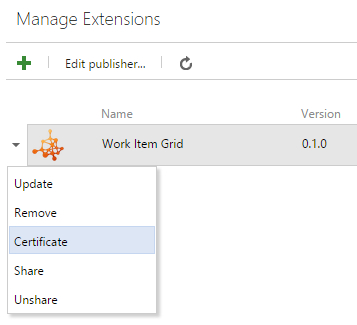
警告
範圍變更會導致證書變更。 修改瞄準鏡後再換一把新鑰匙。
為您的服務產生一個代幣
用 getAppToken() 來讓 JWT 用你分機的憑證簽署,然後交給你的服務:
import * as SDK from "azure-devops-extension-sdk";

SDK.init();

SDK.ready().then(async () => {
    const token = await SDK.getAppToken();

    // Pass this token to your backend as a header or query parameter
    const response = await fetch("https://your-service.example.com/api/data", {
        headers: {
            "Authorization": `Bearer ${token}`
        }
    });
});
驗證令牌
你的後端服務會用擴充套件的秘密金鑰來驗證 JWT。 以下範例說明如何實作驗證。
這很重要
千萬不要在原始碼裡硬編碼你的擴充套件秘密。 從環境變數、Azure Key Vault 或其他安全設定庫載入。
.NET(主控台應用程式)
安裝 NuGet 套件:
dotnet add package System.IdentityModel.Tokens.Jwt
備註
使用版本 7.x 或更新版本。 6.x 及更早版本已不再支持。 詳情請參閱 身份模型版本生命週期 。
using System.IdentityModel.Tokens.Jwt;
using Microsoft.IdentityModel.Tokens;

string secret = Environment.GetEnvironmentVariable("EXTENSION_SECRET")
    ?? throw new InvalidOperationException("EXTENSION_SECRET not configured");
string issuedToken = ""; // Token from the extension request

var validationParameters = new TokenValidationParameters()
{
    IssuerSigningKey = new SymmetricSecurityKey(System.Text.Encoding.UTF8.GetBytes(secret)),
    ValidateIssuer = false,
    ValidateAudience = false,
    ValidateActor = false,
    RequireSignedTokens = true,
    RequireExpirationTime = true,
    ValidateLifetime = true
};

var tokenHandler = new JwtSecurityTokenHandler();
var principal = tokenHandler.ValidateToken(issuedToken, validationParameters, out SecurityToken token);
ASP.NET 核心 Web API
安裝 NuGet 套件:
dotnet add package Microsoft.AspNetCore.Authentication.JwtBearer
Program.cs
using System.Text;
using Microsoft.AspNetCore.Authentication.JwtBearer;
using Microsoft.IdentityModel.Tokens;

var builder = WebApplication.CreateBuilder(args);

builder.Services.AddControllers();

string secret = builder.Configuration["ExtensionSecret"]
    ?? throw new InvalidOperationException("ExtensionSecret not configured");

builder.Services
    .AddAuthentication(JwtBearerDefaults.AuthenticationScheme)
    .AddJwtBearer(options =>
    {
        options.TokenValidationParameters = new TokenValidationParameters()
        {
            IssuerSigningKey = new SymmetricSecurityKey(Encoding.UTF8.GetBytes(secret)),
            ValidateIssuer = false,
            ValidateAudience = false,
            ValidateActor = false,
            RequireSignedTokens = true,
            RequireExpirationTime = true,
            ValidateLifetime = true
        };
    });

var app = builder.Build();

app.UseAuthentication();
app.UseRouting();
app.UseAuthorization();
app.MapControllers();

app.Run();
API 控制器:
using Microsoft.AspNetCore.Authorization;
using Microsoft.AspNetCore.Mvc;

[Route("api/[controller]")]
[Authorize]
public class SampleLogicController : ControllerBase
{
   // Requests without a valid token return 401 Unauthorized
}