Azure DevOps 服務 |Azure DevOps Server |Azure DevOps Server 2022 |Azure DevOps Server 2020
Azure Artifacts 可讓小組使用摘要和上游來源來管理其相依性。 您可以使用 Azure Pipelines 發佈和下載不同類型的成品,作為 CI/CD 工作流程的一部分。
發佈成品
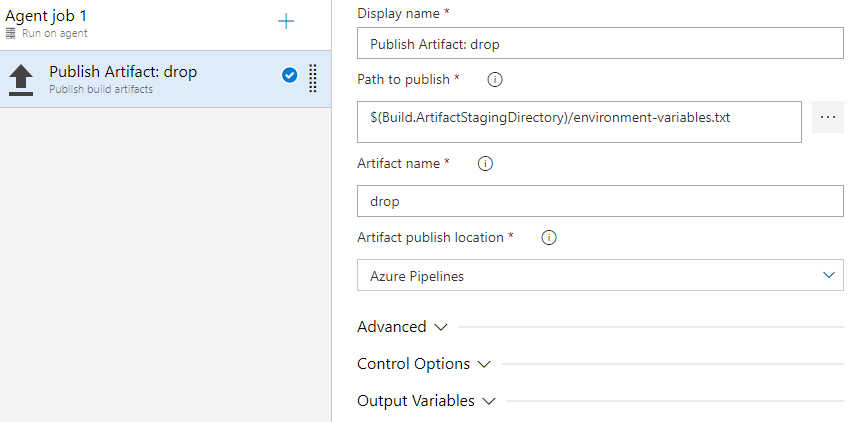
成品可以在管線的任何階段發佈。 您可以使用 YAML 或傳統 Azure DevOps 編輯器來發佈套件。
- powershell: gci env:* | sort-object name | Format-Table -AutoSize | Out-File $env:BUILD_ARTIFACTSTAGINGDIRECTORY/environment-variables.txt

- task: CopyFiles@2
  inputs:
    sourceFolder: '$(Build.SourcesDirectory)'
    contents: '**/$(BuildConfiguration)/**/?(*.exe|*.dll|*.pdb)'
    targetFolder: '$(Build.ArtifactStagingDirectory)'
- task: PublishBuildArtifacts@1
  inputs:
    pathToPublish: '$(Build.ArtifactStagingDirectory)'
    artifactName: drop
- pathToPublish:成品的路徑。 這可以是絕對路徑或相對路徑。 不支援通配符。
- artifactName:成品的名稱。
注意
發行成品時,請確定您未使用其中一個保留的資料夾名稱。 如需詳細資訊,請參閱 應用程式資料夾 。
範例:使用多個工作
- powershell: gci env:* | sort-object name | Format-Table -AutoSize | Out-File $env:BUILD_ARTIFACTSTAGINGDIRECTORY/environment-variables.txt

- task: CopyFiles@2
  inputs:
    sourceFolder: '$(Build.SourcesDirectory)'
    contents: '**/$(BuildConfiguration)/**/?(*.exe|*.dll|*.pdb)'
    targetFolder: '$(Build.ArtifactStagingDirectory)'
- task: PublishBuildArtifacts@1
  inputs:
    pathToPublish: '$(Build.ArtifactStagingDirectory)'
    artifactName: drop1
- task: PublishBuildArtifacts@1
  inputs:
    pathToPublish: '$(Build.ArtifactStagingDirectory)'
    artifactName: drop2
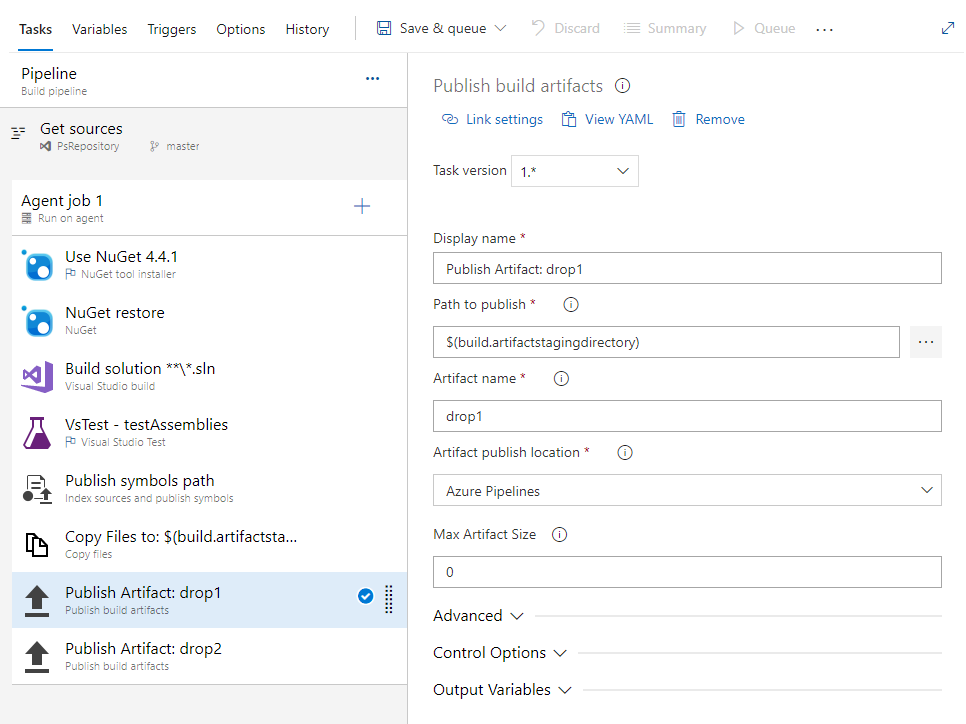
- pathToPublish:成品的路徑。 這可以是絕對路徑或相對路徑。 不支援通配符。
- artifactName:成品的名稱。
範例:複製和發佈二進位檔
- powershell: gci env:* | sort-object name | Format-Table -AutoSize | Out-File $env:BUILD_ARTIFACTSTAGINGDIRECTORY/environment-variables.txt

- task: CopyFiles@2
  inputs:
    sourceFolder: '$(Build.SourcesDirectory)'
    contents: '**/$(BuildConfiguration)/**/?(*.exe|*.dll|*.pdb)'
    targetFolder: '$(Build.ArtifactStagingDirectory)'
- task: PublishBuildArtifacts@1
  inputs:
    pathToPublish: '$(Build.ArtifactStagingDirectory)'
    artifactName: drop
- sourceFolder:包含您要複製之檔案的資料夾。 如果您將此保留空白,則會從 $(Build.SourcesDirectory)進行複製。
- 內容:要包含在複本中的檔案路徑。
- targetFolder:目的地資料夾。
- pathToPublish:要發佈的資料夾或檔案路徑。 它可以是絕對路徑或相對路徑。 不支援通配符。
- artifactName:您要建立之成品的名稱。
注意
請務必不要使用 artifactName 的保留名稱,例如 Bin 或 App_Data。 如需詳細資訊,請參閱 ASP.NET Web 專案資料夾結構 。
 公用程式:複製檔案
 公用程式:發佈組建成品
注意
Build.ArtifactStagingDirectory 每個組建之後都會清除path。 如果您使用此路徑來發佈成品,請務必在發佈步驟之前複製您想要發佈至此目錄的內容。
下載成品
- powershell: gci env:* | sort-object name | Format-Table -AutoSize | Out-File $env:BUILD_ARTIFACTSTAGINGDIRECTORY/environment-variables.txt

- task: DownloadBuildArtifacts@1
  inputs:
    buildType: 'current'        # Options: 'current' | 'specific'. Specify which build artifacts will be downloaded: `current` or from a specific build
    downloadType: 'single'      # Options: 'single' | 'specific'. Choose whether to download a single artifact or all artifacts of a specific build.
    artifactName: 'drop'        # Required when downloadType == single. The name of the artifact that will be downloaded.
    downloadPath: '$(System.ArtifactsDirectory)'    # Path on the agent machine where the artifacts will be downloaded. Default: $(System.ArtifactsDirectory).
 公用程式:下載組建成品
注意
如果您使用部署工作,您可以使用 $(Agent.BuildDirectory) 參考組建成品。 如需詳細資訊,請參閱 代理程式變數 。
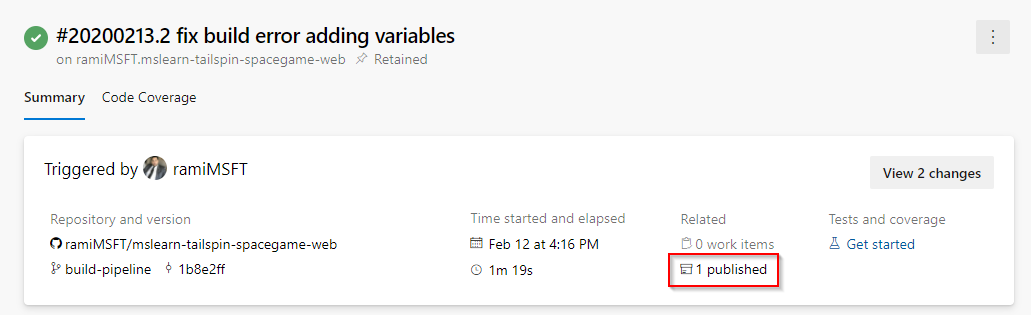
當您的管線執行完成時,請流覽至 [ 摘要 ] 以探索或下載成品。
下載特定成品
steps:
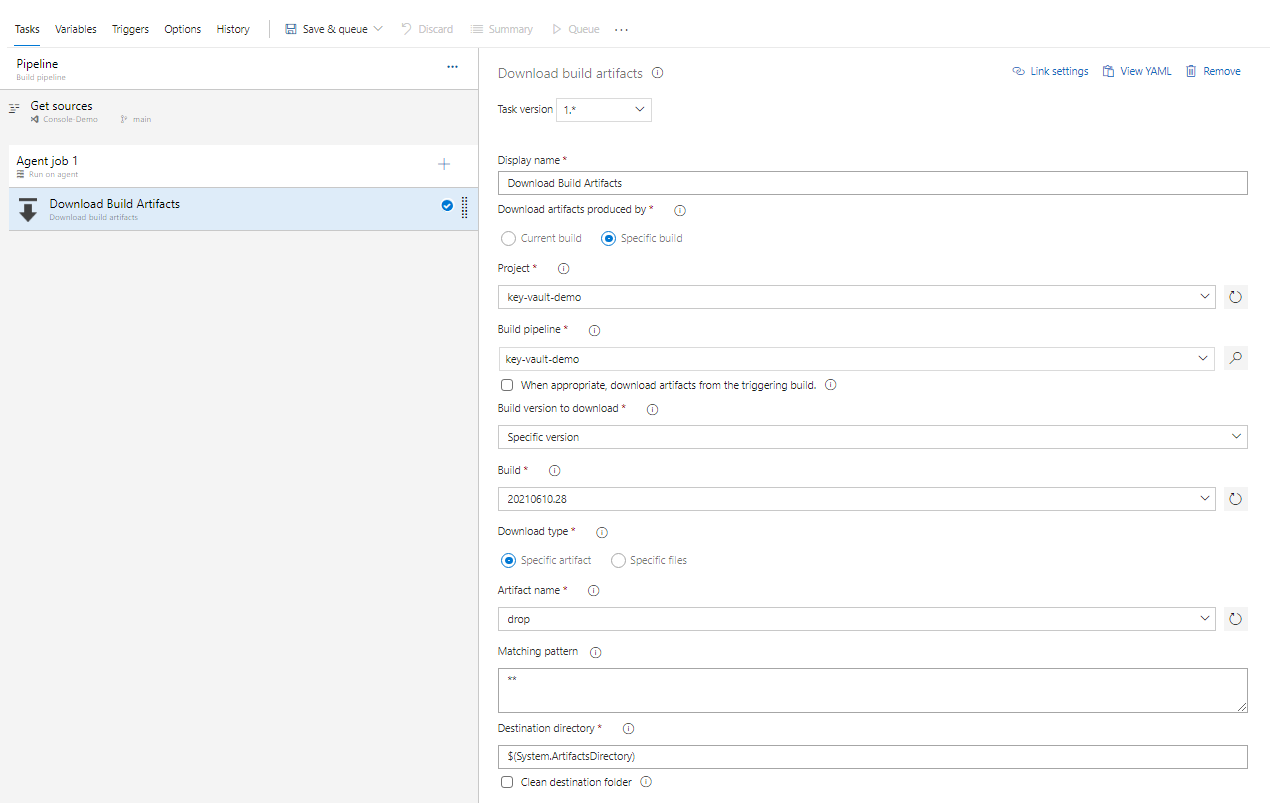
- task: DownloadBuildArtifacts@1
  displayName: 'Download Build Artifacts'
  inputs:
    buildType: specific                        # Options: 'current' | 'specific'. Specify which build artifacts will be downloaded: `current` or from a specific build
    project: 'xxxxxxxxxx-xxxx-xxxx-xxxxxxxxxxx'    # Required when buildType == specific. Project ID.
    pipeline: 20                                   # Required when buildType == specific. Build pipeline.
    buildVersionToDownload: specific    # Options: 'latest' | 'latestFromBranch' | 'specific'. Required when buildType == specific. Build version to download.
    buildId: 128                        # Required when buildType == specific && buildVersionToDownload == specific. Build ID.
    artifactName: drop                  # The name of the artifact that will be downloaded.
    extractTars: false                  # boolean. Extract all files that are stored inside tar archives.
提示
如果您使用 Azure DevOps Server 來允許使用個人存取令牌進行驗證,請停用 IIS 基本身份驗證。 如需詳細資訊,請參閱 為什麼我的 PAT 停止運作?。
在檔案路徑自變數中使用正斜線。 反斜杠無法在macOS/Linux代理程序中運作。
組建成品會儲存在 Windows 檔系統上,這會導致所有 UNIX 許可權遺失,包括執行位。 從 Azure Pipelines 下載成品之後,您可能需要還原正確的 UNIX 許可權。
Build.ArtifactStagingDirectory和Build.StagingDirectory是可互換的。Build.ArtifactStagingDirectory每個組建之後都會清除path。刪除與發行至檔案共用之套件相關聯的組建,會導致刪除該 UNC 路徑中的所有成品。
如果您要將套件發佈至檔案共用,請務必提供組建代理程式的存取權。
如果您的組織使用防火牆,請確定您允許 Azure Artifacts 網域 URL 和 IP 位址 。