使用此工作來暫停發行管線中的部署,並等候手動介入。
Note
This task can only be used in an agentless job and is intended for use in a classic release pipeline. 本文指的是傳統管線。 如需 YAML 使用方式,請參閱 手動驗證工作。
Syntax
# This task is supported on classic release pipelines only.
# Use the classic designer to add and configure this task in a classic release pipeline.
# See the following Inputs section for details on the inputs that this task supports.
Inputs
instructions
-
Instructions
string.
指定繼續或拒絕手動介入時向用戶顯示的指示。 根據這些指示,使用者將會做出關於此手動介入的明智決策。
emailRecipients
-
Notify users
string.
將手動介入擱置的電子郵件傳送給特定使用者(或群組)。 只有具有管理部署許可權的使用者才能在手動介入時採取行動。
onTimeout
-
On timeout
string. 允許的值:reject、resume。 預設值:reject。
在指定的逾時擱置或 60 天之後,自動拒絕或繼續手動介入,無論早於哪一天。
工作控制選項
除了工作輸入之外,所有工作都有控制選項。 如需詳細資訊,請參閱 控制項選項和一般工作屬性。
Output variables
None.
Remarks
在發行管線中使用這項工作,在階段內暫停使用中的部署。 這通常會執行以執行各種手動步驟或動作,然後繼續執行自動化部署工作。
Note
This task can only be used in an agentless job and is intended for use in a classic release pipeline. 本文指的是傳統管線。 如需 YAML 使用方式,請參閱 手動驗證工作。
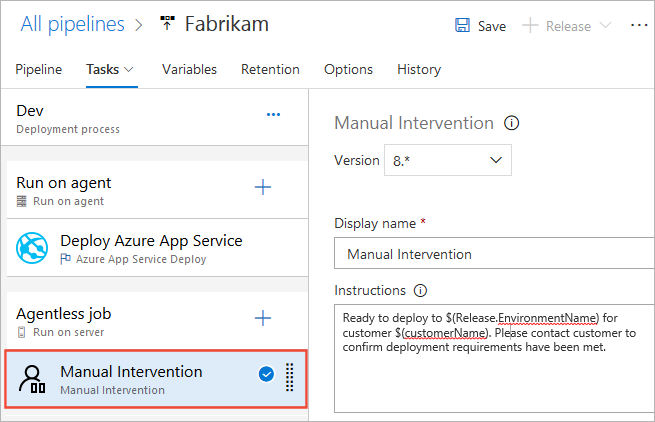
The Manual Intervention task does not perform deployment actions directly. 相反地,它可讓您在階段內暫停作用中的部署,通常是執行各種手動步驟或動作,然後繼續執行自動化部署工作。 例如,使用者可能需要先編輯目前版本的詳細數據,然後再繼續進行(或許輸入發行中工作所使用的自定義變數值)。
The Manual Intervention task configuration includes an Instructions parameter that is used to provide related information or to specify the manual steps the user executes during the agentless job. 您可以設定工作在等候介入時傳送電子郵件通知給使用者和使用者群組,並在可設定的逾時發生后指定自動回應(拒絕或繼續部署)。
Note
您可以使用內建和自訂變數來產生指示的部分。
When the Manual Intervention task is activated during a deployment, it sets the deployment state to IN PROGRESS. 消息列隨即顯示,其中包含開啟 [手動介入] 對話框的連結,其中包含指示。 執行手動步驟之後,系統管理員或使用者可以選擇繼續部署或拒絕部署。 Users with Manage deployment permission on the stage can resume or reject the manual intervention.
如需使用此工作的詳細資訊,請參閱 核准和閘道概觀。
Requirements
| Requirement | Description |
|---|---|
| Pipeline types | Classic release |
| Runs on | Server |
| Demands | None |
| Capabilities | 此工作不符合作業中後續工作的任何需求。 |
| Command restrictions | Any |
| Settable variables | Any |
| Agent version | 所有支援的代理程式版本。 |
| Task category | Deploy |