在 Azure DocumentDB 裡搭配 Node.js 用戶端函式庫使用向量搜尋。 有效率地儲存和查詢向量資料。
本快速入門會使用 JSON 檔案中的範例飯店資料集,其中包含模型中的 text-embedding-3-small 向量。 資料集包括飯店名稱、位置、描述和向量內嵌。
在 GitHub 上尋找 範例程式碼 。
Prerequisites
Azure 訂用帳戶
- 如果您沒有 Azure 訂用帳戶,請建立 免費帳戶
一個現有的 Azure DocumentDB 叢集
如果你沒有叢集,就建立 一個新的叢集
-
自訂網域配置
text-embedding-3-small已部署的模型
在 Azure Cloud Shell 中使用 Bash 環境。 欲了解更多資訊,請參見開始使用 Azure Cloud Shell。

若要在本地執行 CLI 參考命令,請安裝 Azure CLI。 如果你是在 Windows 或 macOS 上運行,可以考慮在 Docker 容器中執行 Azure CLI。 如需詳細資訊,請參閱 如何在 Docker 容器中執行 Azure CLI。
如果您使用的是本機安裝,請使用 az login 命令,透過 Azure CLI 來登入。 請遵循您終端機上顯示的步驟,完成驗證程序。 如需其他登入選項,請參閱 使用 Azure CLI 向 Azure 進行驗證。
出現提示時,請在第一次使用時安裝 Azure CLI 延伸模組。 如需擴充功能的詳細資訊,請參閱 使用和管理 Azure CLI 的擴充功能。
執行 az version 以尋找已安裝的版本和相依程式庫。 若要升級至最新版本,請執行 az upgrade。
TypeScript:全域安裝 TypeScript:
npm install -g typescript
建立帶有向量的資料檔案
為飯店資料檔案建立一個新的資料目錄:
mkdir data把
Hotels_Vector.json包含向量的原始資料檔案複製到你的data目錄。
建立 Node.js 專案
為你的專案建立一個新的兄弟目錄,與資料目錄相同層級,並用 Visual Studio Code 開啟:
mkdir vector-search-quickstart
code vector-search-quickstart
在終端機中,初始化一個 Node.js 專案:
npm init -y
npm pkg set type="module"
安裝必要的套件:
npm install mongodb @azure/identity openai @types/node-
mongodb:MongoDB Node.js 驅動程式 -
@azure/identity:用於無密碼驗證的 Azure 身分識別程式庫 -
openai:OpenAI 客戶端庫,用於創建向量 -
@types/node:Node.js 的類型定義
-
在專案根目錄中建立
.env環境變數的檔案:# Identity for local developer authentication with Azure CLI AZURE_TOKEN_CREDENTIALS=AzureCliCredential # Azure OpenAI Embedding Settings AZURE_OPENAI_EMBEDDING_MODEL=text-embedding-3-small AZURE_OPENAI_EMBEDDING_API_VERSION=2023-05-15 AZURE_OPENAI_EMBEDDING_ENDPOINT= EMBEDDING_SIZE_BATCH=16 # MongoDB configuration MONGO_CLUSTER_NAME= # Data file DATA_FILE_WITH_VECTORS=../data/Hotels_Vector.json FIELD_TO_EMBED=Description EMBEDDED_FIELD=DescriptionVector EMBEDDING_DIMENSIONS=1536 LOAD_SIZE_BATCH=100將檔案中的
.env佔位符值取代為您自己的資訊。-
AZURE_OPENAI_EMBEDDING_ENDPOINT:你的 Azure OpenAI 資源端點網址 -
MONGO_CLUSTER_NAME:你的資源名稱
-
新增檔案
tsconfig.json以設定 TypeScript:{ "compilerOptions": { "target": "ES2020", "module": "NodeNext", "moduleResolution": "nodenext", "declaration": true, "outDir": "./dist", "strict": true, "esModuleInterop": true, "skipLibCheck": true, "noImplicitAny": false, "forceConsistentCasingInFileNames": true, "sourceMap": true, "resolveJsonModule": true, }, "include": [ "src/**/*" ], "exclude": [ "node_modules", "dist" ] }
建立 npm 指令碼
編輯 package.json 檔案並新增以下指令碼:
使用這些腳本編譯 TypeScript 檔案並執行 DiskANN 索引實作。
"scripts": {
    "build": "tsc",
    "start:diskann": "node --env-file .env dist/diskann.js"
}
建立向量搜尋的程式碼檔
為您的 TypeScript 檔案建立 src 目錄。 新增兩個檔案:diskann.ts 及 utils.ts,用於 DiskANN 索引的執行:
mkdir src
touch src/diskann.ts
touch src/utils.ts
建立向量搜尋的程式碼
將以下程式碼貼到檔案中 diskann.ts 。
import path from 'path';
import { readFileReturnJson, getClientsPasswordless, insertData, printSearchResults } from './utils.js';

// ESM specific features - create __dirname equivalent
import { fileURLToPath } from "node:url";
import { dirname } from "node:path";
const __filename = fileURLToPath(import.meta.url);
const __dirname = dirname(__filename);

const config = {
    query: "quintessential lodging near running trails, eateries, retail",
    dbName: "Hotels",
    collectionName: "hotels_diskann",
    indexName: "vectorIndex_diskann",
    dataFile: process.env.DATA_FILE_WITH_VECTORS!,
    batchSize: parseInt(process.env.LOAD_SIZE_BATCH! || '100', 10),
    embeddedField: process.env.EMBEDDED_FIELD!,
    embeddingDimensions: parseInt(process.env.EMBEDDING_DIMENSIONS!, 10),
    deployment: process.env.AZURE_OPENAI_EMBEDDING_MODEL!,
};

async function main() {

    const { aiClient, dbClient } = getClientsPasswordless();

    try {

        if (!aiClient) {
            throw new Error('AI client is not configured. Please check your environment variables.');
        }
        if (!dbClient) {
            throw new Error('Database client is not configured. Please check your environment variables.');
        }

        await dbClient.connect();
        const db = dbClient.db(config.dbName);
        const collection = await db.createCollection(config.collectionName);
        console.log('Created collection:', config.collectionName);
        const data = await readFileReturnJson(path.join(__dirname, "..", config.dataFile));
        const insertSummary = await insertData(config, collection, data);
        console.log('Created vector index:', config.indexName);

        // Create the vector index
        const indexOptions = {
            createIndexes: config.collectionName,
            indexes: [
                {
                    name: config.indexName,
                    key: {
                        [config.embeddedField]: 'cosmosSearch'
                    },
                    cosmosSearchOptions: {
                        kind: 'vector-diskann',
                        dimensions: config.embeddingDimensions,
                        similarity: 'COS', // 'COS', 'L2', 'IP'
                        maxDegree: 20, // 20 - 2048,  edges per node
                        lBuild: 10 // 10 - 500, candidate neighbors evaluated
                    }
                }
            ]
        };
        const vectorIndexSummary = await db.command(indexOptions);

        // Create embedding for the query
        const createEmbeddedForQueryResponse = await aiClient.embeddings.create({
            model: config.deployment,
            input: [config.query]
        });

        // Perform the vector similarity search
        const searchResults = await collection.aggregate([
            {
                $search: {
                    cosmosSearch: {
                        vector: createEmbeddedForQueryResponse.data[0].embedding,
                        path: config.embeddedField,
                        k: 5
                    }
                }
            },
            {
                $project: {
                    score: {
                        $meta: "searchScore"
                    },
                    document: "$$ROOT"
                }
            }
        ]).toArray();

        // Print the results
        printSearchResults(insertSummary, vectorIndexSummary, searchResults);

    } catch (error) {
        console.error('App failed:', error);
        process.exitCode = 1;
    } finally {
        console.log('Closing database connection...');
        if (dbClient) await dbClient.close();
        console.log('Database connection closed');
    }
}

// Execute the main function
main().catch(error => {
    console.error('Unhandled error:', error);
    process.exitCode = 1;
});
此主模組提供下列功能:
- 包括實用功能
- 建立環境變數的組態物件
- 為 Azure OpenAI 與 DocumentDB 建立客戶端
- 連接到MongoDB,建立資料庫和集合,插入資料,建立標準索引
- 使用 IVF、HNSW 或 DiskANN 建立向量索引
- 使用 OpenAI 用戶端為範例查詢文字建立嵌入。 您可以變更檔案頂端的查詢
- 使用內嵌執行向量搜尋並列印結果
建立公用程式函數
將以下程式碼貼到:utils.ts
import { MongoClient, OIDCResponse, OIDCCallbackParams } from 'mongodb';
import { AzureOpenAI } from 'openai/index.js';
import { promises as fs } from "fs";
import { AccessToken, DefaultAzureCredential, TokenCredential, getBearerTokenProvider } from '@azure/identity';

// Define a type for JSON data
export type JsonData = Record<string, any>;

export const AzureIdentityTokenCallback = async (params: OIDCCallbackParams, credential: TokenCredential): Promise<OIDCResponse> => {
    const tokenResponse: AccessToken | null = await credential.getToken(['https://ossrdbms-aad.database.windows.net/.default']);
    return {
        accessToken: tokenResponse?.token || '',
        expiresInSeconds: (tokenResponse?.expiresOnTimestamp || 0) - Math.floor(Date.now() / 1000)
    };
};
export function getClients(): { aiClient: AzureOpenAI; dbClient: MongoClient } {
    const apiKey = process.env.AZURE_OPENAI_EMBEDDING_KEY!;
    const apiVersion = process.env.AZURE_OPENAI_EMBEDDING_API_VERSION!;
    const endpoint = process.env.AZURE_OPENAI_EMBEDDING_ENDPOINT!;
    const deployment = process.env.AZURE_OPENAI_EMBEDDING_MODEL!;
    const mongoConnectionString = process.env.MONGO_CONNECTION_STRING!;

    if (!apiKey || !apiVersion || !endpoint || !deployment || !mongoConnectionString) {
        throw new Error('Missing required environment variables: AZURE_OPENAI_EMBEDDING_KEY, AZURE_OPENAI_EMBEDDING_API_VERSION, AZURE_OPENAI_EMBEDDING_ENDPOINT, AZURE_OPENAI_EMBEDDING_MODEL, MONGO_CONNECTION_STRING');
    }

    const aiClient = new AzureOpenAI({
        apiKey,
        apiVersion,
        endpoint,
        deployment
    });
    const dbClient = new MongoClient(mongoConnectionString, {
        // Performance optimizations
        maxPoolSize: 10,         // Limit concurrent connections
        minPoolSize: 1,          // Maintain at least one connection
        maxIdleTimeMS: 30000,    // Close idle connections after 30 seconds
        connectTimeoutMS: 30000, // Connection timeout
        socketTimeoutMS: 360000, // Socket timeout (for long-running operations)
        writeConcern: {          // Optimize write concern for bulk operations
            w: 1,                // Acknowledge writes after primary has written
            j: false             // Don't wait for journal commit
        }
    });

    return { aiClient, dbClient };
}

export function getClientsPasswordless(): { aiClient: AzureOpenAI | null; dbClient: MongoClient | null } {
    let aiClient: AzureOpenAI | null = null;
    let dbClient: MongoClient | null = null;

    // Validate all required environment variables upfront
    const apiVersion = process.env.AZURE_OPENAI_EMBEDDING_API_VERSION!;
    const endpoint = process.env.AZURE_OPENAI_EMBEDDING_ENDPOINT!;
    const deployment = process.env.AZURE_OPENAI_EMBEDDING_MODEL!;
    const clusterName = process.env.MONGO_CLUSTER_NAME!;

    if (!apiVersion || !endpoint || !deployment || !clusterName) {
        throw new Error('Missing required environment variables: AZURE_OPENAI_EMBEDDING_API_VERSION, AZURE_OPENAI_EMBEDDING_ENDPOINT, AZURE_OPENAI_EMBEDDING_MODEL, MONGO_CLUSTER_NAME');
    }

    console.log(`Using Azure OpenAI Embedding API Version: ${apiVersion}`);
    console.log(`Using Azure OpenAI Embedding Deployment/Model: ${deployment}`);

    const credential = new DefaultAzureCredential();

    // For Azure OpenAI with DefaultAzureCredential
    {
        const scope = "https://cognitiveservices.azure.com/.default";
        const azureADTokenProvider = getBearerTokenProvider(credential, scope);
        aiClient = new AzureOpenAI({
            apiVersion,
            endpoint,
            deployment,
            azureADTokenProvider
        });
    }

    // For DocumentDB with DefaultAzureCredential (uses signed-in user)
    {
        dbClient = new MongoClient(
            `mongodb+srv://${clusterName}.mongocluster.cosmos.azure.com/`, {
            connectTimeoutMS: 120000,
            tls: true,
            retryWrites: false,
            maxIdleTimeMS: 120000,
            authMechanism: 'MONGODB-OIDC',
            authMechanismProperties: {
                OIDC_CALLBACK: (params: OIDCCallbackParams) => AzureIdentityTokenCallback(params, credential),
                ALLOWED_HOSTS: ['*.azure.com']
            }
        }
        );
    }

    return { aiClient, dbClient };
}

export async function readFileReturnJson(filePath: string): Promise<JsonData[]> {

    console.log(`Reading JSON file from ${filePath}`);

    const fileAsString = await fs.readFile(filePath, "utf-8");
    return JSON.parse(fileAsString);
}
export async function writeFileJson(filePath: string, jsonData: JsonData): Promise<void> {
    const jsonString = JSON.stringify(jsonData, null, 2);
    await fs.writeFile(filePath, jsonString, "utf-8");

    console.log(`Wrote JSON file to ${filePath}`);
}
export async function insertData(config, collection, data) {
    console.log(`Processing in batches of ${config.batchSize}...`);
    const totalBatches = Math.ceil(data.length / config.batchSize);

    let inserted = 0;
    let updated = 0;
    let skipped = 0;
    let failed = 0;

    for (let i = 0; i < totalBatches; i++) {
        const start = i * config.batchSize;
        const end = Math.min(start + config.batchSize, data.length);
        const batch = data.slice(start, end);

        try {
            const result = await collection.insertMany(batch, { ordered: false });
            inserted += result.insertedCount || 0;
            console.log(`Batch ${i + 1} complete: ${result.insertedCount} inserted`);
        } catch (error: any) {
            if (error?.writeErrors) {
                // Some documents may have been inserted despite errors
                console.error(`Error in batch ${i + 1}: ${error?.writeErrors.length} failures`);
                failed += error?.writeErrors.length;
                inserted += batch.length - error?.writeErrors.length;
            } else {
                console.error(`Error in batch ${i + 1}:`, error);
                failed += batch.length;
            }
        }

        // Small pause between batches to reduce resource contention
        if (i < totalBatches - 1) {
            await new Promise(resolve => setTimeout(resolve, 100));
        }
    }
    const indexColumns = [
        "HotelId",
        "Category",
        "Description",
        "Description_fr"
    ];
    for (const col of indexColumns) {
        const indexSpec = {};
        indexSpec[col] = 1; // Ascending index
        await collection.createIndex(indexSpec);
    }

    return { total: data.length, inserted, updated, skipped, failed };
}

export function printSearchResults(insertSummary, indexSummary, searchResults) {


    if (!searchResults || searchResults.length === 0) {
        console.log('No search results found.');
        return;
    }

    searchResults.map((result, index) => {

        const { document, score } = result as any;

        console.log(`${index + 1}. HotelName: ${document.HotelName}, Score: ${score.toFixed(4)}`);
        //console.log(`   Description: ${document.Description}`);
    });

}
此公用程式模組提供下列功能:
-
JsonData:資料結構的介面 -
scoreProperty:基於向量搜尋方法的查詢結果中分數的位置 -
getClients: 為 Azure OpenAI 與 Azure DocumentDB 建立並回傳客戶端 -
getClientsPasswordless:創建並返回 Azure OpenAI 與 Azure DocumentDB 的客戶端,使用無密碼認證。 在兩個資源上啟用 RBAC,並登入 Azure CLI -
readFileReturnJson:讀取 JSON 檔案並將其內容傳回為物件陣JsonData列 -
writeFileJson:將物件陣JsonData列寫入 JSON 檔案 -
insertData:將資料批次插入 MongoDB 集合中,並在指定欄位上建立標準索引 -
printSearchResults:列印向量搜尋的結果,包括分數和飯店名稱
使用 Azure CLI 進行驗證
在執行應用程式前先登入 Azure CLI,讓應用程式能安全存取 Azure 資源。
az login
程式碼使用你本地的開發者認證,透過 getClientsPasswordless 中的 utils.ts 函式來存取 Azure DocumentDB 和 Azure OpenAI。 當你設定 AZURE_TOKEN_CREDENTIALS=AzureCliCredential時,這個設定會告訴函式必須使用 Azure CLI 憑證來進行 確定性認證。 這個函式依賴 @azure/identity 的 DefaultAzureCredential 來尋找環境中的 Azure 憑證。 了解更多如何 使用 Azure Identity 函式庫將 JavaScript 應用程式驗證至 Azure 服務。
建置並執行應用程式
建置 TypeScript 檔案,然後執行應用程式:
應用程式記錄和輸出顯示:
- 集合建立和資料插入狀態
- 向量索引建立
- 包含飯店名稱和相似度分數的搜尋結果
Using Azure OpenAI Embedding API Version: 2023-05-15
Using Azure OpenAI Embedding Deployment/Model: text-embedding-3-small-2
Created collection: hotels_diskann
Reading JSON file from \documentdb-samples\ai\data\Hotels_Vector.json
Processing in batches of 50...
Batch 1 complete: 50 inserted
Created vector index: vectorIndex_diskann
1. HotelName: Royal Cottage Resort, Score: 0.4991
2. HotelName: Country Comfort Inn, Score: 0.4785
3. HotelName: Nordick's Valley Motel, Score: 0.4635
4. HotelName: Economy Universe Motel, Score: 0.4461
5. HotelName: Roach Motel, Score: 0.4388
Closing database connection...
Database connection closed
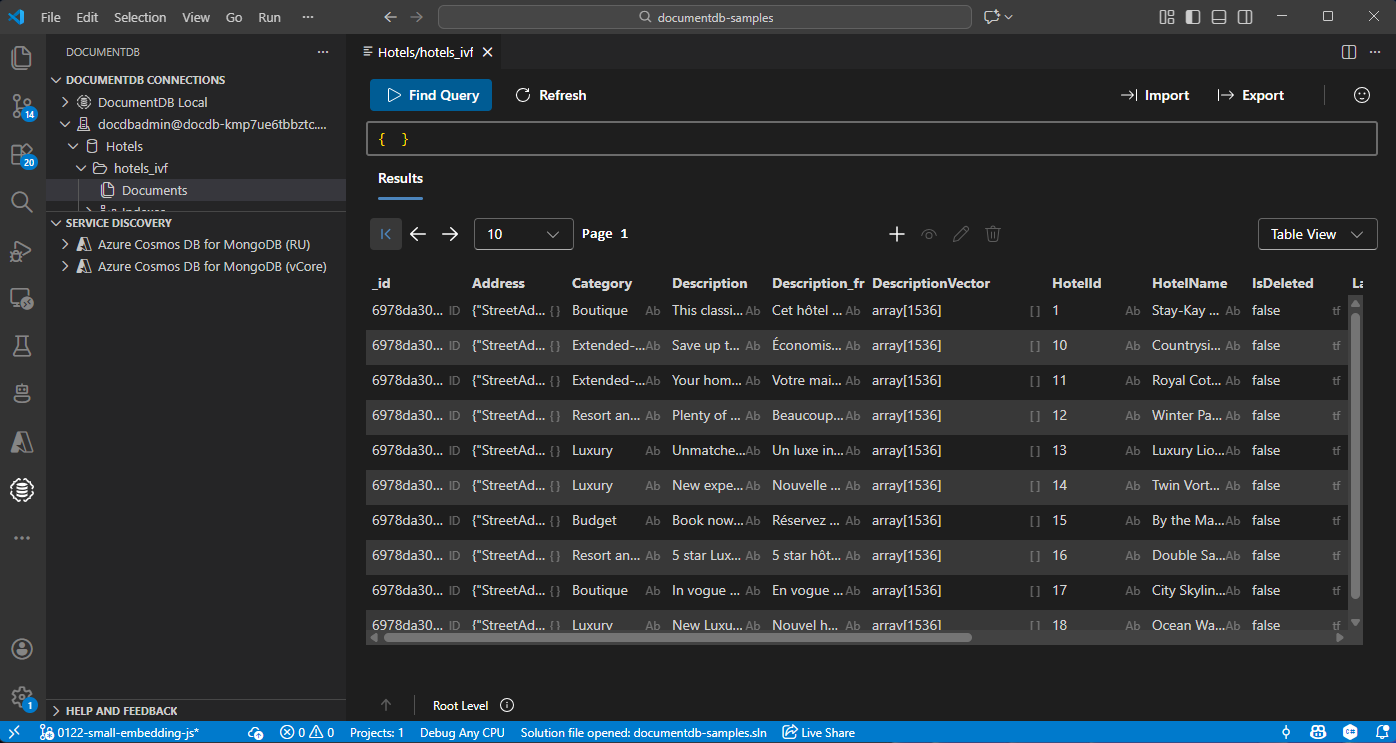
在 Visual Studio Code 中檢視和管理資料
在 Visual Studio Code 中選擇 DocumentDB 擴充功能 ,以連接你的 Azure DocumentDB 帳號。
檢視飯店資料庫中的資料和索引。
清理資源
當你不需要資源群組、DocumentDB 帳號和 Azure OpenAI 資源時,刪除它們以避免額外成本。