在 Azure DocumentDB 裡搭配 Python 用戶端函式庫使用向量搜尋。 有效率地儲存和查詢向量資料。
此快速入門使用範例飯店資料集,包含模型預先計算的向量 text-embedding-3-small ,並以 JSON 檔案呈現。 資料集包括飯店名稱、位置、描述和向量內嵌。
在 GitHub 上尋找 範例程式碼 。
Prerequisites
Azure 訂用帳戶
- 如果您沒有 Azure 訂用帳戶,請建立 免費帳戶
一個現有的 Azure DocumentDB 叢集
如果你沒有叢集,就建立 一個新的叢集
-
自訂網域配置
text-embedding-3-small已部署的模型
在 Azure Cloud Shell 中使用 Bash 環境。 欲了解更多資訊,請參見開始使用 Azure Cloud Shell。

若要在本地執行 CLI 參考命令,請安裝 Azure CLI。 如果你是在 Windows 或 macOS 上運行,可以考慮在 Docker 容器中執行 Azure CLI。 如需詳細資訊,請參閱 如何在 Docker 容器中執行 Azure CLI。
如果您使用的是本機安裝,請使用 az login 命令,透過 Azure CLI 來登入。 請遵循您終端機上顯示的步驟,完成驗證程序。 如需其他登入選項,請參閱 使用 Azure CLI 向 Azure 進行驗證。
出現提示時,請在第一次使用時安裝 Azure CLI 延伸模組。 如需擴充功能的詳細資訊,請參閱 使用和管理 Azure CLI 的擴充功能。
執行 az version 以尋找已安裝的版本和相依程式庫。 若要升級至最新版本,請執行 az upgrade。
- Python 3.9 或更高版本
建立帶有向量的資料檔案
為飯店資料檔案建立一個新的資料目錄:
mkdir data把
Hotels_Vector.json包含向量的原始資料檔案複製到你的data目錄。
建立一個 Python 專案
為您的專案建立新的目錄,並在 Visual Studio Code 中開啟它:
mkdir vector-search-quickstart
code vector-search-quickstart
在終端機中,建立並啟動虛擬環境:
針對 Windows:
python -m venv venv
venv\\Scripts\\activate
對於 macOS/Linux:
python -m venv venv
source venv/bin/activate
安裝必要的套件:
pip install pymongo azure-identity openai python-dotenv-
pymongo:適用於 Python 的 MongoDB 驅動程式 -
azure-identity:用於無密碼驗證的 Azure 身分識別程式庫 -
openai:OpenAI 客戶端庫,用於創建向量 -
python-dotenv:從 .env 檔案管理環境變數
-
建立
.env環境變數的檔案在vector-search-quickstart:# Identity for local developer authentication with Azure CLI AZURE_TOKEN_CREDENTIALS=AzureCliCredential # Azure OpenAI configuration AZURE_OPENAI_EMBEDDING_ENDPOINT= AZURE_OPENAI_EMBEDDING_MODEL=text-embedding-3-small AZURE_OPENAI_EMBEDDING_API_VERSION=2023-05-15 # Azure DocumentDB configuration MONGO_CLUSTER_NAME= # Data Configuration (defaults should work) DATA_FILE_WITH_VECTORS=../data/Hotels_Vector.json EMBEDDED_FIELD=DescriptionVector EMBEDDING_DIMENSIONS=1536 EMBEDDING_SIZE_BATCH=16 LOAD_SIZE_BATCH=50針對本文中使用的無密碼驗證,請將檔案中的
.env預留位置值取代為您自己的資訊:-
AZURE_OPENAI_EMBEDDING_ENDPOINT:你的 Azure OpenAI 資源端點網址 -
MONGO_CLUSTER_NAME: Your Azure DocumentDB 資源名稱
您應該始終首選無密碼身份驗證,但這需要額外的設定。 如需設定受控識別和完整驗證選項範圍的詳細資訊,請參閱使用 適用於 Python 的 Azure SDK 向 Azure 服務驗證 Python 應用程式。
-
建立向量搜尋的程式碼檔
透過建立向量搜尋的程式碼檔案來繼續專案。 完成後,專案結構應如下所示:
├── data/
│   ├── Hotels.json              # Source hotel data (without vectors)
│   └── Hotels_Vector.json       # Hotel data with vector embeddings
└── vector-search-quickstart/
    ├── src/
    │   ├── diskann.py           # DiskANN vector search implementation
    │   ├── hnsw.py              # HNSW vector search implementation
    │   ├── ivf.py               # IVF vector search implementation
    │   └── utils.py              # Shared utility functions
    ├── requirements.txt         # Python dependencies
    ├── .env                     # Environment variables template
為您的 Python 檔案建立 src 目錄。 新增兩個檔案:diskann.py 及 utils.py,用於 DiskANN 索引的執行:
mkdir src
touch src/diskann.py
touch src/utils.py
建立向量搜尋的程式碼
將以下程式碼貼到檔案中 diskann.py 。
import os
from typing import List, Dict, Any
from utils import get_clients, get_clients_passwordless, read_file_return_json, insert_data, print_search_results, drop_vector_indexes
from dotenv import load_dotenv

# Load environment variables
load_dotenv()


def create_diskann_vector_index(collection, vector_field: str, dimensions: int) -> None:

    print(f"Creating DiskANN vector index on field '{vector_field}'...")

    # Drop any existing vector indexes on this field first
    drop_vector_indexes(collection, vector_field)

    # Use the native MongoDB command for DocumentDB vector indexes
    index_command = {
        "createIndexes": collection.name,
        "indexes": [
            {
                "name": f"diskann_index_{vector_field}",
                "key": {
                    vector_field: "cosmosSearch"  # DocumentDB vector search index type
                },
                "cosmosSearchOptions": {
                    # DiskANN algorithm configuration
                    "kind": "vector-diskann",

                    # Vector dimensions must match the embedding model
                    "dimensions": dimensions,

                    # Vector similarity metric - cosine is good for text embeddings
                    "similarity": "COS",

                    # Maximum degree: number of edges per node in the graph
                    # Higher values improve accuracy but increase memory usage
                    "maxDegree": 20,

                    # Build parameter: candidates evaluated during index construction
                    # Higher values improve index quality but increase build time
                    "lBuild": 10
                }
            }
        ]
    }

    try:
        # Execute the createIndexes command directly
        result = collection.database.command(index_command)
        print("DiskANN vector index created successfully")

    except Exception as e:
        print(f"Error creating DiskANN vector index: {e}")

        # Check if it's a tier limitation and suggest alternatives
        if "not enabled for this cluster tier" in str(e):
            print("\nDiskANN indexes require a higher cluster tier.")
            print("Try one of these alternatives:")
            print("  • Upgrade your DocumentDB cluster to a higher tier")
            print("  • Use HNSW instead: python src/hnsw.py")
            print("  • Use IVF instead: python src/ivf.py")
        raise


def perform_diskann_vector_search(collection,
                                 azure_openai_client,
                                 query_text: str,
                                 vector_field: str,
                                 model_name: str,
                                 top_k: int = 5) -> List[Dict[str, Any]]:

    print(f"Performing DiskANN vector search for: '{query_text}'")

    try:
        # Generate embedding for the query text
        embedding_response = azure_openai_client.embeddings.create(
            input=[query_text],
            model=model_name
        )

        query_embedding = embedding_response.data[0].embedding

        # Construct the aggregation pipeline for vector search
        # DocumentDB uses $search with cosmosSearch
        pipeline = [
            {
                "$search": {
                    # Use cosmosSearch for vector operations in DocumentDB
                    "cosmosSearch": {
                        # The query vector to search for
                        "vector": query_embedding,

                        # Field containing the document vectors to compare against
                        "path": vector_field,

                        # Number of final results to return
                        "k": top_k
                    }
                }
            },
            {
                # Add similarity score to the results
                "$project": {
                    "document": "$$ROOT",
                    # Add search score from metadata
                    "score": {"$meta": "searchScore"}
                }
            }
        ]

        # Execute the aggregation pipeline
        results = list(collection.aggregate(pipeline))

        return results

    except Exception as e:
        print(f"Error performing DiskANN vector search: {e}")
        raise


def main():

    # Load configuration from environment variables
    config = {
        'cluster_name': os.getenv('MONGO_CLUSTER_NAME'),
        'database_name': 'Hotels',
        'collection_name': 'hotels_diskann',
        'data_file': os.getenv('DATA_FILE_WITH_VECTORS', '../data/Hotels_Vector.json'),
        'vector_field': os.getenv('EMBEDDED_FIELD', 'DescriptionVector'),
        'model_name': os.getenv('AZURE_OPENAI_EMBEDDING_MODEL', 'text-embedding-3-small'),
        'dimensions': int(os.getenv('EMBEDDING_DIMENSIONS', '1536')),
        'batch_size': int(os.getenv('LOAD_SIZE_BATCH', '100'))
    }

    try:
        # Initialize clients
        print("\nInitializing MongoDB and Azure OpenAI clients...")
        mongo_client, azure_openai_client = get_clients_passwordless()

        # Get database and collection
        database = mongo_client[config['database_name']]
        collection = database[config['collection_name']]

        # Load data with embeddings
        print(f"\nLoading data from {config['data_file']}...")
        data = read_file_return_json(config['data_file'])
        print(f"Loaded {len(data)} documents")

        # Verify embeddings are present
        documents_with_embeddings = [doc for doc in data if config['vector_field'] in doc]
        if not documents_with_embeddings:
            raise ValueError(f"No documents found with embeddings in field '{config['vector_field']}'. "
                           "Please run create_embeddings.py first.")

        # Insert data into collection
        print(f"\nInserting data into collection '{config['collection_name']}'...")

        # Insert the hotel data
        stats = insert_data(
            collection,
            documents_with_embeddings,
            batch_size=config['batch_size']
        )

        if stats['inserted'] == 0 and not stats.get('skipped'):
            raise ValueError("No documents were inserted successfully")

        # Create DiskANN vector index (skip if data was already present)
        if not stats.get('skipped'):
            create_diskann_vector_index(
                collection,
                config['vector_field'],
                config['dimensions']
            )

            # Wait briefly for index to be ready
            import time
            print("Waiting for index to be ready...")
            time.sleep(2)

        # Perform sample vector search
        query = "quintessential lodging near running trails, eateries, retail"

        results = perform_diskann_vector_search(
            collection,
            azure_openai_client,
            query,
            config['vector_field'],
            config['model_name'],
            top_k=5
        )

        # Display results
        print_search_results(results, max_results=5, show_score=True)


    except Exception as e:
        print(f"\nError during DiskANN demonstration: {e}")
        raise

    finally:
        # Close the MongoDB client
        if 'mongo_client' in locals():
            mongo_client.close()


if __name__ == "__main__":
    main()
此主模組提供下列功能:
包括實用功能
建立環境變數的組態物件
建立 Azure OpenAI 和 Azure DocumentDB 的用戶端
連接到MongoDB,建立資料庫和集合,插入資料,建立標準索引
使用 IVF、HNSW 或 DiskANN 建立向量索引
使用 OpenAI 用戶端為範例查詢文字建立嵌入。 您可以變更檔案頂端的查詢
使用內嵌執行向量搜尋並列印結果
建立公用程式函數
將以下程式碼貼到:utils.py
import json
import os
import time
import warnings
from typing import Dict, List, Any, Optional, Tuple

# Suppress the PyMongo CosmosDB cluster detection warning
# Must be set before importing pymongo
warnings.filterwarnings(
    "ignore",
    message="You appear to be connected to a CosmosDB cluster.*",
)

from pymongo import MongoClient, InsertOne
from pymongo.collection import Collection
from pymongo.errors import BulkWriteError
from azure.identity import DefaultAzureCredential
from pymongo.auth_oidc import OIDCCallback, OIDCCallbackContext, OIDCCallbackResult
from openai import AzureOpenAI
from dotenv import load_dotenv

# Load environment variables from .env file
load_dotenv()

class AzureIdentityTokenCallback(OIDCCallback):
    def __init__(self, credential):
        self.credential = credential

    def fetch(self, context: OIDCCallbackContext) -> OIDCCallbackResult:
        token = self.credential.get_token(
            "https://ossrdbms-aad.database.windows.net/.default").token
        return OIDCCallbackResult(access_token=token)

def get_clients() -> Tuple[MongoClient, AzureOpenAI]:

    # Get MongoDB connection string - required for DocumentDB access
    mongo_connection_string = os.getenv("MONGO_CONNECTION_STRING")
    if not mongo_connection_string:
        raise ValueError("MONGO_CONNECTION_STRING environment variable is required")

    # Create MongoDB client with optimized settings for DocumentDB
    mongo_client = MongoClient(
        mongo_connection_string,
        maxPoolSize=50,  # Allow up to 50 connections for better performance
        minPoolSize=5,   # Keep minimum 5 connections open
        maxIdleTimeMS=30000,  # Close idle connections after 30 seconds
        serverSelectionTimeoutMS=5000,  # 5 second timeout for server selection
        socketTimeoutMS=20000  # 20 second socket timeout
    )

    # Get Azure OpenAI configuration
    azure_openai_endpoint = os.getenv("AZURE_OPENAI_EMBEDDING_ENDPOINT")
    azure_openai_key = os.getenv("AZURE_OPENAI_EMBEDDING_KEY")

    if not azure_openai_endpoint or not azure_openai_key:
        raise ValueError("Azure OpenAI endpoint and key are required")

    # Create Azure OpenAI client for generating embeddings
    azure_openai_client = AzureOpenAI(
        azure_endpoint=azure_openai_endpoint,
        api_key=azure_openai_key,
        api_version=os.getenv("AZURE_OPENAI_EMBEDDING_API_VERSION", "2023-05-15")
    )

    return mongo_client, azure_openai_client


def get_clients_passwordless() -> Tuple[MongoClient, AzureOpenAI]:

    # Get MongoDB cluster name for passwordless authentication
    cluster_name = os.getenv("MONGO_CLUSTER_NAME")
    if not cluster_name:
        raise ValueError("MONGO_CLUSTER_NAME environment variable is required")

    # Create credential object for Azure authentication
    credential = DefaultAzureCredential()

    authProperties = {"OIDC_CALLBACK": AzureIdentityTokenCallback(credential)}

    # Create MongoDB client with Azure AD token callback
    mongo_client = MongoClient(
        f"mongodb+srv://{cluster_name}.global.mongocluster.cosmos.azure.com/",
        connectTimeoutMS=120000,
        tls=True,
        retryWrites=True,
        authMechanism="MONGODB-OIDC",
        authMechanismProperties=authProperties
    )

    # Get Azure OpenAI endpoint
    azure_openai_endpoint = os.getenv("AZURE_OPENAI_EMBEDDING_ENDPOINT")
    if not azure_openai_endpoint:
        raise ValueError("AZURE_OPENAI_EMBEDDING_ENDPOINT environment variable is required")

    # Create Azure OpenAI client with credential-based authentication
    azure_openai_client = AzureOpenAI(
        azure_endpoint=azure_openai_endpoint,
        azure_ad_token_provider=lambda: credential.get_token("https://cognitiveservices.azure.com/.default").token,
        api_version=os.getenv("AZURE_OPENAI_EMBEDDING_API_VERSION", "2023-05-15")
    )

    return mongo_client, azure_openai_client


def azure_identity_token_callback(credential: DefaultAzureCredential) -> str:

    # DocumentDB requires this specific scope
    token_scope = "https://cosmos.azure.com/.default"

    # Get token from Azure AD
    token = credential.get_token(token_scope)

    return token.token


def read_file_return_json(file_path: str) -> List[Dict[str, Any]]:

    try:
        with open(file_path, 'r', encoding='utf-8') as file:
            return json.load(file)
    except FileNotFoundError:
        print(f"Error: File '{file_path}' not found")
        raise
    except json.JSONDecodeError as e:
        print(f"Error: Invalid JSON in file '{file_path}': {e}")
        raise


def write_file_json(data: List[Dict[str, Any]], file_path: str) -> None:

    try:
        with open(file_path, 'w', encoding='utf-8') as file:
            json.dump(data, file, indent=2, ensure_ascii=False)
        print(f"Data successfully written to '{file_path}'")
    except IOError as e:
        print(f"Error writing to file '{file_path}': {e}")
        raise


def insert_data(collection: Collection, data: List[Dict[str, Any]],
                batch_size: int = 100, index_fields: Optional[List[str]] = None) -> Dict[str, int]:

    total_documents = len(data)

    # Check if data already exists in the collection
    existing_count = collection.count_documents({})
    if existing_count >= total_documents:
        print(f"Collection already has {existing_count} documents, skipping insert and index creation")
        return {'total': total_documents, 'inserted': 0, 'failed': 0, 'skipped': True}

    # Clear existing data if counts don't match to ensure clean state
    if existing_count > 0:
        print(f"Collection has {existing_count} documents but expected {total_documents}, clearing and re-inserting...")
        collection.delete_many({})

    inserted_count = 0
    failed_count = 0

    print(f"Starting batch insertion of {total_documents} documents...")

    # Create indexes if specified
    if index_fields:
        for field in index_fields:
            try:
                collection.create_index(field)
                print(f"Created index on field: {field}")
            except Exception as e:
                print(f"Warning: Could not create index on {field}: {e}")

    # Process data in batches to manage memory and error recovery
    for i in range(0, total_documents, batch_size):
        batch = data[i:i + batch_size]
        batch_num = (i // batch_size) + 1
        total_batches = (total_documents + batch_size - 1) // batch_size

        try:
            # Prepare bulk insert operations
            operations = [InsertOne(document) for document in batch]

            # Execute bulk insert
            result = collection.bulk_write(operations, ordered=False)
            inserted_count += result.inserted_count

            print(f"Batch {batch_num} completed: {result.inserted_count} documents inserted")

        except BulkWriteError as e:
            # Handle partial failures in bulk operations
            inserted_count += e.details.get('nInserted', 0)
            failed_count += len(batch) - e.details.get('nInserted', 0)

            print(f"Batch {batch_num} had errors: {e.details.get('nInserted', 0)} inserted, "
                  f"{failed_count} failed")

            # Print specific error details for debugging
            for error in e.details.get('writeErrors', []):
                print(f"  Error: {error.get('errmsg', 'Unknown error')}")

        except Exception as e:
            # Handle unexpected errors
            failed_count += len(batch)
            print(f"Batch {batch_num} failed completely: {e}")

        # Small delay between batches to avoid overwhelming the database
        time.sleep(0.1)

    # Return summary statistics
    stats = {
        'total': total_documents,
        'inserted': inserted_count,
        'failed': failed_count
    }

    return stats


def drop_vector_indexes(collection, vector_field: str) -> None:

    try:
        # Get all indexes for the collection
        indexes = list(collection.list_indexes())

        # Find vector indexes on the specified field
        vector_indexes = []
        for index in indexes:
            if 'key' in index and vector_field in index['key']:
                if index['key'][vector_field] == 'cosmosSearch':
                    vector_indexes.append(index['name'])

        # Drop each vector index found
        for index_name in vector_indexes:
            print(f"Dropping existing vector index: {index_name}")
            collection.drop_index(index_name)

        if vector_indexes:
            print(f"Dropped {len(vector_indexes)} existing vector index(es)")
        else:
            print("No existing vector indexes found to drop")

    except Exception as e:
        print(f"Warning: Could not drop existing vector indexes: {e}")
        # Continue anyway - the error might be that no indexes exist


def print_search_resultsx(results: List[Dict[str, Any]],
                        max_results: int = 5,
                        show_score: bool = True) -> None:

    if not results:
        print("No search results found.")
        return

    print(f"\nSearch Results (showing top {min(len(results), max_results)}):")
    print("=" * 80)

    for i, result in enumerate(results[:max_results], 1):

        # Display hotel name and ID
        print(f"HotelName: {result['HotelName']}, Score: {result['score']:.4f}")

def print_search_results(results: List[Dict[str, Any]],
                        max_results: int = 5,
                        show_score: bool = True) -> None:

    if not results:
        print("No search results found.")
        return

    print(f"\nSearch Results (showing top {min(len(results), max_results)}):")
    print("=" * 80)

    for i, result in enumerate(results[:max_results], 1):

        # Check if results are nested under 'document' (when using $$ROOT)
        if 'document' in result:
            doc = result['document']
        else:
            doc = result

        # Display hotel name and ID
        print(f"HotelName: {doc['HotelName']}, Score: {result['score']:.4f}")


    if len(results) > max_results:
        print(f"\n... and {len(results) - max_results} more results")
此公用程式模組提供下列功能:
-
get_clients: 為 Azure OpenAI 與 Azure DocumentDB 建立並回傳客戶端 -
get_clients_passwordless:建立並回傳 Azure OpenAI 和 Azure DocumentDB 的客戶端,使用無密碼認證 -
azure_identity_token_callback:取得用於 MongoDB OIDC 認證的 Azure AD 令牌 -
read_file_return_json: 讀取 JSON 檔案,並以物件陣列的形式回傳其內容 -
write_file_json: 將一組物件寫入 JSON 檔案 -
insert_data:將資料批次插入 MongoDB 集合中,並在指定欄位上建立標準索引 -
drop_vector_indexes:將目標向量場上的現有向量指標移除 -
print_search_results: 列印向量搜尋結果,包括分數與飯店名稱
使用 Azure CLI 進行驗證
在執行應用程式之前,請先登入 Azure CLI,以便安全地存取 Azure 資源。
az login
程式碼會利用你本地的開發者認證來存取 Azure DocumentDB 和 Azure OpenAI。 當你設定 AZURE_TOKEN_CREDENTIALS=AzureCliCredential時,這個設定會告訴函式必須使用 Azure CLI 憑證來進行 確定性認證。 認證依賴 azure-identity 的 DefaultAzureCredential 來尋找環境中的 Azure 憑證。 了解更多如何 使用 Azure Identity 函式庫將 Python 應用程式驗證到 Azure 服務。
執行應用程式
若要執行 Python 指令碼:
您會看到符合向量搜尋查詢的前五家飯店及其相似性分數。
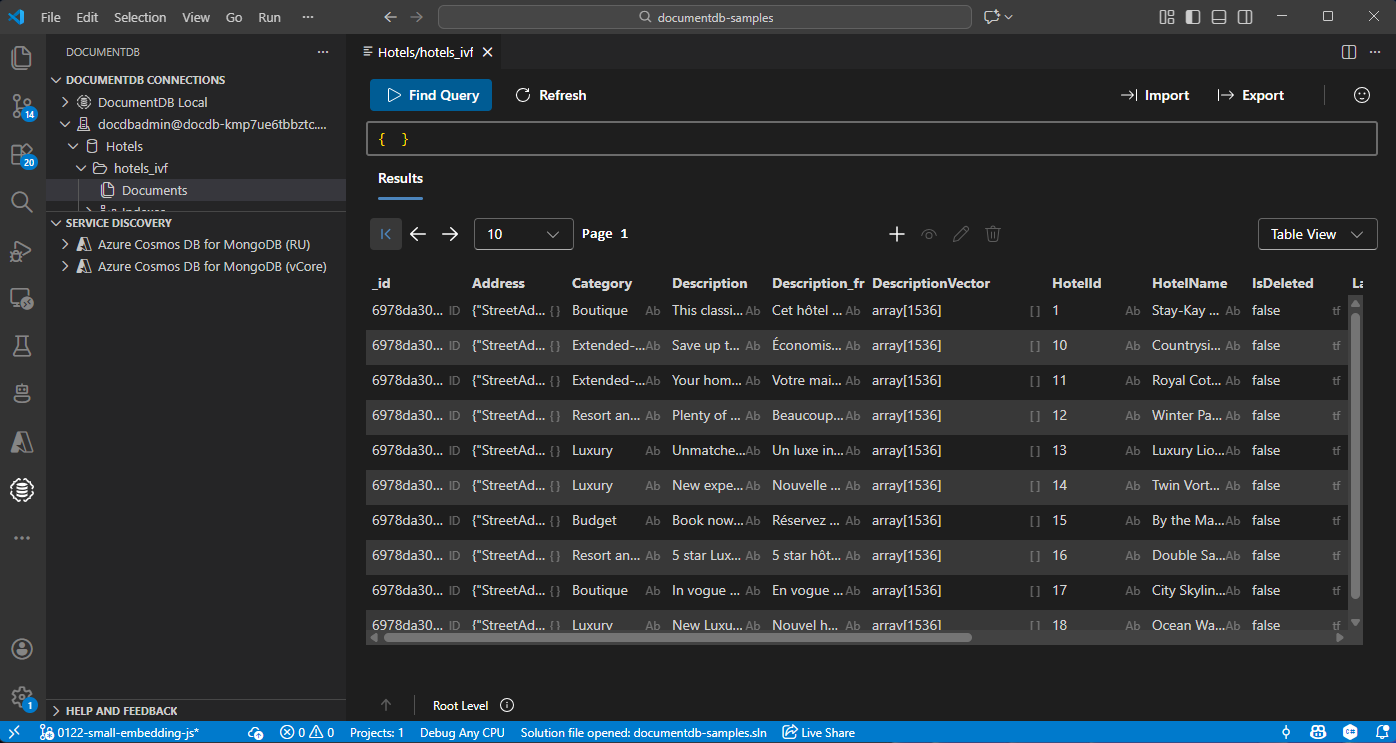
在 Visual Studio Code 中檢視和管理資料
在 Visual Studio Code 中選擇 DocumentDB 擴充功能 ,以連接你的 Azure DocumentDB 帳號。
檢視飯店資料庫中的資料和索引。
清理資源
刪除資源群組、Azure DocumentDB 帳號和不需要的 Azure OpenAI 資源,以避免額外費用。