資源會在每日使用、重新設定,甚至重新部署的過程中進行變更。 大部分的變更都是根據設計,但有時則不會。 您可以:
- 了解何時在 Azure Resource Manager 屬性上偵測到變更。
- 檢視屬性變更詳細資料。
- 跨訂閱、管理群組或租用戶大規模查詢變更。
在本文章中,您將了解:
- 載荷 JSON 的結構。
- 如何使用 CLI、PowerShell 或 Azure 入口網站,透過 Resource Graph 查詢資源變更。
- 查詢資源變更的查詢範例和最佳做法。
- 變更分析會使用「變更執行者」功能:
-
changedBy:是誰在您的資源中起始變更,例如應用程式 ID 或授權人員的電子郵件地址。 -
clientType:進行變更的客戶端,例如 Azure 入口網站。 -
operation:呼叫的操作,例如Microsoft.Compute/virtualmachines/write。 資源operation變更數據的欄位代表用來起始變更的 Azure 角色型訪問控制許可權 。
-
必要條件
了解變更事件屬性
建立、更新或刪除資源時,系統會建立新的變更資源 (Microsoft.Resources/changes) 來擴充修改的資源,並代表變更的屬性。 應會在五分鐘內提供變更記錄。 某些變更詳細資料可能會比其他項目更早顯示。 下列範例 JSON 資料負載示範變更資源屬性:
{
  "targetResourceId": "/subscriptions/11111111-1111-1111-1111-111111111111/resourceGroups/myResourceGroup/providers/microsoft.compute/virtualmachines/myVM",
  "targetResourceType": "microsoft.compute/virtualmachines",
  "changeType": "Update",
  "changeAttributes": {
    "previousResourceSnapshotId": "11111111111111111111_22222222-3333-aaaa-bbbb-444444444444_5555555555_6666666666",
    "newResourceSnapshotId": "33333333333333333333_44444444-5555-ffff-gggg-666666666666_7777777777_8888888888",
    "correlationId": "11111111-1111-1111-1111-111111111111",
    "changedByType": "User",
    "changesCount": 2,
    "clientType": "Azure Portal",
    "changedBy": "john@contoso.com",
    "operation": "microsoft.compute/virtualmachines/write",
    "timestamp": "2024-06-12T13:26:17.347+00:00"
  },
  "changes": {
    "properties.provisioningState": {
      "newValue": "Succeeded",
      "previousValue": "Updating",
      "isTruncated": "true"
    },
    "tags.key1": {
      "newValue": "NewTagValue",
      "previousValue": "null",
    }
  }
}
請參閱變更資源屬性的參考指南完整說明。
資源 operation 變更數據的欄位代表用來起始變更的 Azure 角色型訪問控制許可權 。 此欄位不一定描述實際執行的作業,而是使用的許可權(授權動作)。 例如,Microsoft.Compute/virtualmachines/write 對應至作業 PUT/providers/Microsoft.Compute/virtualmachines的權限。
若要瞭解在資源中擷取的變更類型(也就是建立、刪除、更新),我們建議您使用 changeType 字段,而不是 operation 字段,這代表用來起始變更的 Azure 角色型訪問控制許可權 。
如果已知用戶端類型, clientType 字段會顯示用戶端名稱,例如 「Azure 入口網站」。如果用戶端已提供但不知道,則字段會顯示用戶端應用程式識別碼。
注意
刪除的資源目前不支援快照。
針對具有 changeType:D elete 的記錄, changesCount 會顯示為0,因為資源本身會遭到刪除,而且沒有剩餘的屬性。 針對具有 changeType:Create 的記錄,因為在資源建立過程中,每一個資源屬性都會被修改,並且記錄每個屬性的變更會產生過多的雜訊,所以 changesCount 也會顯示為 0。
引進新屬性時,不會顯示為變更。 例如,當新的 API 版本引進新的屬性時,可能會發生這種情況。 同樣地,如果將新的索引鍵新增至標籤且沒有任何數值,則不會顯示這些變更。
執行查詢
請嘗試針對 resourcechanges 資料表進行以租戶為基礎的 Resource Graph 查詢。 此查詢會傳回前五個最新的 Azure 資源變更,其中包含變更時間、變更類型、目標資源識別碼、目標資源類型,以及每個變更記錄的變更詳細資料。
# Login first with az login if not using Cloud Shell

# Run Azure Resource Graph query
az graph query -q 'resourcechanges | project properties.changeAttributes.timestamp, properties.changeType, properties.targetResourceId, properties.targetResourceType, properties.changes | limit 5'
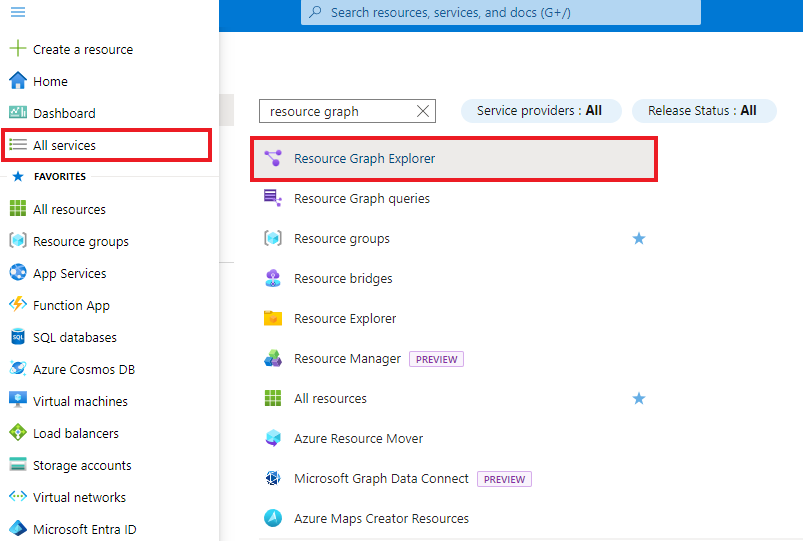
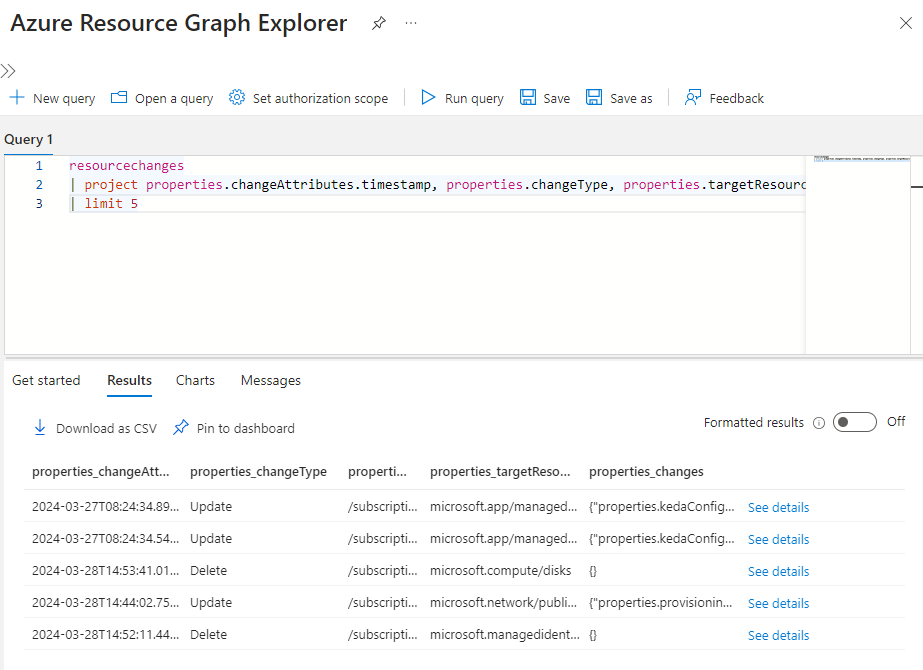
您可以更新此查詢,為 timestamp 屬性指定使用者更容易理解的資料行名稱。
# Run Azure Resource Graph query with 'extend'
az graph query -q 'resourcechanges | extend changeTime=todatetime(properties.changeAttributes.timestamp) | project changeTime, properties.changeType, properties.targetResourceId, properties.targetResourceType, properties.changes | limit 5'
若要將查詢結果限制為最近的變更,請將查詢更新為 order by 使用者定義的 changeTime 屬性。
# Run Azure Resource Graph query with 'order by'
az graph query -q 'resourcechanges | extend changeTime=todatetime(properties.changeAttributes.timestamp) | project changeTime, properties.changeType, properties.targetResourceId, properties.targetResourceType, properties.changes | order by changeTime desc | limit 5'
您也可以分別使用管理群組或參數,再搭配-ManagementGroup或-Subscription訂用帳戶進行查詢。
注意
如果查詢未從您可存取的訂用帳戶傳回結果,則 Search-AzGraphPowerShell Cmdlet 是為預設內容中的訂用帳戶所預設。
Resource Graph Explorer 也提供了全新介面,供您將某些查詢的結果轉換成可釘選到 Azure 儀表板的圖表。
查詢資源變更
透過 Resource Graph,您可以查詢 resourcechanges、resourcecontainerchanges 或 healthresourcechanges 資料表,以依任何變更資源屬性進行篩選或排序。 下列範例會查詢 resourcechanges 資料表,但也可以套用至 resourcecontainerchanges 或 healthresourcechanges 資料表。
注意
欲深入了解 healthresourcechanges 資料,請參閱 Project Flash 文檔。
範例
在查詢和分析資源變更前,請先檢視以下最佳實務與定義。
- 在特定時間範圍內查詢變更事件,並評估變更詳細資料。
- 此查詢最適合在事件管理期間用來了解可能相關的變更。
- 將組態管理資料庫 (CMDB) 保持最新狀態。
- 您只會收到其變更,而不必依排程頻率重新整理所有資源及其完整屬性集。
- 了解當資源變更合規性狀態時,其他哪些屬性已變更。
- 藉由評估這些額外的屬性,可深入解析其他可能需要透過 Azure 原則定義來管理的屬性。
- 查詢命令的順序很重要。 在下列範例中,
order by必須位於limit命令之前。-
order by命令會依變更時間排序查詢結果。 -
limit命令接著會限制已排序的結果,以確保您得到五個最新的結果。
-
-
Unknown 是什麼意思?
- 當變更發生在未被識別的客戶端時,會顯示「未知」。 用戶端的識別是根據與原始變更要求相關聯的使用者代理程式和用戶端應用程式識別碼。 在此案例中,身份/客戶資訊存在,但與任何已知客戶不符。
- 「未知」可表示為該
clientType數值。
-
未指定 是什麼意思?
- 當變更時沒有可用的身份或客戶資訊,則顯示「未指定」。 通知事件不包含變更者、用戶端應用程式 ID 或使用者代理資訊,且資源的系統元資料也未包含
lastModifiedBy或createdBy值。 - 「未指定」可表示為
changedBy、changedByType、clientType及operation值。
- 當變更時沒有可用的身份或客戶資訊,則顯示「未指定」。 通知事件不包含變更者、用戶端應用程式 ID 或使用者代理資訊,且資源的系統元資料也未包含
-
System 是什麼意思?
- 「系統」顯示於背景平台變更發生且與任何直接使用者操作無關時。
- 「系統」可以顯示為
changedBy和changedByType值。
過去 24 小時期間的所有變更
resourcechanges
| extend changeTime = todatetime(properties.changeAttributes.timestamp), targetResourceId = tostring(properties.targetResourceId),
changeType = tostring(properties.changeType), correlationId = properties.changeAttributes.correlationId,
changedProperties = properties.changes, changeCount = properties.changeAttributes.changesCount
| where changeTime > ago(1d)
| order by changeTime desc
| project changeTime, targetResourceId, changeType, correlationId, changeCount, changedProperties
在特定資源群組中刪除的資源
resourcechanges
| where resourceGroup == "myResourceGroup"
| extend changeTime = todatetime(properties.changeAttributes.timestamp), targetResourceId = tostring(properties.targetResourceId),
  changeType = tostring(properties.changeType), correlationId = properties.changeAttributes.correlationId
| where changeType == "Delete"
| order by changeTime desc
| project changeTime, resourceGroup, targetResourceId, changeType, correlationId
特定屬性值的變更
resourcechanges
| extend provisioningStateChange = properties.changes["properties.provisioningState"], changeTime = todatetime(properties.changeAttributes.timestamp), targetResourceId = tostring(properties.targetResourceId), changeType = tostring(properties.changeType)
| where isnotempty(provisioningStateChange)and provisioningStateChange.newValue == "Succeeded"
| order by changeTime desc
| project changeTime, targetResourceId, changeType, provisioningStateChange.previousValue, provisioningStateChange.newValue
過去七天內依人員與用戶端分類並按計數排序的變更
resourcechanges
| extend changeTime = todatetime(properties.changeAttributes.timestamp),
  targetResourceId = tostring(properties.targetResourceId),
  changeType = tostring(properties.changeType), changedBy = tostring(properties.changeAttributes.changedBy),
  changedByType = properties.changeAttributes.changedByType,
  clientType = tostring(properties.changeAttributes.clientType)
| where changeTime > ago(7d)
| project changeType, changedBy, changedByType, clientType
| summarize count() by changedBy, changeType, clientType
| order by count_ desc
虛擬機器大小的變更
resourcechanges
| extend vmSize = properties.changes["properties.hardwareProfile.vmSize"], changeTime = todatetime(properties.changeAttributes.timestamp), targetResourceId = tostring(properties.targetResourceId), changeType = tostring(properties.changeType)
| where isnotempty(vmSize)
| order by changeTime desc
| project changeTime, targetResourceId, changeType, properties.changes, previousSize = vmSize.previousValue, newSize = vmSize.newValue
依變更類型和訂閱名稱的變更次數
resourcechanges
| extend changeType = tostring(properties.changeType), changeTime = todatetime(properties.changeAttributes.timestamp), targetResourceType=tostring(properties.targetResourceType)
| summarize count() by changeType, subscriptionId
| join (resourcecontainers | where type=='microsoft.resources/subscriptions' | project SubscriptionName=name, subscriptionId) on subscriptionId
| project-away subscriptionId, subscriptionId1
| order by count_ desc
使用特定標籤所建立資源的最新的資源變動
resourcechanges
|extend targetResourceId = tostring(properties.targetResourceId), changeType = tostring(properties.changeType), createTime = todatetime(properties.changeAttributes.timestamp)
| where createTime > ago(7d) and changeType == "Create" or changeType == "Update" or changeType == "Delete"
| project  targetResourceId, changeType, createTime
| join ( resources | extend targetResourceId=id) on targetResourceId
| where tags ['Environment'] =~ 'prod'
| order by createTime desc
| project createTime, id, resourceGroup, type