若要將資料傳送至 Azure IoT 操作中的 Microsoft Fabric OneLake,您可以設定資料流端點。 此設定可讓您指定目的地端點、驗證方法、資料表和其他設定。
先決條件
將權限指派給受控識別
若要為 Microsoft Fabric OneLake 設定資料流端點,建議您使用使用者指派或系統指派的受控識別。 這種方法是安全的,而且不需要手動管理認證。
建立 Microsoft Fabric OneLake 之後,您必須將角色指派給 Azure IoT 操作受控識別,以授與寫入 Fabric 湖存放庫的權限。
如果使用系統指派的受控識別,請在 Azure 入口網站中移至您的 Azure IoT 作業實例,然後選取 [ 概觀]。 複製 Azure IoT Operations Arc 擴充功能之後所列的擴充功能名稱。 例如,azure-iot-operations-xxxx7。 使用 Azure IoT 操作 Arc 延伸模組的相同名稱,即可找到系統指派的受控識別。
移至您所建立Microsoft網狀架構工作區,選取 [ 管理存取>權+ 新增人員或群組]。
- 搜尋針對雲端連線所設定的使用者指派受控識別或系統指派的受控識別的名稱。 例如,azure-iot-operations-xxxx7。
- 選取 [參與者] 作為角色,然後選取 [新增]。 這可讓受控識別具備寫入 Fabric 湖存放庫的必要權限。 若要深入瞭解,請參閱 Microsoft Fabric 工作區中的角色。
建立 Microsoft Fabric OneLake 的資料流端點
在操作介面中,選取 [資料流程端點] 索引標籤。
在 [建立新的數據流端點] 下,選取 [Microsoft Fabric OneLake>New]。

輸入端點的下列設定:
| 設定 |
描述 |
| 主辦人 |
Microsoft Fabric OneLake 端點的主機名稱,格式為 onelake.dfs.fabric.microsoft.com。 |
| 湖存放庫名稱 |
應該儲存資料之湖存放庫的名稱。 |
| 工作區名稱 |
與湖存放庫相關聯的工作區名稱。 |
| OneLake 路徑類型 |
OneLake 中使用的路徑類型。 選取 [檔案 ] 或 [ 數據表]。 |
| 驗證方法 |
用於驗證的方法。 選擇 [系統指派的受控識別 ] 或 [ 使用者指派的受控識別]。 |
| 用戶端識別碼 |
使用者指派之受控識別的用戶端識別碼。 如果使用 使用者指派的受控識別,就為必需。 |
| 租用戶識別碼 |
使用者指派之受控識別的租用戶識別碼。 如果使用 使用者指派的受控識別,就為必需。 |
選取 [套用] 以佈建端點。
建立或取代
使用 az iot ops dataflow endpoint create fabric-onelake 命令來建立或取代 Microsoft Fabric OneLake 數據流端點。
az iot ops dataflow endpoint create fabric-onelake --resource-group <ResourceGroupName> --instance <AioInstanceName> --name <EndpointName> --workspace <WorkspaceName> --lakehouse <LakehouseName> --path-type <PathType>
參數 --workspace 是 Microsoft Fabric 工作區的名稱。
--lakehouse 是工作區內 Microsoft Fabric 湖存放庫的名稱。 參數 --path-type 會指定 OneLake 路徑類型,可以是 Tables 或 Files。
以下是建立或取代名為 fabric-endpointMicrosoft Fabric OneLake 數據流端點的範例命令:
az iot ops dataflow endpoint create fabric-onelake --resource-group myResourceGroup --instance myAioInstance --name fabric-endpoint --workspace myWorkspace --lakehouse myLakehouse --path-type Tables
建立或變更
使用 az iot ops dataflow endpoint apply 命令來建立或變更 Microsoft Fabric OneLake 數據流端點。
az iot ops dataflow endpoint apply --resource-group <ResourceGroupName> --instance <AioInstanceName> --name <EndpointName> --config-file <ConfigFilePathAndName>
參數 --config-file 是 JSON 組態檔的路徑和檔名,其中包含資源屬性。
在此範例中,假設名為 fabric-endpoint.json 的組態檔,其中包含儲存在使用者主目錄中的下列內容:
{
  "endpointType": "FabricOneLake",
  "fabricOneLakeSettings": {
    "authentication": {
      "method": "SystemAssignedManagedIdentity",
      "systemAssignedManagedIdentitySettings": {}
    },
    "batching": {
      "latencySeconds": 60,
      "maxMessages": 100000
    },
    "host": "https://onelake.dfs.fabric.microsoft.com",
    "oneLakePathType": "Tables",
    "names": {
      "workspaceName": "<WorkspaceName>",
      "lakehouseName": "<LakehouseName>"
    }
  }
}
以下是建立名為 fabric-endpoint的新 Microsoft Fabric OneLake 數據流端點的範例命令:
az iot ops dataflow endpoint apply --resource-group myResourceGroupName --instance myAioInstanceName --name fabric-endpoint --config-file ~/fabric-endpoint.json
使用下列內容建立 Bicep .bicep 檔案。
param aioInstanceName string = '<AIO_INSTANCE_NAME>'
param customLocationName string = '<CUSTOM_LOCATION_NAME>'
param endpointName string = '<ENDPOINT_NAME>'
param workspaceName string = '<WORKSPACE_NAME>'
param lakehouseName string = '<LAKEHOUSE_NAME>'

resource aioInstance 'Microsoft.IoTOperations/instances@2024-11-01' existing = {
  name: aioInstanceName
}
resource customLocation 'Microsoft.ExtendedLocation/customLocations@2021-08-31-preview' existing = {
  name: customLocationName
}
resource oneLakeEndpoint 'Microsoft.IoTOperations/instances/dataflowEndpoints@2024-11-01' = {
  parent: aioInstance
  name: endpointName
  extendedLocation: {
    name: customLocation.id
    type: 'CustomLocation'
  }
  properties: {
    endpointType: 'FabricOneLake'
    fabricOneLakeSettings: {
      // The default Fabric OneLake host URL in most cases
      host: 'https://onelake.dfs.fabric.microsoft.com'
      authentication: {
        // See available authentication methods section for method types
        // method: <METHOD_TYPE>
      }
      oneLakePathType: 'Tables'
      names: {
        workspaceName: workspaceName
        lakehouseName: lakehouseName
      }
    }
  }
}
然後,透過 Azure CLI 進行部署。
az deployment group create --resource-group <RESOURCE_GROUP> --template-file <FILE>.bicep
使用下列內容建立 Kubernetes 資訊清單 .yaml 檔案。
apiVersion: connectivity.iotoperations.azure.com/v1
kind: DataflowEndpoint
metadata:
  name: <ENDPOINT_NAME>
  namespace: azure-iot-operations
spec:
  endpointType: FabricOneLake
  fabricOneLakeSettings:
    # The default Fabric OneLake host URL in most cases
    host: https://onelake.dfs.fabric.microsoft.com
    authentication:
      # See available authentication methods section for method types
      # method: <METHOD_TYPE>
    oneLakePathType: Tables
    names:
      workspaceName: <WORKSPACE_NAME>
      lakehouseName: <LAKEHOUSE_NAME>
然後將資訊清單檔套用至 Kubernetes 叢集。
kubectl apply -f <FILE>.yaml
OneLake 路徑類型
oneLakePathType 設定會決定要用於 OneLake 路徑的路徑類型。 預設值為 Tables,這是最常見使用案例的建議路徑類型。
Tables 路徑類型是 OneLake 湖存放庫中用來儲存資料的資料表。 它也可以設定為 Files,這是 OneLake 湖存放庫中用來儲存資料的檔案。 當您想要以 Files 路徑類型不支援的檔案格式儲存資料時,Tables 路徑類型會很有用。
OneLake 路徑類型是在數據流端點的 [ 基本 ] 索引標籤中設定。
如果您使用 az iot ops 資料流端點 create fabric-onelake 命令,參數 --path-type 會指定 OneLake 路徑類型,可以是 Tables 或 Files。
az iot ops dataflow endpoint create fabric-onelake --resource-group <ResourceGroupName> --instance <AioInstanceName> --name <EndpointName> --workspace <WorkspaceName> --lakehouse <LakehouseName> --path-type <PathType>
如果您使用 az iot ops 數據流端點 apply,oneLakePathType屬性將在 JSON 組態檔中設定。
{
  "endpointType": "FabricOneLake",
  "fabricOneLakeSettings": {
    "oneLakePathType": "Tables"
  }
}
fabricOneLakeSettings: {
  oneLakePathType: 'Tables' // Or 'Files'
}
fabricOneLakeSettings:
  oneLakePathType: Tables # Or Files
可用的驗證方法
下列驗證方法適用於 Microsoft Fabric OneLake 資料流端點。
系統指派的受控識別
設定資料流端點之前,請先將角色指派給 Azure IoT 操作受控識別,以授與寫入 Fabric 湖存放庫的權限:
- 在 Azure 入口網站中,移至您的 Azure IoT 作業實例,然後選取 [ 概觀]。
- 複製 Azure IoT Operations Arc 擴充功能之後所列的擴充功能名稱。 例如,azure-iot-operations-xxxx7。
- 移至 [Microsoft網狀架構] 工作區,選取 [ 管理存取>權+ 新增人員或群組]。
- 搜尋系統指派的受控識別名稱。 例如,azure-iot-operations-xxxx7。
- 選取適當的角色,然後選取 [ 新增]。
然後,使用系統指派的受控識別設定來設定資料流端點。
在 [作業體驗數據流端點設定] 頁面中,選取 [ 基本 ] 索引標籤,然後選擇 [ 驗證方法>系統指派的受控識別]。
建立或取代
使用 az iot ops dataflow endpoint create fabric-onelake 命令來建立或取代 Microsoft Fabric OneLake 數據流端點。
az iot ops dataflow endpoint create fabric-onelake --auth-type SystemAssignedManagedIdentity --resource-group <ResourceGroupName> --instance <AioInstanceName> --name <EndpointName> --workspace <WorkspaceName> --lakehouse <LakehouseName> --path-type <PathType>
參數 --workspace 是 Microsoft Fabric 工作區的名稱。
--lakehouse 是工作區內 Microsoft Fabric 湖存放庫的名稱。 參數 --path-type 會指定 OneLake 路徑類型,可以是 Tables 或 Files。
以下是建立或取代名為 fabric-endpointMicrosoft Fabric OneLake 數據流端點的範例命令:
az iot ops dataflow endpoint create fabric-onelake --resource-group myResourceGroup --instance myAioInstance --name fabric-endpoint --workspace myWorkspace --lakehouse myLakehouse --path-type Tables
建立或變更
使用 az iot ops dataflow endpoint apply 命令來建立或變更 Microsoft Fabric OneLake 數據流端點。
az iot ops dataflow endpoint apply --resource-group <ResourceGroupName> --instance <AioInstanceName> --name <EndpointName> --config-file <ConfigFilePathAndName>
參數 --config-file 是 JSON 組態檔的路徑和檔名,其中包含資源屬性。
在此範例中,假設名為 fabric-endpoint.json 的組態檔,其中包含儲存在使用者主目錄中的下列內容:
{
  "endpointType": "FabricOneLake",
  "fabricOneLakeSettings": {
    "authentication": {
      "method": "SystemAssignedManagedIdentity",
      "systemAssignedManagedIdentitySettings": {}
    },
    "batching": {
      "latencySeconds": 60,
      "maxMessages": 100000
    },
    "host": "https://onelake.dfs.fabric.microsoft.com",
    "oneLakePathType": "Tables",
    "names": {
      "workspaceName": "<WorkspaceName>",
      "lakehouseName": "<LakehouseName>"
    }
  }
}
以下是建立名為 fabric-endpoint的新 Microsoft Fabric OneLake 數據流端點的範例命令:
az iot ops dataflow endpoint apply --resource-group myResourceGroupName --instance myAioInstanceName --name fabric-endpoint --config-file ~/fabric-endpoint.json
fabricOneLakeSettings: {
  authentication: {
    method: 'SystemAssignedManagedIdentity'
    systemAssignedManagedIdentitySettings: {}
  }
}
fabricOneLakeSettings:
  authentication:
    method: SystemAssignedManagedIdentity
    systemAssignedManagedIdentitySettings:
      {}
如果您需要覆寫系統指派的受控識別對象,您可以指定 audience 設定。
在大部分情況下,您不需要指定服務對象。 在未指定對象的情況下建立受控識別,其預設對象範圍限定於您的儲存體帳戶。
建立或取代
使用 az iot ops dataflow endpoint create fabric-onelake 命令來建立或取代 Microsoft Fabric OneLake 數據流端點。
az iot ops dataflow endpoint create fabric-onelake --auth-type SystemAssignedManagedIdentity fabric-onelake --audience https://<account>.onelake.dfs.fabric.microsoft.com --resource-group <ResourceGroupName> --instance <AioInstanceName> --name <EndpointName> --workspace <WorkspaceName> --lakehouse <LakehouseName> --path-type <PathType>
參數 --audience 會指定系統指派受控識別的受眾。 預設觀眾為 https://<account>.onelake.dfs.fabric.microsoft.com。
以下是建立或取代名為 fabric-endpointMicrosoft Fabric OneLake 數據流端點的範例命令:
az iot ops dataflow endpoint create fabric-onelake --auth-type SystemAssignedManagedIdentity --audience https://account.onelake.dfs.fabric.microsoft.com --resource-group myResourceGroup --instance myAioInstance --name fabric-endpoint --workspace myWorkspace --lakehouse myLakehouse --path-type Tables
建立或變更
使用 az iot ops dataflow endpoint apply 命令來建立或變更 Microsoft Fabric OneLake 數據流端點。
az iot ops dataflow endpoint apply --resource-group <ResourceGroupName> --instance <AioInstanceName> --name <EndpointName> --config-file <ConfigFilePathAndName>
參數 --config-file 是 JSON 組態檔的路徑和檔名,其中包含資源屬性。
在此範例中,假設名為 fabric-endpoint.json 的組態檔,其中包含儲存在使用者主目錄中的下列內容:
{
  "endpointType": "FabricOneLake",
  "fabricOneLakeSettings": {
    "authentication": {
      "method": "SystemAssignedManagedIdentity",
      "systemAssignedManagedIdentitySettings": {
        "audience": "https://<account>.onelake.dfs.fabric.microsoft.com"
      }
    },
    "batching": {
      "latencySeconds": 60,
      "maxMessages": 100000
    },
    "host": "https://onelake.dfs.fabric.microsoft.com",
    "oneLakePathType": "Tables",
    "names": {
      "workspaceName": "<WorkspaceName>",
      "lakehouseName": "<LakehouseName>"
    }
  }
}
以下是建立名為 fabric-endpoint的新 Microsoft Fabric OneLake 數據流端點的範例命令:
az iot ops dataflow endpoint apply --resource-group myResourceGroupName --instance myAioInstanceName --name fabric-endpoint --config-file ~/fabric-endpoint.json
fabricOneLakeSettings: {
  authentication: {
    method: 'SystemAssignedManagedIdentity'
    systemAssignedManagedIdentitySettings: {
      audience: 'https://<ACCOUNT>.onelake.dfs.fabric.microsoft.com'
    }
  }
}
fabricOneLakeSettings:
  authentication:
    method: SystemAssignedManagedIdentity
    systemAssignedManagedIdentitySettings:
      audience: https://<ACCOUNT>.onelake.dfs.fabric.microsoft.com
使用者指派的受控識別
若要將使用者指派的受控識別用於驗證,您必須先部署已啟用安全設定的 Azure IoT 操作。 然後,您必須 為雲端連線設定使用者指派的受控識別。 若要深入瞭解,請參閱 在 Azure IoT 作業部署中啟用安全設定。
設定資料流端點之前,請先將角色指派給使用者指派的受控識別,以授與寫入 Fabric 湖存放庫的權限。
- 移至 [Microsoft網狀架構] 工作區,選取 [ 管理存取>權+ 新增人員或群組]。
- 搜尋使用者指派的受控識別名稱。
- 選取適當的角色,然後選取 [ 新增]。
然後,使用使用者指派的受控識別設定來設定資料流端點。
在 [作業體驗數據流端點設定] 頁面中,選取 [ 基本 ] 索引標籤,然後選擇 [ 驗證方法>使用者指派的受控識別]。
在適當的欄位中輸入使用者指派的受控識別用戶端識別碼和租用戶識別碼。
建立或取代
使用 az iot ops dataflow endpoint create fabric-onelake 命令,以使用者指派的受控識別來建立或取代 Microsoft Fabric OneLake 數據流端點。
az iot ops dataflow endpoint create fabric-onelake --auth-type UserAssignedManagedIdentity --client-id <ClientId> --tenant-id <TenantId> --scope <Scope> --resource-group <ResourceGroupName> --instance <AioInstanceName> --name <EndpointName> --workspace <WorkspaceName> --lakehouse <LakehouseName> --path-type <PathType>
參數 --auth-type 會指定驗證方法,在此案例中為 UserAssignedManagedIdentity 。
--client-id、 --tenant-id和 --scope 參數分別指定使用者指派的受控識別用戶端標識碼、租使用者標識碼和範圍。
以下是建立或取代名為 fabric-endpointMicrosoft Fabric OneLake 數據流端點的範例命令:
範例 命令:
az iot ops dataflow endpoint create fabric-onelake --auth-type UserAssignedManagedIdentity --client-id ClientId --tenant-id TenantId --scope https://storage.azure.com/.default --resource-group myResourceGroup --instance myAioInstance --name fabric-endpoint --workspace myWorkspace --lakehouse myLakehouse --path-type Tables
建立或變更
使用 az iot ops dataflow endpoint apply 命令來建立或變更具有使用者指派受控識別的 Microsoft Fabric OneLake 數據流端點。
az iot ops dataflow endpoint apply --resource-group <ResourceGroupName> --instance <AioInstanceName> --name <EndpointName> --config-file <ConfigFilePathAndName>
參數 --config-file 是 JSON 組態檔的路徑和檔名,其中包含資源屬性。
範例 fabric-endpoint.json:
{
  "endpointType": "FabricOneLake",
  "fabricOneLakeSettings": {
    "authentication": {
      "method": "UserAssignedManagedIdentity",
      "userAssignedManagedIdentitySettings": {
        "clientId": "<ClientId>",
        "scope": "<Scope>",
        "tenantId": "<TenantId>"
      }
    },
    "batching": {
      "latencySeconds": 60,
      "maxMessages": 100000
    },
    "host": "https://onelake.dfs.fabric.microsoft.com",
    "oneLakePathType": "Tables",
    "names": {
      "workspaceName": "<WorkspaceName>",
      "lakehouseName": "<LakehouseName>"
    }
  }
}
範例 命令:
az iot ops dataflow endpoint apply --resource-group myResourceGroupName --instance myAioInstanceName --name fabric-endpoint --config-file ~/fabric-endpoint.json
fabricOneLakeSettings: {
  authentication: {
    method: 'UserAssignedManagedIdentity'
    userAssignedManagedIdentitySettings: {
      clientId: '<ID>'
      tenantId: '<ID>'
      // Optional, defaults to 'https://storage.azure.com/.default'
      // scope: 'https://<SCOPE_URL>'
    }
  }
}
若要使用使用者指派的受控識別,請指定 UserAssignedManagedIdentity 驗證方法,並提供受控識別的 clientId 和 tenantId。
fabricOneLakeSettings:
  authentication:
    method: UserAssignedManagedIdentity
    userAssignedManagedIdentitySettings:
      clientId: <ID>
      tenantId: <ID>
      # Optional, defaults to 'https://storage.azure.com/.default'
      # scope: https://<SCOPE_URL>
在這裡,範圍是選擇性的,預設為 https://storage.azure.com/.default。 如果您需要覆寫預設範圍,請使用 Bicep 或 Kubernetes 指定 scope 設定。
進階設定
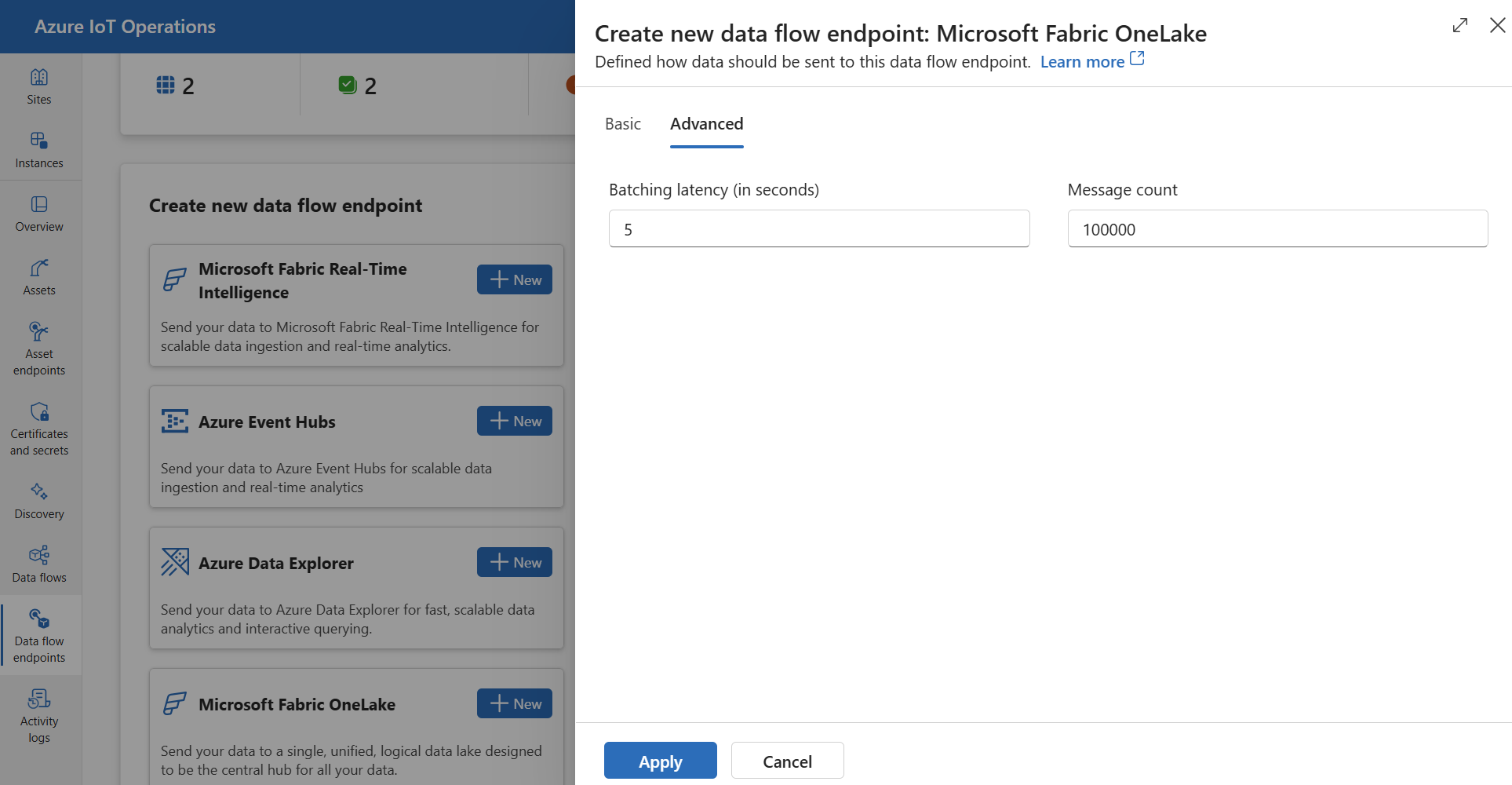
您可以設定 Fabric OneLake 端點的進階設定,例如批次處理延遲和訊息計數。 您可以在資料流端點 [ 進階 入口網站] 索引標籤或資料流端點自訂資源中設定這些設定。
批次處理
使用 batching 設定來設定訊息數目上限,以及訊息傳送至目的地之前的最大延遲。 當您想要針對網路頻寬進行最佳化,並減少對目的地的要求數目時,此設定很有用。
| 欄位 |
描述 |
必要 |
latencySeconds |
將訊息傳送至目的地之前要等候的最大秒數。 預設值為 60 秒。 |
否 |
maxMessages |
要傳送至目的地的訊息數目上限。 預設值為 100000 則訊息。 |
否 |
例如,若要將訊息數目上限設定為 1000,以及延遲上限為 100 秒,請使用下列設定:
在作業體驗中,選取數據流端點的 [ 進階 ] 索引標籤。
使用 az iot ops dataflow endpoint apply 命令來建立或變更 Microsoft Fabric OneLake 數據流端點進階設定。
az iot ops dataflow endpoint apply --resource-group <ResourceGroupName> --instance <AioInstanceName> --name <EndpointName> --config-file <ConfigFilePathAndName>
參數 --config-file 是 JSON 組態檔的路徑和檔名,其中包含資源屬性。
在此範例中,假設名為 fabric-endpoint.json 的組態檔,其中包含儲存在使用者主目錄中的下列內容:
{
  "endpointType": "FabricOneLake",
  "fabricOneLakeSettings": {
    "authentication": {
      "method": "SystemAssignedManagedIdentity",
      "systemAssignedManagedIdentitySettings": {}
    },
    "batching": {
      "latencySeconds": 100,
      "maxMessages": 1000
    },
    "host": "https://onelake.dfs.fabric.microsoft.com",
    "oneLakePathType": "Tables",
    "names": {
      "workspaceName": "<WorkspaceName>",
      "lakehouseName": "<LakehouseName>"
    }
  }
}
以下是建立名為 fabric-endpoint的新 Microsoft Fabric OneLake 數據流端點的範例命令:
az iot ops dataflow endpoint apply --resource-group myResourceGroupName --instance myAioInstanceName --name fabric-endpoint --config-file ~/fabric-endpoint.json
fabricOneLakeSettings: {
  batching: {
    latencySeconds: 100
    maxMessages: 1000
  }
}
fabricOneLakeSettings:
  batching:
    latencySeconds: 100
    maxMessages: 1000
後續步驟
若要深入了解數據流,請參閱 建立數據流。