本文將教你如何利用受管理身份部署 Azure Red Hat OpenShift 叢集。 使用 服務主體 的現有叢集無法移轉為使用受控識別。 您必須在 Azure Red Hat OpenShift 叢集上建立使用受控識別的新叢集。
Azure Red Hat OpenShift 是一項受控 OpenShift 服務,可支援受控識別和工作負載身分識別。 受控識別和工作負載識別可藉由提供短期令牌而非具有用戶端密碼認證的服務主體來協助在保護工作負載和應用程式時將風險降到最低。
如需詳細資訊,請參閱:
先決條件
如果你沒有使用 Azure 入口網站,請確保你使用的是 Azure CLI 版本 2.84.0 或以上,該版本包含完全支援的 CLI 參數,以支援管理身份叢集。 用 az --version 來查找你安裝的 Azure CLI 版本。 如果您需要安裝或升級,請參閱安裝 Azure CLI。
Azure Red Hat OpenShift 至少需要 44 個核心才能建立 OpenShift 叢集。 新 Azure 訂用帳戶的預設 Azure 資源配額不符合此需求。 若要要求提高資源限制,請參閱提高 VM 系列 vCPU 配額。
44 個核心的使用方式如下:
- 啟動程式計算機:8 個核心
- 控制平面(主計算機):24 核心
- 計算(工作機器):12 個核心
安裝完成時,會移除啟動程序計算機,而您的叢集總共會使用36個核心。 如需詳細資訊,請參閱 在 Azure 上安裝。
執行以下指令,檢查你的 Azure 訂閱對標準 DSv5 虛擬機大小的配額,這是 CLI 或 Portal 的預設虛擬機大小:
LOCATION=eastus
az vm list-usage -l $LOCATION \
--query "[?contains(name.value, 'standardDSv5Family')]" -o table
確認您的許可權
在本文中,您會建立包含叢集虛擬網路和受控識別的資源群組。 若要建立資源群組,您需要包含資源群組或訂用帳戶的參與者和使用者存取系統管理員許可權或擁有者許可權。
您還需要具備足夠的 Microsoft Entra 許可權(租用戶的成員使用者,或指派為 應用程式管理員角色的訪客),以建立一組受管識別並指派供叢集使用的角色。 如需詳細資訊,請參閱 成員和來賓 ,以及 將系統管理員和非系統管理員角色指派給具有 Microsoft Entra ID 的使用者。
註冊資源提供者
某些 Azure 資源提供者,包括 Azure Red Hat OpenShift 資源提供者,需要註冊才能運作。 註冊資源提供者會在訂用帳戶內建立服務主體,以授權資源提供者執行某些動作,例如資源建立。 有關使用 Azure 入口網站註冊資源提供者的指引,或更多關於資源提供者註冊的資訊,請參見 註冊資源提供者。
如果您有多個 Azure 訂用帳戶,請指定相關的訂用帳戶識別碼:
az account set --subscription <SUBSCRIPTION ID>註冊
Microsoft.RedHatOpenShift資源提供者:az provider register -n Microsoft.RedHatOpenShift --wait註冊
Microsoft.Compute資源提供者:az provider register -n Microsoft.Compute --wait註冊
Microsoft.Storage資源提供者:az provider register -n Microsoft.Storage --wait註冊
Microsoft.Authorization資源提供者:az provider register -n Microsoft.Authorization --wait
取得 Red Hat 提取祕密 (選擇性)
Azure Red Hat OpenShift 的 pull secret 不會改變 Red Hat OpenShift 授權的費用。
Red Hat 提取憑證可讓您的叢集存取 Red Hat 容器映像檔庫,以及 OperatorHub 的運算子等其他內容。 此步驟是選擇性的,但建議使用。 如果您稍後決定新增提取密碼,請遵循本指南。 即使提取密碼包含該欄位,cloud.openshift.com 欄位也會從您的祕密中移除。 此欄位會啟用額外的監視功能,此功能會將資料傳送至 RedHat,因此預設為停用。 若要啟用此功能,請參閱 啟用遠端健康情況報告。
瀏覽至您的 Red Hat OpenShift 叢集管理員入口網站並登入。
您必須登入您的 Red Hat 帳戶,或使用您的商務電子郵件建立新的 Red Hat 帳戶,並接受條款和條件。
選取 [下載提取密碼],然後下載要與您的 Azure Red Hat OpenShift 叢集搭配使用的提取密碼。
將儲存的
pull-secret.txt檔案保持在其他安全位置。 如果您需要建立包含 Red Hat 或認證合作夥伴範例或作員的叢集,則會在每個叢集建立中使用此檔案。執行
az aro create命令時,您可以使用--pull-secret @pull-secret.txt參數來參考您的提取祕密。 從您儲存az aro create檔案的目錄執行pull-secret.txt。 否則,請將@pull-secret.txt取代為@/path/to/my/pull-secret.txt。如果您要複製提取祕密,或在其他指令碼中參考,您的提取祕密應格式化為有效的 JSON 字串。
為叢集準備自訂網域 (選擇性)
執行 az aro create 命令時,您可以使用 --domain foo.example.com 參數來指定叢集的自訂網域。
備註
透過 Azure CLI 建立叢集時,新增網域名稱是選擇性的。 透過入口網站新增叢集時,需要網域名稱(或用作 OpenShift 控制台和 API 伺服器自動產生 DNS 名稱一部分的字首)。 如需詳細資訊,請參閱 快速入門:使用 Azure 入口網站部署 Azure Red Hat OpenShift 叢集。
如果您為叢集提供自訂網域,請注意下列幾點:
- 建立叢集之後,您必須在 DNS 伺服器中為
--domain指定的 建立兩個 DNS A 記錄:- api - 指向 API 伺服器 IP 位址
- *.apps - 指向輸入 IP 位址
- 在建立好叢集之後,藉由執行下列命令來取得這些值:
az aro show -n -g --query '{api:apiserverProfile.ip, ingress:ingressProfiles[0].ip}'。
- OpenShift 控制台位於 URL,例如
https://console-openshift-console.apps.example.com,而不是內建網域https://console-openshift-console.apps.<random>.<location>.aroapp.io。 - 根據預設,OpenShift 會針對自訂網域
*.apps.example.com上建立的所有路由使用自我簽署憑證。 如果您在連線到叢集之後選擇使用自定義 DNS,您必須遵循 OpenShift 檔來設定 輸入控制器的自訂 CA ,以及 API 伺服器的自定義 CA。
安裝
你可以使用 Azure CLI、Portal、Bicep 或 Azure Resource Manager 範本(ARM 範本)來部署使用 managed identitys 的 Azure Red Hat OpenShift 叢集。
使用 Azure CLI 進行安裝
本節說明如何使用 Azure CLI 建立 Azure Red Hat OpenShift 叢集,使用受管理身份。
建立包含兩個空白子網路的虛擬網路
建立包含兩個空白子網路的虛擬網路。 如果您有符合您需求的現有虛擬網路,請略過此步驟。
如需網路和需求的相關信息,請參閱 Azure Red Hat OpenShift 的網路功能。
在執行
az命令的殼層環境中設定下列變數。LOCATION=eastus # the location of your cluster RESOURCEGROUP=aro-rg # the name of the resource group where you want to create your cluster CLUSTER=cluster # the name of your cluster建立資源群組。
Azure 資源群組是部署及管理 Azure 資源所在的邏輯群組。 建立資源群組時,系統會要求您指定位置。 此位置是儲存資源群組中繼資料的位置,如果您未在資源建立期間指定另一個區域,此位置也會是您在 Azure 中執行資源的位置。 使用 az group create 命令來建立資源群組。
備註
Azure Red Hat OpenShift 不適用於可建立 Azure 資源群組的所有區域。 如需支援 Azure Red Hat OpenShift 區域的相關資訊,請參閱可用區域。
az group create \
  --location $LOCATION \
  --name $RESOURCEGROUP
在先前建立的相同資源群組中建立虛擬網路及其主控和工作者子網路。
Azure Red Hat OpenShift 叢集需要具有兩個空子網的虛擬網路,以供控制器節點和工作節點使用。 您可以建立新的虛擬網路或使用現有的虛擬網路。
az network vnet create \
   --resource-group $RESOURCEGROUP \
   --name aro-vnet \
   --address-prefixes 10.0.0.0/22
az network vnet subnet create \ --resource-group $RESOURCEGROUP \ --vnet-name aro-vnet \ --name master \ --address-prefixes 10.0.0.0/23az network vnet subnet create \ --resource-group $RESOURCEGROUP \ --vnet-name aro-vnet \ --name worker \ --address-prefixes 10.0.2.0/23
建立必要的使用者指定管理的身分識別
建立下列必要的身分識別。 Azure Red Hat OpenShift 需要九個受控識別,每個受控識別都需要指派一個內建角色。
- 與核心 OpenShift 運算子相關的七個受控識別。
- Azure Red Hat OpenShift 服務操作員的一個受控識別。
- 為叢集新增另一個身分識別,以啟用這些身分識別的使用。
受控識別元件包括:
- OpenShift Image Registry Operator(image-registry)
- OpenShift 網路操作員 (cloud-network-config)
- OpenShift 磁碟存儲操作員 (disk-csi-driver)
- OpenShift 檔案儲存管理員(file-csi-driver)
- OpenShift 叢集輸入運算子 (輸入)
- OpenShift Cloud Controller Manager (cloud-controller-manager)
- OpenShift Machine API 運算元(machine-api)
- Azure Red Hat OpenShift 服務作員 (aro-operator)
有八個不同的受控識別和對應的內建角色,這些角色代表 Azure Red Hat OpenShift 每個元件執行其職責所需的許可權。 此外,平臺需要另一個身分識別,即叢集身分識別,以對先前列出的受控識別元件(aro-cluster)執行聯邦認證的建立。
如需 Red Hat OpenShift 叢集運算符的詳細資訊,請參閱 叢集運算符參考。
如需 Azure Red Hat OpenShift 中受控識別的詳細資訊,請參閱 瞭解 Azure Red Hat OpenShift 中的受控識別。
建立必要的身分識別:
az identity create \
--resource-group $RESOURCEGROUP \
--name aro-cluster
az identity create \ --resource-group $RESOURCEGROUP \ --name cloud-controller-manageraz identity create \ --resource-group $RESOURCEGROUP \ --name ingressaz identity create \ --resource-group $RESOURCEGROUP \ --name machine-apiaz identity create \ --resource-group $RESOURCEGROUP \ --name disk-csi-driveraz identity create \ --resource-group $RESOURCEGROUP \ --name cloud-network-configaz identity create \ --resource-group $RESOURCEGROUP \ --name image-registryaz identity create \ --resource-group $RESOURCEGROUP \ --name file-csi-driveraz identity create \ --resource-group $RESOURCEGROUP \ --name aro-operator為每個作員身分識別、叢集身分識別和第一方服務主體建立必要的角色指派。
備註
本文假設只有主節點和工作節點子網路存在。 如果您在安裝時設定了額外的叢集子網,就需要為那些需要的子網授予角色指派的範圍。
下列主節點和工作者子網的角色指派假設不存在已附加的網路安全組(NSG)、路由表或網路位址轉換(NAT)閘道。 如果您將任何這些網路資源帶到安裝過程中,則需要建立更多角色指派,以賦予操作員身分識別對這些額外網路資源的許可權。 對於每位需要為下列子網或虛擬網路進行角色指派的操作員,也需要為額外的網路資源進行角色指派。
SUBSCRIPTION_ID=$(az account show --query 'id' -o tsv)

# assign cluster identity permissions over identities previously created

az role assignment create \
    --assignee-object-id "$(az identity show --resource-group $RESOURCEGROUP --name aro-cluster --query principalId -o tsv)" \
    --assignee-principal-type ServicePrincipal \
    --role "/subscriptions/$SUBSCRIPTION_ID/providers/Microsoft.Authorization/roleDefinitions/ef318e2a-8334-4a05-9e4a-295a196c6a6e" \
    --scope "/subscriptions/$SUBSCRIPTION_ID/resourcegroups/$RESOURCEGROUP/providers/Microsoft.ManagedIdentity/userAssignedIdentities/aro-operator"

az role assignment create \
    --assignee-object-id "$(az identity show --resource-group $RESOURCEGROUP --name aro-cluster --query principalId -o tsv)" \
    --assignee-principal-type ServicePrincipal \
    --role "/subscriptions/$SUBSCRIPTION_ID/providers/Microsoft.Authorization/roleDefinitions/ef318e2a-8334-4a05-9e4a-295a196c6a6e" \
    --scope "/subscriptions/$SUBSCRIPTION_ID/resourcegroups/$RESOURCEGROUP/providers/Microsoft.ManagedIdentity/userAssignedIdentities/cloud-controller-manager"

az role assignment create \
    --assignee-object-id "$(az identity show --resource-group $RESOURCEGROUP --name aro-cluster --query principalId -o tsv)" \
    --assignee-principal-type ServicePrincipal \
    --role "/subscriptions/$SUBSCRIPTION_ID/providers/Microsoft.Authorization/roleDefinitions/ef318e2a-8334-4a05-9e4a-295a196c6a6e" \
    --scope "/subscriptions/$SUBSCRIPTION_ID/resourcegroups/$RESOURCEGROUP/providers/Microsoft.ManagedIdentity/userAssignedIdentities/ingress"

az role assignment create \
    --assignee-object-id "$(az identity show --resource-group $RESOURCEGROUP --name aro-cluster --query principalId -o tsv)" \
    --assignee-principal-type ServicePrincipal \
    --role "/subscriptions/$SUBSCRIPTION_ID/providers/Microsoft.Authorization/roleDefinitions/ef318e2a-8334-4a05-9e4a-295a196c6a6e" \
    --scope "/subscriptions/$SUBSCRIPTION_ID/resourcegroups/$RESOURCEGROUP/providers/Microsoft.ManagedIdentity/userAssignedIdentities/machine-api"

az role assignment create \
    --assignee-object-id "$(az identity show --resource-group $RESOURCEGROUP --name aro-cluster --query principalId -o tsv)" \
    --assignee-principal-type ServicePrincipal \
    --role "/subscriptions/$SUBSCRIPTION_ID/providers/Microsoft.Authorization/roleDefinitions/ef318e2a-8334-4a05-9e4a-295a196c6a6e" \
    --scope "/subscriptions/$SUBSCRIPTION_ID/resourcegroups/$RESOURCEGROUP/providers/Microsoft.ManagedIdentity/userAssignedIdentities/disk-csi-driver"

az role assignment create \
    --assignee-object-id "$(az identity show --resource-group $RESOURCEGROUP --name aro-cluster --query principalId -o tsv)" \
    --assignee-principal-type ServicePrincipal \
    --role "/subscriptions/$SUBSCRIPTION_ID/providers/Microsoft.Authorization/roleDefinitions/ef318e2a-8334-4a05-9e4a-295a196c6a6e" \
    --scope "/subscriptions/$SUBSCRIPTION_ID/resourcegroups/$RESOURCEGROUP/providers/Microsoft.ManagedIdentity/userAssignedIdentities/cloud-network-config"

az role assignment create \
    --assignee-object-id "$(az identity show --resource-group $RESOURCEGROUP --name aro-cluster --query principalId -o tsv)" \
    --assignee-principal-type ServicePrincipal \
    --role "/subscriptions/$SUBSCRIPTION_ID/providers/Microsoft.Authorization/roleDefinitions/ef318e2a-8334-4a05-9e4a-295a196c6a6e" \
    --scope "/subscriptions/$SUBSCRIPTION_ID/resourcegroups/$RESOURCEGROUP/providers/Microsoft.ManagedIdentity/userAssignedIdentities/image-registry"

az role assignment create \
    --assignee-object-id "$(az identity show --resource-group $RESOURCEGROUP --name aro-cluster --query principalId -o tsv)" \
    --assignee-principal-type ServicePrincipal \
    --role "/subscriptions/$SUBSCRIPTION_ID/providers/Microsoft.Authorization/roleDefinitions/ef318e2a-8334-4a05-9e4a-295a196c6a6e" \
    --scope "/subscriptions/$SUBSCRIPTION_ID/resourcegroups/$RESOURCEGROUP/providers/Microsoft.ManagedIdentity/userAssignedIdentities/file-csi-driver"

# assign vnet-level permissions for operators that require it, and subnets-level permission for operators that require it

az role assignment create \
    --assignee-object-id "$(az identity show --resource-group $RESOURCEGROUP --name cloud-controller-manager --query principalId -o tsv)" \
    --assignee-principal-type ServicePrincipal \
    --role "/subscriptions/$SUBSCRIPTION_ID/providers/Microsoft.Authorization/roleDefinitions/a1f96423-95ce-4224-ab27-4e3dc72facd4" \
    --scope "/subscriptions/$SUBSCRIPTION_ID/resourceGroups/$RESOURCEGROUP/providers/Microsoft.Network/virtualNetworks/aro-vnet/subnets/master"

az role assignment create \
    --assignee-object-id "$(az identity show --resource-group $RESOURCEGROUP --name cloud-controller-manager --query principalId -o tsv)" \
    --assignee-principal-type ServicePrincipal \
    --role "/subscriptions/$SUBSCRIPTION_ID/providers/Microsoft.Authorization/roleDefinitions/a1f96423-95ce-4224-ab27-4e3dc72facd4" \
    --scope "/subscriptions/$SUBSCRIPTION_ID/resourceGroups/$RESOURCEGROUP/providers/Microsoft.Network/virtualNetworks/aro-vnet/subnets/worker"

az role assignment create \
    --assignee-object-id "$(az identity show --resource-group $RESOURCEGROUP --name ingress --query principalId -o tsv)" \
    --assignee-principal-type ServicePrincipal \
    --role "/subscriptions/$SUBSCRIPTION_ID/providers/Microsoft.Authorization/roleDefinitions/0336e1d3-7a87-462b-b6db-342b63f7802c" \
    --scope "/subscriptions/$SUBSCRIPTION_ID/resourceGroups/$RESOURCEGROUP/providers/Microsoft.Network/virtualNetworks/aro-vnet/subnets/master"

az role assignment create \
    --assignee-object-id "$(az identity show --resource-group $RESOURCEGROUP --name ingress --query principalId -o tsv)" \
    --assignee-principal-type ServicePrincipal \
    --role "/subscriptions/$SUBSCRIPTION_ID/providers/Microsoft.Authorization/roleDefinitions/0336e1d3-7a87-462b-b6db-342b63f7802c" \
    --scope "/subscriptions/$SUBSCRIPTION_ID/resourceGroups/$RESOURCEGROUP/providers/Microsoft.Network/virtualNetworks/aro-vnet/subnets/worker"

az role assignment create \
    --assignee-object-id "$(az identity show --resource-group $RESOURCEGROUP --name machine-api --query principalId -o tsv)" \
    --assignee-principal-type ServicePrincipal \
    --role "/subscriptions/$SUBSCRIPTION_ID/providers/Microsoft.Authorization/roleDefinitions/0358943c-7e01-48ba-8889-02cc51d78637" \
    --scope "/subscriptions/$SUBSCRIPTION_ID/resourceGroups/$RESOURCEGROUP/providers/Microsoft.Network/virtualNetworks/aro-vnet/subnets/master"

az role assignment create \
    --assignee-object-id "$(az identity show --resource-group $RESOURCEGROUP --name machine-api --query principalId -o tsv)" \
    --assignee-principal-type ServicePrincipal \
    --role "/subscriptions/$SUBSCRIPTION_ID/providers/Microsoft.Authorization/roleDefinitions/0358943c-7e01-48ba-8889-02cc51d78637" \
    --scope "/subscriptions/$SUBSCRIPTION_ID/resourceGroups/$RESOURCEGROUP/providers/Microsoft.Network/virtualNetworks/aro-vnet/subnets/worker"

az role assignment create \
    --assignee-object-id "$(az identity show --resource-group $RESOURCEGROUP --name cloud-network-config --query principalId -o tsv)" \
    --assignee-principal-type ServicePrincipal \
    --role "/subscriptions/$SUBSCRIPTION_ID/providers/Microsoft.Authorization/roleDefinitions/be7a6435-15ae-4171-8f30-4a343eff9e8f" \
    --scope "/subscriptions/$SUBSCRIPTION_ID/resourceGroups/$RESOURCEGROUP/providers/Microsoft.Network/virtualNetworks/aro-vnet"

az role assignment create \
    --assignee-object-id "$(az identity show --resource-group $RESOURCEGROUP --name file-csi-driver --query principalId -o tsv)" \
    --assignee-principal-type ServicePrincipal \
    --role "/subscriptions/$SUBSCRIPTION_ID/providers/Microsoft.Authorization/roleDefinitions/0d7aedc0-15fd-4a67-a412-efad370c947e" \
    --scope "/subscriptions/$SUBSCRIPTION_ID/resourceGroups/$RESOURCEGROUP/providers/Microsoft.Network/virtualNetworks/aro-vnet"

az role assignment create \
    --assignee-object-id "$(az identity show --resource-group $RESOURCEGROUP --name image-registry --query principalId -o tsv)" \
    --assignee-principal-type ServicePrincipal \
    --role "/subscriptions/$SUBSCRIPTION_ID/providers/Microsoft.Authorization/roleDefinitions/8b32b316-c2f5-4ddf-b05b-83dacd2d08b5" \
    --scope "/subscriptions/$SUBSCRIPTION_ID/resourceGroups/$RESOURCEGROUP/providers/Microsoft.Network/virtualNetworks/aro-vnet"

az role assignment create \
    --assignee-object-id "$(az identity show --resource-group $RESOURCEGROUP --name aro-operator --query principalId -o tsv)" \
    --assignee-principal-type ServicePrincipal \
    --role "/subscriptions/$SUBSCRIPTION_ID/providers/Microsoft.Authorization/roleDefinitions/4436bae4-7702-4c84-919b-c4069ff25ee2" \
    --scope "/subscriptions/$SUBSCRIPTION_ID/resourceGroups/$RESOURCEGROUP/providers/Microsoft.Network/virtualNetworks/aro-vnet/subnets/master"

az role assignment create \
    --assignee-object-id "$(az identity show --resource-group $RESOURCEGROUP --name aro-operator --query principalId -o tsv)" \
    --assignee-principal-type ServicePrincipal \
    --role "/subscriptions/$SUBSCRIPTION_ID/providers/Microsoft.Authorization/roleDefinitions/4436bae4-7702-4c84-919b-c4069ff25ee2" \
    --scope "/subscriptions/$SUBSCRIPTION_ID/resourceGroups/$RESOURCEGROUP/providers/Microsoft.Network/virtualNetworks/aro-vnet/subnets/worker"

az role assignment create \
    --assignee-object-id "$(az ad sp list --display-name "Azure Red Hat OpenShift RP" --query '[0].id' -o tsv)" \
    --assignee-principal-type ServicePrincipal \
    --role "/subscriptions/$SUBSCRIPTION_ID/providers/Microsoft.Authorization/roleDefinitions/42f3c60f-e7b1-46d7-ba56-6de681664342" \
    --scope "/subscriptions/$SUBSCRIPTION_ID/resourceGroups/$RESOURCEGROUP/providers/Microsoft.Network/virtualNetworks/aro-vnet"
建立叢集
若要建立叢集,請執行選項底下顯示的下列命令。 如果您選擇使用下列其中一個選項,請據以修改命令:
- 選項 1:您可以 傳遞 Red Hat 提取秘密,讓您的叢集能夠存取 Red Hat 容器登錄以及其他內容。 將
--pull-secret @pull-secret.txt引數新增至您的命令。 - 選項 2:您可以使用 自訂網域。 將
--domain foo.example.com引數新增至您的命令,並將foo.example.com取代為您自己的自訂網域。
使用必要的環境變數建立叢集。 對每一個 --assign-platform-workload-identity 旗幟,第一個參數代表鍵,指出 Azure Red Hat OpenShift 資源提供者,在特定識別下應使用哪個 OpenShift 操作員。 第二個參數代表的是對身份本身的參考。
az aro create \
    --resource-group $RESOURCEGROUP \
    --name $CLUSTER \
    --vnet aro-vnet \
    --master-subnet master \
    --worker-subnet worker \
    --version <VERSION> \
    --enable-managed-identity \
    --assign-cluster-identity aro-cluster \
    --assign-platform-workload-identity file-csi-driver file-csi-driver \
    --assign-platform-workload-identity cloud-controller-manager cloud-controller-manager \
    --assign-platform-workload-identity ingress ingress \
    --assign-platform-workload-identity image-registry image-registry \
    --assign-platform-workload-identity machine-api machine-api \
    --assign-platform-workload-identity cloud-network-config cloud-network-config \
    --assign-platform-workload-identity aro-operator aro-operator \
    --assign-platform-workload-identity disk-csi-driver disk-csi-driver
作為選項,如果身分識別資源存在於不同的 區域 或 資源群組中,您可以傳遞完整的資源標識符來建立。 請參閱下列範例:
az aro create \
    --resource-group $RESOURCEGROUP \
    --name $CLUSTER \
    --vnet aro-vnet \
    --master-subnet master \
    --worker-subnet worker \
    --version <VERSION> \
    --enable-managed-identity \
    --assign-cluster-identity /subscriptions/$SUBSCRIPTION_ID/resourcegroups/$RESOURCEGROUP/providers/Microsoft.ManagedIdentity/userAssignedIdentities/aro-cluster \
    --assign-platform-workload-identity file-csi-driver /subscriptions/$SUBSCRIPTION_ID/resourcegroups/$RESOURCEGROUP/providers/Microsoft.ManagedIdentity/userAssignedIdentities/file-csi-driver \
    --assign-platform-workload-identity cloud-controller-manager /subscriptions/$SUBSCRIPTION_ID/resourcegroups/$RESOURCEGROUP/providers/Microsoft.ManagedIdentity/userAssignedIdentities/cloud-controller-manager \
    --assign-platform-workload-identity ingress /subscriptions/$SUBSCRIPTION_ID/resourcegroups/$RESOURCEGROUP/providers/Microsoft.ManagedIdentity/userAssignedIdentities/ingress \
    --assign-platform-workload-identity image-registry /subscriptions/$SUBSCRIPTION_ID/resourcegroups/$RESOURCEGROUP/providers/Microsoft.ManagedIdentity/userAssignedIdentities/image-registry \
    --assign-platform-workload-identity machine-api /subscriptions/$SUBSCRIPTION_ID/resourcegroups/$RESOURCEGROUP/providers/Microsoft.ManagedIdentity/userAssignedIdentities/machine-api \
    --assign-platform-workload-identity cloud-network-config /subscriptions/$SUBSCRIPTION_ID/resourcegroups/$RESOURCEGROUP/providers/Microsoft.ManagedIdentity/userAssignedIdentities/cloud-network-config \
    --assign-platform-workload-identity aro-operator /subscriptions/$SUBSCRIPTION_ID/resourcegroups/$RESOURCEGROUP/providers/Microsoft.ManagedIdentity/userAssignedIdentities/aro-operator \
    --assign-platform-workload-identity disk-csi-driver /subscriptions/$SUBSCRIPTION_ID/resourcegroups/$RESOURCEGROUP/providers/Microsoft.ManagedIdentity/userAssignedIdentities/disk-csi-driver
選取不同的 Azure Red Hat OpenShift 版本
您可以在建立叢集時,選擇使用特定版本的 Azure Red Hat OpenShift。 首先,使用 CLI 來查詢可用的 Azure Red Hat OpenShift 版本:
az aro get-versions --location <REGION>
選擇版本之後,請使用 --version 命令中的 az aro create 參數來指定它。
使用 Bicep 安裝
本節說明如何使用 Bicep 建立帶有受管理身份的 Azure Red Hat OpenShift 叢集。
將 範例 Bicep 檔案 存成一個檔案。 這個例子中,儲存為 azuredeploy.bicep。
在您打算執行
az命令的 Shell 環境中設定下列變數。LOCATION=eastus # the location of your cluster RESOURCEGROUP=aro-rg # the name of the resource group where you want to create your cluster CLUSTER=cluster # the name of your cluster VERSION=4.15.35 # the version of the cluster PULL_SECRET=$(cat pull-secret.txt) # the Red Hat pull secret JSON, provided as file or string建立資源群組來保存叢集資源和叢集虛擬網路和身分識別。
az group create --name $RESOURCEGROUP --location $LOCATION針對資源提供者,請檢查訂用帳戶的第一方服務主體對象標識碼。
ARO_RP_SP_OBJECT_ID=$(az ad sp list --display-name "Azure Red Hat OpenShift RP" --query '[0].id' -o tsv)部署 Bicep 檔案:
az deployment group create \
  --name aroDeployment \
  --resource-group $RESOURCEGROUP \
  --template-file azuredeploy.bicep \
  --parameters location=$LOCATION \
  --parameters version=$VERSION \
  --parameters clusterName=$CLUSTER \
  --parameters rpObjectId=$ARO_RP_SP_OBJECT_ID
如果你使用拉取憑證或自訂網域的可選參數,請在
\參數後添加一個換行反斜線(rpObjectId),並在部署指令中納入以下參數:--parameters domain=$DOMAIN \ #optional --parameters pullSecret=$PULL_SECRET # optional
Bicep 範例檔案
備註
本文假設只有主節點和工作節點子網路存在。 如果您在安裝時設定了額外的叢集子網,就需要為那些需要的子網授予角色指派的範圍。
下列主節點和工作者子網的角色指派假設不存在已附加的網路安全組(NSG)、路由表或網路位址轉換(NAT)閘道。 如果您將任何這些網路資源帶到安裝過程中,則需要建立更多角色指派,以賦予操作員身分識別對這些額外網路資源的許可權。 對於每位需要為下列子網或虛擬網路進行角色指派的操作員,也需要為額外的網路資源進行角色指派。
@description('Location')
param location string = resourceGroup().location

@description('Domain Prefix')
param domain string

@description('Version of the OpenShift cluster')
param version string

@description('Pull secret from cloud.redhat.com. The json should be input as a string')
@secure()
param pullSecret string = ''

@description('Name of vNet')
param clusterVnetName string = 'aro-vnet'

@description('vNet Address Space')
param clusterVnetCidr string = '10.100.0.0/15'

@description('Worker node subnet address space')
param workerSubnetCidr string = '10.100.70.0/23'

@description('Master node subnet address space')
param masterSubnetCidr string = '10.100.76.0/24'

@description('Master Node VM Type')
param masterVmSize string = 'Standard_D8s_v3'

@description('Worker Node VM Type')
param workerVmSize string = 'Standard_D4s_v3'

@description('Worker Node Disk Size in GB')
@minValue(128)
param workerVmDiskSize int = 128

@description('Cidr for Pods')
param podCidr string = '10.128.0.0/14'

@metadata({
 description: 'Cidr of service'
})
param serviceCidr string = '172.30.0.0/16'

@description('Unique name for the cluster')
param clusterName string

@description('Api Server Visibility')
@allowed([
 'Private'
 'Public'
])
param apiServerVisibility string = 'Public'

@description('Ingress Visibility')
@allowed([
 'Private'
 'Public'
])
param ingressVisibility string = 'Public'

@description('The ObjectID of the Resource Provider Service Principal')
param rpObjectId string

@description('Specify if FIPS validated crypto modules are used')
@allowed([
 'Enabled'
 'Disabled'
])
param fips string = 'Disabled'

@description('Specify if master VMs are encrypted at host')
@allowed([
 'Enabled'
 'Disabled'
])
param masterEncryptionAtHost string = 'Disabled'

@description('Specify if worker VMs are encrypted at host')
@allowed([
 'Enabled'
 'Disabled'
])
param workerEncryptionAtHost string = 'Disabled'

var resourceGroupId = '/subscriptions/${subscription().subscriptionId}/resourceGroups/aro-${domain}-${location}'
var masterSubnetId=resourceId('Microsoft.Network/virtualNetworks/subnets', clusterVnetName, 'master')
var workerSubnetId=resourceId('Microsoft.Network/virtualNetworks/subnets', clusterVnetName, 'worker')

resource vnet 'Microsoft.Network/virtualNetworks@2023-06-01' = {
 name: clusterVnetName
 location: location
 properties: {
   addressSpace: { addressPrefixes: [ clusterVnetCidr ] }
   subnets: [
     {
       name: 'master'
       properties: {
         addressPrefixes: [ masterSubnetCidr ]
         serviceEndpoints: [ { service: 'Microsoft.ContainerRegistry' } ]
       }
     }
     {
       name: 'worker'
       properties: {
         addressPrefixes: [ workerSubnetCidr ]
         serviceEndpoints: [ { service: 'Microsoft.ContainerRegistry' } ]
       }
     }
   ]
 }
}

resource workerSubnet 'Microsoft.Network/virtualNetworks/subnets@2020-08-01' existing = {
 parent: vnet
 name: 'worker'
}

resource masterSubnet 'Microsoft.Network/virtualNetworks/subnets@2020-08-01' existing = {
 parent: vnet
 name: 'master'
}

// create required identities

resource cloudControllerManager 'Microsoft.ManagedIdentity/userAssignedIdentities@2023-01-31' = {
   name: 'cloud-controller-manager'
   location: location
}

resource ingress 'Microsoft.ManagedIdentity/userAssignedIdentities@2023-01-31' = {
   name: 'ingress'
   location: location
}

resource machineApi 'Microsoft.ManagedIdentity/userAssignedIdentities@2023-01-31' = {
   name: 'machine-api'
   location: location
}

resource diskCsiDriver 'Microsoft.ManagedIdentity/userAssignedIdentities@2023-01-31' = {
   name: 'disk-csi-driver'
   location: location
}

resource cloudNetworkConfig 'Microsoft.ManagedIdentity/userAssignedIdentities@2023-01-31' = {
   name: 'cloud-network-config'
   location: location
}

resource imageRegistry 'Microsoft.ManagedIdentity/userAssignedIdentities@2023-01-31' = {
   name: 'image-registry'
   location: location
}

resource fileCsiDriver 'Microsoft.ManagedIdentity/userAssignedIdentities@2023-01-31' = {
   name: 'file-csi-driver'
   location: location
}

resource aroOperator 'Microsoft.ManagedIdentity/userAssignedIdentities@2023-01-31' = {
   name: 'aro-operator'
   location: location
}

resource clusterMsi 'Microsoft.ManagedIdentity/userAssignedIdentities@2023-01-31' = {
   name: 'cluster'
   location: location
}

// create required role assignments on vnet / subnets

resource cloudControllerManagerMasterSubnetRoleAssignment 'Microsoft.Authorization/roleAssignments@2022-04-01' = {
   name: guid(masterSubnet.id, 'cloud-controller-manager')
   scope: masterSubnet
   properties: {
       principalId: cloudControllerManager.properties.principalId
       roleDefinitionId: subscriptionResourceId('Microsoft.Authorization/roleDefinitions', 'a1f96423-95ce-4224-ab27-4e3dc72facd4')
       principalType: 'ServicePrincipal'
   }
}

resource cloudControllerManagerWorkerSubnetRoleAssignment 'Microsoft.Authorization/roleAssignments@2022-04-01' = {
 name: guid(workerSubnet.id, 'cloud-controller-manager')
 scope: workerSubnet
 properties: {
     principalId: cloudControllerManager.properties.principalId
     roleDefinitionId: subscriptionResourceId('Microsoft.Authorization/roleDefinitions', 'a1f96423-95ce-4224-ab27-4e3dc72facd4')
     principalType: 'ServicePrincipal'
 }
}

resource ingressMasterSubnetRoleAssignment 'Microsoft.Authorization/roleAssignments@2022-04-01' = {
   name: guid(masterSubnet.id, 'ingress')
   scope: masterSubnet
   properties: {
       principalId: ingress.properties.principalId
       roleDefinitionId: subscriptionResourceId('Microsoft.Authorization/roleDefinitions', '0336e1d3-7a87-462b-b6db-342b63f7802c')
       principalType: 'ServicePrincipal'
   }
}

resource ingressWorkerSubnetRoleAssignment 'Microsoft.Authorization/roleAssignments@2022-04-01' = {
 name: guid(workerSubnet.id, 'ingress')
 scope: workerSubnet
 properties: {
     principalId: ingress.properties.principalId
     roleDefinitionId: subscriptionResourceId('Microsoft.Authorization/roleDefinitions', '0336e1d3-7a87-462b-b6db-342b63f7802c')
     principalType: 'ServicePrincipal'
 }
}

resource machineApiMasterSubnetRoleAssignment 'Microsoft.Authorization/roleAssignments@2022-04-01' = {
   name: guid(masterSubnet.id, 'machine-api')
   scope: masterSubnet
   properties: {
       principalId: machineApi.properties.principalId
       roleDefinitionId: subscriptionResourceId('Microsoft.Authorization/roleDefinitions', '0358943c-7e01-48ba-8889-02cc51d78637')
       principalType: 'ServicePrincipal'
   }
}

resource machineApiWorkerSubnetRoleAssignment 'Microsoft.Authorization/roleAssignments@2022-04-01' = {
   name: guid(workerSubnet.id, 'machine-api')
   scope: workerSubnet
   properties: {
       principalId: machineApi.properties.principalId
       roleDefinitionId: subscriptionResourceId('Microsoft.Authorization/roleDefinitions', '0358943c-7e01-48ba-8889-02cc51d78637')
       principalType: 'ServicePrincipal'
   }
}

resource cloudNetworkConfigVnetRoleAssignment 'Microsoft.Authorization/roleAssignments@2022-04-01' = {
   name: guid(vnet.id, 'cloud-network-config')
   scope: vnet
   properties: {
       principalId: cloudNetworkConfig.properties.principalId
       roleDefinitionId: subscriptionResourceId('Microsoft.Authorization/roleDefinitions', 'be7a6435-15ae-4171-8f30-4a343eff9e8f')
       principalType: 'ServicePrincipal'
   }
}

resource fileCsiDriverVnetRoleAssignment 'Microsoft.Authorization/roleAssignments@2022-04-01' = {
   name: guid(vnet.id, 'file-csi-driver')
   scope: vnet
   properties: {
       principalId: fileCsiDriver.properties.principalId
       roleDefinitionId: subscriptionResourceId('Microsoft.Authorization/roleDefinitions', '0d7aedc0-15fd-4a67-a412-efad370c947e')
       principalType: 'ServicePrincipal'
   }
}

resource imageRegistryVnetRoleAssignment 'Microsoft.Authorization/roleAssignments@2022-04-01' = {
   name: guid(vnet.id, 'image-registry')
   scope: vnet
   properties: {
       principalId: imageRegistry.properties.principalId
       roleDefinitionId: subscriptionResourceId('Microsoft.Authorization/roleDefinitions', '8b32b316-c2f5-4ddf-b05b-83dacd2d08b5')
       principalType: 'ServicePrincipal'
   }
}

resource aroOperatorMasterSubnetRoleAssignment 'Microsoft.Authorization/roleAssignments@2022-04-01' = {
   name: guid(masterSubnet.id, 'aro-operator')
   scope: masterSubnet
   properties: {
       principalId: aroOperator.properties.principalId
       roleDefinitionId: subscriptionResourceId('Microsoft.Authorization/roleDefinitions', '4436bae4-7702-4c84-919b-c4069ff25ee2')
       principalType: 'ServicePrincipal'
   }
}

resource aroOperatorWorkerSubnetRoleAssignment 'Microsoft.Authorization/roleAssignments@2022-04-01' = {
 name: guid(workerSubnet.id, 'aro-operator')
 scope: workerSubnet
 properties: {
     principalId: aroOperator.properties.principalId
     roleDefinitionId: subscriptionResourceId('Microsoft.Authorization/roleDefinitions', '4436bae4-7702-4c84-919b-c4069ff25ee2')
     principalType: 'ServicePrincipal'
 }
}

// create required role assignments on cluster MSI

resource clusterMsiRoleAssignmentCloudControllerManager 'Microsoft.Authorization/roleAssignments@2022-04-01' = {
   name: guid(cloudControllerManager.id, 'cluster')
   scope: cloudControllerManager
   properties: {
       principalId: clusterMsi.properties.principalId
       roleDefinitionId: subscriptionResourceId('Microsoft.Authorization/roleDefinitions', 'ef318e2a-8334-4a05-9e4a-295a196c6a6e')
       principalType: 'ServicePrincipal'
   }
}

resource clusterMsiRoleAssignmentIngress 'Microsoft.Authorization/roleAssignments@2022-04-01' = {
   name: guid(ingress.id, 'cluster')
   scope: ingress
   properties: {
       principalId: clusterMsi.properties.principalId
       roleDefinitionId: subscriptionResourceId('Microsoft.Authorization/roleDefinitions', 'ef318e2a-8334-4a05-9e4a-295a196c6a6e')
       principalType: 'ServicePrincipal'
   }
}

resource clusterMsiRoleAssignmentMachineApi 'Microsoft.Authorization/roleAssignments@2022-04-01' = {
   name: guid(machineApi.id, 'cluster')
   scope: machineApi
   properties: {
       principalId: clusterMsi.properties.principalId
       roleDefinitionId: subscriptionResourceId('Microsoft.Authorization/roleDefinitions', 'ef318e2a-8334-4a05-9e4a-295a196c6a6e')
       principalType: 'ServicePrincipal'
   }
}

resource clusterMsiRoleAssignmentDiskCsiDriver 'Microsoft.Authorization/roleAssignments@2022-04-01' = {
   name: guid(diskCsiDriver.id, 'cluster')
   scope: diskCsiDriver
   properties: {
       principalId: clusterMsi.properties.principalId
       roleDefinitionId: subscriptionResourceId('Microsoft.Authorization/roleDefinitions', 'ef318e2a-8334-4a05-9e4a-295a196c6a6e')
       principalType: 'ServicePrincipal'
   }
}

resource clusterMsiRoleAssignmentCloudNetworkConfig 'Microsoft.Authorization/roleAssignments@2022-04-01' = {
   name: guid(cloudNetworkConfig.id, 'cluster')
   scope: cloudNetworkConfig
   properties: {
       principalId: clusterMsi.properties.principalId
       roleDefinitionId: subscriptionResourceId('Microsoft.Authorization/roleDefinitions', 'ef318e2a-8334-4a05-9e4a-295a196c6a6e')
       principalType: 'ServicePrincipal'
   }
}

resource clusterMsiRoleAssignmentCloudImageRegistry 'Microsoft.Authorization/roleAssignments@2022-04-01' = {
   name: guid(imageRegistry.id, 'cluster')
   scope: imageRegistry
   properties: {
       principalId: clusterMsi.properties.principalId
       roleDefinitionId: subscriptionResourceId('Microsoft.Authorization/roleDefinitions', 'ef318e2a-8334-4a05-9e4a-295a196c6a6e')
       principalType: 'ServicePrincipal'
   }
}

resource clusterMsiRoleAssignmentCloudFileCsiDriver 'Microsoft.Authorization/roleAssignments@2022-04-01' = {
   name: guid(fileCsiDriver.id, 'cluster')
   scope: fileCsiDriver
   properties: {
       principalId: clusterMsi.properties.principalId
       roleDefinitionId: subscriptionResourceId('Microsoft.Authorization/roleDefinitions', 'ef318e2a-8334-4a05-9e4a-295a196c6a6e')
       principalType: 'ServicePrincipal'
   }
}

resource clusterMsiRoleAssignmentCloudAroOperator 'Microsoft.Authorization/roleAssignments@2022-04-01' = {
   name: guid(aroOperator.id, 'cluster')
   scope: aroOperator
   properties: {
       principalId: clusterMsi.properties.principalId
       roleDefinitionId: subscriptionResourceId('Microsoft.Authorization/roleDefinitions', 'ef318e2a-8334-4a05-9e4a-295a196c6a6e')
       principalType: 'ServicePrincipal'
   }
}

// create first party role assignment over the vnet

resource fpspRoleAssignment 'Microsoft.Authorization/roleAssignments@2022-04-01' = {
   name: guid(vnet.id, rpObjectId)
   scope: vnet
   properties: {
       principalId: rpObjectId
       roleDefinitionId: subscriptionResourceId('Microsoft.Authorization/roleDefinitions', '42f3c60f-e7b1-46d7-ba56-6de681664342')
       principalType: 'ServicePrincipal'
   }
}

// create cluster

resource cluster 'Microsoft.RedHatOpenShift/openShiftClusters@2025-07-25' = {
   name: clusterName
   location: location
   properties: {
       clusterProfile: {
           domain: domain
           #disable-next-line use-resource-id-functions
           resourceGroupId: resourceGroupId
           version: version
           fipsValidatedModules: fips
           pullSecret: pullSecret
       }
       networkProfile: {podCidr: podCidr, serviceCidr: serviceCidr}
       masterProfile: {
           vmSize: masterVmSize
           subnetId: masterSubnetId
           encryptionAtHost: masterEncryptionAtHost
       }
       workerProfiles: [{
           name: 'worker'
           count: 3
           diskSizeGB: workerVmDiskSize
           vmSize: workerVmSize
           subnetId: workerSubnetId
           encryptionAtHost: workerEncryptionAtHost
       }]
       apiserverProfile: {visibility: apiServerVisibility}
       ingressProfiles: [{name: 'default', visibility: ingressVisibility}]
       platformWorkloadIdentityProfile: {
           platformWorkloadIdentities: {
               'cloud-controller-manager': {resourceId: cloudControllerManager.id}
               ingress: {resourceId: ingress.id}
               'machine-api': {resourceId: machineApi.id}
               'disk-csi-driver': {resourceId: diskCsiDriver.id}
               'cloud-network-config': {resourceId: cloudNetworkConfig.id}
               'image-registry': {resourceId: imageRegistry.id}
               'file-csi-driver': {resourceId: fileCsiDriver.id}
               'aro-operator': {resourceId: aroOperator.id}
           }
       }
   }
   identity: {
       type: 'UserAssigned'
       userAssignedIdentities: {
           '${clusterMsi.id}': {}
       }
   }
}
使用 ARM 樣本安裝
本節說明如何使用 ARM 範本建立具有受管理身份的 Azure Red Hat OpenShift 叢集。
將 範例 ARM 範本 存檔到檔案中。 在此範例中,檔案名稱為 azuredeploy.json。
在您打算執行
az命令的 Shell 環境中設定下列變數。LOCATION=eastus # the location of your cluster RESOURCEGROUP=aro-rg # the name of the resource group where you want to create your cluster CLUSTER=cluster # the name of your cluster VERSION=4.15.35 # the version of the cluster PULL_SECRET=$(cat pull-secret.txt) # the Red Hat pull secret JSON, provided as file or string建立資源群組來保存叢集資源和叢集虛擬網路和身分識別。
az group create --name $RESOURCEGROUP --location $LOCATION針對資源提供者,請檢查訂用帳戶的第一方服務主體對象標識碼。
ARO_RP_SP_OBJECT_ID=$(az ad sp list --display-name "Azure Red Hat OpenShift RP" --query '[0].id' -o tsv)部署 ARM 範本:
az deployment group create \
  --name aroDeployment \
  --resource-group $RESOURCEGROUP \
  --template-file azuredeploy.json \
  --parameters location=$LOCATION \
  --parameters version=$VERSION \
  --parameters clusterName=$CLUSTER \
  --parameters rpObjectId=$ARO_RP_SP_OBJECT_ID
如果你使用拉取憑證或自訂網域的可選參數,請在
\參數後添加一個換行反斜線(rpObjectId),並在部署指令中納入以下參數:--parameters domain=$DOMAIN \ #optional --parameters pullSecret=$PULL_SECRET # optional
範例 ARM 範本
備註
本文假設只有主節點和工作節點子網路存在。 如果您在安裝時設定了額外的叢集子網,就需要為那些需要的子網授予角色指派的範圍。
下列主節點和工作者子網的角色指派假設不存在已附加的網路安全組(NSG)、路由表或網路位址轉換(NAT)閘道。 如果您將任何這些網路資源帶到安裝過程中,則需要建立更多角色指派,以賦予操作員身分識別對這些額外網路資源的許可權。 對於每位需要為下列子網或虛擬網路進行角色指派的操作員,也需要為額外的網路資源進行角色指派。
{
  "$schema": "https://schema.management.azure.com/schemas/2019-04-01/deploymentTemplate.json#",
  "contentVersion": "1.0.0.0",
  "metadata": {
    "_generator": {
      "name": "bicep",
      "version": "0.38.33.27573",
      "templateHash": "9848565761041118745"
    }
  },
  "parameters": {
    "location": {
      "type": "string",
      "defaultValue": "[resourceGroup().location]",
      "metadata": {
        "description": "Location"
      }
    },
    "domain": {
      "type": "string",
      "metadata": {
        "description": "Domain Prefix"
      }
    },
    "version": {
      "type": "string",
      "metadata": {
        "description": "Version of the OpenShift cluster"
      }
    },
    "pullSecret": {
      "type": "securestring",
      "defaultValue": "",
      "metadata": {
        "description": "Pull secret from cloud.redhat.com. The json should be input as a string"
      }
    },
    "clusterVnetName": {
      "type": "string",
      "defaultValue": "aro-vnet",
      "metadata": {
        "description": "Name of vNet"
      }
    },
    "clusterVnetCidr": {
      "type": "string",
      "defaultValue": "10.100.0.0/15",
      "metadata": {
        "description": "vNet Address Space"
      }
    },
    "workerSubnetCidr": {
      "type": "string",
      "defaultValue": "10.100.70.0/23",
      "metadata": {
        "description": "Worker node subnet address space"
      }
    },
    "masterSubnetCidr": {
      "type": "string",
      "defaultValue": "10.100.76.0/24",
      "metadata": {
        "description": "Master node subnet address space"
      }
    },
    "masterVmSize": {
      "type": "string",
      "defaultValue": "Standard_D8s_v3",
      "metadata": {
        "description": "Master Node VM Type"
      }
    },
    "workerVmSize": {
      "type": "string",
      "defaultValue": "Standard_D4s_v3",
      "metadata": {
        "description": "Worker Node VM Type"
      }
    },
    "workerVmDiskSize": {
      "type": "int",
      "defaultValue": 128,
      "minValue": 128,
      "metadata": {
        "description": "Worker Node Disk Size in GB"
      }
    },
    "podCidr": {
      "type": "string",
      "defaultValue": "10.128.0.0/14",
      "metadata": {
        "description": "Cidr for Pods"
      }
    },
    "serviceCidr": {
      "type": "string",
      "defaultValue": "172.30.0.0/16",
      "metadata": {
        "description": "Cidr of service"
      }
    },
    "clusterName": {
      "type": "string",
      "metadata": {
        "description": "Unique name for the cluster"
      }
    },
    "apiServerVisibility": {
      "type": "string",
      "defaultValue": "Public",
      "allowedValues": [
        "Private",
        "Public"
      ],
      "metadata": {
        "description": "Api Server Visibility"
      }
    },
    "ingressVisibility": {
      "type": "string",
      "defaultValue": "Public",
      "allowedValues": [
        "Private",
        "Public"
      ],
      "metadata": {
        "description": "Ingress Visibility"
      }
    },
    "rpObjectId": {
      "type": "string",
      "metadata": {
        "description": "The ObjectID of the Resource Provider Service Principal"
      }
    },
    "fips": {
      "type": "string",
      "defaultValue": "Disabled",
      "allowedValues": [
        "Enabled",
        "Disabled"
      ],
      "metadata": {
        "description": "Specify if FIPS validated crypto modules are used"
      }
    },
    "masterEncryptionAtHost": {
      "type": "string",
      "defaultValue": "Disabled",
      "allowedValues": [
        "Enabled",
        "Disabled"
      ],
      "metadata": {
        "description": "Specify if master VMs are encrypted at host"
      }
    },
    "workerEncryptionAtHost": {
      "type": "string",
      "defaultValue": "Disabled",
      "allowedValues": [
        "Enabled",
        "Disabled"
      ],
      "metadata": {
        "description": "Specify if worker VMs are encrypted at host"
      }
    }
  },
  "variables": {
    "resourceGroupId": "[format('/subscriptions/{0}/resourceGroups/aro-{1}-{2}', subscription().subscriptionId, parameters('domain'), parameters('location'))]",
    "masterSubnetId": "[resourceId('Microsoft.Network/virtualNetworks/subnets', parameters('clusterVnetName'), 'master')]",
    "workerSubnetId": "[resourceId('Microsoft.Network/virtualNetworks/subnets', parameters('clusterVnetName'), 'worker')]"
  },
  "resources": [
    {
      "type": "Microsoft.Network/virtualNetworks",
      "apiVersion": "2023-06-01",
      "name": "[parameters('clusterVnetName')]",
      "location": "[parameters('location')]",
      "properties": {
        "addressSpace": {
          "addressPrefixes": [
            "[parameters('clusterVnetCidr')]"
          ]
        },
        "subnets": [
          {
            "name": "master",
            "properties": {
              "addressPrefixes": [
                "[parameters('masterSubnetCidr')]"
              ],
              "serviceEndpoints": [
                {
                  "service": "Microsoft.ContainerRegistry"
                }
              ]
            }
          },
          {
            "name": "worker",
            "properties": {
              "addressPrefixes": [
                "[parameters('workerSubnetCidr')]"
              ],
              "serviceEndpoints": [
                {
                  "service": "Microsoft.ContainerRegistry"
                }
              ]
            }
          }
        ]
      }
    },
    {
      "type": "Microsoft.ManagedIdentity/userAssignedIdentities",
      "apiVersion": "2023-01-31",
      "name": "cloud-controller-manager",
      "location": "[parameters('location')]"
    },
    {
      "type": "Microsoft.ManagedIdentity/userAssignedIdentities",
      "apiVersion": "2023-01-31",
      "name": "ingress",
      "location": "[parameters('location')]"
    },
    {
      "type": "Microsoft.ManagedIdentity/userAssignedIdentities",
      "apiVersion": "2023-01-31",
      "name": "machine-api",
      "location": "[parameters('location')]"
    },
    {
      "type": "Microsoft.ManagedIdentity/userAssignedIdentities",
      "apiVersion": "2023-01-31",
      "name": "disk-csi-driver",
      "location": "[parameters('location')]"
    },
    {
      "type": "Microsoft.ManagedIdentity/userAssignedIdentities",
      "apiVersion": "2023-01-31",
      "name": "cloud-network-config",
      "location": "[parameters('location')]"
    },
    {
      "type": "Microsoft.ManagedIdentity/userAssignedIdentities",
      "apiVersion": "2023-01-31",
      "name": "image-registry",
      "location": "[parameters('location')]"
    },
    {
      "type": "Microsoft.ManagedIdentity/userAssignedIdentities",
      "apiVersion": "2023-01-31",
      "name": "file-csi-driver",
      "location": "[parameters('location')]"
    },
    {
      "type": "Microsoft.ManagedIdentity/userAssignedIdentities",
      "apiVersion": "2023-01-31",
      "name": "aro-operator",
      "location": "[parameters('location')]"
    },
    {
      "type": "Microsoft.ManagedIdentity/userAssignedIdentities",
      "apiVersion": "2023-01-31",
      "name": "cluster",
      "location": "[parameters('location')]"
    },
    {
      "type": "Microsoft.Authorization/roleAssignments",
      "apiVersion": "2022-04-01",
      "scope": "[format('Microsoft.Network/virtualNetworks/{0}/subnets/{1}', parameters('clusterVnetName'), 'master')]",
      "name": "[guid(resourceId('Microsoft.Network/virtualNetworks/subnets', parameters('clusterVnetName'), 'master'), 'cloud-controller-manager')]",
      "properties": {
        "principalId": "[reference(resourceId('Microsoft.ManagedIdentity/userAssignedIdentities', 'cloud-controller-manager'), '2023-01-31').principalId]",
        "roleDefinitionId": "[subscriptionResourceId('Microsoft.Authorization/roleDefinitions', 'a1f96423-95ce-4224-ab27-4e3dc72facd4')]",
        "principalType": "ServicePrincipal"
      },
      "dependsOn": [
        "[resourceId('Microsoft.ManagedIdentity/userAssignedIdentities', 'cloud-controller-manager')]",
        "[resourceId('Microsoft.Network/virtualNetworks', parameters('clusterVnetName'))]"
      ]
    },
    {
      "type": "Microsoft.Authorization/roleAssignments",
      "apiVersion": "2022-04-01",
      "scope": "[format('Microsoft.Network/virtualNetworks/{0}/subnets/{1}', parameters('clusterVnetName'), 'worker')]",
      "name": "[guid(resourceId('Microsoft.Network/virtualNetworks/subnets', parameters('clusterVnetName'), 'worker'), 'cloud-controller-manager')]",
      "properties": {
        "principalId": "[reference(resourceId('Microsoft.ManagedIdentity/userAssignedIdentities', 'cloud-controller-manager'), '2023-01-31').principalId]",
        "roleDefinitionId": "[subscriptionResourceId('Microsoft.Authorization/roleDefinitions', 'a1f96423-95ce-4224-ab27-4e3dc72facd4')]",
        "principalType": "ServicePrincipal"
      },
      "dependsOn": [
        "[resourceId('Microsoft.ManagedIdentity/userAssignedIdentities', 'cloud-controller-manager')]",
        "[resourceId('Microsoft.Network/virtualNetworks', parameters('clusterVnetName'))]"
      ]
    },
    {
      "type": "Microsoft.Authorization/roleAssignments",
      "apiVersion": "2022-04-01",
      "scope": "[format('Microsoft.Network/virtualNetworks/{0}/subnets/{1}', parameters('clusterVnetName'), 'master')]",
      "name": "[guid(resourceId('Microsoft.Network/virtualNetworks/subnets', parameters('clusterVnetName'), 'master'), 'ingress')]",
      "properties": {
        "principalId": "[reference(resourceId('Microsoft.ManagedIdentity/userAssignedIdentities', 'ingress'), '2023-01-31').principalId]",
        "roleDefinitionId": "[subscriptionResourceId('Microsoft.Authorization/roleDefinitions', '0336e1d3-7a87-462b-b6db-342b63f7802c')]",
        "principalType": "ServicePrincipal"
      },
      "dependsOn": [
        "[resourceId('Microsoft.ManagedIdentity/userAssignedIdentities', 'ingress')]",
        "[resourceId('Microsoft.Network/virtualNetworks', parameters('clusterVnetName'))]"
      ]
    },
    {
      "type": "Microsoft.Authorization/roleAssignments",
      "apiVersion": "2022-04-01",
      "scope": "[format('Microsoft.Network/virtualNetworks/{0}/subnets/{1}', parameters('clusterVnetName'), 'worker')]",
      "name": "[guid(resourceId('Microsoft.Network/virtualNetworks/subnets', parameters('clusterVnetName'), 'worker'), 'ingress')]",
      "properties": {
        "principalId": "[reference(resourceId('Microsoft.ManagedIdentity/userAssignedIdentities', 'ingress'), '2023-01-31').principalId]",
        "roleDefinitionId": "[subscriptionResourceId('Microsoft.Authorization/roleDefinitions', '0336e1d3-7a87-462b-b6db-342b63f7802c')]",
        "principalType": "ServicePrincipal"
      },
      "dependsOn": [
        "[resourceId('Microsoft.ManagedIdentity/userAssignedIdentities', 'ingress')]",
        "[resourceId('Microsoft.Network/virtualNetworks', parameters('clusterVnetName'))]"
      ]
    },
    {
      "type": "Microsoft.Authorization/roleAssignments",
      "apiVersion": "2022-04-01",
      "scope": "[format('Microsoft.Network/virtualNetworks/{0}/subnets/{1}', parameters('clusterVnetName'), 'master')]",
      "name": "[guid(resourceId('Microsoft.Network/virtualNetworks/subnets', parameters('clusterVnetName'), 'master'), 'machine-api')]",
      "properties": {
        "principalId": "[reference(resourceId('Microsoft.ManagedIdentity/userAssignedIdentities', 'machine-api'), '2023-01-31').principalId]",
        "roleDefinitionId": "[subscriptionResourceId('Microsoft.Authorization/roleDefinitions', '0358943c-7e01-48ba-8889-02cc51d78637')]",
        "principalType": "ServicePrincipal"
      },
      "dependsOn": [
        "[resourceId('Microsoft.ManagedIdentity/userAssignedIdentities', 'machine-api')]",
        "[resourceId('Microsoft.Network/virtualNetworks', parameters('clusterVnetName'))]"
      ]
    },
    {
      "type": "Microsoft.Authorization/roleAssignments",
      "apiVersion": "2022-04-01",
      "scope": "[format('Microsoft.Network/virtualNetworks/{0}/subnets/{1}', parameters('clusterVnetName'), 'worker')]",
      "name": "[guid(resourceId('Microsoft.Network/virtualNetworks/subnets', parameters('clusterVnetName'), 'worker'), 'machine-api')]",
      "properties": {
        "principalId": "[reference(resourceId('Microsoft.ManagedIdentity/userAssignedIdentities', 'machine-api'), '2023-01-31').principalId]",
        "roleDefinitionId": "[subscriptionResourceId('Microsoft.Authorization/roleDefinitions', '0358943c-7e01-48ba-8889-02cc51d78637')]",
        "principalType": "ServicePrincipal"
      },
      "dependsOn": [
        "[resourceId('Microsoft.ManagedIdentity/userAssignedIdentities', 'machine-api')]",
        "[resourceId('Microsoft.Network/virtualNetworks', parameters('clusterVnetName'))]"
      ]
    },
    {
      "type": "Microsoft.Authorization/roleAssignments",
      "apiVersion": "2022-04-01",
      "scope": "[format('Microsoft.Network/virtualNetworks/{0}', parameters('clusterVnetName'))]",
      "name": "[guid(resourceId('Microsoft.Network/virtualNetworks', parameters('clusterVnetName')), 'cloud-network-config')]",
      "properties": {
        "principalId": "[reference(resourceId('Microsoft.ManagedIdentity/userAssignedIdentities', 'cloud-network-config'), '2023-01-31').principalId]",
        "roleDefinitionId": "[subscriptionResourceId('Microsoft.Authorization/roleDefinitions', 'be7a6435-15ae-4171-8f30-4a343eff9e8f')]",
        "principalType": "ServicePrincipal"
      },
      "dependsOn": [
        "[resourceId('Microsoft.ManagedIdentity/userAssignedIdentities', 'cloud-network-config')]",
        "[resourceId('Microsoft.Network/virtualNetworks', parameters('clusterVnetName'))]"
      ]
    },
    {
      "type": "Microsoft.Authorization/roleAssignments",
      "apiVersion": "2022-04-01",
      "scope": "[format('Microsoft.Network/virtualNetworks/{0}', parameters('clusterVnetName'))]",
      "name": "[guid(resourceId('Microsoft.Network/virtualNetworks', parameters('clusterVnetName')), 'file-csi-driver')]",
      "properties": {
        "principalId": "[reference(resourceId('Microsoft.ManagedIdentity/userAssignedIdentities', 'file-csi-driver'), '2023-01-31').principalId]",
        "roleDefinitionId": "[subscriptionResourceId('Microsoft.Authorization/roleDefinitions', '0d7aedc0-15fd-4a67-a412-efad370c947e')]",
        "principalType": "ServicePrincipal"
      },
      "dependsOn": [
        "[resourceId('Microsoft.ManagedIdentity/userAssignedIdentities', 'file-csi-driver')]",
        "[resourceId('Microsoft.Network/virtualNetworks', parameters('clusterVnetName'))]"
      ]
    },
    {
      "type": "Microsoft.Authorization/roleAssignments",
      "apiVersion": "2022-04-01",
      "scope": "[format('Microsoft.Network/virtualNetworks/{0}', parameters('clusterVnetName'))]",
      "name": "[guid(resourceId('Microsoft.Network/virtualNetworks', parameters('clusterVnetName')), 'image-registry')]",
      "properties": {
        "principalId": "[reference(resourceId('Microsoft.ManagedIdentity/userAssignedIdentities', 'image-registry'), '2023-01-31').principalId]",
        "roleDefinitionId": "[subscriptionResourceId('Microsoft.Authorization/roleDefinitions', '8b32b316-c2f5-4ddf-b05b-83dacd2d08b5')]",
        "principalType": "ServicePrincipal"
      },
      "dependsOn": [
        "[resourceId('Microsoft.ManagedIdentity/userAssignedIdentities', 'image-registry')]",
        "[resourceId('Microsoft.Network/virtualNetworks', parameters('clusterVnetName'))]"
      ]
    },
    {
      "type": "Microsoft.Authorization/roleAssignments",
      "apiVersion": "2022-04-01",
      "scope": "[format('Microsoft.Network/virtualNetworks/{0}/subnets/{1}', parameters('clusterVnetName'), 'master')]",
      "name": "[guid(resourceId('Microsoft.Network/virtualNetworks/subnets', parameters('clusterVnetName'), 'master'), 'aro-operator')]",
      "properties": {
        "principalId": "[reference(resourceId('Microsoft.ManagedIdentity/userAssignedIdentities', 'aro-operator'), '2023-01-31').principalId]",
        "roleDefinitionId": "[subscriptionResourceId('Microsoft.Authorization/roleDefinitions', '4436bae4-7702-4c84-919b-c4069ff25ee2')]",
        "principalType": "ServicePrincipal"
      },
      "dependsOn": [
        "[resourceId('Microsoft.ManagedIdentity/userAssignedIdentities', 'aro-operator')]",
        "[resourceId('Microsoft.Network/virtualNetworks', parameters('clusterVnetName'))]"
      ]
    },
    {
      "type": "Microsoft.Authorization/roleAssignments",
      "apiVersion": "2022-04-01",
      "scope": "[format('Microsoft.Network/virtualNetworks/{0}/subnets/{1}', parameters('clusterVnetName'), 'worker')]",
      "name": "[guid(resourceId('Microsoft.Network/virtualNetworks/subnets', parameters('clusterVnetName'), 'worker'), 'aro-operator')]",
      "properties": {
        "principalId": "[reference(resourceId('Microsoft.ManagedIdentity/userAssignedIdentities', 'aro-operator'), '2023-01-31').principalId]",
        "roleDefinitionId": "[subscriptionResourceId('Microsoft.Authorization/roleDefinitions', '4436bae4-7702-4c84-919b-c4069ff25ee2')]",
        "principalType": "ServicePrincipal"
      },
      "dependsOn": [
        "[resourceId('Microsoft.ManagedIdentity/userAssignedIdentities', 'aro-operator')]",
        "[resourceId('Microsoft.Network/virtualNetworks', parameters('clusterVnetName'))]"
      ]
    },
    {
      "type": "Microsoft.Authorization/roleAssignments",
      "apiVersion": "2022-04-01",
      "scope": "[format('Microsoft.ManagedIdentity/userAssignedIdentities/{0}', 'cloud-controller-manager')]",
      "name": "[guid(resourceId('Microsoft.ManagedIdentity/userAssignedIdentities', 'cloud-controller-manager'), 'cluster')]",
      "properties": {
        "principalId": "[reference(resourceId('Microsoft.ManagedIdentity/userAssignedIdentities', 'cluster'), '2023-01-31').principalId]",
        "roleDefinitionId": "[subscriptionResourceId('Microsoft.Authorization/roleDefinitions', 'ef318e2a-8334-4a05-9e4a-295a196c6a6e')]",
        "principalType": "ServicePrincipal"
      },
      "dependsOn": [
        "[resourceId('Microsoft.ManagedIdentity/userAssignedIdentities', 'cloud-controller-manager')]",
        "[resourceId('Microsoft.ManagedIdentity/userAssignedIdentities', 'cluster')]"
      ]
    },
    {
      "type": "Microsoft.Authorization/roleAssignments",
      "apiVersion": "2022-04-01",
      "scope": "[format('Microsoft.ManagedIdentity/userAssignedIdentities/{0}', 'ingress')]",
      "name": "[guid(resourceId('Microsoft.ManagedIdentity/userAssignedIdentities', 'ingress'), 'cluster')]",
      "properties": {
        "principalId": "[reference(resourceId('Microsoft.ManagedIdentity/userAssignedIdentities', 'cluster'), '2023-01-31').principalId]",
        "roleDefinitionId": "[subscriptionResourceId('Microsoft.Authorization/roleDefinitions', 'ef318e2a-8334-4a05-9e4a-295a196c6a6e')]",
        "principalType": "ServicePrincipal"
      },
      "dependsOn": [
        "[resourceId('Microsoft.ManagedIdentity/userAssignedIdentities', 'cluster')]",
        "[resourceId('Microsoft.ManagedIdentity/userAssignedIdentities', 'ingress')]"
      ]
    },
    {
      "type": "Microsoft.Authorization/roleAssignments",
      "apiVersion": "2022-04-01",
      "scope": "[format('Microsoft.ManagedIdentity/userAssignedIdentities/{0}', 'machine-api')]",
      "name": "[guid(resourceId('Microsoft.ManagedIdentity/userAssignedIdentities', 'machine-api'), 'cluster')]",
      "properties": {
        "principalId": "[reference(resourceId('Microsoft.ManagedIdentity/userAssignedIdentities', 'cluster'), '2023-01-31').principalId]",
        "roleDefinitionId": "[subscriptionResourceId('Microsoft.Authorization/roleDefinitions', 'ef318e2a-8334-4a05-9e4a-295a196c6a6e')]",
        "principalType": "ServicePrincipal"
      },
      "dependsOn": [
        "[resourceId('Microsoft.ManagedIdentity/userAssignedIdentities', 'cluster')]",
        "[resourceId('Microsoft.ManagedIdentity/userAssignedIdentities', 'machine-api')]"
      ]
    },
    {
      "type": "Microsoft.Authorization/roleAssignments",
      "apiVersion": "2022-04-01",
      "scope": "[format('Microsoft.ManagedIdentity/userAssignedIdentities/{0}', 'disk-csi-driver')]",
      "name": "[guid(resourceId('Microsoft.ManagedIdentity/userAssignedIdentities', 'disk-csi-driver'), 'cluster')]",
      "properties": {
        "principalId": "[reference(resourceId('Microsoft.ManagedIdentity/userAssignedIdentities', 'cluster'), '2023-01-31').principalId]",
        "roleDefinitionId": "[subscriptionResourceId('Microsoft.Authorization/roleDefinitions', 'ef318e2a-8334-4a05-9e4a-295a196c6a6e')]",
        "principalType": "ServicePrincipal"
      },
      "dependsOn": [
        "[resourceId('Microsoft.ManagedIdentity/userAssignedIdentities', 'cluster')]",
        "[resourceId('Microsoft.ManagedIdentity/userAssignedIdentities', 'disk-csi-driver')]"
      ]
    },
    {
      "type": "Microsoft.Authorization/roleAssignments",
      "apiVersion": "2022-04-01",
      "scope": "[format('Microsoft.ManagedIdentity/userAssignedIdentities/{0}', 'cloud-network-config')]",
      "name": "[guid(resourceId('Microsoft.ManagedIdentity/userAssignedIdentities', 'cloud-network-config'), 'cluster')]",
      "properties": {
        "principalId": "[reference(resourceId('Microsoft.ManagedIdentity/userAssignedIdentities', 'cluster'), '2023-01-31').principalId]",
        "roleDefinitionId": "[subscriptionResourceId('Microsoft.Authorization/roleDefinitions', 'ef318e2a-8334-4a05-9e4a-295a196c6a6e')]",
        "principalType": "ServicePrincipal"
      },
      "dependsOn": [
        "[resourceId('Microsoft.ManagedIdentity/userAssignedIdentities', 'cloud-network-config')]",
        "[resourceId('Microsoft.ManagedIdentity/userAssignedIdentities', 'cluster')]"
      ]
    },
    {
      "type": "Microsoft.Authorization/roleAssignments",
      "apiVersion": "2022-04-01",
      "scope": "[format('Microsoft.ManagedIdentity/userAssignedIdentities/{0}', 'image-registry')]",
      "name": "[guid(resourceId('Microsoft.ManagedIdentity/userAssignedIdentities', 'image-registry'), 'cluster')]",
      "properties": {
        "principalId": "[reference(resourceId('Microsoft.ManagedIdentity/userAssignedIdentities', 'cluster'), '2023-01-31').principalId]",
        "roleDefinitionId": "[subscriptionResourceId('Microsoft.Authorization/roleDefinitions', 'ef318e2a-8334-4a05-9e4a-295a196c6a6e')]",
        "principalType": "ServicePrincipal"
      },
      "dependsOn": [
        "[resourceId('Microsoft.ManagedIdentity/userAssignedIdentities', 'cluster')]",
        "[resourceId('Microsoft.ManagedIdentity/userAssignedIdentities', 'image-registry')]"
      ]
    },
    {
      "type": "Microsoft.Authorization/roleAssignments",
      "apiVersion": "2022-04-01",
      "scope": "[format('Microsoft.ManagedIdentity/userAssignedIdentities/{0}', 'file-csi-driver')]",
      "name": "[guid(resourceId('Microsoft.ManagedIdentity/userAssignedIdentities', 'file-csi-driver'), 'cluster')]",
      "properties": {
        "principalId": "[reference(resourceId('Microsoft.ManagedIdentity/userAssignedIdentities', 'cluster'), '2023-01-31').principalId]",
        "roleDefinitionId": "[subscriptionResourceId('Microsoft.Authorization/roleDefinitions', 'ef318e2a-8334-4a05-9e4a-295a196c6a6e')]",
        "principalType": "ServicePrincipal"
      },
      "dependsOn": [
        "[resourceId('Microsoft.ManagedIdentity/userAssignedIdentities', 'cluster')]",
        "[resourceId('Microsoft.ManagedIdentity/userAssignedIdentities', 'file-csi-driver')]"
      ]
    },
    {
      "type": "Microsoft.Authorization/roleAssignments",
      "apiVersion": "2022-04-01",
      "scope": "[format('Microsoft.ManagedIdentity/userAssignedIdentities/{0}', 'aro-operator')]",
      "name": "[guid(resourceId('Microsoft.ManagedIdentity/userAssignedIdentities', 'aro-operator'), 'cluster')]",
      "properties": {
        "principalId": "[reference(resourceId('Microsoft.ManagedIdentity/userAssignedIdentities', 'cluster'), '2023-01-31').principalId]",
        "roleDefinitionId": "[subscriptionResourceId('Microsoft.Authorization/roleDefinitions', 'ef318e2a-8334-4a05-9e4a-295a196c6a6e')]",
        "principalType": "ServicePrincipal"
      },
      "dependsOn": [
        "[resourceId('Microsoft.ManagedIdentity/userAssignedIdentities', 'aro-operator')]",
        "[resourceId('Microsoft.ManagedIdentity/userAssignedIdentities', 'cluster')]"
      ]
    },
    {
      "type": "Microsoft.Authorization/roleAssignments",
      "apiVersion": "2022-04-01",
      "scope": "[format('Microsoft.Network/virtualNetworks/{0}', parameters('clusterVnetName'))]",
      "name": "[guid(resourceId('Microsoft.Network/virtualNetworks', parameters('clusterVnetName')), parameters('rpObjectId'))]",
      "properties": {
        "principalId": "[parameters('rpObjectId')]",
        "roleDefinitionId": "[subscriptionResourceId('Microsoft.Authorization/roleDefinitions', '42f3c60f-e7b1-46d7-ba56-6de681664342')]",
        "principalType": "ServicePrincipal"
      },
      "dependsOn": [
        "[resourceId('Microsoft.Network/virtualNetworks', parameters('clusterVnetName'))]"
      ]
    },
    {
      "type": "Microsoft.RedHatOpenShift/openShiftClusters",
      "apiVersion": "2025-07-25",
      "name": "[parameters('clusterName')]",
      "location": "[parameters('location')]",
      "properties": {
        "clusterProfile": {
          "domain": "[parameters('domain')]",
          "resourceGroupId": "[variables('resourceGroupId')]",
          "version": "[parameters('version')]",
          "fipsValidatedModules": "[parameters('fips')]",
          "pullSecret": "[parameters('pullSecret')]"
        },
        "networkProfile": {
          "podCidr": "[parameters('podCidr')]",
          "serviceCidr": "[parameters('serviceCidr')]"
        },
        "masterProfile": {
          "vmSize": "[parameters('masterVmSize')]",
          "subnetId": "[variables('masterSubnetId')]",
          "encryptionAtHost": "[parameters('masterEncryptionAtHost')]"
        },
        "workerProfiles": [
          {
            "name": "worker",
            "count": 3,
            "diskSizeGB": "[parameters('workerVmDiskSize')]",
            "vmSize": "[parameters('workerVmSize')]",
            "subnetId": "[variables('workerSubnetId')]",
            "encryptionAtHost": "[parameters('workerEncryptionAtHost')]"
          }
        ],
        "apiserverProfile": {
          "visibility": "[parameters('apiServerVisibility')]"
        },
        "ingressProfiles": [
          {
            "name": "default",
            "visibility": "[parameters('ingressVisibility')]"
          }
        ],
        "platformWorkloadIdentityProfile": {
          "platformWorkloadIdentities": {
            "cloud-controller-manager": {
              "resourceId": "[resourceId('Microsoft.ManagedIdentity/userAssignedIdentities', 'cloud-controller-manager')]"
            },
            "ingress": {
              "resourceId": "[resourceId('Microsoft.ManagedIdentity/userAssignedIdentities', 'ingress')]"
            },
            "machine-api": {
              "resourceId": "[resourceId('Microsoft.ManagedIdentity/userAssignedIdentities', 'machine-api')]"
            },
            "disk-csi-driver": {
              "resourceId": "[resourceId('Microsoft.ManagedIdentity/userAssignedIdentities', 'disk-csi-driver')]"
            },
            "cloud-network-config": {
              "resourceId": "[resourceId('Microsoft.ManagedIdentity/userAssignedIdentities', 'cloud-network-config')]"
            },
            "image-registry": {
              "resourceId": "[resourceId('Microsoft.ManagedIdentity/userAssignedIdentities', 'image-registry')]"
            },
            "file-csi-driver": {
              "resourceId": "[resourceId('Microsoft.ManagedIdentity/userAssignedIdentities', 'file-csi-driver')]"
            },
            "aro-operator": {
              "resourceId": "[resourceId('Microsoft.ManagedIdentity/userAssignedIdentities', 'aro-operator')]"
            }
          }
        }
      },
      "identity": {
        "type": "UserAssigned",
        "userAssignedIdentities": {
          "[format('{0}', resourceId('Microsoft.ManagedIdentity/userAssignedIdentities', 'cluster'))]": {}
        }
      },
      "dependsOn": [
        "[resourceId('Microsoft.ManagedIdentity/userAssignedIdentities', 'aro-operator')]",
        "[resourceId('Microsoft.ManagedIdentity/userAssignedIdentities', 'cloud-controller-manager')]",
        "[resourceId('Microsoft.ManagedIdentity/userAssignedIdentities', 'cloud-network-config')]",
        "[resourceId('Microsoft.ManagedIdentity/userAssignedIdentities', 'cluster')]",
        "[resourceId('Microsoft.ManagedIdentity/userAssignedIdentities', 'disk-csi-driver')]",
        "[resourceId('Microsoft.ManagedIdentity/userAssignedIdentities', 'file-csi-driver')]",
        "[resourceId('Microsoft.ManagedIdentity/userAssignedIdentities', 'image-registry')]",
        "[resourceId('Microsoft.ManagedIdentity/userAssignedIdentities', 'ingress')]",
        "[resourceId('Microsoft.ManagedIdentity/userAssignedIdentities', 'machine-api')]"
      ]
    }
  ]
}
建立 Azure Red Hat OpenShift 叢集
請登入Azure portal。
在 Azure 入口網站功能表上,或從 [首頁] 頁面上,選取左上方三個水平橫條圖底下的 [所有服務]。
搜尋並選取 [Azure Red Hat OpenShift 叢集]。
選取 ,創建。
在 [基本] 索引標籤上,設定下列選項:
-
專案詳細資料:
- 選取 Azure 訂用帳戶。
- 選擇或建立一個 Azure 資源群組,例如
test-aro-rg。
-
執行個體詳細資料:
- 選取 Azure Red Hat OpenShift 叢集的 [區域]。
- 輸入 OpenShift 叢集名稱,例如
testcluster。 - 輸入 網域名稱,例如
testdomain。 - 選擇 OpenShift 叢集版本
- 選擇 主虛擬機大小 和 工作虛擬機大小。
- 選取 [背景工作節點計數 ] (要建立的背景工作節點數目)。
![Azure 入口網站上 [基本] 索引標籤的螢幕快照。](media/create-cluster/basics.png)
備註
網域名稱欄位會預先填入隨機字串。 您可以指定網域名稱,例如 example.com,或是字串/前置詞,例如 abc,作為 OpenShift 控制台和 API 伺服器自動產生的 DNS 名稱的一部分。 如果未指定資源組名稱,則此字首也會用作用來容納叢集的虛擬機器的資源組名稱的一部分。
-
專案詳細資料:
在 [驗證] 索引標籤上,完成下列各節。
你可以選擇叢集的認證機制,使用受管理身份或服務主體。 預設是管理身份。
在 「管理身份」中,選擇 「自動建立身份與角色 」或「 使用現有身份與角色指派」
如果你選擇 自動建立身份與角色,已登入的使用者必須擁有建立使用者指派的受管理身份與角色指派權限。 系統將為您執行必要的使用者指派管理識別與適當的角色指派,使用對應的內建角色來進行。
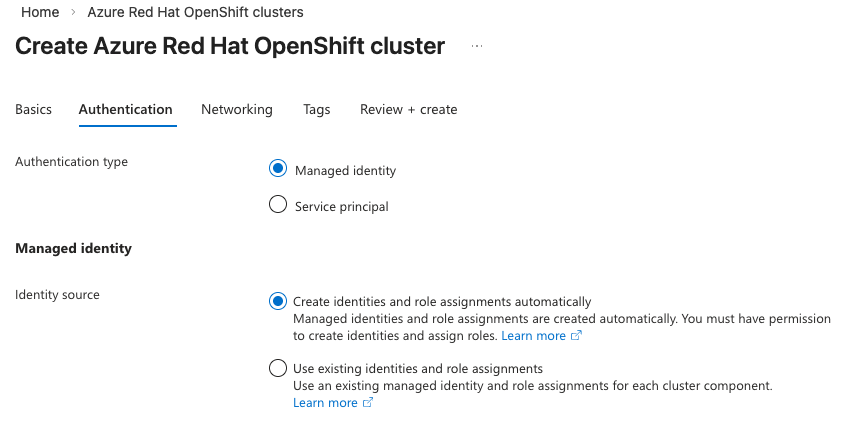
如果您選擇 「使用現有身份與角色指派」,您必須已建立正確的使用者指派管理身份及對應的角色指派。 選擇此選項後,會展開下方一個區塊,讓你可以選擇每個元件由使用者指派的管理身份。
備註
請參閱 「了解身份角色指派架構 」,以了解使用者指派的受管理身份及需要建立的角色指派詳細資訊。
點選每個元件的 選擇 ,右側會開啟身份選擇刀片,讓你選擇對應的管理身份。
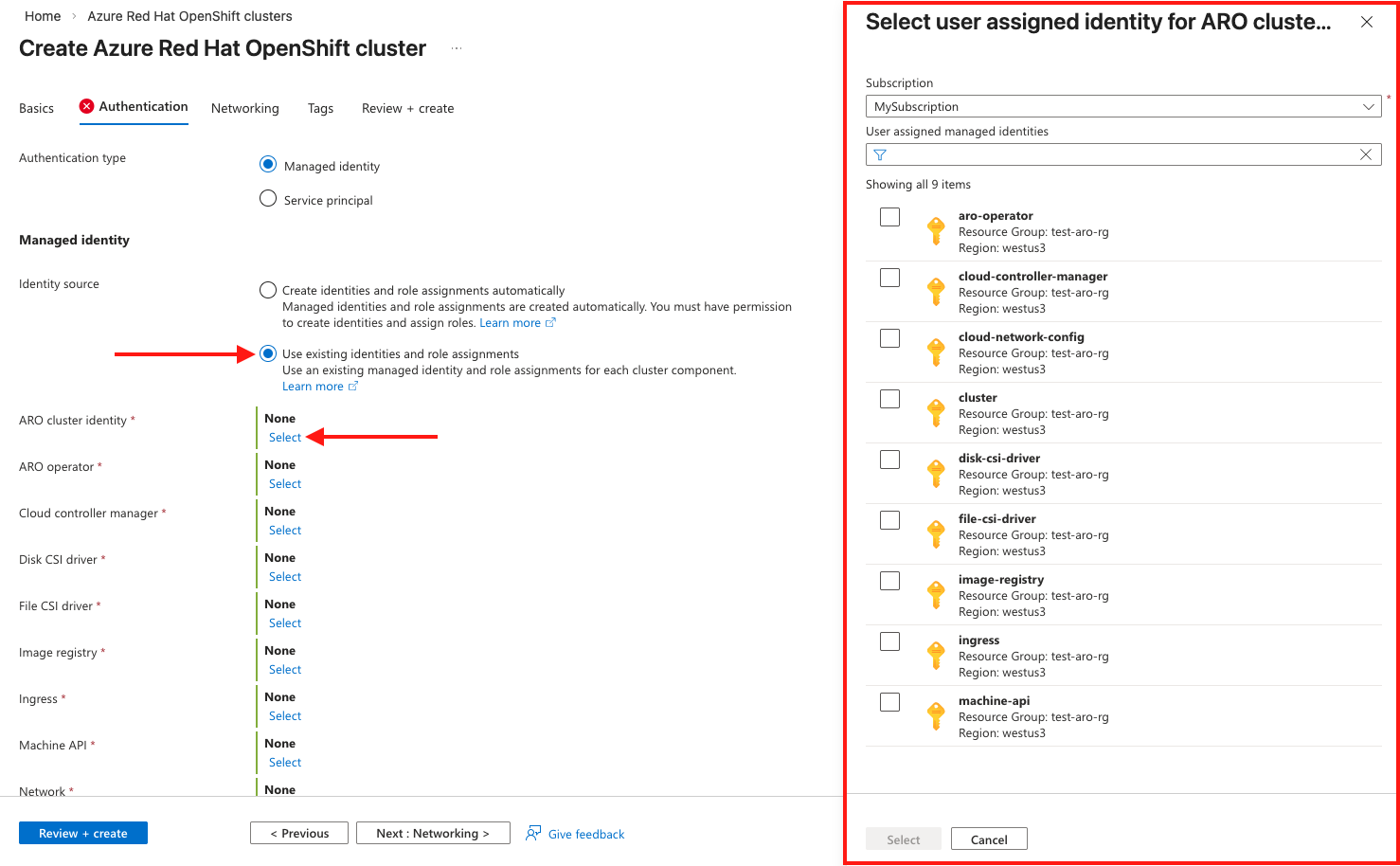
在 [網路] 索引標籤上,設定必要的選項。
備註
執行 OpenShift 4 的 Azure Red Hat OpenShift 叢集需要一個具有兩個空白子網的虛擬網路:一個用於控制平面,另一個用於工作節點。
備註
如果你使用現有的受管理身份,那麼你必須擁有現有的虛擬網路和子網路。 你無法在叢集建立流程中建立新的虛擬網路。
![Azure 入口網站上 [網络] 索引標籤的螢幕快照。](media/create-cluster/networking.png)
在 [標記] 索引標籤上,新增標記來組織您的資源。

點擊 Review + 建立 ,驗證完成後再 建立 。 請注意,你會看到你選擇的認證機制,以及你選擇的是自動身份還是現有身份流程。
![Azure 入口網站上 [檢閱 + 建立] 索引標籤的截圖。](media/create-cluster/openshift-review-create-managed-identity.png)
建立 Azure Red Hat OpenShift 叢集大約需要 45 分鐘的時間。 部署完成時,請瀏覽至您的資源,方法是:
- 選取 [移至資源。
- 流覽至 Azure Red Hat OpenShift 叢集資源群組,然後選取 Azure Red Hat OpenShift 資源。
![Azure 入口網站上 [基本] 索引標籤的螢幕快照。](media/create-cluster/basics.png#lightbox)
![Azure 入口網站上 [網络] 索引標籤的螢幕快照。](media/create-cluster/networking.png#lightbox)

![Azure 入口網站上 [檢閱 + 建立] 索引標籤的截圖。](media/create-cluster/openshift-review-create-managed-identity.png#lightbox)
收拾整理
若要刪除受控識別叢集,請執行下列命令:
az aro delete -n $CLUSTER -g $RESOURCEGROUP
刪除指令並不會清理安裝時建立的叢集指派的受管理身份。 您必須手動刪除身分識別和角色指派。
相關內容
如需詳細資訊,請參閱 瞭解 Azure Red Hat OpenShift 中的受控識別。