在本指南中,您將瞭解如何:
- 建立使用者指派的受控身分識別(UAMI),以與 Azure 營運者服務管理員(AOSM)搭配使用
- 指派 UAMI 許可權以存取所需的資源。
- 執行網路功能 (NF) 或站台網路服務 (SNS) 作業時,請使用 UAMI。
警告
需要在預期SNS社群網絡服務操作可能運行四小時或更長時間的情況下使用UAMI。 如果在長時間執行的SNS作業期間未使用UAMI,SNS可能會在元件作業完成之前回報錯誤的失敗狀態。
先決條件
您必須透過建立自定義角色來創建自定義角色。 本文假設您已將自定義角色命名為 「自定義角色 - AOSM 服務作員存取發行者」。
您必須與網路服務設計工具合作,以瞭解受控識別所需的許可權,以及SNS所使用的網路函數定義版本 (NFDV)。
您需要選擇的發行者為網路函數定義版本資源指派「擁有者」或「使用者存取管理員」角色。 您還必須擁有一個資源群組,且在其中您被指定為「擁有者」或「使用者存取管理員」角色。
建立 UAMI
首先,創建一個UAMI。 如需詳細資訊,請參閱 為您的 SNS 建立使用者指派的受控識別 。
建立自定義角色並指派給UAMI
接下來,建立自定義角色。 首先,請考慮以最佳範圍為基礎的方法,然後建立角色並將其指派至新的 UAMI。
UAMI 自訂角色的範圍考量
自定義角色必須獲指派足夠的許可權,才能存取用戶資源。 自訂角色可以針對單一子資源 (例如 NFDV) 進行範圍設定,以實現最細微的控制。 或者,自訂角色也可以設定於父代資源 (例如發行者資源群組) 的範圍,從而對所有子資源授予相同的存取權。 為了正確運作,不論是逐一指派或透過父代範圍,以下所有資源都必須指派至自訂角色:
- 所有網路函式定義群組 (NFDG) 和版本。
- 所有網路函式定義 (NFD) 和版本。
- 所有網路服務設計群組 (NSD) 和版本。
- 所有設定群組方案(CGS)及其版本。
- 所有自定義位置。
請賦予所選範圍的適當權限。
UAMI 需要下列個別許可權,才能執行必要的 SNS 作業:
- 在 NFD 上;
- Microsoft.HybridNetwork/publishers/networkFunctionDefinitionGroups/networkFunctionDefinitionVersions/use/action
- Microsoft.HybridNetwork/Publishers/NetworkFunctionDefinitionGroups/NetworkFunctionDefinitionVersions/read
- 在 NSD 上;
- Microsoft.HybridNetwork/publishers/networkServiceDesignGroups/networkServiceDesignVersions/use/action
- Microsoft.HybridNetwork/publishers/networkServiceDesignGroups/networkServiceDesignVersions/read
- 在 CGS 上;
- Microsoft.HybridNetwork/Publishers/ConfigurationGroupSchemas/read
- 在自定義位置上;
- Microsoft.ExtendedLocation/customLocations/deploy/action
- Microsoft.ExtendedLocation/customLocations/read
- 此外,UAMI 本身需要存取權;
- Microsoft.ManagedIdentity/userAssignedIdentities/assign/action
如果使用父資源範圍方法,則會將所需的許可權套用至父資源。
備註
請勿提供對這些發行者資源的任何寫入或刪除存取權。
透過入口網站指派自定義角色
存取 Azure 入口網站,並開啟您選擇的資源範圍;例如,發行者資源群組或網路函數定義版本。
在此項目側邊功能表中,選取 存取控制 (IAM)。
選擇 [新增角色指派]。

在 [作業函式角色] 下,於清單中尋找您的自定義角色,然後繼續進行 [下一步]。

選取 [受控識別],然後選擇 [ + 選取成員 ],然後尋找並選擇新的受控識別。 選擇 [] 選取 []。

選擇檢閱並指派。


重複角色指派
針對選定範圍方法的所有剩餘資源,重複角色分配過程。
透過入口網站指派受控識別運算子
移至 Azure 入口網站,並搜尋「受控識別」。
從受控身份清單中選取您的身份。
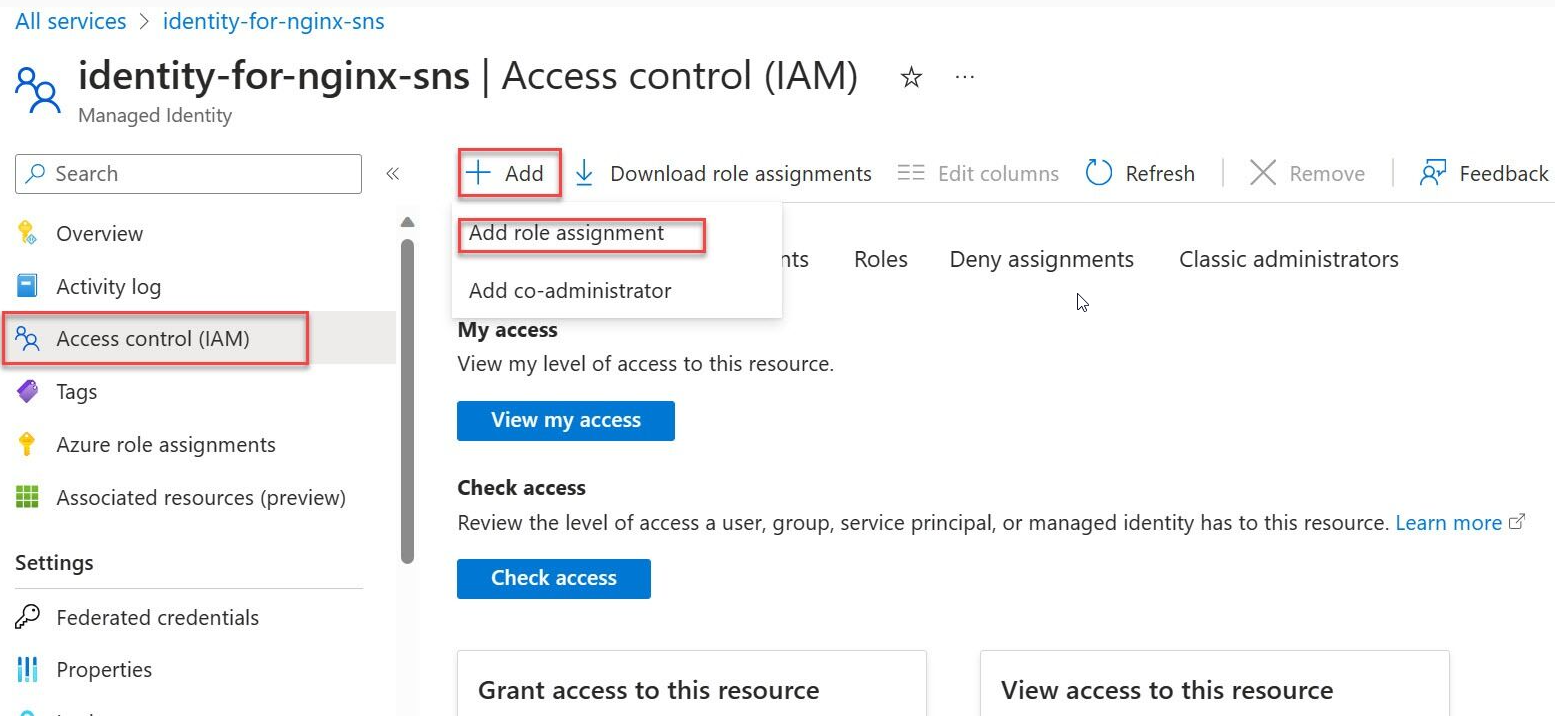
在側邊功能表上,選取 [存取控制 (IAM)]。
選擇 [新增角色指派 ],然後選取 [受控識別作員 ] 角色。
選取 Managed Identity 操作員 角色。

選取 受控身份。
選取 [+ 選取成員 ],然後瀏覽至使用者指派的受控識別,然後繼續進行指派。
![顯示已選取受控識別的 [新增角色指派] 畫面的螢幕快照。](media/managed-identity-user-assigned-ubuntu.png)

![顯示已選取受控識別的 [新增角色指派] 畫面的螢幕快照。](media/managed-identity-user-assigned-ubuntu.png#lightbox)
完成本文中所述的所有工作,可確保網站網路服務 (SNS) 具有在指定 Azure 環境中有效運作的必要權限。
透過 Bicep 建立 UAMI,並指派權限
所需的建立與指派權限作業也支援透過 Bicep 指令碼進行。 此方法在工作流程管線內需要自動化這些作業時,可能更適用。 下列範例示範建立具有最低權限指派角色的 UAMI 所需的 Bicep 作業。 根據範疇策略,視需要擴充角色指派。
// ----------- MIO Role Definition -----------
// This role is used to assign the Managed Identity Operator role to the User Assigned Managed Identity (UAMI).
@description('This is the built-in MIO role. See https://learn.microsoft.com/en-us/azure/role-based-access-control/built-in-roles#managed-identity-operator')
resource MIORoleDefinition 'Microsoft.Authorization/roleDefinitions@2018-01-01-preview' existing = {
  scope: managedIdentity
  name: 'f1a07417-d97a-45cb-824c-7a7467783830'
}

// This role is used to assign the Contributor role to the User Assigned Managed Identity (UAMI) at the resource group level.
resource ContributorRoleDefinition 'Microsoft.Authorization/roleDefinitions@2018-01-01-preview' existing = {
  scope: subscription()
  name: 'b24988ac-6180-42a0-ab88-20f7382dd24c'
}

// Assign the Managed Identity Operator role to the User Assigned Managed Identity (UAMI) at the scope of the managed identity.
resource roleAssignment 'Microsoft.Authorization/roleAssignments@2020-04-01-preview' = {
  name: guid(resourceGroup().id, principalId, MIORoleDefinition.id)
  scope: managedIdentity
  properties: {
    roleDefinitionId: MIORoleDefinition.id
    principalId: managedIdentity.properties.principalId
    principalType: 'ServicePrincipal'
  }
}
// Get reference to the target resource group
resource targetRg 'Microsoft.Resources/resourceGroups@2022-09-01' existing = {
  name: 'publisherResourceGroupName' // Replace with the actual resource group name
  scope: subscription('subscriptionId')
}

// Assign the Contributor role to the User Assigned Managed Identity (UAMI) at the scope of the publisher resource group.
resource roleAssignmentContributor 'Microsoft.Authorization/roleAssignments@2020-04-01-preview' = {
  name: guid(resourceGroup().id, principalId, ContributorRoleDefinition.id)
  scope: targetRg
  properties: {
    roleDefinitionId: ContributorRoleDefinition.id
    principalId: managedIdentity.properties.principalId
    principalType: 'ServicePrincipal'
  }
}
搭配 NF 和 SNS 作業使用 UAMI
NF 範本考量
必須更新 NF 範本,才能包含 identityObj 參數。 下列 JSON 範例示範搭配泛型 NF 設定使用此參數:
{
  "$schema": "https://schema.management.azure.com/schemas/2019-04-01/deploymentTemplate.json#",
  "contentVersion": "1.0.0.0",
  "parameters": {
    "nameValue": {
      "type": "string",
      "defaultValue": "[concat('anf-', substring(uniqueString(deployment().name), 0, 6))]"
    },
    "locationValue": {
      "type": "string",
      "defaultValue": "eastus2euap"
    },
    "nfviTypeValue": {
      "type": "string",
      "defaultValue": "AzureArcKubernetes"
    },
    "nfviIdValue": {
      "type": "string"
    },
    "config": {
      "type": "object",
      "defaultValue": {}
    },
    "nfdvId": {
      "type": "string"
    },
    "identityObj": {
      "type": "object",
      "defaultValue": {
        "type": "UserAssigned",
        "userAssignedIdentities": {
          "/subscriptions/<subscriptionId>/resourceGroups/<rgName>/providers/Microsoft.ManagedIdentity/userAssignedIdentities/<uaminame>": {}
        }
      }
    }
  },
  "variables": {
    "deploymentValuesValue": "[string(createObject('role1releasenamespace', parameters('config').role1releasenamespace, 'role1releasename',parameters('config').role1releasename, 'role2releasenamespace', parameters('config').role2releasenamespace, 'role2releasename',parameters('config').role2releasename,'role3releasenamespace', parameters('config').role3releasenamespace, 'role3releasename',parameters('config').role3releasename))]",
    "nfName": "[concat(parameters('nameValue'), '-CNF')]"
  },
  "resources": [
    {
      "type": "Microsoft.HybridNetwork/networkFunctions",
      "apiVersion": "2024-04-15",
      "name": "[variables('nfName')]",
      "location": "[parameters('locationValue')]",
      "identity": "[parameters('identityObj')]",
      "properties": {
        "networkFunctionDefinitionVersionResourceReference": {
          "id": "[parameters('nfdvId')]",
          "idType": "Open"
        },
        "nfviType": "[parameters('nfviTypeValue')]",
        "nfviId": "[parameters('nfviIdValue')]",
        "allowSoftwareUpdate": true,
        "configurationType": "Secret",
        "secretDeploymentValues": "[string(variables('deploymentValuesValue'))]"
      }
    }
  ]
}
SNS 範本注意事項
SNS 範本必須更新,才能包含身分識別資源參數。 以下 Bicep 範例說明在通用 SNS 設定中,如何使用此參數:
resource azCoreSnsUAMI 'Microsoft.HybridNetwork/sitenetworkservices@2023-09-01' = {
  name: snsNameUAMI
  location: location
  sku: {
    name: 'Standard'
  }
  identity:  {
    type: 'UserAssigned'
    userAssignedIdentities: {
     '${managedIdentity.id}': {}
    }
  }
  properties: {
    siteReference: {
      id: azCoreSite.id
    }
    networkServiceDesignVersionResourceReference: {
        id: nsdv.id
        idType: 'Open'
    }
    desiredStateConfigurationGroupValueReferences: {
      Test_Configuration: {
        id: azCoreCgv.id
      }
      Secret_Configuration:{
        id:azCoreCgvSecret.id
      }
    }
  }
}