快速入門:使用 Terraform 建立私人端點
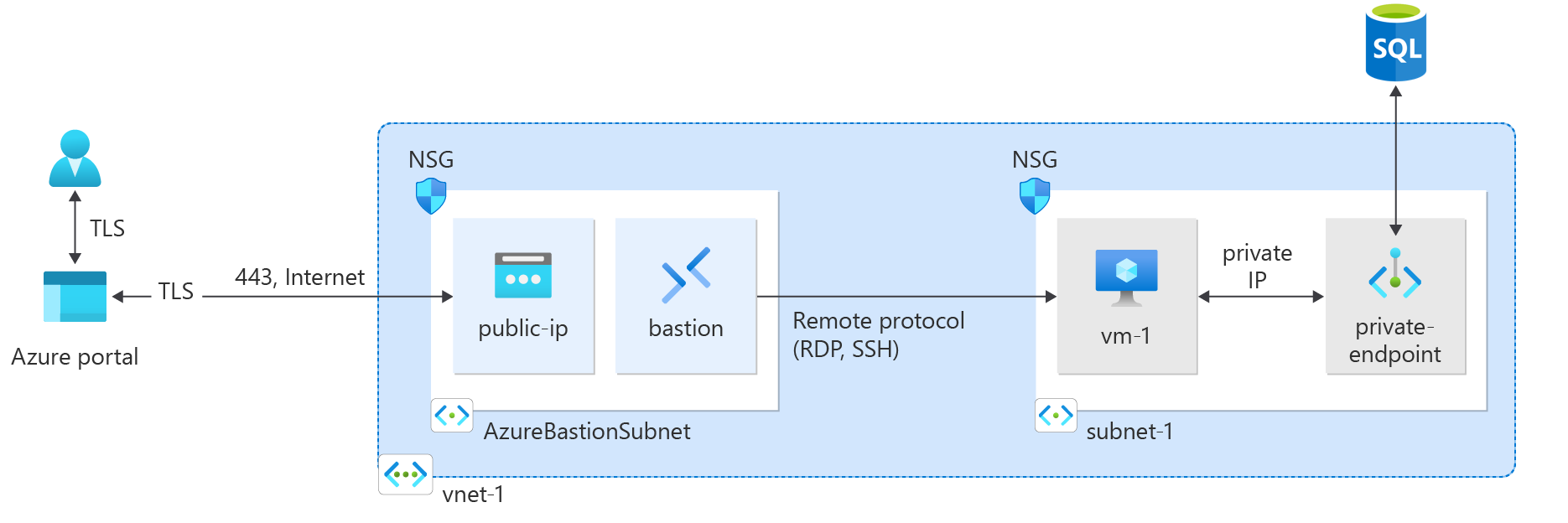
在本快速入門中,您會使用 Terraform 來建立私人端點。 私人端點會連線到 Azure SQL 資料庫。 私人端點與虛擬網路和私人域名系統 (DNS) 區域相關聯。 私人 DNS 區域會解析私人端點 IP 位址。 虛擬網路包含用來測試私人端點與 SQL 資料庫 實例連線的虛擬機。
腳本會為 SQL 伺服器產生隨機密碼,以及虛擬機的隨機 SSH 金鑰。 執行文稿時,所建立資源的名稱會輸出。
Terraform 可讓您定義、預覽和部署雲端基礎結構。 使用 Terraform 時,您可以使用 HCL 語法來建立設定檔。 HCL 語法可讓您指定雲端提供者 (例如 Azure) 和構成雲端基礎結構的元素。 建立設定檔之後,您可以建立執行計畫,讓您先預覽基礎結構變更,之後再部署。 驗證變更之後,您可以套用執行計畫來部署基礎結構。
必要條件
實作 Terraform 程式碼
建立目錄,然後在目錄中測試並執行範例 Terraform 程式碼,且設為目前的目錄。
建立名為
main.tf的檔案,並插入下列程式碼:resource "random_pet" "prefix" { prefix = var.resource_group_name_prefix length = 1 } # Resource Group resource "azurerm_resource_group" "rg" { location = var.resource_group_location name = "${random_pet.prefix.id}-rg" } # Virtual Network resource "azurerm_virtual_network" "my_terraform_network" { name = "${random_pet.prefix.id}-vnet" address_space = ["10.0.0.0/16"] location = azurerm_resource_group.rg.location resource_group_name = azurerm_resource_group.rg.name } # Subnet 1 resource "azurerm_subnet" "my_terraform_subnet_1" { name = "subnet-1" resource_group_name = azurerm_resource_group.rg.name virtual_network_name = azurerm_virtual_network.my_terraform_network.name address_prefixes = ["10.0.0.0/24"] } # Public IP address for NAT gateway resource "azurerm_public_ip" "my_public_ip" { name = "public-ip-nat" location = azurerm_resource_group.rg.location resource_group_name = azurerm_resource_group.rg.name allocation_method = "Static" sku = "Standard" } # NAT Gateway resource "azurerm_nat_gateway" "my_nat_gateway" { name = "nat-gateway" location = azurerm_resource_group.rg.location resource_group_name = azurerm_resource_group.rg.name } # Associate NAT Gateway with Public IP resource "azurerm_nat_gateway_public_ip_association" "example" { nat_gateway_id = azurerm_nat_gateway.my_nat_gateway.id public_ip_address_id = azurerm_public_ip.my_public_ip.id } # Associate NAT Gateway with Subnet resource "azurerm_subnet_nat_gateway_association" "example" { subnet_id = azurerm_subnet.my_terraform_subnet_1.id nat_gateway_id = azurerm_nat_gateway.my_nat_gateway.id } # Create public IP for virtual machine resource "azurerm_public_ip" "my_public_ip_vm" { name = "public-ip-vm" location = azurerm_resource_group.rg.location resource_group_name = azurerm_resource_group.rg.name allocation_method = "Static" sku = "Standard" } # Create Network Security Group and rule resource "azurerm_network_security_group" "my_terraform_nsg" { name = "nsg-1" location = azurerm_resource_group.rg.location resource_group_name = azurerm_resource_group.rg.name security_rule { name = "SSH" priority = 1001 direction = "Inbound" access = "Allow" protocol = "Tcp" source_port_range = "*" destination_port_range = "22" source_address_prefix = "*" destination_address_prefix = "*" } } # Create network interface resource "azurerm_network_interface" "my_terraform_nic" { name = "nic-1" location = azurerm_resource_group.rg.location resource_group_name = azurerm_resource_group.rg.name ip_configuration { name = "my_nic_configuration" subnet_id = azurerm_subnet.my_terraform_subnet_1.id private_ip_address_allocation = "Dynamic" public_ip_address_id = azurerm_public_ip.my_public_ip_vm.id } } # Connect the security group to the network interface resource "azurerm_network_interface_security_group_association" "example" { network_interface_id = azurerm_network_interface.my_terraform_nic.id network_security_group_id = azurerm_network_security_group.my_terraform_nsg.id } # Generate random text for a unique storage account name resource "random_id" "random_id" { keepers = { # Generate a new ID only when a new resource group is defined resource_group = azurerm_resource_group.rg.name } byte_length = 8 } # Create storage account for boot diagnostics resource "azurerm_storage_account" "my_storage_account" { name = "diag${random_id.random_id.hex}" location = azurerm_resource_group.rg.location resource_group_name = azurerm_resource_group.rg.name account_tier = "Standard" account_replication_type = "LRS" } # Create virtual machine resource "azurerm_linux_virtual_machine" "my_terraform_vm" { name = "vm-1" location = azurerm_resource_group.rg.location resource_group_name = azurerm_resource_group.rg.name network_interface_ids = [azurerm_network_interface.my_terraform_nic.id] size = "Standard_DS1_v2" os_disk { name = "myOsDisk" caching = "ReadWrite" storage_account_type = "Premium_LRS" } source_image_reference { publisher = "Canonical" offer = "0001-com-ubuntu-server-jammy" sku = "22_04-lts-gen2" version = "latest" } computer_name = "hostname" admin_username = var.username admin_ssh_key { username = var.username public_key = jsondecode(azapi_resource_action.ssh_public_key_gen.output).publicKey } boot_diagnostics { storage_account_uri = azurerm_storage_account.my_storage_account.primary_blob_endpoint } } # Create SQL server name resource "random_pet" "azurerm_mssql_server_name" { prefix = "sql" } # Random password for SQL server resource "random_password" "admin_password" { count = var.admin_password == null ? 1 : 0 length = 20 special = true min_numeric = 1 min_upper = 1 min_lower = 1 min_special = 1 } locals { admin_password = try(random_password.admin_password[0].result, var.admin_password) } # Create SQL server resource "azurerm_mssql_server" "server" { name = random_pet.azurerm_mssql_server_name.id resource_group_name = azurerm_resource_group.rg.name location = azurerm_resource_group.rg.location administrator_login = var.admin_username administrator_login_password = local.admin_password version = "12.0" } # Create SQL database resource "azurerm_mssql_database" "db" { name = var.sql_db_name server_id = azurerm_mssql_server.server.id } # Create private endpoint for SQL server resource "azurerm_private_endpoint" "my_terraform_endpoint" { name = "private-endpoint-sql" location = azurerm_resource_group.rg.location resource_group_name = azurerm_resource_group.rg.name subnet_id = azurerm_subnet.my_terraform_subnet_1.id private_service_connection { name = "private-serviceconnection" private_connection_resource_id = azurerm_mssql_server.server.id subresource_names = ["sqlServer"] is_manual_connection = false } private_dns_zone_group { name = "dns-zone-group" private_dns_zone_ids = [azurerm_private_dns_zone.my_terraform_dns_zone.id] } } # Create private DNS zone resource "azurerm_private_dns_zone" "my_terraform_dns_zone" { name = "privatelink.database.windows.net" resource_group_name = azurerm_resource_group.rg.name } # Create virtual network link resource "azurerm_private_dns_zone_virtual_network_link" "my_terraform_vnet_link" { name = "vnet-link" resource_group_name = azurerm_resource_group.rg.name private_dns_zone_name = azurerm_private_dns_zone.my_terraform_dns_zone.name virtual_network_id = azurerm_virtual_network.my_terraform_network.id }建立名為
outputs.tf的檔案,並插入下列程式碼:output "resource_group_name" { description = "The name of the created resource group." value = azurerm_resource_group.rg.name } output "virtual_network_name" { description = "The name of the created virtual network." value = azurerm_virtual_network.my_terraform_network.name } output "subnet_name_1" { description = "The name of the created subnet 1." value = azurerm_subnet.my_terraform_subnet_1.name } output "nat_gateway_name" { description = "The name of the created NAT gateway." value = azurerm_nat_gateway.my_nat_gateway.name } output "sql_server_name" { value = azurerm_mssql_server.server.name } output "admin_password" { sensitive = true value = local.admin_password }建立名為
provider.tf的檔案,並插入下列程式碼:terraform { required_providers { azapi = { source = "azure/azapi" version = "~>1.5" } azurerm = { source = "hashicorp/azurerm" version = "~>3.0" } random = { source = "hashicorp/random" version = "~>3.0" } } } provider "azurerm" { features { resource_group { prevent_deletion_if_contains_resources = false } } }建立名為
ssh.tf的檔案,並插入下列程式碼:resource "random_pet" "ssh_key_name" { prefix = "ssh" separator = "" } resource "azapi_resource_action" "ssh_public_key_gen" { type = "Microsoft.Compute/sshPublicKeys@2022-11-01" resource_id = azapi_resource.ssh_public_key.id action = "generateKeyPair" method = "POST" response_export_values = ["publicKey", "privateKey"] } resource "azapi_resource" "ssh_public_key" { type = "Microsoft.Compute/sshPublicKeys@2022-11-01" name = random_pet.ssh_key_name.id location = azurerm_resource_group.rg.location parent_id = azurerm_resource_group.rg.id } output "key_data" { value = jsondecode(azapi_resource_action.ssh_public_key_gen.output).publicKey }建立名為
variables.tf的檔案,並插入下列程式碼:variable "resource_group_location" { type = string default = "eastus" description = "Location of the resource group." } variable "resource_group_name_prefix" { type = string default = "rg" description = "Prefix of the resource group name that's combined with a random ID so name is unique in your Azure subscription." } variable "username" { type = string description = "The username for the local account that will be created on the new VM." default = "azureuser" } variable "sql_db_name" { type = string description = "The name of the SQL Database." default = "SampleDB" } variable "admin_username" { type = string description = "The administrator username of the SQL logical server." default = "azureadmin" } variable "admin_password" { type = string description = "The administrator password of the SQL logical server." sensitive = true default = null }
初始化 Terraform
執行 terraform init 來初始化 Terraform 部署。 此命令會下載管理 Azure 資源所需的 Azure 提供者。
terraform init -upgrade
重點︰
-upgrade參數會將必要的提供者外掛程式升級至符合設定版本條件約束的最新版本。
建立 Terraform 執行計畫
執行 terraform plan 以建立執行計畫。
terraform plan -out main.tfplan
重點︰
terraform plan命令會建立執行計畫,但不會執行。 相反地,其會決定要在您指定的設定檔中建立設定所需的動作。 此模式可讓您在對實際資源進行任何變更之前,先確認執行方案是否符合您的預期。- 選用的
-out參數可讓您指定計畫的輸出檔。 使用-out參數可確保您所檢閱的方案就是所套用的方案。
套用 Terraform 執行計畫
執行 terraform apply 將執行計畫套用至您的雲端基礎結構。
terraform apply main.tfplan
重點︰
- 範例
terraform apply命令會假設您先前已執行terraform plan -out main.tfplan。 - 如果您為
-out參數指定了不同的檔案名稱,請在呼叫terraform apply時使用該檔案名稱。 - 若您未使用
-out參數,請呼叫terraform apply,不需要使用參數。
驗證結果
取得 Azure 資源群組名稱。
resource_group_name=$(terraform output -raw resource_group_name)取得 SQL Server 名稱。
sql_server=$(terraform output -raw sql_server)執行 az sql server show 以顯示 SQL Server 私人端點的詳細數據。
az sql server show \
    --resource-group $resource_group_name \
    --name $sql_server --query privateEndpointConnections \
    --output tsv
清除資源
當您不再需要透過 Terraform 建立的資源時,請執行下列步驟:
執行 terraform plan 並指定
destroy旗標。terraform plan -destroy -out main.destroy.tfplan重點︰
terraform plan命令會建立執行計畫,但不會執行。 相反地,其會決定要在您指定的設定檔中建立設定所需的動作。 此模式可讓您在對實際資源進行任何變更之前,先確認執行方案是否符合您的預期。- 選用的
-out參數可讓您指定計畫的輸出檔。 使用-out參數可確保您所檢閱的方案就是所套用的方案。
執行 terraform apply 以套用執行方案。
terraform apply main.destroy.tfplan
對 Azure 上的 Terraform 進行疑難排解
針對在 Azure 上使用 Terraform 時的常見問題進行疑難排解。