本教學課程是系列的第三部分,示範如何將 Service Fabric 應用程式部署至 Azure 中的叢集。
在本系列的第三部分中,您將瞭解如何:
- 在 Azure 中建立安全的 Linux 叢集
- 將應用程式部署至叢集
在本教學課程系列中,您將瞭解如何:
- 建置 Java Service Fabric Reliable Services 應用程式
- 在本機叢集上部署和偵錯應用程式
- 將應用程式部署至 Azure 叢集
- 設定應用程式的監視和診斷
- 設定 CI/CD
先決條件
開始進行本教學課程之前:
- 如果您沒有 Azure 訂用帳戶,請建立 免費帳戶
- 安裝 Azure CLI
- 安裝適用於 Mac 或 Linux 的 Service Fabric SDK
- 安裝 Python 3
在 Azure 中建立 Service Fabric 叢集
下列步驟會建立將應用程式部署至 Service Fabric 叢集所需的必要資源。 此外,還設定了使用 ELK (Elasticsearch、Logstash、Kibana) 堆疊監控解決方案運作狀態所需的資源。 具體而言,事件中樞 會用作 Service Fabric 日誌的接收端。 它設定為將記錄從 Service Fabric 叢集傳送至 Logstash 執行個體。
開啟終端機並下載下列套件,其中包含必要的協助程式腳本和範本,以在 Azure 中建立資源
git clone https://github.com/Azure-Samples/service-fabric-java-quickstart.git登入您的 Azure 帳戶
az login設定您要用來建立資源的 Azure 訂用帳戶
az account set --subscription [SUBSCRIPTION-ID]從 service-fabric-java-quickstart/AzureCluster 資料夾中,執行下列命令,在 Key Vault 中建立叢集憑證。 此憑證可用來保護您的 Service Fabric 叢集。 提供區域 (必須與您的 Service Fabric 叢集相同)、金鑰保存庫資源群組名稱、金鑰保存庫名稱、憑證密碼和叢集 DNS 名稱。
./new-service-fabric-cluster-certificate.sh [REGION] [KEY-VAULT-RESOURCE-GROUP] [KEY-VAULT-NAME] [CERTIFICATE-PASSWORD] [CLUSTER-DNS-NAME-FOR-CERTIFICATE]

Example: ./new-service-fabric-cluster-certificate.sh 'westus' 'testkeyvaultrg' 'testkeyvault' '<password>' 'testservicefabric.westus.cloudapp.azure.com'
上述命令會傳回下列資訊,稍後應該注意這些資訊。
Source Vault Resource Id: /subscriptions/<subscription_id>/resourceGroups/testkeyvaultrg/providers/Microsoft.KeyVault/vaults/<name>
Certificate URL: https://<name>.vault.azure.net/secrets/<cluster-dns-name-for-certificate>/<guid>
Certificate Thumbprint: <THUMBPRINT>
為儲存記錄的儲存體帳戶建立資源群組
az group create --location [REGION] --name [RESOURCE-GROUP-NAME]

Example: az group create --location westus --name teststorageaccountrg
建立儲存體帳戶,用來儲存將產生的記錄
az storage account create -g [RESOURCE-GROUP-NAME] -l [REGION] --name [STORAGE-ACCOUNT-NAME] --kind Storage

Example: az storage account create -g teststorageaccountrg -l westus --name teststorageaccount --kind Storage
存取 Azure 入口網站 ,並流覽至儲存體帳戶的 [共用存取簽章] 索引標籤。 產生 SAS 權杖,如下所示。
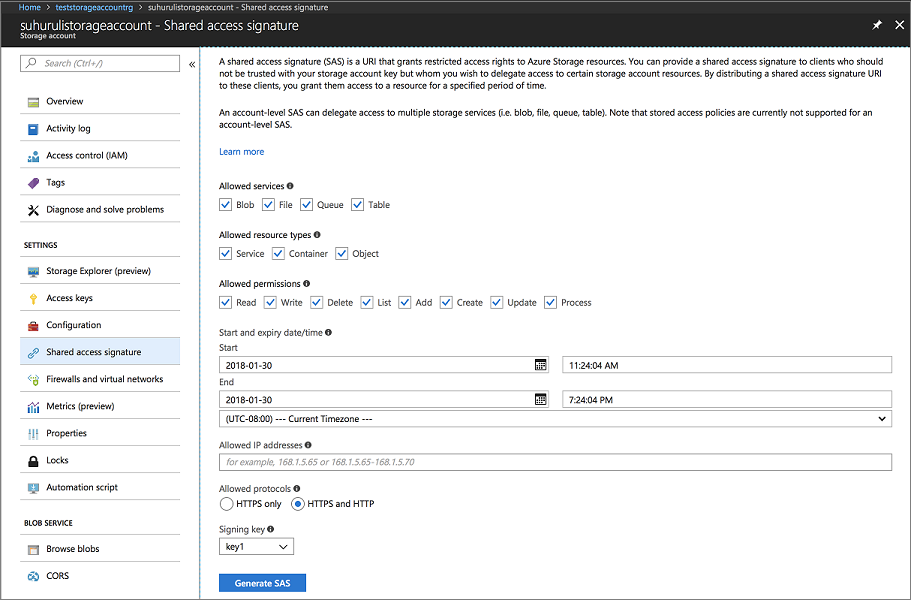
複製帳戶 SAS URL,並將其放在一邊,以便在建立 Service Fabric 叢集時使用。 它類似於以下 URL:
?sv=2017-04-17&ss=bfqt&srt=sco&sp=rwdlacup&se=2018-01-31T03:24:04Z&st=2018-01-30T19:24:04Z&spr=https,http&sig=IrkO1bVQCHcaKaTiJ5gilLSC5Wxtghu%2FJAeeY5HR%2BPU%3D建立包含事件中樞資源的資源群組。 事件中樞可用來將訊息從 Service Fabric 傳送至執行 ELK 資源的伺服器。
az group create --location [REGION] --name [RESOURCE-GROUP-NAME]

Example: az group create --location westus --name testeventhubsrg
使用下列命令建立事件中樞資源。 請依照提示輸入 namespaceName、eventHubName、consumerGroupName、sendAuthorizationRule 和 receiveAuthorizationRule 的詳細資料。
az deployment group create -g [RESOURCE-GROUP-NAME] --template-file eventhubsdeploy.json

Example:
az deployment group create -g testeventhubsrg --template-file eventhubsdeploy.json
Please provide string value for 'namespaceName' (? for help): testeventhubnamespace
Please provide string value for 'eventHubName' (? for help): testeventhub
Please provide string value for 'consumerGroupName' (? for help): testeventhubconsumergroup
Please provide string value for 'sendAuthorizationRuleName' (? for help): sender
Please provide string value for 'receiveAuthorizationRuleName' (? for help): receiver
複製上述命令的 JSON 輸出中 輸出欄位的內容 。 建立 Service Fabric 叢集時會使用寄件者資訊。 當 Logstash 服務設定為從事件中樞接收訊息時,應該儲存接收者名稱和金鑰,以供下一個教學課程使用。 下列 blob 是 JSON 輸出範例:
"outputs": {
    "receiver Key": {
        "type": "String",
        "value": "[KEY]"
    },
    "receiver Name": {
        "type": "String",
        "value": "receiver"
    },
    "sender Key": {
        "type": "String",
        "value": "[KEY]"
    },
    "sender Name": {
        "type": "String",
        "value": "sender"
    }
}
執行 eventhubssastoken.py 腳本,為您建立的 EventHubs 資源產生 SAS URL。 Service Fabric 叢集會使用此 SAS URL 將記錄傳送至事件中樞。 因此,會使用 寄件 者原則來產生 URL。 腳本會傳回下列步驟中使用的事件中樞資源的 SAS URL:
python3 eventhubssastoken.py 'testeventhubs' 'testeventhubs' 'sender' '[PRIMARY-KEY]'複製傳回的 JSON 中 sr 欄位的值。 sr 欄位值是 EventHubs 的 SAS 權杖。 下列URL是 sr 欄位的範例:
https%3A%2F%testeventhub.servicebus.windows.net%testeventhub&sig=7AlFYnbvEm%2Bat8ALi54JqHU4i6imoFxkjKHS0zI8z8I%3D&se=1517354876&skn=senderEventHubs 的 SAS URL 遵循下列結構:
https://<namespacename>.servicebus.windows.net/<eventhubsname>?sr=<sastoken>。 例如,https://testeventhubnamespace.servicebus.windows.net/testeventhub?sr=https%3A%2F%testeventhub.servicebus.windows.net%testeventhub&sig=7AlFYnbvEm%2Bat8ALi54JqHU4i6imoFxkjKHS0zI8z8I%3D&se=1517354876&skn=sender開啟 sfdeploy.parameters.json 檔案,並取代上述步驟中的下列內容。 步驟 8 中註明了 [SAS-URL-STORAGE-ACCOUNT]。 [SAS-URL-EVENT-HUBS] 已在步驟 11 中註明。
"applicationDiagnosticsStorageAccountName": {
    "value": "teststorageaccount"
},
"applicationDiagnosticsStorageAccountSasToken": {
    "value": "[SAS-URL-STORAGE-ACCOUNT]"
},
"loggingEventHubSAS": {
    "value": "[SAS-URL-EVENT-HUBS]"
}
開啟 sfdeploy.parameters.json。 變更下列參數,然後儲存檔案。
- clusterName。 僅使用小寫字母和數字。
- adminUserName(設為非空白的值)
- adminPassword (設為空白以外的值)
執行下列命令來建立 Service Fabric 叢集
az sf cluster create --location 'westus' --resource-group 'testlinux' --template-file sfdeploy.json --parameter-file sfdeploy.parameters.json --secret-identifier <certificate_url_from_step4>
將應用程式部署至叢集
在部署應用程式之前,您必須將下列程式碼片段新增至 Voting/VotingApplication/ApplicationManifest.xml 檔案。 X509FindValue 欄位是從在 Azure 中建立 Service Fabric 叢集一節的步驟 4 傳回的指紋。 此程式碼片段巢狀在 ApplicationManifest 欄位 (根欄位) 下。
<Certificates>
      <SecretsCertificate X509FindType="FindByThumbprint" X509FindValue="[CERTIFICATE-THUMBPRINT]" />
</Certificates>
若要將應用程式部署至此叢集,您必須使用 SFCTL 來建立與叢集的連線。 SFCTL 需要同時包含公開金鑰和私密金鑰的 PEM 檔案才能連線到叢集。 執行下列命令,以產生同時具有公開金鑰和私密金鑰的 PEM 檔案。
openssl pkcs12 -in <clustername>.<region>.cloudapp.azure.com.pfx -out sfctlconnection.pem -nodes -passin pass:<password>執行下列命令以連線至叢集。
sfctl cluster select --endpoint https://<clustername>.<region>.cloudapp.azure.com:19080 --pem sfctlconnection.pem --no-verify若要部署您的應用程式,請導覽至 Voting/Scripts 資料夾,然後執行 install.sh 腳本。
./install.sh若要存取 Service Fabric 瀏覽器,請開啟您最愛的瀏覽器,然後輸入
https://testlinuxcluster.westus.cloudapp.azure.com:19080。 從憑證存放區中選擇您要用來連線至此端點的憑證。 如果您使用的是 Linux 電腦,則必須將 new-service-fabric-cluster-certificate.sh 腳本所產生的憑證匯入 Chrome,才能檢視 Service Fabric 總管。 如果您使用的是 Mac,則必須將 PFX 文件安裝到鑰匙串中。 您注意到您的應用程式已安裝在叢集上。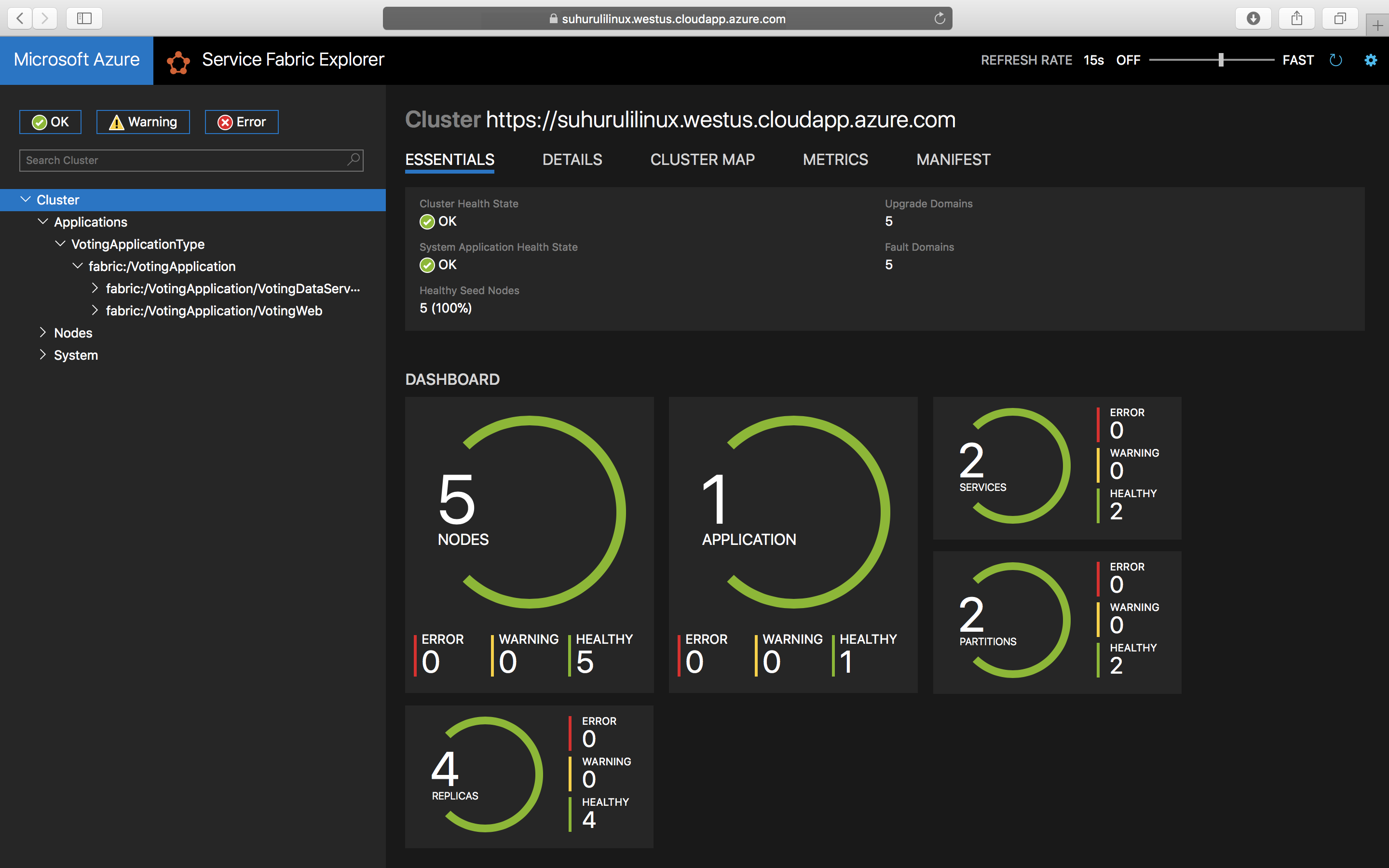
若要存取您的應用程式,請輸入
https://testlinuxcluster.westus.cloudapp.azure.com:8080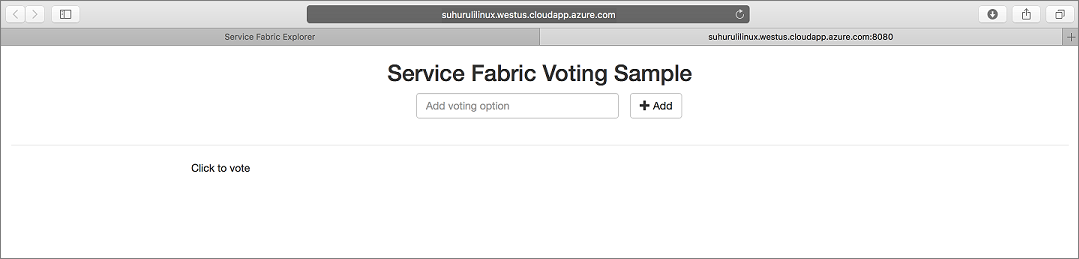
若要從叢集解除安裝應用程式,請在 Scripts 資料夾中執行 uninstall.sh 指令碼
./uninstall.sh
後續步驟
在本教程中,您將學到如何:
- 在 Azure 中建立安全的 Linux 叢集
- 建立使用 ELK 進行監控所需的資源
前進到下一個教學課程: