ContentPresenter 類別
定義
重要
部分資訊涉及發行前產品,在發行之前可能會有大幅修改。 Microsoft 對此處提供的資訊,不做任何明確或隱含的瑕疵擔保。
顯示 ContentControl的內容。
public ref class ContentPresenter : System::Windows::FrameworkElement[System.Windows.Localizability(System.Windows.LocalizationCategory.None, Readability=System.Windows.Readability.Unreadable)]
public class ContentPresenter : System.Windows.FrameworkElement[<System.Windows.Localizability(System.Windows.LocalizationCategory.None, Readability=System.Windows.Readability.Unreadable)>]
type ContentPresenter = class
inherit FrameworkElementPublic Class ContentPresenter
Inherits FrameworkElement- 繼承
- 衍生
- 屬性
範例
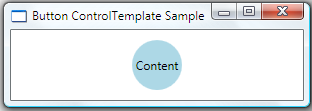
下圖顯示 一個 ButtonStyle ,該 使 的 為 ControlTemplateButton。 定義ControlTemplate為元素Button中Ellipse出現的 Grid 。 ContentPresenter Content Button標記應在 內垂直與水平Grid均顯示並置中。
<Style TargetType="Button">
  <!--Set to true to not get any properties from the themes.-->
  <Setter Property="OverridesDefaultStyle" Value="True"/>
  <Setter Property="Template">
    <Setter.Value>
      <ControlTemplate TargetType="Button">
        <Grid>
          <Ellipse Fill="{TemplateBinding Background}"/>
          <ContentPresenter HorizontalAlignment="Center"
                            VerticalAlignment="Center"/>
        </Grid>
      </ControlTemplate>
    </Setter.Value>
  </Setter>
</Style>
下圖顯示了套用時的 Button 外觀:
備註
你通常會用 ContentPresenter 在 ControlTemplate a ContentControl 的 中指定內容要加入的位置。 每種ContentControl類型預設都有 。ContentPresenterControlTemplate
當物件ContentPresenter位於 的 時ControlTemplateContentControl,、ContentContentTemplateContentTemplateSelector、與屬性的值來自於 的相同名稱ContentControl的性質。 你可以讓 ContentPresenter 屬性從模板父的屬性中取得這些屬性的值,方法是設定 ContentSource 該屬性或綁定到它們上。
該ContentPresenter使用以下邏輯來顯示:Content
如果 ContentTemplate 上的ContentPresenter屬性是 設定,則 將 ContentPresenter 套用到 DataTemplate 該Content屬性,結果UIElement及其子元素(如有)會被顯示。 欲了解更多物件 DataTemplate 相關資訊,請參閱 資料模板概覽。
若 ContentTemplateSelector 上的ContentPresenter屬性為 設定,則對ContentPresenter該DataTemplate屬性套用適當的 Content ,結果UIElement及其子元素(如有)會被顯示。
若 與 DataTemplate 類型 相關聯 Content,則 ContentPresenter 將 應用於 DataTemplate 該 Content 屬性,結果 UIElement 及其子元素(如有)會被顯示。
若 Content 是UIElement物件,則顯示 。UIElement 如果已經 UIElement 有父母,則會發生例外。
如果存在 將 TypeConverter 的 Content 類型轉換成 UIElement,則 ContentPresenter 會使用該 TypeConverter 類型,結果 UIElement 會被顯示出來。
如果有 能 TypeConverter 將 的 Content 型別轉換成字串,就 ContentPresenter 利用它 TypeConverter 並建立 來 TextBlock 包含該字串。 TextBlock顯示出來。
若內容為 XmlElement,屬性 InnerText 值以 顯示為 TextBlock。
呼叫 ContentPresenterToString 的方法 Content 和 會產生 a TextBlock 來包含由 返回的 ToString字串。 TextBlock顯示出來。
建構函式
| 名稱 | Description |
|---|---|
| ContentPresenter() |
初始化 ContentPresenter 類別的新執行個體。 |
欄位
| 名稱 | Description |
|---|---|
| ContentProperty |
識別 Content 依賴性質。 |
| ContentSourceProperty |
識別 ContentSource 依賴性質。 |
| ContentStringFormatProperty |
識別 ContentStringFormat 依賴性質。 |
| ContentTemplateProperty |
識別 ContentTemplate 依賴性質。 |
| ContentTemplateSelectorProperty |
識別 ContentTemplateSelector 依賴性質。 |
| RecognizesAccessKeyProperty |
識別 RecognizesAccessKey 依賴性質。 |
屬性
| 名稱 | Description |
|---|---|
| ActualHeight |
取得此元素的渲染高度。 (繼承來源 FrameworkElement) |
| ActualWidth |
取得這個元素的渲染寬度。 (繼承來源 FrameworkElement) |
| AllowDrop |
取得或設定一個值,指示該元素是否能作為拖放操作的目標。 這是相依性屬性。 (繼承來源 UIElement) |
| AreAnyTouchesCaptured |
會得到一個值,表示是否至少捕捉到一個觸碰到這個元素。 (繼承來源 UIElement) |
| AreAnyTouchesCapturedWithin |
會獲得一個值,表示是否至少捕捉到一個觸碰到該元素或其視覺樹中的任意子元素。 (繼承來源 UIElement) |
| AreAnyTouchesDirectlyOver |
會得到一個值,表示是否至少有一個觸碰點壓在這個元素上。 (繼承來源 UIElement) |
| AreAnyTouchesOver |
會得到一個值,表示是否至少有一個觸控點壓在這個元素或其視覺樹中的任何子元素上。 (繼承來源 UIElement) |
| BindingGroup |
取得或設定 BindingGroup ,該元素所用的。 (繼承來源 FrameworkElement) |
| BitmapEffect |
已淘汰.
已淘汰.
會取得或設定一個位圖效果,直接套用到該元素的渲染內容。 這是相依性屬性。 (繼承來源 UIElement) |
| BitmapEffectInput |
已淘汰.
已淘汰.
取得或設定一個直接套用到該元素渲染內容的點陣圖效果輸入來源。 這是相依性屬性。 (繼承來源 UIElement) |
| CacheMode |
取得或設定 的快取表示 UIElement。 (繼承來源 UIElement) |
| Clip |
取得或設定用來定義元素內容輪廓的幾何形狀。 這是相依性屬性。 (繼承來源 UIElement) |
| ClipToBounds |
取得或設定一個值,指示是否要裁剪該元素(或該元素子元素的內容)以符合包含元素的大小。 這是相依性屬性。 (繼承來源 UIElement) |
| CommandBindings |
會得到與此元素相關的物件集合 CommandBinding 。 A CommandBinding 啟用此元素的指令處理,並宣告指令、其事件與該元素所附加的處理器之間的連結。 (繼承來源 UIElement) |
| Content |
取得或設定用於產生子元素 ContentPresenter的資料。 |
| ContentSource |
取得或設定自動別名期間要使用的基底名稱。 |
| ContentStringFormat |
取得或設定一個複合字串,指定若以字串形式顯示的 Content 屬性,該格式化該方式。 |
| ContentTemplate |
取得或設定用來顯示控件內容的範本。 |
| ContentTemplateSelector |
取得或設定 , DataTemplateSelector使應用程式撰寫者能提供自訂邏輯,選擇用於顯示控制項內容的範本。 |
| ContextMenu |
取得或設定當透過使用者介面(UI)從該元素中請求右鍵選單時,該元素應會出現。 (繼承來源 FrameworkElement) |
| Cursor |
當滑鼠指標位於此元素上方時,會顯示游標。 (繼承來源 FrameworkElement) |
| DataContext |
當元素參與資料綁定時,取得或設定其資料上下文。 (繼承來源 FrameworkElement) |
| DefaultStyleKey |
當主題風格被使用或定義時,取得或設定用於此控制的風格鍵。 (繼承來源 FrameworkElement) |
| DependencyObjectType |
會取得 DependencyObjectType 包裹此實例 CLR 類型的 。 (繼承來源 DependencyObject) |
| DesiredSize |
取得這個項目在版面配置處理序的測量傳遞期間所計算的大小。 (繼承來源 UIElement) |
| Dispatcher |
了解 Dispatcher 這與此 DispatcherObject 有關。 (繼承來源 DispatcherObject) |
| Effect |
取得或設定點陣效應套用到 UIElement。 這是相依性屬性。 (繼承來源 UIElement) |
| FlowDirection |
設定文字及其他使用者介面(UI)元素在控制其版面配置的父元素內的流動方向。 (繼承來源 FrameworkElement) |
| Focusable |
取得或設定一個值,指示該元素是否能接收焦點。 這是相依性屬性。 (繼承來源 UIElement) |
| FocusVisualStyle |
取得或設定一個屬性,允許自訂外觀、效果或其他風格特性,當該元素捕捉鍵盤焦點時會套用。 (繼承來源 FrameworkElement) |
| ForceCursor |
取得或設定一個值,指示是否 FrameworkElement 應該強制使用者介面(UI)依照屬性宣告 Cursor 的方式渲染游標。 (繼承來源 FrameworkElement) |
| HasAnimatedProperties |
會得到一個值,表示該元素是否有任何動畫屬性。 (繼承來源 UIElement) |
| HasEffectiveKeyboardFocus |
會得到一個表示你 UIElement 是否有焦點的值。 (繼承來源 UIElement) |
| Height |
取得或設定元素的建議高度。 (繼承來源 FrameworkElement) |
| HorizontalAlignment |
當該元素被組合在父元素(如面板或項目控制項)中時,取得或設定該元素所套用的水平對齊特性。 (繼承來源 FrameworkElement) |
| InheritanceBehavior |
取得或設定財產價值繼承、資源金鑰查詢及 RelativeSource FindAncestor 查詢的範圍限制。 (繼承來源 FrameworkElement) |
| InputBindings |
取得與此元素相關的輸入綁定集合。 (繼承來源 UIElement) |
| InputScope |
取得或設定此輸入的 FrameworkElement上下文。 (繼承來源 FrameworkElement) |
| IsArrangeValid |
會獲得一個值,表示該元素配置中子元素的計算大小與位置是否有效。 (繼承來源 UIElement) |
| IsEnabled |
取得或設定一個值,指示該元素是否在使用者介面(UI)中啟用。 這是相依性屬性。 (繼承來源 UIElement) |
| IsEnabledCore |
得到一個值,該值在衍生類別中成為的 IsEnabled 回傳值。 (繼承來源 UIElement) |
| IsFocused |
獲得一個決定該元素是否具有邏輯焦點的值。 這是相依性屬性。 (繼承來源 UIElement) |
| IsHitTestVisible |
取得或設定一個值,宣告該元素是否可能從其渲染內容的某部分回傳為命中測試結果。 這是相依性屬性。 (繼承來源 UIElement) |
| IsInitialized |
會獲得一個值,表示該元素是否已被初始化,無論是在 XAML 處理器處理過程中,或是明確呼叫其 EndInit() 方法時。 (繼承來源 FrameworkElement) |
| IsInputMethodEnabled |
會取得一個值,表示輸入法系統(如輸入法編輯器(IME))是否啟用以處理該元素的輸入。 (繼承來源 UIElement) |
| IsKeyboardFocused |
會獲得一個值,表示該元素是否具有鍵盤焦點。 這是相依性屬性。 (繼承來源 UIElement) |
| IsKeyboardFocusWithin |
會取得一個值,表示鍵盤焦點是否位於元素或其視覺樹子元素中的任何位置。 這是相依性屬性。 (繼承來源 UIElement) |
| IsLoaded |
會得到一個值,表示該元素是否已被載入以進行呈現。 (繼承來源 FrameworkElement) |
| IsManipulationEnabled |
取得或設定一個值,指示操作事件是否在此啟用 UIElement。 (繼承來源 UIElement) |
| IsMeasureValid |
會得到一個值,表示目前版面測量回傳的大小是否有效。 (繼承來源 UIElement) |
| IsMouseCaptured |
會得到一個值,表示滑鼠是否被捕捉到這個元素。 這是相依性屬性。 (繼承來源 UIElement) |
| IsMouseCaptureWithin |
會獲得一個值,決定滑鼠捕捉是由這個元素還是其視覺樹中的子元素所持有。 這是相依性屬性。 (繼承來源 UIElement) |
| IsMouseDirectlyOver |
會得到一個值,表示滑鼠指標的位置是否對應於包含元素合成的命中測試結果。 這是相依性屬性。 (繼承來源 UIElement) |
| IsMouseOver |
會取得一個值,表示滑鼠指標是否位於此元素上方(包括視覺樹中的子元素)。 這是相依性屬性。 (繼承來源 UIElement) |
| IsSealed |
會獲得一個值,表示該實例目前是否封存(唯讀)。 (繼承來源 DependencyObject) |
| IsStylusCaptured |
會獲得一個值,表示觸控筆是否被此元素捕捉。 這是相依性屬性。 (繼承來源 UIElement) |
| IsStylusCaptureWithin |
會得到一個值,決定觸控筆擷取是由此元素持有,還是元素界限及其視覺樹內的元素。 這是相依性屬性。 (繼承來源 UIElement) |
| IsStylusDirectlyOver |
會得到一個值,表示觸控筆位置是否對應於包含元素合成的命中測試結果。 這是相依性屬性。 (繼承來源 UIElement) |
| IsStylusOver |
會獲得一個值,表示觸控筆游標是否位於此元素(包括視覺子元素)上方。 這是相依性屬性。 (繼承來源 UIElement) |
| IsVisible |
會取得一個值,表示該元素是否在使用者介面(UI)中可見。 這是相依性屬性。 (繼承來源 UIElement) |
| Language |
取得或設定適用於元素的在地化/全球化語言資訊。 (繼承來源 FrameworkElement) |
| LayoutTransform |
取得或設定一個圖形轉換,當執行版面配置時,該轉換應該套用到這個元素。 (繼承來源 FrameworkElement) |
| LogicalChildren |
為該元素的邏輯子元素取得一個列舉器。 (繼承來源 FrameworkElement) |
| Margin |
取得或設定元素的外緣。 (繼承來源 FrameworkElement) |
| MaxHeight |
取得或設定元素的最大高度限制。 (繼承來源 FrameworkElement) |
| MaxWidth |
取得或設定元素的最大寬度限制。 (繼承來源 FrameworkElement) |
| MinHeight |
取得或設定元素的最小高度限制。 (繼承來源 FrameworkElement) |
| MinWidth |
取得或設定元素的最小寬度限制。 (繼承來源 FrameworkElement) |
| Name |
取得或設定元素的識別名稱。 這個名稱提供了一個參考,讓程式碼後方(code-hind,例如事件處理程式程式碼)能在 XAML 處理器在處理過程中建構標記元素後,參考該元素。 (繼承來源 FrameworkElement) |
| Opacity |
在使用者介面(UI)渲染時,取得或設定對整體 UIElement 套用的不透明度因子。 這是相依性屬性。 (繼承來源 UIElement) |
| OpacityMask |
取得或設定不透明度遮罩,作為 Brush 一套實作,適用於該元素渲染內容的任意 alpha 通道遮罩。 這是相依性屬性。 (繼承來源 UIElement) |
| OverridesDefaultStyle |
取得或設定一個值,指示此元素是否包含主題樣式的樣式屬性。 (繼承來源 FrameworkElement) |
| Parent |
取得該元素的邏輯父元素。 (繼承來源 FrameworkElement) |
| PersistId |
已淘汰.
會得到一個唯一識別此元素的值。 (繼承來源 UIElement) |
| RecognizesAccessKey |
取得或設定一個值,指示是否 ContentPresenter 應該在其風格中使用 AccessText 。 |
| RenderSize |
取得(或設定)這個元素的最終渲染大小。 (繼承來源 UIElement) |
| RenderTransform |
取得或設定影響此元素渲染位置的轉換資訊。 這是相依性屬性。 (繼承來源 UIElement) |
| RenderTransformOrigin |
取得或設定任何可能渲染轉換的中心點,該轉換由 宣 RenderTransform告 ,相對於元素的邊界。 這是相依性屬性。 (繼承來源 UIElement) |
| Resources |
取得或設定本地定義的資源字典。 (繼承來源 FrameworkElement) |
| SnapsToDevicePixels |
會取得或設定一個值,決定該元素在渲染時是否應該使用裝置特定的像素設定。 這是相依性屬性。 (繼承來源 UIElement) |
| Style |
在渲染時,取得或設定該元素所使用的樣式。 (繼承來源 FrameworkElement) |
| StylusPlugIns |
會取得與此元素相關的所有觸控筆外掛(自訂)物件集合。 (繼承來源 UIElement) |
| Tag |
取得或設定一個任意物件值,可用來儲存該元素的自訂資訊。 (繼承來源 FrameworkElement) |
| TemplatedParent |
會取得該元素範本父碼的參考。 若元素非透過範本建立,此屬性不適用。 (繼承來源 FrameworkElement) |
| ToolTip |
取得或設定該元素在使用者介面(UI)中顯示的工具提示物件。 (繼承來源 FrameworkElement) |
| TouchesCaptured |
將所有被捕捉的觸控裝置都傳送到這個元素。 (繼承來源 UIElement) |
| TouchesCapturedWithin |
會將所有被捕捉的觸控裝置轉移到此元素或其視覺樹中的任何子元素。 (繼承來源 UIElement) |
| TouchesDirectlyOver |
所有觸控裝置都安裝在這個元件上。 (繼承來源 UIElement) |
| TouchesOver |
取得所有位於此元素或其視覺樹中子元素上的觸控裝置。 (繼承來源 UIElement) |
| Triggers |
取得直接在此元素或子元素中建立的觸發器集合。 (繼承來源 FrameworkElement) |
| Uid |
取得或設定此元素的唯一識別碼(用於本地化)。 這是相依性屬性。 (繼承來源 UIElement) |
| UseLayoutRounding |
取得或設定一個值,指示是否應對該元素在佈局中對其大小與位置進行四捨五入。 (繼承來源 FrameworkElement) |
| VerticalAlignment |
當該元素組合於父元素(如面板或項目控制項)時,取得或設定該元素所套用的垂直對齊特性。 (繼承來源 FrameworkElement) |
| Visibility |
取得或設定此元素的使用者介面(UI)可見性。 這是相依性屬性。 (繼承來源 UIElement) |
| VisualBitmapEffect |
已淘汰.
已淘汰.
取得或設定 BitmapEffect 的值。Visual (繼承來源 Visual) |
| VisualBitmapEffectInput |
已淘汰.
已淘汰.
取得或設定 BitmapEffectInput 的值。Visual (繼承來源 Visual) |
| VisualBitmapScalingMode |
取得或設定 BitmapScalingMode 。Visual (繼承來源 Visual) |
| VisualCacheMode |
取得或設定 的快取表示 Visual。 (繼承來源 Visual) |
| VisualChildrenCount |
取得該元素中視覺子元素的數量。 (繼承來源 FrameworkElement) |
| VisualClearTypeHint |
取得或設定 ,ClearTypeHint決定 ClearType 在 中如何被渲染。Visual (繼承來源 Visual) |
| VisualClip |
會取得或設定 的 Visual 剪輯區域作為 Geometry 一個值。 (繼承來源 Visual) |
| VisualEdgeMode |
取得或設定 的 Visual 邊模態作為 EdgeMode 一個值。 (繼承來源 Visual) |
| VisualEffect |
取得或設定點陣效應套用到 Visual。 (繼承來源 Visual) |
| VisualOffset |
取得或設定視覺物件的偏移值。 (繼承來源 Visual) |
| VisualOpacity |
取得或設定 的不透明度 Visual。 (繼承來源 Visual) |
| VisualOpacityMask |
取得或設定 Brush 代表不 Visual透明度遮罩的值。 (繼承來源 Visual) |
| VisualParent |
取得視覺物件的視覺樹父。 (繼承來源 Visual) |
| VisualScrollableAreaClip |
為 取得或設定一個可切換的可捲動區域。Visual (繼承來源 Visual) |
| VisualTextHintingMode |
取得或設定 TextHintingMode 的 Visual。 (繼承來源 Visual) |
| VisualTextRenderingMode |
取得或設定 TextRenderingMode 的 Visual。 (繼承來源 Visual) |
| VisualTransform | (繼承來源 Visual) |
| VisualXSnappingGuidelines |
取得或設定 x 座標(垂直)指引集合。 (繼承來源 Visual) |
| VisualYSnappingGuidelines |
取得或設定 y 座標(水平)指引集合。 (繼承來源 Visual) |
| Width |
取得或設定元素的寬度。 (繼承來源 FrameworkElement) |
方法
事件
| 名稱 | Description |
|---|---|
| ContextMenuClosing |
發生在元素上任何上下文選單關閉之前。 (繼承來源 FrameworkElement) |
| ContextMenuOpening |
當打開元素上的任何右鍵選單時都會發生。 (繼承來源 FrameworkElement) |
| DataContextChanged |
當該元素的資料上下文改變時會發生。 (繼承來源 FrameworkElement) |
| DragEnter |
當輸入系統回報一個底層拖曳事件,並將此元素作為拖曳目標時發生。 (繼承來源 UIElement) |
| DragLeave |
當輸入系統回報一個底層拖曳事件,並將此元素作為拖原點時發生。 (繼承來源 UIElement) |
| DragOver |
當輸入系統回報一個底層拖曳事件,該元素為潛在的投放目標時發生。 (繼承來源 UIElement) |
| Drop |
當輸入系統回報一個底層丟棄事件,並將此元素作為丟棄目標時發生。 (繼承來源 UIElement) |
| FocusableChanged |
發生於 Focusable 屬性的值變更時。 (繼承來源 UIElement) |
| GiveFeedback |
當輸入系統回報涉及此元素的底層拖放事件時,會發生這種情況。 (繼承來源 UIElement) |
| GotFocus |
當這個元素獲得邏輯焦點時就會發生。 (繼承來源 UIElement) |
| GotKeyboardFocus |
當鍵盤聚焦於此元素時會發生。 (繼承來源 UIElement) |
| GotMouseCapture |
當這個元素捕捉滑鼠時會發生。 (繼承來源 UIElement) |
| GotStylusCapture |
當這個元素捕捉觸控筆時會發生。 (繼承來源 UIElement) |
| GotTouchCapture |
當觸碰到這個元素時會發生。 (繼承來源 UIElement) |
| Initialized |
當初始化時 FrameworkElement 會發生。 此事件與財產價值 IsInitialized 從 |
| IsEnabledChanged |
當該元素屬性的值 IsEnabled 改變時,會發生這種情況。 (繼承來源 UIElement) |
| IsHitTestVisibleChanged |
當依賴性質對該元素的值 IsHitTestVisible 改變時,會發生這種情況。 (繼承來源 UIElement) |
| IsKeyboardFocusedChanged |
當該屬性在此元素上的價值 IsKeyboardFocused 改變時,就會發生這種情況。 (繼承來源 UIElement) |
| IsKeyboardFocusWithinChanged |
當該屬性在此元素上的價值 IsKeyboardFocusWithin 改變時,就會發生這種情況。 (繼承來源 UIElement) |
| IsMouseCapturedChanged |
當該屬性在此元素上的價值 IsMouseCaptured 改變時,就會發生這種情況。 (繼承來源 UIElement) |
| IsMouseCaptureWithinChanged |
當該元素的值 IsMouseCaptureWithinProperty 改變時,會發生這種情況。 (繼承來源 UIElement) |
| IsMouseDirectlyOverChanged |
當該屬性在此元素上的價值 IsMouseDirectlyOver 改變時,就會發生這種情況。 (繼承來源 UIElement) |
| IsStylusCapturedChanged |
當該屬性在此元素上的價值 IsStylusCaptured 改變時,就會發生這種情況。 (繼承來源 UIElement) |
| IsStylusCaptureWithinChanged |
當該屬性在此元素上的價值 IsStylusCaptureWithin 改變時,就會發生這種情況。 (繼承來源 UIElement) |
| IsStylusDirectlyOverChanged |
當該屬性在此元素上的價值 IsStylusDirectlyOver 改變時,就會發生這種情況。 (繼承來源 UIElement) |
| IsVisibleChanged |
當該屬性在此元素上的價值 IsVisible 改變時,就會發生這種情況。 (繼承來源 UIElement) |
| KeyDown |
當按鍵時,當焦點放在該元素時會發生。 (繼承來源 UIElement) |
| KeyUp |
當鑰匙釋放時,焦點放在該元素時會發生。 (繼承來源 UIElement) |
| LayoutUpdated |
當與當前 Dispatcher 相關的各種視覺元素的佈局改變時,會發生這種情況。 (繼承來源 UIElement) |
| Loaded |
當元素已擺放、渲染並準備互動時,會發生這種情況。 (繼承來源 FrameworkElement) |
| LostFocus |
當這個元素失去邏輯焦點時就會發生。 (繼承來源 UIElement) |
| LostKeyboardFocus |
當鍵盤不再專注於該元素時,會發生這種情況。 (繼承來源 UIElement) |
| LostMouseCapture |
當該元素失去滑鼠捕捉時會發生。 (繼承來源 UIElement) |
| LostStylusCapture |
當該元素失去觸控筆捕捉時會發生。 (繼承來源 UIElement) |
| LostTouchCapture |
當此元素失去觸碰捕捉時發生。 (繼承來源 UIElement) |
| ManipulationBoundaryFeedback |
當操控遇到邊界時,就會發生。 (繼承來源 UIElement) |
| ManipulationCompleted |
當對物體完成操作與慣性 UIElement 時,會發生這種情況。 (繼承來源 UIElement) |
| ManipulationDelta |
當輸入裝置在操作期間變更位置時發生。 (繼承來源 UIElement) |
| ManipulationInertiaStarting |
當輸入裝置在操作過程中失去與物體 UIElement 接觸,慣性開始時,就會發生這種情況。 (繼承來源 UIElement) |
| ManipulationStarted |
當輸入裝置開始對 UIElement 物件進行操作時,會發生這種情況。 (繼承來源 UIElement) |
| ManipulationStarting |
第一次建立操作處理器時發生。 (繼承來源 UIElement) |
| MouseDown |
當任何滑鼠按鍵且指標位於此元素上時,會發生這種情況。 (繼承來源 UIElement) |
| MouseEnter |
當滑鼠指標進入該元素的範圍時,會發生這種情況。 (繼承來源 UIElement) |
| MouseLeave |
當滑鼠指標離開該元素的邊界時,會發生這種情況。 (繼承來源 UIElement) |
| MouseLeftButtonDown |
當滑鼠左鍵按下時,滑鼠指標正好位於此元素上方。 (繼承來源 UIElement) |
| MouseLeftButtonUp |
當滑鼠左鍵放開時,滑鼠指標正放在該元素上方。 (繼承來源 UIElement) |
| MouseMove |
當滑鼠指標移動到該元素時會發生。 (繼承來源 UIElement) |
| MouseRightButtonDown |
當滑鼠右鍵按下時,滑鼠指標正放在此元素上時會發生。 (繼承來源 UIElement) |
| MouseRightButtonUp |
當滑鼠右鍵放開時,滑鼠指標正放在該元素上方,會發生這種情況。 (繼承來源 UIElement) |
| MouseUp |
當任何滑鼠按鍵放到該元素上時,會發生這種情況。 (繼承來源 UIElement) |
| MouseWheel |
當使用者旋轉滑鼠滾輪,而滑鼠指標位於此元素上時,會發生這種情況。 (繼承來源 UIElement) |
| PreviewDragEnter |
當輸入系統回報一個底層拖曳事件,並將此元素作為拖曳目標時發生。 (繼承來源 UIElement) |
| PreviewDragLeave |
當輸入系統回報一個底層拖曳事件,並將此元素作為拖原點時發生。 (繼承來源 UIElement) |
| PreviewDragOver |
當輸入系統回報一個底層拖曳事件,該元素為潛在的投放目標時發生。 (繼承來源 UIElement) |
| PreviewDrop |
當輸入系統回報一個底層丟棄事件,並將此元素作為丟棄目標時發生。 (繼承來源 UIElement) |
| PreviewGiveFeedback |
當拖放操作啟動時會發生。 (繼承來源 UIElement) |
| PreviewGotKeyboardFocus |
當鍵盤聚焦於此元素時會發生。 (繼承來源 UIElement) |
| PreviewKeyDown |
當按鍵時,當焦點放在該元素時會發生。 (繼承來源 UIElement) |
| PreviewKeyUp |
當鑰匙釋放時,焦點放在該元素時會發生。 (繼承來源 UIElement) |
| PreviewLostKeyboardFocus |
當鍵盤不再專注於該元素時,會發生這種情況。 (繼承來源 UIElement) |
| PreviewMouseDown |
當任何滑鼠按鍵且指標位於此元素上時,會發生這種情況。 (繼承來源 UIElement) |
| PreviewMouseLeftButtonDown |
當滑鼠左鍵按下時,滑鼠指標正好位於此元素上方。 (繼承來源 UIElement) |
| PreviewMouseLeftButtonUp |
當滑鼠左鍵放開時,滑鼠指標正放在該元素上方。 (繼承來源 UIElement) |
| PreviewMouseMove |
當滑鼠指標移動時,當滑鼠指標位於該元素上方時,會發生這種情況。 (繼承來源 UIElement) |
| PreviewMouseRightButtonDown |
當滑鼠右鍵按下時,滑鼠指標正放在此元素上時會發生。 (繼承來源 UIElement) |
| PreviewMouseRightButtonUp |
當滑鼠右鍵放開時,滑鼠指標正放在該元素上方,會發生這種情況。 (繼承來源 UIElement) |
| PreviewMouseUp |
當滑鼠指標位於該元素上方時,放開任何滑鼠按鈕時會發生。 (繼承來源 UIElement) |
| PreviewMouseWheel |
當使用者旋轉滑鼠滾輪,而滑鼠指標位於此元素上時,會發生這種情況。 (繼承來源 UIElement) |
| PreviewQueryContinueDrag |
當拖放操作時鍵盤或滑鼠按鈕狀態發生變化。 (繼承來源 UIElement) |
| PreviewStylusButtonDown |
當觸控筆按鈕在指標正覆蓋此元素時,會發生這種情況。 (繼承來源 UIElement) |
| PreviewStylusButtonUp |
當觸控筆按鈕放開時,指標正放在該元素上方,會發生這種情況。 (繼承來源 UIElement) |
| PreviewStylusDown |
當觸控筆觸碰數位化器時,觸控筆正覆蓋在此元件上方,就會發生這種情況。 (繼承來源 UIElement) |
| PreviewStylusInAirMove |
當觸控筆在未觸碰數位化器的情況下移動元素時,會發生這種情況。 (繼承來源 UIElement) |
| PreviewStylusInRange |
當觸控筆靠近觸控板,且位於該元件上方時,會發生此現象。 (繼承來源 UIElement) |
| PreviewStylusMove |
當觸控筆在元素上方移動時會發生。 觸控筆必須在數位化器偵測到時移動才能提升此事件,否則會 PreviewStylusInAirMove 被提升。 (繼承來源 UIElement) |
| PreviewStylusOutOfRange |
當觸控筆離數位化器太遠無法被偵測時,會發生這種情況。 (繼承來源 UIElement) |
| PreviewStylusSystemGesture |
當使用者執行多種觸控筆手勢之一時,會發生這種情況。 (繼承來源 UIElement) |
| PreviewStylusUp |
當使用者將觸控筆從數位化器上方抬起時,會發生這種情況。 (繼承來源 UIElement) |
| PreviewTextInput |
當這個元素以與裝置無關的方式接收文字時,就會發生。 (繼承來源 UIElement) |
| PreviewTouchDown |
當手指觸碰螢幕時,手指正覆蓋著這個元素。 (繼承來源 UIElement) |
| PreviewTouchMove |
當手指在螢幕上移動時,手指正覆蓋著該元素。 (繼承來源 UIElement) |
| PreviewTouchUp |
當手指在螢幕上方時,手指被抬離螢幕,就會發生。 (繼承來源 UIElement) |
| QueryContinueDrag |
當拖放操作時鍵盤或滑鼠按鈕狀態發生變化。 (繼承來源 UIElement) |
| QueryCursor |
當游標被請求顯示時會發生。 每當滑鼠指標移動到新位置時,這個事件會在元素上觸發,這意味著游標物件可能需要根據新位置進行調整。 (繼承來源 UIElement) |
| RequestBringIntoView |
當 對此元素被調用時 BringIntoView(Rect) ,會發生。 (繼承來源 FrameworkElement) |
| SizeChanged |
當ActualHeightActualWidth該元素的屬性值改變時,會發生這種情況。 (繼承來源 FrameworkElement) |
| SourceUpdated |
當該元素綁定任何現有屬性的來源值改變時,會發生這種情況。 (繼承來源 FrameworkElement) |
| StylusButtonDown |
當觸控筆按鈕在指標正覆蓋此元素時,會發生這種情況。 (繼承來源 UIElement) |
| StylusButtonUp |
當觸控筆按鈕放開時,指標正放在該元素上方,會發生這種情況。 (繼承來源 UIElement) |
| StylusDown |
當觸控筆觸碰數位化器時,觸控筆正覆蓋此元件。 (繼承來源 UIElement) |
| StylusEnter |
當唱針進入該元素的範圍時,會發生這種情況。 (繼承來源 UIElement) |
| StylusInAirMove |
當觸控筆在未觸碰數位化器的情況下移動元素時,會發生這種情況。 (繼承來源 UIElement) |
| StylusInRange |
當觸控筆靠近觸控板,且位於該元件上方時,會發生此現象。 (繼承來源 UIElement) |
| StylusLeave |
當唱針離開元素範圍時發生。 (繼承來源 UIElement) |
| StylusMove |
當觸控筆移動到這個元素上時會發生。 觸控筆必須在數位化器上移動以提升此事件。 否則, StylusInAirMove 則是升高。 (繼承來源 UIElement) |
| StylusOutOfRange |
當觸控筆距離數位化器太遠無法偵測時,會發生在該元件上方。 (繼承來源 UIElement) |
| StylusSystemGesture |
當使用者執行多種觸控筆手勢之一時,會發生這種情況。 (繼承來源 UIElement) |
| StylusUp |
當使用者將觸控筆從觸控板上方抬起時,會發生在觸控板上方。 (繼承來源 UIElement) |
| TargetUpdated |
當該元素綁定任何屬性的目標值改變時,會發生這種情況。 (繼承來源 FrameworkElement) |
| TextInput |
當這個元素以與裝置無關的方式接收文字時,就會發生。 (繼承來源 UIElement) |
| ToolTipClosing |
發生在元件上任何提示關閉前。 (繼承來源 FrameworkElement) |
| ToolTipOpening |
當打開元素的任何提示時,都會發生。 (繼承來源 FrameworkElement) |
| TouchDown |
當手指觸碰螢幕時,手指正覆蓋著這個元素。 (繼承來源 UIElement) |
| TouchEnter |
當觸碰從該元素範圍外移動到該元素範圍內時,就會發生。 (繼承來源 UIElement) |
| TouchLeave |
當觸碰從該元素的範圍內移動到外部時,就會發生這種情況。 (繼承來源 UIElement) |
| TouchMove |
當手指在螢幕上移動時,手指正覆蓋著該元素。 (繼承來源 UIElement) |
| TouchUp |
當手指在螢幕上方時,手指被抬離螢幕,就會發生。 (繼承來源 UIElement) |
| Unloaded |
當元素從載入元素樹中移除時,會發生這種情況。 (繼承來源 FrameworkElement) |
明確介面實作
| 名稱 | Description |
|---|---|
| IQueryAmbient.IsAmbientPropertyAvailable(String) |
關於此成員的描述,請參見方法。IsAmbientPropertyAvailable(String) (繼承來源 FrameworkElement) |
