Typography.NumeralAlignment 屬性
定義
重要
部分資訊涉及發行前產品,在發行之前可能會有大幅修改。 Microsoft 對此處提供的資訊,不做任何明確或隱含的瑕疵擔保。
取得或設定一個 FontNumeralAlignment 列舉值,表示使用數字時寬度的對齊。
public:
 property System::Windows::FontNumeralAlignment NumeralAlignment { System::Windows::FontNumeralAlignment get(); void set(System::Windows::FontNumeralAlignment value); };
public System.Windows.FontNumeralAlignment NumeralAlignment { get; set; }member this.NumeralAlignment : System.Windows.FontNumeralAlignment with get, setPublic Property NumeralAlignment As FontNumeralAlignment屬性值
FontNumeralAlignment列舉值。 預設值為 Normal。
備註
這個屬性會取得或設定一個擁有該 Typography 屬性的物件值,這是存取 Typography 類別實例的唯一方式。 此外,這個屬性支援附加屬性的使用方式,以便在 XAML 中包含文字的物件上設定它。
OpenType 字型支援比例數字與表格式數字功能,以控制使用數字時的寬度對齊。 比例數字會將每個數字視為不同的寬度——「1」比「5」窄。 表格式數字則視為等寬數字,以便垂直對齊,可提高財務類資訊的可讀性。
下列文字在第一欄中顯示使用 Miramonte 字型的兩個比例字形。 請注意數字 "5" 和 "1" 之間的寬度差異。 第二個資料行顯示這兩個相同的數值,並透過使用表格字形功能來調整它們的寬度。
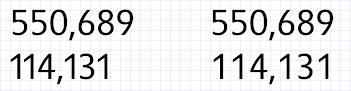 比例與帶標籤圖的範例
以下程式碼範例展示了如何使用 NumeralAlignment 屬性為 Miramonte 字型定義比例圖形與表格圖形。
<TextBlock FontFamily="Miramonte">
  <Run Typography.NumeralAlignment="Proportional">114,131</Run>
</TextBlock>
<TextBlock FontFamily="Miramonte">
  <Run Typography.NumeralAlignment="Tabular">114,131</Run>
</TextBlock>
XAML 屬性使用方式
< 物件Typography.NumericalAlignment=“FontNumeralAlignment”>
相依財產資訊
| Item | 價值觀 |
|---|---|
| 識別碼欄位 | NumeralAlignmentProperty |
元資料屬性設為 true |
AffectsMeasure、AffectsRender、Inherits |
