Aspire 透過提供可重複使用的建置區塊來改善開發體驗,這些建置區塊可用來快速排列應用程式相依性,並將其公開給您自己的程式碼。 以 Aspire為基礎的應用程式的主要建置組塊之一是 資源。 請考慮下列程式代碼:
var builder = DistributedApplication.CreateBuilder(args);

var redis = builder.AddRedis("cache");

var db = builder.AddPostgres("pgserver")
                .AddDatabase("inventorydb");

builder.AddProject<Projects.InventoryService>("inventoryservice")
       .WithReference(redis)
       .WithReference(db);
在上述程式代碼中,有四個資源表示:
-
cache:Redis 容器。 -
pgserver:Postgres 容器。 -
inventorydb:裝載在pgserver上的資料庫。 -
inventoryservice: ASP.NET Core 應用程式。
一般開發人員撰寫的大多數 Aspire相關程式碼都圍繞著向 應用程式模型 添加資源並在它們之間建立引用。
自訂資源的關鍵 Aspire 元素
在 Aspire 中建立自訂資源需要下列項目:
- 實作 IResource 的自定義資源類型
- 為 IDistributedApplicationBuilder 的擴充方法,名為
Add{CustomResource},其中{CustomResource}是自定義資源的名稱。
當自訂資源需要選用設定時,開發人員可能會想要實作 With* 後綴擴展方法,使這些設定選項便於探索,並且可以使用 建構器模式。
實際範例:MailDev
為了協助瞭解如何開發自定義資源,本文示範如何建置 MailDev的自定義資源範例。 MailDev 是一種開放原始碼工具,提供本機郵件伺服器,其設計目的是讓開發人員在其應用程式中測試電子郵件傳送行為。 如需詳細資訊,請參閱 MailDevGitHub 存放庫。
在此範例中,您會為您所建立 Aspire 資源建立新的 MailDev 項目作為測試環境。 雖然您可以在現有的 Aspire 專案中建立自定義資源,但最好考慮自定義資源是否可以跨多個 Aspire型解決方案使用,而且應該開發為可重複使用的整合。
設定入門專案
建立一個新 Aspire 專案,用來測試我們正在開發的新資源。
dotnet new aspire -o MailDevResource
cd MailDevResource
dir
建立項目之後,您應該會看到包含下列項目的清單:
-
MailDevResource.AppHost:用來測試自訂資源的 AppHost 。 -
MailDevResource.ServiceDefaults:服務將 預設配置用於服務相關專案。 -
MailDevResource.sln:參考這兩個專案的方案檔。
執行下列命令,確認專案可以順利建置並執行:
dotnet run --project MailDevResource.AppHost/MailDevResource.AppHost.csproj
主控台輸出看起來應該如下所示:
Building...
info: Aspire.Hosting.DistributedApplication[0]
      Aspire version: 9.0.0
info: Aspire.Hosting.DistributedApplication[0]
      Distributed application starting.
info: Aspire.Hosting.DistributedApplication[0]
      Application host directory is:
      ..\docs-aspire\docs\extensibility\snippets\MailDevResource\MailDevResource.AppHost
info: Aspire.Hosting.DistributedApplication[0]
      Now listening on: https://localhost:17251
info: Aspire.Hosting.DistributedApplication[0]
      Login to the dashboard at https://localhost:17251/login?t=928db244c720c5022a7a9bf5cf3a3526
info: Aspire.Hosting.DistributedApplication[0]
      Distributed application started. Press Ctrl+C to shut down.
在瀏覽器中選取儀表板連結以查看儀表板:Aspire

按 Ctrl+C 關閉應用程式(您可以關閉瀏覽器索引標籤)。
建立資源擴展庫
Aspire 資源只是包含在一個類別庫中且參考 Aspire 裝載庫(Aspire.Hosting)的類別和方法。 藉由將資源放在個別的專案中,您可以更輕鬆地在基於Aspire的應用程式之間共用,並有可能在 NuGet 上進行封裝與共用。
建立名為 MailDev的類別庫專案。載入。
dotnet new classlib -o MailDev.Hosting將
Aspire.Hosting新增至類別庫作為套件參考。dotnet add ./MailDev.Hosting/MailDev.Hosting.csproj package Aspire.Hosting --version 9.0.0重要
您在此處指定的版本應該符合 Aspire 解決方案中使用的 SDK 版本。
將類別庫參考新增至 MailDevResource.AppHost 專案。
dotnet add ./MailDevResource.AppHost/MailDevResource.AppHost.csproj reference ./MailDev.Hosting/MailDev.Hosting.csproj將類別庫專案新增至方案檔。
dotnet sln ./MailDevResource.sln add ./MailDev.Hosting/MailDev.Hosting.csproj
執行下列步驟之後,您可以啟動專案:
dotnet run --project ./MailDevResource.AppHost/MailDevResource.AppHost.csproj
這會導致主控台顯示警告:
.\.nuget\packages\aspire.hosting.apphost\9.0.0\build\Aspire.Hosting.AppHost.targets(174,5): warning ASPIRE004: '..\MailDev.Hosting\MailDev.Hosting.csproj' is referenced by an A
spire Host project, but it is not an executable. Did you mean to set IsAspireProjectResource="false"? [D:\source\repos\docs-aspire\docs\extensibility\snippets\MailDevResource\MailDevResource.AppHost\MailDevRe
source.AppHost.csproj]
這是因為 Aspire 將 AppHost 中的專案參照視為服務專案。 若要告知Aspire專案參照應被視為非服務專案,請將專案的MailDevResource.AppHostMailDevResource.AppHost.csproj檔案參照修改MailDev.Hosting為下列:
<ItemGroup>
  <!-- The IsAspireProjectResource attribute tells Aspire to treat this
       reference as a standard project reference and not attempt to generate
       a metadata file -->
  <ProjectReference Include="..\MailDev.Hosting\MailDev.Hosting.csproj"
                    IsAspireProjectResource="false" />
</ItemGroup>
現在,當您啟動 AppHost 時,控制台不會顯示任何警告。
定義資源類型
這 MailDev.裝載 類別程式庫包含資源類型和擴充方法,用於將資源新增至 AppHost。 您應該先考慮使用自訂資源時想要提供給開發人員的體驗。 在這裡自訂資源的情況下,您希望開發人員能夠撰寫如下的程式代碼:
var builder = DistributedApplication.CreateBuilder(args);

var maildev = builder.AddMailDev("maildev");

builder.AddProject<Projects.NewsletterService>("newsletterservice")
       .WithReference(maildev);
若要達成此目的,您需要名為 MailDevResource 的自定義資源,以實作 IResourceWithConnectionString,讓取用者可以搭配 WithReference 擴充功能來插入 MailDev 伺服器的連線詳細數據作為連接字串。
MailDev 可作為容器資源使用,因此您們也希望衍生自 ContainerResource,從而使得我們可以利用 Aspire 中各種預先存在的以容器為中心的擴充功能。
以下列程式代碼取代 Class1.cs 專案中 MailDev.Hosting 檔案的內容,並將檔案重新命名為 MailDevResource.cs:
// For ease of discovery, resource types should be placed in
// the Aspire.Hosting.ApplicationModel namespace. If there is
// likelihood of a conflict on the resource name consider using
// an alternative namespace.
namespace Aspire.Hosting.ApplicationModel;

public sealed class MailDevResource(string name) : ContainerResource(name), IResourceWithConnectionString
{
    // Constants used to refer to well known-endpoint names, this is specific
    // for each resource type. MailDev exposes an SMTP endpoint and a HTTP
    // endpoint.
    internal const string SmtpEndpointName = "smtp";
    internal const string HttpEndpointName = "http";

    // An EndpointReference is a core Aspire type used for keeping
    // track of endpoint details in expressions. Simple literal values cannot
    // be used because endpoints are not known until containers are launched.
    private EndpointReference? _smtpReference;

    public EndpointReference SmtpEndpoint =>
        _smtpReference ??= new(this, SmtpEndpointName);

    // Required property on IResourceWithConnectionString. Represents a connection
    // string that applications can use to access the MailDev server. In this case
    // the connection string is composed of the SmtpEndpoint endpoint reference.
    public ReferenceExpression ConnectionStringExpression =>
        ReferenceExpression.Create(
            $"smtp://{SmtpEndpoint.Property(EndpointProperty.HostAndPort)}"
        );
}
在上述自定義資源中,EndpointReference 和 ReferenceExpression 是數種實作介面集合的類型範例,例如 IManifestExpressionProvider、IValueProvider和 IValueWithReferences。 如需這些類型及其在 中 Aspire的角色的相關資訊,請參閱 技術詳細資料。
定義資源擴展
若要讓開發人員輕鬆地使用自定義資源,必須將名為 AddMailDev 的擴充方法新增至 MailDev.Hosting 專案。
AddMailDev 擴充方法負責設定資源,使其可以成功作為容器啟動。
將下列程式代碼新增至 專案中名為 MailDev 的新檔案中:
using Aspire.Hosting.ApplicationModel;

// Put extensions in the Aspire.Hosting namespace to ease discovery as referencing
// the Aspire hosting package automatically adds this namespace.
namespace Aspire.Hosting;

public static class MailDevResourceBuilderExtensions
{
    /// <summary>
    /// Adds the <see cref="MailDevResource"/> to the given
    /// <paramref name="builder"/> instance. Uses the "2.1.0" tag.
    /// </summary>
    /// <param name="builder">The <see cref="IDistributedApplicationBuilder"/>.</param>
    /// <param name="name">The name of the resource.</param>
    /// <param name="httpPort">The HTTP port.</param>
    /// <param name="smtpPort">The SMTP port.</param>
    /// <returns>
    /// An <see cref="IResourceBuilder{MailDevResource}"/> instance that
    /// represents the added MailDev resource.
    /// </returns>
    public static IResourceBuilder<MailDevResource> AddMailDev(
        this IDistributedApplicationBuilder builder,
        string name,
        int? httpPort = null,
        int? smtpPort = null)
    {
        // The AddResource method is a core API within Aspire and is
        // used by resource developers to wrap a custom resource in an
        // IResourceBuilder<T> instance. Extension methods to customize
        // the resource (if any exist) target the builder interface.
        var resource = new MailDevResource(name);

        return builder.AddResource(resource)
                      .WithImage(MailDevContainerImageTags.Image)
                      .WithImageRegistry(MailDevContainerImageTags.Registry)
                      .WithImageTag(MailDevContainerImageTags.Tag)
                      .WithHttpEndpoint(
                          targetPort: 1080,
                          port: httpPort,
                          name: MailDevResource.HttpEndpointName)
                      .WithEndpoint(
                          targetPort: 1025,
                          port: smtpPort,
                          name: MailDevResource.SmtpEndpointName);
    }
}

// This class just contains constant strings that can be updated periodically
// when new versions of the underlying container are released.
internal static class MailDevContainerImageTags
{
    internal const string Registry = "docker.io";

    internal const string Image = "maildev/maildev";

    internal const string Tag = "2.1.0";
}
驗證 AppHost 內的自訂整合
現在,自定義資源的基本結構已完成,現在可以在實際的AppHost專案中進行測試。 在 AppHost.cs 項目中開啟 MailDevResource.AppHost 檔案,並使用下列程式代碼加以更新:
var builder = DistributedApplication.CreateBuilder(args);

var maildev = builder.AddMailDev("maildev");

builder.Build().Run();
更新 AppHost.cs 檔案後,啟動AppHost專案並開啟儀表板:
dotnet run --project ./MailDevResource.AppHost/MailDevResource.AppHost.csproj
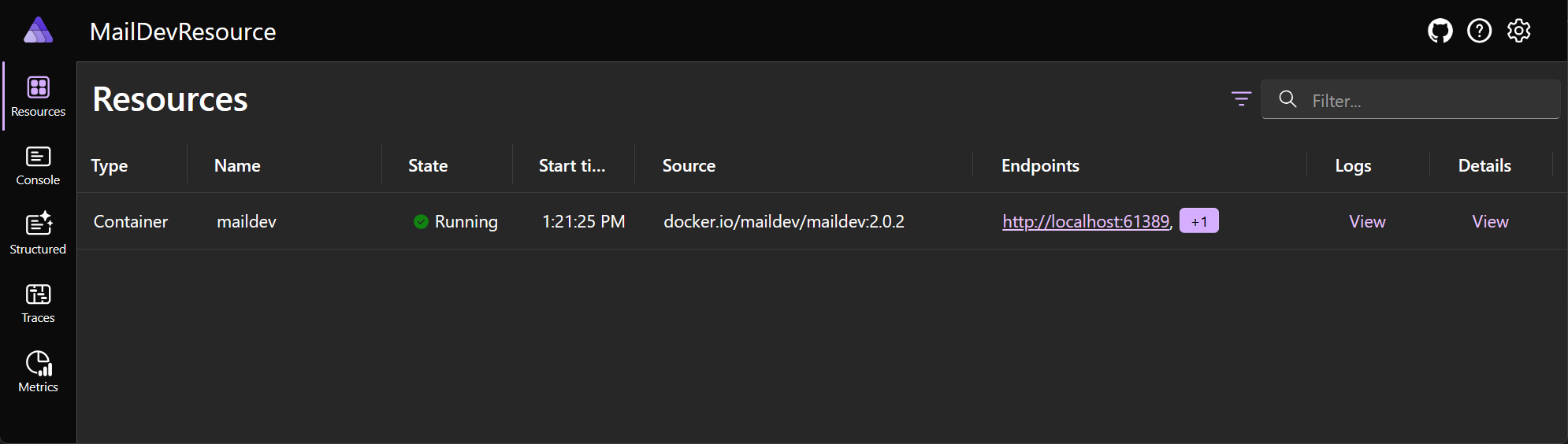
在幾分鐘后,儀錶板會顯示 maildev 資源正在執行,且有一個超連結可供流覽至 MailDev Web 應用程式,其中顯示應用程式傳送的每個電子郵件內容。
Aspire儀表板看起來應該類似下列內容:
MailDev Web 應用程式看起來應該如下所示:

將服務專案新增至 .NET AppHost 進行測試
一旦 Aspire 成功啟動 MailDev 整合,就可以在 MailDev 專案中取用 .NET 的連接資訊。 在 Aspire 中,通常會有一個 託管套件 和一個或多個 元件套件。 例如,請考慮:
-
裝載套件:用來代表應用程式模型中的資源。
Aspire.Hosting.Redis
-
元件套件:用來設定及取用用戶端連結庫。
Aspire.StackExchange.RedisAspire.StackExchange.Redis.DistributedCachingAspire.StackExchange.Redis.OutputCaching
在 MailDev 資源的情況下,.NET 平台已經有簡單的郵件傳輸通訊協定 (SMTP) 用戶端,格式為 SmtpClient。 在此範例中,為了簡單起見,您可以使用此現有的 API,不過其他資源類型可能受益於自定義整合連結庫來協助開發人員。
若要測試端到端場景,您需要一個 .NET 專案,我們可以將連線資訊插入到用於 MailDev 資源的專案中。 新增 Web API 專案:
建立名為 .NET的新 MailDevResource.NewsletterService 專案。
dotnet new webapi --use-minimal-apis -o MailDevResource.NewsletterService新增對 MailDev.Hosting 專案的引用。
dotnet add ./MailDevResource.NewsletterService/MailDevResource.NewsletterService.csproj reference ./MailDev.Hosting/MailDev.Hosting.csproj新增對 MailDevResource.AppHost 專案的引用。
dotnet add ./MailDevResource.AppHost/MailDevResource.AppHost.csproj reference ./MailDevResource.NewsletterService/MailDevResource.NewsletterService.csproj將新專案新增至方案檔。
dotnet sln ./MailDevResource.sln add ./MailDevResource.NewsletterService/MailDevResource.NewsletterService.csproj
新增專案並更新參考之後,請開啟 AppHost.cs 專案中的 MailDevResource.AppHost.csproj,並更新原始碼檔,如下所示:
var builder = DistributedApplication.CreateBuilder(args);

var maildev = builder.AddMailDev("maildev");

builder.AddProject<Projects.MailDevResource_NewsletterService>("newsletterservice")
       .WithReference(maildev);

builder.Build().Run();
更新 AppHost.cs 檔案後,再次啟動 AppHost。 然後確認電子報服務已啟動,且已將環境變數 ConnectionStrings__maildev 新增至進程。 從 [資源] 頁面上,尋找 newsletterservice 數據列,然後選取 [詳細數據] 數據行上的 [檢視] 連結:
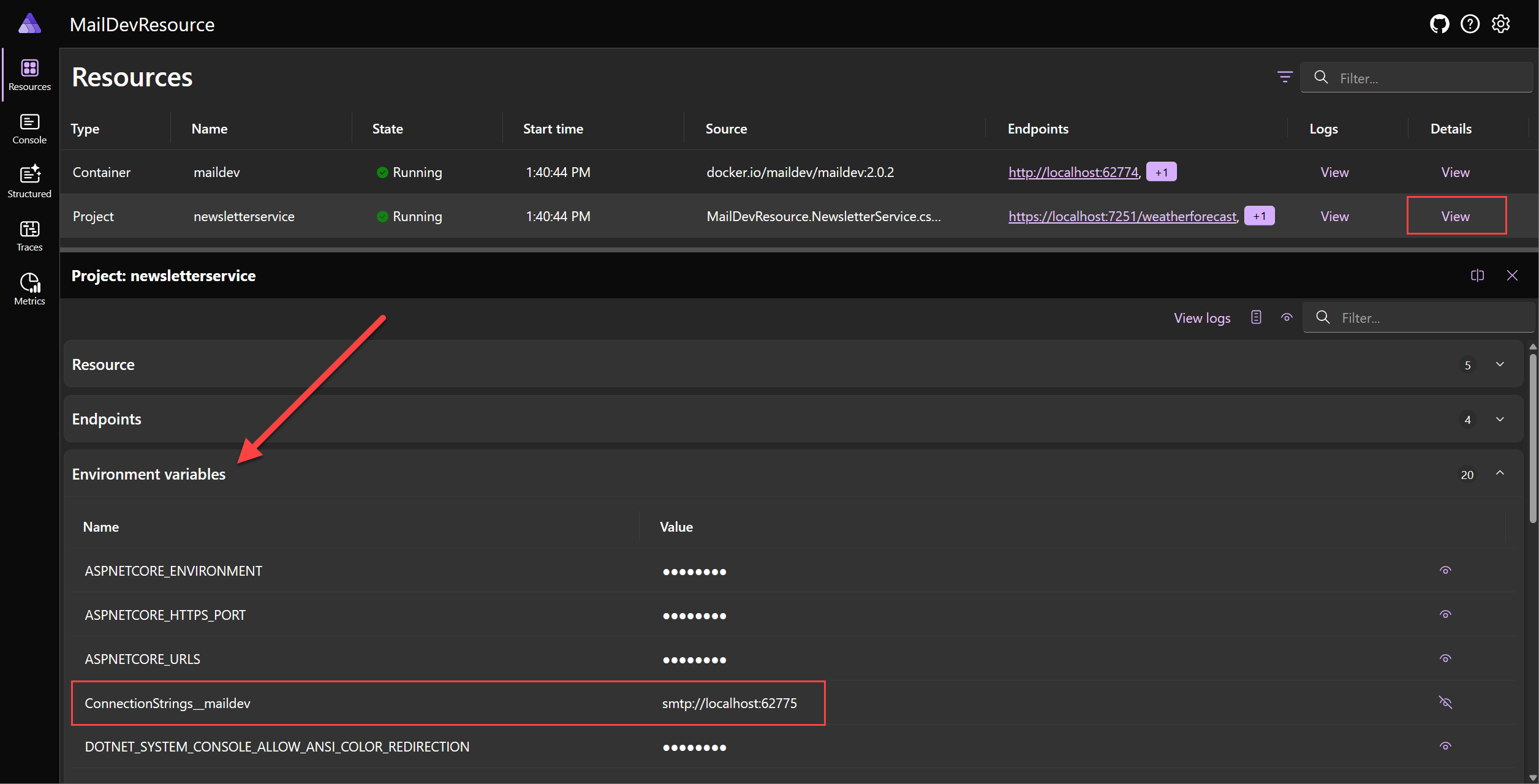
上述螢幕快照顯示 newsletterservice 項目的環境變數。
ConnectionStrings__maildev 環境變數是 maildev 資源插入項目的連接字串。
使用連接字串傳送訊息
為了使用被注入到電子報服務專案中的 SMTP 連線詳細數據,請將 SmtpClient 實例作為單例注入到相依性注入容器中。 將下列代碼新增至 Program.cs 專案中的 MailDevResource.NewsletterService 檔案,以設定單例服務。 在 Program 類別中,緊接在 // Add services to the container 批注之後,新增下列程序代碼:
builder.Services.AddSingleton<SmtpClient>(sp =>
{
    var smtpUri = new Uri(builder.Configuration.GetConnectionString("maildev")!);

    var smtpClient = new SmtpClient(smtpUri.Host, smtpUri.Port);

    return smtpClient;
});
提示
不過,此代碼段依賴官方 SmtpClient;在某些平臺上,此類型已過時,不建議用於其他平臺。 如需使用 MailKit 的更現代方法,請參閱 建立自訂Aspire用戶端整合。
若要測試用戶端,請將兩個簡單的 subscribe 和 unsubscribe POST 方法新增至電子報服務。 新增下列程序代碼,取代 MapGet 專案的 Program.cs 檔案中的 “weatherforecast ” 呼叫,以設定 ASP.NET Core 路由:
app.MapPost("/subscribe", async (SmtpClient smtpClient, string email) =>
{
    using var message = new MailMessage("newsletter@yourcompany.com", email)
    {
        Subject = "Welcome to our newsletter!",
        Body = "Thank you for subscribing to our newsletter!"
    };

    await smtpClient.SendMailAsync(message);
});

app.MapPost("/unsubscribe", async (SmtpClient smtpClient, string email) =>
{
    using var message = new MailMessage("newsletter@yourcompany.com", email)
    {
        Subject = "You are unsubscribed from our newsletter!",
        Body = "Sorry to see you go. We hope you will come back soon!"
    };

    await smtpClient.SendMailAsync(message);
});
提示
如果您的程式代碼編輯器不會自動新增 System.Net.Mail 和 Microsoft.AspNetCore.Mvc 命名空間至 Program.cs,請記得參考這些命名空間。
更新文件後 Program.cs ,啟動 AppHost 並使用您的瀏覽器,或 curl 點擊以下 URL(或者,如果您正在使用 Visual Studio ,則可以使用 .http 文件):
POST /subscribe?email=test@test.com HTTP/1.1
Host: localhost:7251
Content-Type: application/json
若要使用此 API,您可以使用 curl 來傳送要求。 下列 curl 命令會將 HTTP POST 請求發送至 subscribe 端點,並期待使用 email 查詢字串值來訂閱電子報。
Content-Type 標頭設定為 application/json,以顯示請求正文的格式為 JSON:
curl -H "Content-Type: application/json" --request POST https://localhost:7251/subscribe?email=test@test.com
下一個 API 是 unsubscribe 端點。 此端點用來取消訂閱電子報。
POST /unsubscribe?email=test@test.com HTTP/1.1
Host: localhost:7251
Content-Type: application/json
若要取消訂閱電子報,您可以使用下列 curl 命令,將 email 參數傳遞至 unsubscribe 端點做為查詢字串:
curl -H "Content-Type: application/json" --request POST https://localhost:7251/unsubscribe?email=test@test.com
提示
請確定您將 替 https://localhost:7251 換為正確的 localhost 連接埠 (您正在執行的 AppHost 的 URL)。
如果這些 API 呼叫傳回成功的回應 (HTTP 200, Ok),則您應該能夠在儀錶板的 maildev 資源上選取 ,而 MailDev UI 會顯示已傳送至 SMTP 端點的電子郵件。
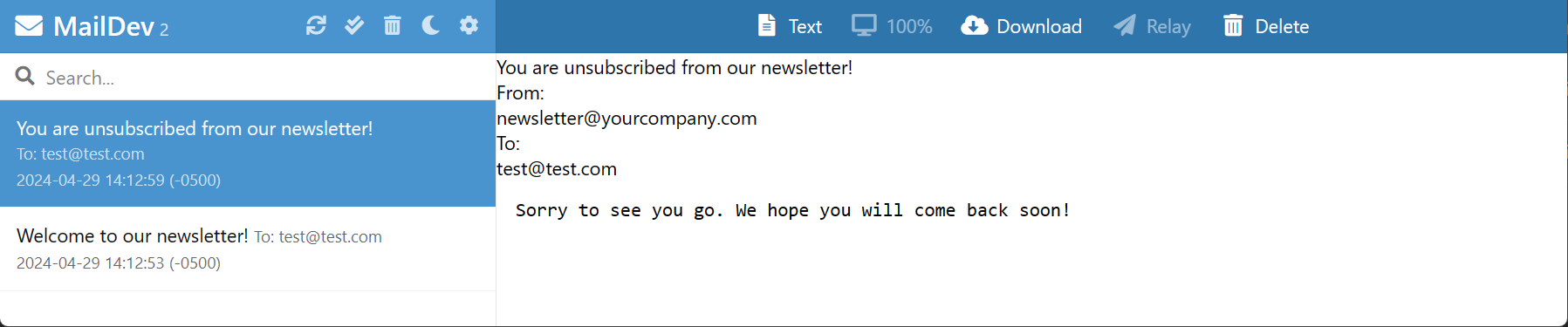 中顯示的電子郵件
技術詳細數據
在下列各節中,將討論各種技術細節,這些細節在開發 Aspire 的自訂資源時必須瞭解。
保護網路
在此範例中,MailDev 資源是透過 HTTP 和 SMTP 向主電腦公開的容器資源。 MailDev 資源是開發工具,不適用於生產環境。 若要改用 HTTPS,請參閱 MailDev:設定 HTTPS。
開發公開網路端點的自定義資源時,請務必考慮資源的安全性影響。 例如,如果資源是資料庫,請務必確保資料庫安全且連接字串不會公開至公用因特網。
ReferenceExpression 和 EndpointReference 類型
在上述程式代碼中,MailDevResource 有兩個屬性:
-
SmtpEndpoint:EndpointReference 類型。 -
ConnectionStringExpression:ReferenceExpression 類型。
這些類型是在幾種不同類型中之一,用於整個 Aspire,藉以表示組態數據,而該數據直到 Aspire 專案執行或透過 Azure Developer CLI(azd)工具發佈至雲端後才會最終確定。
這些類型有助於解決的基本問題是延遲解決具體組態資訊,直到 所有 資訊可用為止。
例如,MailDevResource 會公開 ConnectionStringExpression 這個屬性以符合 IResourceWithConnectionString 介面的需求。 屬性的類型是 ReferenceExpression,並且是透過將插值字串傳遞至 Create 方法來建立的。
public ReferenceExpression ConnectionStringExpression =>
    ReferenceExpression.Create(
        $"smtp://{SmtpEndpoint.Property(EndpointProperty.HostAndPort)}"
    );
Create 方法的簽章如下所示:
public static ReferenceExpression Create(
    in ExpressionInterpolatedStringHandler handler)
這不是一般的 String 參數。 方法會使用 內插字串處理模式,來擷取內插字串範本及其內引用的值,以允許客製化處理。 在 的情況下 Aspire,這些詳細資料會擷取在 中 ReferenceExpression ,當內插字串中參考的每個值可用時,可以對其進行評估。
以下是執行流程的運作方式:
- 實作 IResourceWithConnectionString 的資源會新增至模型(例如,
AddMailDev(...))。 -
IResourceBuilder<MailDevResource>傳遞至 WithReference,該方法擁有專為處理 IResourceWithConnectionString 實作者而設計的特殊重載。 - 將
WithReference資源包裝在 ConnectionStringReference 實例中,並在專案 EnvironmentCallbackAnnotation 建置並開始執行後,於 Aspire 中擷取並評估該物件。 - 當參考連接字串的程式啟動 Aspire 時,會開始評估運算式。 它會先取得 ConnectionStringReference,並呼叫 IValueProvider.GetValueAsync。
-
GetValueAsync方法會取得 ConnectionStringExpression 屬性的值,以取得 ReferenceExpression 實例。 - IValueProvider.GetValueAsync 方法接著會呼叫 GetValueAsync,以處理先前擷取的插補字串。
- 因為插補字串包含像 EndpointReference 這樣的其他參考型別的參考,它們也會進行評估,並用實際值替代(此時該值已可供使用)。
指令清單發佈
IManifestExpressionProvider 介面的設計目的是要解決在部署時共用資源之間的連線信息問題。 此特定問題的解決方案在內環網路概述中Aspire進行了描述。 與在本機開發類似,許多值都是配置應用程式所必須的,但在應用程式透過像是 azd(Azure Developer CLI)的工具部署之前,這些值無法確定。
為了解決這個問題 Aspire ,會產生一個資訊清單檔案 ,該 azd 檔案和其他部署工具會解譯。 而不是為資源之間的連接資訊指定具體值,使用表達式語法,部署工具會評估它。 一般而言,開發人員看不到指令清單檔案,但可能會產生一個進行手動檢查。 下列命令可在 AppHost 上使用,以產生資訊清單。
dotnet run --project MailDevResource.AppHost/MailDevResource.AppHost.csproj -- --publisher manifest --output-path aspire-manifest.json
這個指令會產生如下的清單檔案:
{
  "resources": {
    "maildev": {
      "type": "container.v0",
      "connectionString": "smtp://{maildev.bindings.smtp.host}:{maildev.bindings.smtp.port}",
      "image": "docker.io/maildev/maildev:2.1.0",
      "bindings": {
        "http": {
          "scheme": "http",
          "protocol": "tcp",
          "transport": "http",
          "targetPort": 1080
        },
        "smtp": {
          "scheme": "tcp",
          "protocol": "tcp",
          "transport": "tcp",
          "targetPort": 1025
        }
      }
    },
    "newsletterservice": {
      "type": "project.v0",
      "path": "../MailDevResource.NewsletterService/MailDevResource.NewsletterService.csproj",
      "env": {
        "OTEL_DOTNET_EXPERIMENTAL_OTLP_EMIT_EXCEPTION_LOG_ATTRIBUTES": "true",
        "OTEL_DOTNET_EXPERIMENTAL_OTLP_EMIT_EVENT_LOG_ATTRIBUTES": "true",
        "OTEL_DOTNET_EXPERIMENTAL_OTLP_RETRY": "in_memory",
        "ASPNETCORE_FORWARDEDHEADERS_ENABLED": "true",
        "ConnectionStrings__maildev": "{maildev.connectionString}"
      },
      "bindings": {
        "http": {
          "scheme": "http",
          "protocol": "tcp",
          "transport": "http"
        },
        "https": {
          "scheme": "https",
          "protocol": "tcp",
          "transport": "http"
        }
      }
    }
  }
}
因為MailDevResource實作資訊清單發佈邏輯,因此IResourceWithConnectionString知道即使Aspire是容器資源,它也需要一個MailDevResource欄位。
connectionString 欄位會參考指令清單中 maildev 資源的其他部分,以產生最終字串:
{
    // ... other content omitted.
    "connectionString": "smtp://{maildev.bindings.smtp.host}:{maildev.bindings.smtp.port}"
}
Aspire 知道如何形成此字串,因為它查看 ConnectionStringExpression 並透過 IManifestExpressionProvider 介面建立最終字串(這與使用 IValueProvider 介面的方式非常相似)。
MailDevResource 會自動包含在指令清單中,因為它衍生自 ContainerResource。 資源作者可以選擇在資源生成器上使用 ExcludeFromManifest 擴充方法來抑制輸出內容至清單。
public static IResourceBuilder<MailDevResource> AddMailDev(
    this IDistributedApplicationBuilder builder,
    string name,
    int? httpPort = null,
    int? smtpPort = null)
{
    var resource = new MailDevResource(name);

    return builder.AddResource(resource)
                  .WithImage(MailDevContainerImageTags.Image)
                  .WithImageRegistry(MailDevContainerImageTags.Registry)
                  .WithImageTag(MailDevContainerImageTags.Tag)
                  .WithHttpEndpoint(
                      targetPort: 1080,
                      port: httpPort,
                      name: MailDevResource.HttpEndpointName)
                  .WithEndpoint(
                      targetPort: 1025,
                      port: smtpPort,
                      name: MailDevResource.SmtpEndpointName)
                  .ExcludeFromManifest(); // This line was added
}
應該仔細考慮資源是否應刊登在清單中或隱藏。 如果將資源新增至清單,則應以安全且可靠的方式進行設定。
總結
在自訂資源教學課程中,您已瞭解如何建立使用現有容器化應用程式 (Aspire) 的自定義 MailDev 資源。 然後,您便用它來改善本機開發體驗,讓您輕鬆地測試應用程式內可能使用的電子郵件功能。 這些經驗可以應用於構建其他可在以Aspire為基礎的應用中使用的自訂資源。 此特定範例未包含任何自定義整合,但可以建置自定義整合,讓開發人員更容易使用資源。 在此案例中,您可以依賴 SmtpClient 平台中現有的 .NET 類別來傳送電子郵件。
