測試平臺為測試架構和擴充點提供寶貴的服務。 這些服務符合常見的需求,例如存取組態、剖析和擷取命令行自變數、取得記錄處理站,以及存取記錄系統等。
IServiceProvider 會針對測試平台實作 服務定位器模式。
IServiceProvider 直接派生自基類庫。
namespace System
{
    public interface IServiceProvider
    {
        object? GetService(Type serviceType);
    }
}
測試平台提供實用的擴充方法,以存取知名的服務對象。 所有這些方法都存放在 Microsoft.Testing.Platform.Services 命名空間內的靜態類別中。
public static class ServiceProviderExtensions
{
    public static TService GetRequiredService<TService>(
        this IServiceProvider provider)

    public static TService? GetService<TService>(
        this IServiceProvider provider)

    public static IMessageBus GetMessageBus(
        this IServiceProvider serviceProvider)

    public static IConfiguration GetConfiguration(
        this IServiceProvider serviceProvider)

    public static ICommandLineOptions GetCommandLineOptions(
        this IServiceProvider serviceProvider)

    public static ILoggerFactory GetLoggerFactory(
        this IServiceProvider serviceProvider)

    public static IOutputDevice GetOutputDevice(
        this IServiceProvider serviceProvider)

    // ... and more
}
大多數由擴展點公開的註冊工廠會提供對IServiceProvider的存取:例如,當註冊測試框架時,IServiceProvider會作為參數傳遞給工廠方法。
ITestApplicationBuilder RegisterTestFramework(
    Func<IServiceProvider, ITestFrameworkCapabilities> capabilitiesFactory,
    Func<ITestFrameworkCapabilities, IServiceProvider, ITestFramework> adapterFactory);
在上述程式代碼中,capabilitiesFactory 和 adapterFactory 都提供 IServiceProvider 做為參數。
IConfiguration 服務
IConfiguration 介面可透過 IServiceProvider 取得,並提供對測試框架組態設定及擴充點的存取。 根據預設,這些組態會從下列來源載入:
- 命令列選項,顯示在該
commandLineOptions:區塊下方。 - 環境變數。
- 一個名為 [appname] 的 JSON 檔案.testconfig.json位於測試應用程式執行檔旁邊。
命令列選項優先於環境變數,而環境變數又優先於 [appname].testconfig.json 中的值。 MTP 載入每個來源,並選擇第一個提供每個金鑰的來源。 對於 commandLineOptions: 值,MTP 會選擇完整選項的來源,避免索引參數在不同來源間合併。 關於組態檔案發現與優先順序的詳細資訊,請參見 MTP 組態設定。
介面是簡單的字串鍵-值對:
public interface IConfiguration
{
    string? this[string key] { get; }
}
從 MTP 2.4.0 開始,設定服務也實作了該 IConfigurationRoot 介面。 用 GetSection 來檢索一個 IConfigurationSection,並用來 GetChildren 枚舉直接的子區段。 一個區段會公開其 Key、完整的 Path、可選純量 Value,以及 HasValue 狀態。 提供者必須在透過列舉出現金鑰前實作 IHierarchicalConfigurationProvider ,但你可以從任何提供者取得已知路徑。
JSON 組態檔
JSON 檔案遵循階層式結構。 要訪問子屬性,您需要使用 : 分隔符。 例如,請考慮可能測試架構的組態,例如:
{
  "CustomTestingFramework": {
    "DisableParallelism": true
  }
}
代碼段看起來會像這樣:
IServiceProvider serviceProvider = null; // Get the service provider...

var configuration = serviceProvider.GetConfiguration();

if (bool.TryParse(configuration["CustomTestingFramework:DisableParallelism"], out var value) && value is true)
{
    // ...
}
在陣列的案例中,例如:
{
  "CustomTestingFramework": {
    "Engine": [
      "ThreadPool",
      "CustomThread"
    ]
  }
}
要访问第一個元素("ThreadPool")的語法如下:
IServiceProvider serviceProvider = null; // Get the service provider...

var configuration = serviceProvider.GetConfiguration();

var fistElement = configuration["CustomTestingFramework:Engine:0"];
環境變數
: 分隔符不適用於所有平臺上的環境變數階層式索引鍵。
__,雙底線為:
例如,環境變數可以設定如下(此範例適用於 Windows):
setx CustomTestingFramework__DisableParallelism=True
您可以在建立 ITestApplicationBuilder時,選擇不使用環境變數組態來源:
var options = new TestApplicationOptions();

options.Configuration.ConfigurationSources.RegisterEnvironmentVariablesConfigurationSource = false;

var builder = await TestApplication.CreateBuilderAsync(args, options);
ICommandLineOptions 服務
ICommandLineOptions 服務可用來擷取平臺已剖析之命令行選項的相關詳細數據。 可用的 API 包括:
public interface ICommandLineOptions
{
    bool IsOptionSet(string optionName);

    bool TryGetOptionArgumentList(
        string optionName,
        out string[]? arguments);
}
ICommandLineOptions 可以透過某些 API 取得,例如 ICommandLineOptionsProvider,或者您可以透過擴充方法 ,從 serviceProvider.GetCommandLineOptions() 擷取實例。
ICommandLineOptions.IsOptionSet(string optionName):這個方法可讓您確認是否已指定特定選項。 指定 optionName時,請省略 -- 前置詞。 例如,如果使用者輸入 --myOption,您應該只傳遞 myOption。
ICommandLineOptions.TryGetOptionArgumentList(string optionName, out string[]? arguments):此方法可以讓您檢查是否已設定某個特定選項,如果已設定,則可以取得對應的值;若為多值選項(像是參數個數超過一),則可取得所有相應值。 與上一個案例類似,應該在沒有 optionName 前綴的情況下提供 --。
IArtifactNamingService 服務
從 MTP 2.4.0 開始,為 IArtifactNamingService 擴充功能提供與 MTP 報告擴充功能相同的跨平台檔案名稱模板。 使用 serviceProvider.GetArtifactNamingService() 取回它,然後使用範本呼叫 ResolveFileName。
服務展開 {pname}、 {pid}、 {asm}、 {tfm}{arch}、 {time}和 。 它會保留目錄路徑區段,並依目前作業系統的規則清理末端檔名。 未知的佔位符保持不變。 關於佔位符描述,請參見 報表檔案名稱。
ILoggerFactory 服務
測試平臺隨附會產生記錄檔的整合式記錄系統。 您可以執行 --help 命令來檢視記錄選項。
您可以從選擇的選項包括:
--diagnostic                             Enable the diagnostic logging. The default log level is 'Trace'. The file will be written in the output directory with the name log_[MMddHHssfff].diag
--diagnostic-synchronous-write Force the built-in file logger to write the log synchronously. Useful for scenario where you don't want to lose any log (i.e. in case of crash). Note that this is slowing down the test execution.
--diagnostic-output-directory            Output directory of the diagnostic logging, if not specified the file will be generated inside the default 'TestResults' directory.
--diagnostic-file-prefix           Prefix for the log file name that will replace '[log]_.'
--diagnostic-verbosity                   Define the level of the verbosity for the --diagnostic. The available values are 'Trace', 'Debug', 'Information', 'Warning', 'Error', and 'Critical'
從程式代碼撰寫的觀點來看,若要記錄資訊,您必須從 ILoggerFactory取得 IServiceProvider。
ILoggerFactory API 如下所示:
public interface ILoggerFactory
{
    ILogger CreateLogger(string categoryName);
}

public static class LoggerFactoryExtensions
{
    public static ILogger<TCategoryName> CreateLogger<TCategoryName>(this ILoggerFactory factory);
}
記錄器處理站可讓您使用 ILogger API 建立 CreateLogger 物件。 另外還有一個方便的 API,可接受泛型自變數,以作為類別名稱使用。
public interface ILogger
{
    Task LogAsync<TState>(
        LogLevel logLevel,
        TState state,
        Exception? exception,
        Func<TState, Exception?, string> formatter);

    void Log<TState>(
        LogLevel logLevel,
        TState state,
        Exception? exception,
        Func<TState, Exception?, string> formatter);

    bool IsEnabled(LogLevel logLevel);
}

public interface ILogger<out TCategoryName> : ILogger
{
}

public static class LoggingExtensions
{
    public static Task LogCriticalAsync(this ILogger logger, string message);
    public static Task LogDebugAsync(this ILogger logger, string message);
    public static Task LogErrorAsync(this ILogger logger, Exception ex);
    public static Task LogErrorAsync(this ILogger logger, string message, Exception ex);
    public static Task LogErrorAsync(this ILogger logger, string message);
    public static Task LogInformationAsync(this ILogger logger, string message);
    public static Task LogTraceAsync(this ILogger logger, string message);
    public static Task LogWarningAsync(this ILogger logger, string message);
    public static void LogCritical(this ILogger logger, string message);
    public static void LogDebug(this ILogger logger, string message);
    public static void LogError(this ILogger logger, Exception ex);
    public static void LogError(this ILogger logger, string message, Exception ex);
    public static void LogError(this ILogger logger, string message);
    public static void LogInformation(this ILogger logger, string message);
    public static void LogTrace(this ILogger logger, string message);
    public static void LogWarning(this ILogger logger, string message);
}
ILogger所建立的 ILoggerFactory 物件提供 API,用於記錄各種層級的資訊。 這些記錄層級包括:
public enum LogLevel
{
    Trace,
    Debug,
    Information,
    Warning,
    Error,
    Critical,
    None,
}
以下是如何使用記錄 API 的範例:
...
IServiceProvider provider = null; // Get the service provider...

var factory = provider.GetLoggerFactory();

var logger = factory.CreateLogger<TestingFramework>();

// ...

if (logger.IsEnabled(LogLevel.Information))
{
    await logger.LogInformationAsync(
        $"Executing request of type '{context.Request}'");
}

// ...
請記住,若要避免不必要的配置,您應該使用 API 來檢查層級是否 ILogger.IsEnabled(LogLevel)。
IDiagnosticLoggingInformation 服務
從 MTP 2.5 預覽版開始,呼叫 serviceProvider.GetDiagnosticLoggingInformation() 以取得內建診斷檔案記錄器的實驗性資訊。 當診斷日誌未啟用時,該方法會回來 null 。
該 IDiagnosticLoggingInformation 服務揭露了:
-
LogFile,目前接收診斷記錄的檔案。 -
LogLevel,寫入檔案的最低層級。 -
SynchronousWrite,顯示檔案記錄器是否同步寫入條目。
服務是現場進行的。 在測試應用程式建構期間,MTP 可以將日誌重新定位到有效結果目錄。 保留該服務,並在需要路徑時再讀取 LogFile,而不是快取第一個 FileInfo。 如果日誌恢復在原始位置留下部分檔案, LogFile 則會識別接收新條目的替換檔案。
重要
此 API 使用 TPEXP 診斷 ID,且可能會在未來版本中變更或遭移除。
IMessageBus 服務
訊息總線服務是促進測試框架與其擴充之間資訊交換的中央機制。
測試平臺的訊息總線會採用 發行-訂閱模式。
共用總線的主要結構如下所示:
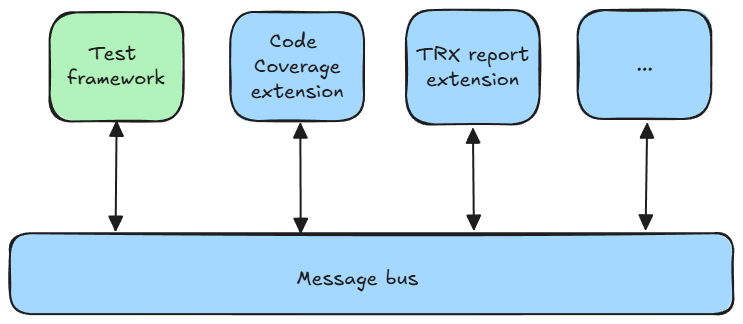
如下圖所示,其中包含延伸模組和測試架構,有兩個可能動作:將資訊推送至總線,或從總線取用資訊。
IMessageBus 滿足 推送動作 至總線,而 API 為:
public interface IMessageBus
{
    Task PublishAsync(
        IDataProducer dataProducer,
        IData data);
}

public interface IDataProducer : IExtension
{
    Type[] DataTypesProduced { get; }
}

public interface IData
{
    string DisplayName { get; }
    string? Description { get; }
}
請考慮關於參數的下列詳細資料:
IDataProducer:IDataProducer通過將其可以提供的資訊類型Type傳達給訊息總線,並通過從基本介面 IExtension繼承來建立擁有權。 這表示您無法不分青紅皂白地將數據推送至訊息總線;您必須事先宣告產生的數據類型。 如果您推送非預期的數據,將會觸發例外狀況。IData:此介面可作為佔位元,而您只需要提供描述性詳細數據,例如名稱和描述。 介面不會透露數據的性質,這是刻意的。 這表示測試架構和延伸模組可以將任何類型的數據推送至總線,而且此數據可由任何已註冊的延伸模組或測試架構本身取用。
此方法促進資訊交換流程的演進,防止當擴充套件不熟悉新資料時出現重大變更。 它可讓不同版本的延伸模組和測試架構以相互瞭解為基礎,以和諧運作。
匯流排的另一端稱為消費者,其訂閱了特定類型的資料,因此能夠處理這些資料。
重要
請始終使用 await,來等待 呼叫 PublishAsync。 如果您未這麼做,測試平臺和擴充功能可能無法正確處理 IData,這可能會導致細微的錯誤。 只有當您從 await 中返回 後,您才能確定 IData 已排入訊息總線的處理隊列中。 不論您正在使用的擴展點為何,請確定您已等候所有 PublishAsync 呼叫,然後再結束擴展。 例如,如果您要實作 testing framework,則不應該在 要求上呼叫 Complete,直到您等候該特定要求的所有 PublishAsync 呼叫為止。
IOutputDevice 服務
測試平臺會封裝 輸出裝置的概念,讓測試架構和延伸模組 透過將任何類型的數據傳輸至目前使用的顯示系統來呈現 資訊。
輸出裝置 的最傳統範例是主控台輸出。
注意
雖然測試平臺是設計來支援自定義 輸出裝置,但目前無法使用此擴充點。
若要將數據傳輸到 輸出裝置,您必須從 IOutputDevice取得 IServiceProvider。
API 包含:
public interface IOutputDevice
{
    Task DisplayAsync(
        IOutputDeviceDataProducer producer,
        IOutputDeviceData data,
        CancellationToken cancellationToken);
}

public interface IOutputDeviceDataProducer : IExtension
{
}

public interface IOutputDeviceData
{
}
IOutputDeviceDataProducer 會擴充 IExtension,並將傳送者的相關信息提供給 輸出裝置。
IOutputDeviceData 可作為佔位元介面。
IOutputDevice 背後的概念是容納更複雜的資訊,而不僅僅是彩色文字。 例如,它可以是可以以圖形方式表示的複雜物件。
根據預設,測試平臺會為 IOutputDeviceData 物件提供傳統的彩色文字模型:
public class TextOutputDeviceData : IOutputDeviceData
{
    public TextOutputDeviceData(string text)
    public string Text { get; }
}

public sealed class FormattedTextOutputDeviceData : TextOutputDeviceData
{
    public FormattedTextOutputDeviceData(string text)
    public IColor? ForegroundColor { get; init; }
    public IColor? BackgroundColor { get; init; }
}

public sealed class SystemConsoleColor : IColor
{
    public ConsoleColor ConsoleColor { get; init; }
}
以下是如何使用彩色文字搭配使用中 作用中 輸出裝置的範例:
IServiceProvider provider = null; // Get the service provider...

var outputDevice = provider.GetOutputDevice();

await outputDevice.DisplayAsync(
    this,
    new FormattedTextOutputDeviceData($"TestingFramework version '{Version}' running tests with parallelism of {_dopValue}")
    {
        ForegroundColor = new SystemConsoleColor
        {
            ConsoleColor = ConsoleColor.Green
        }
    },
    CancellationToken.None);
除了使用彩色文字的標準之外,IOutputDevice 和 IOutputDeviceData 的主要優點是,輸出裝置 完全獨立且對使用者不為人知。 這可讓您開發複雜的使用者介面。 例如,實作 即時 顯示測試進度的 Web 應用程式是完全可行的。
IPlatformInformation 服務
實驗性 IPlatformInformation 服務提供平台 Name、選用的 Version、選用的 CommitHash,以及選用的 BuildDate。
