| 屬性 | 值 |
|---|---|
| 規則識別碼 | CA2009 |
| 職稱 | 請勿對 ImmutableCollection 值呼叫 ToImmutableCollection |
| 類別 | 可靠性 |
| 修正是造成中斷還是不中斷 | 不中斷 |
| 在 .NET 10 中預設啟用 | 作為建議 |
| 適用語言 | C# 與 Visual Basic |
原因
在 System.Collections.Immutable 命名空間中的不可變集合上非必要地呼叫了 ToImmutable 方法。
規則描述
System.Collections.Immutable namespace 包含定義不可變集合的類型。 此規則會分析下列不可變的集合類型:
- System.Collections.Immutable.ImmutableArray<T>
- System.Collections.Immutable.ImmutableList<T>
- System.Collections.Immutable.ImmutableHashSet<T>
- System.Collections.Immutable.ImmutableSortedSet<T>
- System.Collections.Immutable.ImmutableDictionary<TKey,TValue>
- System.Collections.Immutable.ImmutableSortedDictionary<TKey,TValue>
這些類型會定義擴充方法,從現有的 IEnumerable<T> 集合建立新的不可變集合。
- ImmutableArray<T> 定義 ToImmutableArray。
- ImmutableList<T> 定義 ToImmutableList。
- ImmutableHashSet<T> 定義 ToImmutableHashSet。
- ImmutableSortedSet<T> 定義 ToImmutableSortedSet。
- ImmutableDictionary<TKey,TValue> 定義 ToImmutableDictionary。
- ImmutableSortedDictionary<TKey,TValue> 定義 ToImmutableSortedDictionary。
這些擴充方法的設計目的是將可變集合轉換成不可變的集合。 不過,呼叫端有可能會不小心提供無法變更的集合作為這些方法的輸入。 這代表效能和/或功能問題。
- 效能問題:不可變集合上的不必要裝箱、拆箱和/或執行階段型別檢查。
- 潛在的功能問題:呼叫端假設在可變動的集合上運作,但實際上操作的是一個不可變的集合。
如何修正違規
若要修正違規,請移除不可變集合上的冗餘 ToImmutable 呼叫。 例如,下列兩個代碼段會顯示違反規則,以及如何修正這些代碼段:
using System;
using System.Collections.Generic;
using System.Collections.Immutable;

public class C
{
    public void M(IEnumerable<int> collection, ImmutableArray<int> immutableArray)
    {
        // This is fine.
        M2(collection.ToImmutableArray());

        // This leads to CA2009.
        M2(immutableArray.ToImmutableArray());
    }

    private void M2(ImmutableArray<int> immutableArray)
    {
        Console.WriteLine(immutableArray.Length);
    }
}
using System;
using System.Collections.Generic;
using System.Collections.Immutable;

public class C
{
    public void M(IEnumerable<int> collection, ImmutableArray<int> immutableArray)
    {
        // This is fine.
        M2(collection.ToImmutableArray());

        // This is now fine.
        M2(immutableArray);
    }

    private void M2(ImmutableArray<int> immutableArray)
    {
        Console.WriteLine(immutableArray.Length);
    }
}
提示
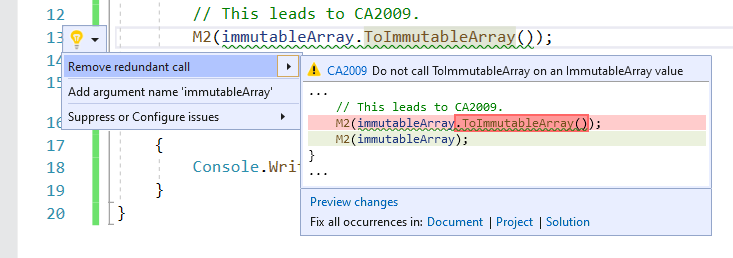
在 Visual Studio 中,可以使用針對此規則的程式碼修正。 若要使用它,請將游標放在違規上,然後按 Ctrl+。(句號)。 從所呈現的選項清單中,選擇 [移除備援呼叫 ]。
隱藏警告的時機
除非您不擔心不可變集合的不必要配置效能影響,否則請勿隱藏此規則的違規。
隱藏警告
如果您只想要隱藏單一違規,請將預處理器指示詞新增至原始程式檔以停用,然後重新啟用規則。
#pragma warning disable CA2009
// The code that's violating the rule is on this line.
#pragma warning restore CA2009
若要停用檔案、資料夾或專案的規則,請在組態檔中將其嚴重性設為 none。
[*.{cs,vb}]
dotnet_diagnostic.CA2009.severity = none
如需詳細資訊,請參閱 如何隱藏程式代碼分析警告。
