Note
The Retail Interest Group by Dynamics 365 Commerce has moved from Yammer to Viva Engage. If you don't have access to the new Viva Engage community, fill out this form (https://aka.ms/JoinD365commerceVivaEngageCommunity) to be added and stay engaged in the latest discussions.
This article describes the out-of-box support for incremental capture as part of order invoicing in Dynamics 365 Commerce. It also describes how to enable incremental capture for the Dynamics 365 Payment Connector for Adyen, and how incremental capture can be added to partner payment connectors by using the payments software development kit (SDK).
When you enable incremental capture, orders that are fulfilled over time with multiple invoices reference the original authorization for multiple invoices and captured payments. This approach contrasts with legacy support for fulfilling orders with multiple invoices, which causes a new authorization to be obtained every time a portion of the order is fulfilled and the balance due changes.
The Dynamics 365 Payment Connector for Adyen supports incremental capture out of the box when you fulfill orders from the POS and Commerce headquarters.
Many merchants fulfill orders in multiple shipments. By default, the out-of-box process for handling credit card payments for orders that are fulfilled over multiple shipments is to capture payments as those shipments are invoiced and then get a new payment authorization for the balance due for the remaining items that must be shipped. This process ensures that payment capture can be consistently supported across payment processors.
However, there are also some downsides. For example, when you partially capture an authorization and then create a new authorization for the balance due, the old authorization and new authorization might overlap. In this case, open authorizations that exceed the order total might appear against customer payment cards. This situation can possibly result in authorizations that exceed open balances for credit cards, or card issuers block cards from being processed due to suspicion of fraud.
To address these issues, incremental capture support was introduced for the Dynamics 365 Payment Connector for Adyen and payments SDK. If a processor supports incremental capture, you can update payment connectors to capture against a single authorization multiple times over the course of order fulfillment.
The following illustration shows the difference between the different payment capture frameworks when multiple captures are done against a single authorization.
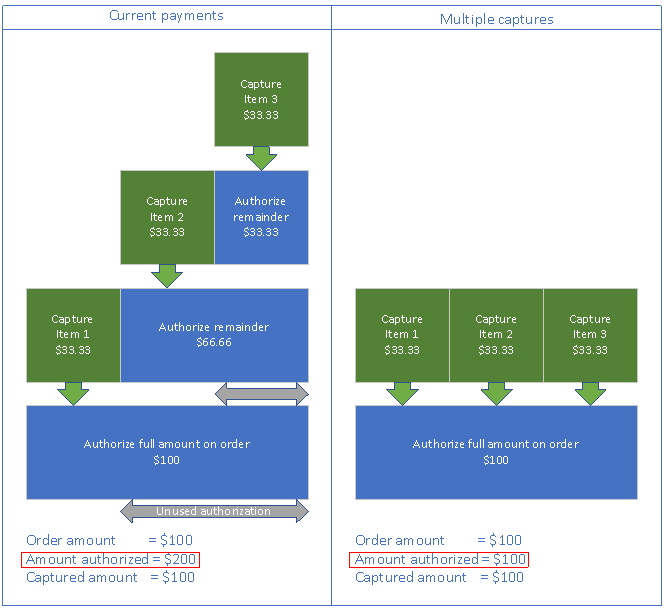
Incremental capture support for headquarters invoicing (in other words, any invoicing that occurs as part of order fulfillment in headquarters) was first added to the payments SDK in Commerce version 10.0.13. In Commerce version 10.0.18, incremental capture support through the SDK was extended to channels outside of headquarters. For the storefront, Store Commerce, and call center, this extended support means that authorizations created for new orders can be marked as SupportsMultipleCaptures. When you later invoice those orders in headquarters or Store Commerce, you can capture payments and retain the original authorization for reference when you capture payments for subsequent invoices.
Enable incremental capture
Prerequisite features
Enable the following features before you enable incremental capture.
| Feature name | Description |
|---|---|
| Unified payment posting journal defaults for Commerce | This feature changes the way that business logic creates customer payment and customer refund payment journals for orders that are created through the call center, POS, or e-commerce channel. |
| Omni-channel payments | This feature enables omni-channel payment scenarios such as buy online, pick up in store (BOPIS). For more information, see Omni-channel payments overview. |
| Duplicate payment protection on invoicing | This feature enables duplicate payment protection for invoicing scenarios. Commerce payment functionality might affect customizations in invoicing scenarios. If your organization has invoicing customizations, make sure that you refactor them before turning on Commerce payment functionality in production environments. |
| Enable refunds over multiple captures | This functionality improves that capability to do multiple linked refunds against an order. |
| Enable manual void of expired credit card payment lines when authorizations are expired | This feature adds support for manual deletion of payment lines if they expire and the authorization can't be refreshed. |
| Omni-channel Commerce order payments. | This feature rationalizes payments across channels and enables editing of payments for storefront and POS orders within the call center. Previously listed features are prerequisites for this feature, so this feature should be enabled last. For more information, see Omni-channel Commerce order payments. |
Enable the "Extensibility to support incremental credit card capture" feature
This feature was originally introduced for incremental capture for headquarters invoicing through the payments SDK. It was augmented to also enable incremental capture support through the Dynamics 365 Payment Connector for Adyen and all channels.
To enable the "Extensibility to support incremental credit card capture" feature in Commerce headquarters, follow these steps:
- Go to System administration > Workspaces > Feature management.
- Select the All tab to show all available features.
- Search for Extensibility to support incremental credit card capture.
- Select the feature and then select Enable now.
Set the credit card authorization parameter
To set the credit card authorization parameter in headquarters, follow these steps:
- Go to Accounts receivable > Setup > Accounts receivable parameters.
- In the left navigation pane, select Credit card.
- On the Set up information for the delivery of shipments FastTab, under Setup, ensure that the Credit card authorization option is set to Yes. If set to No, the incremental capture functionality doesn't work properly.
Enable incremental capture for the Dynamics 365 Payment Connector for Adyen
In addition to enabling the "Extensibility to support incremental credit card capture" feature, set the value of the Enable Request Protection property to True in the Dynamics 365 Payment Connector for Adyen merchant properties for every channel where the connector is used. If you set the value to False or leave it blank, incremental capture isn't enabled for the connector. When you set the property to True, a tracking ID is added to requests to the payment provider to prevent duplicate requests. Tracking ID support for partner payment connectors is explained in the Uptake incremental capture for partner payment connectors section.
Some payment methods don't support incremental capture. You can configure those payment methods in the Non incremental capture payment methods field of the Dynamics 365 Payment Connector for Adyen merchant properties. The value you set in this field should match the "Payment Method Variant/Card type" string used by Adyen to identify card types in authorization responses. You can find the payment method variant strings in Adyen on the PaymentMethodVariant page. If there are multiple card types that you want to exempt from incremental capture, separate them by semicolons.
One example of a payment method variant that doesn't support incremental capture is Interac. In the Adyen documentation, the string listed for the Interac payment method variant is interac. If you're configuring payment services for a Canadian merchant that accepts Interac, add this payment method variant to the list of "Non incremental capture payment methods" in the connector merchant properties.
Merchants enabling incremental capture for the Dynamics 365 Payment Connector for Adyen should also contact Adyen to ensure that the allowMultiplePartialCapture flag is set to Yes on their merchant account. If this flag isn't enabled at the merchant account level, the capture logic at the time of invoicing falls back to legacy supported flows.
Uptake incremental capture for partner payment connectors
To uptake support for incremental capture as part of headquarters invoicing for partner payment connectors, and to support incremental capture across all channels, upgrade to the payments SDK that is provided in Commerce version 10.0.18.
IPaymentReferenceProvider
This version of the payment SDK adds the IPaymentReferenceProvider interface. By using this interface, you can include a PaymentTrackingID value in each request and response. Use the PaymentTrackingID value to track payment requests. It also ensures that, between back-office invoicing requests and the processor, duplicate requests are caught before they're resent. In this way, it helps prevent duplicate payments.
Here's a sample implementation from the SampleConnector.cs file in the payments SDK.
#region ITrackingSupport
/// <summary>
/// Get the payment provider reference to safeguard against duplicate requests.
/// </summary>
/// <param name="command">The payment operation that will use the tracking ID.</param>
/// <param name="amount">The payment transaction amount.</param>
/// <returns>Returns the PaymentTransactionReferenceData.</returns>
/// <remarks>List of supported commands can be seen in the constants defined in <see cref="Microsoft.Dynamics.Retail.PaymentSDK.Portable.Constants.SupportedCorrelationCommands"/></remarks>
public PaymentTransactionReferenceData GetPaymentReferenceData(string command, decimal amount)
{
    PaymentTransactionReferenceData paymentTransactionReferenceData = new PaymentTransactionReferenceData();
    paymentTransactionReferenceData.Amount = amount;
    paymentTransactionReferenceData.Command = command;
    paymentTransactionReferenceData.IdFromConnector = Guid.NewGuid().ToString();
    paymentTransactionReferenceData.InitiatedDate = DateTime.UtcNow;
    return paymentTransactionReferenceData;
}
#endregion
The following sample from the AuthorizeRequest.cs file in the payments SDK uses a PaymentTrackingID value.
authorizeRequest.PaymentTrackingId = PaymentUtilities.GetPropertyStringValue(
    hashtable,
    GenericNamespace.TransactionData,
    TransactionDataProperties.PaymentTrackingId);
Support for multiple captures
If a payment processor supports multiple captures, set the SupportsMultipleCaptures property to True for authorization responses from the connector. If you set the property to False or don't provide it, the authorization isn't eligible for incremental capture. In this case, if there's a new balance due after invoicing, a new authorization is obtained.
Here's a sample from the AuthorizationResponseProperties.cs file in the payments SDK.
/// <summary>
/// Gets the SupportsMultipleCaptures property.
/// </summary>
public static string SupportsMultipleCaptures
{
    get { return "SupportsMultipleCaptures"; }
}
As back-office invoicing processes captures against authorizations that are enabled for multiple captures, the total captured amount is tracked. Capture requests continue to reference the original authorization until it's fully captured.
Authorizations that are expired according to Accounts receivable parameters aren't eligible for incremental capture.
The SupportsMultipleCaptures property isn't global. It's specific to the authorization. An environment might have both connectors that support incremental capture and connectors that don't support it.
Incremental capture user experience
The incremental capture user experience is no different from the user experience when incremental capture isn't enabled. The key difference is that when incremental capture is enabled, if the original authorization is still valid, a new authorization isn't obtained after an order is partially invoiced. Instead, the existing authorization is retained and used for subsequent payment captures.
For users investigating payment issues in headquarters or in their processor's portal, incremental capture orders appear as having a single authorization with multiple payment captures mapped to it, as opposed to legacy flows where authorizations and captures have a 1:1 ratio.