這很重要
在對生成式 AI 進行大量投資並增強 Microsoft Copilot 的整合後,Power Virtual Agents 的功能和特性現已成為 Microsoft Copilot Studio 的一部分。
我們更新文件和訓練內容時,部分文章和螢幕擷取畫面可能會參考 Power Virtual Agents。
上下文變數的資料型態是一個帶有兩個屬性的 JSON 物件: isDisplayable 和 Value。
JSON 物件的結構如下:
{
            "type": "object",
             "properties": {
                    "isDisplayable": {
                        " description": " Context variable should display in agent UI or not",
                        "type": "boolean"
                    },
                    "Value": {
                         " description": " Context variable value pass through bot , this can be string Boolean or number",
                        "type": "string or Boolean or Number"
                    }
                },
                "required": [ "isDisplayable", "Value" ]
        }
isDisplayable 的輸入值為:
- 布爾值 (true 或 false)
Value 的輸入值可以是:
- 布爾值
- 字串
- Number
若要在 Copilot Studio 和 Azure 機器人的 交談摘要控制項 中顯示內容變數,請使用 isDisplayablesetContextProvider 方法主體中的屬性。
範例:{\"isDisplayable\":\"true\"," +"\"Value\":\"context variable value as string\"}
isDisplayable 的輸入值為布林值(真或假)。 Value 的輸入值可以是字串、布林值或數字。
要在....../use/oc-customer-summary.md#view-conversation-summary 對於使用 Microsoft Copilot Studio 或 Azure 機器人的對話,請在 reference/methods/setContextProvider.md 方法的正文中包含該isDisplayable屬性。
以下範例展示了一個字串上下文變數:
{ “isDisplayable”: true, “Value”: “Context 變數 value” }
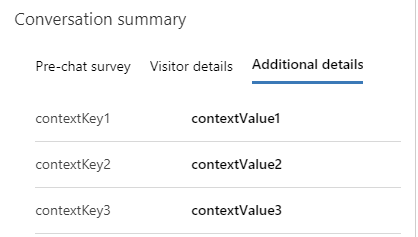
當 isDisplayable 設為 true 時,上下文變數會出現在對話摘要控制項的第三個分頁。 Value 屬性包含使用者的回應或其他資訊,形式為字串、布林值或數字格式。