用戶端密碼或用戶端憑證
如果您的 Web 應用程式現在呼叫下游 Web API,請提供 appsettings.json 檔案中的用戶端密碼或用戶端憑證。 您也可以新增一個區段,以指定:
- 下游 Web API 的 URL
- 呼叫 API 所需的範圍
在下列範例中,GraphBeta 區段會指定這些設定。
{
  "AzureAd": {
    "Instance": "https://login.microsoftonline.com/",
    "ClientId": "[Enter_the_Application_Id_Here]",
    "TenantId": "common",

   // To call an API
   "ClientCredentials": [
    {
      "SourceType": "ClientSecret",
      "ClientSecret":"[Enter_the_Client_Secret_Here]"
    }
  ]
 },
 "GraphBeta": {
    "BaseUrl": "https://graph.microsoft.com/beta",
    "Scopes": ["user.read"]
    }
}
注意
您可以提出一組用戶端憑證,其中包括無憑證的解決方案,例如 Azure Kubernetes 的工作負載身份聯盟。
舊版的 Microsoft.Identity.Web 在單一屬性 "ClientSecret" 中表示用戶端密碼,而不是 "ClientCredentials"。 這仍支援回溯相容性,但您無法同時使用 "ClientSecret" 屬性和 "ClientCredentials" 集合。
您可以提供用戶端憑證,而不是用戶端密碼。 下列程式碼片段顯示如何使用儲存在 Azure Key Vault 中的憑證。
{
  "AzureAd": {
    "Instance": "https://login.microsoftonline.com/",
    "ClientId": "[Enter_the_Application_Id_Here]",
    "TenantId": "common",

   // To call an API
   "ClientCredentials": [
      {
        "SourceType": "KeyVault",
        "KeyVaultUrl": "https://msidentitywebsamples.vault.azure.net",
        "KeyVaultCertificateName": "MicrosoftIdentitySamplesCert"
      }
   ]
  },
  "GraphBeta": {
    "BaseUrl": "https://graph.microsoft.com/beta",
    "Scopes": ["user.read"]
  }
}
警告
如果您忘記將 Scopes 變更為陣列,則在嘗試使用 IDownstreamApi 範圍時,會顯示 null,而 IDownstreamApi 會嘗試對下游 API 進行匿名 (未驗證) 呼叫,這會導致 401/unauthenticated。
Microsoft.Identity.Web 提供數種方式來描述憑證 (透過設定或程式碼)。 如需詳細資訊,請參閱 GitHub 上的 Microsoft.Identity.Web - 使用憑證。
修改Startup.cs檔案
您的 Web 應用程式需要取得下游 API 的令牌。 您可以在 .EnableTokenAcquisitionToCallDownstreamApi() 後面加上 .AddMicrosoftIdentityWebApp(Configuration) 行來進行指定。 這行程式碼會顯示您可以在控制器和頁面動作中使用的 IAuthorizationHeaderProvider 服務。 不過,下列兩個選項可讓您更輕鬆地完成。 您也需要在 .AddInMemoryTokenCaches() 中選擇權杖快取實作,例如 :
using Microsoft.Identity.Web;

public class Startup
{
  // ...
  public void ConfigureServices(IServiceCollection services)
  {
  // ...
  services.AddAuthentication(OpenIdConnectDefaults.AuthenticationScheme)
          .AddMicrosoftIdentityWebApp(Configuration, "AzureAd")
            .EnableTokenAcquisitionToCallDownstreamApi(new string[]{"user.read" })
            .AddInMemoryTokenCaches();
   // ...
  }
  // ...
}
傳遞給 EnableTokenAcquisitionToCallDownstreamApi 的範圍是選擇性的,並使您的 Web 應用程式能夠在使用者登入時要求範圍並徵得使用者對這些範圍的同意。 如果您未指定範圍,則 Microsoft.Identity.Web 會啟用累加式同意體驗。
Microsoft.Identity.Web 提供兩種機制,讓您不需要取得權杖,即可從 Web 應用程式呼叫 Web API。 您選擇的選項取決於您是否要呼叫 Microsoft Graph 或其他 API。
選項 1:呼叫 Microsoft Graph
如果您想要呼叫 Microsoft Graph,Microsoft.Identity.Web 會讓您在 API 動作中直接使用 GraphServiceClient (由 Microsoft Graph SDK 公開)。 若要將 Microsoft Graph 功能公開:
將 Microsoft.Identity.Web.GraphServiceClient NuGet 套件新增至專案。
在 .AddMicrosoftGraph() 檔案的 .EnableTokenAcquisitionToCallDownstreamApi() 後面加入 。
.AddMicrosoftGraph() 有數個覆寫選項。 使用以設定區段作為參數的覆寫,程式碼就會變成:
using Microsoft.Identity.Web;

public class Startup
{
  // ...
  public void ConfigureServices(IServiceCollection services)
  {
  // ...
  services.AddAuthentication(OpenIdConnectDefaults.AuthenticationScheme)
          .AddMicrosoftIdentityWebApp(Configuration, "AzureAd")
            .EnableTokenAcquisitionToCallDownstreamApi(new string[]{"user.read" })
               .AddMicrosoftGraph(Configuration.GetSection("GraphBeta"))
            .AddInMemoryTokenCaches();
   // ...
  }
  // ...
}
選項 2:呼叫 Microsoft Graph 以外的下游 Web API
若要呼叫 Microsoft Graph 以外的 API,Microsoft.Identity.Web 可讓您在 API 動作中使用 IDownstreamApi 介面。 若要使用此介面:
將 Microsoft.Identity.Web.DownstreamApi NuGet 套件新增至您的專案。
在 .AddDownstreamApi() 檔案的 .EnableTokenAcquisitionToCallDownstreamApi() 後面加入 。
.AddDownstreamApi() 有兩個引數,且顯示在下列程式碼片段中:
- 服務的名稱 (API),用於控制器動作以參考對應的組態
- 此組態區段表示用來呼叫下游 Web API 的參數。
using Microsoft.Identity.Web;

public class Startup
{
  // ...
  public void ConfigureServices(IServiceCollection services)
  {
  // ...
  services.AddAuthentication(OpenIdConnectDefaults.AuthenticationScheme)
          .AddMicrosoftIdentityWebApp(Configuration, "AzureAd")
            .EnableTokenAcquisitionToCallDownstreamApi(new string[]{"user.read" })
               .AddDownstreamApi("MyApi", Configuration.GetSection("GraphBeta"))
            .AddInMemoryTokenCaches();
   // ...
  }
  // ...
}
摘要
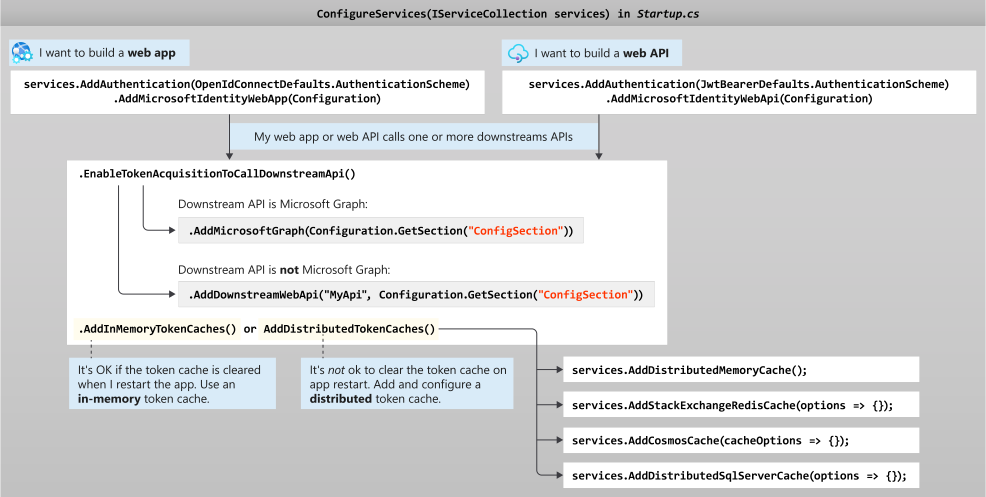
如同 Web API,您可以選擇各種權杖快取實作。 如需詳細資訊,請參閱 GitHub 上的 Microsoft.Identity.Web - 權杖快取序列化。
下圖顯示 Microsoft.Identity.Web 的各種可能性,以及其對Startup.cs 檔案的影響:
用戶端密碼或用戶端憑證
如果您的 Web 應用程式現在呼叫下游 Web API,請提供 appsettings.json 檔案中的用戶端密碼或用戶端憑證。 您也可以新增一個區段,以指定:
- 下游 Web API 的 URL
- 呼叫 API 所需的範圍
在下列範例中,GraphBeta 區段會指定這些設定。
{
  "AzureAd": {
    "Instance": "https://login.microsoftonline.com/",
    "ClientId": "[Enter_the_Application_Id_Here]",
    "TenantId": "common",

   // To call an API
   "ClientCredentials": [
    {
      "SourceType": "ClientSecret",
      "ClientSecret":"[Enter_the_Client_Secret_Here]"
    }
  ]
 },
 "GraphBeta": {
    "BaseUrl": "https://graph.microsoft.com/beta",
    "Scopes": ["user.read"]
    }
}
注意
您可以提出一組用戶端憑證,其中包括無憑證的解決方案,例如 Azure Kubernetes 的工作負載身份聯盟。
舊版的 Microsoft.Identity.Web 在單一屬性 "ClientSecret" 中表示用戶端密碼,而不是 "ClientCredentials"。 這仍支援回溯相容性,但您無法同時使用 "ClientSecret" 屬性和 "ClientCredentials" 集合。
您可以提供用戶端憑證,而不是用戶端密碼。 下列程式碼片段顯示如何使用儲存在 Azure Key Vault 中的憑證。
{
  "AzureAd": {
    "Instance": "https://login.microsoftonline.com/",
    "ClientId": "[Enter_the_Application_Id_Here]",
    "TenantId": "common",

   // To call an API
   "ClientCredentials": [
      {
        "SourceType": "KeyVault",
        "KeyVaultUrl": "https://msidentitywebsamples.vault.azure.net",
        "KeyVaultCertificateName": "MicrosoftIdentitySamplesCert"
      }
   ]
  },
  "GraphBeta": {
    "BaseUrl": "https://graph.microsoft.com/beta",
    "Scopes": ["user.read"]
  }
}
警告
如果您忘記將 Scopes 變更為陣列,則在嘗試使用 IDownstreamApi 範圍時,會顯示 null,而 IDownstreamApi 會嘗試對下游 API 進行匿名 (未驗證) 呼叫,這會導致 401/unauthenticated。
Microsoft.Identity.Web 提供數種方式來描述憑證 (透過設定或程式碼)。 如需詳細資訊,請參閱 GitHub 上的 Microsoft.Identity.Web - 使用憑證。
Startup.Auth.cs
您的 Web 應用程式需要取得權杖來呼叫下游 API,Microsoft.Identity.Web 提供兩種機制,以便從 Web 應用程式呼叫 Web API。 您選擇的選項取決於您是否要呼叫 Microsoft Graph 或其他 API。
選項 1:呼叫 Microsoft Graph
如果您想要呼叫 Microsoft Graph,Microsoft.Identity.Web 會讓您在 API 動作中直接使用 GraphServiceClient (由 Microsoft Graph SDK 公開)。 若要將 Microsoft Graph 功能公開:
- 將 Microsoft.Identity.Web.GraphServiceClient NuGet 套件新增至專案。
- 將
.AddMicrosoftGraph() 新增至 Startup.Auth.cs 檔案中的服務集合。
.AddMicrosoftGraph() 有數個覆寫選項。 使用以設定區段作為參數的覆寫,程式碼就會變成:
using Microsoft.Extensions.DependencyInjection;
using Microsoft.Identity.Client;
using Microsoft.Identity.Web;
using Microsoft.Identity.Web.OWIN;
using Microsoft.Identity.Web.TokenCacheProviders.InMemory;
using Microsoft.IdentityModel.Validators;
using Microsoft.Owin.Security;
using Microsoft.Owin.Security.Cookies;
using Owin;

namespace WebApp
{
    public partial class Startup
    {
        public void ConfigureAuth(IAppBuilder app)
        {
            app.SetDefaultSignInAsAuthenticationType(CookieAuthenticationDefaults.AuthenticationType);

            app.UseCookieAuthentication(new CookieAuthenticationOptions());

            // Get an TokenAcquirerFactory specialized for OWIN
            OwinTokenAcquirerFactory owinTokenAcquirerFactory = TokenAcquirerFactory.GetDefaultInstance<OwinTokenAcquirerFactory>();

            // Configure the web app.
            app.AddMicrosoftIdentityWebApp(owinTokenAcquirerFactory,
                                          updateOptions: options => {});

            // Add the services you need.
            owinTokenAcquirerFactory.Services
                .Configure<ConfidentialClientApplicationOptions>(options =>
                      { options.RedirectUri = "https://localhost:44326/"; })
                .AddMicrosoftGraph()
                .AddInMemoryTokenCaches();
            owinTokenAcquirerFactory.Build();
        }
    }
}
選項 2:呼叫 Microsoft Graph 以外的下游 Web API
若要呼叫 Microsoft Graph 以外的 API,Microsoft.Identity.Web 可讓您在 API 動作中使用 IDownstreamApi 介面。 若要使用此介面:
- 將 Microsoft.Identity.Web.DownstreamApi NuGet 套件新增至您的專案。
- 在
.AddDownstreamApi() 檔案的 .EnableTokenAcquisitionToCallDownstreamApi() 後面加入 。
.AddDownstreamApi() 有兩個引數。
- 服務的名稱(API):您可以在控制器動作中使用這個名稱來參考對應的組態
- 此組態區段表示用來呼叫下游 Web API 的參數。
程式碼如下:
  using Microsoft.Extensions.DependencyInjection;
  using Microsoft.Identity.Client;
  using Microsoft.Identity.Web;
  using Microsoft.Identity.Web.OWIN;
  using Microsoft.Identity.Web.TokenCacheProviders.InMemory;
  using Microsoft.IdentityModel.Validators;
  using Microsoft.Owin.Security;
  using Microsoft.Owin.Security.Cookies;
  using Owin;

  namespace WebApp
  {
      public partial class Startup
      {
          public void ConfigureAuth(IAppBuilder app)
          {
              app.SetDefaultSignInAsAuthenticationType(CookieAuthenticationDefaults.AuthenticationType);

              app.UseCookieAuthentication(new CookieAuthenticationOptions());

              // Get a TokenAcquirerFactory specialized for OWIN.
              OwinTokenAcquirerFactory owinTokenAcquirerFactory = TokenAcquirerFactory.GetDefaultInstance<OwinTokenAcquirerFactory>();

              // Configure the web app.
              app.AddMicrosoftIdentityWebApp(owinTokenAcquirerFactory,
                                            updateOptions: options => {});

              // Add the services you need.
              owinTokenAcquirerFactory.Services
                  .Configure<ConfidentialClientApplicationOptions>(options =>
                        { options.RedirectUri = "https://localhost:44326/"; })
                  .AddDownstreamApi("Graph", owinTokenAcquirerFactory.Configuration.GetSection("GraphBeta"))
                  .AddInMemoryTokenCaches();
              owinTokenAcquirerFactory.Build();
          }
      }
  }
摘要
您可以選擇各種權杖快取實作。 如需詳細資訊,請參閱 GitHub 上的 Microsoft.Identity.Web - 權杖快取序列化。
下圖顯示 Microsoft.Identity.Web 的各種可能性,以及其對Startup.cs 檔案的影響:
本文中程式碼範例和以下項目是從 ASP.NET Web app sample (ASP.NET Web 應用程式範例) 擷取的。 建議參考該範例以取得完整的實作詳細資料。
實作 Java 程式代碼範例
本文中程式碼範例和下列項目是從 Java web application that calls Microsoft Graph (呼叫 Microsoft Graph 的 Java Web 應用程式) 擷取的,其為使用適用於 Java MSAL 的 Web 應用程式範例。
範例目前會讓適用於 Java 的 MSAL 產生授權碼 URL,並處理導覽至 Microsoft 身分識別平台的授權端點。 您也可以使用 Sprint 安全性來登入使用者。 建議參考範例以取得完整的實作詳細資料。
實作Node.js程式代碼範例
本文中程式碼範例和下列項目是從 Node.js & Express.js web application that calls Microsoft Graph (呼叫 Microsoft Graph 的 Node.js & Express.js Web 應用程式) 擷取的,這是使用 MSAL Node 的 Web 應用程式範例。
此範例目前會讓 MSAL Node 產生授權碼 URL,並處理導覽至 Microsoft 身分識別平台的授權端點。 如下所示:
/**
 * Prepares the auth code request parameters and initiates the first leg of auth code flow
 * @param req: Express request object
 * @param res: Express response object
 * @param next: Express next function
 * @param authCodeUrlRequestParams: parameters for requesting an auth code url
 * @param authCodeRequestParams: parameters for requesting tokens using auth code
 */
redirectToAuthCodeUrl(authCodeUrlRequestParams, authCodeRequestParams, msalInstance) {
    return async (req, res, next) => {
        // Generate PKCE Codes before starting the authorization flow
        const { verifier, challenge } = await this.cryptoProvider.generatePkceCodes();

        // Set generated PKCE codes and method as session vars
        req.session.pkceCodes = {
            challengeMethod: 'S256',
            verifier: verifier,
            challenge: challenge,
        };

        /**
         * By manipulating the request objects below before each request, we can obtain
         * auth artifacts with desired claims. For more information, visit:
         * https://azuread.github.io/microsoft-authentication-library-for-js/ref/modules/_azure_msal_node.html#authorizationurlrequest
         * https://azuread.github.io/microsoft-authentication-library-for-js/ref/modules/_azure_msal_node.html#authorizationcoderequest
         **/
        req.session.authCodeUrlRequest = {
            ...authCodeUrlRequestParams,
            responseMode: msal.ResponseMode.FORM_POST, // recommended for confidential clients
            codeChallenge: req.session.pkceCodes.challenge,
            codeChallengeMethod: req.session.pkceCodes.challengeMethod,
        };

        req.session.authCodeRequest = {
            ...authCodeRequestParams,
            code: '',
        };

        try {
            const authCodeUrlResponse = await msalInstance.getAuthCodeUrl(req.session.authCodeUrlRequest);
            res.redirect(authCodeUrlResponse);
        } catch (error) {
            next(error);
        }
    };
}
實作 Python 程式代碼範例
本文中的程式碼片段以及以下文章中的片段,都是從使用身分識別套件(MSAL Python 的包裝函式)呼叫 Microsoft Graph 的 Python Web 應用程式範例中擷取的。
此範例會使用身分識別套件產生授權碼 URL,並處理導覽至 Microsoft 身分識別平台的授權端點。 建議參考範例以取得完整的實作詳細資料。
Microsoft.Identity.Web.OWIN 會透過設定正確的 Open ID Connect 設定、訂閱授權碼接收事件,以及兌換授權碼來簡化程式碼。 兌換授權碼無需額外的程式碼。 如需其運作方式的詳細資訊,請參閱 Microsoft.Identity.Web 原始程式碼。
AuthProvider 類別中的 handleRedirect 方法會處理從 Microsoft Entra ID 收到的授權碼。 如下所示:
handleRedirect(options = {}) {
    return async (req, res, next) => {
        if (!req.body || !req.body.state) {
            return next(new Error('Error: response not found'));
        }

        const authCodeRequest = {
            ...req.session.authCodeRequest,
            code: req.body.code,
            codeVerifier: req.session.pkceCodes.verifier,
        };

        try {
            const msalInstance = this.getMsalInstance(this.msalConfig);

            if (req.session.tokenCache) {
                msalInstance.getTokenCache().deserialize(req.session.tokenCache);
            }

            const tokenResponse = await msalInstance.acquireTokenByCode(authCodeRequest, req.body);

            req.session.tokenCache = msalInstance.getTokenCache().serialize();
            req.session.idToken = tokenResponse.idToken;
            req.session.account = tokenResponse.account;
            req.session.isAuthenticated = true;

            const state = JSON.parse(this.cryptoProvider.base64Decode(req.body.state));
            res.redirect(state.successRedirect);
        } catch (error) {
            next(error);
        }
    }
}
應用程式收到授權碼後, AuthFilter.java#L51-L56:
- 委派到
AuthHelper.processAuthenticationCodeRedirect 方法,位於 AuthHelper.java#L67-L97 中。
- 呼叫
getAuthResultByAuthCode。
class AuthHelper {
  // Code omitted
  void processAuthenticationCodeRedirect(HttpServletRequest httpRequest, String currentUri, String fullUrl)
            throws Throwable {

  // Code omitted
  AuthenticationResponse authResponse = AuthenticationResponseParser.parse(new URI(fullUrl), params);

  // Code omitted
  IAuthenticationResult result = getAuthResultByAuthCode(
                    httpRequest,
                    oidcResponse.getAuthorizationCode(),
                    currentUri);

// Code omitted
  }
}
getAuthResultByAuthCode 方法是定義在 AuthHelper.java#L176 中。 其會建立 MSAL ConfidentialClientApplication,然後使用從授權碼建立的 acquireToken() 來呼叫 AuthorizationCodeParameters。
   private IAuthenticationResult getAuthResultByAuthCode(
            HttpServletRequest httpServletRequest,
            AuthorizationCode authorizationCode,
            String currentUri) throws Throwable {

        IAuthenticationResult result;
        ConfidentialClientApplication app;
        try {
            app = createClientApplication();

            String authCode = authorizationCode.getValue();
            AuthorizationCodeParameters parameters = AuthorizationCodeParameters.builder(
                    authCode,
                    new URI(currentUri)).
                    build();

            Future<IAuthenticationResult> future = app.acquireToken(parameters);

            result = future.get();
        } catch (ExecutionException e) {
            throw e.getCause();
        }

        if (result == null) {
            throw new ServiceUnavailableException("authentication result was null");
        }

        SessionManagementHelper.storeTokenCacheInSession(httpServletRequest, app.tokenCache().serialize());

        return result;
    }

    private ConfidentialClientApplication createClientApplication() throws MalformedURLException {
        return ConfidentialClientApplication.builder(clientId, ClientCredentialFactory.create(clientSecret)).
                authority(authority).
                build();
    }
參考 教學:透過 Microsoft 身份平台登入 Python Flask 網頁應用程式
Microsoft 登入畫面會將授權碼傳送至應用程式註冊中指定的 /getAToken URL。
auth_response 路由會處理該 URL、呼叫 auth.complete_login 以處理授權碼,然後傳回錯誤或重新導向至首頁。
@app.route(app_config.REDIRECT_PATH)
def auth_response():
    result = auth.complete_log_in(request.args)
    if "error" in result:
        return render_template("auth_error.html", result=result)
    return redirect(url_for("index"))
如需該程式代碼的完整內容,請參閱 app.py 。
ASP.NET Core 教程使用依賴注入,讓您在應用程式的 Startup.cs 檔案中決定權杖快取的實作方式。 Microsoft.Identity.Web 隨附權杖快取序列化中所述的預建權杖快取序列化程式。 一個有趣的可能性是選擇 ASP.NET Core 分散式記憶體快取:
// Use a distributed token cache by adding:
    services.AddMicrosoftIdentityWebAppAuthentication(Configuration, "AzureAd")
            .EnableTokenAcquisitionToCallDownstreamApi(
                initialScopes: new string[] { "user.read" })
            .AddDistributedTokenCaches();

// Then, choose your implementation.
// For instance, the distributed in-memory cache (not cleared when you stop the app):
services.AddDistributedMemoryCache();

// Or a Redis cache:
services.AddStackExchangeRedisCache(options =>
{
 options.Configuration = "localhost";
 options.InstanceName = "SampleInstance";
});

// Or even a SQL Server token cache:
services.AddDistributedSqlServerCache(options =>
{
 options.ConnectionString = _config["DistCache_ConnectionString"];
 options.SchemaName = "dbo";
 options.TableName = "TestCache";
});
如需有關權杖快取提供者的詳細資訊,請參閱 Microsoft.Identity.Web 的權杖快取序列化一文,以及 Web 應用程式教學課程的 ASP.NET Core Web 應用程式教學課程 | 權杖快取階段。
ASP.NET 教學課程會使用相依性注入,讓您決定在應用程式的 Startup.Auth.cs 檔案中要使用的權杖快取實作。
Microsoft.Identity.Web 隨附權杖快取序列化中所述的預建權杖快取序列化程式。 一個有趣的可能性是選擇 ASP.NET Core 分散式記憶體快取:
var services = owinTokenAcquirerFactory.Services;
// Use a distributed token cache by adding:
services.AddDistributedTokenCaches();

// Then, choose your implementation.
// For instance, the distributed in-memory cache (not cleared when you stop the app):
services.AddDistributedMemoryCache();

// Or a Redis cache:
services.AddStackExchangeRedisCache(options =>
{
 options.Configuration = "localhost";
 options.InstanceName = "SampleInstance";
});

// Or even a SQL Server token cache:
services.AddDistributedSqlServerCache(options =>
{
 options.ConnectionString = _config["DistCache_ConnectionString"];
 options.SchemaName = "dbo";
 options.TableName = "TestCache";
});
如需令牌快取提供者的詳細資訊,請參閱 Microsoft.Identity.Web 令牌快取串行化一文和 ASP.NET Core Web應用程式教學課程 |Web 應用程式教學課程的令牌快取階段。
如需詳細資訊,請參閱 MSAL.NET 中的權杖快取序列化。
MSAL Java 提供序列化和反序列化權杖快取的方法。 Java 範例會處理來自會話的序列化,如 getAuthResultBySilentFlow 中的 方法內所示:
IAuthenticationResult getAuthResultBySilentFlow(HttpServletRequest httpRequest, HttpServletResponse httpResponse)
      throws Throwable {

  IAuthenticationResult result =  SessionManagementHelper.getAuthSessionObject(httpRequest);

  IConfidentialClientApplication app = createClientApplication();

  Object tokenCache = httpRequest.getSession().getAttribute("token_cache");
  if (tokenCache != null) {
      app.tokenCache().deserialize(tokenCache.toString());
  }

  SilentParameters parameters = SilentParameters.builder(
          Collections.singleton("User.Read"),
          result.account()).build();

  CompletableFuture<IAuthenticationResult> future = app.acquireTokenSilently(parameters);
  IAuthenticationResult updatedResult = future.get();

  // Update session with latest token cache.
  SessionManagementHelper.storeTokenCacheInSession(httpRequest, app.tokenCache().serialize());

  return updatedResult;
}
SessionManagementHelper中提供了 類別的詳細資料。
在 Node.js 範例中,會使用應用程式工作階段來儲存權杖快取。 使用 MSAL Node 快取方法時,工作階段中的權杖快取會在發送權杖請求之前讀取,然後在權杖請求成功完成後更新。 如下所示:
acquireToken(options = {}) {
    return async (req, res, next) => {
        try {
            const msalInstance = this.getMsalInstance(this.msalConfig);

            /**
             * If a token cache exists in the session, deserialize it and set it as the
             * cache for the new MSAL CCA instance. For more, see:
             * https://github.com/AzureAD/microsoft-authentication-library-for-js/blob/dev/lib/msal-node/docs/caching.md
             */
            if (req.session.tokenCache) {
                msalInstance.getTokenCache().deserialize(req.session.tokenCache);
            }

            const tokenResponse = await msalInstance.acquireTokenSilent({
                account: req.session.account,
                scopes: options.scopes || [],
            });

            /**
             * On successful token acquisition, write the updated token
             * cache back to the session. For more, see:
             * https://github.com/AzureAD/microsoft-authentication-library-for-js/blob/dev/lib/msal-node/docs/caching.md
             */
            req.session.tokenCache = msalInstance.getTokenCache().serialize();
            req.session.accessToken = tokenResponse.accessToken;
            req.session.idToken = tokenResponse.idToken;
            req.session.account = tokenResponse.account;

            res.redirect(options.successRedirect);
        } catch (error) {
            if (error instanceof msal.InteractionRequiredAuthError) {
                return this.login({
                    scopes: options.scopes || [],
                    redirectUri: options.redirectUri,
                    successRedirect: options.successRedirect || '/',
                })(req, res, next);
            }

            next(error);
        }
    };
}
在 Python 範例中,身分識別套件會負責權杖快取,其使用全域 session 物件進行儲存。
Flask 提供內建功能來支援儲存在 Cookie 中的工作階段,但由於身分識別 Cookie 的長度較長,因此本範例改用 Flask-session 套件。 所有內容均在 app.py 中初始化:
import identity
import identity.web
import requests
from flask import Flask, redirect, render_template, request, session, url_for
from flask_session import Session

import app_config

app = Flask(__name__)
app.config.from_object(app_config)
Session(app)

auth = identity.web.Auth(
    session=session,
    authority=app.config["AUTHORITY"],
    client_id=app.config["CLIENT_ID"],
    client_credential=app.config["CLIENT_SECRET"],
)
由於 SESSION_TYPE="filesystem" 中的 app_config.py 設定,Flask-session 套件使用本機檔案系統來儲存會話。
對於實際執行環境,您應該使用可在多個執行個體之間保存並部署應用程式的設定,例如 "sqlachemy" 或 "redis"。
 員工租戶 (瞭解更多資訊)
