透過使用 Fabric SDK 進行評估,你可以程式化測試資料代理對自然語言問題的回應能力。 透過簡單的 Python 介面,你可以定義實地範例、執行評估並分析結果——全部都在你的筆記本環境中完成。 這個流程能幫助你驗證準確性、除錯錯誤,並在部署到生產環境前有信心地改進代理程式。
這很重要
這項功能目前處於預覽階段。
先決條件
- 付費的 F2 或更高級別的 Fabric 容量,或啟用 Microsoft Fabric 的 Power BI Premium(P1 或更高級別)容量。
- 根據 Fabric 資料代理租戶設定中說明的需求,啟用 AI 的跨地理處理與跨地理儲存功能。
- 至少有一個資料來源,包含資料:倉庫、湖屋、Power BI 語意模型、KQL 資料庫、鏡像資料庫或本體。 你必須有讀取權限存取資料來源。
安裝數據代理程式 SDK
要開始程式化評估你的 Fabric 資料代理程式,請安裝 Fabric 資料代理 Python SDK。 此 SDK 提供與數據代理程式互動、執行評估及記錄結果所需的工具和方法。 在筆記本中執行下列命令,以安裝最新版本:
%pip install -U fabric-data-agent-sdk
此步驟可確保您擁有 SDK 中最先進的功能和修正程式。
載入您的地面真相數據集
要評估你的 Fabric 資料代理,你需要一組範例問題以及預期答案。 利用這些問題來驗證代理人對現實世界查詢的回應準確度。
在程式碼中直接使用 pandas DataFrame 定義這些問題:
import pandas as pd

# Define a sample evaluation set with user questions and their expected answers.
# You can modify the question/answer pairs to match your scenario.
df = pd.DataFrame(
    columns=["question", "expected_answer"],
    data=[
        ["Show total sales for Canadian Dollar for January 2013", "46,117.30"],
        ["What is the product with the highest total sales for Canadian Dollar in 2013", "Mountain-200 Black, 42"],
        ["Total sales outside of the US", "19,968,887.95"],
        ["Which product category had the highest total sales for Canadian Dollar in 2013", "Bikes (Total Sales: 938,654.76)"]
    ]
)
或者,如果你已有評估資料集,可以從包含 question 欄位和 expected_answer的 CSV 檔載入:
# Load questions and expected answers from a CSV file
input_file_path = "/lakehouse/default/Files/Data/Input/curated_2.csv"
df = pd.read_csv(input_file_path)
此數據集可作為針對數據代理程式執行自動化評估的輸入,以評估精確度和涵蓋範圍。
評估及檢視您的數據代理程式
下一步是利用函 evaluate_data_agent 數執行評估。 此功能將代理人的回應與您的預期結果進行比較,並儲存評估指標。
Note
此步驟需要一個已發佈至你評估階段的資料代理(production 或 sandbox)。 如果你還沒有,請參考「建立 Fabric 資料代理程式」。
from fabric.dataagent.evaluation import evaluate_data_agent

# Name of your data agent
data_agent_name = "AgentEvaluation"

# (Optional) Name of the workspace if the data agent is in a different workspace
workspace_name = None

# (Optional) Name of the output table to store evaluation results (default: "evaluation_output")
# Two tables will be created:
# - "<table_name>": contains summary results (e.g., accuracy)
# - "<table_name>_steps": contains detailed reasoning and step-by-step execution
table_name = "demo_evaluation_output"

# Specify the data agent stage: "production" (default) or "sandbox"
data_agent_stage = "production"

# Run the evaluation and get the evaluation ID
try:
    evaluation_id = evaluate_data_agent(
        df,
        data_agent_name,
        workspace_name=workspace_name,
        table_name=table_name,
        data_agent_stage=data_agent_stage
    )
    print(f"Unique ID for the current evaluation run: {evaluation_id}")
except Exception as e:
    print(f"Evaluation failed: {e}")
運行結束後,你會看到類似以下文字的輸出:
Unique ID for the current evaluation run: <evaluation-id>
取得評估摘要
執行評估後,你可以利用函 get_evaluation_summary 式取得結果的高階摘要。 此功能提供資料代理整體表現的洞察,包括回應數量符合預期答案等指標。
from fabric.dataagent.evaluation import get_evaluation_summary

# Retrieve a summary of the evaluation results
summary_df = get_evaluation_summary(table_name)
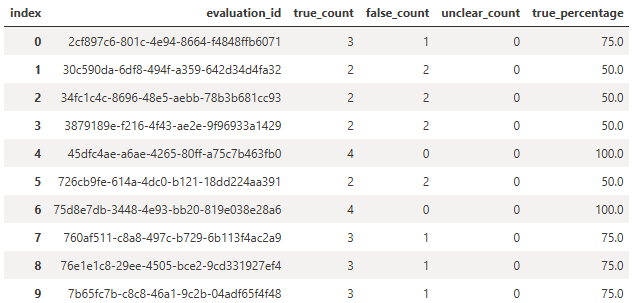
預設情況下,此函式尋找一個名為 evaluation_output的表格。 如果你在評估時指定了自訂資料表名稱(例如 demo_evaluation_output),請將該名稱作為 table_name 參數傳遞。
傳回的 DataFrame 包含匯總的計量,例如正確、不正確或不清楚的回應數目。 此結果有助於您快速評估代理人的準確性並找出改進空間。
檢查詳細的評估結果
想更深入了解資料代理對每個問題的回應,請使用這個 get_evaluation_details 函式。 此函式會傳回評估回合的詳細細目,包括實際的代理程式回應、它們是否符合預期的答案,以及評估線程的連結(僅對執行評估的用戶可見)。
from fabric.dataagent.evaluation import get_evaluation_details

# Table name used during evaluation
table_name = "demo_evaluation_output"

# Whether to return all evaluation rows (True) or only failures (False)
get_all_rows = False

# Whether to print a summary of the results
verbose = True

# Retrieve evaluation details for a specific run
eval_details = get_evaluation_details(
    evaluation_id,
    table_name,
    get_all_rows=get_all_rows,
    verbose=verbose
)

自訂您的評估提示
預設情況下,Fabric SDK 會使用內建提示來評估資料代理的實際答案是否符合預期答案。 不過,你也可以使用 critic_prompt 參數,提供更細緻或領域專屬的評估提示。
您的自訂提示應該包含 佔位元 {query}、 {expected_answer}與 {actual_answer}。 評量過程會動態地替換這些佔位符來取代每題。
from fabric.dataagent.evaluation import evaluate_data_agent

# Define a custom prompt for evaluating agent responses
critic_prompt = """
    Given the following query, expected answer, and actual answer, please determine if the actual answer is equivalent to expected answer. If they are equivalent, respond with 'yes'.

    Query: {query}

    Expected Answer:
    {expected_answer}

    Actual Answer:
    {actual_answer}

    Is the actual answer equivalent to the expected answer?
"""

# Name of the data agent
data_agent_name = "AgentEvaluation"

# Run evaluation using the custom critic prompt
evaluation_id = evaluate_data_agent(df, data_agent_name, critic_prompt=critic_prompt)
這項功能在下列情況下特別有用:
- 你應該對什麼算是配對,採用更寬鬆或嚴格的標準。
- 你預期的答案和實際答案格式可能不同,但語意上仍然相當。
- 您必須擷取應如何判斷答案的特定領域細微差別。
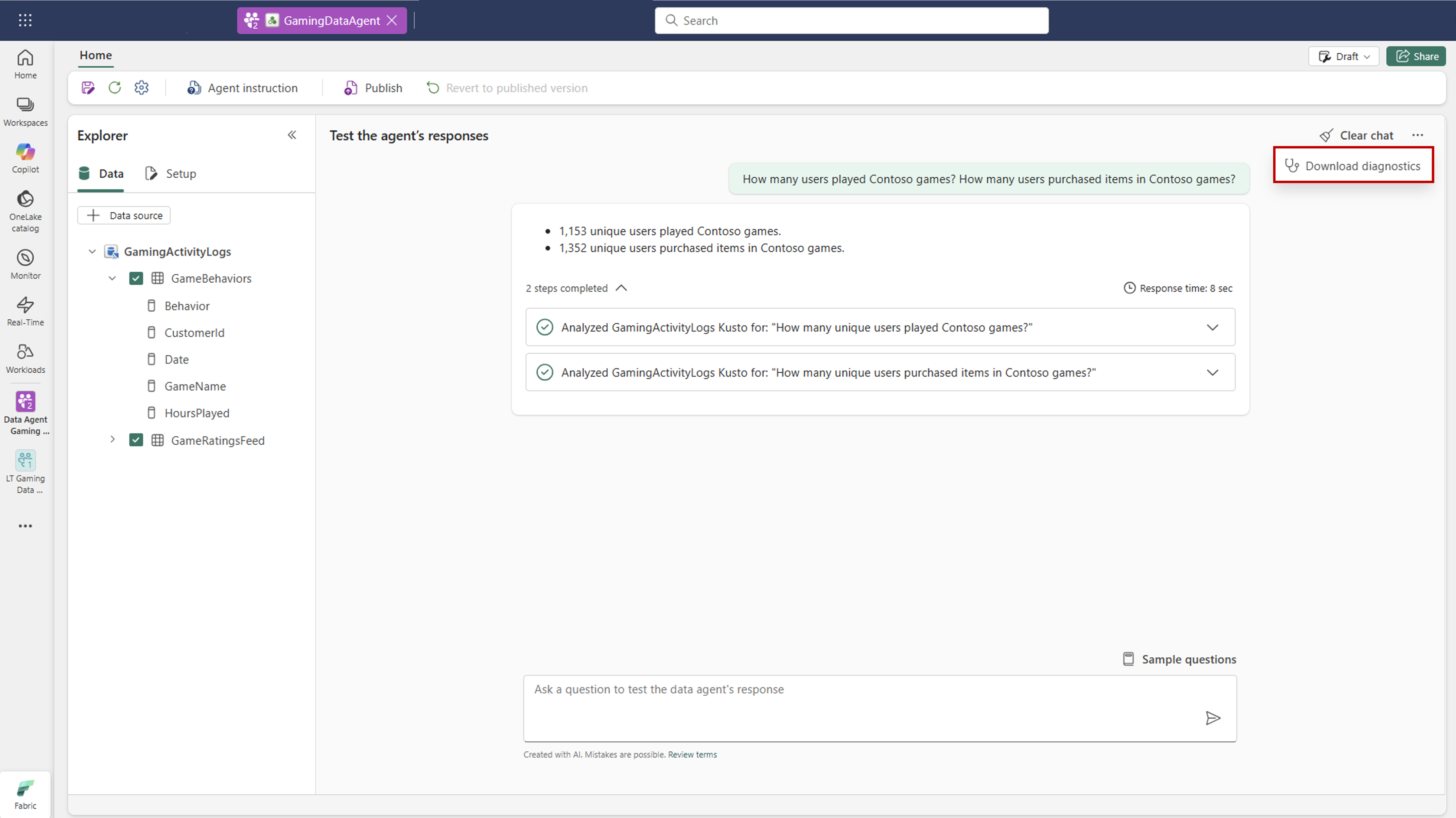
診斷按鈕
診斷按鈕讓你下載資料代理程式設定與執行步驟的完整快照。 此匯出包含資料來源設定、套用指令、所使用的範例查詢,以及資料代理生成回應所採取的底層步驟等細節。
當您與 Microsoft 支援服務 合作或排除意外行為時,請使用此功能。 透過檢視下載的檔案,你可以精確看到資料代理如何處理你的請求、套用了哪些設定,以及可能出現的問題所在。 這種透明度讓你更容易除錯並優化資料代理的效能。
Troubleshooting
| Issue | 原因 | Resolution |
|---|---|---|
| 找不到資料代理 |
data_agent_name 或 workspace_name 不正確,或代理程式尚未發佈。 |
確認代理名稱和工作空間,並確保代理已發佈到指定的 data_agent_stage。 |
| 結果為空或缺失 | 資料表名稱與在 evaluate_data_agent 期間使用的名稱不符。 |
將相同 table_name 值傳遞給 get_evaluation_summary 和 get_evaluation_details。 |
message_url 無法進入 |
評估執行緒僅對執行該評估的使用者可見。 | 用你自己的身份重新執行評估,以存取線程連結。 |
| 自訂提示沒有影響或錯誤 |
critic_prompt缺少必要的佔位符。 |
在你的提示詞中加入 {query}、{actual_answer} 和 {expected_answer}。 |
| 權限錯誤或容量錯誤 | 缺少 F2 或更高的容量,或是缺少對資料來源的讀取權限。 | 確認先決條件,包括容量與資料來源讀取權限。 |