應用程式保護:條件式存取會封鎖對伺服器權杖的存取,直到 Intune 確認已套用應用程式保護原則為止。 此功能需要變更新增使用者流程。 一旦客戶啟用應用程式保護 CA,該客戶租用戶中存取受保護資源的應用程式將無法取得存取權杖,除非它們支援此功能。
注意事項
本指南分為幾個不同的階段。 首先檢閱 第 1 階段:規劃整合。
階段 6:應用程式保護 CA 支援
階段目標
- 了解可用於支援應用程式保護的不同 API iOS 應用程式中的條件式存取
- 整合應用程式保護 針對您的應用程式和使用者的條件式存取。
- 測試上述與您的應用程式及使用者的整合。
相依性
除了 Intune SDK 之外,您還需要這兩個元件以在應用程式中啟用應用程式保護 CA。
- iOS 驗證器應用程式
- MSAL 驗證程式庫 1.0 或更新版本
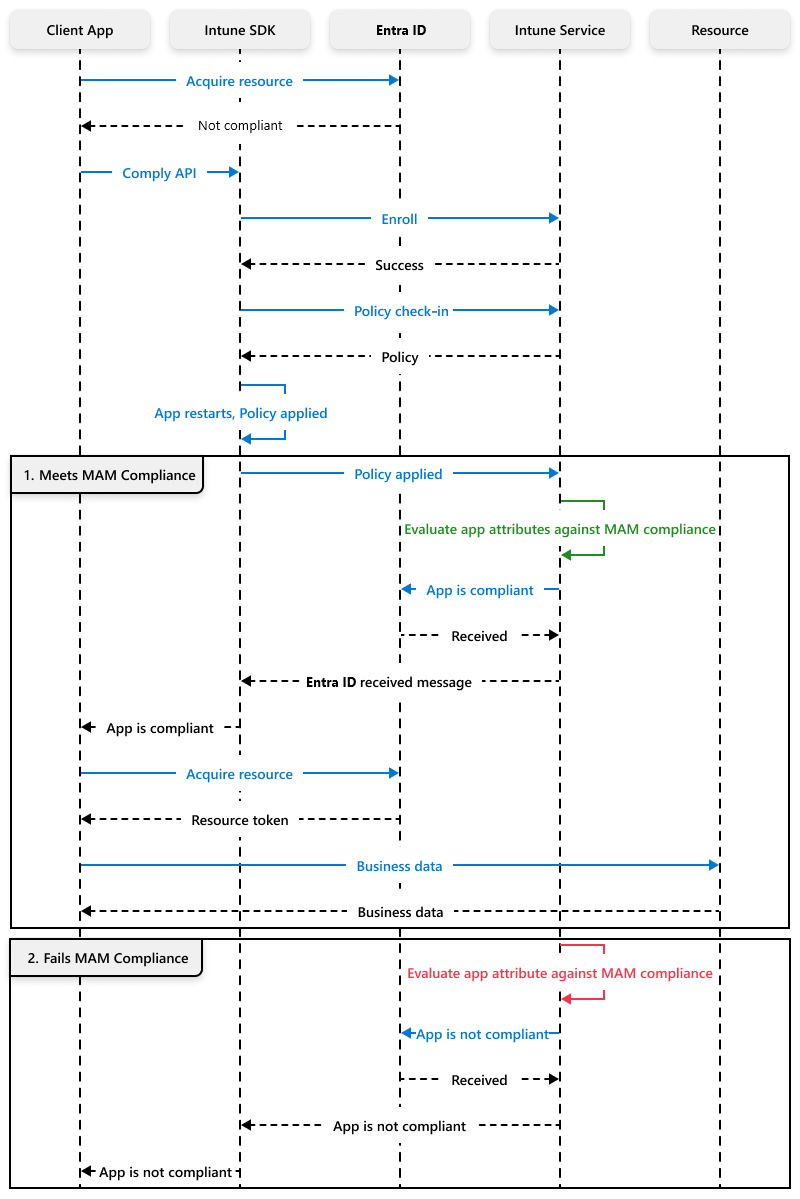
MAM-CA 修復流程
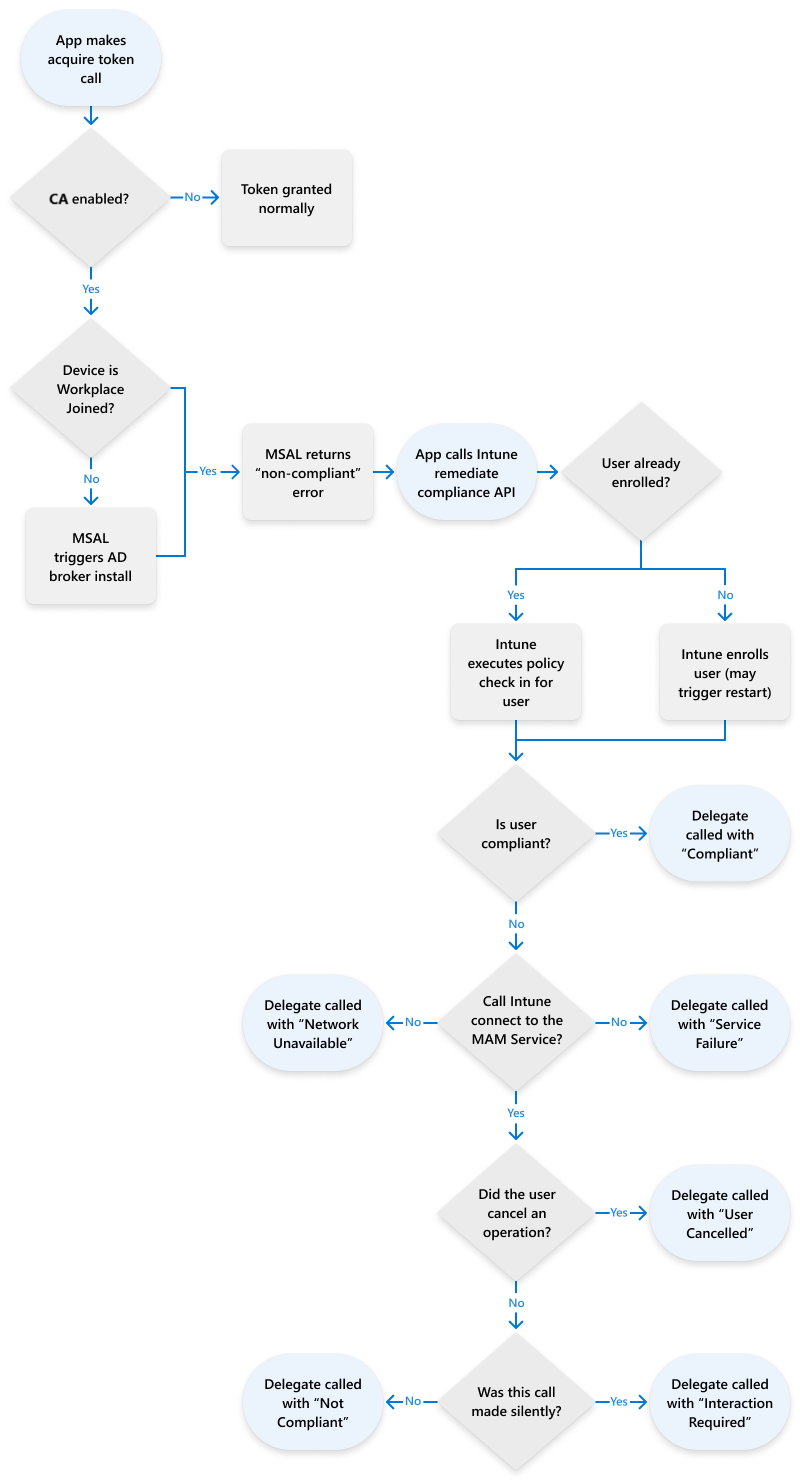
MAM 合規性程序流程
新 API
大部分的新 API 都可以在 IntuneMAMComplianceManager.h 中找到。 應用程式必須注意以下所述的三個行為差異。
| 新行為 | 描述 |
|---|---|
| 應用程式→ ADAL/MSAL:取得權杖 | 當應用程式嘗試取得權杖時,應該準備好接收ERROR_SERVER_PROTECTION_POLICY_REQUIRED。 應用程式可能會在其初始帳戶新增流程期間,或稍後在應用程式生命週期中存取權杖時收到此錯誤。 當應用程式收到此錯誤時,將不會授與存取權杖,而且需要進行補救以擷取任何伺服器資料。 |
| 應用程式→ Intune SDK:呼叫 remediateComplianceForIdentity | 當應用程式收到來自 ADAL 的ERROR_SERVER_PROTECTION_POLICY_REQUIRED或來自 MSAL 的 MSALErrorServerProtectionPoliciesRequired 時,它應該呼叫 [[IntuneMAMComplianceManager instance] remediateComplianceForIdentity] 讓Intune註冊應用程式並套用原則。 在此通話期間可能會重新啟動應用程式。 如果應用程式需要在重新開機之前儲存狀態,可以在 IntuneMAMPolicyDelegate 的 restartApplication 委派方法中執行此動作。 remediateComplianceForIdentity 提供 registerAndEnrollAccount 和 loginAndEnrollAccount 的所有功能。 因此,應用程式不需要使用這些舊版 API 中的任何一個。 |
| Intune →應用程式: 委派補救通知 | 在 Intune 擷取並套用原則之後,它會使用 IntuneMAMComplianceDelegate 通訊協定通知應用程式結果。 如需應用程式應如何處理每個錯誤的相關資訊,請參閱 IntuneComplianceManager.h 中的 IntuneMAMComplianceStatus。 在除 IntuneMAMComplianceCompliant 之外的所有案例中,使用者將沒有有效的存取權杖。 如果應用程式已有受管理內容,但無法進入符合規範狀態,應用程式應該呼叫選擇性抹除以移除任何公司內容。 如果無法達到符合規範狀態,應用程式應該以當地語系化的方式顯示由 withErrorMessage 和 andErrorTitle 所提供的錯誤訊息和標題字串。 |
IntuneMAMComplianceDelegate 的 hasComplianceStatus 方法範例
(void) accountId:(NSString*_Nonnull) accountId hasComplianceStatus:(IntuneMAMComplianceStatus) status withErrorMessage:(NSString*_Nonnull) errMsg andErrorTitle:(NSString*_Nonnull) errTitle
{
    switch(status)
    {
        case IntuneMAMComplianceCompliant:
        {
            /*
            Handle successful compliance
            */
            break;
        }
        case IntuneMAMComplianceNotCompliant:
        case IntuneMAMComplianceNetworkFailure:
        case IntuneMAMComplianceUserCancelled:
        case IntuneMAMComplianceServiceFailure:
        {
            UIAlertController* alert = [UIAlertController alertControllerWithTitle:errTitle
            message:errMsg
            preferredStyle:UIAlertControllerStyleAlert];
            UIAlertAction* defaultAction = [UIAlertAction actionWithTitle:@"OK" style:UIAlertActionStyleDefault
            handler:^(UIAlertAction * action) {exit(0);}];
            [alert addAction:defaultAction];
            dispatch_async(dispatch_get_main_queue(), ^{
            [self presentViewController:alert animated:YES completion:nil];
            });
            break;
        }
        case IntuneMAMComplianceInteractionRequired:
        {
            [[IntuneMAMComplianceManager instance] remediateComplianceForAccountId:accountId silent:NO];
            break;
        }
    }
}
func accountId(_ accountId: String, hasComplianceStatus status: IntuneMAMComplianceStatus, withErrorMessage errMsg: String, andErrorTitle errTitle: String) {
        switch status {
        case .compliant:
           //Handle successful compliance
        case .notCompliant, .networkFailure,.serviceFailure,.userCancelled:
            DispatchQueue.main.async {
              let alert = UIAlertController(title: errTitle, message: errMsg, preferredStyle: .alert)
                alert.addAction(UIAlertAction(title: "OK", style: .default, handler: { action in
                    exit(0)
                }))
                self.present(alert, animated: true, completion: nil)
            }
        case .interactionRequired:
            IntuneMAMComplianceManager.instance().remediateCompliance(forAccountId: accountId, silent: false)
   }
MSAL/ADAL
應用程式必須將用戶端功能變數新增至其 MSAL/ADAL 設定,以表示支援應用程式保護 CA。 下列值為必要項目:claims = {“access_token”:{“xms_cc”:{“values”:[“protapp”]}}}
MSALPublicClientApplicationConfig 類別參考 (azuread.github.io)
    MSALAADAuthority *authority = [[MSALAADAuthority alloc] initWithURL:[[NSURL alloc] initWithString:IntuneMAMSettings.aadAuthorityUriOverride] error:&msalError];
    MSALPublicClientApplicationConfig *config = [[MSALPublicClientApplicationConfig alloc]
                                                 initWithClientId:IntuneMAMSettings.aadClientIdOverride
                                                 redirectUri:IntuneMAMSettings.aadRedirectUriOverride
                                                 authority:authority];

    /*
     IF YOU'RE IMPLEMENTING CA IN YOUR APP, PLEASE PAY ATTENTION TO THE FOLLOWING...
    */
    // This is needed for CA!
    // This line adds an option to the MSAL token request so that MSAL knows that CA may be active
    // Without this, MSAL won't know that CA could be activated
    // In the event that CA is activated and this line isn't in place, the auth flow will fail

    config.clientApplicationCapabilities = @[@"protapp"];
guard let authorityURL = URL(string: kAuthority) else {
            print("Unable to create authority URL")
            return
        }
         let authority = try MSALAADAuthority(url: authorityURL)
         let msalConfiguration = MSALPublicClientApplicationConfig(clientId: kClientID,redirectUri: kRedirectUri,
                                                                  authority: authority)
        msalConfiguration.clientApplicationCapabilities = ["ProtApp"]
        self.applicationContext = try MSALPublicClientApplication(configuration: msalConfiguration)
若要擷取 MAM SDK 合規性補救 API 之 accountId 參數的 Microsoft Entra 物件識別碼,您必須執行下列步驟:
- 首先,在 MSAL 向應用程式報告ERROR_SERVER_PROTECTION_POLICY_REQUIRED時,從 MSALError 物件內的 userInfo[MSALHomeAccountIdKey] 取得 homeAccountId。
- 此 homeAccountId 的格式為 ObjectId.TenantId。 分割 '.' 上的字串以擷取 ObjectId 值,然後在補救 API remediateComplianceForAccountId 中將該值用於 accountId 參數。
結束準則
設定 App Protection CA 的測試使用者
- 使用您的系統管理員認證登入。https://portal.azure.com
- 選取 [Microsoft Entra ID>] 條件式存取>[建立新原則]。 建立新的條件式存取原則。
- 透過設定下列項目來設定條件式存取原則:
- 填寫 名稱 欄位。
- 啟用該原則。
- 將原則指派給使用者或群組。
- 指派雲端應用程式。 選取 [包括>所有雲端應用程式]。 如警告所示,請小心不要錯誤設定此設定。 例如,如果您排除所有雲端應用程式,就會將自己鎖定在主機之外。
- 選取 [存取控制][授與存取>權] [需要應用程式保護原則],>以授與存取控制項。
- 當您完成設定原則時,請選取 [ 建立] 以儲存原則並加以套用。
- 啟用原則。
- 您也需要確定使用者是 MAM 原則的目標。
測試案例
| 測試案例 | 如何測試 | 預期成果 |
|---|---|---|
| 一律套用 MAM-CA | 在註冊您的應用程式之前,請確定使用者是應用程式保護 CA 和 MAM 原則的目標。 | 確認您的應用程式會處理上述的補救案例,且應用程式可以取得存取權杖。 |
| 在使用者註冊後套用 MAM-CA | 使用者應該已經登入應用程式,但不是應用程式保護 CA 的目標。 | 在主控台中以應用程式保護 CA 為目標使用者,並確認您正確處理 MAM 補救 |
| MAM-CA 不合規性 | 設定應用程式保護 CA 原則,但不要指派 MAM 原則。 | 使用者應該無法取得存取權杖。 這對於測試應用程式如何處理 IntuneMAMComplianceStatus 錯誤案例很有用。 |
後續步驟
完成上述所有 結束準則 之後,您的應用程式現在已成功與應用程式保護 CA 支援整合。 後續章節「 階段 7:Web 檢視功能 」可能或可能不需要,取決於您的應用程式所需的應用程式保護原則支援。