偵測執行指定 API 作業所需的最小許可權。 使用來自指定本機資料夾的 API 資訊。
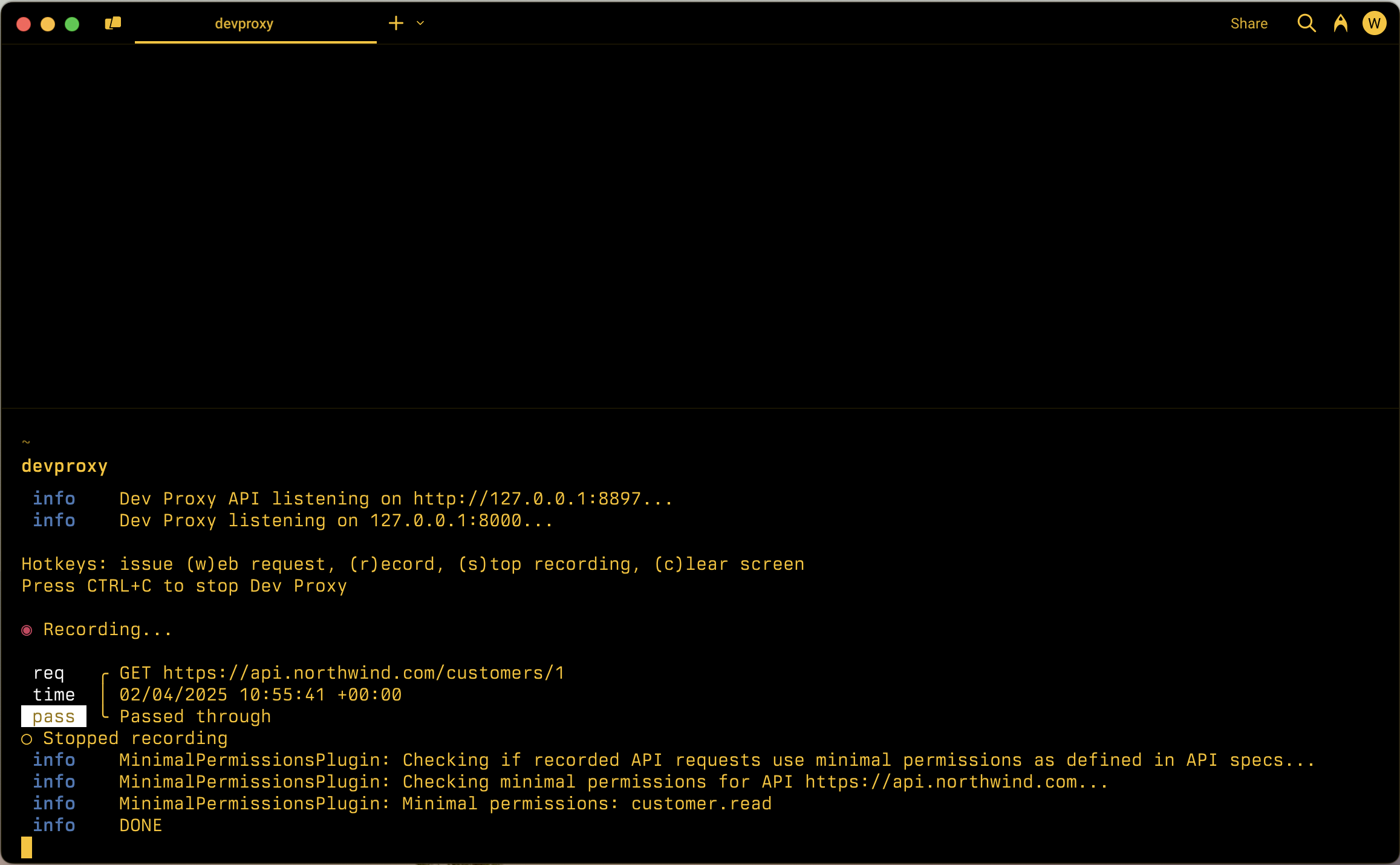
設定範例
{
  "$schema": "https://raw.githubusercontent.com/dotnet/dev-proxy/main/schemas/v3.3.1/rc.schema.json",
  "plugins": [
    {
      "name": "MinimalPermissionsPlugin",
      "enabled": true,
      "pluginPath": "~appFolder/plugins/DevProxy.Plugins.dll",
      "configSection": "minimalPermissionsPlugin"
    }
  ],
  "minimalPermissionsPlugin": {
    "$schema": "https://raw.githubusercontent.com/dotnet/dev-proxy/main/schemas/v3.3.1/minimalpermissionsplugin.schema.json",
    "apiSpecsFolderPath": "./api-specs"
  }
}
設定屬性
| 屬性 | 說明 | 預設 |
|---|---|---|
apiSpecsFolderPath |
具有 API 規格之資料夾的相對或絕對路徑 | 無 |
schemeName |
用來判斷最低權限的安全配置定義名稱。 如果未指定,外掛程式會從規格中的第一個 oauth2 配置讀取資訊 | 無 |
命令列選項
無
備註
外掛程式 MinimalPermissionsPlugin 會檢查應用程式是否使用最少的許可權來呼叫 API。 若要檢查許可權,外掛程式會使用位於指定本機資料夾中之 API 的相關信息。
定義 API 許可權
外掛程式 MinimalPermissionsPlugin 支援檢查使用 OAuth 保護之 API 的 OAuth 許可權。 外掛程式會使用提供的 API 規格中的資訊,計算呼叫應用程式中使用的 API 所需的最小許可權。
若要定義 API 的許可權,請在 API 的 OpenAPI 定義中包含這些許可權。 下列範例示範如何在 OpenAPI 定義中定義 API 的權限:
{
  "openapi": "3.0.1",
  "info": {
    "title": "Northwind API",
    "description": "Northwind API",
    "version": "v1.0"
  },
  "servers": [
    {
      "url": "https://api.northwind.com"
    }
  ],
  "components": {
    "securitySchemes": {
      "OAuth2": {
        "type": "oauth2",
        "flows": {
          "authorizationCode": {
            "authorizationUrl": "https://login.microsoftonline.com/common/oauth2/authorize",
            "tokenUrl": "https://login.microsoftonline.com/common/oauth2/token",
            "scopes": {
              "customer.read": "Grants access to ready customer info",
              "customer.readwrite": "Grants access to read and write customer info"
            }
          }
        }
      }
    },
    "schemas": {
      "Customer": {
        "type": "object",
        "properties": {}
      }
    }
  },
  "paths": {
    "/customers/{customers-id}": {
      "description": "Provides operations to manage a customer",
      "get": {
        "summary": "Get customer by ID",
        "operationId": "getCustomerById",
        "security": [
          {
            "OAuth2": [
              "customer.read"
            ]
          },
          {
            "OAuth2": [
              "customer.readwrite"
            ]
          }
        ],
        "responses": {
          "200": {
            "description": "OK",
            "content": {
              "application/json; charset=utf-8": {
                "schema": {
                  "$ref": "#/components/schemas/Customer"
                }
              }
            }
          }
        }
      },
      "patch": {
        "summary": "Update customer by ID",
        "operationId": "updateCustomerById",
        "security": [
          {
            "OAuth2": [
              "customer.readwrite"
            ]
          }
        ],
        "requestBody": {
          "required": true,
          "content": {
            "application/json": {
              "schema": {
                "$ref": "#/components/schemas/Customer"
              }
            }
          }
        },
        "responses": {
          "204": {
            "description": "No Content"
          }
        }
      },
      "parameters": [
        {
          "name": "customers-id",
          "in": "path",
          "required": true,
          "schema": {
            "type": "string"
          }
        }
      ]
    }
  },
  "x-ms-generated-by": {
    "toolName": "Dev Proxy",
    "toolVersion": "0.22.0"
  }
}
相關部分是 securitySchemes 區段,您可以在其中定義 API 所使用的 OAuth 範圍。 然後,針對每個作業,您會在 security 區段中包含必要的範圍。
取代 API 規格中的變數
某些 API 規格可能包含伺服器 URL 中的變數。 使用變數是容納不同環境(例如開發、預備、生產環境)、API 版本或租用戶的常見做法。 具有變數的 URL 如下所示:
openapi: 3.0.4
info:
  title: SharePoint REST API
  description: SharePoint REST API
  version: v1.0
servers:
  - url: https://{tenant}.sharepoint.com
    variables:
      tenant:
        default: contoso
外掛程式 MinimalPermissionsPlugin 支援取代 API 規格內容中的變數。 若要取代變數,請使用 選項啟動 Dev Proxy --env ,並指定變數名稱和值。 例如,若要將 tenant 變數取代為 contoso,請使用下列命令:
devproxy --env tenant=northwind
這個指令會將 tenant API 規格中的變數取代為 值 northwind。 外掛程式會使用取代的 URL 來檢查應用程式是否使用最少的許可權來呼叫 API。
