選擇形狀。
語法
表情。選擇 (替換)
expression 一個用於表示 Shape 物件的變數。
參數
| 名稱 | 必要/選用 | 資料類型 | 描述 |
|---|---|---|---|
| Replace | 選用 | Variant | 真(True )則用新選拔取代現有選擇。 False 則將新選擇加入目前的選擇。 預設值為 True。 |
| Replace | 選用 | Variant |
傳回值
Nothing
範例
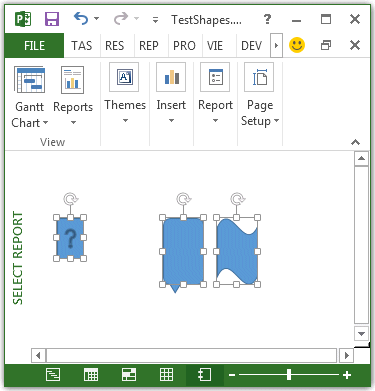
以下範例會建立三個形狀,然後選擇每個形狀。 由於第二和第三個選擇會與第一個選擇相加,因此三個形狀都會被選取 (見圖1) 。
Sub SelectShapes()
    Dim theReport As Report
    Dim shp1 As shape
    Dim shp2 As shape
    Dim shp3 As shape
    Dim reportName As String

    reportName = "Select Report"

    Set theReport = ActiveProject.Reports.Add(reportName)
    Set shp1 = theReport.Shapes.AddShape(msoShapeActionButtonHelp, 20, 50, 20, 30)
    Set shp2 = theReport.Shapes.AddShape(msoShapeBalloon, 100, 50, 30, 50)
    Set shp3 = theReport.Shapes.AddShape(msoShapeWave, 140, 50, 30, 50)

    shp1.Select
    shp2.Select False
    shp3.Select False
End Sub
圖 1: 使用 Select 方法加入選區
另請參閱
支援和意見反應
有關於 Office VBA 或這份文件的問題或意見反應嗎? 如需取得支援服務並提供意見反應的相關指導,請參閱 Office VBA 支援與意見反應。