在報表中新增一個表格,並回傳一個代表該表格的 Shape 物件。
語法
expression。
AddTable
(數字列、數字列、左欄、頂部、寬度、高度)
expression 代表 Shapes 物件的變數。
參數
| 名稱 | 必要/選用 | 資料類型 | 描述 |
|---|---|---|---|
| 數字行 | 必要 | Long | 表格中的列數。 建立資料表時會忽略 NumRows。 |
| 數字欄位 | 必要 | Long | 表格中的欄數。 建立資料表時會忽略 NumColumns。 |
| Left | 必要 | Single | 左邊 (相對於報告窗格左側,在表格) 點。 |
| Top | 必要 | Single | 上邊相對於報告窗格頂端,) 點數 (。 |
| Width | 必要 | Single | 表格寬度,以點數計算。 |
| Height | 必要 | Single | 桌子的高度,以點數計算。 |
| 數字行 | 必要 | 抄截 | |
| 數字欄位 | 必要 | 抄截 | |
| Left | 必要 | 浮 | |
| Top | 必要 | 浮 | |
| Width | 必要 | 浮 | |
| Height | 必要 | 浮 | |
| 名稱 | 必要/選用 | 資料類型 | 描述 |
傳回值
圖形
註解
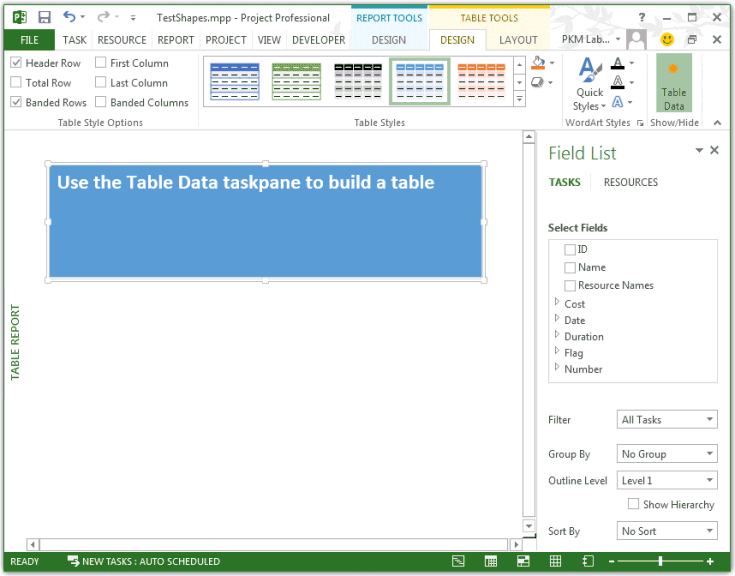
當 AddTable 方法建立資料表時,專案會忽略 NumRows 和 NumColumns。 當建立一個資料表時,它有一列一欄,包含以下文字: 使用資料表工作窗格建立資料表 (見圖1) 。 當你選擇該表格時,專案會顯示名為 「欄位清單」的表格資料工作窗格,預設選擇 了「任務 」。 你可以透過欄位 清單 工作窗格手動將欄位加入報告。
圖 1: AddTable 方法建立一個一列一欄的表格
範例
TestReportTable 巨集建立圖 1 所示的表格,然後選擇該表格來顯示 Table Data 工作窗格。
Sub TestReportTable()
    Dim theReport As Report
    Dim tableShape As shape
    Dim theReportTable As ReportTable
    Dim reportName As String
    Dim tableName As String
    Dim rows As Integer
    Dim columns As Integer
    Dim left As Integer
    Dim top As Integer
    Dim width As Integer
    Dim height As Integer

    reportName = "Table Report"
    Set theReport = ActiveProject.Reports.Add(reportName)

     ' Add the table.
    tableName = "Task information"
    rows = 0
    columns = 0
    left = 0
    top = 30
    width = 110
    height = 20

    ' Project ignores the NumRows and NumColumns parameters when
    ' creating a ReportTable.
    Set tableShape = theReport.Shapes.AddTable(rows, columns, _
                        left, top, width, height)

    tableShape.Name = tableName
    tableShape.Select
    Set theReportTable = tableShape.Table

    With theReportTable
        Debug.Print "Rows: " & .RowsCount
        Debug.Print "Columns: " & .ColumnsCount
        Debug.Print "Cell 1,1 contents:" & vbCrLf & vbTab; .GetCellText(1, 1)
    End With
End Sub
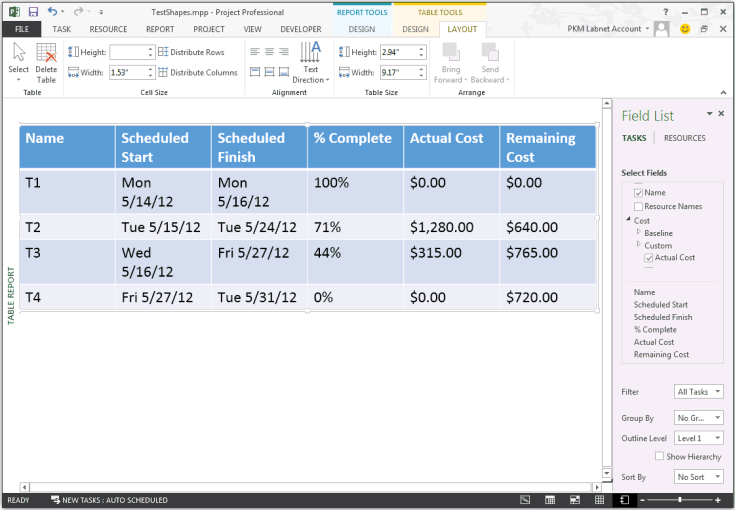
要指定資料表欄位,請使用 UpdateTableData 方法。 在前一個巨集的行後 Set theReportTable = tableShape.Table 加入以下程式碼。
OutlineLevel 參數指定第一層級任務,並過濾掉專案摘要任務。
    ' Set fields for the table.
    Dim fieldArray(1 To 6) As PjField

    fieldArray(1) = pjTaskName
    fieldArray(2) = pjTaskStart
    fieldArray(3) = pjTaskFinish
    fieldArray(4) = pjTaskPercentComplete
    fieldArray(5) = pjTaskActualCost
    fieldArray(6) = pjTaskRemainingCost

    theReportTable.UpdateTableData Task:=True, OutlineLevel:=1, SafeArrayOfPjField:=fieldArray
在一個包含四個任務的專案上執行修改過的 TestReportTable 巨集,任務中完成百分比和資源成本各有不同。 圖2為表格結果範例。
圖 2: UpdateTableData 方法可以為資料表新增欄位
另請參閱
支援和意見反應
有關於 Office VBA 或這份文件的問題或意見反應嗎? 如需取得支援服務並提供意見反應的相關指導,請參閱 Office VBA 支援與意見反應。