您可以為雲端解決方案提供者或控制面板廠商 (CPV) 建立應用程式,以實作安全應用程式模型架構。
重要
自 2023 年 6 月 30 日起,Azure Active Directory (Azure AD) Graph 已淘汰。 接下來,我們不會對 Azure AD Graph 進行進一步的投資。 Azure AD Graph API 除了安全性相關修正之外,沒有 SLA 或維護承諾。 對新功能的投資只會在 Microsoft Graph 中進行。
我們會以累加步驟淘汰 Azure AD Graph,讓您有足夠的時間將應用程式移轉至 Microsoft Graph API。 在稍後宣佈的日期,我們將封鎖使用 Azure AD Graph 建立任何新的應用程式。
若要深入瞭解,請參閱 重要:Azure AD Graph 停用和 PowerShell 模組淘汰。
建立合作夥伴中心服務主體
首先,在 CSP 合作夥伴租戶中建立 Microsoft 合作夥伴中心服務主體,用於建立多租戶應用程式。
針對 CSP 合作夥伴租戶,此服務主體應該已經存在。 如果沒有,請使用下列步驟建立 。
在系統管理員 PowerShell 視窗中,執行下列命令。
- 安裝 AzureAD 模組。
Install-Module Microsoft.Graph - 執行 Connect-MgGraph,這會提示使用者名稱和密碼。 輸入租用戶系統管理員認證。
Connect-MgGraph - 建立 Microsoft 合作夥伴中心服務主體帳戶。
New-MgServicePrincipal -DisplayName "Microsoft Partner Center" -AppId 00001111-aaaa-2222-bbbb-3333cccc4444
在 CSP 合作夥伴的租戶中建立多租戶應用程式
使用下列步驟,確定已為新建立的多租使用者應用程式設定下列應用程式屬性。
- 登入 portal.azure.com
- 選取 Microsoft Entra ID 和應用程式註冊,來建立具有多租戶功能的新註冊。
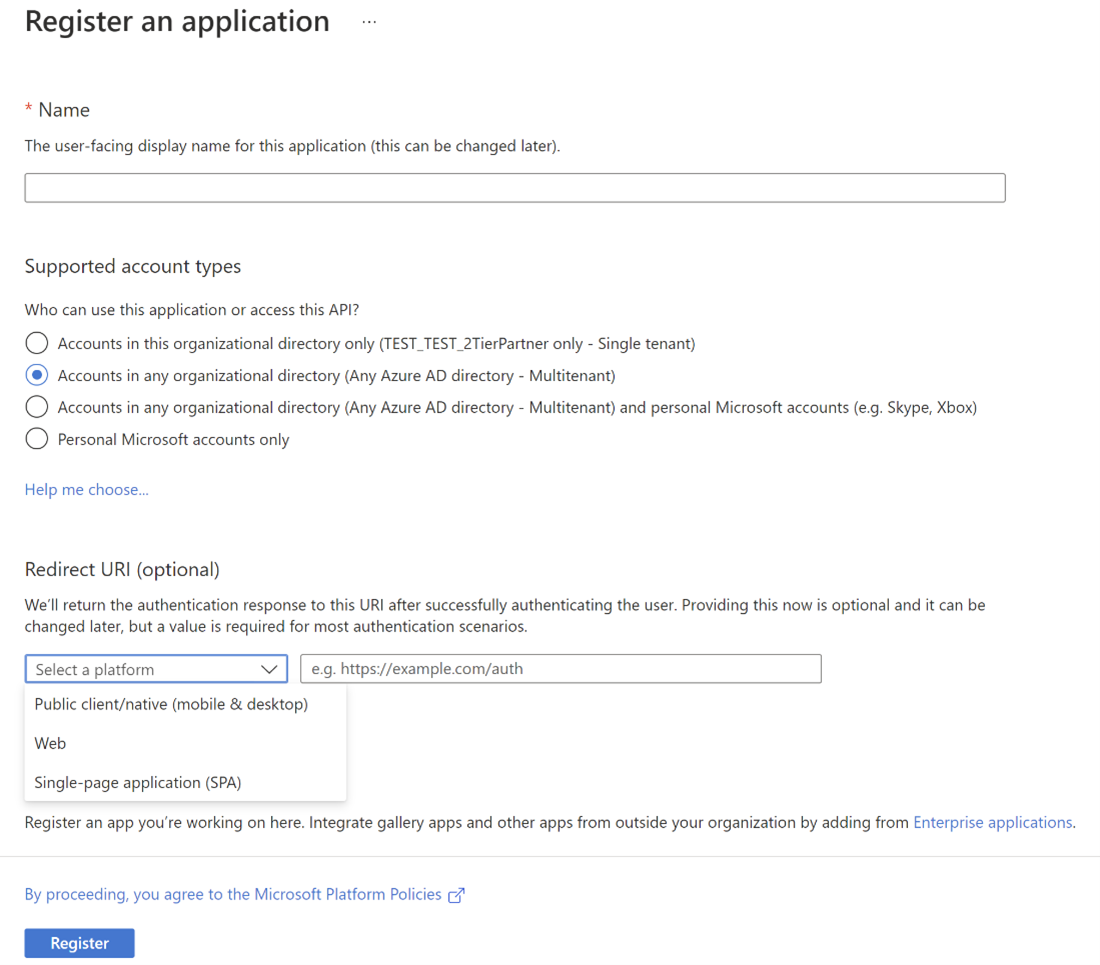
- 為您的應用程式選取使用者面向的顯示名稱。
- 選擇支援的帳戶類型:任何組織目錄中的帳戶(任何 Microsoft Entra 目錄 - 多租戶)。
- 選取 平臺 類型為 「Web」。。
- 重新導向 URL 必須是您的應用程式重新導向 URL,這將顯示同意成功訊息給合作夥伴並收集刷新令牌。 請確定應用程式的重新導向 URL 設定為執行即時 Web 應用程式的端點。 此應用程式必須接受來自 Microsoft Entra 登入呼叫的 授權碼。
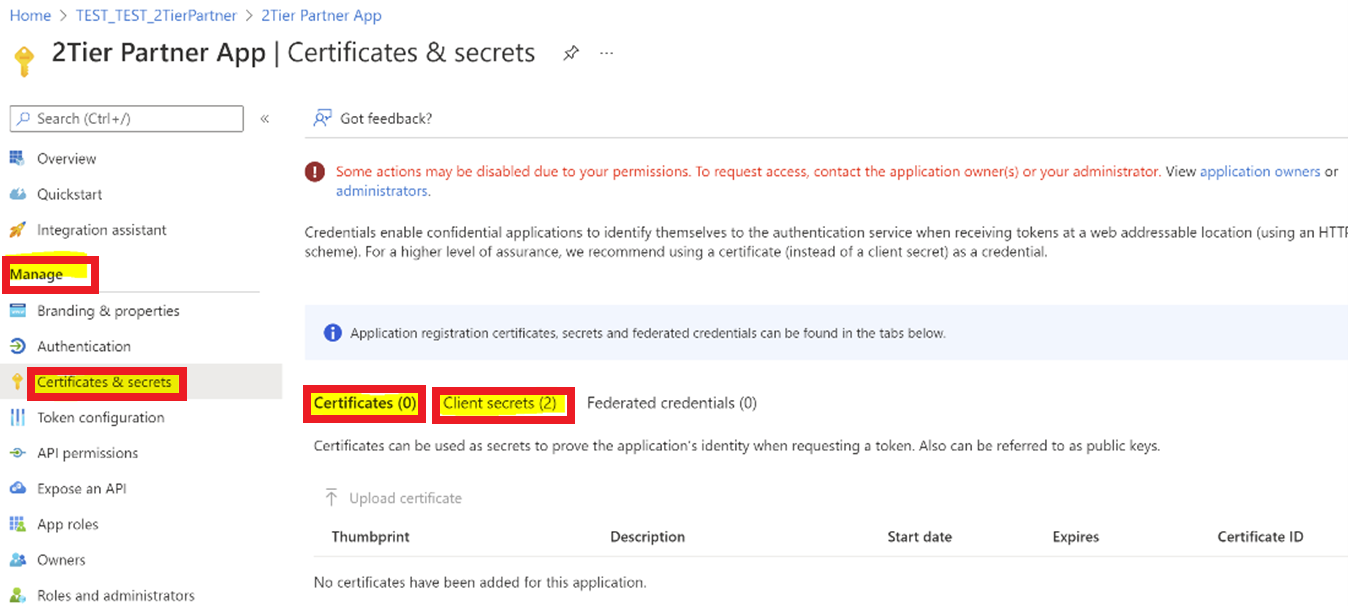
- 前往 [管理>憑證 & 用戶端密碼>] 標籤中的 [+新增用戶端密碼]。
注意
您需要從 Microsoft Entra ID 的 Web 應用程式設定中取得以下資訊:
- 應用程式識別碼
- 應用程式秘密
套用許可權
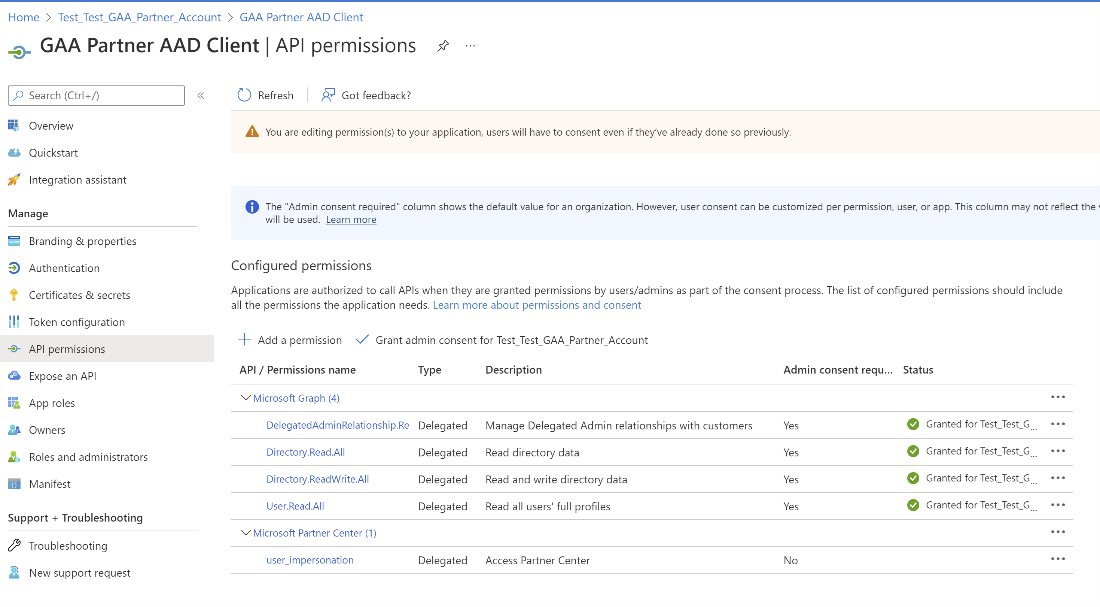
請確定已為多租使用者應用程式設定下列許可權。
在 [API 權限] 區段中:
不應該有任何直接的應用程式權限授予多租戶應用程式。
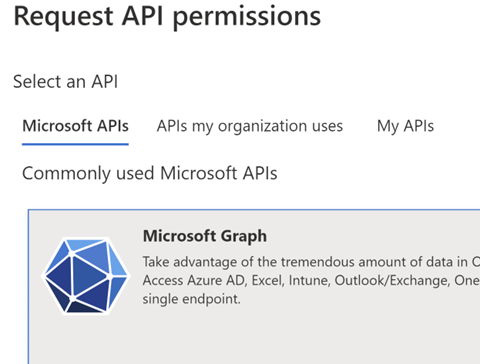
請遵循下列路徑來新增 Microsoft Graph 的委派許可權:
-
API 許可權>新增許可權>Microsoft API>Microsoft Graph>委派的許可權
DelegatedAdminRelationship.ReadWrite.All User.Read.All
- 請遵循下列路徑來在 [委派許可權] 底下新增 Microsoft 合作夥伴中心 - 授與合作夥伴中心存取 許可權:
- API 許可權>新增許可權>我的組織使用的 API>Microsoft 合作夥伴中心>委派的許可權>用戶模擬
-
API 許可權>新增許可權>Microsoft API>Microsoft Graph>委派的許可權
提供同意連結
向合作夥伴出示同意連結,並讓他們使用其服務帳戶登入,以核准應用程式代表服務帳戶在合作夥伴租戶上執行操作。
CSP 合作夥伴使用者 必須是 全域管理員和系統管理員代理人,才能同意多租用戶應用程式。
多租戶應用程式
您需要將多租戶ApplicationID替換為您的應用程式識別碼。
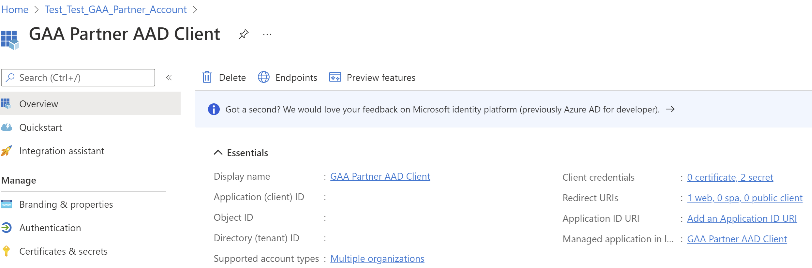
流覽至 應用程式註冊,選取應用程式 (用戶端) 標識碼,然後在以下位置替換。
取得授權碼
您必須從 Microsoft Entra 登入呼叫取得 Web 應用程式的授權碼:
- 登入 Microsoft Entra ID。
- 以您的 Microsoft Entra 應用程式識別碼 (GUID) 取代 Application-Id。
- 出現提示時,請使用已設定 MFA 的用戶帳戶登入。
- 出現提示時,請輸入其他 MFA 資訊(電話號碼或電子郵件位址),以確認您的登入。
- 登入之後,瀏覽器會使用您的授權碼,將呼叫重新導向至 Web 應用程式端點。 例如,下列範例程式代碼會重新導向至
https://localhost:44395/。
GET https://login.microsoftonline.com/common/oauth2/authorize?&client_id=<CSPApplicationId>&response_type=code&redirect_url=https://<CSPApplicationUrl_which_collects_refreshtoken>
或
GET https://login.microsoftonline.com/common/oauth2/authorize?&client_id=<CSPApplicationId>&response_type=code
針對中國,請使用下列連結:
GET https://login.chinacloudapi.cn/common/oauth2/authorize ?&client_id= <CSPApplicationId>&response_type=code&redirect_url= https://<CSPApplicationUrl_which_collects_refreshtoken>
或
GET https://login.chinacloudapi.cn/common/oauth2/authorize?&client_id= <CSPApplicationId>&response_type=code
授權碼呼叫追蹤:https://localhost:44395/?code=<authorization_code>&<rest of properties for state>
取得重新整理令牌
然後,您必須使用授權碼來取得更新令牌。
- 使用授權碼對Microsoft Entra 登入端點進行POST呼叫
https://login.microsoftonline.com/CSPTenantID/oauth2/token。 如需範例,請參閱下列 範例呼叫。 - 請注意回傳的重置金鑰。
- 將重新整理令牌儲存在 Azure Key Vault 中。 如需詳細資訊,請參閱 Key Vault API 檔。
注意
下列範例 POST 呼叫中所述的資源適用於 GDAP-Graph API。
其他電腦 API 的資源如下所示:
合作夥伴中心 API (https://api.partnercenter.microsoft.com)
合作夥伴 API (https://api.partner.microsoft.com)
範例呼叫
POST  'https://login.microsoftonline.com/<partnerTenantId>/oauth2/token' \
--header 'content-type: application/x-www-form-urlencoded' \
--form 'grant_type="authorization_code"' \
--form 'client_id=<application_id or client_id>' \
--form 'resource="https://graph.microsoft.com"' \
--form 'code="<authorization_code>"'
Response Body:

{
    "token_type": "Bearer",
    "scope": "DelegatedAdminRelationship.ReadWrite.All User.Read.All",
    "expires_in": "4549",
    "ext_expires_in": "4549",
    "expires_on": "1652886571",
    "not_before": "1652881721",
    "resource": "https://graph.microsoft.com",
    "access_token": "Access_token",
    "refresh_token": "Refresh_token",
    "id_token": "Id_token"
}
設定金鑰保存庫
首先,在 CSP 合作夥伴的租使用者中建立新的 Web 應用程式。 如果 CPV 應用程式用於呼叫合作夥伴中心 API,CPV 應該在 CPV 合作夥伴的租使用者中建立新的 Web 應用程式。
如果您使用 Azure Key Vault:
- 使用適當的
<key-vault-name>建立 Azure Key Vault,併產生 DNS 名稱,例如:https://<key-vault-name>.vault.azure.net - 將刷新權杖新增至金鑰保存庫。
提供金鑰保存庫的存取權
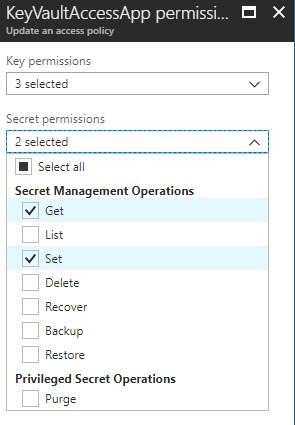
在密鑰保存庫的存取原則中,新增 KeyVaultAccessApp,並賦予其許可權來只管理 Get 和 Set 層面的 秘密。
設定原型
原型有兩個應用程式:
-
合作夥伴同意:代表 Web 應用程式,其設計目的是接受 CSP 合作夥伴的同意,並顯示成功訊息。
- 此應用程式會設定使用者同意,並擷取已同意使用者的刷新令牌。
- 經同意的使用者的重整令牌用於為 CSP 合作夥伴租戶生成存取令牌。
-
CSP 應用程式 或 CPV 應用程式:代表主要應用程式,其會呼叫合作夥伴中心 API 和圖形。
- 代表合作夥伴執行商務和用戶動作的 API。
此應用程式會先為特定對象(合作夥伴中心 API 或 Graph API)擷取存取令牌,然後再呼叫相應的 API。 它會使用安全地儲存在金鑰保存庫中的重新整理令牌。
合作夥伴同意應用程式 (CSP)
CSP Web 組態
針對 CSP 合作夥伴應用程式,web.config 檔案已指出下列各節。使用對應的應用程式識別碼和秘密來更新這些值。 針對主要應用程式,請使用「憑證」作為 Web 應用程式密碼,而不是純密碼,因為它提供額外的安全性層。
<!-- AppID that represents CSP application -->
<add key="ida:CSPApplicationId" value="CSPApplicationIdValue" />
<!--
Please use certificate as your client secret and deploy the certificate to your environment.
The following application secret is for sample application only. please do not use secret directly from the config file.
-->
<add key="ida:CSPApplicationSecret" value="CSPApplicationSecretValue" />
<!-- AppID that is given access for keyvault to store the refresh tokens --> <add key="ida:KeyVaultClientId" value="KeyVaultClientIdValue" />
<!--
Please use certificate as your client secret and deploy the certificate to your environment.
The following application secret is for sample application only. please do not use secret directly from the config file.
-->
<add key="ida:KeyVaultClientSecret" value="KeyVaultClientSecretValue" />
<!-- AAD instance: Global is .com, for different national clouds it changes German cloud: .de, China cloud: login.chinacloudapi.cn -->
<add key="ida:AADInstance" value="https://login.microsoftonline.com/" />
CSP 應用程式組態
針對 CSP 合作夥伴應用程式,app.config 檔案已指出下列各節。使用對應的應用程式識別碼和秘密來更新值。 針對主要應用程式,請使用「憑證」作為 Web 應用程式密碼,而不是純密碼,因為它提供額外的安全性層。
<!-- AppID that represents CSP application -->
<add key="ida:CPVApplicationId" value="CPVApplicationIdValue" />
<!--
Please use certificate as your client secret and deploy the certificate to your environment. The following application secret is for sample application only. please do not use secret directly from the config file.
-->
<add key="ida:CPVApplicationSecret" value="CPVApplicationSecretValue" />
<!-- AppID that is given access for keyvault to store the refresh tokens -->
<add key="ida:KeyVaultClientId" value="KeyVaultClientIdValue" />
<!--
Please use certificate as your client secret and deploy the certificate to your environment. The following application secret is for sample application only. please do not use secret directly from the config file.
-->
<add key="ida:KeyVaultClientSecret" value="KeyVaultClientSecretValue" />
<!-- AAD instance: Global is .com, for different national clouds it changes German cloud: .de,
China cloud: login.chinacloudapi.cn -->
<add key="ida:AADInstance" value="https://login.microsoftonline.com/" />
合作夥伴同意應用程式 (CPV)
使用 CPV 應用程式的 CSP 可以呼叫 ApplicationConsent API,在客戶租使用者上建立服務主體,以存取 Microsoft Graph 來管理客戶租使用者。 如需詳細資訊,請參閱 合作夥伴中心驗證。
CPV Web 設定
針對 CSP 合作夥伴應用程式,web.config 檔案已指出下列各節。使用對應的應用程式識別碼和秘密來更新這些值。 針對主要應用程式,請使用「憑證」作為 Web 應用程式密碼,而不是純密碼,因為它提供額外的安全性層。
<!-- AppID that represents Control panel vendor application -->
<add key="ida:CPVApplicationId" value="CPVApplicationIdValue" />
<!--
Please use certificate as your client secret and deploy the certificate to your environment. The following application secret is for sample application only. please do not use secret directly from the config file.
-->
<add key="ida:CPVApplicationSecret" value="CPVApplicationSecretValue" />
<!-- AppID that is given access for keyvault to store the refresh tokens -->
<add key="ida:KeyVaultClientId" value="KeyVaultClientIdValue" />
<!--
Please use certificate as your client secret and deploy the certificate to your environment. The following application secret is for sample application only. please do not use secret directly from the config file.
-->
<add key="ida:KeyVaultClientSecret" value="KeyVaultClientSecretValue" />
<!-- AAD instance: Global is .com, for different national clouds it changes German cloud: .de, China cloud: login.chinacloudapi.cn -->
<add key="ida:AADInstance" value="https://login.microsoftonline.com/" />
CPV 應用程式組態
針對 CPV 合作夥伴應用程式,app.config 檔案已指出下列各節。使用對應的應用程式識別碼和秘密來更新值。 針對主要應用程式,請使用「憑證」作為 Web 應用程式密碼,而不是純密碼,因為它提供額外的安全性層。
<!-- AppID that represents Control panel vendor application -->
<add key="ida:CPVApplicationId" value="CPVApplicationIdValue" />
<!--
Please use certificate as your client secret and deploy the certificate to your environment. The following application secret is for sample application only. please do not use secret directly from the config file.
-->
<add key="ida:CPVApplicationSecret" value="CPVApplicationSecretValue" />
<!-- AppID that is given access for keyvault to store the refresh tokens -->
<add key="ida:KeyVaultClientId" value="KeyVaultClientIdValue" />
<!--
Please use certificate as your client secret and deploy the certificate to your environment. The following application secret is for sample application only. please do not use secret directly from the config file.
-->
<add key="ida:KeyVaultClientSecret" value="KeyVaultClientSecretValue" />
<!-- AAD instance: Global is .com, for different national clouds it changes German cloud: .de, China cloud: login.chinacloudapi.cn -->
<add key="ida:AADInstance" value="https://login.microsoftonline.com/" />