Copilot 點數會支應您在 Power Platform 環境中使用 Copilot Studio 建立的 Agent 與 Copilot 使用量。 作為管理員,你將信用分配給需要的環境,並決定當環境用盡分配的信用點時該如何處理。 除了透過 Power Platform 管理中心進行管理外,您也可以使用 Power Platform API 和系統管理 (Admin) SDK,以程式碼管理 Copilot 點數配置。 自動化信用分配在多環境中分配容量、標準化超額行為,或將分配納入部署流程管理時非常有用。
在本教學課程中,您將了解如何:
- 在 Power Platform 管理中心管理 Copilot 信用點數。
- 請使用 Power Platform API 進行認證。
- 查看可分配的 Copilot 積分。
- 將 Copilot 點數分配給某個環境。
- 控制環境是否從租用戶容量提取用量。
Copilot 的信用點數以權利 ID MCSMessages 表示,並透過 licensing/allocationsV2 Power Platform API 的操作進行管理。
allocationsV2/availability 作業會回報可供配置的容量有多少,而 allocationsV2 作業則會寫入環境的配置量。 本文中所有程式範例皆使用 API 版本 2024-10-01。
每個環境分配都包含一套 執行規則 ,決定當環境消耗其分配的信用點時會發生什麼事。 管理中心中的 使用我租用戶中的可用容量 選項對應至 TenantPool 強制執行規則:啟用時,環境在自身配額用盡後,會繼續使用租用戶中未分配的容量;停用時,環境將以其配額為上限。
Warning
如果已發佈的環境群組規則控管從我的租用戶內的可用容量提取,您就無法覆寫個別環境的設定。 透過 Power Platform 管理中心、Power Platform API 或管理 SDK 進行的更新都會因錯誤 TenantPoolLockedByPolicy 而被拒絕。 更改並重新發布環境群組的規則,或 將環境從群組中移除 ,以便獨立管理設定。 移除後,環境仍保留群組最後套用的值,但設定可編輯。 欲了解更多可用群組規則,請參閱 環境群組規則。
先決條件
一個為 Power Platform API 設定的應用程式註冊。 請注意應用程式註冊的 應用程式(用戶端)ID 和 目錄(租戶)ID。
管理授權與容量的權限。 請以 Power Platform 管理員 或 全域管理員 角色,或可管理授權與容量的等效角色登入。
對於 SDK 範例,請安裝其公開存放庫中每月發行的 SDK:
dotnet add package Microsoft.PowerPlatform.Management
pip install powerplatform-management
管理 Copilot 點數分配
本節在 Power Platform 管理中心及每個 SDK 中展示相同的端對端流程——檢查可用資源、分配環境信用額度,以及控制環境是否從租戶容量中提取資金。 使用索引標籤在系統管理中心與您偏好的語言之間切換。
登入 Power Platform 系統管理中心。
在導覽窗格中,選擇授權。
在產品中,選擇 Copilot Studio,然後選擇管理 Copilot Credits。
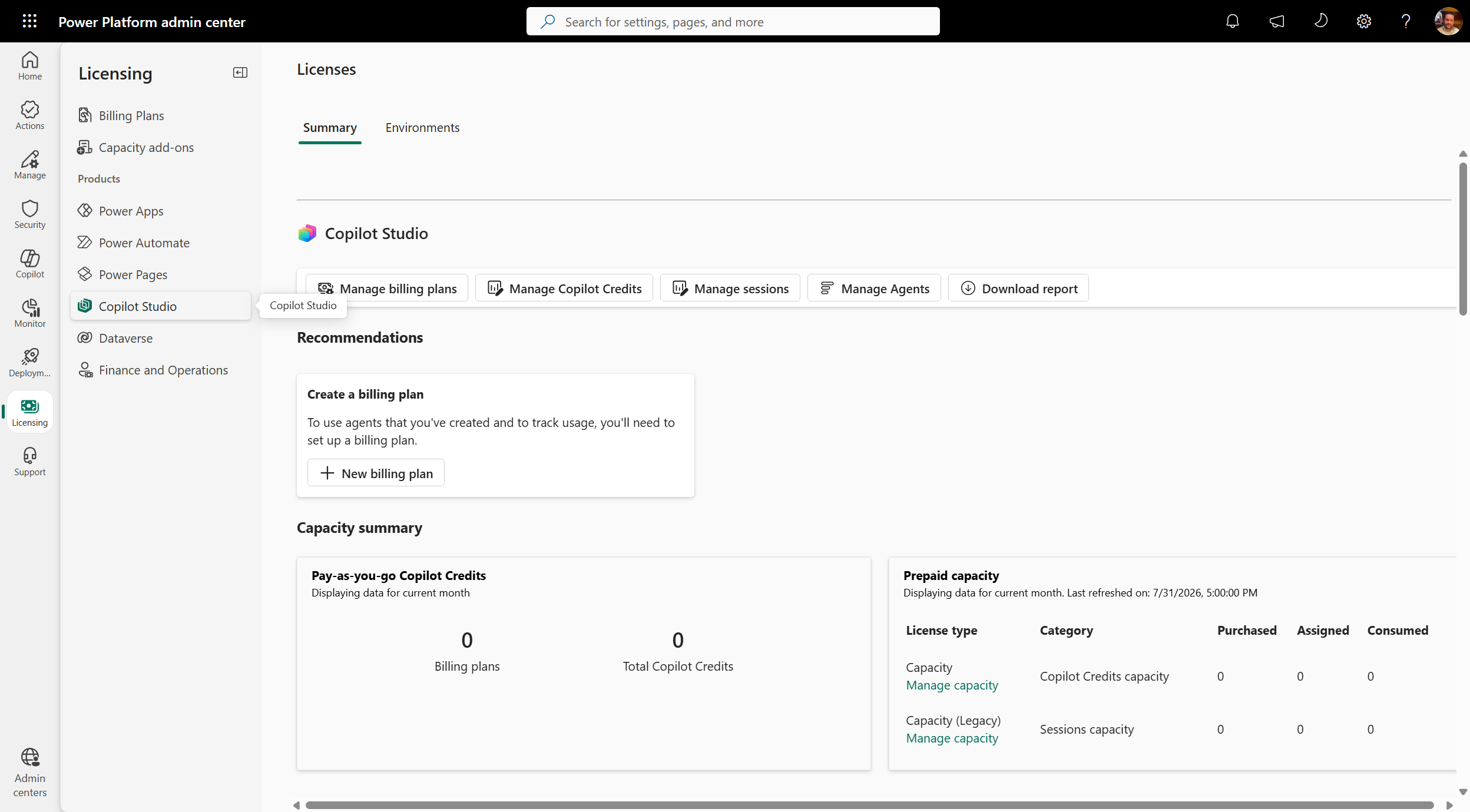
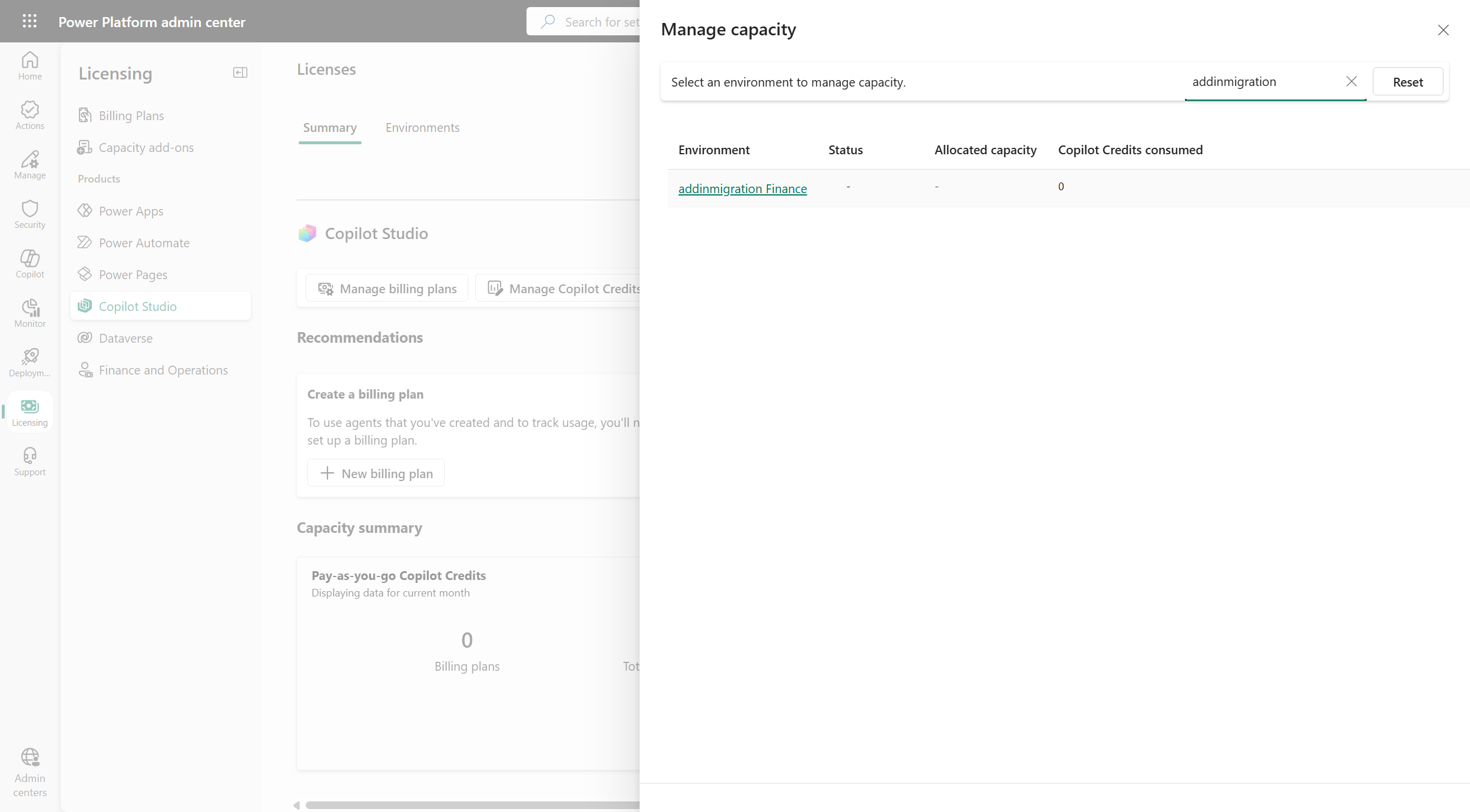
選擇你想管理的環境。 使用 搜尋 框依名稱搜尋環境。
在 分配容量 下,輸入要分配給該環境的 Copilot 點數額度。 面板顯示已消耗多少信用點數、已分配多少信用點數,以及租客可分配的信用額度。
在容量超額底下,選取或清除從我的租用戶中可用容量提取,以控制環境用盡其配置額度時的行為:
-
已選取:環境的配置點數耗盡後,會繼續從您租用戶的未配置容量提取用量。
-
清除:環境會被限制在分配上限,分配用盡後停止消費。
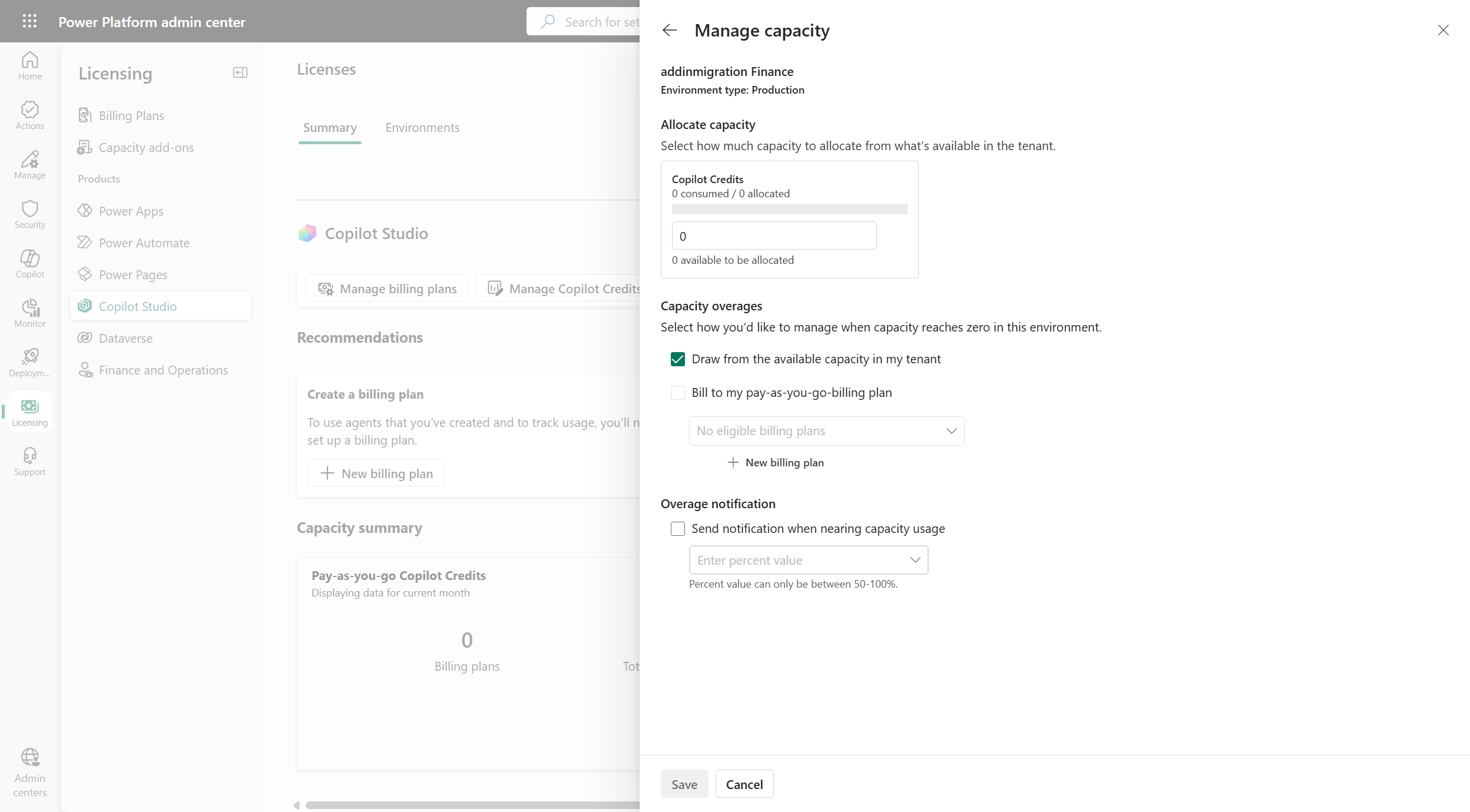
選取 [儲存]。
下列範例會以目前使用者身分互動式登入,讀取可配置的 Copilot 點數,將點數配置給環境,並關閉從我的租用戶中可用容量提取,讓環境的用量上限為其配置額度。
# Requires the MSAL.PS module: Install-Module MSAL.PS -Scope CurrentUser
Import-Module "MSAL.PS"

$clientId      = "<application (client) ID of your app registration>"
$tenantId      = "<directory (tenant) ID>"
$environmentId = "<environment ID>"
$apiBaseUrl    = "https://api.powerplatform.com"
$apiVersion    = "2024-10-01"

# Sign in interactively and request a token for the Power Platform API
$auth = Get-MsalToken -ClientId $clientId -TenantId $tenantId -Scope "https://api.powerplatform.com/.default" -Interactive
$headers = @{ Authorization = "Bearer $($auth.AccessToken)" }

# 1. View the Copilot Credits available to allocate for the environment
$filter = [uri]::EscapeDataString("environmentId eq '$environmentId' and EntitlementId in ('MCSMessages')")
$availability = Invoke-RestMethod -Method Get `
    -Uri "$apiBaseUrl/licensing/allocationsV2/availability?api-version=$apiVersion&`$filter=$filter" `
    -Headers $headers
$availability.entitlementAllocationsAvailable |
    ForEach-Object { Write-Host "$($_.entitlementId): $($_.availableQuantity) available" }

# 2. Allocate Copilot Credits to the environment and turn off tenant capacity draw
$allocationBody = @{
    scope = @{ environmentId = $environmentId }
    allocatedEntitlements = @(
        @{
            entitlementId    = "MCSMessages"
            allocation       = @{ quantity = 5000 }
            enforcementRules = @(
                # Disable TenantPool so the environment is capped at its allocation.
                # Set enabled = $true to let the environment draw from tenant capacity.
                @{ ruleType = "TenantPool"; enabled = $false }
            )
        }
    )
} | ConvertTo-Json -Depth 10

Invoke-RestMethod -Method Put `
    -Uri "$apiBaseUrl/licensing/allocationsV2?api-version=$apiVersion" `
    -Headers $headers -ContentType "application/json" -Body $allocationBody
Write-Host "Updated Copilot credit allocation for environment $environmentId"
下列範例會使用您應用程式註冊的用戶端識別碼互動式登入,讀取可配置的 Copilot 點數,將點數配置給環境,並關閉從我的租用戶中可用容量提取,讓環境的用量上限為其配置額度。
using Microsoft.PowerPlatform.Management;
using Microsoft.PowerPlatform.Management.Models;

// Create an interactive client using your app registration's client ID.
// A browser window opens for sign-in.
var factory = new ServiceClientFactory();
var client = factory.Create("YOUR_CLIENT_ID");

var environmentId = "<environment ID>";
var apiVersion = "2024-10-01";

// 1. View the Copilot Credits available to allocate for the environment
var availability = await client.Licensing.AllocationsV2.Availability.GetAsync(config =>
{
    config.QueryParameters.ApiVersion = apiVersion;
    config.QueryParameters.Filter =
        $"environmentId eq '{environmentId}' and EntitlementId in (MCSMessages)";
});

foreach (var entitlement in availability.EntitlementAllocationsAvailable)
{
    Console.WriteLine($"{entitlement.EntitlementId}: {entitlement.AvailableQuantity} available");
}

// 2. Allocate Copilot Credits to the environment and turn off tenant capacity draw
var request = new AllocationPutRequestModel
{
    Scope = new ScopeModel { EnvironmentId = environmentId },
    AllocatedEntitlements = new List<EntitlementAllocationModel>
    {
        new EntitlementAllocationModel
        {
            EntitlementId = "MCSMessages",
            Allocation = new AllocationModel { Quantity = 5000 },
            EnforcementRules = new List<AllocationEnforcementRule>
            {
                // Disable TenantPool so the environment is capped at its allocation.
                // Set Enabled = true to let the environment draw from tenant capacity.
                new AllocationEnforcementRule
                {
                    RuleType = AllocationEnforcementRuleTypes.TenantPool,
                    Enabled = false
                }
            }
        }
    }
};

await client.Licensing.AllocationsV2.PutAsync(request, config =>
{
    config.QueryParameters.ApiVersion = apiVersion;
});
Console.WriteLine($"Updated Copilot credit allocation for environment {environmentId}");
下列範例會使用您應用程式註冊的用戶端識別碼互動式登入,讀取可配置的 Copilot 點數,將點數配置給環境,並關閉從我的租用戶中可用容量提取,讓環境的用量上限為其配置額度。
import asyncio
from azure.identity import InteractiveBrowserCredential
from kiota_abstractions.base_request_configuration import RequestConfiguration
from kiota_authentication_azure.azure_identity_authentication_provider import (
    AzureIdentityAuthenticationProvider,
)
from kiota_http.httpx_request_adapter import HttpxRequestAdapter
from mspp_management.service_client_base import ServiceClientBase
from mspp_management.licensing.allocations_v2.allocations_v2_request_builder import (
    AllocationsV2RequestBuilder,
)
from mspp_management.licensing.allocations_v2.availability.availability_request_builder import (
    AvailabilityRequestBuilder,
)
from mspp_management.models.allocation_put_request_model import AllocationPutRequestModel
from mspp_management.models.scope_model import ScopeModel
from mspp_management.models.entitlement_allocation_model import EntitlementAllocationModel
from mspp_management.models.allocation_model import AllocationModel
from mspp_management.models.allocation_enforcement_rule import AllocationEnforcementRule
from mspp_management.models.allocation_enforcement_rule_types import (
    AllocationEnforcementRuleTypes,
)

API_VERSION = "2024-10-01"


async def manage_copilot_credits(client: ServiceClientBase, environment_id: str):
    # 1. View the Copilot Credits available to allocate for the environment
    query_params = AvailabilityRequestBuilder.AvailabilityRequestBuilderGetQueryParameters(
        api_version=API_VERSION,
        filter=f"environmentId eq '{environment_id}' and EntitlementId in (MCSMessages)",
    )
    availability = await client.licensing.allocations_v2.availability.get(
        request_configuration=RequestConfiguration(query_parameters=query_params)
    )
    for entitlement in availability.entitlement_allocations_available:
        print(f"{entitlement.entitlement_id}: {entitlement.available_quantity} available")

    # 2. Allocate Copilot Credits to the environment and turn off tenant capacity draw
    # Disable TenantPool so the environment is capped at its allocation.
    # Set enabled = True to let the environment draw from tenant capacity.
    tenant_pool_rule = AllocationEnforcementRule()
    tenant_pool_rule.rule_type = AllocationEnforcementRuleTypes.TenantPool
    tenant_pool_rule.enabled = False

    entitlement = EntitlementAllocationModel()
    entitlement.entitlement_id = "MCSMessages"
    entitlement.allocation = AllocationModel()
    entitlement.allocation.quantity = 5000
    entitlement.enforcement_rules = [tenant_pool_rule]

    request = AllocationPutRequestModel()
    request.scope = ScopeModel()
    request.scope.environment_id = environment_id
    request.allocated_entitlements = [entitlement]

    put_params = AllocationsV2RequestBuilder.AllocationsV2RequestBuilderPutQueryParameters(
        api_version=API_VERSION,
    )
    await client.licensing.allocations_v2.put(
        request, request_configuration=RequestConfiguration(query_parameters=put_params)
    )
    print(f"Updated Copilot credit allocation for environment {environment_id}")


async def main():
    # Sign in interactively using your app registration's client ID.
    credential = InteractiveBrowserCredential(client_id="YOUR_CLIENT_ID")
    auth_provider = AzureIdentityAuthenticationProvider(
        credentials=credential,
        scopes=["https://api.powerplatform.com/.default"],
    )
    adapter = HttpxRequestAdapter(authentication_provider=auth_provider)
    client = ServiceClientBase(adapter)

    await manage_copilot_credits(client, environment_id="<environment ID>")


asyncio.run(main())