使用 ConnectToGit 和 DisconnectFromGit API,程式化整合你的 Microsoft Dataverse 環境與 Git 原始碼控制。 透過這些 API,你可以將個別解決方案或整個環境連接到支援的 Git 倉庫,並透過程式碼管理這些連結。
先決條件
在使用這些 API 前,請確保您具備:
- 存取 Microsoft Dataverse 環境
- 系統管理員權限
- Git 倉庫的讀寫存取權限
ConnectToGit API
建立 Dataverse 解決方案或環境與 Git 儲存庫之間的連結。 透過這個連線,你可以管理 Dataverse 元件的原始碼控制。
Parameters
API ConnectToGit 接受以下參數:
| 參數 | 類型 | Required | Description |
|---|---|---|---|
GitFolder |
String | Yes | 你想綁定解決方案或環境的資料夾名稱。 |
Branch |
String | Yes | 你想連接的分支名稱。 |
ConnectionType |
Integer | No | 指定要連接什麼。 參見 ConnectionType 參數。 |
GitProvider |
Integer | No | Git 提供者。 請參見 GitProvider 參數。 |
Organization |
String | No | 你想連結的組織名稱。 |
Project |
String | No | 你想連結的專案名稱。 |
Repository |
String | No | 你想連接的儲存庫名稱。 |
RootFolder |
String | No | 解決方案範圍內所有解決方案所在的根目錄的名稱。 |
SolutionUniqueName |
String | No | 你想連接到 git 的獨特解決方案名稱。 |
UpstreamBranch |
String | No | 你想連接的上游分支名稱。 預設為儲存庫的預設分支。 |
GitHubConnectionId |
String | No | Power Platform GitHub 連線的連線 ID。 當 GitHubPAT 為 GitProvider 時為必填,除非你提供 1。 當 Dataverse 環境啟用虛擬網路(VNET)支援時,無法使用。 |
GitHubPAT |
String | No | GitHub 個人存取權杖,並可存取目標倉庫。 當 GitHubConnectionId 為 GitProvider 時為必填,除非您提供 1。 當 Dataverse 環境啟用虛擬網路(VNET)支援時,這是必要的。 |
GitHubAppConfigId |
String | No | 參考 GitHub 應用程式的設定記錄。 在GitProvider為1時,為必要項。 請使用 githubappconfigs(<recordId>) 格式。 |
ConnectionType 參數
參數 ConnectionType 控制是連接整個 Dataverse 環境,還是連接到特定解決方案。
| 價值 | 標籤 | Description |
|---|---|---|
| 0 | Solution | 將特定的 Dataverse 解決方案連接到 Git。 |
| 1 | 環境 | 將整個 Dataverse 環境連接到 Git。 |
GitProvider 參數
用 GitProvider 參數指定你使用的 Git 供應商類型,可能是 Azure DevOps 或 GitHub。
| 價值 | 標籤 | Description |
|---|---|---|
| 0 | Azure DevOps | 用於託管在 Azure DevOps 上的儲存庫 |
| 1 | GitHub | 用於托管在 GitHub 上的資料庫 |
DisconnectFromGit API
移除 Dataverse 解決方案或環境中的 Git 連線,並停用原始碼控制整合。
參數
API DisconnectFromGit 只有一個參數。
| 參數 | 類型 | Required | Description |
|---|---|---|---|
SolutionUniqueName |
String | No | 你想從 Git 斷開的解決方案唯一名稱。 無需中斷與所有解決方案或環境的連接。 |
其他資訊
以下是幾個在調 DisconnectFromGit用 時需要指定的參數值選項。
-
斷開單一解決方案:提供
SolutionUniqueName斷開特定解決方案。 - 斷開所有解決方案:不提供斷開所有解決方案層級連接的參數。
- 斷開環境:不提供斷開環境層級連接的參數。
Examples
以下範例描述使用 ConnectToGit 和 DisconnectFromGit API 的情境:
- 將整個 DataVerse 環境連接到 Azure DevOps 倉庫
- 連結 GitHub 倉庫
- 使用 PowerShell 連接 GitHub 倉庫
- 將整個 Dataverse 環境從 Git 原始碼控制中解除連結
- 將第一個解決方案連接到 Git 倉庫
- 在連接初始解決方案後,再把額外的解決方案連接到同一個 Git 倉庫
- 將特定解決方案從 Git 版本控制中斷開,但其他解決方案仍保持連線
將整個 DataVerse 環境連接到 Azure DevOps 倉庫
此連接使所有環境層級的配置與元件都能進行原始碼控制。
請不要在這條連接上使用這些參數:
RootFolderSolutionUniqueNameUpstreamBranch
這個範例展示了如何使用 ConnectToGit 動作 ,將整個 DataUniverse 環境連接到 Azure DevOps 儲存庫。
請求
POST [Organization URI]/api/data/v9.2/ConnectToGit HTTP/1.1
Accept: application/json
Content-Type: application/json; charset=utf-8
OData-MaxVersion: 4.0
OData-Version: 4.0

{
   "GitFolder": "yourGitfolderName",
   "Branch": "yourBranchName",
   "ConnectionType": 1,
   "GitProvider": 0,
   "Organization": "yourOrganizationName",
   "Project": "yourProjectName",
   "Repository": "yourRepositoryName"
}
回應
HTTP/1.1 204 No Content
OData-Version: 4.0
連結 GitHub 倉庫
在使用 API 連接 GitHub 之前,先完成建立 GitHub 應用程式的設定步驟,安裝到目標倉庫,將其私鑰匯入 Azure Key Vault,並建立 Power Platform GitHub 連線。 欲了解更多資訊,請參閱 Connect to GitHub。
使用 Web API 建立 GitHub 應用程式的設定記錄
使用 Dataverse OData Web API 建立 githubappconfig 紀錄。 發送一個包含 GitHub App 用戶端 ID、金鑰保存庫 URI 和金鑰名稱的 POST 請求。
你可以使用任何 HTTP 用戶端,例如 Insomnia、Visual Studio Code REST 用戶端或 curl,來進行這些呼叫。 你需要持有人代幣來進行認證。 欲了解更多資訊,請參閱使用 Microsoft Dataverse Web API。
POST {{DataverseOrgUrl}}/api/data/v9.2/githubappconfigs
Authorization: Bearer {{token}}
Content-Type: application/json

{
    "githubappid": "Iv23liBWoH9sf7xDrRe6",
    "keyvaulturi": "{{KeyVaultUri}}",
    "keyname": "demoGitHubKey"
}
Important
請注意回應標頭中回傳的記錄 ID。 你需要這個值來識別管理身份、設定 RBAC 並呼叫 ConnectToGit。 記錄 ID 的格式如 13d565bb-4c22-f111-a546-7ced8d6e3e85。
建立 GitHub App 設定記錄後,依照 設定 金鑰保存庫 角色型存取控制 (RBAC) 中的說明,將 金鑰保存庫 Crypto User 角色指派給 Dataverse 受控識別。
呼叫 ConnectToGit API
在建立 githubappconfig 記錄並設定 金鑰保存庫 RBAC 後,請使用 Dataverse Web API 來呼叫 ConnectToGit 動作,以建立來源控制連線。
POST {{DataverseOrgUrl}}/api/data/v9.2/ConnectToGit
Authorization: Bearer {{token}}
Content-Type: application/json

{
    "GitProvider": 1,
    "ConnectionType": 1,
    "Organization": "YourGitHubOrg",
    "Repository": "YourRepo",
    "Project": "placeholder",
    "Branch": "yourBranch",
    "UpstreamBranch": "main",
    "GitFolder": "YourFolder",
    "GitHubConnectionId": "<connectionId>",
    "GitHubAppConfigId": "githubappconfigs(<recordId>)"
}
Important
分支必須已經存在於儲存庫中。 如果需要,先在 GitHub 建立。
GitHubAppConfigId該值必須使用格式 githubappconfigs(<recordId>)。
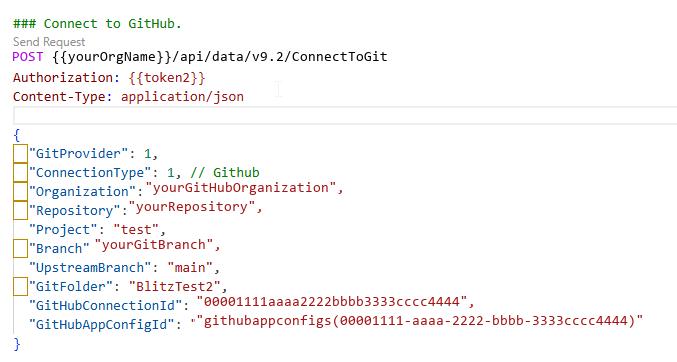
如果你收到成功回應,該環境會連結到 GitHub。
使用 PowerShell 連接 GitHub 倉庫
以下 PowerShell 範例建立 GitHub App 的設定記錄,等待 Dataverse 管理身份出現在 Microsoft Entra ID 中,將 金鑰保存庫 Crypto User 角色指派給管理身份,並呼叫該ConnectToGit動作。 如果你已經有 GitHub App 的設定記錄,請提供GitHubAppConfigId跳過設定和 金鑰保存庫 角色指派步驟。
在執行範例前,先安裝並匯入 Az.Accounts、 Az.KeyVaultAz.Resources 和 PowerShell 模組。 使用具有 Dataverse 環境存取權和指派 金鑰保存庫 角色權限的帳戶,以 Connect-AzAccount 登入。
若 Dataverse 環境啟用虛擬網路(VNET)支援,請提供 GitHubPAT。 GitHub 連線無法與虛擬網路支援一起使用。
[CmdletBinding()]
param(
    [Parameter(Mandatory)]
    [string]$DataverseOrgUrl,

    [Parameter(Mandatory)]
    [string]$GitHubOrg,

    [Parameter(Mandatory)]
    [string]$GitHubRepo,

    [Parameter(Mandatory)]
    [string]$Branch,

    [Parameter(Mandatory)]
    [string]$GitFolder,

    [string]$GitHubAppClientId,

    [string]$KeyVaultName,

    [string]$KeyVaultKeyName,

    [string]$GitHubAppConfigId,

    [string]$GitHubConnectionId,

    [string]$GitHubPAT,

    [ValidateSet(0, 1)]
    [int]$ConnectionType = 1,

    [string]$UpstreamBranch,

    [string]$RootFolder,

    [string]$SolutionUniqueName
)

Set-StrictMode -Version 3.0
$ErrorActionPreference = "Stop"

if (($GitHubConnectionId -and $GitHubPAT) -or (-not $GitHubConnectionId -and -not $GitHubPAT)) {
    throw "Specify either -GitHubConnectionId or -GitHubPAT, but not both."
}

if (-not $GitHubAppConfigId) {
    foreach ($name in @('GitHubAppClientId', 'KeyVaultName', 'KeyVaultKeyName')) {
        if ([string]::IsNullOrWhiteSpace((Get-Variable -Name $name -ValueOnly))) {
            throw "Specify -$name when -GitHubAppConfigId is not provided."
        }
    }
}

$dataverseResource = $DataverseOrgUrl.TrimEnd('/')
$tokenResult = Get-AzAccessToken -ResourceUrl $dataverseResource -AsSecureString
$dataverseToken = [System.Net.NetworkCredential]::new('', $tokenResult.Token).Password

function Invoke-DataverseApi {
    param(
        [Parameter(Mandatory)]
        [string]$Method,

        [Parameter(Mandatory)]
        [string]$Endpoint,

        [object]$Body,

        [switch]$ReturnHeaders
    )

    $headers = @{
        Authorization      = "Bearer $dataverseToken"
        "OData-MaxVersion" = "4.0"
        "OData-Version"    = "4.0"
    }

    $request = @{
        Method      = $Method
        Uri         = "$dataverseResource/api/data/v9.2/$Endpoint"
        Headers     = $headers
        ContentType = "application/json; charset=utf-8"
    }

    if ($Body) {
        $request.Body = $Body | ConvertTo-Json -Depth 10
    }

    if ($ReturnHeaders) {
        return (Invoke-WebRequest @request).Headers
    }

    Invoke-RestMethod @request
}

$appConfigRecordId = $GitHubAppConfigId

if (-not $appConfigRecordId) {
    $keyVault = Get-AzKeyVault -VaultName $KeyVaultName
    $keyVaultUri = 'https://' + $KeyVaultName + '.vault.azure.net/'

    $appConfigBody = @{
        githubappid = $GitHubAppClientId
        keyvaulturi = $keyVaultUri
        keyname     = $KeyVaultKeyName
    }

    $responseHeaders = Invoke-DataverseApi `
        -Method POST `
        -Endpoint "githubappconfigs" `
        -Body $appConfigBody `
        -ReturnHeaders

    $entityIdHeader = [string]$responseHeaders["OData-EntityId"]
    if ($entityIdHeader -notmatch '\(([0-9a-f-]+)\)') {
        throw "Could not read the GitHub App configuration record ID from the Dataverse response."
    }

    $appConfigRecordId = $Matches[1]
    $managedIdentityName = "PPMI-githubappconfigmanagedidentity-$appConfigRecordId"

    $servicePrincipal = $null
    for ($attempt = 1; $attempt -le 60; $attempt++) {
        $servicePrincipal = Get-AzADServicePrincipal -DisplayName $managedIdentityName -ErrorAction SilentlyContinue
        if ($servicePrincipal) {
            break
        }

        Start-Sleep -Seconds 1
    }

    if (-not $servicePrincipal) {
        throw "The Dataverse managed identity was not found in Microsoft Entra ID. Check Dataverse System Jobs for GitHub App configuration errors."
    }

    $keyVaultScope = $keyVault.ResourceId
    if (-not $keyVaultScope) {
        $subscriptionId = (Get-AzContext).Subscription.Id
        $keyVaultScope = "/subscriptions/$subscriptionId/resourceGroups/$($keyVault.ResourceGroupName)/providers/Microsoft.KeyVault/vaults/$KeyVaultName"
    }

    $keyVaultCryptoUserRoleId = "12338af0-0e69-4776-bea7-57ae8d297424"
    $existingAssignment = Get-AzRoleAssignment `
        -ObjectId $servicePrincipal.Id `
        -RoleDefinitionId $keyVaultCryptoUserRoleId `
        -Scope $keyVaultScope `
        -ErrorAction SilentlyContinue

    if (-not $existingAssignment) {
        New-AzRoleAssignment `
            -ObjectId $servicePrincipal.Id `
            -RoleDefinitionId $keyVaultCryptoUserRoleId `
            -Scope $keyVaultScope | Out-Null
    }
}

$connectBody = @{
    GitProvider          = 1
    ConnectionType       = $ConnectionType
    Organization         = $GitHubOrg
    Repository           = $GitHubRepo
    Project              = "placeholder"
    Branch               = $Branch
    GitFolder            = $GitFolder
    GitHubAppConfigId    = "githubappconfigs($appConfigRecordId)"
}

if ($GitHubConnectionId) { $connectBody.GitHubConnectionId = $GitHubConnectionId }
if ($GitHubPAT)          { $connectBody.GitHubPAT          = $GitHubPAT }
if ($UpstreamBranch)     { $connectBody.UpstreamBranch     = $UpstreamBranch }
if ($RootFolder)         { $connectBody.RootFolder         = $RootFolder }
if ($SolutionUniqueName) { $connectBody.SolutionUniqueName = $SolutionUniqueName }

Invoke-DataverseApi -Method POST -Endpoint "ConnectToGit" -Body $connectBody
Write-Host "Connected Dataverse Git integration to GitHub."
將整個 Dataverse 環境從 Git 原始碼控制中斷開
此動作會移除環境層級的 Git 連線。 不要用這個 SolutionUniqueName 參數來做這個操作。 Dataverse 會自動識別並移除環境層級的 Git 連線。
這個範例展示了如何使用 DisconnectFromGit 動作 ,將整個 DataVerse 環境與 Git 的原始碼控制斷開。
請求
POST [Organization URI]/api/data/v9.2/DisconnectFromGit HTTP/1.1
Accept: application/json
Content-Type: application/json; charset=utf-8
OData-MaxVersion: 4.0
OData-Version: 4.0
回應
HTTP/1.1 204 No Content
OData-Version: 4.0
將第一個解決方案連接到 Git 倉庫
此連線將在環境中為第一個解決方案設定儲存庫連結,並建立解決方案層級的原始檔控制資料夾結構。
你需要包含這些參數的數值來指定解:
RootFolderSolutionUniqueName
此範例展示了如何使用 ConnectToGit 動作 將第一個解決方案連接到 Git 儲存庫。
請求
POST [Organization URI]/api/data/v9.2/ConnectToGit HTTP/1.1
Accept: application/json
Content-Type: application/json; charset=utf-8
OData-MaxVersion: 4.0
OData-Version: 4.0

{
   "GitFolder": "yourGitfolderName",
   "Branch": "yourBranchName",
   "ConnectionType": 1,
   "GitProvider": 0,
   "Organization": "yourOrganizationName",
   "Project": "yourProjectName",
   "Repository": "yourRepositoryName",
   "RootFolder": "yourRootFolderName",
   "SolutionUniqueName": "yourSolutionUniqueName"
}
回應
HTTP/1.1 204 No Content
OData-Version: 4.0
在連接初始解決方案後,再把額外的解決方案連接到同一個 Git 倉庫
將第一個方案連接上後,只需要特定於方案的參數。 你會繼承初始連線的儲存庫連線細節。
只設定以下參數:
SolutionUniqueNameBranchGitFolder
Important
你必須先連接第一個解決方案,才能讓它成功。 請參見 將第一個解決方案連接到 Git 倉庫。
此範例展示了如何使用 ConnectToGit 動作 將後續解決方案連接到 Git 儲存庫。
請求
POST [Organization URI]/api/data/v9.2/ConnectToGit HTTP/1.1
Accept: application/json
Content-Type: application/json; charset=utf-8
OData-MaxVersion: 4.0
OData-Version: 4.0

{
   "GitFolder": "yourGitfolderName",
   "Branch": "yourBranchName",
   "SolutionUniqueName": "yourSolutionUniqueName"
}
回應
HTTP/1.1 204 No Content
OData-Version: 4.0
將特定解決方案從 Git 版本控制中斷開,但其他解決方案仍保持連線
用這種方法移除某個解決方案的原始碼控制,而不影響其他方案。
這個範例展示了如何使用 DisconnectFromGit 動作 ,移除某一解決方案的原始碼控制,而不影響其他解決方案。
請求
POST [Organization URI]/api/data/v9.2/DisconnectFromGit HTTP/1.1
Accept: application/json
Content-Type: application/json; charset=utf-8
OData-MaxVersion: 4.0
OData-Version: 4.0

{
   "SolutionUniqueName": "yourSolutionUniqueName"
}
回應
HTTP/1.1 204 No Content
OData-Version: 4.0
錯誤處理
無論是 API ConnectToGit 還是 DisconnectFromGit API 在成功完成時都不會回傳一個值。 當 API 失敗時,會回傳錯誤。
常見錯誤情境包括:
- 憑證無效:確保你有有效的 Git 提供者認證。
- 找不到儲存庫:請驗證組織名稱、專案及儲存庫名稱。
- 權限被拒:請確保您的 Dataverse 帳號擁有原始碼管理權限。
-
找不到解決方案:確認你的環境中存在
SolutionUniqueName。 - 分支不存在:確認指定的分支是否存在於儲存庫中。
支援與額外資源
欲了解更多關於與 Dataverse 整合的原始碼控制資訊,請參見: