Import-DSCResource 是動態關鍵字,只能在配置指令碼區塊內使用,以匯入配置中所需的任何資源。 下的 $PSHOME 資源會自動匯入,但仍將明確匯入 組態中使用的所有資源視為最佳實務。
的 Import-DSCResource 語法如下所示。 按名稱指定模組時,需要在新行上列出每個模組。
Import-DscResource [-Name <ResourceName(s)>] [-ModuleName <ModuleName>] [-ModuleVersion <ModuleVersion>]
參數
-
-Name- 您必須匯入的 DSC 資源名稱。 如果指定模組名稱,則指令會在此模組內搜尋這些 DSC 資源;否則,命令會搜尋所有DSC資源路徑中的DSC資源。 支援萬用字元。 -
-ModuleName- 模組名稱或模組規格。 如果您指定要從模組匯入的資源,指令將嘗試僅匯入這些資源。 如果僅指定模組,則指令會匯入模組中的所有DSC資源。 -
-ModuleVersion- 從 PowerShell 5.0 開始,您可以指定設定應該使用的模組版本。 如需詳細資訊,請參閱 匯入已安裝資源的特定版本。
Import-DscResource -ModuleName xActiveDirectory
範例:在組態中使用 Import-DSCResource
Configuration MSDSCConfiguration
{
    # Search for and imports Service, File, and Registry from the module PSDesiredStateConfiguration.
    Import-DSCResource -ModuleName PSDesiredStateConfiguration -Name Service, File, Registry

    # Search for and import Resource1 from the module that defines it.
    # If only –Name parameter is used then resources can belong to different PowerShell modules as well.
    # TimeZone resource is from the ComputerManagementDSC module which is not installed by default.
    # As a best practice, list each requirement on a different line if possible.  This makes reviewing
    # multiple changes in source control a bit easier.
    Import-DSCResource -Name File
    Import-DSCResource -Name TimeZone

    # Search for and import all DSC resources inside the module PSDesiredStateConfiguration.
    # When specifying the modulename parameter, it is a requirement to list each on a new line.
    Import-DSCResource -ModuleName PSDesiredStateConfiguration
    # In PowerShell 5.0 and later, you can specify a ModuleVersion parameter
    Import-DSCResource -ModuleName ComputerManagementDsc -ModuleVersion 6.0.0.0
...
備註
不支援在相同指令中為資源名稱和模組名稱指定多個值。 如果多個模組中存在相同的資源,它可以具有關於從哪個模組載入哪個資源的非決定性行為。 以下命令將導致編譯過程中出錯。
Import-DscResource -Name UserConfigProvider*,TestLogger1 -ModuleName UserConfigProv,PsModuleForTestLogger
僅使用 Name 參數時要考慮的事項:
- 這是一項資源密集型作業,視機器上安裝的模組數量而定。
- 它將加載找到的第一個具有給定名稱的資源。 如果安裝了多個具有相同名稱的資源,則可能會載入錯誤的資源。
建議的用法是使用參數指定–ModuleName-Name,如下所述。
這種使用方式具有下列優點:
- 它會限制指定資源的搜尋範圍,以減少效能影響。
- 它明確定義定義資源的模組,確保載入正確的資源。
備註
在 PowerShell 5.0 中,DSC 資源可以有多個版本,而且版本可以並存安裝在電腦上。 這是透過將多個版本的資源模組包含在相同模組資料夾中來實作。 如需詳細資訊,請參閱 使用具有多個版本的資源。
具有 Import-DSCResource 的 Intellisense
在 ISE 中撰寫 DSC 設定時,PowerShell 會針對資源和資源屬性提供 IntelliSense。 模組路徑下的 $pshome 資源定義會自動載入。
當您使用關鍵字匯 Import-DSCResource 入資源時,會新增指定的資源定義,並展開 Intellisense 以包含匯入資源的結構描述。

備註
從 PowerShell 5.0 開始,索引標籤完成已新增至 DSC 資源及其屬性的 ISE。 如需詳細資訊,請參閱資源。
編譯組態時,PowerShell 會使用匯入的資源定義來驗證組態中的所有資源區塊。 每個資源區塊都會使用資源的結構描述定義,針對下列規則進行驗證。
- 只會使用結構描述中定義的屬性。
- 每個屬性的資料類型都正確無誤。
- 已指定索引鍵屬性。
- 不會使用唯讀屬性。
- 值對映類型的驗證。
請考慮下列組態:
Configuration SchemaValidationInCorrectEnumValue
{
    # It is best practice to explicitly import all resources used in your Configuration.
    # This includes resources that are imported automatically, like WindowsFeature.
    Import-DSCResource -Name WindowsFeature
    Node localhost
    {
        WindowsFeature ROLE1
        {
            Name = "Telnet-Client"
            Ensure = "Invalid"
        }
    }
}
編譯此組態會導致錯誤。
PSDesiredStateConfiguration\WindowsFeature: At least one of the values 'Invalid' is not supported or
valid for property 'Ensure' on class 'WindowsFeature'. Please specify only supported values:
Present, Absent.
Intellisense 和結構描述驗證可讓您在剖析和編譯期間攔截更多錯誤,避免執行階段的複雜情況。
備註
每個 DSC 資源都可以有一個名稱,以及資源結構描述所定義的 FriendlyName 。 以下是「MSFT_ServiceResource.shema.mof」的前兩行。
[ClassVersion("1.0.0"),FriendlyName("Service")]
class MSFT_ServiceResource : OMI_BaseResource
在組態中使用此資源時,您可以指定 MSFT_ServiceResource 或 服務。
PowerShell v4 和 v5 差異
在 PowerShell 4.0 與 PowerShell 5.0 和更新版本中撰寫組態時,您會看到多個差異。 本節將重點介紹您看到的與本文相關的差異。
多個資源版本
PowerShell 4.0 不支援並存安裝和使用多個版本的資源。 如果您發現將資源匯入組態時發生問題,請確定您只安裝了一個版本的資源。
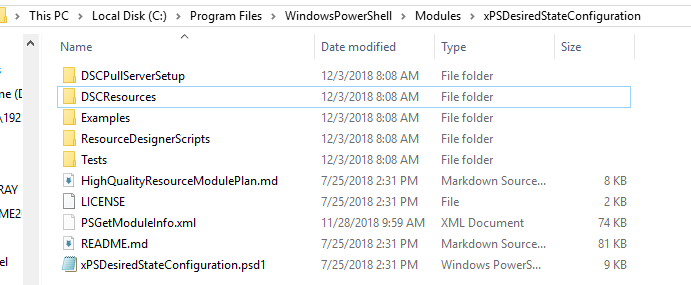
在下圖中,安裝了兩個版本的 xPSDesiredStateConfiguration 模組。

將所需模組版本的內容複製到模組目錄的最上層。
資源位置
撰寫和編譯組態時,您的資源可以儲存在 PSModulePath 所指定的任何目錄中。
在 PowerShell 4.0 中,LCM 需要將所有 DSC 資源模組儲存在 「Program Files\WindowsPowerShell\Modules」 或 $pshome\Modules. 從 PowerShell 5.0 開始,已移除此需求,而且資源模組可以儲存在 所 PSModulePath指定的任何目錄中。
新增 ModuleVersion
從 PowerShell 5.0 開始,參數 -ModuleVersion 可讓您指定要在組態中使用的模組版本。
