在本教學課程系列中,結果會以 預設順序傳回並顯示。 在本教學課程中,您將新增主要和次要排序準則。 作為根據數值排序的替代方式,最後一個範例示範如何根據自定義評分配置檔來排名結果。 我們也會更深入地顯示 複雜類型。
在本教學課程中,您將瞭解如何:
- 根據一個屬性排序結果
- 根據多個屬性排序結果
- 根據評分配置檔排序結果
概觀
本教學課程會擴充 在新增分頁至搜尋結果 教學課程中建立的無限卷動專案。
您可以在下列專案中找到本教學課程中的最終版本程式碼:
先決條件
- 2b-add-infinite-scroll (GitHub) 解決方案。 此專案可以是您自己從上一個教學課程建置的版本,或是從 GitHub 建立的複本。
根據一個屬性排序結果
根據某個屬性,例如飯店評分,進行排序時,我們不僅想要得到排序好的結果,還希望確認排序的正確性。 將 [評等] 欄位新增至結果可讓我們確認結果已正確排序。
在這個練習中,我們還會在結果顯示中添加一些內容:每家酒店的最便宜房價和最昂貴房價。
不需要修改任何模型來啟用排序。 只有檢視和控制器需要更新。 從開啟主控制器開始。
將 OrderBy 屬性新增至搜尋參數
在HomeController.cs中,新增 OrderBy 選項並包含 Rating 屬性,並具有遞減排序順序。 在 Index(SearchData model) 方法中,將下列這一行新增至搜尋參數。
options.OrderBy.Add("Rating desc");備註
默認順序為遞增,不過您可以新增
asc至 屬性,以便清楚說明。 藉由新增desc來指定遞減順序。現在執行應用程式,並輸入任何常見的搜尋字詞。 結果可能或可能不是正確的順序,因為您和開發人員,而不是使用者,都沒有任何簡單的方法來驗證結果!
讓我們清楚指出結果會依評等順序排序。 首先,將 hotels.css 檔案中的 box1 和 box2 類別取代為下列類別(這些類別都是本教學課程所需的所有新類別)。
textarea.box1A {
    width: 324px;
    height: 32px;
    border: none;
    background-color: azure;
    font-size: 14pt;
    color: blue;
    padding-left: 5px;
    text-align: left;
}

textarea.box1B {
    width: 324px;
    height: 32px;
    border: none;
    background-color: azure;
    font-size: 14pt;
    color: blue;
    text-align: right;
    padding-right: 5px;
}

textarea.box2A {
    width: 324px;
    height: 32px;
    border: none;
    background-color: azure;
    font-size: 12pt;
    color: blue;
    padding-left: 5px;
    text-align: left;
}

textarea.box2B {
    width: 324px;
    height: 32px;
    border: none;
    background-color: azure;
    font-size: 12pt;
    color: blue;
    text-align: right;
    padding-right: 5px;
}

textarea.box3 {
    width: 648px;
    height: 100px;
    border: none;
    background-color: azure;
    font-size: 12pt;
    padding-left: 5px;
    margin-bottom: 24px;
}
小提示
瀏覽器通常會快取 css 檔案,這可能會導致使用舊的 css 檔案,並忽略您的編輯。 解決這個問題的一個好方法是將帶有版本參數的查詢字串新增至連結。 例如:
<link rel="stylesheet" href="~/css/hotels.css?v1.1" />如果您認為瀏覽器正在使用舊的 css 檔案,請更新版本號碼。
在 Index(SearchData model) 方法中,將 Rating 屬性新增至 Select 參數,讓結果包含下列三個字段:
options.Select.Add("HotelName");
options.Select.Add("Description");
options.Select.Add("Rating");
開啟檢視 (index.cshtml),並以下列程式代碼取代轉譯迴圈 (<-- 顯示旅館數據。-->)。
<!-- Show the hotel data. -->
@for (var i = 0; i < result.Count; i++)
{
    var ratingText = $"Rating: {result[i].Document.Rating}";

    // Display the hotel details.
    @Html.TextArea($"name{i}", result[i].Document.HotelName, new { @class = "box1A" })
    @Html.TextArea($"rating{i}", ratingText, new { @class = "box1B" })
    @Html.TextArea($"desc{i}", fullDescription, new { @class = "box3" })
}
評等必須在第一個顯示的頁面中,以及透過無限卷動呼叫的後續頁面中提供。 針對這兩種情況的後者,我們需要更新控制器中的 Next 操作,以及檢視中的 捲動 函式。 從控制器開始,將 Next 方法變更為下列程式代碼。 此程式代碼會建立並傳達評等文字。
public async Task<ActionResult> Next(SearchData model)
{
    // Set the next page setting, and call the Index(model) action.
    model.paging = "next";
    await Index(model);

    // Create an empty list.
    var nextHotels = new List<string>();

    // Add a hotel details to the list.
    await foreach (var result in model.resultList.GetResultsAsync())
    {
        var ratingText = $"Rating: {result.Document.Rating}";
        var rateText = $"Rates from ${result.Document.cheapest} to ${result.Document.expensive}";

        string fullDescription = result.Document.Description;

        // Add strings to the list.
        nextHotels.Add(result.Document.HotelName);
        nextHotels.Add(ratingText);
        nextHotels.Add(fullDescription);
    }

    // Rather than return a view, return the list of data.
    return new JsonResult(nextHotels);
}
現在更新檢視中的 捲動 函式,以顯示評等文字。
<script>
    function scrolled() {
        if (myDiv.offsetHeight + myDiv.scrollTop >= myDiv.scrollHeight) {
            $.getJSON("/Home/Next", function (data) {
                var div = document.getElementById('myDiv');

                // Append the returned data to the current list of hotels.
                for (var i = 0; i < data.length; i += 3) {
                    div.innerHTML += '\n<textarea class="box1A">' + data[i] + '</textarea>';
                    div.innerHTML += '\n<textarea class="box1B">' + data[i + 1] + '</textarea>';
                    div.innerHTML += '\n<textarea class="box3">' + data[i + 2] + '</textarea>';
                }
            });
        }
    }
</script>
現在再次執行應用程式。 搜尋任何常見的字詞,例如 「wifi」,並確認結果是依酒店分級的遞減順序排序。
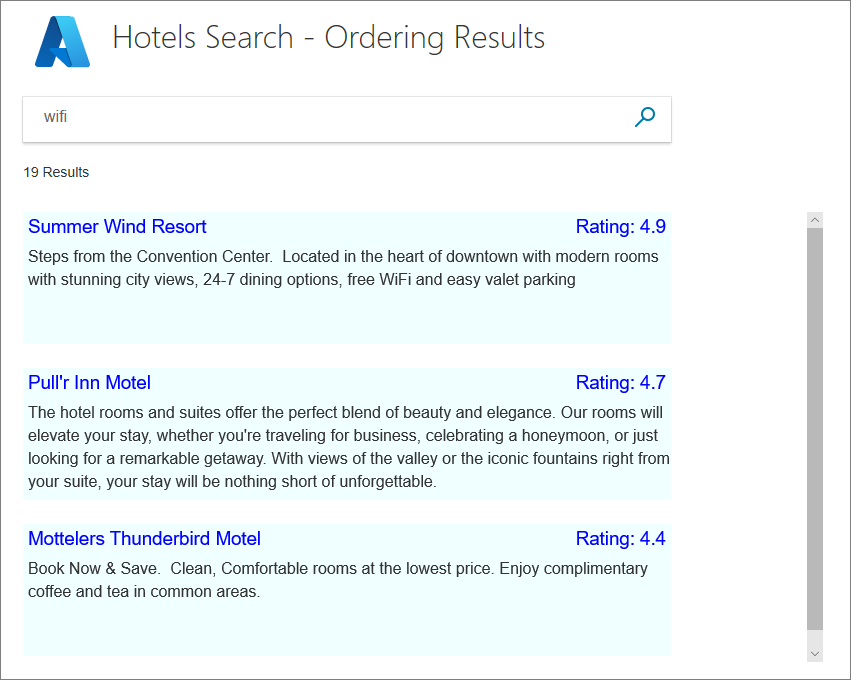
您會注意到,數家酒店的評級相同,因此它們在列表中顯示的順序依舊是數據出現的次序,這是隨機的。
在探討新增第二層排序之前,讓我們新增一些程式代碼來顯示房間費率的範圍。 我們會新增此程式碼以顯示從 複雜類型擷取數據,以便我們可以根據價格討論排序結果(或許是最便宜的優先)。
將房間費率範圍新增至檢視
將包含最便宜且最昂貴房間費率的屬性新增至Hotel.cs模型。
// Room rate range
public double cheapest { get; set; }
public double expensive { get; set; }
計算主控制器中 Index(SearchData model) 動作結尾的房間價格。 在儲存暫存數據之後新增計算。
// Ensure TempData is stored for the next call.
TempData["page"] = page;
TempData["searchfor"] = model.searchText;

// Calculate the room rate ranges.
await foreach (var result in model.resultList.GetResultsAsync())
{
    var cheapest = 0d;
    var expensive = 0d;

    foreach (var room in result.Document.Rooms)
    {
        var rate = room.BaseRate;
        if (rate < cheapest || cheapest == 0)
        {
            cheapest = (double)rate;
        }
        if (rate > expensive)
        {
            expensive = (double)rate;
        }
    }
    model.resultList.Results[n].Document.cheapest = cheapest;
    model.resultList.Results[n].Document.expensive = expensive;
}
將 Rooms 屬性新增至控制器之 Index(SearchData model) 動作方法中的 Select 參數。
options.Select.Add("Rooms");變更檢視中的轉譯迴圈,以顯示結果第一頁的速率範圍。
<!-- Show the hotel data. -->
@for (var i = 0; i < result.Count; i++)
{
    var rateText = $"Rates from ${result[i].Document.cheapest} to ${result[i].Document.expensive}";
    var ratingText = $"Rating: {result[i].Document.Rating}";

    string fullDescription = result[i].Document.Description;

    // Display the hotel details.
    @Html.TextArea($"name{i}", result[i].Document.HotelName, new { @class = "box1A" })
    @Html.TextArea($"rating{i}", ratingText, new { @class = "box1B" })
    @Html.TextArea($"rates{i}", rateText, new { @class = "box2A" })
    @Html.TextArea($"desc{i}", fullDescription, new { @class = "box3" })
}
變更主控制器中的 Next 方法,以針對後續的結果頁面來傳達速率範圍。
public async Task<ActionResult> Next(SearchData model)
{
    // Set the next page setting, and call the Index(model) action.
    model.paging = "next";
    await Index(model);

    // Create an empty list.
    var nextHotels = new List<string>();

    // Add a hotel details to the list.
    await foreach (var result in model.resultList.GetResultsAsync())
    {
        var ratingText = $"Rating: {result.Document.Rating}";
        var rateText = $"Rates from ${result.Document.cheapest} to ${result.Document.expensive}";

        string fullDescription = result.Document.Description;

        // Add strings to the list.
        nextHotels.Add(result.Document.HotelName);
        nextHotels.Add(ratingText);
        nextHotels.Add(rateText);
        nextHotels.Add(fullDescription);
    }

    // Rather than return a view, return the list of data.
    return new JsonResult(nextHotels);
}
更新檢視中的 捲動 函式,以處理房間費率文字。
<script>
    function scrolled() {
        if (myDiv.offsetHeight + myDiv.scrollTop >= myDiv.scrollHeight) {
            $.getJSON("/Home/Next", function (data) {
                var div = document.getElementById('myDiv');

                // Append the returned data to the current list of hotels.
                for (var i = 0; i < data.length; i += 4) {
                    div.innerHTML += '\n<textarea class="box1A">' + data[i] + '</textarea>';
                    div.innerHTML += '\n<textarea class="box1B">' + data[i + 1] + '</textarea>';
                    div.innerHTML += '\n<textarea class="box2A">' + data[i + 2] + '</textarea>';
                    div.innerHTML += '\n<textarea class="box3">' + data[i + 4] + '</textarea>';
                }
            });
        }
    }
</script>
執行應用程式,並確認顯示房間費率範圍。
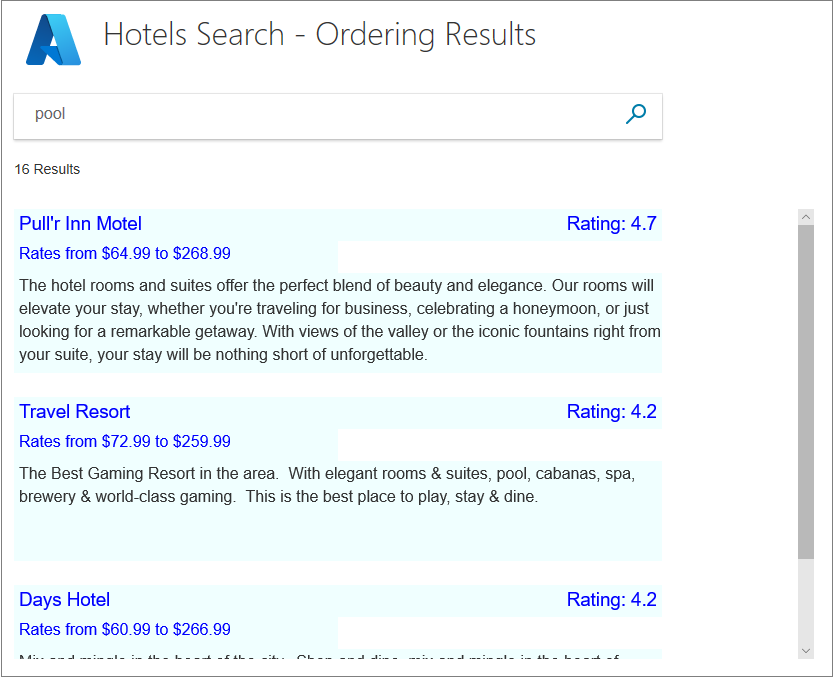
搜尋參數的 OrderBy 屬性不接受 Room.BaseRate 之類的專案,以提供最便宜的房間費率,即使房間已按費率排序也一樣。 在此情況下,會議室不會按費率排序。 若要在範例數據集中顯示旅館,按房間費率排序,您必須排序主控制器中的結果,並以所需的順序將這些結果傳送至檢視。
根據多個值排序結果
現在的問題是如何區分具有相同分級的酒店。 一種方法可能是根據酒店最近的翻新時間來排序,使最近翻新的酒店在結果中排名更高。
若要新增第二層排序,請將 LastRenovationDate 新增至搜尋結果,並將其新增至 OrderBy 中的 Index(SearchData model) 方法。
options.Select.Add("LastRenovationDate");

options.OrderBy.Add("LastRenovationDate desc");
小提示
您可以在 OrderBy 清單中輸入任意數目的屬性。 如果酒店有相同的評級和裝修日期,可以輸入第三個物業來區分它們。
再次,我們需要在檢視中看到裝修日期,以確保排序正確。 對於裝修這樣的事情,可能只是一年就足夠了。 將檢視中的轉譯迴圈變更為下列程序代碼。
<!-- Show the hotel data. -->
@for (var i = 0; i < result.Count; i++)
{
    var rateText = $"Rates from ${result[i].Document.cheapest} to ${result[i].Document.expensive}";
    var lastRenovatedText = $"Last renovated: { result[i].Document.LastRenovationDate.Value.Year}";
    var ratingText = $"Rating: {result[i].Document.Rating}";

    string fullDescription = result[i].Document.Description;

    // Display the hotel details.
    @Html.TextArea($"name{i}", result[i].Document.HotelName, new { @class = "box1A" })
    @Html.TextArea($"rating{i}", ratingText, new { @class = "box1B" })
    @Html.TextArea($"rates{i}", rateText, new { @class = "box2A" })
    @Html.TextArea($"renovation{i}", lastRenovatedText, new { @class = "box2B" })
    @Html.TextArea($"desc{i}", fullDescription, new { @class = "box3" })
}
變更主控制器中的 Next 方法,以轉送上次裝修日期的年份元件。
    public async Task<ActionResult> Next(SearchData model)
    {
        // Set the next page setting, and call the Index(model) action.
        model.paging = "next";
        await Index(model);

        // Create an empty list.
        var nextHotels = new List<string>();

        // Add a hotel details to the list.
        await foreach (var result in model.resultList.GetResultsAsync())
        {
            var ratingText = $"Rating: {result.Document.Rating}";
            var rateText = $"Rates from ${result.Document.cheapest} to ${result.Document.expensive}";
            var lastRenovatedText = $"Last renovated: {result.Document.LastRenovationDate.Value.Year}";

            string fullDescription = result.Document.Description;

            // Add strings to the list.
            nextHotels.Add(result.Document.HotelName);
            nextHotels.Add(ratingText);
            nextHotels.Add(rateText);
            nextHotels.Add(lastRenovatedText);
            nextHotels.Add(fullDescription);
        }

        // Rather than return a view, return the list of data.
        return new JsonResult(nextHotels);
    }
變更檢視中的 捲動 函式,以顯示整修文字。
<script>
    function scrolled() {
        if (myDiv.offsetHeight + myDiv.scrollTop >= myDiv.scrollHeight) {
            $.getJSON("/Home/Next", function (data) {
                var div = document.getElementById('myDiv');

                // Append the returned data to the current list of hotels.
                for (var i = 0; i < data.length; i += 5) {
                    div.innerHTML += '\n<textarea class="box1A">' + data[i] + '</textarea>';
                    div.innerHTML += '\n<textarea class="box1B">' + data[i + 1] + '</textarea>';
                    div.innerHTML += '\n<textarea class="box2A">' + data[i + 2] + '</textarea>';
                    div.innerHTML += '\n<textarea class="box2B">' + data[i + 3] + '</textarea>';
                    div.innerHTML += '\n<textarea class="box3">' + data[i + 4] + '</textarea>';
                }
            });
        }
    }
</script>
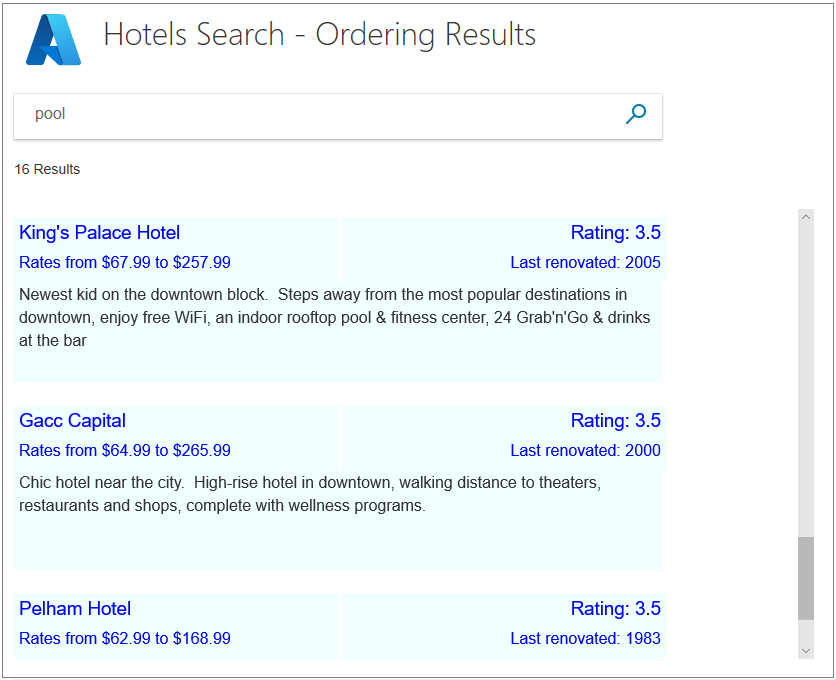
執行應用程式。 搜尋一般詞彙,例如「游泳池」或「景觀」,並確認具有相同評等的飯店現在會以裝修日期的遞減順序顯示。
根據評分檔案排序結果
到目前為止,本教學課程中提供的範例示範了如何根據數值(評等和整修日期)進行排序,並提供 確切 的排序順序。 不過,有些搜尋和某些數據並不適合兩個數據元素之間的如此簡單的比較。 針對全文搜索查詢,認知搜尋包含 排名的概念。 您可以指定評分配置檔來影響結果的排名方式,並提供更複雜的質化比較。
評分模型 定義在索引架構中。 已針對旅館數據設定數個評分配置檔。 讓我們看看如何定義評分配置檔,然後嘗試撰寫程式代碼來搜尋它們。
如何定義評分配置檔
評分配置檔會於設計階段在搜尋索引中定義。 Microsoft託管的只讀旅館索引有三個評分設定檔。 本節會探索評分配置檔,並示範如何在程式碼中使用它們。
以下是未指定任何 OrderBy 或 ScoringProfile 參數時所使用旅館數據集的預設評分設定檔。 如果搜尋文字出現在酒店名稱、描述或標籤列表(如設施)中,此配置文件會提升酒店的分數。 請注意評分的權數如何偏向特定欄位。 如果搜尋文字出現在另一個字段中,但未列於下方,則其權數會是 1。 顯然,分數越高,結果就會在顯示排序中更靠前。
{
   "name": "boostByField",
   "text": {
       "weights": {
           "Tags": 3,
           "HotelName": 2,
           "Description": 1.5,
           "Description_fr": 1.5,
       }
   }
}
如果提供的參數包含一或多個於列表中的標籤(我們稱之為「設施」),下列替代評分方案會顯著提升分數。 此配置檔的關鍵點是 必須 提供參數,其中包含文字。 如果參數是空的,或未提供,則會擲回錯誤。
{
    "name":"boostAmenities",
    "functions":[
        {
        "fieldName":"Tags",
        "freshness":null,
        "interpolation":"linear",
        "magnitude":null,
        "distance":null,
        "tag":{
            "tagsParameter":"amenities"
        },
        "type":"tag",
        "boost":5
        }
    ],
    "functionAggregation":0
},
在第三個配置檔中,酒店評級大幅提升分數。 上次翻新的日期也會提高分數,但前提是該數據落在目前日期的 730 天(2 年)內。
{
    "name":"renovatedAndHighlyRated",
    "functions":[
        {
        "fieldName":"Rating",
        "freshness":null,
        "interpolation":"linear",
        "magnitude":{
            "boostingRangeStart":0,
            "boostingRangeEnd":5,
            "constantBoostBeyondRange":false
        },
        "distance":null,
        "tag":null,
        "type":"magnitude",
        "boost":20
        },
        {
        "fieldName":"LastRenovationDate",
        "freshness":{
            "boostingDuration":"P730D"
        },
        "interpolation":"quadratic",
        "magnitude":null,
        "distance":null,
        "tag":null,
        "type":"freshness",
        "boost":10
        }
    ],
    "functionAggregation":0
}
現在,讓我們看看這些個人檔案是否如我們所認為的那樣運作。
將程式代碼新增至檢視以比較個人資料
開啟 index.cshtml 檔案,並以下列程式代碼取代 <body> 區段。
<body> @using (Html.BeginForm("Index", "Home", FormMethod.Post)) { <table> <tr> <td></td> <td> <h1 class="sampleTitle"> <img src="~/images/azure-logo.png" width="80" /> Hotels Search - Order Results </h1> </td> </tr> <tr> <td></td> <td> <!-- Display the search text box, with the search icon to the right of it. --> <div class="searchBoxForm"> @Html.TextBoxFor(m => m.searchText, new { @class = "searchBox" }) <input class="searchBoxSubmit" type="submit" value=""> </div> <div class="searchBoxForm"> <b> Order: </b> @Html.RadioButtonFor(m => m.scoring, "Default") Default @Html.RadioButtonFor(m => m.scoring, "RatingRenovation") By numerical Rating @Html.RadioButtonFor(m => m.scoring, "boostAmenities") By Amenities @Html.RadioButtonFor(m => m.scoring, "renovatedAndHighlyRated") By Renovated date/Rating profile </div> </td> </tr> <tr> <td valign="top"> <div id="facetplace" class="facetchecks"> @if (Model != null && Model.facetText != null) { <h5 class="facetheader">Amenities:</h5> <ul class="facetlist"> @for (var c = 0; c < Model.facetText.Length; c++) { <li> @Html.CheckBoxFor(m => m.facetOn[c], new { @id = "check" + c.ToString() }) @Model.facetText[c] </li> } </ul> } </div> </td> <td> @if (Model != null && Model.resultList != null) { // Show the total result count. <p class="sampleText"> @Html.DisplayFor(m => m.resultList.Count) Results <br /> </p> <div id="myDiv" style="width: 800px; height: 450px; overflow-y: scroll;" onscroll="scrolled()"> <!-- Show the hotel data. --> @for (var i = 0; i < Model.resultList.Results.Count; i++) { var rateText = $"Rates from ${Model.resultList.Results[i].Document.cheapest} to ${Model.resultList.Results[i].Document.expensive}"; var lastRenovatedText = $"Last renovated: { Model.resultList.Results[i].Document.LastRenovationDate.Value.Year}"; var ratingText = $"Rating: {Model.resultList.Results[i].Document.Rating}"; string amenities = string.Join(", ", Model.resultList.Results[i].Document.Tags); string fullDescription = Model.resultList.Results[i].Document.Description; fullDescription += $"\nAmenities: {amenities}"; // Display the hotel details. @Html.TextArea($"name{i}", Model.resultList.Results[i].Document.HotelName, new { @class = "box1A" }) @Html.TextArea($"rating{i}", ratingText, new { @class = "box1B" }) @Html.TextArea($"rates{i}", rateText, new { @class = "box2A" }) @Html.TextArea($"renovation{i}", lastRenovatedText, new { @class = "box2B" }) @Html.TextArea($"desc{i}", fullDescription, new { @class = "box3" }) } </div> <script> function scrolled() { if (myDiv.offsetHeight + myDiv.scrollTop >= myDiv.scrollHeight) { $.getJSON("/Home/Next", function (data) { var div = document.getElementById('myDiv'); // Append the returned data to the current list of hotels. for (var i = 0; i < data.length; i += 5) { div.innerHTML += '\n<textarea class="box1A">' + data[i] + '</textarea>'; div.innerHTML += '<textarea class="box1B">' + data[i + 1] + '</textarea>'; div.innerHTML += '\n<textarea class="box2A">' + data[i + 2] + '</textarea>'; div.innerHTML += '<textarea class="box2B">' + data[i + 3] + '</textarea>'; div.innerHTML += '\n<textarea class="box3">' + data[i + 4] + '</textarea>'; } }); } } </script> } </td> </tr> </table> } </body>開啟SearchData.cs檔案,並以下列程式代碼取代 SearchData 類別。
public class SearchData
{
    public SearchData()
    {
    }

    // Constructor to initialize the list of facets sent from the controller.
    public SearchData(List<string> facets)
    {
        facetText = new string[facets.Count];

        for (int i = 0; i < facets.Count; i++)
        {
            facetText[i] = facets[i];
        }
    }

    // Array to hold the text for each amenity.
    public string[] facetText { get; set; }

    // Array to hold the setting for each amenitity.
    public bool[] facetOn { get; set; }

    // The text to search for.
    public string searchText { get; set; }

    // Record if the next page is requested.
    public string paging { get; set; }

    // The list of results.
    public DocumentSearchResult<Hotel> resultList;

    public string scoring { get; set; }
}
開啟hotels.css檔案,然後新增下列 HTML 類別。
.facetlist {
    list-style: none;
}

.facetchecks {
    width: 250px;
    display: normal;
    color: #666;
    margin: 10px;
    padding: 5px;
}

.facetheader {
    font-size: 10pt;
    font-weight: bold;
    color: darkgreen;
}
將程式代碼新增至控制器以指定評分配置檔
開啟主控制器檔案。 新增下列 using 語句(協助建立清單)。
using System.Linq;在此範例中,我們需要對 Index 進行初始呼叫,而不只是傳回初始檢視。 方法現在會搜索最多 20 個可在檢視中顯示的設施。
    public async Task<ActionResult> Index()
    {
        InitSearch();

        // Set up the facets call in the search parameters.
        SearchOptions options = new SearchOptions();
        // Search for up to 20 amenities.
        options.Facets.Add("Tags,count:20");

        SearchResults<Hotel> searchResult = await _searchClient.SearchAsync<Hotel>("*", options);

        // Convert the results to a list that can be displayed in the client.
        List<string> facets = searchResult.Facets["Tags"].Select(x => x.Value.ToString()).ToList();

        // Initiate a model with a list of facets for the first view.
        SearchData model = new SearchData(facets);

        // Save the facet text for the next view.
        SaveFacets(model, false);

        // Render the view including the facets.
        return View(model);
    }
我們需要兩個私用方法,將 Facet 儲存到暫存記憶體,並從暫存記憶體復原它們並填入模型。
    // Save the facet text to temporary storage, optionally saving the state of the check boxes.
    private void SaveFacets(SearchData model, bool saveChecks = false)
    {
        for (int i = 0; i < model.facetText.Length; i++)
        {
            TempData["facet" + i.ToString()] = model.facetText[i];
            if (saveChecks)
            {
                TempData["faceton" + i.ToString()] = model.facetOn[i];
            }
        }
        TempData["facetcount"] = model.facetText.Length;
    }

    // Recover the facet text to a model, optionally recoving the state of the check boxes.
    private void RecoverFacets(SearchData model, bool recoverChecks = false)
    {
        // Create arrays of the appropriate length.
        model.facetText = new string[(int)TempData["facetcount"]];
        if (recoverChecks)
        {
            model.facetOn = new bool[(int)TempData["facetcount"]];
        }

        for (int i = 0; i < (int)TempData["facetcount"]; i++)
        {
            model.facetText[i] = TempData["facet" + i.ToString()].ToString();
            if (recoverChecks)
            {
                model.facetOn[i] = (bool)TempData["faceton" + i.ToString()];
            }
        }
    }
我們需要視需要設定 OrderBy 和 ScoringProfile 參數。 將現有的 Index(SearchData model) 方法取代為下列專案。
public async Task<ActionResult> Index(SearchData model)
{
    try
    {
        InitSearch();

        int page;

        if (model.paging != null && model.paging == "next")
        {
            // Recover the facet text, and the facet check box settings.
            RecoverFacets(model, true);

            // Increment the page.
            page = (int)TempData["page"] + 1;

            // Recover the search text.
            model.searchText = TempData["searchfor"].ToString();
        }
        else
        {
            // First search with text.
            // Recover the facet text, but ignore the check box settings, and use the current model settings.
            RecoverFacets(model, false);

            // First call. Check for valid text input, and valid scoring profile.
            if (model.searchText == null)
            {
                model.searchText = "";
            }
            if (model.scoring == null)
            {
                model.scoring = "Default";
            }
            page = 0;
        }

        // Setup the search parameters.
        var options = new SearchOptions
        {
            SearchMode = SearchMode.All,

            // Skip past results that have already been returned.
            Skip = page * GlobalVariables.ResultsPerPage,

            // Take only the next page worth of results.
            Size = GlobalVariables.ResultsPerPage,

            // Include the total number of results.
            IncludeTotalCount = true,
        };
        // Select the data properties to be returned.
        options.Select.Add("HotelName");
        options.Select.Add("Description");
        options.Select.Add("Tags");
        options.Select.Add("Rooms");
        options.Select.Add("Rating");
        options.Select.Add("LastRenovationDate");

        List<string> parameters = new List<string>();
        // Set the ordering based on the user's radio button selection.
        switch (model.scoring)
        {
            case "RatingRenovation":
                // Set the ordering/scoring parameters.
                options.OrderBy.Add("Rating desc");
                options.OrderBy.Add("LastRenovationDate desc");
                break;

            case "boostAmenities":
                {
                    options.ScoringProfile = model.scoring;

                    // Create a string list of amenities that have been clicked.
                    for (int a = 0; a < model.facetOn.Length; a++)
                    {
                        if (model.facetOn[a])
                        {
                            parameters.Add(model.facetText[a]);
                        }
                    }

                    if (parameters.Count > 0)
                    {
                        options.ScoringParameters.Add($"amenities-{ string.Join(',', parameters)}");
                    }
                    else
                    {
                        // No amenities selected, so set profile back to default.
                        options.ScoringProfile = "";
                    }
                }
                break;

            case "renovatedAndHighlyRated":
                options.ScoringProfile = model.scoring;
                break;

            default:
                break;
        }

        // For efficiency, the search call should be asynchronous, so use SearchAsync rather than Search.
        model.resultList = await _searchClient.SearchAsync<Hotel>(model.searchText, options);

        // Ensure TempData is stored for the next call.
        TempData["page"] = page;
        TempData["searchfor"] = model.searchText;
        TempData["scoring"] = model.scoring;
        SaveFacets(model, true);

        // Calculate the room rate ranges.
        await foreach (var result in model.resultList.GetResultsAsync())
        {
            var cheapest = 0d;
            var expensive = 0d;

            foreach (var room in result.Document.Rooms)
            {
                var rate = room.BaseRate;
                if (rate < cheapest || cheapest == 0)
                {
                    cheapest = (double)rate;
                }
                if (rate > expensive)
                {
                    expensive = (double)rate;
                }
            }

            result.Document.cheapest = cheapest;
            result.Document.expensive = expensive;
        }
    }
    catch
    {
        return View("Error", new ErrorViewModel { RequestId = "1" });
    }

    return View("Index", model);
}
閱讀每個 切換 選項的批注。
如果您已完成上一節根據多個屬性排序的額外程式代碼,我們不需要對 下一個 動作進行任何變更。
執行及測試應用程式
執行應用程式。 您應該會在畫面中看到一組完整的設施。
若要進行排序,選取「依數值評等」將按照您在本教學課程中已實作的數值順序排列,並在評等相同的酒店之間利用裝修日期來進行決定。
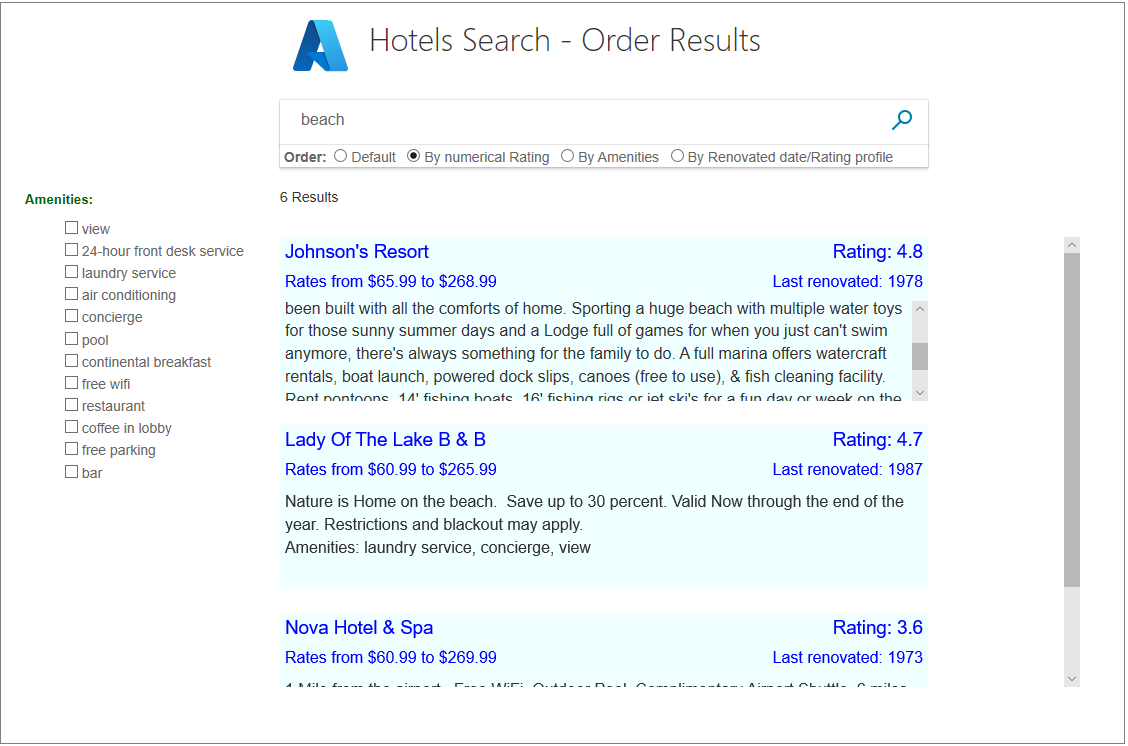
現在試試「按設施」的配置檔案。 選擇各種設施,並確認具備這些設施的酒店在結果清單中獲得提升。
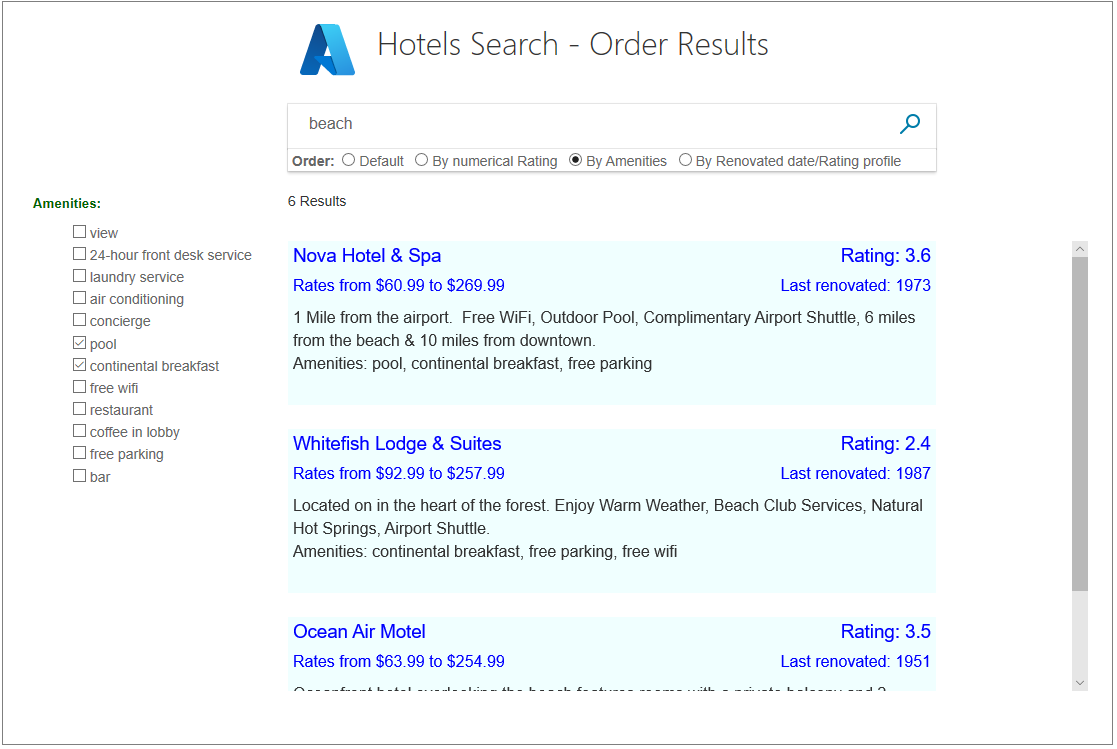
請嘗試「依翻新日期/評分概況」,來查看是否符合您的預期。 只有最近裝修的酒店才能得到 新鮮 度提升。
資源
如需更多資訊,請參閱以下 將評分設定檔新增至 Azure 認知搜尋索引。
外賣
請考慮這個專案的下列要點:
- 用戶預期搜尋結果會依照相關性由高到低排序,最相關的結果會優先顯示。
- 數據需要結構化,以便排序變得容易。 我們無法先輕鬆排序「最便宜」,因為數據沒有結構化,因此不需要額外的程式代碼即可進行排序。
- 排序可能會有許多層級,以區分在較高層級排序上具有相同值的結果。
- 某些結果以遞增順序排序是自然的(例如,距離某個點的距離),有些則以遞減順序排序(例如,客人的評等)。
- 當數據集的數值比較無法使用或無法有效運用時,可以定義評分設定。 評分每個結果有助於以智慧方式排序和顯示結果。
後續步驟
您已完成這一系列的 C# 教學課程 - 您應該已取得 Azure 認知搜尋 API 的寶貴知識。
如需進一步的參考和教學課程,請考慮流覽 Azure 認知搜尋檔中的Microsoft Learn 訓練目錄或其他教學課程。