此 通用 Windows 平台 平臺特定可讓 SearchBar 與拼字檢查引擎互動。 將附加屬性設定 SearchBar.IsSpellCheckEnabled 為 boolean 值,以在 XAML 中取用:
<ContentPage ...
             xmlns:windows="clr-namespace:Xamarin.Forms.PlatformConfiguration.WindowsSpecific;assembly=Xamarin.Forms.Core">
    <StackLayout>
        <SearchBar ... windows:SearchBar.IsSpellCheckEnabled="true" />
        ...
    </StackLayout>
</ContentPage>
或者,您可以使用 Fluent API 從 C# 取用它:
using Xamarin.Forms.PlatformConfiguration;
using Xamarin.Forms.PlatformConfiguration.WindowsSpecific;
...

searchBar.On<Windows>().SetIsSpellCheckEnabled(true);
方法SearchBar.On<Windows>會指定這個平臺專用只會在 通用 Windows 平台 上執行。 命名空間 SearchBar.SetIsSpellCheckEnabled 中的 Xamarin.Forms.PlatformConfiguration.WindowsSpecific 方法會開啟和關閉拼字檢查程式。 此外, SearchBar.SetIsSpellCheckEnabled 方法可用來藉由呼叫 SearchBar.GetIsSpellCheckEnabled 方法來切換拼字檢查器,以傳回是否啟用拼字檢查程式:
searchBar.On<Windows>().SetIsSpellCheckEnabled(!searchBar.On<Windows>().GetIsSpellCheckEnabled());
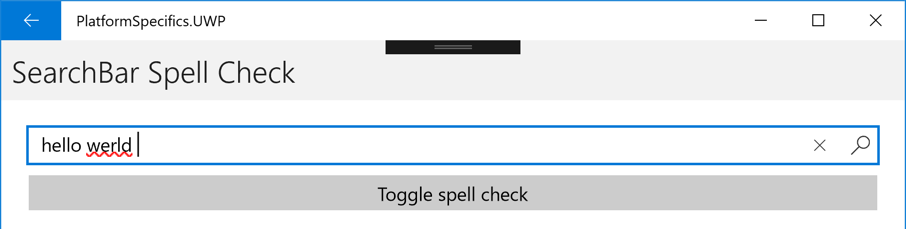
結果是輸入 的 SearchBar 文字可以進行拼字檢查,並向使用者指出不正確的拼字:
注意
SearchBar命名空間中的 Xamarin.Forms.PlatformConfiguration.WindowsSpecific 類別也具有 EnableSpellCheck 和 DisableSpellCheck 方法,可用來分別在 上SearchBar啟用和停用拼字檢查。