類別 Xamarin.FormsContentView 是的型 Layout 別,其中包含單一子專案,通常用來建立自定義、可重複使用的控件。 類別 ContentView 繼承自 TemplatedView。 本文和相關範例說明如何根據 ContentView 類別建立自定義CardView控件。
下列螢幕快照顯示 CardView 衍生自 類別的 ContentView 控制項:

類別 ContentView 會定義單一屬性:
Content是View物件。 這個屬性是由BindableProperty物件所支援,因此它可以是數據系結的目標。
ContentView也會從 TemplatedView 類別繼承 屬性:
ControlTemplateControlTemplate是 ,可以定義或覆寫控件的外觀。
如需屬性的詳細資訊 ControlTemplate ,請參閱 使用ControlTemplate自定義外觀。
建立自定義控件
類別 ContentView 本身提供很少的功能,但可用來建立自定義控件。 範例專案會 CardView 定義控制項 - UI 元素,可在類似卡片的配置中顯示影像、標題和描述。
建立自訂控制項的程式是:
- 在 Visual Studio 2019 中使用
ContentView範本建立新的類別。 - 為新的自定義控件定義程式代碼後置檔案中的任何唯一屬性或事件。
- 建立自定義控制件的UI。
注意
可以建立自定義控件,其版面配置是在程式碼中定義,而不是 XAML。 為了簡單起見,範例應用程式只會使用 XAML 配置來定義單 CardView 一類別。 不過,範例應用程式包含 CardViewCodePage 類別,顯示程式代碼中取用自定義控件的程式。
建立程式代碼後置屬性
CardView自訂控制項會定義下列屬性:
CardTitlestring:物件,表示卡片上顯示的標題。CardDescriptionstring:物件,表示卡片上顯示的描述。IconImageSourceImageSource:物件,表示卡片上顯示的影像。IconBackgroundColorColor:物件,表示卡片上顯示之影像的背景色彩。BorderColorColor:物件,表示卡片框線、影像框線和分隔線的色彩。CardColorColor:物件,表示卡片的背景色彩。
注意
屬性 BorderColor 會影響多個專案以供示範之用。 如有需要,這個屬性可能會分成三個屬性。
每個屬性都由 BindableProperty 實例支援。 BindableProperty支援允許使用MVVM模式來設定和系結每個屬性的樣式。
下列範例示範如何建立備份 BindableProperty:
public static readonly BindableProperty CardTitleProperty = BindableProperty.Create(
    "CardTitle",        // the name of the bindable property
    typeof(string),     // the bindable property type
    typeof(CardView),   // the parent object type
    string.Empty);      // the default value for the property
自訂屬性會使用 GetValue 和 SetValue 方法來取得和設定 BindableProperty 物件值:
public string CardTitle
{
    get => (string)GetValue(CardView.CardTitleProperty);
    set => SetValue(CardView.CardTitleProperty, value);
}
如需對象的詳細資訊 BindableProperty ,請參閱 可系結的屬性。
定義UI
自定義控件 UI 會使用 ContentView 做為控制項的 CardView 根元素。 下列範例顯示 CardView XAML:
<ContentView ...
             x:Name="this"
             x:Class="CardViewDemo.Controls.CardView">
    <Frame BindingContext="{x:Reference this}"
            BackgroundColor="{Binding CardColor}"
            BorderColor="{Binding BorderColor}"
            ...>
        <Grid>
            ...
            <Frame BorderColor="{Binding BorderColor, FallbackValue='Black'}"
                   BackgroundColor="{Binding IconBackgroundColor, FallbackValue='Grey'}"
                   ...>
                <Image Source="{Binding IconImageSource}"
                       .. />
            </Frame>
            <Label Text="{Binding CardTitle, FallbackValue='Card Title'}"
                   ... />
            <BoxView BackgroundColor="{Binding BorderColor, FallbackValue='Black'}"
                     ... />
            <Label Text="{Binding CardDescription, FallbackValue='Card description text.'}"
                   ... />
        </Grid>
    </Frame>
</ContentView>
元素會將 ContentView x:Name 屬性設定為 這個,可用來存取系結至 CardView 實例的物件。 版面配置中的元素會將其屬性上的系結設定為系結物件上定義的值。
如需數據系結的詳細資訊,請參閱 Xamarin.Forms 數據系結。
注意
如果系結為 null,屬性FallbackValue會提供預設值。 這也允許 Visual Studio中的 XAML 預覽程式 轉譯 CardView 控件。
具現化自定義控制件
自定義控件命名空間的參考必須新增至具現化自定義控件的頁面。 下列範例顯示名為 控制件 的命名空間參考,新增至 ContentPage XAML 中的實例:
<ContentPage ...
             xmlns:controls="clr-namespace:CardViewDemo.Controls" >
加入 CardView 參考之後,就可以在 XAML 中具現化,並定義其屬性:
<controls:CardView BorderColor="DarkGray"
                   CardTitle="Slavko Vlasic"
                   CardDescription="Lorem ipsum dolor sit..."
                   IconBackgroundColor="SlateGray"
                   IconImageSource="user.png"/>
CardView也可以在程式代碼中具現化:
CardView card = new CardView
{
    BorderColor = Color.DarkGray,
    CardTitle = "Slavko Vlasic",
    CardDescription = "Lorem ipsum dolor sit...",
    IconBackgroundColor = Color.SlateGray,
    IconImageSource = ImageSource.FromFile("user.png")
};
使用 ControlTemplate 自定義外觀
衍生自 類別的 ContentView 自定義控制項可以使用 XAML、程式代碼或完全不定義外觀來定義外觀。 無論如何定義外觀, ControlTemplate 物件都可以使用自定義版面配置覆寫外觀。
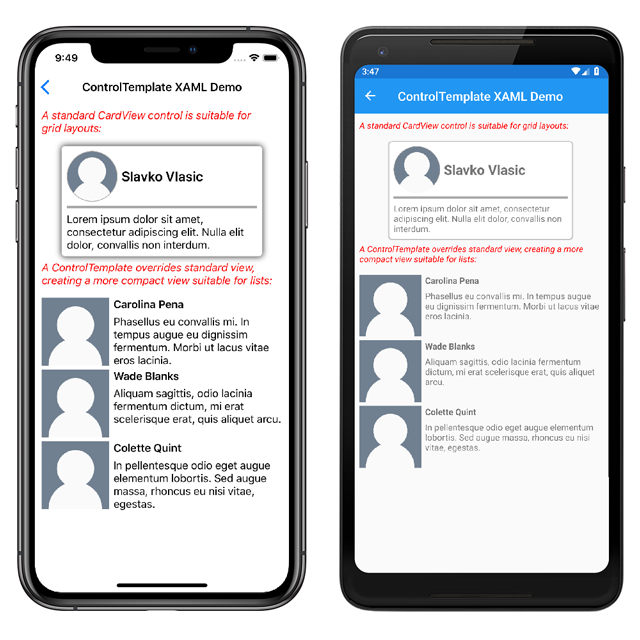
在某些使用案例中,配置 CardView 可能會佔用太多空間。 ControlTemplate可以覆寫版CardView面配置,以提供更精簡的檢視,適用於壓縮清單:
<ContentPage.Resources>
    <ResourceDictionary>
        <ControlTemplate x:Key="CardViewCompressed">
            <Grid>
                <Grid.RowDefinitions>
                    <RowDefinition Height="100" />
                </Grid.RowDefinitions>
                <Grid.ColumnDefinitions>
                    <ColumnDefinition Width="100" />
                    <ColumnDefinition Width="100*" />
                </Grid.ColumnDefinitions>
                <Image Grid.Row="0"
                       Grid.Column="0"
                       Source="{TemplateBinding IconImageSource}"
                       BackgroundColor="{TemplateBinding IconBackgroundColor}"
                       WidthRequest="100"
                       HeightRequest="100"
                       Aspect="AspectFill"
                       HorizontalOptions="Center"
                       VerticalOptions="Center"/>
                <StackLayout Grid.Row="0"
                             Grid.Column="1">
                    <Label Text="{TemplateBinding CardTitle}"
                           FontAttributes="Bold" />
                    <Label Text="{TemplateBinding CardDescription}" />
                </StackLayout>
            </Grid>
        </ControlTemplate>
    </ResourceDictionary>
</ContentPage.Resources>
中的數據 ControlTemplate 系結會 TemplateBinding 使用標記延伸來指定系結。 ControlTemplate屬性接著可以使用其x:Key值,設定為定義的ControlTemplate物件。 下列範例顯示 ControlTemplate 實體上 CardView 設定的屬性:
<controls:CardView ControlTemplate="{StaticResource CardViewCompressed}"/>
下列螢幕快照顯示標準CardView實例,且CardViewControlTemplate其已被覆寫:
如需控件範本的詳細資訊,請參閱 Xamarin.Forms 控件範本。