警告
語意核心進程架構 是實驗性的,仍在開發中,而且可能會變更。
概述
在先前各節中,我們建置了一個流程,以協助我們自動化建立新產品的文件。 我們的流程現在可以產生特定於我們產品的文件,並透過校對和編輯週期來確保其符合我們的品質標準。 在本節中,我們將再次改善該程式,方法是要求人員在文件發佈之前核准或拒絕檔。 程序架構的彈性表示有數種方式可以進行這項作,但在此範例中,我們將示範如何與外部 pubsub 系統整合,以要求核准。
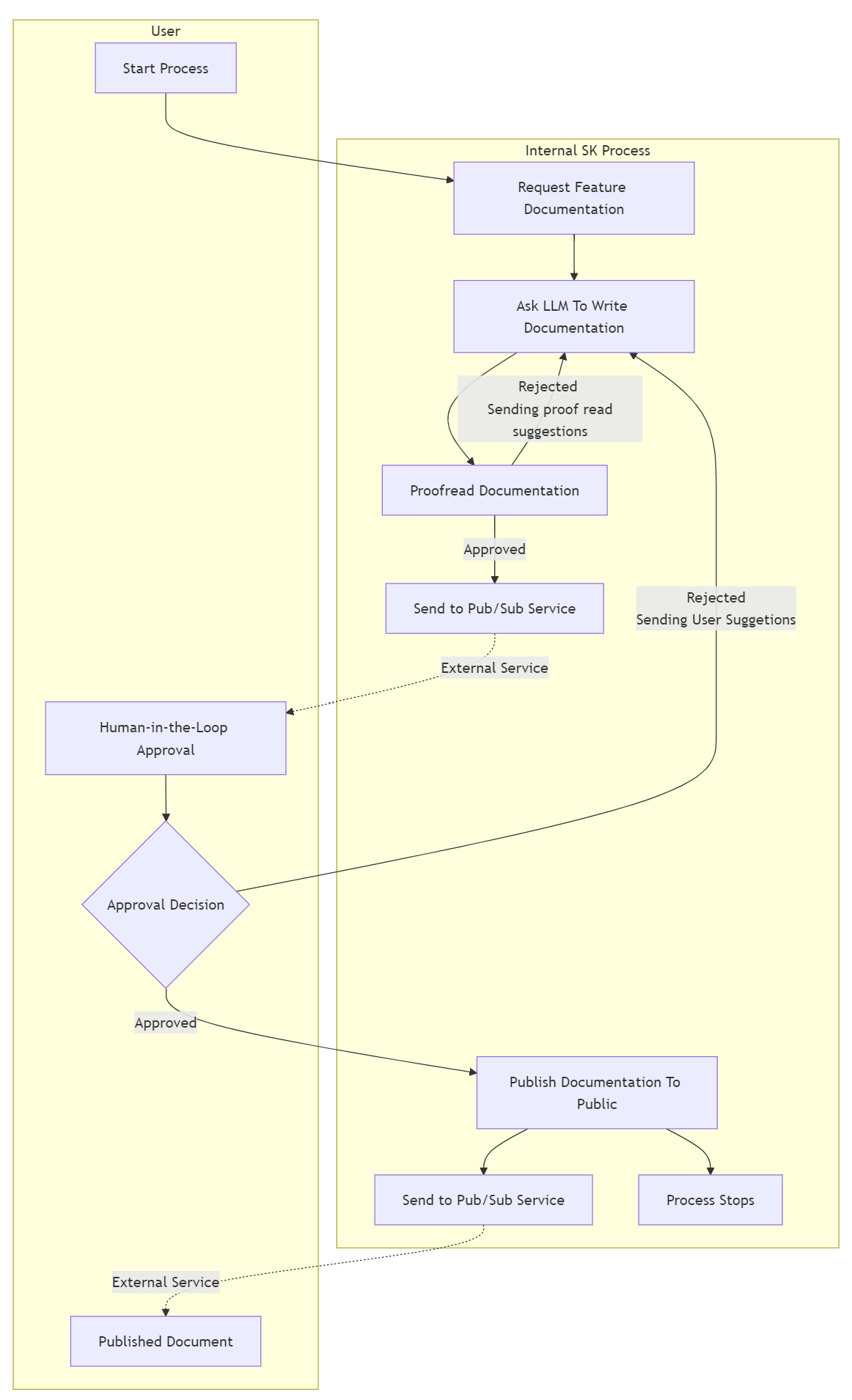
使發佈等待核准
我們需要對程序進行的第一個變更是讓發佈步驟在發佈檔之前等候核准。 其中一個選項是將核准的第二個參數新增至 PublishDocumentation中的 PublishDocumentationStep 函式。 這可運作,因為只有在提供所有必要參數時,才會叫用步驟中的 KernelFunction。
// A process step to publish documentation
public class PublishDocumentationStep : KernelProcessStep
{
    [KernelFunction]
    public DocumentInfo PublishDocumentation(DocumentInfo document, bool userApproval) // added the userApproval parameter
    {
        // Only publish the documentation if it has been approved
        if (userApproval)
        {
            // For example purposes we just write the generated docs to the console
            Console.WriteLine($"[{nameof(PublishDocumentationStep)}]:\tPublishing product documentation approved by user: \n{document.Title}\n{document.Content}");
        }
        return document;
    }
}
Python人機互動過程行為的支援即將推出。
使用上述程式代碼時,只有在產生的檔傳送至 PublishDocumentation 參數,並將核准的結果傳送至 PublishDocumentationStep 參數時,才會叫用 document 中的 userApproval 函式。
我們現在可以重用ProofreadStep步驟的現有邏輯,來額外向我們的外部發布訂閱系統發出一個事件,這將通知人工審批者有一個新的請求。
// A process step to publish documentation
public class ProofReadDocumentationStep : KernelProcessStep
{
    ...

    if (formattedResponse.MeetsExpectations)
    {
        // Events that are getting piped to steps that will be resumed, like PublishDocumentationStep.OnPublishDocumentation
        // require events to be marked as public so they are persisted and restored correctly
        await context.EmitEventAsync("DocumentationApproved", data: document, visibility: KernelProcessEventVisibility.Public);
    }
    ...
}
由於我們希望在校對代理人核准後發佈新生成的文件,因此已核准的文件將在發佈步驟中排隊。 此外,透過我們的外部發布訂閱系統,將向人類通知最新文件的更新。 讓我們更新程式流程,以符合這個新的設計。
Python人機互動過程行為的支援即將推出。
// Create the process builder
ProcessBuilder processBuilder = new("DocumentationGeneration");

// Add the steps
var infoGatheringStep = processBuilder.AddStepFromType<GatherProductInfoStep>();
var docsGenerationStep = processBuilder.AddStepFromType<GenerateDocumentationStepV2>();
var docsProofreadStep = processBuilder.AddStepFromType<ProofreadStep>();
var docsPublishStep = processBuilder.AddStepFromType<PublishDocumentationStep>();

// internal component that allows emitting SK events externally, a list of topic names
// is needed to link them to existing SK events
var proxyStep = processBuilder.AddProxyStep(["RequestUserReview", "PublishDocumentation"]);

// Orchestrate the events
processBuilder
    .OnInputEvent("StartDocumentGeneration")
    .SendEventTo(new(infoGatheringStep));

processBuilder
    .OnInputEvent("UserRejectedDocument")
    .SendEventTo(new(docsGenerationStep, functionName: "ApplySuggestions"));

// When external human approval event comes in, route it to the 'isApproved' parameter of the docsPublishStep
processBuilder
    .OnInputEvent("UserApprovedDocument")
    .SendEventTo(new(docsPublishStep, parameterName: "userApproval"));

// Hooking up the rest of the process steps
infoGatheringStep
    .OnFunctionResult()
    .SendEventTo(new(docsGenerationStep, functionName: "GenerateDocumentation"));

docsGenerationStep
    .OnEvent("DocumentationGenerated")
    .SendEventTo(new(docsProofreadStep));

docsProofreadStep
    .OnEvent("DocumentationRejected")
    .SendEventTo(new(docsGenerationStep, functionName: "ApplySuggestions"));

// When the proofreader approves the documentation, send it to the 'document' parameter of the docsPublishStep
// Additionally, the generated document is emitted externally for user approval using the pre-configured proxyStep
docsProofreadStep
    .OnEvent("DocumentationApproved")
    // [NEW] addition to emit messages externally
    .EmitExternalEvent(proxyStep, "RequestUserReview") // Hooking up existing "DocumentationApproved" to external topic "RequestUserReview"
    .SendEventTo(new(docsPublishStep, parameterName: "document"));

// When event is approved by user, it gets published externally too
docsPublishStep
    .OnFunctionResult()
    // [NEW] addition to emit messages externally
    .EmitExternalEvent(proxyStep, "PublishDocumentation");

var process = processBuilder.Build();
return process;
最後,應該提供 介面 IExternalKernelProcessMessageChannel 的實作,因為它是由新的 ProxyStep內部使用。 此介面用於向外部發送訊息。 實作這個介面將取決於您所使用的外部系統。 在這個範例中,我們將使用我們創建的自訂客戶端來發送訊息到外部的發布/訂閱系統。
// Example of potential custom IExternalKernelProcessMessageChannel implementation
public class MyCloudEventClient : IExternalKernelProcessMessageChannel
{
    private MyCustomClient? _customClient;

    // Example of an implementation for the process
    public async Task EmitExternalEventAsync(string externalTopicEvent, KernelProcessProxyMessage message)
    {
        // logic used for emitting messages externally.
        // Since all topics are received here potentially
        // some if else/switch logic is needed to map correctly topics with external APIs/endpoints.
        if (this._customClient != null)
        {
            switch (externalTopicEvent)
            {
                case "RequestUserReview":
                    var requestDocument = message.EventData.ToObject() as DocumentInfo;
                    // As an example only invoking a sample of a custom client with a different endpoint/api route
                    this._customClient.InvokeAsync("REQUEST_USER_REVIEW", requestDocument);
                    return;

                case "PublishDocumentation":
                    var publishedDocument = message.EventData.ToObject() as DocumentInfo;
                    // As an example only invoking a sample of a custom client with a different endpoint/api route
                    this._customClient.InvokeAsync("PUBLISH_DOC_EXTERNALLY", publishedDocument);
                    return;
            }
        }
    }

    public async ValueTask Initialize()
    {
        // logic needed to initialize proxy step, can be used to initialize custom client
        this._customClient = new MyCustomClient("http://localhost:8080");
        this._customClient.Initialize();
    }

    public async ValueTask Uninitialize()
    {
        // Cleanup to be executed when proxy step is uninitialized
        if (this._customClient != null)
        {
            await this._customClient.ShutdownAsync();
        }
    }
}
最後,若要讓程式 ProxyStep 使用 IExternalKernelProcessMessageChannel 實作,在此情況下 MyCloudEventClient,我們需要正確使用管線。
當使用本機運行時間時,可以在叫用 StartAsync 類別的 KernelProcess 類別時傳遞實作 class。
KernelProcess process;
IExternalKernelProcessMessageChannel myExternalMessageChannel = new MyCloudEventClient();
// Start the process with the external message channel
await process.StartAsync(kernel, new KernelProcessEvent
    {
        Id = inputEvent,
        Data = input,
    },
    myExternalMessageChannel)
使用 Dapr 執行環境時,必須在項目的程序設置中通過相依性注入進行管道設置。
var builder = WebApplication.CreateBuilder(args);
...
// depending on the application a singleton or scoped service can be used
// Injecting SK Process custom client IExternalKernelProcessMessageChannel implementation
builder.Services.AddSingleton<IExternalKernelProcessMessageChannel, MyCloudEventClient>();
Python人機互動過程行為的支援即將推出。
程式流程已進行兩項變更:
- 已新增名為
HumanApprovalResponse的輸入事件,該事件會路由傳送至userApproval步驟的docsPublishStep參數。 - 由於
docsPublishStep中的 KernelFunction 現在有兩個參數,因此我們需要更新現有的路由,以指定document的參數名稱。
執行程式,就像您先前所做的一樣,並注意到當校訂程式核准產生的檔,並將它傳送至 document 步驟的 docPublishStep 參數時,因為該步驟正在等候 userApproval 參數,所以不會再叫用此步驟。 此時,進程會閒置,因為沒有任何步驟可供叫用,而我們開始進程所發出的呼叫會傳回。 此程式會保持處於此閑置狀態,直到我們的「人為迴圈」採取動作來核准或拒絕發佈要求為止。 一旦發生這種情況,並將結果傳回我們的程式,我們可以使用結果重新啟動程式。
// Restart the process with approval for publishing the documentation.
await process.StartAsync(kernel, new KernelProcessEvent { Id = "UserApprovedDocument", Data = true });
Python人機互動過程行為的支援即將推出。
當程式再次以 UserApprovedDocument 啟動時,它會從離開的位置開始,並叫用 docsPublishStep,並將 userApproval 設定為 true,且我們的檔將會發佈。 如果再次用 UserRejectedDocument 事件啟動,該過程將在 ApplySuggestions 階段開始 docsGenerationStep 函數,並且過程將如以前一樣繼續。
現在流程已完成,我們成功將「人機互動」步驟加入到我們的流程中。 現在可以使用該過程來生成我們產品的文件,對其進行校對,並在經過人工審核後予以發布。