開始工作流程移轉之前,請設定所需的端點。
設定端點
工作流程移轉需要下列端點:
| 端點 | 環境 |
|---|---|
| https://api.bap.microsoft.com | Standard commercial |
| https://gov.api.bap.microsoft.us | GCC |
| https://high.api.bap.microsoft.us | GCC High |
| https://api.bap.appsplatform.us | DoD |
設定 Power Automate
如果您之前從未使用此租用戶使用 Power Automate,則必須在開始移轉之前進行設定。 建議您使用 Microsoft Edge。
使用系統管理員帳戶來登入 https://admin.powerplatform.microsoft.com/。
從瀏覽中選取 [管理 ]。
選取您的預設環境。
選取 [新增 Dataverse]。
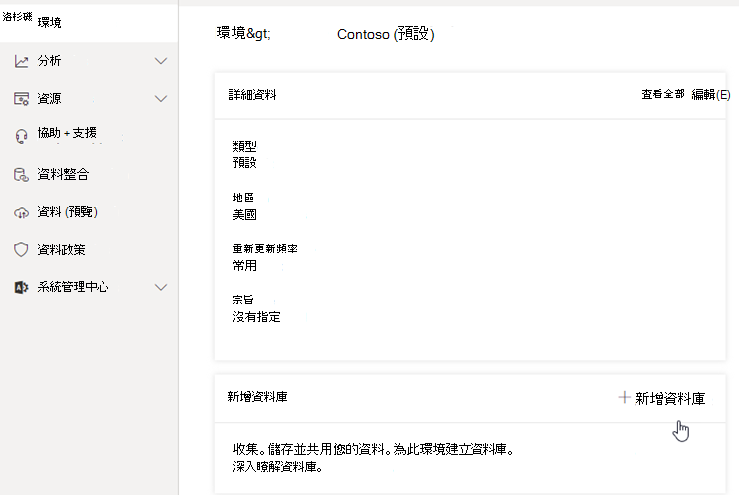
在 [新增 Dataverse ] 工作窗格中,選取 [ 新增]。
等候「狀態」狀態變更為就緒。
若要將 Microsoft Entra 使用者同步至 Microsoft Dataverse,請登入 Microsoft Power Automate |Microsoft Power Platform 與您要設為預設流程擁有者的帳戶。
重要事項
您用來移轉的使用者帳戶必須是 Microsoft 365 租用戶的 SharePoint 系統管理員或 SharePoint 網站系統管理員,而且是可以管理解決方案的 Power Platform 系統管理員。
由於此使用者帳戶將用來在 Power Platform 環境中建立解決方案和使用者,因此也必須指派系統管理員、環境建立者和基本使用者的安全性角色。 深入了解 Power Platform 資料安全性。
使用此帳戶登入 Power Automate,瀏覽至 [解決方案],並確認您可以建立新解決方案。