本主題說明如何使用 C++/WinRT API,無論是 Windows 的一部分、第三方元件廠商實作,或是自己實作。
這很重要
為了讓本主題的程式碼範例簡短且容易嘗試,你可以透過建立一個新的 Windows 主控台應用程式(C++/WinRT)專案,然後複製貼上程式碼來重現它們。 不過,你無法在像那樣的未封裝應用程式中取用任意的自訂(第三方)Windows 執行階段 型別。 用那種方式,你只能取用 Windows 類型。
要從主控台應用程式中取得自訂(第三方)Windows 執行階段 類型,你需要給該應用程式一個套件身份,以便它能解析所使用的自訂類型註冊。 更多資訊請參閱 Windows 應用程式封裝 Project。
或者,也可以從適用於 C++ 的 Blank App(Packaged,桌面版中的 WinUI 3) 或 Windows 執行階段 Component(C++/WinRT) 專案範本建立新的專案。 這些應用程式類型已經有 套件身份。
如果 API 位於 Windows 命名空間
這是你最常使用Windows 執行階段 API的情況。 對於 Windows 命名空間中每個元資料定義的型別,C++/WinRT 都會定義一個 C++ 友善的等價型(稱為投影型別)。 投影型別具有與 Windows 型別相同的完整限定名稱,但它會以 C++ 語法置於 C++ 的 winrt 命名空間中。 例如,Windows::Foundation::Uri 在 C++/WinRT 中投影為 winrt::Windows::Foundation::Uri。
這裡有一個簡單的程式碼範例。 如果你想直接複製貼上以下程式碼範例到 Windows 主控台應用程式(C++/WinRT)專案的主原始碼檔案,請先在專案屬性中設定「不使用預編譯標頭」。
// main.cpp
#include <winrt/Windows.Foundation.h>

using namespace winrt;
using namespace Windows::Foundation;

int main()
{
    winrt::init_apartment();
    Uri contosoUri{ L"http://www.contoso.com" };
    Uri combinedUri = contosoUri.CombineUri(L"products");
}
所包含的標頭 winrt/Windows.Foundation.h 是 SDK 的一部分,位於資料夾 %WindowsSdkDir%Include<WindowsTargetPlatformVersion>\cppwinrt\winrt\內。 該資料夾的標頭包含投影到 C++/WinRT 的 Windows 命名空間類型。 在此範例中,winrt/Windows.Foundation.h包含 winrt::Windows::Foundation::Uri,這是執行時類別 Windows::Foundation::Uri 的投影型別。
Tip
每當您要使用 Windows 命名空間中的型別時,請包含與該命名空間對應的 C++/WinRT 標頭檔。 這些 using namespace 指令是可選的,但很方便。
在上述程式碼範例中,初始化 C++/WinRT 後,我們透過 winrt::Windows::Foundation::Uri 投影型別的一個公開建構子(本例為 Uri(String))堆疊分配值。 對於這種最常見的使用情境,通常你只要這麼做就夠了。 一旦你有了 C++/WinRT 投影型別值,就可以把它當作實際 Windows 執行階段 型別的實例來處理,因為它包含所有相同的成員。
事實上,該投影值是一個代理;它本質上只是指向後備物件的智慧指標。 投影值的建構子會呼叫 RoActivateInstance,來建立支援的 Windows 執行階段 類別(Windows.此處為 Foundation.Uri),並將該物件的預設介面儲存在新的投影值中。 如下所示,你對投影值成員的呼叫實際上會透過智慧指標委派給後備物件;而狀態變更也正是在該物件上發生。
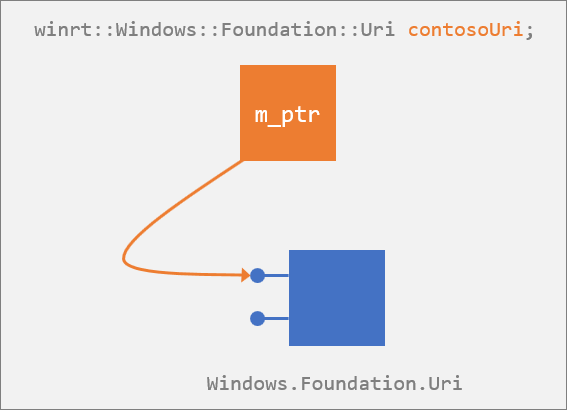
當值 contosoUri 脫離作用域時,會銷毀並釋放對預設介面的參考。 如果該參考是對後援 Windows 執行階段 Windows.Foundation.Uri 物件的最後一個參考,則該後援物件也會被解構。
Tip
投影型別是用來包裝 Windows 執行階段 型別的 API。 例如,投影介面是 Windows 執行階段 介面的包裝器。
C++/WinRT 投影標頭檔
若要從 C++/WinRT 使用 Windows 命名空間 API,請包含來自 %WindowsSdkDir%Include<WindowsTargetPlatformVersion>\cppwinrt\winrt 資料夾的標頭檔。 你必須包含與所使用的每個命名空間對應的標頭檔。
例如,對於 Windows::Security::Cryptography::Certificates 命名空間,等效的 C++/WinRT 型別定義位於 winrt/Windows.Security.Cryptography.Certificates.h。 加入那個標頭後,你可以存取 Windows::Security::Cryptography::Certificates 命名空間中的所有類型。
有時候,一個命名空間標頭會包含相關命名空間標頭的部分,但你不應該依賴這個實作細節。 明確包含你使用的命名空間標頭。
例如,Certificate::GetCertificateBlob 方法會回傳 Windows::Storage::Streams::IBuffer 介面。
在呼叫 Certificate::GetCertificateBlob 方法前,必須包含winrt/Windows.Storage.Streams.h命名空間標頭檔,以確保能接收並操作回傳的 Windows::Storage::Streams::IBuffer。
在使用該命名空間的型別前忘記包含必要的命名空間標頭,是常見的建置錯誤來源。
透過物件、介面或 ABI 存取成員
使用 C++/WinRT 投影時,Windows 執行階段 類別的執行時表示不過是底層的 ABI 介面。 但為了方便起見,你可以依照類別作者的本意來編碼。 例如,你可以呼叫 Uri 的 ToString 方法,就像那是類別的方法一樣(事實上,表面上它是獨立 IStringable 介面上的方法)。
WINRT_ASSERT 是一個巨集定義,並擴展為 _ASSERTE。
Uri contosoUri{ L"http://www.contoso.com" };
WINRT_ASSERT(contosoUri.ToString() == L"http://www.contoso.com/"); // QueryInterface is called at this point.
這種便利是透過查詢適當的介面來實現的。 但你永遠掌控一切。 你可以選擇犧牲一點那樣的便利性,藉由自行取得 IStringable 介面並直接使用它,來換取一點效能提升。 在下面的程式碼範例中,你會在執行時(透過一次性查詢)獲得一個實際的 IStringable 介面指標。 之後,你對 ToString 的呼叫是直接的,避免再呼叫 QueryInterface。
...
IStringable stringable = contosoUri; // One-off QueryInterface.
WINRT_ASSERT(stringable.ToString() == L"http://www.contoso.com/");
如果你知道會在同一介面上呼叫多個方法,你可以選擇這種方法。
順帶一提,如果你真的想在 ABI 層級接觸會員,那你是可以的。 以下範例說明了如何做到,且在 C++/WinRT 與 ABI 之間的互操作系統中有更多細節與程式碼範例。
#include <Windows.Foundation.h>
#include <unknwn.h>
#include <winrt/Windows.Foundation.h>
using namespace winrt::Windows::Foundation;

int main()
{
    winrt::init_apartment();
    Uri contosoUri{ L"http://www.contoso.com" };

    int port{ contosoUri.Port() }; // Access the Port "property" accessor via C++/WinRT.

    winrt::com_ptr<ABI::Windows::Foundation::IUriRuntimeClass> abiUri{
        contosoUri.as<ABI::Windows::Foundation::IUriRuntimeClass>() };
    HRESULT hr = abiUri->get_Port(&port); // Access the get_Port ABI function.
}
延遲初始化
在 C++/WinRT 中,每個投影型別都有一個特殊的 C++/WinRT std::nullptr_t 建構子。 除了那一個之外,所有投影型建構子(包括預設建構子)都會建立一個背後的 Windows 執行階段 物件,並提供一個指向該物件的智慧指標給你。 因此,這條規則適用於任何使用預設建構子的地方,例如未初始化的本地變數、未初始化的全域變數,以及未初始化的成員變數。
另一方面,如果你想建立一個投影型別的變數,而不讓它進而建構其對應的基礎 Windows 執行階段 物件(這樣你就可以將該工作延後到之後再進行),那麼你可以這麼做。 使用該特殊的 C++/WinRT std::nullptr_t 建構函式來宣告您的變數或欄位(C++/WinRT 投影會將其注入到每個執行階段類別中)。 我們在下面的程式碼範例中使用了這個特殊的建構子和 m_gamerPicBuffer 。
#include <winrt/Windows.Storage.Streams.h>
using namespace winrt::Windows::Storage::Streams;

#define MAX_IMAGE_SIZE 1024

struct Sample
{
    void DelayedInit()
    {
        // Allocate the actual buffer.
        m_gamerPicBuffer = Buffer(MAX_IMAGE_SIZE);
    }

private:
    Buffer m_gamerPicBuffer{ nullptr };
};

int main()
{
    winrt::init_apartment();
    Sample s;
    // ...
    s.DelayedInit();
}
投影型別中的所有建構函式,exceptstd::nullptr_t 建構函式外,都會建立對應的 Windows 執行階段 基礎物件。 std::nullptr_t 建構函式基本上不執行任何操作。 它期望投影物件會在下一個時間被初始化。 因此,不論執行時類別是否有預設建構子,你都可以利用此技術來進行有效率的延遲初始化。
這個考量會影響你在調用預設建構子的其他地方,例如向量和映射。 以這個程式碼範例為例,你需要一個 Blank App, Packaged(桌面版的 WinUI 3) 來執行 C++ 專案。
std::map<int, TextBlock> lookup;
lookup[2] = value;
這項指派會建立一個新的 TextBlock,然後又立刻以 value 將其覆寫。 這是解決方法。
std::map<int, TextBlock> lookup;
lookup.insert_or_assign(2, value);
另請參閱 預設建構器如何影響集合。
不要誤將初始化延後
小心不要誤用 std::nullptr_t 建構子。 編譯器在衝突解決時會優先選擇它,而不是工廠建構函式。 舉例來說,考慮這兩個執行時類別的定義。
// GiftBox.idl
runtimeclass GiftBox
{
    GiftBox();
}

// Gift.idl
runtimeclass Gift
{
    Gift(GiftBox giftBox); // You can create a gift inside a box.
}
假設我們想建構一個不在盒子裡的禮物(也就是用未初始化的 GiftBox 建構的禮物)。 首先,讓我們看看 錯誤 的做法。 我們知道有一個接受 GiftBox 的 Gift 建構函式。 但如果我們想要傳入 null 的 GiftBox(透過統一初始化來呼叫 Gift 建構子,就像我們在下方所做的那樣),那麼我們 將無法 得到我們想要的結果。
// These are *not* what you intended. Doing it in one of these two ways
// actually *doesn't* create the intended backing Windows Runtime Gift object;
// only an empty smart pointer.

Gift gift{ nullptr };
auto gift{ Gift(nullptr) };
你在這裡得到的是未初始化的 Gift。 你不會從未初始化的 GiftBox 取得 Gift。 正確的 做法是 這樣的。
// Doing it in one of these two ways creates an initialized
// Gift with an uninitialized GiftBox.

Gift gift{ GiftBox{ nullptr } };
auto gift{ Gift(GiftBox{ nullptr }) };
在錯誤的範例中,傳遞 nullptr 常值會解析為使用延遲初始化建構函式。 若要解析為工廠建構函式,參數的類型必須是 GiftBox。 你仍然可以選擇傳遞明確延遲初始化的 GiftBox,如正確範例所示。
下一個例子 也是 正確的,因為參數的類型是 GiftBox,而非 std::nullptr_t。
GiftBox giftBox{ nullptr };
Gift gift{ giftBox }; // Calls factory constructor.
只有當你傳入 nullptr 常值時,才會產生歧義。
不要誤做複製建構。
這個警告與上文「 請勿誤延遲初始化 」章節所描述的類似。
除了延遲初始化建構子外,C++/WinRT 投影也會在每個執行時類別中注入複製建構子。 它是一個單參數建構器,接受與被建構物件相同的類型。 產生的智慧型指標會指向與其建構函式參數所指向者相同的底層 Windows 執行階段 物件。 結果是兩個智慧指標物件指向同一個背景物件。
這裡有一個執行時類別的定義,我們會在程式碼範例中使用。
// GiftBox.idl
runtimeclass GiftBox
{
    GiftBox(GiftBox biggerBox); // You can place a box inside a bigger box.
}
假設我們想在更大的禮物盒裡建一個禮物盒。
GiftBox bigBox{ ... };

// These are *not* what you intended. Doing it in one of these two ways
// copies bigBox's backing-object-pointer into smallBox.
// The result is that smallBox == bigBox.

GiftBox smallBox{ bigBox };
auto smallBox{ GiftBox(bigBox) };
正確的做法是明確地呼叫啟用處理站。
GiftBox bigBox{ ... };

// These two ways call the activation factory explicitly.

GiftBox smallBox{
    winrt::get_activation_factory<GiftBox, IGiftBoxFactory>().CreateInstance(bigBox) };
auto smallBox{
    winrt::get_activation_factory<GiftBox, IGiftBoxFactory>().CreateInstance(bigBox) };
如果 API 是在 Windows 執行階段 元件中實作
本節適用於元件是你自行撰寫的,或是來自供應商的情況。
Note
關於安裝及使用 C++/WinRT Visual Studio 擴充套件(VSIX)及 NuGet 套件(共同提供專案範本與建置支援)的資訊,請參閱 Visual Studio 對 C++/WinRT 的支援。
在你的應用程式專案中,參考 Windows 執行階段 元件的 Windows 執行階段 元資料.winmd檔案()並編譯。 在建置過程中,cppwinrt.exe 工具會產生一個標準 C++ 函式庫,完整描述——或者說,投射——該元件的 API 介面。 換句話說,產生的函式庫包含元件的投影型別。
接著,就像處理 Windows 命名空間類型一樣,包含標頭檔,並透過其其中一個建構函式來建構投影型別。 你的應用程式專案啟動程式碼會註冊執行時類別,而投影型態的建構子會呼叫 RoActivateInstance ,從參考元件中啟動執行時類別。
#include <winrt/ThermometerWRC.h>

struct App : AppT<App>
{
    ThermometerWRC::Thermometer thermometer;
    ...
};
如需了解更多詳細資料、程式碼,以及如何使用在 Windows 執行階段 元件中實作的 API 的逐步解說,請參閱 使用 C++/WinRT 的 Windows 執行階段 元件 與 在 C++/WinRT 中撰寫事件。
如果 API 是在消費型專案中實作的
本節的程式碼範例取自主題 XAML 控制項;綁定至 C++/WinRT 屬性。 更多細節、程式碼,以及使用同一個專案中實作的執行時類別的操作步驟,請參考該主題。
從 XAML UI 取用的型別必須是執行時類別,即使它和 XAML 在同一個專案裡。 在這種情況下,你會從執行時類別的 Windows 執行階段 元資料.winmd()產生一個投影型別。 同樣地,你包含標頭,但你可以選擇 C++/WinRT 版本 1.0 或版本 2.0 來構建執行階段類別實例。 1.0 版本的方法使用 winrt::make;2.0 版本的方法稱為 統一構造法。 我們來逐一看看。
使用 winrt::make 來構造
我們先從預設(C++/WinRT 版本 1.0)的方法開始,因為至少熟悉這個模式是個好主意。 你透過其 std::nullptr_t 建構函式來建構投影型別。 該建構子不會執行初始化,因此你必須透過 winrt::make helper 函式為實例指派值,並傳遞必要的建構子參數。 與消費程式碼同一專案實作的執行時類別不需要註冊,也不需要透過 Windows 執行階段/COM 啟用實例化。
請參閱 XAML 控制項;繫結至 C++/WinRT 屬性,了解完整的逐步解說。 本節顯示該操作說明的節錄。
// MainPage.idl
import "BookstoreViewModel.idl";
namespace Bookstore
{
    runtimeclass MainPage : Microsoft.UI.Xaml.Controls.Page
    {
        BookstoreViewModel MainViewModel{ get; };
    }
}

// MainPage.h
...
struct MainPage : MainPageT<MainPage>
{
    ...
    private:
        Bookstore::BookstoreViewModel m_mainViewModel{ nullptr };
};
...

// MainPage.cpp
...
#include "BookstoreViewModel.h"

MainPage::MainPage()
{
    m_mainViewModel = winrt::make<Bookstore::implementation::BookstoreViewModel>();
    ...
}
均勻構造
在 C++/WinRT 2.0 及以上版本中,有一種優化的構造形式稱為 統一構造 (參見 C++/WinRT 2.0 的新聞及變更)。
請參閱 XAML 控制項;繫結至 C++/WinRT 屬性,了解完整的逐步解說。 本節顯示該操作說明的節錄。
要用統一建造取代 winrt::make,你需要啟動工廠。 一個不錯的產生方法是把建構子加入你的 IDL。
// MainPage.idl
import "BookstoreViewModel.idl";
namespace Bookstore
{
    runtimeclass MainPage : Microsoft.UI.Xaml.Controls.Page
    {
        MainPage();
        BookstoreViewModel MainViewModel{ get; };
    }
}
接著,在 中 MainPage.h 宣告並初始化 m_mainViewModel ,只需一步,如下所示。
// MainPage.h
...
struct MainPage : MainPageT<MainPage>
{
    ...
    private:
        Bookstore::BookstoreViewModel m_mainViewModel;
        ...
    };
}
...
然後,在 中的 MainPage.cpp 建構函式裡,不需要 m_mainViewModel = winrt::make<Bookstore::implementation::BookstoreViewModel>(); 這段程式碼。
欲了解更多關於統一建構及程式碼範例的資訊,請參閱 「選擇加入統一建構」及「直接實作存取」。
實例化並傳回投影的型別與介面
以下範例說明投影後的類型和介面在您的使用端專案中可能會是什麼樣子。 請記得,投影型別(像這個例子中的那種)是工具生成的,不是你自己會寫出來的。
struct MyRuntimeClass : MyProject::IMyRuntimeClass, impl::require<MyRuntimeClass,
    Windows::Foundation::IStringable, Windows::Foundation::IClosable>
MyRuntimeClass 是一種投影型態;投影介面包括 IMyRuntimeClass、 IStringable 與 IClosable。 本主題說明了您可以具現化投影型別的不同方式。 這裡有一個提醒和摘要,以 MyRuntimeClass 為例。
// The runtime class is implemented in another compilation unit (it's either a Windows API,
// or it's implemented in a second- or third-party component).
MyProject::MyRuntimeClass myrc1;

// The runtime class is implemented in the same compilation unit.
MyProject::MyRuntimeClass myrc2{ nullptr };
myrc2 = winrt::make<MyProject::implementation::MyRuntimeClass>();
- 你可以存取投影型別中所有介面的成員。
- 你可以將投影型別回傳給呼叫者。
- 投影型態與介面源自 winrt::Windows::Foundation::IUnknown。 所以,您可以在投影型別或介面上呼叫 IUnknown::as,以查詢其他投影介面,而您也可以使用這些介面,或將其傳回給呼叫端。 作為成員函式的運作方式類似 QueryInterface。
void f(MyProject::MyRuntimeClass const& myrc)
{
    myrc.ToString();
    myrc.Close();
    IClosable iclosable = myrc.as<IClosable>();
    iclosable.Close();
}
啟用工廠
建立 C++/WinRT 物件的方便且直接的方法如下。
using namespace winrt::Windows::Globalization::NumberFormatting;
...
CurrencyFormatter currency{ L"USD" };
但有時你可能會想自己建立啟動工廠,然後在方便時從中創造物件。 以下是一些範例,說明如何使用 winrt::get_activation_factory 函式範本。
using namespace winrt::Windows::Globalization::NumberFormatting;
...
auto factory = winrt::get_activation_factory<CurrencyFormatter, ICurrencyFormatterFactory>();
CurrencyFormatter currency = factory.CreateCurrencyFormatterCode(L"USD");
using namespace winrt::Windows::Foundation;
...
auto factory = winrt::get_activation_factory<Uri, IUriRuntimeClassFactory>();
Uri uri = factory.CreateUri(L"http://www.contoso.com");
上述兩個例子中的類別是來自 Windows 命名空間的型別。 以下範例中,ThermometerWRC::Thermometer 是 Windows 執行階段 元件中實作的自訂類型。
auto factory = winrt::get_activation_factory<ThermometerWRC::Thermometer>();
ThermometerWRC::Thermometer thermometer = factory.ActivateInstance<ThermometerWRC::Thermometer>();
成員/類型歧義
當成員函式與類型名稱相同時,會產生歧義。 C++ 無限定名稱查詢在成員函式中的規則,會使其先搜尋類別,再搜尋命名空間。 代換失敗並非錯誤(SFINAE)規則不適用(它適用於函式範本的多載解析期間)。 所以如果類別內的名稱不合理,編譯器就不會一直尋找更合適的名稱——它只是回報錯誤。
struct MyPage : Page
{
    void DoWork()
    {
        // This doesn't compile. You get the error
        // "'winrt::Windows::Foundation::IUnknown::as':
        // no matching overloaded function found".
        auto style{ Application::Current().Resources().
            Lookup(L"MyStyle").as<Style>() };
    }
}
上述,編譯器認為你把 FrameworkElement.Style()( 在 C++/WinRT 中是成員函式)作為模板參數傳給 IUnknown::as。 解決方法是強制將名稱Style解讀為 Microsoft::UI:::Xaml::Style。
struct MyPage : Page
{
    void DoWork()
    {
        // One option is to fully-qualify it.
        auto style{ Application::Current().Resources().
            Lookup(L"MyStyle").as<Microsoft::UI::Xaml::Style>() };

        // Another is to force it to be interpreted as a struct name.
        auto style{ Application::Current().Resources().
            Lookup(L"MyStyle").as<struct Style>() };

        // If you have "using namespace Windows::UI;", then this is sufficient.
        auto style{ Application::Current().Resources().
            Lookup(L"MyStyle").as<Xaml::Style>() };

        // Or you can force it to be resolved in the global namespace (into which
        // you imported the Microsoft::UI::Xaml namespace when you did
        // "using namespace Microsoft::UI::Xaml;".
        auto style = Application::Current().Resources().
            Lookup(L"MyStyle").as<::Style>();
    }
}
未限定名稱查詢有一個特殊例外,當名稱後面接著 ::時,會忽略函式、變數和列舉值。 這讓你能做類似的事情。
struct MyPage : Page
{
    void DoSomething()
    {
        Visibility(Visibility::Collapsed); // No ambiguity here (special exception).
    }
}
對 Visibility() 的呼叫會解析為 UIElement.Visibility 成員函式名稱。 但參數 Visibility::Collapsed 接在帶有 Visibility 的單字 :: 後面,因此方法名稱會被忽略,而編譯器會找到列舉類別。
重要 API
- QueryInterface 函式
- RoActivateInstance 函式
- Windows::Foundation::Uri 類別
- WinRT::get_activation_factory 函式範本
- Winrt::make 函式範本
- winrt::Windows::Foundation::IUnknown struct
