來自加速度計、陀螺儀、Compass、傾斜計,以及OrientationSensor類別的感測器資料,皆依其參考軸定義。 這些軸線由裝置的參考座標系定義,隨著使用者旋轉裝置而旋轉。 如果你的應用程式支援自動旋轉,並且會隨著使用者旋轉裝置調整方向,你必須在使用前調整感測器數據以配合旋轉。
- 重要 API:Windows。裝置。感測器,Windows。裝置.感測器.自訂
顯示方向與裝置方向
為了理解感測器的參考軸,你需要區分顯示方向和裝置方向。 顯示方向是指文字和影像在螢幕上的顯示方向,而裝置方向則是裝置的物理位置。
Note
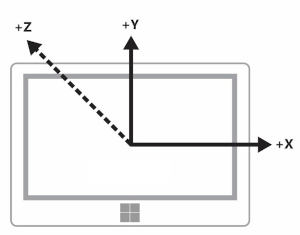
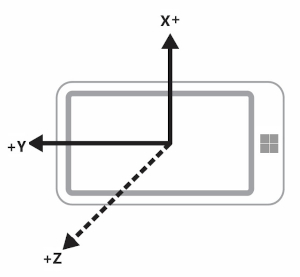
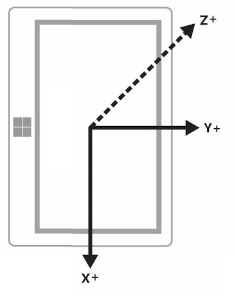
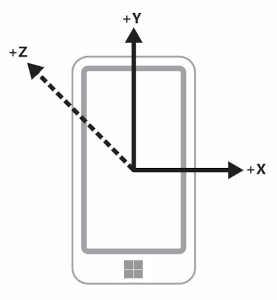
正 z 軸從裝置螢幕延伸,如下圖所示。
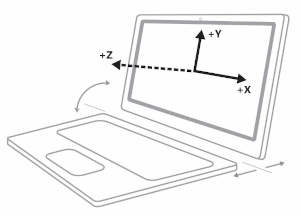
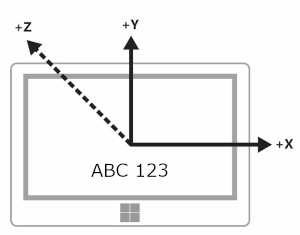
在以下圖表中,裝置與顯示方向皆為Landscape(所示感測器軸線為專屬於地形方向)。
此圖示顯示Landscape中的顯示與裝置方向。
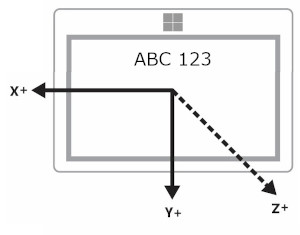
下圖顯示了 LandscapeFlipped 中的顯示與裝置方向。
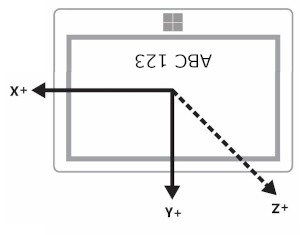
這張最後的圖示顯示了 Landscape 中的顯示方向,而裝置的方向則是 LandscapeFlipped。
你可以透過 DisplayInformation 類別查詢方向值,方法是使用 GetForCurrentView 方法,並設定 CurrentOrientation 屬性。 接著,您可以藉由與 DisplayOrientations 列舉進行比較來建立邏輯。 記得,每一個你支援的方向,都必須支援參考軸轉換成該方向。
橫向優先與直向優先裝置比較
製造商同時生產橫向優先和直向優先的裝置。 參考系在橫向優先裝置(如桌上型電腦和筆電)與直向優先裝置(如手機和部分平板)之間有所不同。 下表顯示了橫向優先與直向先掃描裝置的感測器軸。
| 導覽 | 景觀優先 | 肖像優先 |
|---|---|---|
| 地貌 |
|
|
| Portrait |
|
|
| 景觀翻轉 |
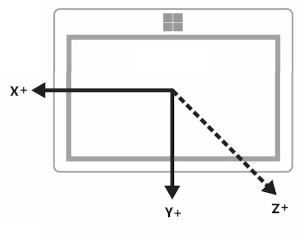
|
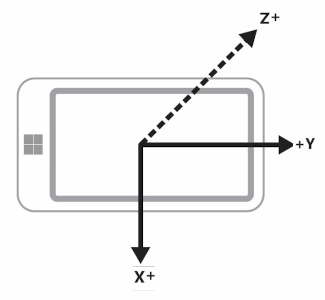
|
| 肖像翻轉 |
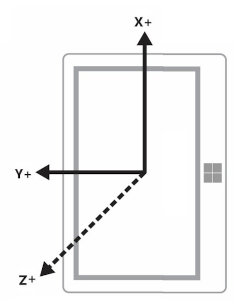
|
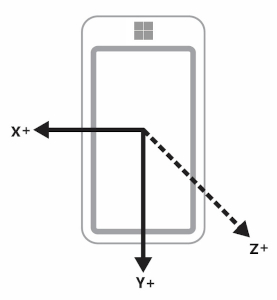
|
廣播顯示裝置與無頭裝置
有些裝置能將顯示訊號廣播到其他裝置。 舉例來說,你可以拿一台平板,將顯示效果廣播到橫向投影機上。 在此情況下,請務必留意,裝置方向是以原始裝置為準,而不是以顯示畫面的裝置為準。 所以加速度計會為平板報告數據。
此外,有些裝置沒有顯示螢幕。 對於這些裝置,其預設方向為直向。
顯示方向與羅盤航向
羅盤方位取決於參考軸,因此會隨裝置方向而改變。 你根據這張表格來補償(假設使用者面向北方)。
| 顯示方向 | 羅盤方位的參考軸 | 面向北方時的 API 羅盤方位(橫向先行) | 面朝北方時的 API 羅盤方位(先直向) | 羅盤航向補償(先行地形) | 指南針航向補償(以直向為先) |
|---|---|---|---|---|---|
| 橫向 | -Z | 0 | 270 | 標題 | (航向 + 90) % 360 |
| 直向 | Y | 90 | 0 | (航向 + 270) % 360 | 標題 |
| 景觀翻轉 | Z | 180 | 90 | (航向 + 180) % 360 | (航向 + 270) % 360 |
| 肖像翻轉 | Y | 270 | 180 | (航向 + 90) % 360 | (航向 + 180) % 360 |
請依照表格所示修改指南針航向,以正確顯示航向。 以下程式碼片段示範如何做到這點。
private void ReadingChanged(object sender, CompassReadingChangedEventArgs e)
{
    double heading = e.Reading.HeadingMagneticNorth;
    double displayOffset;

    // Calculate the compass heading offset based on
    // the current display orientation.
    // In WinUI 3 desktop apps, use interop to get DisplayInformation for the current window.
    var hWnd = WinRT.Interop.WindowNative.GetWindowHandle(App.Window);
    DisplayInformation displayInfo = DisplayInformation.CreateForWindowId(
        Microsoft.UI.Win32Interop.GetWindowIdFromWindow(hWnd));

    switch (displayInfo.CurrentOrientation)
    {
        case DisplayOrientations.Landscape:
            displayOffset = 0;
            break;
        case DisplayOrientations.Portrait:
            displayOffset = 270;
            break;
        case DisplayOrientations.LandscapeFlipped:
            displayOffset = 180;
            break;
        case DisplayOrientations.PortraitFlipped:
            displayOffset = 90;
            break;
     }

    double displayCompensatedHeading = (heading + displayOffset) % 360;

    // Update the UI...
}
加速度計與陀螺儀的顯示方向
此表將加速度計與陀螺儀資料轉換為顯示方向。
| 參考軸 | X | Y | Z |
|---|---|---|---|
| 地貌 | X | Y | Z |
| Portrait | Y | -X | Z |
| 景觀翻轉 | -X | -Y | Z |
| 肖像翻轉 | -Y | X | Z |
以下程式碼範例將這些轉換應用於陀螺儀。
private void ReadingChanged(object sender, GyrometerReadingChangedEventArgs e)
{
    double x_Axis;
    double y_Axis;
    double z_Axis;

    GyrometerReading reading = e.Reading;

    // Calculate the gyrometer axes based on
    // the current display orientation.
    // In WinUI 3 desktop apps, use interop to get DisplayInformation for the current window.
    var hWnd = WinRT.Interop.WindowNative.GetWindowHandle(App.Window);
    DisplayInformation displayInfo = DisplayInformation.CreateForWindowId(
        Microsoft.UI.Win32Interop.GetWindowIdFromWindow(hWnd));
    switch (displayInfo.CurrentOrientation)
    {
        case DisplayOrientations.Landscape:
            x_Axis = reading.AngularVelocityX;
            y_Axis = reading.AngularVelocityY;
            z_Axis = reading.AngularVelocityZ;
            break;
        case DisplayOrientations.Portrait:
            x_Axis = reading.AngularVelocityY;
            y_Axis = -1 * reading.AngularVelocityX;
            z_Axis = reading.AngularVelocityZ;
            break;
        case DisplayOrientations.LandscapeFlipped:
            x_Axis = -1 * reading.AngularVelocityX;
            y_Axis = -1 * reading.AngularVelocityY;
            z_Axis = reading.AngularVelocityZ;
            break;
        case DisplayOrientations.PortraitFlipped:
            x_Axis = -1 * reading.AngularVelocityY;
            y_Axis = reading.AngularVelocityX;
            z_Axis = reading.AngularVelocityZ;
            break;
     }

    // Update the UI...
}
顯示方向與裝置方向
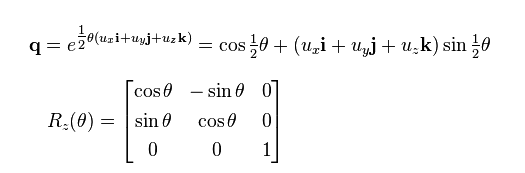
OrientationSensor 資料必須以不同方式更改。 把這些不同的方向想像成逆時針旋轉,所以我們需要反轉旋轉才能恢復使用者的方向。 對於四元數資料,我們可以使用歐拉公式定義帶有參考四元數的旋轉,也可以使用參考旋轉矩陣。
要得到你想要的相對方向,請將參考物件與絕對物件相乘。 請注意,此數學不是交換的。
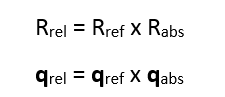
在前述表達式中,感測器資料會回傳絕對物件。
| 顯示方向 | 繞 Z 的逆時針旋轉 | 參考四元數(反向旋轉) | 參考旋轉矩陣(反向旋轉) |
|---|---|---|---|
| 地貌 | 0 | 1 + 0i + 0j + 0k | [1 0 0 0 1 0 0 0 1] |
| Portrait | 90 | cos(-45⁰) + (i + j + k)*sin(-45⁰) | [0 1 0 -1 0 0 0 0 1] |
| 景觀翻轉 | 180 | 0 - I - j - k | [1 0 0 0 1 0 0 0 1] |
| 肖像翻轉 | 270 | cos(-135⁰) + (i + j + k)*sin(-135⁰) | [0 -1 0 1 0 0 0 0 1] |
