應用程式通知是一個 UI 彈出視窗,會出現在應用程式視窗外,向使用者提供即時的資訊或操作。 通知可以僅提供資訊、在點擊後啟動您的應用程式,或觸發背景動作而不把應用程式切換到前台。
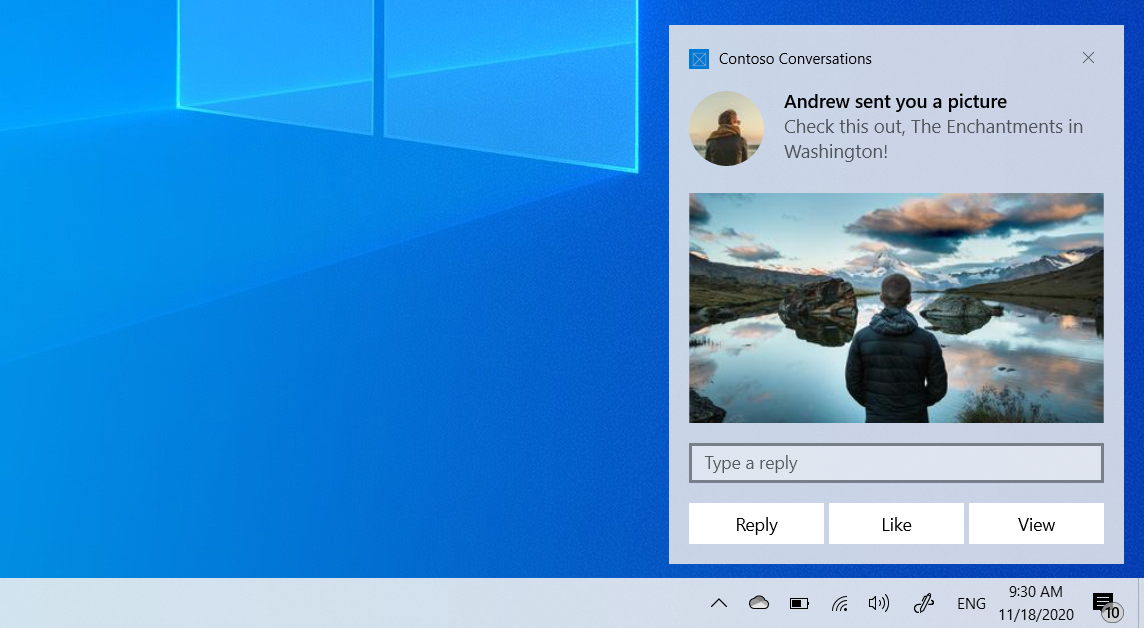
本文將帶你了解如何從 UWP 應用程式建立並發送應用程式通知,並在使用者互動時處理啟動。
關於應用程式通知的概述及其他框架的指引,請參閱 應用程式通知概述。
本文介紹了本地通知。 關於如何從雲端服務傳遞通知的資訊,請參閱 推播通知總覽。
先決條件
- Visual Studio 中的 UWP 應用程式專案
- 安裝於 Visual Studio 的 通用 Windows 平台 開發 工作負載
發送應用程式通知
UWP 應用程式使用 Windows.UI.Notifications 命名空間來構建並傳送 XML 通知。 本節說明如何使用 C# 和 C++ 發送通知。
using Windows.Data.Xml.Dom;
using Windows.UI.Notifications;
var xml = @"<toast launch=""action=viewConversation&conversationId=9813"">
<visual>
<binding template=""ToastGeneric"">
<text>Andrew sent you a picture</text>
<text>Check this out, The Enchantments in Washington!</text>
</binding>
</visual>
</toast>";
var doc = new XmlDocument();
doc.LoadXml(xml);
var notification = new ToastNotification(doc);
ToastNotificationManager.CreateToastNotifier().Show(notification);
句柄啟動
當使用者點擊你的通知(或通知中帶有前景啟動的按鈕)時, OnActivated 應用程式的方法就會被啟動。
OnLaunched 不會被呼叫以啟動通知,即使你的應用程式已經關閉並首次啟動。 我們建議將 和 OnLaunched 合併OnActivated成共用初始化方法。
App.xaml.cs
protected override void OnLaunched(LaunchActivatedEventArgs e)
{
    OnLaunchedOrActivated(e.PreviousExecutionState);

    var rootFrame = Window.Current.Content as Frame;
    if (e.PrelaunchActivated == false)
    {
        if (rootFrame?.Content == null)
        {
            rootFrame?.Navigate(typeof(MainPage), e.Arguments);
        }
        Window.Current.Activate();
    }
}

protected override void OnActivated(IActivatedEventArgs e)
{
    OnLaunchedOrActivated(e.PreviousExecutionState);

    if (e is ToastNotificationActivatedEventArgs toastArgs)
    {
        var rootFrame = Window.Current.Content as Frame;
        if (rootFrame?.Content == null)
        {
            rootFrame?.Navigate(typeof(MainPage));
        }
        Window.Current.Activate();

        // Parse the notification arguments
        string argument = toastArgs.Argument;
        // TODO: Navigate to the relevant content based on the arguments
    }
}

private void OnLaunchedOrActivated(ApplicationExecutionState previousState)
{
    if (Window.Current.Content is not Frame)
    {
        var rootFrame = new Frame();
        rootFrame.NavigationFailed += OnNavigationFailed;
        Window.Current.Content = rootFrame;
    }
}
關於如何為通知新增按鈕、圖片、輸入、音訊及其他豐富內容的資訊,請參見 應用程式通知內容。
相關內容
快速入門:Windows 應用程式 SDK 中的應用程式通知 - 應用程式通知內容
- ToastNotification 類別
- ToastNotificationActivatedEventArgs 類別