小畫家 指定矩形的內部。
多載清單
| 方法 | 描述 |
|---|---|
| FillRectangle(D2D1_RECT_F&,ID2D1Brush*) | 小畫家 指定矩形的內部。 |
| FillRectangle(D2D1_RECT_F*,ID2D1Brush*) | 小畫家 指定矩形的內部。 |
備註
如果錯誤碼失敗,這個方法就不會傳回錯誤碼。 若要判斷繪圖作業 (例如 FillRectangle) 是否失敗,請檢查 ID2D1RenderTarget::EndDraw 或 ID2D1RenderTarget::Flush 方法傳回的結果。
範例
下列範例會使用ID2D1HwndRenderTarget來繪製和填滿數個矩形。 此範例會產生下圖所示的輸出。
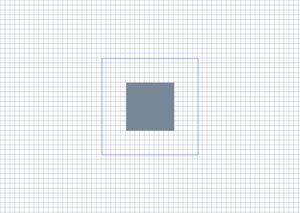
// This method discards device-specific
// resources if the Direct3D device dissapears during execution and
// recreates the resources the next time it's invoked.
HRESULT DemoApp::OnRender()
{
HRESULT hr = S_OK;
hr = CreateDeviceResources();
if (SUCCEEDED(hr))
{
m_pRenderTarget->BeginDraw();
m_pRenderTarget->SetTransform(D2D1::Matrix3x2F::Identity());
m_pRenderTarget->Clear(D2D1::ColorF(D2D1::ColorF::White));
D2D1_SIZE_F rtSize = m_pRenderTarget->GetSize();
// Draw a grid background.
int width = static_cast<int>(rtSize.width);
int height = static_cast<int>(rtSize.height);
for (int x = 0; x < width; x += 10)
{
m_pRenderTarget->DrawLine(
D2D1::Point2F(static_cast<FLOAT>(x), 0.0f),
D2D1::Point2F(static_cast<FLOAT>(x), rtSize.height),
m_pLightSlateGrayBrush,
0.5f
);
}
for (int y = 0; y < height; y += 10)
{
m_pRenderTarget->DrawLine(
D2D1::Point2F(0.0f, static_cast<FLOAT>(y)),
D2D1::Point2F(rtSize.width, static_cast<FLOAT>(y)),
m_pLightSlateGrayBrush,
0.5f
);
}
// Draw two rectangles.
D2D1_RECT_F rectangle1 = D2D1::RectF(
rtSize.width/2 - 50.0f,
rtSize.height/2 - 50.0f,
rtSize.width/2 + 50.0f,
rtSize.height/2 + 50.0f
);
D2D1_RECT_F rectangle2 = D2D1::RectF(
rtSize.width/2 - 100.0f,
rtSize.height/2 - 100.0f,
rtSize.width/2 + 100.0f,
rtSize.height/2 + 100.0f
);
// Draw a filled rectangle.
m_pRenderTarget->FillRectangle(&rectangle1, m_pLightSlateGrayBrush);
// Draw the outline of a rectangle.
m_pRenderTarget->DrawRectangle(&rectangle2, m_pCornflowerBlueBrush);
hr = m_pRenderTarget->EndDraw();
}
if (hr == D2DERR_RECREATE_TARGET)
{
hr = S_OK;
DiscardDeviceResources();
}
return hr;
}
如需相關教學課程,請參閱 建立簡單的 Direct2D 應用程式。
需求
| 需求 | 值 |
|---|---|
| 頁首 |
|
| 程式庫 |
|
| DLL |
|
另請參閱
�
�